



Stock-Market-Prediction-Web-App-using-Machine-Learning
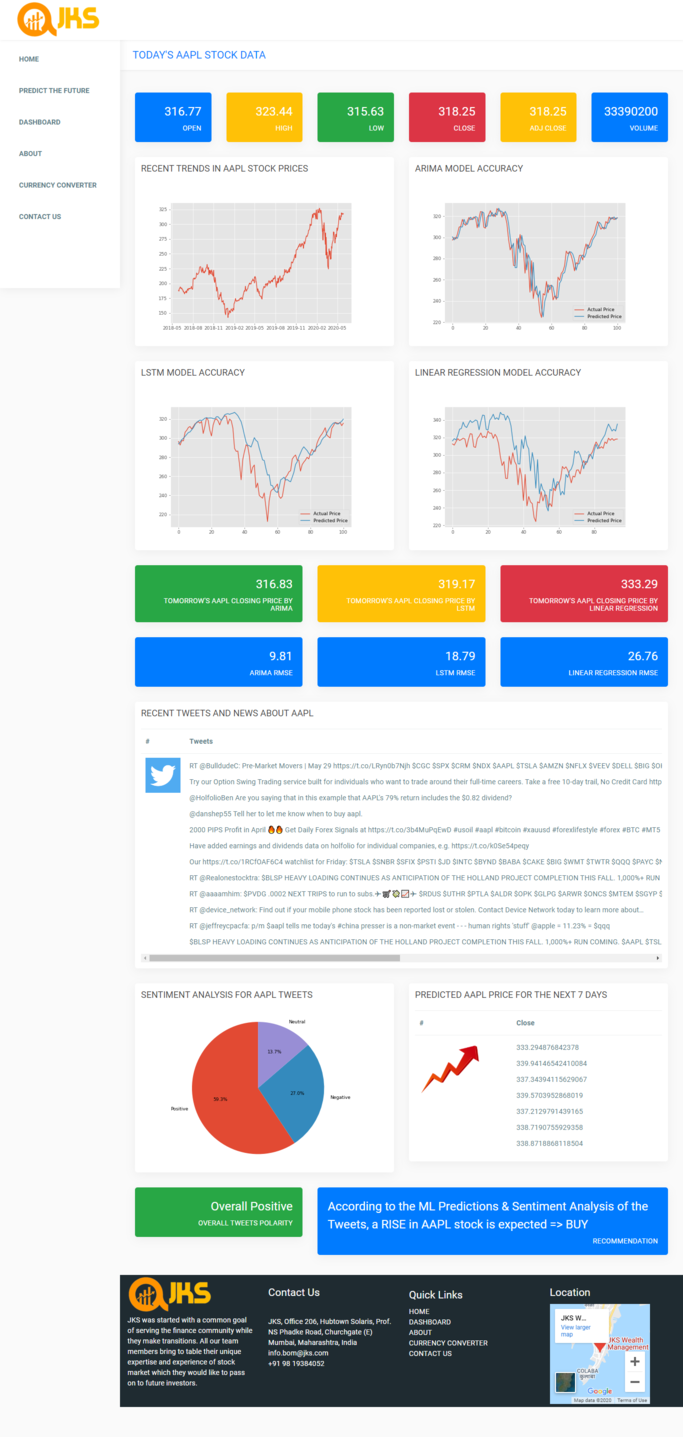
Stock Market Prediction Web App based on Machine Learning and Sentiment Analysis of Tweets (API keys included in code). The front end of the Web App is based on Flask and Wordpress. The App forecasts stock prices of the next seven days for any given stock under NASDAQ or NSE as input by the user. Predictions are made using three algorithms: ARIMA, LSTM, Linear Regression. The Web App combines the predicted prices of the next seven days with the sentiment analysis of tweets to give recommendation whether the price is going to rise or fall.
Table of Contents
[System Description and Functions](#system-description-and-functions)
[Built With](#built-with)
[Installation](#installation)
[Authors](#authors)
[Links](#links)
System Description and Functions
Demo Video:

Screenshots:


Admin Creds:
Username: admin
Email Address: stockpredictorapp@gmail.com
Password: Samplepass@123
There are two roles in the system: Admin and User.
Users can:
Register and Login
Check Real Time stock prices
Read recent news about different stocks
Currency Converter
Edit or delete their own profile
Educate the user about stocks
Download list of stock tickers
Predict Stock prices for the next 7 days for all NASDAQ and NSE stocks
Admin can:
Create, Retrieve, Update Delete Users.
Manually trigger emails.
Register and Login
Check Real Time stock prices
Read recent news about different stocks
Currency Converter
Edit or delete their own profile
Educate the user about stocks
Download list of stock tickers
Predict Stock prices for the next 7 days for all NASDAQ and NSE stocks
Built With
Installation
- Install XAMPP server
- Download wordpress zip folder from this link.
- Extract the downloaded zip into
htdocsfolder of XAMPP. - Open the
wp-config.phpfile from the extracted folder and add your phpmyadmin username and password. - Go to phpmyadmin, create a new database called
wordpress. - Select this database, go to Operations tab and Import the
wordpress.sqlfile into this created databse. - Clone the repo, cd into it
- Run
pip install -r requirements.txt - Run
python main.pyto start server. - Go to
localhost/wordpressto access the app.
Find more screenshots in the screenshots folder Or click here
Authors
Kaushik Jadhav
Github: https://github.com/kaushikjadhav01 Medium: https://medium.com/@kaushikjadhav01 LinkedIn: https://www.linkedin.com/in/kaushikjadhav01/ Portfolio: http://kajadhav.me/ Linked In: https://www.linkedin.com/in/kajadhav/ Dev.to: https://dev.to/kaushikjadhav01 Codesignal: https://app.codesignal.com/profile/kaushik_j_vtc Google Scholar: https://scholar.google.com/citations?user=iRYcFi0AAAAJ Daily.dev: https://app.daily.dev/kaushikjadhav01 Google devs: https://developers.google.com/profile/u/kaushikjadhav01 Stack Overflow: https://stackoverflow.com/users/21890981/kaushik-jadhav