简体中文 · English · 日本語 · 한국어 · Português do Brasil
Stickman Video Director
Turn any idea into a high-quality stickman video built to move.
One Codex Skill turns your copy into a confirmed English voiceover, a visual-first director's plan, and production-ready Gemini Omni Flash prompts (supports custom durations in 10-second increments, default 60 seconds).
Built for visual explainers, motivational stories, educational shorts, and fast-moving essays on YouTube Shorts, TikTok, Instagram Reels, and YouTube.
Visual Style Ecosystem & Live Demos
Click any animated preview to open the full 10-second HD video with sound. If these styles inspire your creative workflow, please give the repository a Star!
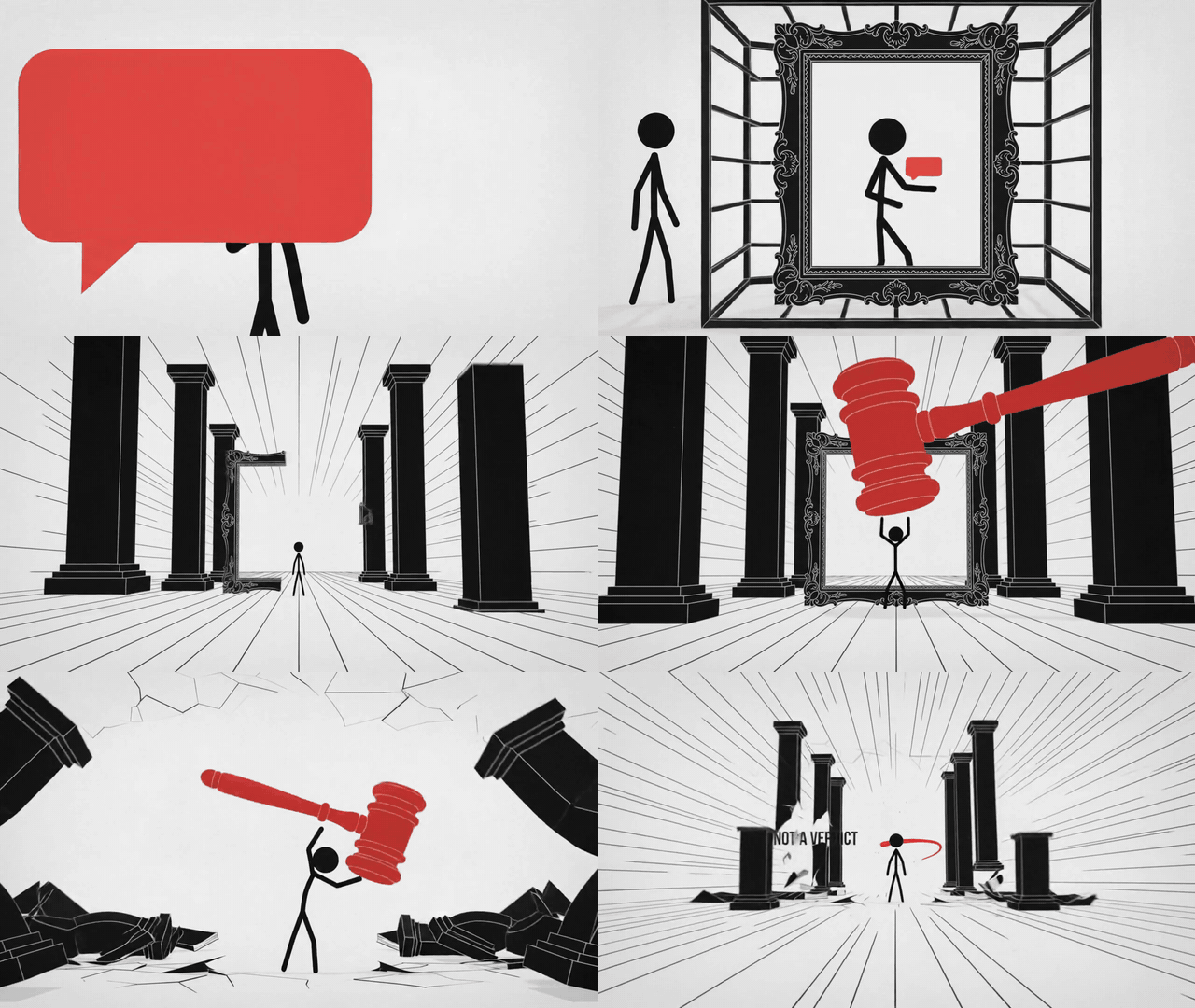
Style 1: Classic Minimalist (Monochrome)
The purest high-contrast minimalist stick figure. Faceless, devoid of complex clothing, leveraging bold linework and high-saturation accent colors to penetrate viewer cognition. Ideal for hard science, logical breakdowns, and mental models.
| Style 1A: Light Mode | Style 1B: Dark Mode |
|---|---|
 |
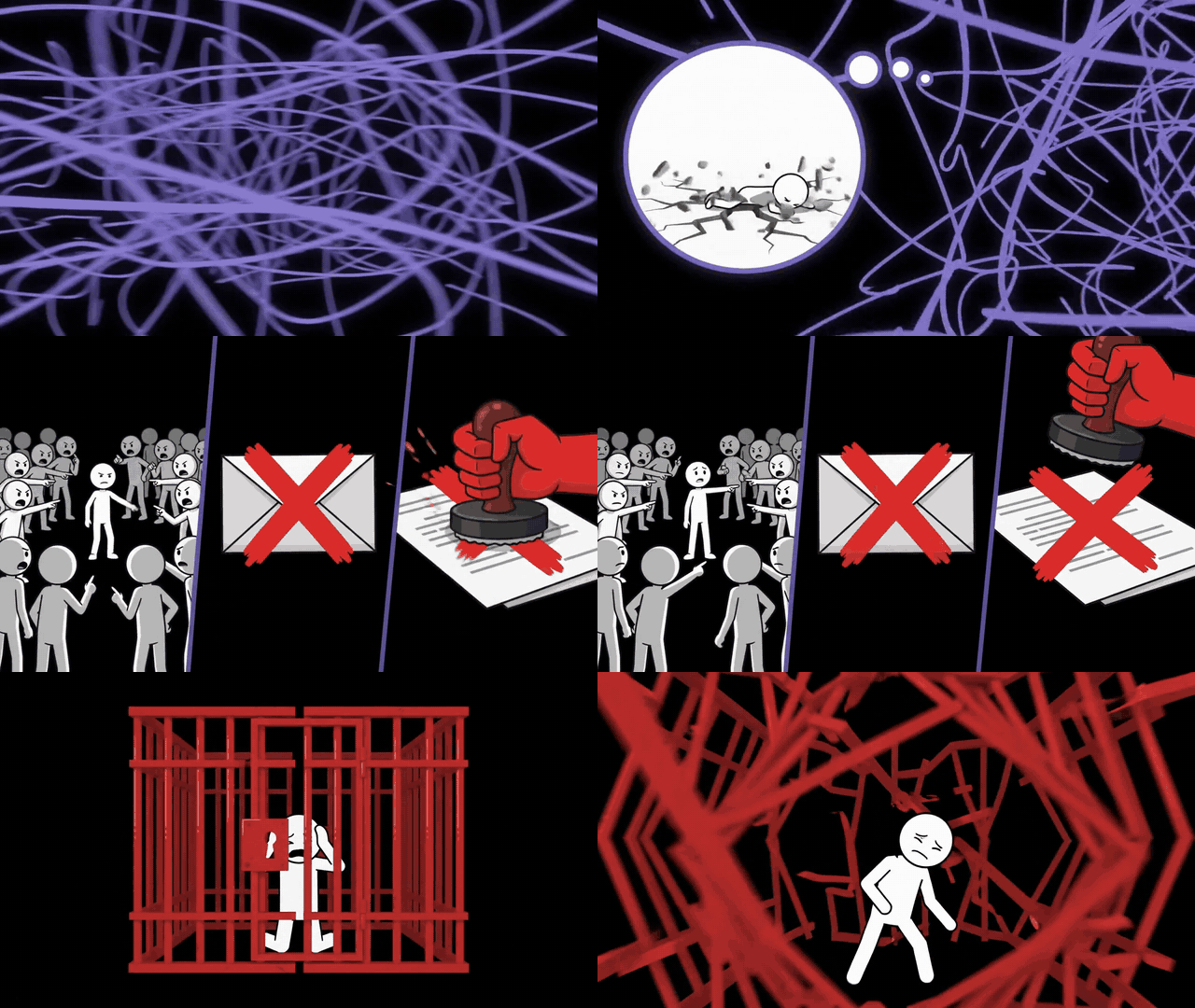 |
| White canvas · Black stick figure | Black canvas · White stick figure |
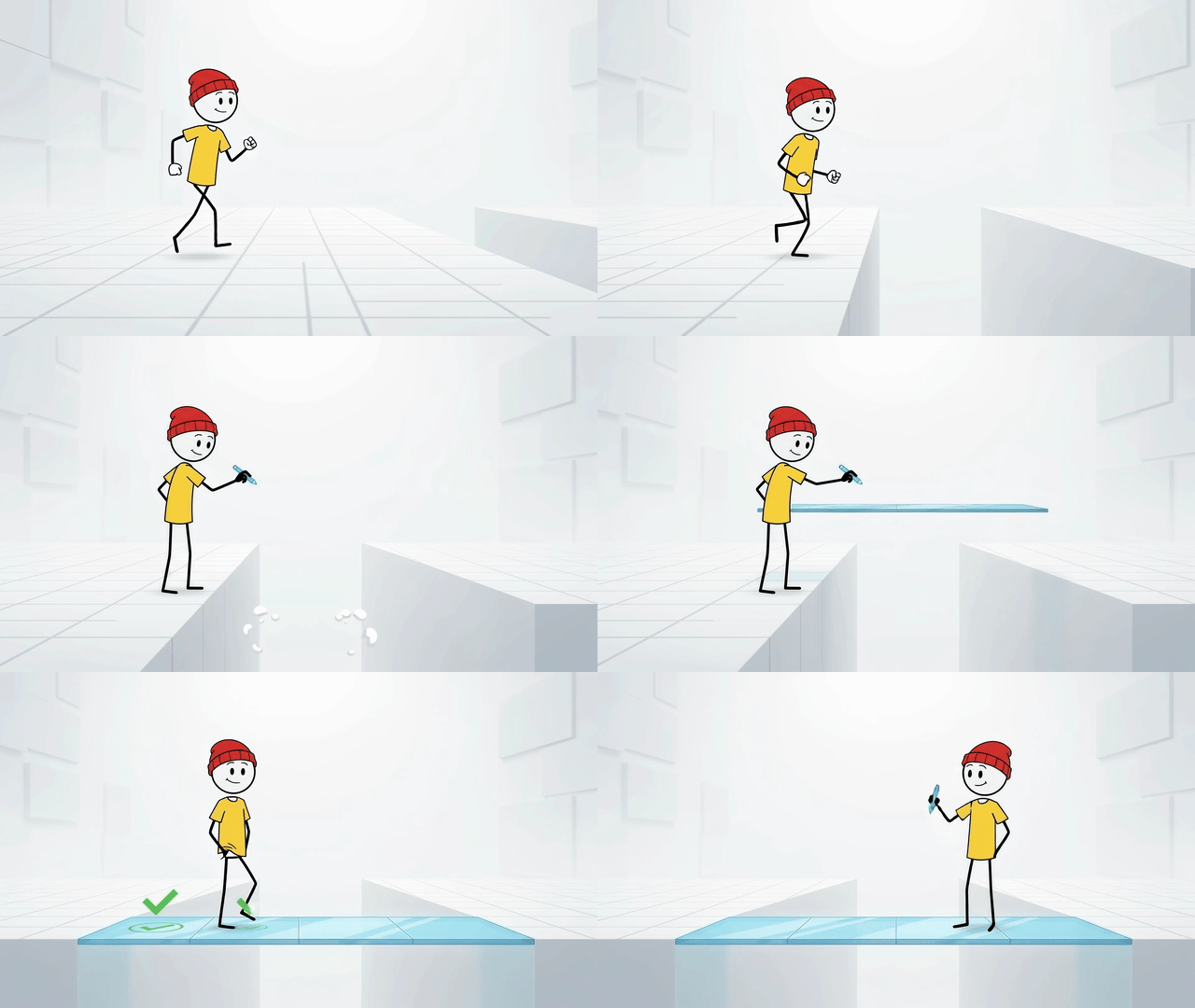
Style 2: Modern Beanie Zeke (Dynamic 2D)
A modern 2D animated stick figure with a distinctive character persona (red beanie + yellow t-shirt + minimalist black limbs). Battle-tested to eliminate eye glitches, pom-pom distortion, and limb jitter, producing buttery-smooth motion.
| Style 2A: Studio Tech | Style 2B: Cinematic Story |
|---|---|
 |
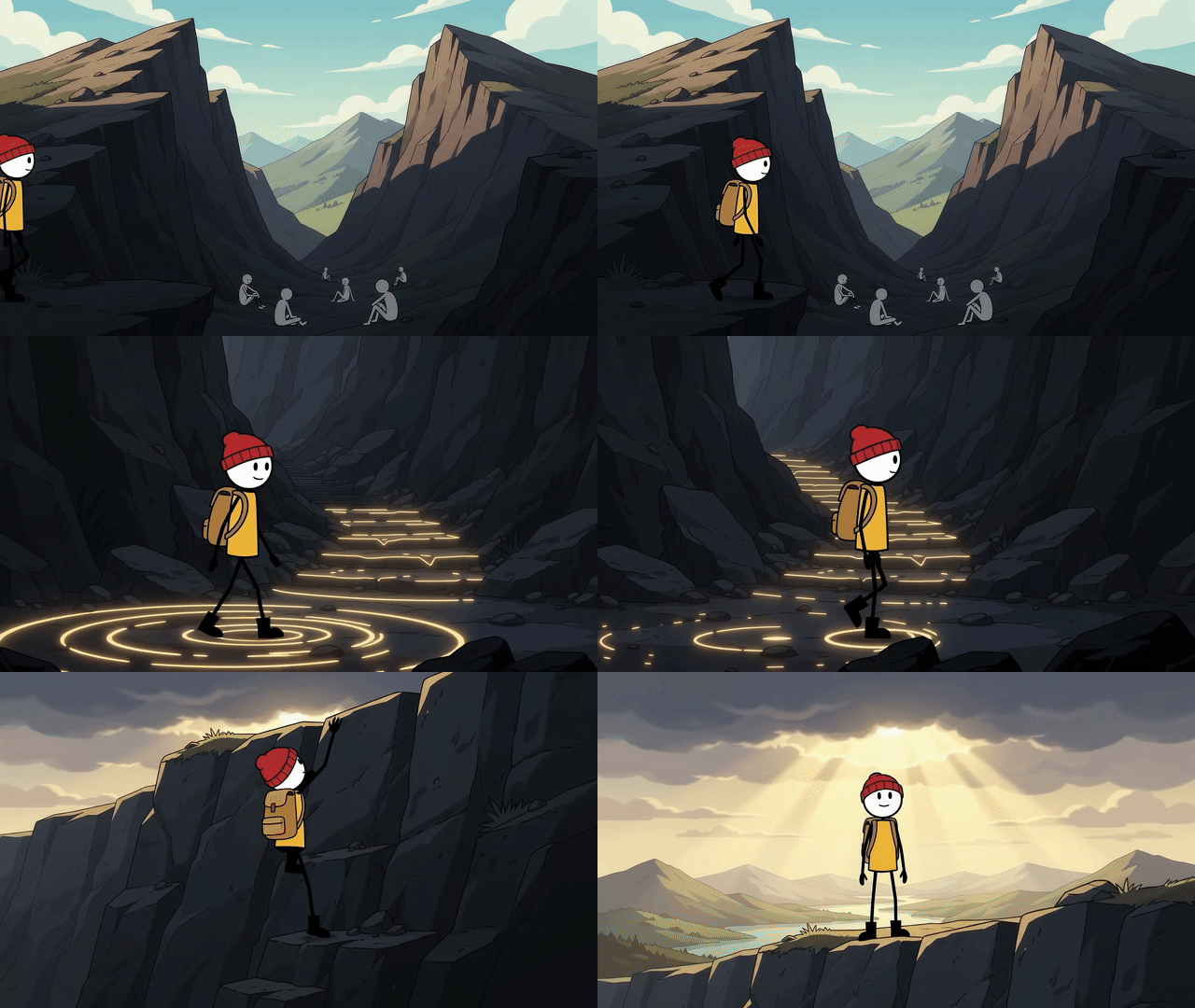 |
| Pure white space · Subtle grid · Cyan glow | Full-color immersion · Cinematic lighting · Narrative mood |
- Style 2A: Studio Tech: Bright white high-key studio + subtle light-gray perspective floor grid + glowing cyan/blue semi-transparent floating glass UI (Apple Keynote minimalist tech aesthetic, built-in anti-clutter constraints).
- Style 2B: Cinematic Story: Full-color immersive narrative environments (warm bedroom, dusk window, desert highway, mountain summit) + cinematic lighting (Pixar animated short aesthetic, character maintains clean 2D stick lines).
Style 3: Prehistoric Hand-Drawn / Dark Comedy
Expressive prehistoric stick characters drawn with rough black outlines, white filled heads and animal-hide costumes, staged in earthy hand-drawn environments. Best for workplace satire, everyday frustrations and ironic stories: modern problems told through prehistoric visual metaphors.
| Style 3: Prehistoric Hand-Drawn / Dark Comedy |
|---|
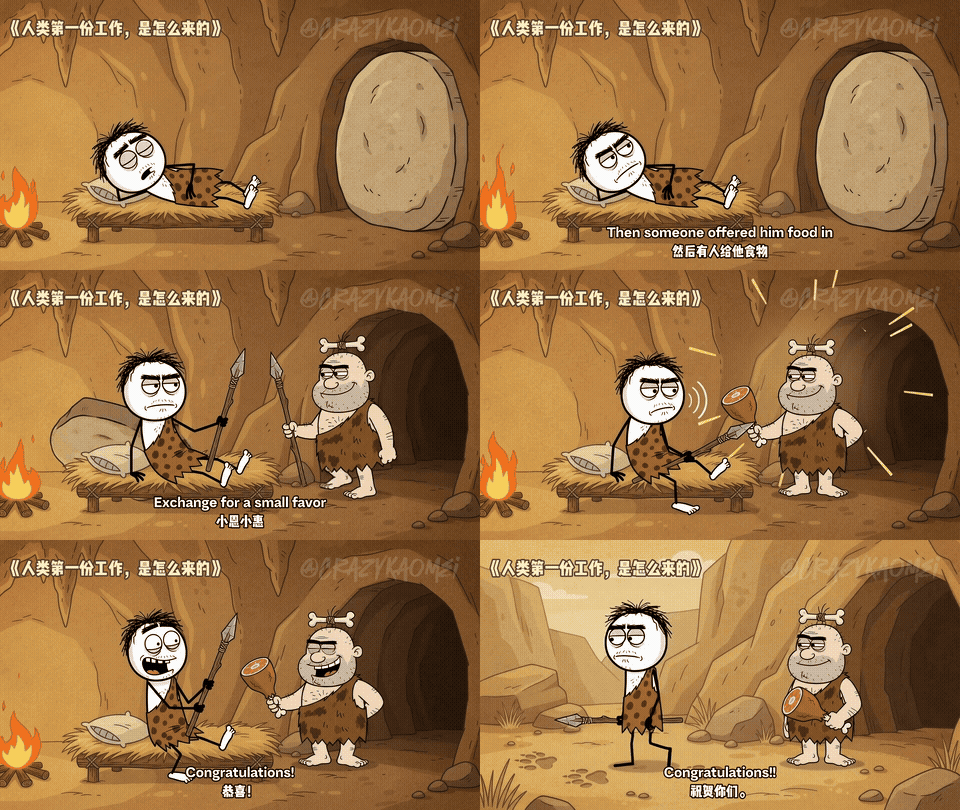 |
| Rough hand-drawn lines · Earthy scenery · Expressive reactions |
- Visual style: Ochre caves, camps and wilderness, warm fire accents, simple black stick limbs and exaggerated cartoon expressions.
- Story-specific casting: Women, men, children and elders can have distinct proportions, faces, hair, costumes and accessories. Keep the style across stories and each character's identity within a story.
- Comic storytelling: Clear physical actions, deadpan pauses and ironic callbacks. The complete 30-second sample uses three Omni Flash clips, with subtitles and editing added by the creator.
The sample is fictional workplace satire, not historical evidence. Independent generations may still need references and editing for visual/audio consistency.
Long-Term Evolution: The Ultimate Stickman Style Catalog
This is my long-term open-source project dedicated to bringing every viral stickman visual style into one production system.
I have systematically organized nearly 10 distinct stickman visual styles. I will continue rolling out new styles regularly—star the repo to stay updated:
- Style 3: Prehistoric Hand-Drawn / Dark Comedy (available) — Variable casts, prehistoric visual analogies and ironic stories
- Style 4: 2D Stickman in Realistic 3D World — Cross-dimensional contrast, RPG beginner adventure, fantasy isekai journeys
- Style 5: Masterclass Lecture / Stand-up Explainer — Blackboard chalkboard props, scholar walkthroughs, effortless complex knowledge breakdown
- Style 6: Hand-Drawn Picture Book / Knight's Quest — Heartwarming fairy tales, classical fables, cozy children's bedtime stories
- Style 7: High-Octane Graffiti / Martial Arts Combat — Minimalist adrenaline fight choreographies, combo duels, impactful kinetic combat
- Style 8: Sitcom / Dual-Character Dialogue (planned) — Dynamic two-character banter, emotional sparring, workplace satire, and daily rants
- Style 9: Viral Roguelike Card Game / Boss Rush — Exponential stat gains, monster progression, viral mobile game ad walkthroughs
3 Major Directions I Am Actively Building:
- Complete Style Coverage: Unlocking all viral stickman aesthetics so creators across any niche can immediately produce videos;
- High-Value Content Engine: Moving beyond generic AI prompts by analyzing and distilling viral hooks and structures into plug-and-play adaptation scripts;
- Dedicated Stickman Web Studio: As the style library grows, I plan to build a dedicated website for live visual previews, curated viral scripts, and one-click prompt copying.
A script is not yet a video
A good idea can still become a flat animation: one character, one background, and ten seconds with nothing new to look at. Directing a full video means shaping the opening hook, pacing the explanation, inventing relevant visual metaphors, moving the camera, connecting scenes, and protecting continuity across separate generations.
Stickman Video Director does that production thinking before you spend generation credits.
Why creators use this Skill
| Advantage | What it gives you |
|---|---|
| Stronger story architecture | Powered by the 60%+ completion rate 5-stage heartbeat engine (Golden Hook → Disrupt Assumptions → Unveil Secrets → Ultimate Truth → Elevation & Discussion) for razor-sharp emotional pacing and maximum retention. |
| Custom video duration | Full control over video length: 30s, 60s, 90s, 3min, 5min, or any 10-second multiple (default 60 seconds). |
| A real approval checkpoint | Shows a readable director's proposal before producing final model prompts. Revise the story while changes are still cheap. |
| Dense, relevant motion | Plans three timed beats per clip, with visual metaphors, environment changes, camera movement, text moments, interactions, transitions, BGM, and SFX. |
| Complete production locks | Repeats character, line weight, palette, voice, dialogue, audio, transition, and negative constraints inside every standalone prompt. |
| Format-aware direction | Recomposes staging, camera paths, and text placement for 9:16 or 16:9 instead of merely changing a ratio label. |
| Controlled visual contrast | Supports white-background/black-figure and black-background/white-figure systems, plus up to three saturated accent colors. |
| Source fidelity | Avoids inventing unsupported facts, statistics, quotations, or product claims. |
Core Narrative Engine: 5-Stage Heartbeat for 60%+ Completion Rate
Viral short videos with 60%+ completion rates master emotional pacing. Whether you input a simple topic or raw copy, the Skill automatically restructures it into a 5-stage emotional escalation model (duration adapts dynamically to your total video length):
- Golden Hook: Instant counter-intuitive question or visual paradox right at the start (fires within 2–5 seconds for shorts), hooking immediate curiosity;
- Disrupt Assumptions: State conventional wisdom, then shatter it in a single sentence to create cognitive friction;
- Unveil Secrets: Reveal hidden mechanics or insider details, escalating curiosity;
- Ultimate Truth: Deliver the core business logic or fundamental human nature insight for a satisfying cognitive payoff;
- Elevation & Discussion: Distill the key takeaway with a punchy conclusion and leave a provocative question that sparks comments and debate.
No API or MCP dependency is required. Install the Skill, invoke it, and work through the guided flow in conversation.
One idea, composed for the right screen
| Ratio | Best fit | Directional emphasis |
|---|---|---|
9:16 |
YouTube Shorts, TikTok, Instagram Reels | Vertical depth, bold central silhouettes, stacked reveals, mobile-safe text |
16:9 |
YouTube explainers, educational videos, visual essays | Wide staging, lateral camera travel, split-screen comparisons, generous negative space |
Paste → Choose → Approve → Generate → Stitch
- Paste copy, notes, an article, or simply a topic.
- Choose aspect ratio (
16:9or9:16), video duration (multiples of 10s: 30s, 60s, 3min, 5min, default 60s), and visual style (Style 1 Minimalist, Style 2A Studio Tech, Style 2B Cinematic Story, or upcoming styles). - Approve a detailed director's proposal with the English VO, reference translation, visuals, camera, transitions, BGM, and SFX.
- Generate corresponding self-contained Gemini Omni Flash prompts (default 6 prompts for 60s) after the current proposal is approved.
- Stitch the approximately ten-second clips into one coherent, high-quality final video.
Change the ratio, duration, style, theme, narration, scene structure, palette, voice, or tone at any point. When global changes occur, the Skill returns to the proposal stage and asks for approval again.
What you receive
- A creator-ready English title, core message, hook, tone, palette, voice, and music direction
- Flexible English narration scaled to duration (approx. 20–25 words per 10 seconds, ~120–150 words for 60s)
- Multiple progressive storyboard scenes with a visible change every two to three seconds
- Exact English dialogue plus reference translation
- Independent Gemini Omni Flash prompts matching your scene count (default 6) with timed beats and anti-glitch constraints
- Matched endings and openings for cleaner transitions between clips
- BGM, sound-effect, continuity, and final stitching guidance
Example request
Use $directing-stickman-videos to turn this copy into an English stickman video:

Gravity bends space and time so strongly around a black hole that even light cannot escape.
The Skill first asks for the missing aspect ratio, duration, and visual style. It then presents the director's proposal for confirmation before generating any final model prompt.
💡 How to Run Videos at Ultra-Low Cost: Gemini Omni Flash Quickstart Guide
Many creators asking about AI video generation wonder: "How do I actually use the prompts? Will it be expensive?"
The answer: The cost is close to zero, making daily publishing easy for anyone!
With remarkable motion coherence and character consistency, Gemini Omni Flash is widely recognized as one of the best AI video models available. On Google's official creative platform, Google Flow (https://labs.google/fx/tools/flow):
- Super affordable per clip: Generating a 10-second 720P video in Google Flow costs only ~15 credits;
- 1,000 monthly credits included: Google AI Pro membership provides 1,000 video credits every month—enough for 60+ 10-second clips, easily covering daily content creation;
- Get started for pennies: Official membership is normally $19.99/month, but affordable access can be obtained through overseas promotional accounts, giving you full access to top-tier video generation (image generation is completely free with no credit deduction);
- Step-by-step practical guide: For a detailed cost-saving guide and Flow setup walkthrough, check out my tutorial: 《Google Flow Walkthrough & Gemini Pro Guide: Unlimited Nano Banana Image Generation + Top Video Model》.
Install
Clone the repository:
git clone https://github.com/kaomei/stickman-video-director.git
cd stickman-video-director
Copy the installable Skill folder into your Codex skills directory:
cp -R skills/directing-stickman-videos "${CODEX_HOME:-$HOME/.codex}/skills/"
Restart Codex so the Skill appears in the available-skills list. Then invoke it and paste your source:
$directing-stickman-videos
Built for iteration, honest about generation
- Approval stays explicit. Phase B cannot begin until you approve the current proposal.
- Global changes trigger recomposition. A new ratio, duration, or style rebuilds the direction instead of applying a mechanical text replacement.
- Prompts stay independent. Each prompt repeats the critical locks needed to generate its clip on its own.
- Meaning stays grounded. The Skill may strengthen structure and delivery, but it does not add unsupported claims.
- Audio can still vary. Independent video generations may produce slight voice or music differences. For maximum consistency, keep synchronized SFX from each clip and add one continuous external VO and BGM track during assembly.
Repository map
skills/directing-stickman-videos/  Installable Skill
assets/readme/                     README preview media and style roadmap
tests/                             Behavioral scenarios and verification scripts
docs/superpowers/specs/            Approved product designs
docs/superpowers/plans/            Implementation plans
Make it better
Ideas, examples, prompt improvements, and real-world generation notes are welcome. Open an issue or submit a pull request with a focused change and enough context to reproduce the result.
If you're particularly excited about any style on the roadmap, leave a comment in an Issue or Star the repository. Your feedback directly decides which stickman style I prioritize in the next update!
License
MIT