keras-ocr 
This is a slightly polished and packaged version of the Keras CRNN implementation and the published CRAFT text detection model. It provides a high level API for training a text detection and OCR pipeline.
Please see the documentation for more examples, including for training a custom model.
Getting Started
Installation
keras-ocr supports Python >= 3.6 and TensorFlow >= 2.0.0.
# To install from master
pip install git+https://github.com/faustomorales/keras-ocr.git#egg=keras-ocr

# To install from PyPi
pip install keras-ocr
Using
The package ships with an easy-to-use implementation of the CRAFT text detection model from this repository and the CRNN recognition model from this repository.
import matplotlib.pyplot as plt

import keras_ocr

# keras-ocr will automatically download pretrained
# weights for the detector and recognizer.
pipeline = keras_ocr.pipeline.Pipeline()

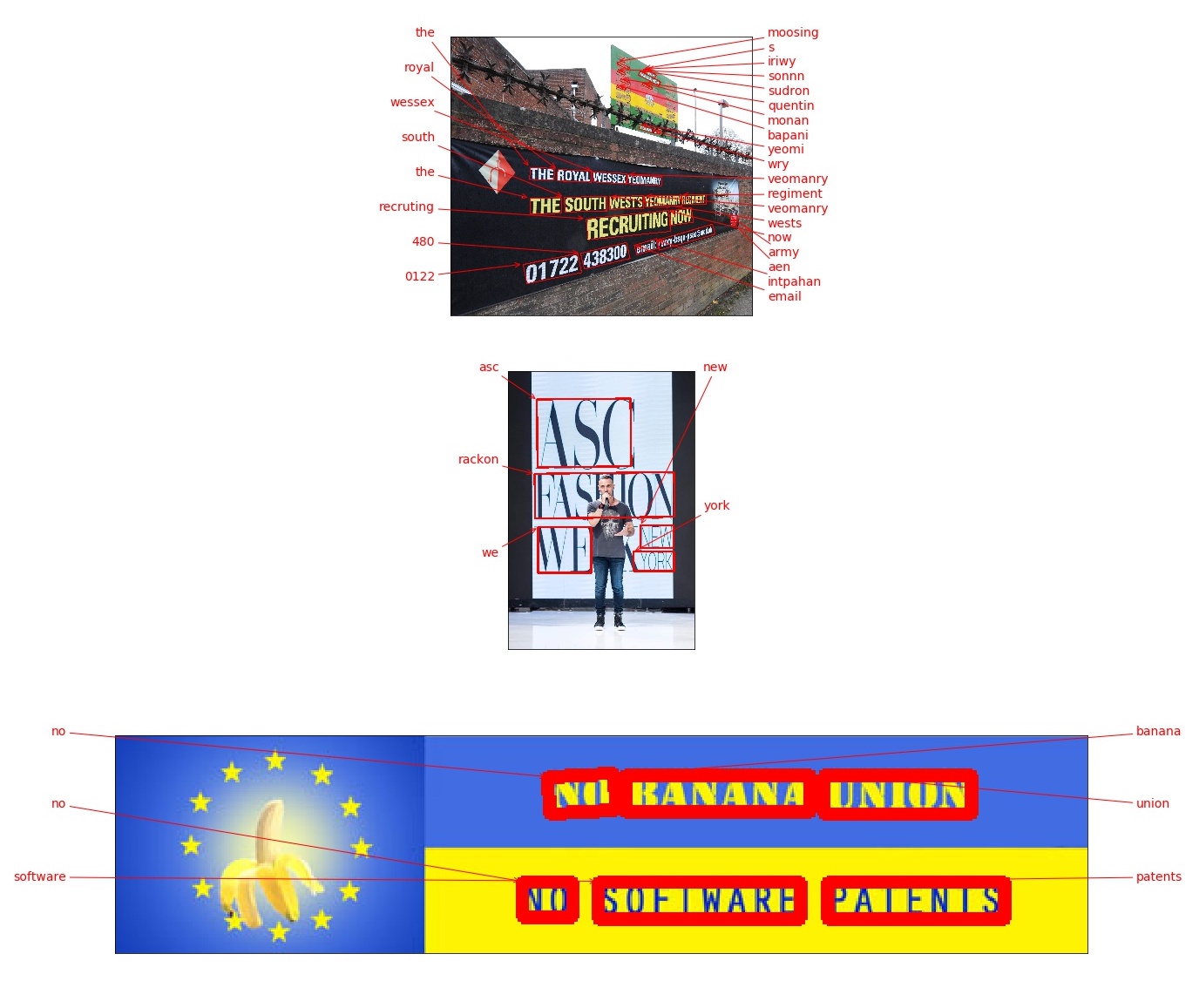
# Get a set of three example images
images = [
    keras_ocr.tools.read(url) for url in [
        'https://upload.wikimedia.org/wikipedia/commons/b/bd/Army_Reserves_Recruitment_Banner_MOD_45156284.jpg',
        'https://upload.wikimedia.org/wikipedia/commons/e/e8/FseeG2QeLXo.jpg',
        'https://upload.wikimedia.org/wikipedia/commons/b/b4/EUBanana-500x112.jpg'
    ]
]

# Each list of predictions in prediction_groups is a list of
# (word, box) tuples.
prediction_groups = pipeline.recognize(images)

# Plot the predictions
fig, axs = plt.subplots(nrows=len(images), figsize=(20, 20))
for ax, image, predictions in zip(axs, images, prediction_groups):
    keras_ocr.tools.drawAnnotations(image=image, predictions=predictions, ax=ax)
Comparing keras-ocr and other OCR approaches
You may be wondering how the models in this package compare to existing cloud OCR APIs. We provide some metrics below and the notebook used to compute them using the first 1,000 images in the COCO-Text validation set. We limited it to 1,000 because the Google Cloud free tier is for 1,000 calls a month at the time of this writing. As always, caveats apply:
- No guarantees apply to these numbers -- please beware and compute your own metrics independently to verify them. As of this writing, they should be considered a very rough first draft. Please open an issue if you find a mistake. In particular, the cloud APIs have a variety of options that one can use to improve their performance and the responses can be parsed in different ways. It is possible that I made some error in configuration or parsing. Again, please open an issue if you find a mistake!
- We ignore punctuation and letter case because the out-of-the-box recognizer in keras-ocr (provided by this independent repository) does not support either. Note that both AWS Rekognition and Google Cloud Vision support punctuation as well as upper and lowercase characters.
- We ignore non-English text.
- We ignore illegible text.
| model | latency | precision | recall |
|---|---|---|---|
| AWS | 719ms | 0.45 | 0.48 |
| GCP | 388ms | 0.53 | 0.58 |
| keras-ocr (scale=2) | 417ms | 0.53 | 0.54 |
| keras-ocr (scale=3) | 699ms | 0.5 | 0.59 |
- Precision and recall were computed based on an intersection over union of 50% or higher and a text similarity to ground truth of 50% or higher.
keras-ocrlatency values were computed using a Tesla P4 GPU on Google Colab.scalerefers to the argument provided tokeras_ocr.pipelines.Pipeline()which determines the upscaling applied to the image prior to inference.- Latency for the cloud providers was measured with sequential requests, so you can obtain significant speed improvements by making multiple simultaneous API requests.
- Each of the entries provides a link to the JSON file containing the annotations made on each pass. You can use this with the notebook to compute metrics without having to make the API calls yourself (though you are encoraged to replicate it independently)!
Why not compare to Tesseract? In every configuration I tried, Tesseract did very poorly on this test. Tesseract performs best on scans of books, not on incidental scene text like that in this dataset.
Advanced Configuration
By default if a GPU is available Tensorflow tries to grab almost all of the available video memory, and this sucks if you're running multiple models with Tensorflow and Pytorch. Setting any value for the environment variable MEMORY_GROWTH will force Tensorflow to dynamically allocate only as much GPU memory as is needed.
You can also specify a limit per Tensorflow process by setting the environment variable MEMORY_ALLOCATED to any float, and this value is a float ratio of VRAM to the total amount present.
To apply these changes, call keras_ocr.config.configure() at the top of your file where you import keras_ocr.
Contributing
To work on the project, start by doing the following. These instructions probably do not yet work for Windows but if a Windows user has some ideas for how to fix that it would be greatly appreciated (I don't have a Windows machine to test on at the moment).
# Install local dependencies for
# code completion, etc.
make init

# Build the Docker container to run
# tests and such.
make build
- You can get a JupyterLab server running to experiment with using
make lab. - To run checks before committing code, you can use
make format-check type-check lint-check test. - To view the documentation, use
make docs.
To implement new features, please first file an issue proposing your change for discussion.
To report problems, please file an issue with sample code, expected results, actual results, and a complete traceback.
Troubleshooting
- This package is installing
opencv-python-headlessbut I would prefer a differentopencvflavor. This is due to aleju/imgaug#473. You can uninstall the unwanted OpenCV flavor after installingkeras-ocr. We apologize for the inconvenience.