MeshFlow: Efficient Artistic Mesh Generation with MeshVAE and Flow-based Diffusion Transformer (CVPR 2026 Highlight)
Weiyu Li1,2 Antoine Toisoul1 Tom Monnier1 Roman Shapovalov1
Rakesh Ranjan1 Ping Tan2 Andrea Vedaldi1
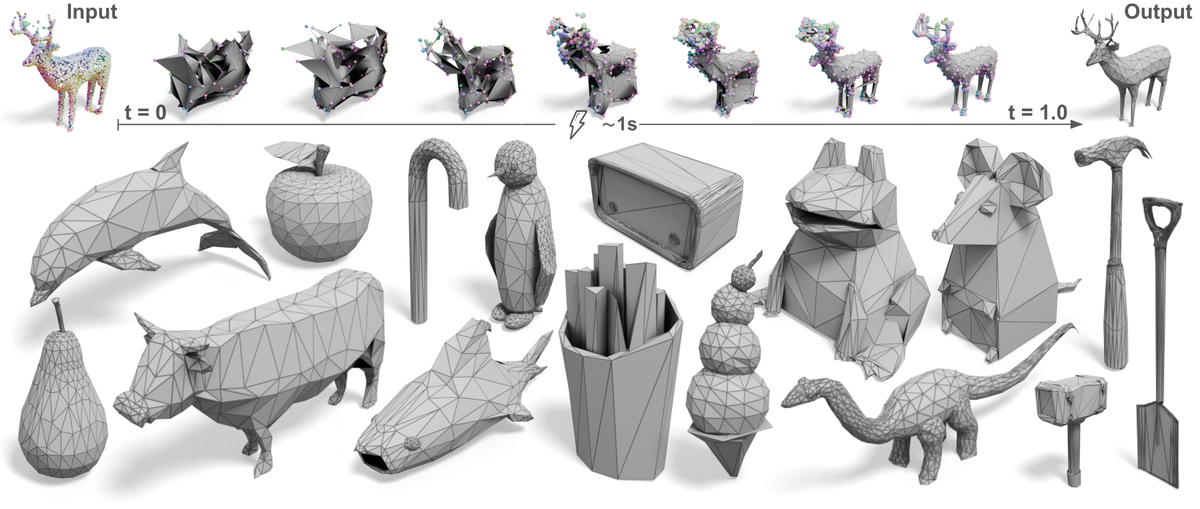
MeshFlow generates artist-like meshes in ~1 second with MeshVAE + flow-matching DiT, using input geometry and an optional reference image.
Pretrained models
Before running the code, download the MeshFlow checkpoint bundle and place it under ckpt/meshflow/:
ckpt/meshflow/
├── config.yaml
└── model.pth
You can also prepare the directory manually:
mkdir -p ckpt/meshflow
# download config.yaml and model.pth into ckpt/meshflow/
| Module | Role |
|---|---|
| MeshFlowVAE | Encodes mesh topology into continuous latents; decodes verts, normals, and adjacency |
| MeshFlowDiT | Flow matching on latents with voxel RoPE + optional image cross-attention |
| DINOv3Encoder | Visual tokens for optional reference-image conditioning |
| MeshFlowPipeline | End-to-end: surface sampling → flow matching → VAE decode |
Image conditioning: DINOv3
If you use reference-image conditioning (inference_dit.py --ref_image, pipeline.run(image=...), or the Gradio image upload), you also need to configure DINOv3. Mesh / point-cloud-only inference does not load DINOv3.
DINOv3 setup instructions
- Clone the official repo (facebookresearch/dinov3) to the default
hub_dir:
git clone https://github.com/facebookresearch/dinov3.git \
  ~/.cache/torch/hub/facebookresearch_dinov3_main
-
Request and download backbone weights following the DINOv3 pretrained models guide. Access is granted via Meta's DINOv3 download page; after approval you will receive download URLs by email. Use
wget(not a web browser) to fetch the checkpoint matching your config (default:dinov3_vitl16). -
Optional: point MeshFlow to local weights in
ckpt/meshflow/config.yamlif the default Meta CDN download does not work in your environment:
visual_condition:
  hub_model: dinov3_vitl16
  hub_dir: /root/.cache/torch/hub/facebookresearch_dinov3_main
  hub_weights: /path/to/dinov3_vitl16_pretrain_lvd1689m-8aa4cbdd.pth
  pretrained: true
  image_size: 512
model.pth does not bundle DINOv3 weights; the visual encoder backbone is loaded from the local DINOv3 hub checkout on first reference-image use.
Quick Start
First, clone this repository and install the dependencies:
git clone https://github.com/facebookresearch/meshflow.git
cd meshflow
pip install -r requirements.txt
Download the MeshFlow checkpoint into ckpt/meshflow/ as described above.
Now, try the model with a few lines of code:
from meshflow.pipelines import MeshFlowPipeline

pipeline = MeshFlowPipeline.from_pretrained(
    "ckpt/meshflow",
    device="cuda",
    dtype="fp16",
)

mesh = pipeline.run(
    mesh="path/to/input.ply",       # mesh / point cloud for RoPE geometry condition
    image=None,                     # optional reference image (.png / .jpg / .webp)
    steps=28,
    guidance_scale=2.5,             # only effective when `image` is provided (CFG on visual cond)
    seed=42,
)
mesh.to_trimesh().export("output.glb")
Interactive Demo
Online demo: facebook/meshflow on Hugging Face Spaces
You can also launch the Gradio demo locally:
python gradio_app.py --gpu 0 --dtype fp16
Omit --model_path to use local ckpt/meshflow/ if present, otherwise download config.yaml and model.pth from facebook/meshflow into ~/.cache/meshflow/. Or pass an explicit bundle path:
python gradio_app.py --model_path ckpt/meshflow --num_verts 4096
Upload a mesh or point cloud for RoPE surface sampling, optionally add a reference image, and generate a new mesh in the browser. torch.compile is enabled by default on CUDA (--no-compile to disable). When the model config sets denoiser_model.use_proj_cond_on_temb: true, use the num_verts slider to send a DiT control signal that roughly controls generated mesh vertex count.
More results and method details are on the project page.
Inference
VAE reconstruction
python inference_vae.py \
  --model_path ckpt/meshflow \
  --input  \
  --output outputs/meshflow_vae/run1
Outputs: inputs_meshes/ (.ply), vae_recon/ (.ply).
Optional: --dtype bf16|fp16|fp32 (default: fp16).
DiT generation
python inference_dit.py \
  --model_path ckpt/meshflow \
  --input  \
  --ref_image  \
  --output outputs/meshflow_dit/run1 \
  --steps 28 \
  --compile \
  --guidance_scale 2.5  # only when --ref_image is provided
--ref_image is optional — if omitted, a zero visual condition is used. When using a reference image, configure DINOv3 as described in Pretrained models.
Outputs: input_meshes/, input_images/ (when --ref_image is set), surface_pc/ (.ply), rope_cond/ (.ply), generated_meshes/ (.glb).
| Flag | Description |
|---|---|
--model_path |
Directory with config.yaml + model.pth |
--steps |
Sampling steps (default: from config) |
--guidance_scale |
CFG on visual cond; only effective when --ref_image is set (default: from config) |
--dtype |
Autocast dtype: bf16, fp16, or fp32 (default: fp16) |
--num_verts |
proj_cond_on_temb numerator (num_verts / mesh_model.num_latents from config); roughly controls generated mesh resolution. Requires use_proj_cond_on_temb in config |
--compile |
torch.compile on CUDA for faster inference (recommended; omit to disable) |
--seed |
Random seed |
Evaluation
Chamfer and Hausdorff distances between GT and reconstructed meshes:
python evaluate.py \
  --gt_path outputs/meshflow_vae/run1/inputs_meshes \
  --pred_path outputs/meshflow_vae/run1/vae_recon \
  --output_path outputs/meshflow_vae/run1/eval_results.txt
Notes
- Input meshes should respect the configured vertex budget (
mesh_model.num_latents, 4096 by default).--num_vertsis the DiT control numerator (proj_cond_on_temb = num_verts / num_latents), only whendenoiser_model.use_proj_cond_on_tembis enabled. - Optional RMBG matting is in
meshflow/pipelines/utils.py; enable withMeshFlowPipeline(use_rmbg=True).
BibTeX
@inproceedings{li2026meshflow,
  title={MeshFlow: Efficient Artistic Mesh Generation via MeshVAE and Flow-based Diffusion Transformer},
  author={Li, Weiyu and Toisoul, Antoine and Monnier, Tom and Shapovalov, Roman and Ranjan, Rakesh and Tan, Ping and Vedaldi, Andrea},
  booktitle={Proceedings of the IEEE/CVF Conference on Computer Vision and Pattern Recognition (CVPR)},
  year={2026},
  note={Highlight}
}
License
See the LICENSE file for details about the license under which this code is made available.