Byte Latent Transformer
This repository contains code for our paper: "Byte Latent Transformer: Patches Scale Better Than Tokens"
Abstract
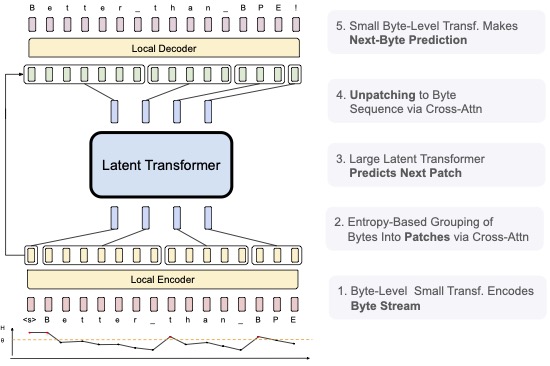
We introduce the Byte Latent Transformer architecture (BLTs), a new byte-level LLM architecture that for the first time, matches tokenization-based LLM performance at scale, with significant improvements in inference efficiency and robustness. BLT encodes bytes into dynamically sized patches, which serve as the primary units of computation. Patches are segmented dynamically based on the entropy of the next byte, allocating more compute and model capacity where there is more data complexity. The BLT architecture includes new attention mechanisms to maximize the information flow between byte and patch hidden representations and a new type of byte-sequence memory. We present the first scaling study of byte-level models up to 8B parameters and 8T training bytes, showing for the first time that we can train a model end-to-end at scale from bytes with no tokenization or other preprocessing. Scaling trends reveal training and inference efficiency benefits from dynamically selecting very long patches on average, along with qualitative improvements with reasoning and long tail generalization from modeling byte-sequences.
Development Status
We are actively updating the blt code to make it easier to reproduce our results. Please file an issue and/or be patient while we make more of our code public!
Quick start
There are three ways you can create your environment.
Option 1: conda + pip
Run these commands in your terminal or a script:
git clone https://github.com/facebookresearch/blt
cd blt
conda create -n blt python=3.12
conda activate blt
pip install --pre torch --index-url https://download.pytorch.org/whl/nightly/cu121
pip install ninja
pip install -v -U git+https://github.com/facebookresearch/xformers.git@de742ec3d64bd83b1184cc043e541f15d270c148
pip install -r requirements.txt
Option 2: Slurm Job to Build Env
git clone https://github.com/facebookresearch/blt
cd blt

bash setup/create_env.sh
# or if you have access to a SLURM cluster
sbatch setup/create_env.sh
Once that is done you can activate the environment
conda activate blt_
Options 3 (experimental, reproducible): uv
Run the following to install the env using uv. The main benefit of this method is that the build is reproducible since there is a lock file.
uv pip install --group pre_build --no-build-isolation
uv pip install --group compile_xformers --no-build-isolation
uv sync
uv run python download_blt_weights.py
uv run python demo.py "A BLT has"
Downloading HF Model Weights and Generating Text
We have released weights on HF for the BLT 1B Model and BLT 7B Model. We are actively working with HF to make BLT available in Transformers and will update this when it is. In the meantime, you can follow these instructions to load model weights, initialize a model, and generate text. These instructions have been tested on H100 GPUs, but we can only offer suggestions on running on other hardware.
- On the model weights HF page, create a HuggingFace account, request access to weights, and wait for approval.
- On the huggingface cli, login:
huggingface-cli login
From here there are two options: (1) load weights in our train script and (2) loading weights via HF hub to use for anything else.
Load Weights via HF Hub
In your terminal:
python -m bytelatent.hf load-transformers --entropy-repo facebook/blt-entropy --blt-repo facebook/blt-1b --prompt "My test prompt" hub
In your own code:
from bytelatent.transformer import LMTransformer
from bytelatent.model.blt import ByteLatentTransformer
from bytelatent.hf import BltTokenizerAndPatcher

entropy_repo = "facebook/blt-entropy"
blt_repo = "facebook/blt-1b"
entropy_model = LMTransformer.from_pretrained(entropy_repo)
blt_model = ByteLatentTransformer.from_pretrained(blt_repo)
tok_and_patcher = BltTokenizerAndPatcher.from_pretrained(blt_repo)
tokenizer = tok_and_patcher.tokenizer_args.build()
patcher = tok_and_patcher.patcher_args.build()
Load Weights for Running BLT Train Script
- Download the model weights with:
python download_blt_weights.py, which will load tohf-weights - Run the generate demo:
python demo.py "A BLT has".
The demo generates text, but is also a good starting point for loading BLT in your own code.
Downloading Training Data
Note: The following instructions are not well tested in the BLT code as it is based on the lingua code, which we have diverged from.
Use the provided script to download and prepare data from huggingface (among fineweb_edu, fineweb_edu_10bt, or dclm_baseline_1.0).
This command will download the fineweb_edu and prepare it for training in the ./data directory, specifying the amount of memory terashuf (the tool used to shuffle samples) will be allocated. By default, the number of chunks (nchunks) is 32. If you are running on fewer than 32 GPUs, it is recommended to set nchunks to 1 or to match nchunks with the number of GPUs (nchunks = NGPUs). See here for more details.
python setup/download_prepare_hf_data.py fineweb_edu --data_dir ./data --seed 42 --nchunks
to download tokenizer (here llama3), use the following script:
python setup/download_tokenizer.py llama3 --api_key
Now launch a debug job to check if everything works. The provided configurations are templates, you need to adapt them for them to work (change dump_dir, data.root_dir, data.tokenizer.path, etc ...)
# stool stands for SLURM tool !
python -m bytelatent.stool script=bytelatent.train config=bytelatent/configs/debug.yaml nodes=1 partition=
# if you want to launch locally you can use torchrun
torchrun --nproc-per-node 8 -m bytelatent.train config=bytelatent/configs/debug.yaml
# or you can also launch on 1 GPU
python -m bytelatent.train  config=bytelatent/configs/debug.yaml
When using stool, if a job crashes, it can be relaunched using sbatch:
sbatch path/to/dump_dir/submit.slurm
Linting
To lint, run the following command
bash dev/lint.sh
Citation
The BLT is partially based on Meta Lingua, so consider citing it in addition to our BLT paper if you re-use our work.
BLT Paper Citation (will be updated to arXiv soon)
@article{meta_blt,
  author = {Artidoro Pagnoni, Ram Pasunuru, Pedro Rodriguez, John Nguyen, Benjamin Muller, Margaret Li, Chunting Zhou, Lili Yu, Jason Weston, Luke Zettlemoyer, Gargi Ghosh, Mike Lewis, Ari Holtzman†, Srinivasan Iyer},
  title = {Byte Latent Transformer: Patches Scale Better Than Tokens},
  url = {https://github.com/facebookresearch/blt},
  year = {2024}
}
Lingua Code
@misc{meta_lingua,
  author = {Mathurin Videau, Badr Youbi Idrissi, Daniel Haziza, Luca Wehrstedt, Jade Copet, Olivier Teytaud, David Lopez-Paz},
  title = {{Meta Lingua}: A minimal {PyTorch LLM} training library},
  url = {https://github.com/facebookresearch/lingua},
  year = {2024}
}
License
The BLT code is partially based on Meta Lingua.
Meta BLT is licensed under CC-BY-NC-4.0 license. Refer to the LICENSE file in the top level directory.