Wave-U-Net
Implementation of the Wave-U-Net for audio source separation.
For the (improved) Pytorch version, click here.
For a third-party implementation in Tensorflow 2/Keras (not by me), click here.
Listening examples
Listen to vocal separation results here and to multi-instrument separation results here
What is the Wave-U-Net?
The Wave-U-Net is a convolutional neural network applicable to audio source separation tasks, which works directly on the raw audio waveform, presented in this paper.
The Wave-U-Net is an adaptation of the U-Net architecture to the one-dimensional time domain to perform end-to-end audio source separation. Through a series of downsampling and upsampling blocks, which involve 1D convolutions combined with a down-/upsampling process, features are computed on multiple scales/levels of abstraction and time resolution, and combined to make a prediction.
See the diagram below for a summary of the network architecture.
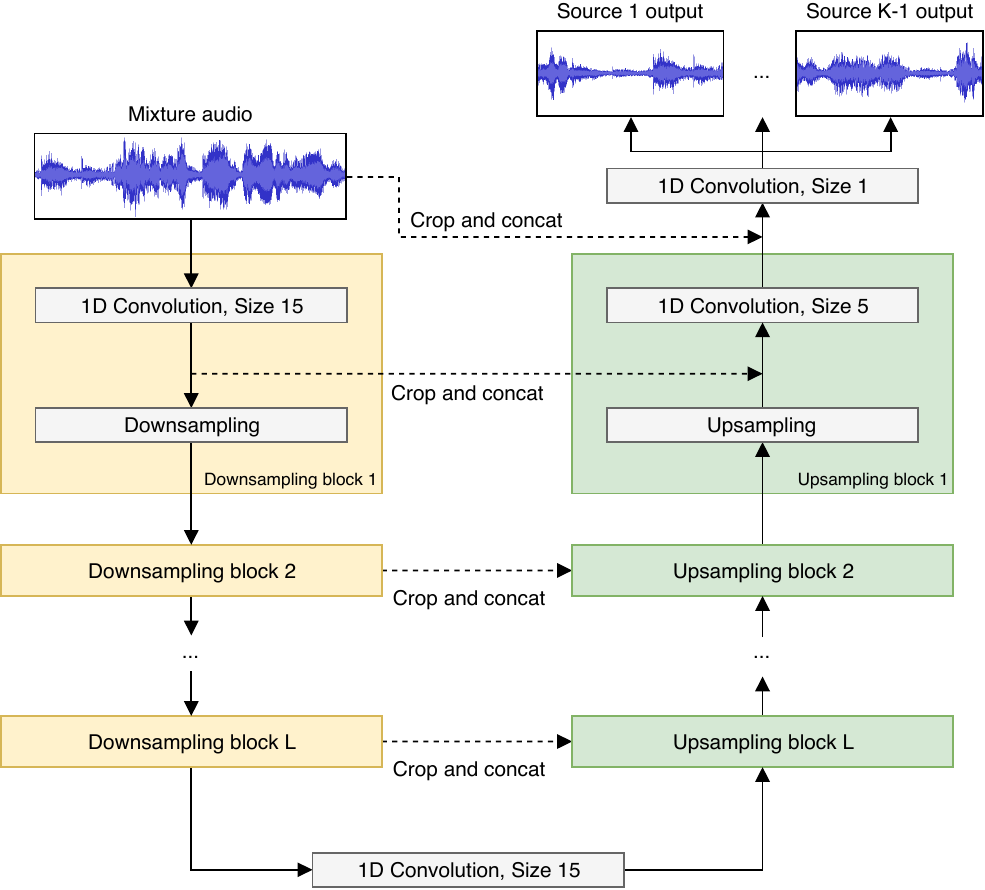
Participation in the SiSec separation competition
The Wave-U-Net also participated in the SiSec separation campaign as submissions STL1 and STL2 and achieved a good performance, especially considering the limited dataset we used compared to many other submissions despite having a more data-hungry end-to-end approach (we have to learn the frequency decomposition front-end from data as well).
Installation
Requirements
GPU strongly recommended to avoid very long training times.
The project is based on Python 3.6.8 and requires libsndfile and CUDA 9 to be installed.
Then, the following Python packages need to be installed:
numpy==1.15.4
sacred==0.7.3
tensorflow-gpu==1.8.0
librosa==0.6.2
soundfile==0.10.2
lxml==4.2.1
musdb==0.2.3
museval==0.2.0
google==2.0.1
protobuf==3.4.0
Alternatively to tensorflow-gpu the CPU version of TF, tensorflow can be used, if there is no GPU available.
All the above packages are also saved in the file requirements.txt located in this repository, so you can clone the repository and then execute the following in the downloaded repository's path to install all the required packages at once:
pip install -r requirements.txt
To recreate the figures from the paper, use functions in Plot.py. The matplotlib<3.0 package needs to be installed as well in that case.
Download datasets
To directly use the pre-trained models we provide for download to separate your own songs, now skip directly to the last section, since the datasets are not needed in that case.
To reproduce the experiments in the paper (train all the models), you need to download the datasets below. You can of course use your own datasets for training, but for this you would need to modify the code manually, which will not be discussed here.
MUSDB18
Download the full MUSDB18 dataset and extract it into a folder of your choice. It should have two subfolders: "test" and "train" as well as a README.md file.
CCMixter (only required for vocal separation experiments)
If you want to replicate the vocal separation experiments and not only the multi-instrument experiments, you also need to download the CCMixter vocal separation database from https://members.loria.fr/ALiutkus/kam/. Extract this dataset into a folder of your choice. Its main folder should contain one subfolder for each song.
Set-up filepaths
Now you need to set up the correct file paths for the datasets and the location where source estimates should be saved.
Open the Config.py file, and set the musdb_path entry of the model_config dictionary to the location of the main folder of the MUSDB18 dataset.
Also set the estimates_path entry of the same model_config dictionary to the path pointing to an empty folder where you want the final source estimates of the model to be saved into.
If you use CCMixter, open the CCMixter.xml in the main repository folder, and replace the given file path tagged as databaseFolderPath with your path to the main folder of CCMixter.
Training the models / model overview
Since the paper investigates many model variants of the Wave-U-Net and also trains the U-Net proposed for vocal separation, which achieved state-of-the-art performance, as a comparison, we give a list of model variants to train and the command needed to start training them:
| Model name (from paper) | Description | Separate vocals or multi-instrument? | Command for training |
|---|---|---|---|
| M1 | Baseline Wave-U-Net model | Vocals | python Training.py |
| M2 | M1 + difference output layer | Vocals | python Training.py with cfg.baseline_diff |
| M3 | M2 + proper input context | Vocals | python Training.py with cfg.baseline_context |
| M4 | BEST-PERFORMING: M3 + Stereo I/O | Vocals | python Training.py with cfg.baseline_stereo |
| M5 | M4 + Learned upsampling layer | Vocals | python Training.py with cfg.full |
| M6 | M4 applied to multi-instrument sep. | Multi-instrument | python Training.py with cfg.full_multi_instrument |
| M7 | Wave-U-Net model to compare with SotA models U7,U7a | Vocals | python Training.py with cfg.baseline_comparison |
| U7 | U-Net replication from prior work, audio-based MSE loss | Vocals | python Training.py with cfg.unet_spectrogram |
| U7a | Like U7, but with L1 magnitude loss | Vocals | python Training.py with cfg.unet_spectrogram_l1 |
NEW:
We also include the following models not part of the paper (also with pre-trained weights for download!):
| Model name (not in paper) | Description | Separate vocals or multi-instrument? | Command for training |
|---|---|---|---|
| M5-HighSR | M5 with 44.1 KHz sampling rate | Vocals | python Training.py with cfg.full_44KHz |
M5-HighSR is our best vocal separator, reaching a median (mean) vocal/acc SDR of 4.95 (1.01) and 11.16 (12.87), respectively.
Test trained models on songs!
We provide a pretrained versions of models M4, M6 and M5-HighSR so you can separate any of your songs right away.
Downloading our pretrained models
Download our pretrained models here.
Unzip the archive into the checkpoints subfolder in this repository, so that you have one subfolder for each model (e.g. REPO/checkpoints/baseline_stereo)
Run pretrained models
For a quick demo on an example song with our pre-trained best vocal separation model (M5-HighSR), one can simply execute
python Predict.py with cfg.full_44KHz
to separate the song "Mallory" included in this repository's audio_examples subfolder into vocals and accompaniment. The output will be saved next to the input file.
To apply our pretrained model to any of your own songs, simply point to its audio file path using the input_path parameter:
python Predict.py with cfg.full_44KHz input_path="/mnt/medien/Daniel/Music/Dark Passion Play/Nightwish - Bye Bye Beautiful.mp3"
If you want to save the predictions to a custom folder instead of where the input song is, just add the output_path parameter:
python Predict.py with cfg.full_44KHz input_path="/mnt/medien/Daniel/Music/Dark Passion Play/Nightwish - Bye Bye Beautiful.mp3" output_path="/home/daniel"
If you want to use other pre-trained models we provide (such as our multi-instrument separator) or your own ones, point to the location of the Tensorflow checkpoint file using the model_path parameter, making sure that the model configuration (here: full_multi_instrument) matches with the model saved in the checkpoint. As an example for our pre-packaged multi-instrument model:
python Predict.py with cfg.full_multi_instrument model_path="checkpoints/full_multi_instrument/full_multi_instrument-134067" input_path="/mnt/medien/Daniel/Music/Dark Passion Play/Nightwish - Bye Bye Beautiful.mp3" output_path="/home/daniel"
Known issues / Troubleshooting
MacOS: If matplotlib gives errors upon being imported, see this issue and that issue for solutions.
During the preparation of the MUSDB dataset, conversion to WAV can sometimes halt because of an ffmpeg process freezing that is used within the musdb python package to identify the datasets mp4 audio streams. This seems to be an error occurring upon the subprocess.Popen() used deep within the stempeg library. Due to its random nature, it is not currently known how to fix this. I suggest regenerating the dataset again if this error occurs.