


smartcat (sc)
Puts a brain behind cat! CLI interface to bring language models into the Unix ecosystem and allow terminal power users to make the most out of LLMs while maintaining full control.
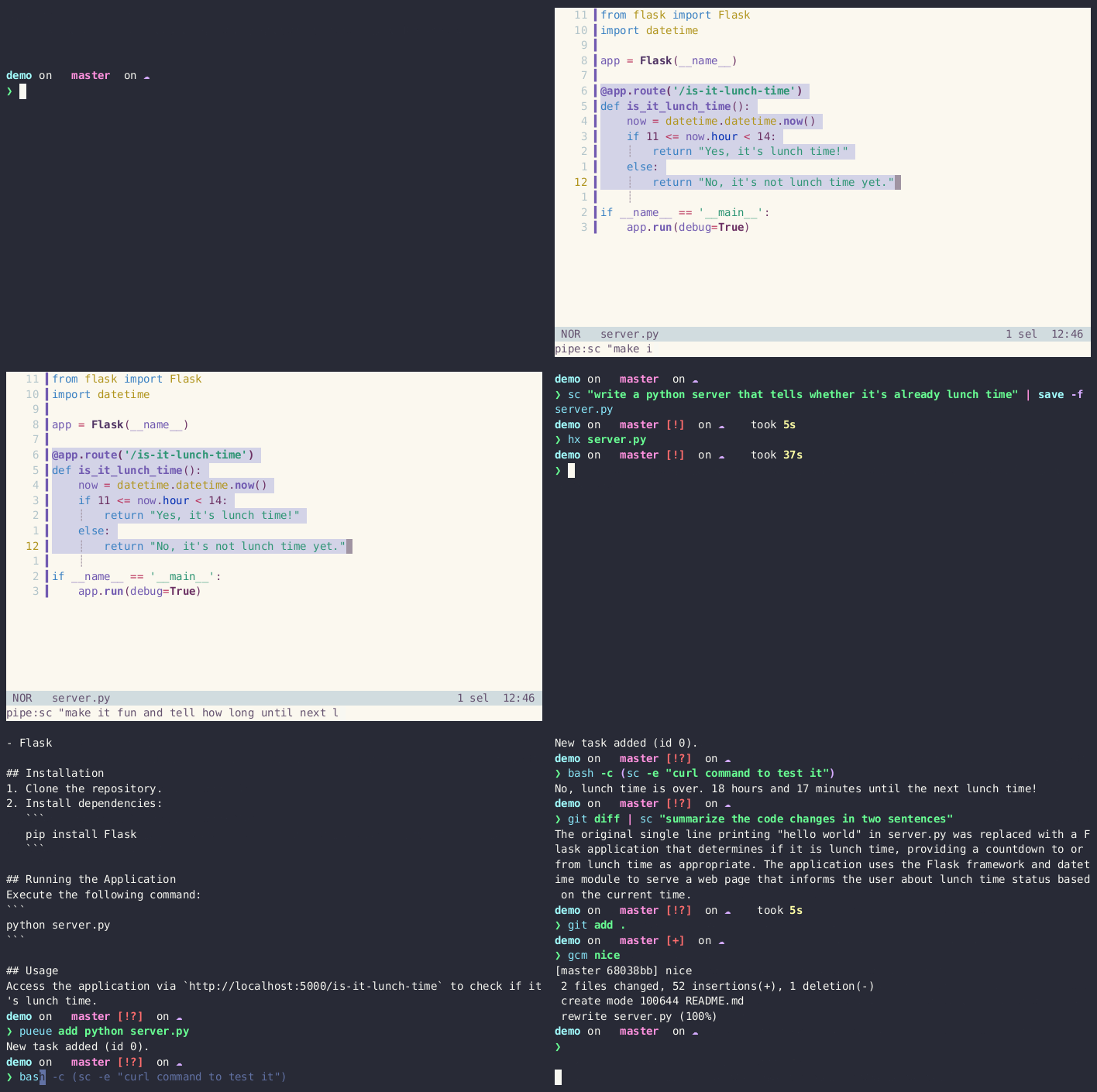
What makes it special:
- Made for power users; tailor the config to reduce overhead on your most frequent tasks
- Minimalist, built according to the Unix philosophy with terminal and editor integration in mind
- Good I/O handling to insert user input in prompts and use the result in CLI-based workflows
- Built-in partial prompt to make the model play nice as a CLI tool
- Full configurability on which API, LLM version, and temperature you use
- Write and save your own prompt templates for faster recurring tasks (simplify, optimize, tests, etc.)
- Conversation support
- Glob expressions to include context files
Currently supports the following APIs:
- Local runs with Ollama or any server compliant with its format; see the Ollama setup section for the free and easiest way to get started!
(Answers might be slow depending on your setup; you may want to try the third-party APIs for an optimal workflow.) - Anthropic, Azure OpenAi, Groq, Mistral AI, OpenAI
Table of Contents
- Installation
- Recommended models
- Usage
- A few examples to get started 🐈⬛
- Configuration ← please read this carefully
- Ollama setup ← easiest way to get running for free
- How to help?
Installation
On the first run (sc), it will ask you to generate default configuration files and provide guidance on finalizing the installation (see the Configuration section).
The minimum configuration requirement is a default prompt that calls a setup API (either remote with an API key or local with Ollama).
Now on how to get it.
With Cargo
With an up-to-date Rust and Cargo setup (you might consider running rustup update):
cargo install smartcat
Run this command again to update smartcat.
Arch Linux
If you are on Arch Linux, you can install the package from the extra repository:
pacman -S smartcat
By downloading the binary
Choose the one compiled for your platform on the release page.
Recommended Models
Currently the best results are achieved with APIs from Anthropic, Mistral or Openai. It costs about $2-3 a month for typical use with the best models.
Usage
Usage: sc [OPTIONS] [INPUT_OR_TEMPLATE_REF] [INPUT_IF_TEMPLATE_REF]

Arguments:
  [INPUT_OR_TEMPLATE_REF]  ref to a prompt template from config or straight input (will use `default` prompt template if input)
  [INPUT_IF_TEMPLATE_REF]  if the first arg matches a config template, the second will be used as input

Options:
  -e, --extend-conversation        whether to extend the previous conversation or start a new one
  -r, --repeat-input               whether to repeat the input before the output, useful to extend instead of replacing
      --api                   overrides which api to hit [possible values: ollama, anthropic, groq, mistral, openai]
  -m, --model               overrides which model (of the api) to use
  -t, --temperature   higher temperature  means answer further from the average
  -l, --char-limit     max number of chars to include, ask for user approval if more, 0 = no limit
  -c, --context ...       glob patterns or list of files to use the content as context
                                   make sure it's the last arg.
  -h, --help                       Print help
  -V, --version                    Print version
You can use it to accomplish tasks in the CLI but also in your editors (if they are good Unix citizens, i.e., work with shell commands and text streams) to complete, refactor, write tests... anything!
The key to making this work seamlessly is a good default prompt that tells the model to behave like a CLI tool and not write any unwanted text like markdown formatting or explanations.
A few examples to get started 🐈⬛
sc "say hi"  # just ask (uses default prompt template)

sc test                         # use templated prompts
sc test "and parametrize them"  # extend them on the fly

sc "explain how to use this program" -c **/*.md main.py  # use files as context

git diff | sc "summarize the changes"  # pipe data in

cat en.md | sc "translate in french" >> fr.md   # write data out
sc -e "use a more informal tone" -t 2 >> fr.md  # extend the conversation and raise the temprature
Integrating with editors
The key for good integration in editors is a good default prompt (or set of prompts) combined with the -p flag for specifying the task at hand.
The -r flag can be used to decide whether to replace or extend the selection.
Vim
Start by selecting some text, then press :. You can then pipe the selection content to smartcat.
:'<,'>!sc "replace the versions with wildcards"
:'<,'>!sc "fix this function"
will overwrite the current selection with the same text transformed by the language model.
:'<,'>!sc -r test
will repeat the input, effectively appending at the end of the current selection the result of the language model.
Add the following remap to your vimrc for easy access:
nnoremap sc :'<,'>!sc
Helix and Kakoune
Same concept, different shortcut, simply press the pipe key to redirect the selection to smartcat.
pipe:sc test -r
With some remapping you may have your most reccurrent action attached to few keystrokes e.g. wt!
Example Workflows
For quick questions:
sc "my quick question"
which will likely be your fastest path to answer: a shortcut to open your terminal (if you're not in it already), sc and you're set. No tab finding, no logins, no redirects etc.
To help with coding:
select a struct
:'<,'>!sc "implement the traits FromStr and ToString for this struct"
select the generated impl block
:'<,'>!sc -e "can you make it more concise?"
put the cursor at the bottom of the file and give example usage as input
:'<,'>!sc -e "now write tests for it knowing it's used like this" -c src/main.rs
...
To have a full conversation with a llm from a markdown file:
vim problem_solving.md

> write your question as comment in the markdown file then select your question
> and send it to smartcat using the aforementioned trick, use `-r` to repeat the input.

If you wan to continue the conversation, write your new question as a comment and repeat
the previous step with `-e -r`.

> This allows you to keep track of your questions and make a nice reusable document.

Configuration
- By default, lives at
$HOME/.config/smartcator%USERPROFILE%\.config\smartcaton Windows - The directory can be set using the
SMARTCAT_CONFIG_PATHenvironment variable - Use
#[]as the placeholder for input when writing prompts; if none is provided, it will be automatically added at the end of the last user message - The default model is a local
phi3run with Ollama, but it's recommended to try the latest models and see which one works best for you - The prompt named
defaultwill be used by default - You can adjust the temperature and set a default for each prompt depending on its use case
Three files are used:
.api_configs.tomlstores your credentials; you need at least one provider with API key or a local Ollama setupprompts.tomlstores your prompt templates; you need at least thedefaultpromptconversation.tomlstores the latest chat if you need to continue it; it's auto-managed, but you can make backups if desired
.api_configs.toml
[ollama]  # local API, no key required
url = "http://localhost:11434/api/chat"
default_model = "phi3"
timeout_seconds = 180  # default timeout if not specified

[openai]  # each supported api has their own config section with api and url
api_key = ""
default_model = "gpt-4-turbo-preview"
url = "https://api.openai.com/v1/chat/completions"

[mistral]
# you can use a command to grab the key, requires a working `sh` command
api_key_command = "pass mistral/api_key"
default_model = "mistral-medium"
url = "https://api.mistral.ai/v1/chat/completions"

[groq]
api_key_command = "echo $MY_GROQ_API_KEY"
default_model = "llama3-70b-8192"
url = "https://api.groq.com/openai/v1/chat/completions"

[anthropic]
api_key = ""
url = "https://api.anthropic.com/v1/messages"
default_model = "claude-3-opus-20240229"
version = "2023-06-01"  # anthropic API version, see https://docs.anthropic.com/en/api/versioning

[cerebras]
api_key = ""
default_model = "llama3.1-70b"
url = "https://api.cerebras.ai/v1/chat/completions"
prompts.toml
[default]  # a prompt is a section
api = "ollama"  # must refer to an entry in the `.api_configs.toml` file
model = "phi3"  # each prompt may define its own model

[[default.messages]]  # then you can list messages
role = "system"
content = """\
You are an expert programmer and a shell master. You value code efficiency and clarity above all things. \
What you write will be piped in and out of cli programs so you do not explain anything unless explicitely asked to. \
Never write ``` around your answer, provide only the result of the task you are given. Preserve input formatting.\
"""

[empty]  # always nice to have an empty prompt available
api = "openai"
# not mentioning the model will use the default from the api config
messages = []

[test]
api = "anthropic"
temperature = 0.0

[[test.messages]]
role = "system"
content = """\
You are an expert programmer and a shell master. You value code efficiency and clarity above all things. \
What you write will be piped in and out of cli programs so you do not explain anything unless explicitely asked to. \
Never write ``` around your answer, provide only the result of the task you are given. Preserve input formatting.\
"""

[[test.messages]]
role = "user"
# the following placeholder string #[] will be replaced by the input
# each message seeks it and replaces it
content ='''Write tests using pytest for the following code. Parametrize it if appropriate.

#[]
'''
see the config setup file for more details.
Ollama setup
- Install Ollama
- Pull the model you plan on using
ollama pull phi3 - Test the model
ollama run phi3 "say hi" - Make sure the serving is available
curl http://localhost:11434which should say "Ollama is running", else you might need to runollama serve smartcatwill now be able to reach your local ollama, enjoy!
⚠️ Answers might be slow depending on your setup, you may want to try the third party APIs for an optimal workflow. Timeout is configurable and set to 30s by default.
How to help?
See CONTRIBUTING.md.