# Hands-On Large Language Models CN(ZH) -- 动手学大模型
这本书(Hands-On Large Language Models)原作者是 Jay Alammar,Maarten Grootendorst。 英文好的同学强烈推荐支持原书,访问 原书地址 。
这是中文版本的 hands-on LLMs,推荐大家访问原书。
也非常欢迎大家感兴趣可以关注公众号【chaofa用代码打点酱油】获得文字更新推送~ 或者加群来吹水聊天(🤣)
中文版有什么特点
- 对代码进行了更详细的注释,并且在部分内容加上自己的理解。
- 有更适合国内网络环境使用的 Notebook 版本,不需要翻墙可以使用(主要是更快)
- 配套的中文视频讲解。
[!TIP] 🦧 跑代码需要 LLM API?试试我做的 ApeRouter — 国内直连的 LLM API 路由,支持 Claude / GPT / Kimi 等模型,无需翻墙。更多 AI 学习资源:ApeCode.ai
目录
建议海外用户通过 Google Colab 运行所有示例,以获得最简单的设置。Google Colab 允许您免费使用具有 16GB 显存的 T4 GPU。所有示例主要使用 Google Colab 构建和测试,因此它应该是更稳定的平台。然而,任何其他云提供商都应该可以工作。
国内用户如果想要运行,最好还是用中文可运行 Notebook,你可以复制我的容器直接运行这些代码,注册链接,这样不需要翻墙,国内网络环境访问 Google Colab 可能比较慢。
| 章节 | Google Colab | 中文 Notebook
复制后可直接运行| 视频讲解
(可点击)|
|---|---|------|------|
| 第一章: 介绍大模型 |  |
| |
|
| 第二章: Tokens and Embeddings |
| |
|
| 第三章: Looking Inside Transformer LLMs |
| |
|
| 第四章: Text Classification | | |
|
| 第五章: Text Clustering and Topic Modeling |
| |
|
| 第六章: Prompt Engineering |
| |
|
| 第七章: Advanced Text Generation Techniques and Tools |
| |
|
| 第八章: Semantic Search and Retrieval-Augmented Generation |
RAG 进化之路:传统 RAG 到工具与强化学习双轮驱动的 Agentic RAG | |
|
| 第九章: Multimodal Large Language Models |
| | 在录了~ |
| 第十章: Creating Text Embedding Models |
| | 在录了~ |
| 第十一章: Fine-tuning Representation Models for Classification |
| | 在录了~ |
| 第 12.1 章: 大模型 SFT |
| |
|
| bonous1 - 动手实现 LoRA(非import peft) | LoRA 原理和 PyTorch 代码实现 |
|
|
| bonus2 从零实现 GRPO (Agent RL),用于 Agentic RAG 训练 | RAG 进化之路:传统 RAG 到工具与强化学习双轮驱动的 Agentic RAG | |
|
[!TIP] You can check the setup folder for a quick-start guide to install all packages locally and you can check the conda folder for a complete guide on how to setup your environment, including conda and PyTorch installation. Note that the depending on your OS, Python version, and dependencies your results might be slightly differ. However, they should this be similar to the examples in the book.
🤝 Renoise:会规划镜头的 AI Agent + 自由编排的画布
Renoise 是一个把 AI Agent 和画布放在同一个工作台里的 AI 视频、图片创作平台。不会写提示词也没关系:用大白话跟 Renoise Agent 说你想拍什么,它会追问细节、写好提示词、把需求拆成一组镜头,先出角色图再喂给后面每个镜头,保证人物不走样;生成前会列清每条任务的参数和要花多少积分,你确认了才提交。生成结果自动铺在旁边的画布上,想自己控场就直接在画布上连线、改节点,把上一镜的尾帧一键抽出来当下一镜的首帧,改好的节点还能拖回对话让 Agent 接着改。底层可选 Seedance、Kling、GPT Image、Nano Banana 等 29 个顶尖模型。学完大模型原理,不妨来看看一个 Agent 是怎么把多模态模型串成一条创作流水线的。 去 Renoise 试试
其他资源
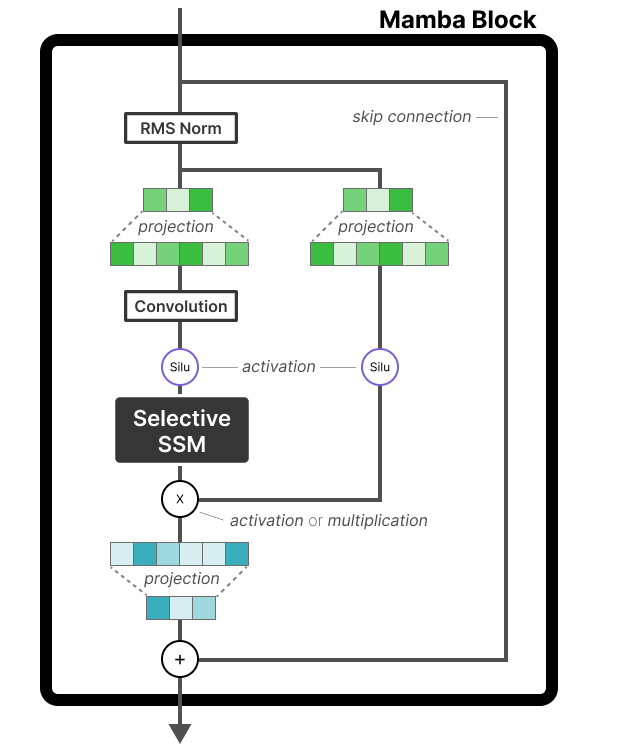
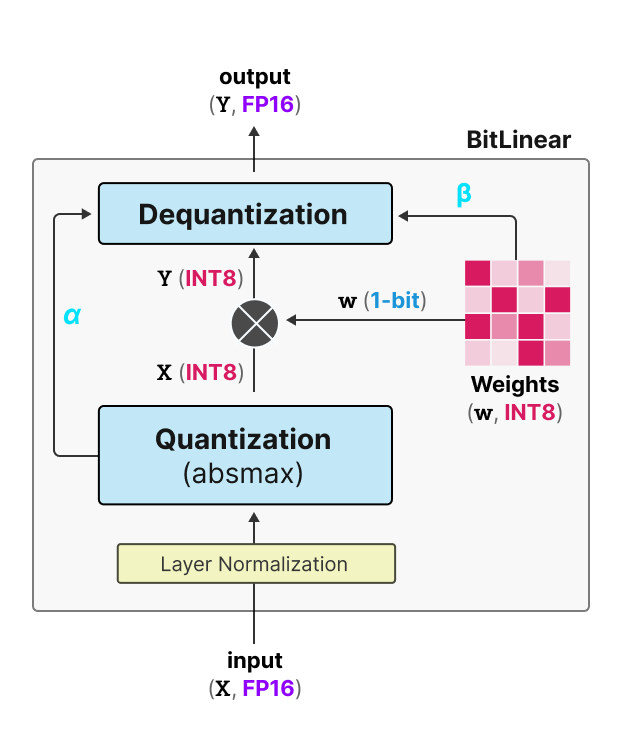
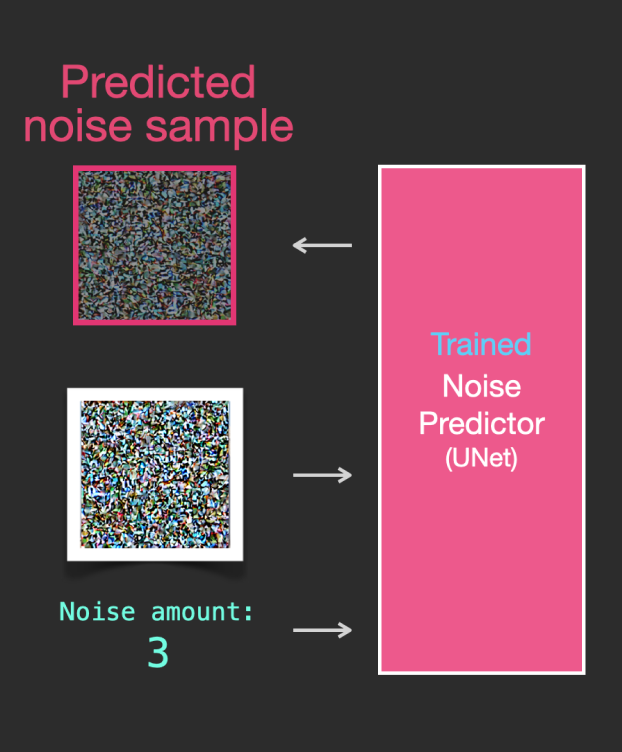
We attempted to put as much information into the book without it being overwhelming. However, even with a 400-page book there is still much to discover! If you are interested in similar illustrated/visual guides we created, these might be of interest to you:
| A Visual Guide to Mamba | A Visual Guide to Quantization | The Illustrated Stable Diffusion |
|---|---|---|
 |
 |
 |
Citation
Please consider citing the book if you consider it useful for your research:
@book{hands-on-llms-book,
  author       = {Jay Alammar and Maarten Grootendorst},
  title        = {Hands-On Large Language Models},
  publisher    = {O'Reilly},
  year         = {2024},
  isbn         = {978-1098150969},
  url          = {https://www.oreilly.com/library/view/hands-on-large-language/9781098150952/},
  github       = {https://github.com/HandsOnLLM/Hands-On-Large-Language-Models}
}
🦧 More from the Author
- 🌐 ApeCode.ai — AI 编程工具与学习平台
- 🔗 ApeRouter — 国内直连的 LLM API 路由,支持 Claude / GPT / Kimi
- 📝 yuanchaofa.com — 技术博客:LLM / Agent / 深度学习
- 🎬 B站 / YouTube — 视频教程
- 💬 微信:
bbruceyuan(请备注来意)