Scarf
The native Mac & iOS app for your Hermes AI agent.
See every session, project, skill, memory file, and cron job — on your Mac, and from your iPhone over SSH.
Website · Download for Mac · ScarfGo on the App Store · Wiki · FAQ
Why Scarf
Hermes is a terminal-and-messaging agent — powerful, but invisible. Scarf gives it a face:
- Full visibility. Every session, message, tool call, token, and dollar — live dashboards, full-text search, activity feeds, cost breakdowns.
- Full control. Chat with rich streaming (ACP) or a real terminal, edit memory and skills, manage cron, gateways, MCP servers, and every config key — from a GUI instead of YAML.
- Your servers, no middleman. Local
~/.hermes/or any number of remote hosts over plain SSH (your existing~/.ssh/config, agent, ProxyJump). There is no companion service in the middle — nothing between your device and your Hermes host. - Native and safe. Pure Swift 6 / SwiftUI — no Electron. Hermes state is opened read-only; management actions go through the
hermesCLI, so Scarf can't corrupt your agent's data. - Version-adaptive. Scarf detects each host's Hermes version and capability-gates its UI: Hermes v0.6 through v0.21 all work, and newer-only surfaces simply hide on older hosts.
Available in English, 简体中文, Deutsch, Français, Español, 日本語, and Português (Brasil).
ScarfGo — your agent in your pocket


ScarfGo is the native iPhone companion — the same Hermes servers you run from your Mac, reachable from your phone. Multi-server, project-scoped chat with session resume, project dashboards, skills browsing + Hub install, memory editor, cron, and per-server Hermes profile switching. Hold the composer's mic button to dictate — on-device speech-to-text only, never a server fallback (thanks to @danmarauda) — or start a Live Voice conversation with Hermes when your host supports it. Pure-Swift SSH (Citadel) — the Ed25519 private key is generated on-device, lives in the iOS Keychain, and never leaves the phone.

ScarfGo is now on the App Store — free. Want beta builds on the edge? Join the public TestFlight →
Connecting takes about a minute: add a server (same details as ssh user@host), tap Generate Key, paste the public key into the host's ~/.ssh/authorized_keys, tap Test connection. Full walkthrough: ScarfGo Onboarding · feature tour: ScarfGo · Mac-vs-iOS matrix: Platform Differences.
Privacy
Scarf for macOS collects usage statistics (event names + fixed-vocabulary properties, never content, paths, or hostnames) to guide development. A random per-install identifier is stored on your Mac and sent only as a hash, so active installs can be counted and followed over time without knowing who you are. Opt out any time in Settings → Advanced → Usage Analytics. ScarfGo for iOS collects nothing. Details in the Privacy Policy. The one voice feature that sends data to a third party is Live Voice (GPT-Live mode), and only when you start it: your voice streams directly from your Mac or phone to OpenAI, with recent chat messages as context and Hermes's replies so the voice can speak them, and both apps ask before the first session.
What's New in 3.6.0
- ScarfGo checks your server's identity — it remembers each server's SSH host key on first connect and refuses a server that shows a different one, with both fingerprints and a Trust New Key step in System. Before this, ScarfGo accepted any host key. The Mac app always checked.
- Easier to read in light and dark mode — a deeper orange for buttons and links in light mode, dark text on orange buttons in dark mode, darker status text that passes WCAG AA, and brick-red destructive actions, across both apps.
- Privacy, described accurately — the privacy policy and in-app text now match the code. Live Voice asks for consent once more because the screen now says that Hermes's replies and status lines also go to OpenAI. The Mac setting is now called "usage statistics" instead of "anonymous."
- On macOS 14 Sonoma? Scarf has required macOS 15 since v2.20.0. The update feed now says so, so Sonoma Macs are no longer offered updates that can't open.
- Full notes: releases/v3.6.0/RELEASE_NOTES.md.
All previous releases: Release Notes Index.
Features
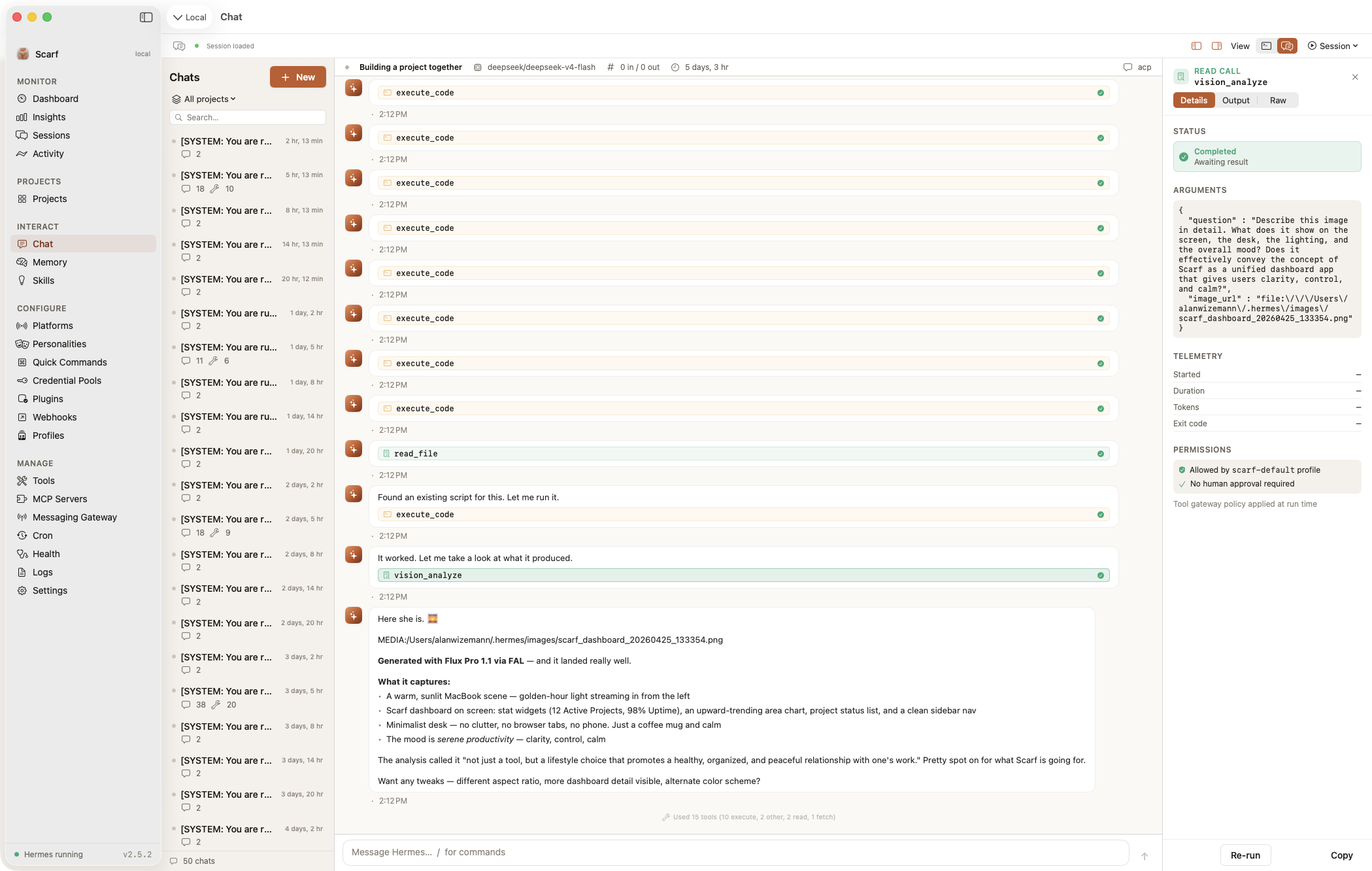
Scarf mirrors Hermes's whole surface through a sidebar UI. Sections marked ⚙ are capability-gated — they appear only when the connected host's Hermes version supports them.
Projects — mission control per repo
Projects sit first in the sidebar because that's how you actually work. Selecting one opens a unified cockpit: Dashboard, Sessions, Board, Site, Context, Cron, Memory, Secrets, Templates, Slash commands, Mini-apps, and Fleet.
- Project dashboards — agent-generated JSON dashboards with stat boxes, charts, tables, progress bars, checklists, and embedded web views, live-refreshed. See Project Dashboards below.
- Kanban board ⚙ — full read/write board over Hermes's Kanban, per-project tenants, chat-scoped views.
- Mini-apps — sandboxed HTML/CSS/JS panels inside a project that can drive your agent through a rate-limited, permission-gated bridge (locked-down
WKWebView, default-deny permissions reviewed on first open). - Fleet & Portfolio — the same repo on several machines groups into one logical project; Scarf flags config drift and can push model presets, boards, and cron to the whole fleet.
- Templates — install
.scarftemplatebundles from the community catalog, a local file, or ascarf://installlink; export your own. - Project chats load your context — chats spawn Hermes with the project as cwd, so
AGENTS.md/CLAUDE.md/.cursorrulesload automatically, on Mac and iOS alike.
Monitor
- Dashboard — system health, token usage, cost tracking (per-model breakdown on Hermes 0.20), recent sessions.
- Insights — usage analytics: token/cost trends, model + platform stats, top tools, activity heatmaps, 7/30/90-day filtering.
- Sessions — full conversation history with reasoning display, tool-call inspection, full-text search, pin/rename/delete, and Markdown/HTML/Quarto/JSONL export with secret redaction.
- Activity — live tool-execution feed with filtering and a detail inspector.
Interact
- Chat — two modes: Rich Chat streams over the Agent Client Protocol (ACP) with markdown, tool-call visualization, thinking display, permission prompts, and per-session edit-approval modes; Terminal runs
hermes chatin a real terminal (SwiftTerm). Both persist sessions, resume, and auto-reconnect. - Voice — talk to Hermes instead of typing it. Hermes Voice playback ⚙ speaks assistant replies through the connected server's own configured text-to-speech provider, falling back to the system voice (Settings → Voice → Playback Engine, Hermes v0.20.1+; thanks to @danmarauda). Voice conversation ⚙ is a full two-way spoken conversation on Mac and ScarfGo, and every real request still goes to Hermes, which answers with your model and full toolset. With Hermes's default chained mode it's free and needs no key: your speech becomes text on your device (on-device only), and the reply is read aloud by the host's text-to-speech provider or the system voice (Hermes v0.20.1+). With Hermes's GPT-Live mode an OpenAI voice model listens and talks in real time (Hermes v0.21.3+, about $0.05/min on the host's own OpenAI key); your voice then streams directly from your device to OpenAI, so Scarf asks once before the first session. See the wiki for setup and privacy details.
- Memory — view/edit MEMORY.md and USER.md with live refresh and profile-scoped memory.
- Curator ⚙ — Hermes's skill curator: status, archive idle skills, consolidation controls.
- Skills — browse installed skills, search the Skills Hub across registries, install/update/uninstall from the app.
Configure
- Platforms — native setup forms for Hermes's messaging platforms (Telegram, Discord, Slack, WhatsApp, Signal, iMessage, Matrix, ntfy, and more) including QR pairing flows.
- Personalities · Quick Commands · Credential Pools · Plugins · Webhooks · Profiles — every Hermes identity/extension surface, with safe write paths.
- Models ⚙ — the model picker as a first-class pane, with local-model discovery (Ollama, LM Studio, vLLM, llama.cpp — local or over SSH), context-window guards, and vision-capability warnings.
- Hermes Proxy ⚙ — launch Hermes's OpenAI-compatible local proxy and point Codex CLI / Aider / Cline / Continue at it.
Manage
- Tools · MCP Servers · Messaging Gateway · Cron · Health · Logs · Settings — toolset toggles per platform; full MCP server management (presets, OAuth, mTLS, test-connection); gateway start/stop + pairing; full cron CRUD with run history; health diagnostics with one-click fixes; live log tailing with session-ID filtering; and a structured Settings editor covering essentially every
config.yamlkey Hermes exposes — written through a lossless YAML editor that preserves everything it doesn't model.
Multi-server: one window per server
Scarf is a multi-window app — each window binds to one Hermes server. Your local ~/.hermes/ appears automatically; add remotes via File → Open Server → Manage Servers… → Add. Remote hosts are reached over system SSH (your ~/.ssh/config, ssh-agent, ProxyJump, ControlMaster); SQLite is served from atomic snapshots; chat tunnels as ssh -T host -- hermes acp. Everything works against remote identically to local.
Remote host requirements: key-based SSH (run ssh-add once), sqlite3 and pgrep on the remote PATH, and ~/.hermes/ readable by the SSH user. If the Dashboard shows "Stopped" or empty values on a green connection, open Manage Servers → 🩺 Run Diagnostics — fourteen checks in one SSH session, each with a remediation hint. Details: Servers & Remote.
Requirements & compatibility
- macOS 15+ (Scarf) · iOS 18.6+ (ScarfGo) · Xcode 16+ to build from source.
- Hermes v0.6.0+ on each host. Current target: v0.21.5 (v2026.9.24) — every newer surface is capability-gated or schema-detected, so older hosts keep working with newer-only UI hidden.
| Hermes | Status |
|---|---|
| v0.6.0 – v0.17.0 (2026-03 → 2026-06) | Verified — full feature history in the wiki compatibility page |
| v0.18.x (2026-07) | Verified — messages.compacted schema detection, MoA + Vertex providers |
| v0.19.x "Quicksilver" | Verified — audited as part of the v0.18.2 → v0.20.0 source delta; the ACP chat composer's /compact becomes /compress at v0.19.1 (the CLI table has said compress since v0.3.0), so Scarf sends the spelling each host actually understands |
| v0.20.0 "Herald" (2026-08-03) | Verified — pinned sessions, per-model cost, new exports, cron run history, profile routing |
| v0.20.4 "Herald" (2026-08-18) | Verified — curator ledger/purge, project skills, unread sessions, MCP catalog + identity headers, personalities-in-code |
| v0.20.5 (2026-08-19) | Verified — full-output --version probe, unlimited max turns, unseeded stt.provider, profile display names, OpenCode Free |
| v0.20.6 (2026-08-27) | Verified — cron incidents/doctor/Run Now, bot-chat delivery, browser close-profile, curator pin/unpin diagnostics, essential hermes-agent skill |
| v0.21.0 "Pantheon" (2026-08-31) | Verified — Peers (hermes peer), dotted-key escaping, MCP catalog 20 → 65 servers, turn-lease default 1800 → 5s, two new providers |
| v0.21.2 (2026-09-11) | Verified — the state.db reliability patch; schema, ACP wire and every Scarf argv unchanged at the tag; hermes backup --keep 0 passed so Hermes's new prune default never deletes your older backups |
| v0.21.1 (2026-09-07) | Verified — Tavily back, perplexity web backend, bounded service_tier modes, shared-metrics telemetry, plugins compat --json, cron --paused/--failure-deliver, MCP device-code OAuth, messages_fts 8 KB tool-content prefix |
| v0.21.3 (2026-09-14) | Verified — GPT-Live voice chat mode (Scarf 3.3.0) |
| v0.21.4 (2026-09-21) | Verified — multiplex-by-default gateway, FTS index aligned to an 8 KB tool prefix, opencode-free removed, chatgpt aliases, OpenAI-native web search, cron model pin, new exit codes for backup / profile delete / peer dm / sessions optimize |
| v0.21.5 (2026-09-24) | Verified — current target — parked profiles, the standalone status box, retired multiplex_profiles: false rewritten, MCP numeric on/off; verified at the tag and on a live host |
Scarf reads Hermes's SQLite database and CLI output with automatic schema detection. If a Hermes update changes either, the Health view shows compatibility warnings.
Install
Pre-built binary (recommended)
Download from Releases: Scarf-vX.X.X-Universal.zip (Apple Silicon + Intel) or -ARM64.zip (smaller). Unzip, drag Scarf.app to Applications, launch — builds are Developer ID signed and notarized. Updates arrive automatically via Sparkle.
"Scarf.app is damaged" on first launch?
The bundle is fine — every release passes codesign --verify --strict --deep and spctl --assess before shipping. Remove only the quarantine attribute:
xattr -d com.apple.quarantine /Applications/Scarf.app
Or extract with ditto -xk instead of double-clicking the zip. Do not run xattr -rc (strips codesign xattrs) or codesign --force --deep --sign - (corrupts Sparkle's nested signatures). If a clean re-download + quarantine removal doesn't fix it, open an issue with codesign --verify --verbose=4 --strict output captured before any mitigation.
Build from source
git clone https://github.com/awizemann/scarf.git
cd scarf/scarf
open scarf.xcodeproj
No Apple Developer account? Use ./scripts/local-build.sh for an unsigned Debug build — see BUILDING.md.
Project Dashboards
Drop a .scarf/dashboard.json into any project and Scarf renders a live-updating dashboard — stat boxes, charts, tables, progress bars, checklists, rich text, and embedded web views. The real power is letting your Hermes agent generate and maintain it (from cron, after builds, whenever state changes — Scarf watches the file):
{
  "version": 1,
  "title": "My Project",
  "sections": [{
    "title": "Overview",
    "columns": 3,
    "widgets": [
      { "type": "stat", "title": "Test Coverage", "value": "87%", "icon": "checkmark.shield", "color": "green" },
      { "type": "progress", "title": "Sprint", "value": 0.73, "label": "73% complete" },
      { "type": "list", "title": "Tasks", "items": [{ "text": "Deploy to prod", "status": "pending" }] }
    ]
  }]
}
Register the project by appending { "name": "...", "path": "..." } to ~/.hermes/scarf/projects.json (or click Projects → +). Widget types: stat (with optional sparkline), progress, text, table, chart, list, webview (embeds a full browser tab for local dev servers, reports, Grafana, …), markdown_file, log_tail, cron_status, status_grid, kanban_summary, and image. Full schema + examples: DASHBOARD_SCHEMA.md.
Architecture
MVVM-Feature, Swift 6 strict concurrency, and only two external dependencies (SwiftTerm and Sparkle) — everything else is system frameworks. Mac app, iOS app, and the shared ScarfCore/ScarfDesign/ScarfIOS packages live in one Xcode project. Hermes state (state.db, config.yaml, logs, memory, skills) is read directly — state.db strictly read-only to avoid WAL contention — and management actions go through the hermes CLI. The app sandbox is disabled because Scarf must read ~/.hermes/ and spawn the Hermes binary (which is also why it can't ship on the App Store).
Deep dives: Architecture Overview · Transport Layer · Data Model · ACP Subprocess.
Releases
Scarf ships through GitHub Releases via one local script (scripts/release.sh): universal archive → Developer ID signing → notarization → stapling → Sparkle EdDSA-signed appcast on gh-pages → GitHub release + tag. The appcast is served from awizemann.github.io/scarf/appcast.xml.
Contributing
Contributions are welcome — several of Scarf's best recent fixes were community PRs. Open an issue to discuss before submitting a PR; see CONTRIBUTING.md for the architecture rules, the zero-warnings bar, and the 8-step recipe for contributing a new language. Template submissions have their own flow with CI validation: templates/CONTRIBUTING.md.
Support
Questions → the website FAQ or the Wiki · bugs → GitHub issues.
If Scarf is useful to you:
