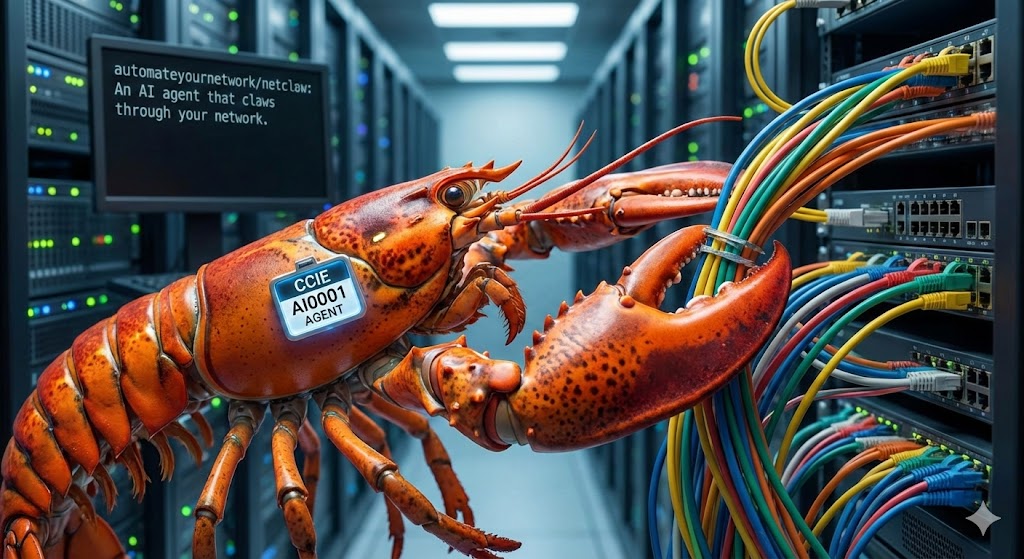
NetClaw
A CCIE-level AI network engineering coworker that runs on OpenClaw or Hermes, with 237 skills and 176 MCP integrations in its catalog. Investigate live networks, learn from your own documentation, coordinate specialist agents, and carry out approved changes with baselines, verification and an immutable audit trail. Available tools and HUD controls depend on the selected runtime and installed components.
Work from chat, the visual HUD, your phone, or a Zoom meeting. Start with one NetClaw, or build a risk of specialist NetClaws behind a single Border.
Start here: Choose a runtime · Install · Capabilities · RAG · GCF · Mobile · Zoom · VS Code · HUD · Jev
Project: Source version 1.9.0 — unpublished · Release notes · Contributing — numbered specs + Spec Kit · Changelog
VS Code: Install NetClaw or explore the VS Code Extension: a native workbench for your existing NetClaw, with Chat, Canvas, RAG, Testbed management, per-MCP configuration and reviewed security controls.
Reference: Architecture · MCP servers · Skills · Workflows · Safety
Hermes or OpenClaw?
Choose the agent runtime during installation. Both can use the shared NetClaw HUD for Chat, branching Canvas investigations, local Avatar and browser-owned conversation history. Your choice persists across launches; an existing OpenClaw installation keeps its default.
| Choose | Why use it? | Current shared HUD behavior |
|---|---|---|
| OpenClaw (default) | You want NetClaw's established gateway workflows and its broader existing HUD controls, or already run OpenClaw. | Uses your configured gateway, with model/effort controls and installed tools subject to existing permissions and change control. |
| Hermes | You prefer the Hermes agent, CLI and skill ecosystem, or already deploy Hermes and want the same NetClaw workspace. | Uses your selected Hermes home and configured provider/model through a dedicated protected companion. The first qualified HUD tool is the read-only subnet calculator and its installed skill. |
Hermes runtime installation includes the selected NetClaw MCP servers and skills. The protected HUD companion admits only reviewed tools: installing another MCP does not automatically enable it in HUD conversations. Attachments, configuration APPLY, per-conversation model/effort overrides and hosted Avatar are unavailable in this first Hermes HUD release. Local Avatar is supported. See the Hermes setup and capability guide.
Connection: the browser on :3000 talks to the HUD API on :3001. For Hermes, the
API uses a private MCP bridge and an authenticated companion on loopback :8643;
it does not connect directly to or restart your ordinary Hermes gateway. Hermes HUD
acceptance passed on Mac and Ubuntu under Windows WSL2; native Windows uses WSL.
Spec 148 delivers the shared HUD connection. NetClaw 1.8.0 / spec149 adds Hermes iN2N/eN2N and Mobile Ask Border through protected execution. The initial qualified profile is subnet calculation; media attachments and production Hermes confinement remain unavailable. See setup, mobile versions and tested scope. Runtime installation details · Acceptance and exact tested platforms
The function-first HUD opens on standard Chat, with a Chat / Canvas interface switch, selected-runtime operations panels, Basic/Advanced presentation and detailed Jev views. OpenClaw also offers its native interface in a separate tab. Saved conversations survive refresh; runtime and usage indicators show available evidence rather than assumed values. See the HUD guide for the broader workspace.
RAG — answers grounded in your documents
Teach NetClaw your vendor guides, standards, customer designs and runbooks. Upload through Slack or the HUD RAG panel, ingest a local file, or preview a URL crawl before importing it. PDF, Markdown, HTML, text and modern Office formats are supported; legacy Office conversion uses optional LibreOffice.
Hybrid semantic and keyword search, local reranking and structure-aware chunks return cited passages with document, section and page context. Retrieval runs locally after the models are installed. NetClaw can refine a search within a bounded budget and report when the corpus cannot answer. Uploaded knowledge stays separate from the agent's experiential memory; captured network snapshots are opt-in and carry their age.
Try: “Using our uploaded design guide, explain the intended BGP policy and cite the relevant sections.” Then ask for a live device check to compare intent with current state.
Setup, formats and retrieval pipeline · Consented knowledge sharing between peers
GCF — compact network evidence
GCF gives participating MCP integrations a compact representation of structured tool results: tabular encoding for repeated records, graph encoding for topology, and optional session references and deltas for repeated queries. This reduces repetitive payload text so more useful network evidence can fit into a model's context. The serializer retains source data and falls back to JSON when encoding fails.
Choose NETCLAW_GCF_MODE=full, graph, generic or off; session/delta behavior also requires the caller to enable it. Savings depend on the payload and model. The recorded 1,000-node fixture used 98,859 graph-output characters versus 139,881 compact-JSON characters (about 29% less); serializer token counts use a characters/4 estimate, not a model tokenizer or a guaranteed billing reduction.
Optional: NETCLAW_TABULAR_FORMAT=bpp encodes flat, non-graph results (the payloads that would otherwise use the GCF generic profile) with bpp instead. It requires pip install bpp-format, is off by default, never affects graph, session or delta encoding, and falls back to GCF generic if bpp is missing or its round trip is not lossless.
Serializer and mode reference · Recorded benchmark · Reproduce the benchmark
NetClaw Mobile — your network in your pocket
The Flutter client brings the Border to iOS and Android. Enroll with a single-use QR token, ask by text or voice, scan a device QR/deep link, and receive answers with the responding claw identified. A dashboard, conversation history, feed and approvals view keep the operator connected away from the desk.
Resolve approval requests with device biometrics and attach camera/microphone captures to an investigation. The phone is an NCFED edge member with device-native capabilities; the Border handles agent reasoning. Explicit notifications can reach a connected phone, with platform push fallback when configured. Existing authorization and audit rules still apply.
Build, enroll and use Mobile · iOS release checklist · Android release checklist
Zoom — network investigations in the meeting
Bring NetClaw into an incident call through Zoom Realtime Media Streams. With listening enabled, transcript and chat context can trigger network investigations through the existing Border and specialist routing. The Zoom App side panel shows status and returned evidence, with an optional camera overlay.
Live meeting context and historical meeting search serve different purposes: RTMS supplies the current conversation; the official Zoom Meetings MCP can supply prior meeting context where configured. Historical connectivity is environment-dependent. Meeting requests retain the same device-write approval gates as other channels.
RTMS setup, tools and deployment boundaries · Meeting intelligence specification
Function-first HUD
Start with standard Chat, switch to Canvas for branching investigations, or open the native OpenClaw interface in a separate tab. The local operations workspace also provides Claw/MCP drill-downs, reported LLMs, Jev assessments, RAG uploads and retrieval, Tokenomics, service Logs, masked Configuration, Security mode/enforcement panels, and Documentation. Basic/Advanced presentation and optional Three.js views keep evidence accessible. See the HUD guide. The service remains local to the host; the new UI does not change its access controls.
VS Code Extension
Bring your existing NetClaw into Visual Studio Code. The NetClaw extension gives you a themed operations workbench alongside your code, configuration and documentation. It connects to the NetClaw you already run on OpenClaw or Hermes; available actions follow that runtime's capabilities.
Install: search Extensions for NetClaw by publisher NetClaw, or use:
code --install-extension NetClaw.netclaw
Use VS Code 1.102 or later on macOS or Linux. On Windows, open your intended WSL distribution and install the extension in WSL. Existing Remote SSH workspaces are supported; loopback addresses refer to the extension host. Browser VS Code and native Windows runtime hosting are not supported.
Start your NetClaw HUD, open the NetClaw Activity Bar, and choose Add existing NetClaw. Give the connection a friendly nickname such as My Mac lab, enter its HUD API address—normally http://127.0.0.1:3001—and review the returned installation identity. Start the updated HUD to enable full Testbed and scoped MCP editing; updating the extension alone cannot add those API routes.
| Work in the editor | What you can do |
|---|---|
| Chat, Canvas and Avatar | Talk to the selected runtime, branch investigations and use bundled local characters beside the same Chat. Select file/context content explicitly. |
| RAG knowledge | Browse collections, upload selected documents and search cited passages with source and staleness context. |
| Testbed inventory | Add, edit and remove devices through cards or advanced YAML. Import YAML, JSON or basic CSV, preview changes, review saves, export and inspect recovery copies. |
| MCP configuration | Open integration-specific fields, keep/replace/clear values, inspect shared settings and review supported setup actions. Existing secret values stay private. |
| DefenseClaw and OpenShell | Inspect status, permissions, redacted policy YAML and logs. Review supported connector tool rules or sandbox network-policy changes, with explicit acknowledgment when protection may weaken. |
| Operations and federation | Inspect reported Risk/peer state, BGP relationships, tokenomics, logs, audit evidence, mobile/edge and Science Officer observations. |
| Copilot, Claude Code and Codex | Opt into the scoped assistant interface for inspection/proposals and separately enable delegated NetClaw requests. Existing runtime authorization still applies. |
Cards, labeled forms, search and filters follow light, dark and high-contrast editor themes. The interactive 3D BGP view uses reported sessions and includes an accessible list. It does not infer physical cabling or health.
Changes retain their review boundaries: Testbed saves do not connect devices, saved MCP configuration does not prove endpoint access, and stored security policy does not prove traffic enforcement. Supported actions depend on the installed runtime and native CLI capabilities.
VS Code 1.1.0 (Spec152): the upper Connections panel now opens the six runtime workspace Markdown files for reading, reviewed edits and upload/overwrite, with no delete. It also provides reviewed Start/Stop/Restart for the selected installation’s verified owned services, offline Start and Save & Restart. This is not in Marketplace 1.0.1. See workspace controls and prerequisites and verification. Source 1.11.0 supplies the required HUD discovery and native helper. See release verification and platform limits, including WSL regular-file acceptance and intentional symlink refusal.
Extension guide and setup · Privacy · Exact 0.1.1 qualification and platform scope
Resources
- NetClaw Overview — community guide
Quick Install
git clone https://github.com/automateyournetwork/netclaw.git
cd netclaw
./scripts/install.sh          # interactive installer — pick exactly what you want
Run it as your normal user — not with
sudo. Under sudo, OpenClaw's config, your API keys, and all skills land in/root/.openclawwhere your ownopenclawcan't see them. The installer refuses to run under sudo and instead asks before each specific command that needs root.
The installer opens an interactive TUI (pure bash — no dialog/whiptail needed): pick an install profile, then optionally fine-tune the exact MCP server list in an arrow-key checklist (Space to toggle, a all, n none). Only what you select gets installed.
Install profiles:
| Profile | What you get |
|---|---|
| Recommended | Curated starter set: pyATS, NetBox, ServiceNow, GAIT audit trail, Chrome DevTools, nmap, diagrams, utilities |
| Custom | Hand-pick from every component in a categorized checklist |
| Everything | The classic full install — every component |
| Cisco | pyATS, ACI, ISE, Catalyst Center, Meraki, SD-WAN, CML, FMC, RADKit, ThousandEyes |
| Multivendor | Cisco + Juniper, Arista, Aruba, F5, NetBox, Nautobot |
| Cloud | AWS, Azure, GCP, Cloudflare, Terraform, Vault, GitHub |
| Security | ISE, FMC, Panorama, FortiManager, Check Point, Zscaler, Claroty, nmap, CVE |
| Labs | CML, ContainerLab, Batfish, protocol peering, N2N federation, SuzieQ |
| Observability | Grafana, Prometheus, Datadog, Splunk, PagerDuty, ThousandEyes, Kubeshark |
| Minimal | pyATS + audit trail + core utilities |
Scripted / non-interactive installs:
./scripts/install.sh --profile recommended        # any profile, no TUI
./scripts/install.sh --components "pyats netbox"  # exact component list
./scripts/install.sh --all                        # everything
./scripts/install.sh --list                       # see all components & profiles
The installer reports the host OS, version, architecture and component Python, then checks the selected components before installing packages or changing runtime configuration. Known unsupported components are disabled in the custom checklist; explicit selections and profiles fail with all detected blockers rather than silently dropping components. A full selection can therefore be blocked on macOS.
./scripts/install.sh --runtime hermes --preflight --components "forward panorama zabbix zoom-rtms"
./scripts/install.sh --preflight --all             # report all declared prerequisites; no installation
Preflight checks declared Python bounds, native SDK platforms, external commands,
Forward's Go/CGO toolchain and Docker daemon availability. It does not prove package
resolution or vendor connectivity. Existing Python 3.12 is preferred for component
runtimes unless NETCLAW_PY is explicitly set; python3 on PATH must still be 3.10+.
See Python compatibility and prerequisites.
Filled .env and first-time setup
You can fill credentials before installing: copy .env.example to .env in the
NetClaw checkout, then edit and uncomment the settings you need. The installer
imports supported settings into ~/.openclaw/.env before onboarding starts
(~/.hermes/.env for Hermes). It resolves the checkout path regardless of where
you run the installer. Existing runtime assignments, including empty ones, win;
conflicts are listed by variable name without printing values.
Onboarding still chooses your provider, model, gateway and channels. Reuse detected credentials when the runtime offers that choice. Filling an API key does not supply those other choices. Onboarding failure now stops installation with an error instead of reporting completion.
For an existing installation, import without reinstalling components:
python3 scripts/import-env.py             # preview; writes nothing
python3 scripts/import-env.py --apply     # add missing runtime settings
# Hermes: add --runtime hermes to both commands
If OpenClaw has not been configured, continue with openclaw onboard --install-daemon.
For an already-running gateway, run openclaw gateway restart to load newly
imported settings. ./scripts/setup.sh also imports before its platform questions;
skip platforms that are already configured. To replace an existing runtime value,
edit the runtime .env deliberately; import never overwrites it.
The importer accepts single-line dotenv assignments declared in .env.example,
keeps their literal syntax, skips blank values and obvious placeholders such as
changeme/sk-ant-..., and never executes or expands them. Quote values containing
#. Unknown names are reported for manual runtime configuration; malformed or
multiline records fail before any write. Destination writes are atomic with mode
0600; symlinks are refused. Generated MCP launcher paths remain installer-managed.
An inherited process variable can still take precedence over either dotenv file.
For a custom OpenClaw state directory, export OPENCLAW_STATE_DIR before import,
installation and later OpenClaw commands; OPENCLAW_CONFIG_PATH can select its
config file. For Hermes use HERMES_HOME. NetClaw retains its historical
OPENCLAW_HOME state-directory fallback in the installer/importer; prefer
OPENCLAW_STATE_DIR for consistency with upstream OpenClaw.
Current OpenClaw intentionally filters provider keys from a working-directory
.env; the durable runtime file is the appropriate location for them. See
OpenClaw environment precedence.
Agent runtime — OpenClaw or Hermes
NetClaw runs on top of an agent runtime. OpenClaw is the default. You can also run NetClaw on Hermes (Nous Research's self-improving agent). The interactive installer asks which runtime to use; scripted installs pick it explicitly:
./scripts/install.sh --runtime hermes --profile recommended
NETCLAW_RUNTIME=hermes ./scripts/install.sh --all
| OpenClaw (default) | Hermes | |
|---|---|---|
| Install | npm install -g openclaw@latest |
curl -fsSL https://hermes-agent.nousresearch.com/install.sh | bash |
| Binary | openclaw |
hermes (~/.local/bin) |
| State dir | ~/.openclaw/ |
~/.hermes/ (override with $HERMES_HOME) |
| Config | openclaw.json |
config.yaml (mcp_servers:) |
| Skills | workspace/skills/ |
skills/ |
| Onboard | openclaw onboard --install-daemon |
hermes setup + hermes gateway install |
| Talk to it | openclaw tui |
hermes --tui / hermes chat |
On a Hermes install the installer still deploys the same MCP servers, skills,
SOUL, and platform credentials — NetClaw's MCP registrations
(config/openclaw.json → mcpServers) are translated into Hermes'
mcp_servers: block by scripts/openclaw-to-hermes-mcp.py (paths made
absolute, ${VAR} resolved from the shared .env, merged non-destructively).
Inspect the result with hermes mcp list.
Scope: the runtime choice covers install, onboarding, gateway, MCP registration, skills, credentials and the shared HUD. Hermes HUD conversations use the protected companion's qualified tools. Spec149 / 1.8.0 adds protected Hermes iN2N/eN2N execution and Mobile Ask Border. See qualification and compatibility; installed does not mean qualified.
For the shared HUD, install --runtime hermes --add "subnet-calc hermes-hud",
then run ./scripts/netclaw hud select hermes "$HOME/.hermes" and
./scripts/netclaw hud. See Hermes HUD setup and limits.
The eight-tool conversation bridge is HUD-private and excluded from agent-native
registrations. Windows uses the Linux launcher inside Ubuntu on WSL2.
A Risk of NetClaws (iN2N)
A risk is the (real) collective noun for a group of lobsters — and NetClaw is a lobster. You can now run a risk of NetClaws: instead of one monolith carrying every skill, run a group of focused, specialized claws coordinated by a single Border Claw. You talk only to the Border; it routes each request to the member that owns the capability (a CML claw, a pyATS claw, an Azure claw…) and returns the result.
- Focus & token economy — each member carries only the skills it needs.
- Least privilege — each member gets only its integration's secrets.
- One door — the Border is the single interface, single external identity, and single audit trail; members dial it outbound (no ngrok, no mesh, no inbound ports — co-located or across clouds). Any provider/model per claw (incl. local Ollama). Cold/on-demand members spin up on first use.
At install you pick standalone, Border, or Member. This is the internal counterpart to N2N federation between different operators (eN2N). A classic standalone NetClaw is just "a risk of one, its own Border."
NCFED is documented as an IETF Internet-Draft —
draft-capobianco-ncfed-00(Experimental), specifying the wire protocol (BGP-multiplexed discrimination, 13-octet handshake, framing, eN2N consent + iN2N TOFU trust models) for the IETFagentprotoeffort:docs/ietf/draft-capobianco-ncfed-00.md.
Claw Certification (feature 060) closes the eN2N crypto gap: federation channels are TLS-encrypted and certificate-authenticated — domain-verified (ACME/Let's Encrypt via DNS-01, identity bound to a DNS name you own, not the tunnel) or pinned self-signed TOFU. The Border is its risk's CA so members verify the hub (mutual auth); credentials auto-rotate before expiry. Enable with
N2N_CERT_MODE=on|enforce; existing claws upgrade in one command (scripts/patch-claw-certs.sh). New to peering? See docs/N2N-FEDERATION-GUIDE.md.
Production mode — enforced, honest, and durable (feature 057)
N2N_RISK_MODE=production enforces, fail-closed, rather than merely flagging.
Layered, production-grade security — and posture that never lies:
- Member sandbox — host-level kernel confinement. Each member runs as a
hardened
systemdunit (NoNewPrivileges,ProtectSystem=strict, the operator's master.envmade inaccessible, private/tmp, and syscall/namespace limits on native Linux); on-demand members cold-start in a transient hardenedsystemd-rununit. The member keeps its real tools/network but is kernel-confined. (OpenShell containers were evaluated and rejected for live-infra members — empty, egress-denied sandboxes; host confinement is what actually works.) - Model-guard — DefenseClaw LLM guardrail proxy. Model I/O routes through the
DefenseClaw Go proxy (
:4000) for prompt/response inspection; member skill/MCP sets are DefenseClaw component-scanned before they run. If the guard is unavailable, delegations fail closed (no silent bypass to a direct provider). - Audit — GAIT immutable git trail. Every delegation/enrollment/removal/
quarantine is committed to
~/.openclaw/n2n/gait/(append-only) on both Border and member sides, cross-referenced to the SQLite audit. - Least-privilege secrets by construction — each member gets only its
integration's
.envslice; the sandbox hides the master.env. - Honest posture —
testing/production — enforced/production — DEGRADED ( missing); never a false enforced claim. Per-control policy: containment gap (sandbox / model-guard) blocks; audit-only gap (GAIT) runs flaggedaudit-degraded;N2N_STRICT_ALL=1blocks on any gap. - Durable runtime — mesh daemon + always-on members as
systemd --userservices (Restart=always), generated byscripts/in2n-services.py; fault isolation distinguishes daemon vs member vs backend. - A2A cards advertise the risk's posture and LLM capability (model + guarded flag) so federated peers see a neighbour's security + reasoning tier.
Token/context economy: the monolith loaded ~194 skills + ~37–52 MCP servers (hundreds–thousands of tool schemas) into every turn. A risk runs a lean Border (0 domain skills, ~32 broker tools) that routes to members carrying ~3 specialty skills + 1 vendor MCP each — roughly a 15–30× reduction in per-claw tool-schema context, plus tiered models (Opus Border, Sonnet/Haiku/Ollama members). See docs/N2N-RISK.md and specs/057-in2n-production-enforcement.
→ Full guide: docs/N2N-RISK.md · external peering: N2N-PEERING-NETCLAWS.md · already federated with a peer? docs/N2N-RISK-MIGRATION-FOR-PEERS.md
Whatever you pick, the installer then runs a two-phase setup:
Phase 1: openclaw onboard (OpenClaw's built-in wizard)
- Pick your AI provider (Anthropic, OpenAI, Bedrock, Vertex, 30+ options)
- Set up the gateway (local mode, auth, port)
- Connect channels (Slack, Discord, Telegram, WhatsApp, etc.)
- Install the daemon service
Phase 2: ./scripts/setup.sh (NetClaw platform credentials)
- Network devices (testbed.yaml editor)
- Platform credentials — only for the components you installed (your selection is remembered in
~/.openclaw/netclaw-components.conf) - Your identity (name, role, timezone for USER.md)
After setup, start NetClaw:
openclaw gateway              # terminal 1
openclaw tui                  # terminal 2
Reconfigure anytime:
openclaw configure— AI provider, gateway, channels./scripts/setup.sh— network platform credentials./scripts/install.sh— add or remove MCP servers (re-run keeps your current selection preselected)
Enterprise Security (DefenseClaw + OpenShell)
NetClaw includes enterprise-grade security via Cisco DefenseClaw and NVIDIA OpenShell:
| Layer | Technology | Protection |
|---|---|---|
| Container | NVIDIA OpenShell | Docker-based sandbox with YAML policies |
| Guardrails | Cisco DefenseClaw | LLM inspection, tool call filtering |
| Scanning | CodeGuard | Credential detection, injection prevention |
| Audit | SQLite + SIEM | Full compliance logging |
Enable Security
# During install (recommended)
./scripts/install.sh
# Answer 'y' to "Enable DefenseClaw + OpenShell?"

# Or enable later
./scripts/defenseclaw-enable.sh
Run NetClaw Securely
# One-command secure startup (recommended)
./scripts/netclaw-secure-start.sh

# Then connect to sandbox:
openshell sandbox connect netclaw
export HOME=/sandbox
openclaw gateway run &
openclaw tui
# Or guardrails only (no container)
defenseclaw setup guardrail --mode action
claw
Visual HUD
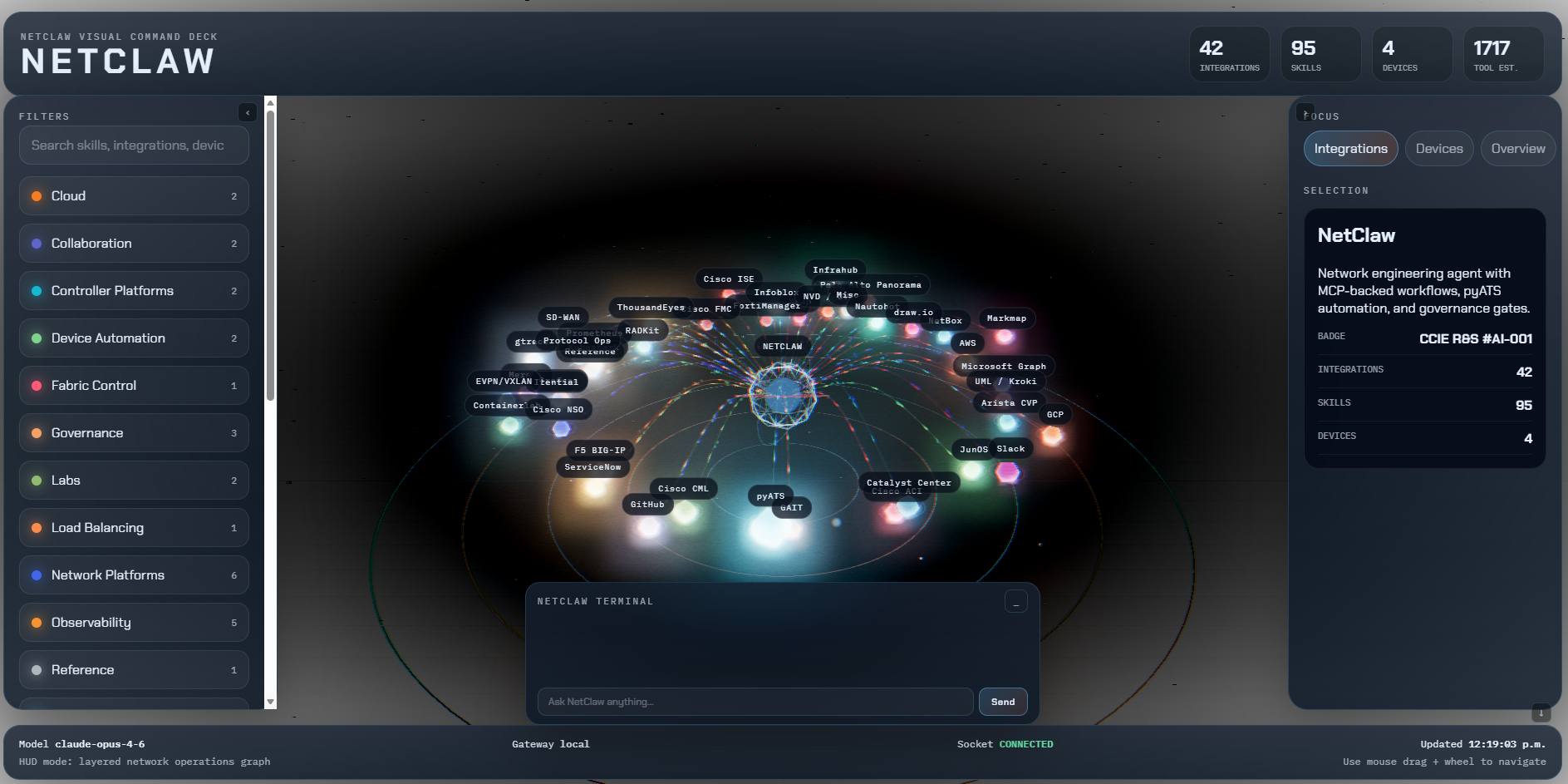
The capability catalogue covers currently 176 MCP integrations and 237 skills; configured entries are not proof of live connectivity.
The function-first HUD opens on standard Chat, with an operations dashboard and a preserved, branching Canvas workspace. Inspect internal Claws, mobile edges and external neighbours; drill into reported MCPs and LLM identities; compare Jev evidence; upload/search RAG; review token usage, estimates and budgets; inspect LAB/production mode, DefenseClaw and OpenShell; filter service logs; and browse guides, CLI declarations, MCP signatures and the HUD OpenAPI reference. Three.js views are optional companions to the panels and tables. Configured capabilities, recorded usage and estimates stay distinct from verified live state.
On Windows, start the gateway and Visual HUD together by double-clicking
Start-NetClaw.cmd, or from PowerShell:
.\Start-NetClaw.ps1
The launcher verifies Node.js, npm, and OpenClaw; installs Visual HUD
dependencies on the first run; avoids starting duplicate services; waits for
the configured gateway port plus ports 3000 and 3001; and opens Canvas Chat. Use
.\Start-NetClaw.ps1 -Interface HUD to open the main dashboard instead,
or add -NoBrowser when you only want to start the services.
cd ui/netclaw-visual
npm install
npm run dev                   # then open http://localhost:3000
Requires the OpenClaw gateway to be running for live chat (openclaw gateway run).
After updating your checkout, run scripts/upgrade-hud.sh --check from the repository
root, then scripts/upgrade-hud.sh --apply to rebuild. Add --install-deps only when
the lockfile dependencies need installation. This helper preserves configuration,
security modes and Canvas storage; it does not pull Git or restart services.
HUD guide · Logging guide · Security modes · CLI/interface reference · HUD OpenAPI · Setup and legacy utilities
What It Does
Full platform capability overview
A CCIE-level AI network engineering coworker. Built on OpenClaw with Anthropic Claude, 237 skills, and 176 MCP integrations for complete network automation with ITSM gating, source-of-truth reconciliation, immutable audit trails, gNMI streaming telemetry, NetFlow/IPFIX flow telemetry, Canvas/A2UI inline network visualizations, packet capture analysis, GitHub config-as-code, GitLab DevOps (issues, merge requests, pipelines, repositories, wikis), Jenkins CI/CD (job monitoring, build triggering, log analysis, SCM tracking), Chrome DevTools browser automation (visualization render QA, controller GUI gap-filling, undocumented API discovery, headless or watchable-headed), Computer Use full-desktop automation (legacy desktop-only tools with no browser or API path, virtual XFCE desktop with VNC/noVNC Watch Mode), Cisco CML lab simulation, ContainerLab containerized network labs, Cisco NSO orchestration, Cisco SD-WAN vManage monitoring, Grafana observability (dashboards, Prometheus, Loki, alerting, incidents), Prometheus direct PromQL monitoring, Kubeshark Kubernetes traffic analysis, Cisco Meraki Dashboard management, Cisco ThousandEyes network intelligence, AWS and Azure cloud networking, Cisco Secure Firewall policy auditing, Check Point Security (15 MCPs: policy, threat intel, gateway, SASE, malware), Itential network orchestration, Juniper JunOS device automation, Arista CloudVision Portal monitoring, F5 BIG-IP pyATS iControl REST coverage, Infoblox DDI, Palo Alto Panorama, FortiManager, Batfish offline configuration analysis, UML diagram generation, EVPN/VXLAN fabric workflows, live BGP/OSPF control-plane participation, OSPF/IS-IS link-state and BGP topology analysis over stored Topolograph snapshots, nmap network scanning, gtrace path analysis and IP enrichment, Slack-native operations, Cisco WebEx-native operations, Microsoft 365 integration, Twilio voice/SMS, Twitter/X integration, Claroty OT/IoT asset management, Forward Networks digital twin, Ollama local LLM routing, an offline agentic RAG document knowledge base (cited answers from user-uploaded vendor guides and standards), layered Memory MCP, MemPalace persistent AI memory, and Lantronix Percepxion/SLC out-of-band console-server management (fleet-wide and direct single-device).
NetClaw is an autonomous network engineering agent powered by Claude that can:
- Monitor device health — CPU, memory, interfaces, hardware, NTP, logs — fleet-wide in parallel
- Troubleshoot connectivity, routing adjacencies, performance, and flapping using OSI-layer methodology with multi-hop parallel state collection
- Analyze routing protocols — OSPF (LSDB, LSA types, area design), BGP (11-step path selection, NOTIFICATION codes), EIGRP (DUAL states)
- Audit security posture — ACLs, AAA, CoPP, management plane hardening, CIS benchmarks, ISE NAD verification, NVD CVE scanning
- Discover topology via CDP/LLDP, ARP, routing peers — reconcile against NetBox cables
- Configure devices with full ITSM-gated change management — ServiceNow CR, baseline, apply, verify, rollback
- Reconcile NetBox or Nautobot source of truth against live device state — flag IP drift, undocumented links, missing interfaces; query Nautobot IPAM for IP addresses, prefixes, VRF/tenant/site filtering when the org uses Nautobot instead of NetBox
- Manage ACI fabric — health audits, policy analysis, safe tenant/VRF/BD/EPG changes with fault delta rollback
- Investigate endpoints via ISE — auth history, posture, profiling, human-authorized quarantine
- Audit Cisco Secure Firewall policies via FMC — search access rules by IP/FQDN, resolve FTD device policies, cross-FMC consistency checks, and SGT-based policy review
- Operate Infoblox DDI — inspect DNS zones and records, DHCP scopes and leases, and IPAM utilization before address-related changes
- Inspect Cisco Meraki infrastructure via Cisco's official remote MCP — 494 read-only Dashboard capabilities behind 2 tools: org inventory, networks, devices, wireless SSIDs, RF profiles, Air Marshal, switch ports and ACLs, MX L3/L7 firewall rules, site-to-site VPN, content filtering, security events, loss/latency history, and the configuration change audit. Writes are structurally absent upstream — changes are made in the dashboard
- Audit Palo Alto Panorama and FortiManager estates — policy search, device-group/ADOM/package review, NAT validation, and commit/install readiness checks
- Monitor network paths via Cisco ThousandEyes — synthetic test results, agent health, hop-by-hop path visualization (latency, loss, MPLS labels per hop), BGP route analysis (AS path, reachability, origin validation), outage investigation, anomaly detection, instant on-demand tests, endpoint VPN diagnostics, and AI-powered views explanations — via both community (9 tools, local stdio) and official (~20 tools, remote HTTP) MCP servers
- Access remote devices via Cisco RADKit cloud relay — discover device inventory, inspect device attributes and capabilities, execute CLI commands with timeout/truncation controls, and perform SNMP GET operations on air-gapped or cloud-unreachable devices without direct SSH/SNMP connectivity
- Automate Juniper JunOS devices via PyEZ/NETCONF — CLI command execution, configuration management, Jinja2 template rendering, device facts collection, and batch operations across router fleets
- Monitor Arista fabric via CloudVision Portal REST API — device inventory, event stream, connectivity monitor status, and device tag management for fleet-wide health assessment
- Monitor Cisco SD-WAN fabric via vManage API (read-only) — device inventory (vManage, vSmart, vBond, vEdge), WAN Edge serial/chassis details, device and feature templates, centralized policies, active alarms, audit events, interface statistics, BFD session health, OMP route analysis, DTLS/TLS control connections, and running config retrieval
- Observe infrastructure via Grafana (75+ tools) — search/view/modify dashboards, query Prometheus metrics with PromQL (interface traffic, CPU, BGP state, error rates, histogram percentiles), query Loki logs with LogQL (syslog, SNMP traps, application logs), manage alerting rules and contact points, track incidents with timeline activities, view OnCall schedules and current responders, annotate dashboards, render panel images, and generate deep links
- Query Prometheus directly (6 tools) — execute instant and range PromQL queries, browse available metrics with pagination, retrieve metric metadata (type, help, unit), inspect scrape target health and status, and verify Prometheus server availability. Supports basic auth, bearer tokens (Grafana Cloud, Thanos, Cortex), and multi-tenant org IDs
- Inspect Kubernetes traffic with Kubeshark (6 tools) — capture L4/L7 traffic across cluster pods, export pcaps for Wireshark analysis, create point-in-time snapshots, filter with KFL expressions, list TCP/UDP flows with RTT metrics, and get top-talker summaries. Automatic TLS decryption via eBPF. Dissects HTTP, gRPC, GraphQL, Redis, Kafka, DNS
- Observe network state with SuzieQ (5 tools) — query current and historical network state across 20+ tables, run BGP/OSPF/interface/EVPN assertions, get aggregated summaries, trace forwarding paths hop-by-hop, and discover value distributions. Time-travel queries for historical analysis
- Troubleshoot EVPN/VXLAN fabrics — VTEP reachability, VNI mapping, EVPN route-type inspection, multihoming state, and underlay/overlay correlation
- Participate in BGP and OSPF as a live routing peer — inject/withdraw routes, query RIB/LSDB, adjust LOCAL_PREF and OSPF cost, peer with real routers over GRE tunnels via native protocol speakers (RFC 4271/5340)
- Trace network paths with gtrace — advanced traceroute with MPLS label detection, ECMP path discovery, and NAT detection; continuous MTR monitoring with per-hop loss and jitter; distributed GlobalPing probes from 500+ worldwide locations; ASN ownership lookup, geolocation, and reverse DNS for IP enrichment
- Scan for CVE vulnerabilities against the NVD database with CVSS severity correlation and exposure confirmation
- Manage F5 BIG-IP load balancers — virtual servers, pools, iRules, stats, and change management
- Audit F5 BIG-IP via iControl REST API — LTM virtual servers, pools, nodes, 40+ monitor types, 60+ profile types, iRules, GTM wide IPs, system health (CPU, memory, disk), HA sync-status, certificates, analytics (HTTP, TCP, DNS, DoS), live-update signature freshness
- Operate Catalyst Center — device inventory, client monitoring, site management, and troubleshooting
- Calculate IPv4 and IPv6 subnets — VLSM planning, wildcard masks, allocation standards
- Alert via Slack — severity-formatted notifications, incident workflows, and user-aware routing
- Alert via Cisco WebEx — Adaptive Card-formatted notifications with interactive incident management buttons, threaded investigation, user-aware escalation via People API, and voice responses
- Diagram your network with Draw.io topology maps (color-coded by reconciliation status)
- Visualize protocol hierarchies as interactive Markmap mind maps
- Render inline Canvas/A2UI visualizations in chat — topology maps with health-colored nodes, real-time dashboards (CPU, memory, BGP, OSPF), severity-sorted alert cards, ServiceNow change request timelines, config/routing/ACL diffs, hop-by-hop path traces with ECMP and black hole detection, and aggregated health scorecards with drill-down
- Generate UML and infrastructure diagrams via Kroki — 27+ types including network topology (nwdiag), rack layouts (rackdiag), packet headers (packetdiag), protocol state machines, sequence diagrams, C4 architecture, Mermaid, D2, Graphviz, ERD — output as SVG, PNG, PDF
- Reference IETF RFCs and Wikipedia for standards-compliant configuration
- Store reports, config backups, and diagrams on SharePoint via Microsoft Graph
- Generate Visio topology diagrams from CDP/LLDP discovery and upload to SharePoint
- Notify via Microsoft Teams — health alerts, change updates, and report delivery to Teams channels
- Analyze packet captures — upload a pcap to Slack and NetClaw runs deep tshark analysis: protocol hierarchy, conversations, endpoints, DNS/HTTP extraction, expert info, and filtered inspection
- Track network changes in GitHub — create issues from findings, commit config backups, open PRs for changes, link to ServiceNow CRs
- Manage Jenkins CI/CD pipelines (16 tools via remote HTTP) — monitor job and build status, trigger parameterized builds with human-in-the-loop confirmation, analyze build logs with regex search, track SCM changes and correlate commits with builds, verify Jenkins health and authentication — via the official Jenkins MCP Server plugin (Streamable HTTP transport)
- Track Jira issues and Confluence pages (72 tools via stdio) — search issues with JQL, create and update issues with human-in-the-loop, transition through workflows, link issues, manage Confluence pages with CQL search, create postmortems and runbooks, cross-product incident-to-documentation workflows — via the community mcp-atlassian server (Cloud + Server/DC support)
- Orchestrate network services via Cisco NSO — retrieve device configs from NSO's CDB, check sync status, inspect operational state, discover service types and deployed instances, platform inventory, and NED management — all via RESTCONF from Slack
- Simulate network topologies in Cisco CML — create labs, add nodes, wire links, start/stop labs, execute CLI commands, capture packets on lab links, and manage CML users — all from natural language via Slack
- Deploy containerized network labs via ContainerLab — deploy multi-vendor topologies (SR Linux, cEOS, IOS XR, NX-OS, FRR, cRPD), inspect running labs, execute commands on nodes, and destroy labs when done — all through the ContainerLab API
- Inspect AWS cloud networking — VPCs, Transit Gateways, Cloud WAN, VPN tunnels, Network Firewalls, flow logs, ENI details, and route tables via 27 read-only AWS Network tools
- Monitor AWS CloudWatch — query metrics (VPN tunnel state, NAT GW drops, TGW traffic), check alarms, run Logs Insights queries, analyze VPC flow logs
- Audit AWS security — IAM users/roles/policies (read-only), CloudTrail API event history, credential rotation compliance, MFA enforcement
- Analyze AWS costs — service breakdowns, network cost drivers (NAT GW, TGW, VPN, data transfer), monthly trends, forecasts, anomaly investigation
- Diagram AWS architecture — auto-discover and render VPCs, subnets, TGWs, load balancers as visual topology diagrams (requires graphviz)
- Stream gNMI telemetry from Cisco IOS-XR, Juniper, Arista, and Nokia SR OS devices — structured YANG model queries, SAMPLE/ON_CHANGE subscriptions, ITSM-gated configuration changes, YANG capability browsing, and gNMI-vs-CLI state comparison
- Audit every action in an immutable Git-based trail (GAIT) — there is always an answer to "what did the AI do and why"
- Track token consumption and cost in real-time — every interaction displays input/output tokens, USD cost, and GCF savings. Session-level tracking with per-tool breakdown. Powered by Anthropic's
count_tokens()API with local estimation fallback - Encode tool responses with GCF (Graph Compact Format), with JSON fallback. Generic encoding is checked for a lossless round trip. Graph summaries and deltas retain a complete authoritative source snapshot so metrics, errors, timestamps, and other fields are never silently dropped. Savings depend on the payload and mode; earlier 91–99% figures described reduced graph projections, not complete operational evidence. Configure
NETCLAW_GCF_MODEasfull(default),graph,generic, oroff. - Remember across sessions with MemPalace — semantic search across all past sessions, temporal knowledge graph for network facts (upgrades, peer changes, maintenance windows) with validity windows, cross-domain navigation between wings, and per-agent diaries. Complements OpenClaw's file-based daily logs (
memory/YYYY-MM-DD.md) with structured, searchable long-term memory — "GAIT records what happened. MemPalace remembers why." - Secure production deployments with DefenseClaw — Cisco AI Defense enterprise security: OpenShell kernel-level sandbox (Landlock, seccomp, namespaces), component scanning before execution, CodeGuard static analysis, LLM prompt/completion inspection, runtime guardrails, SQLite audit logging with SIEM export (Splunk HEC, OTLP) for SOC2/PCI-DSS/HIPAA compliance
Enterprise Security
NetClaw includes DefenseClaw from Cisco AI Defense as the recommended enterprise security layer:
| Feature | Description |
|---|---|
| OpenShell Sandbox | Kernel-level isolation (Landlock, seccomp, network namespaces) |
| Component Scanning | Skills, MCPs, and plugins scanned before execution |
| CodeGuard Analysis | Detect hardcoded credentials, eval, shell commands, SQL injection |
| Runtime Guardrails | LLM inspection + tool call inspection with 6 rule categories |
| Audit Logging | SQLite database with SIEM export (Splunk HEC, OTLP) |
Enable DefenseClaw
# During installation
./scripts/install.sh
# Answer "y" to "Enable DefenseClaw (recommended)?"

# Or enable later
./scripts/defenseclaw-enable.sh
Key Commands
defenseclaw --version              # Check installation
defenseclaw skill scan       # Scan a skill before use
defenseclaw tool block       # Block a dangerous tool
defenseclaw alerts                 # View security alerts
Full documentation: docs/DEFENSECLAW.md | Security Principles | Upgrade Guide
Check Point Security Integration
NetClaw integrates with Check Point's enterprise security platform through 15 official MCP servers, providing AI-powered automation for firewall policies, threat intelligence, gateway diagnostics, SASE management, and malware analysis.
| Domain | MCP Servers | Capabilities |
|---|---|---|
| Policy Management | management, policy-insights | Audit rules, suggest optimizations, NAT review |
| Threat Intelligence | reputation-service | IP/URL/file reputation lookups |
| Gateway Diagnostics | quantum-gw-cli, gw-connection-analysis | Health, ClusterXL, connection debug |
| Threat Prevention | threat-prevention | IPS signatures, IOC feeds, profiles |
| SASE | harmony-sase | Cloud-delivered security regions and apps |
| Malware Analysis | threat-emulation | File sandboxing and verdicts |
| HTTPS Inspection | https-inspection | SSL/TLS decryption policies |
| More | gaia, docs, spark, cpinfo, argos, logs | OS mgmt, docs search, MSP, diagnostics, ERM |
Enable Check Point Integration
# During installation
./scripts/install.sh
# Answer "y" to "Enable Check Point Security Integration?"

# Or enable for existing installation
./scripts/checkpoint-enable.sh
Example Queries
/checkpoint show me all firewall policies
/checkpoint check reputation of IP 185.220.101.1
/checkpoint show gateway health status
/checkpoint what IPS protections are available for CVE-2024-1234
/checkpoint cross-reference firewall rules with my CML lab topology
Full documentation: docs/CHECKPOINT.md | Skill Definition
Optional Jev Science Officer
Border can consult Jev for evidence review, specialist selection, answer review, diagnostic advice, change-plan review and incident triage. It invents typed questions from the current human request and member evidence, then explains whether Jev's assessment supported, challenged or changed the recommendation. Jev remains advisory; existing device and change-approval gates retain authority.
Enable the Jev Science Officer installer component and configure a TypeSafe key or compatible endpoint. Defaults are $5/day and $0.25/use case, with operator setup and settings overrides. Sanitized evidence is the default; additional private hosted disclosure needs exact scoped approval. See setup, privacy and interpretation. The RISK view shows the dedicated advisor separately from execution members.
Architecture
Human (Slack / WebEx / WebChat / Mobile / Zoom) --> NetClaw (CCIE Agent on OpenClaw)
                                |
                                |-- KNOWLEDGE & CONTEXT:
                                |     MCP: RAG             --> Local document retrieval with citations
                                |     GCF serializer       --> Compact table/graph evidence for participating MCPs
                                |
                                |-- EDGE & MEETINGS:
                                |     NCFED Mobile         --> Phone chat, notifications, biometrics, capture
                                |     Zoom RTMS + App      --> Meeting context, investigations, evidence panel
                                |
                                |-- SCIENCE OFFICER (optional):
                                |     MCP: Jev --> typed advisory probabilities / compatible endpoint
                                |                  dynamic questions; no execution authority
                                |
                                |-- DEVICE AUTOMATION:
                                |     MCP: pyATS           --> IOS-XE / NX-OS / IOS-XR devices
                                |     MCP: Juniper JunOS   --> PyEZ / NETCONF (CLI, config, templates)
                                |     MCP: F5 BIG-IP       --> iControl REST (virtuals, pools, iRules)
                                |     MCP: Catalyst Center --> DNA-C API (devices, clients, sites)
                                |     MCP: Arista CVP      --> CloudVision REST API (inventory, events, tags)
                                |
                                |-- gNMI TELEMETRY:
                                |     MCP: gNMI MCP        --> gNMI Get/Set/Subscribe/Capabilities (10 tools)
                                |                              IOS-XR, Juniper, Arista, Nokia via pygnmi
                                |
                                |-- INFRASTRUCTURE:
                                |     MCP: Cisco ACI       --> APIC / ACI fabric
                                |     MCP: Cisco ISE       --> Identity, posture, TrustSec
                                |     MCP: NetBox          --> DCIM/IPAM source of truth (read-write)
                                |     MCP: Nautobot        --> IPAM source of truth (5 tools, alternative to NetBox)
                                |     MCP: Infrahub        --> Schema-driven SoT, GraphQL, branches (10 tools)
                                |     MCP: ServiceNow      --> Incidents, Changes, CMDB
                                |
                                |-- MICROSOFT 365:
                                |     MCP: Microsoft Graph  --> OneDrive, SharePoint, Visio, Teams
                                |
                                |-- SECURITY & COMPLIANCE:
                                |     MCP: NVD CVE         --> NIST vulnerability database
                                |
                                |-- VERSION CONTROL:
                                |     MCP: GitHub           --> Issues, PRs, code search, Actions (Docker)
                                |
                                |-- PACKET ANALYSIS:
                                |     MCP: Packet Buddy     --> pcap/pcapng deep analysis via tshark
                                |
                                |-- NETWORK ORCHESTRATION:
                                |     MCP: Cisco NSO          --> Device config, sync, services via RESTCONF
                                |     MCP: Itential IAP       --> Config mgmt, compliance, workflows, lifecycle (65+ tools)
                                |
                                |-- FIREWALL SECURITY:
                                |     MCP: Cisco FMC          --> Access policy search, FTD targeting, multi-FMC
                                |     MCP: Check Point (15)   --> Policy, threat intel, gateway, SASE, malware (40+ tools)
                                |
                                |-- CLOUD-MANAGED NETWORKING:
                                |     MCP: Cisco Meraki       --> official remote MCP, 494 read-only capabilities via 2 tools
                                |
                                |-- NETWORK INTELLIGENCE:
                                |     MCP: ThousandEyes (community) --> Tests, agents, path vis, dashboards (9 tools, stdio)
                                |     MCP: ThousandEyes (official)  --> Alerts, outages, BGP, instant tests, endpoints (~20 tools, remote HTTP)
                                |
                                |-- REMOTE DEVICE ACCESS:
                                |     MCP: Cisco RADKit  --> Cloud-relayed CLI, SNMP, device inventory (5 tools, stdio)
                                |
                                |-- SD-WAN:
                                |     MCP: Cisco SD-WAN      --> vManage API (12 read-only tools: devices, templates, policies, alarms)
                                |
                                |-- OBSERVABILITY:
                                |     MCP: Grafana            --> Dashboards, Prometheus, Loki, alerting, incidents, OnCall (75+ tools via uvx)
                                |     MCP: Prometheus         --> Direct PromQL queries, metric discovery, target health (6 tools via pip)
                                |     MCP: Kubeshark          --> K8s L4/L7 traffic capture, TLS decryption, pcap export, flow analysis (6 tools, remote HTTP)
                                |     MCP: SuzieQ             --> Network state queries, assertions, summaries, path tracing (5 tools, stdio)
                                |
                                |-- PROTOCOL PARTICIPATION:
                                |     MCP: Protocol MCP      --> BGP/OSPF/GRE speakers (10 tools, scapy)
                                |
                                |-- LAB & SIMULATION:
                                |     MCP: Cisco CML         --> Lab lifecycle, topology, nodes, captures
                                |     MCP: ContainerLab      --> Containerized labs (SR Linux, cEOS, FRR) via API
                                |
                                |-- AWS CLOUD:
                                |     MCP: AWS Network        --> VPC, TGW, Cloud WAN, VPN, Firewall (27 tools)
                                |     MCP: AWS CloudWatch     --> Metrics, alarms, logs, flow log analysis
                                |     MCP: AWS IAM            --> Users, roles, policies (read-only)
                                |     MCP: AWS CloudTrail     --> API event audit trail
                                |     MCP: AWS Cost Explorer  --> Spending analysis, forecasts
                                |     MCP: AWS Diagram        --> Architecture visualization (graphviz)
                                |
                                |-- GCP CLOUD (remote HTTP):
                                |     MCP: Compute Engine     --> VMs, disks, templates (28 tools)
                                |     MCP: Cloud Monitoring   --> Metrics, alerts, time series (6 tools)
                                |     MCP: Cloud Logging      --> Log search, VPC flow logs, audit (6 tools)
                                |     MCP: Resource Manager   --> Project discovery (1 tool)
                                |
                                |-- INLINE VISUALIZATION:
                                |     Skill: Canvas A2UI   --> Topology maps, dashboards, alerts, timelines, diffs, paths, scorecards
                                |
                                |-- UTILITIES:
                                |     MCP: Subnet Calc     --> IPv4 + IPv6 CIDR calculator
                                |     MCP: GAIT            --> Git-based AI audit trail
                                |     MCP: Wikipedia       --> Technology context
                                |     MCP: Markmap         --> Mind map visualizations
                                |     MCP: Draw.io         --> Network topology diagrams
                                |     MCP: UML MCP         --> 27+ diagram types via Kroki
                                |
                                |-- COLLABORATION:
                                |     Channel: Slack         --> Bidirectional via WebSocket (OpenClaw built-in)
                                |     Channel: Cisco WebEx   --> Bidirectional via webhooks (@jimiford/webex plugin)
                                |     MCP: Microsoft Graph   --> Teams, SharePoint, OneDrive, Visio
                                |
                                '     MCP: RFC Lookup      --> IETF standards reference
OpenClaw Workspace Files
NetClaw ships with the full set of OpenClaw workspace markdown files. These are injected into the agent's system prompt at session start to define its identity, behavior, and operating procedures.
| File | Purpose | Loaded When |
|---|---|---|
| SOUL.md | Core personality, CCIE expertise, 12 non-negotiable rules, protocol knowledge base | Every session |
| AGENTS.md | Operating instructions: memory system, safety rules, change management workflow, Slack behavior, escalation matrix | Every session |
| IDENTITY.md | Name, creature type, vibe, emoji — NetClaw's identity card | Every session |
| USER.md | Your preferences, timezone, role, network details — personalization layer (edit this) | Every session |
| TOOLS.md | Local infrastructure notes: device IPs, SSH hosts, Slack channels, site info (edit this) | Every session |
| HEARTBEAT.md | Periodic health checks: device reachability, OSPF/BGP state, CPU/memory, syslog scan | Every heartbeat cycle |
How they work: OpenClaw reads these files at session start and injects them under "Project Context" in the system prompt. Each file is capped at 20,000 characters. Sub-agents only receive AGENTS.md and TOOLS.md.
What to customize: Edit USER.md with your name, timezone, and preferences. Edit TOOLS.md with your device IPs, Slack channels, and site information. The rest define NetClaw's behavior and expertise — modify only if you want to change how the agent operates.
NetClaw Pal
The HUD's fourth Chat interface, Avatar, offers selectable local John and Lobster 3D characters beside the existing Chat, preserving its configured model, conversation and approvals. Rotate, pan and zoom the character; enable the Mac system voice for local audio-reactive animation. Cloned voice, dedicated microphone input and custom-avatar import are follow-on work. Tavus remains an experimental, disabled-by-default stock-video foundation with its own key, bounded Free allowance and restricted agent; live hosted acceptance is pending. See setup, recording guidance and limitations and spec 144.
MCP Servers (176)
Existing voice installations: complete the voice authentication migration before restarting the upgraded Twilio webhook service. Callbacks now require valid signatures; alert triggers require a separate bearer token.
FastMCP modernization: see the upgrade, rollback and compatibility guide for spec 141 and the remaining external exceptions.
Adding one? Follow docs/ADDING-AN-MCP.md and run
python3 scripts/reconcile-mcp.pybefore pushing — CI enforces it.
Adding a new MCP server or skill? Run
python3 scripts/verify-inventory-counts.pybefore opening your PR — it computes the true skill/MCP counts from the codebase and flags any documentation that has drifted out of sync, so these numbers don't need to be manually recounted (see spec 047 for details).
| # | MCP Server | Repository | Transport | Function |
|---|---|---|---|---|
| 1 | pyATS | automateyournetwork/pyATS_MCP | stdio (Python) | Device CLI, Genie parsers, config push, dynamic test execution |
| 2 | F5 BIG-IP | czirakim/F5.MCP.server | stdio (Python) | iControl REST API — virtuals, pools, iRules, profiles, stats |
| 3 | Catalyst Center | richbibby/catalyst-center-mcp | stdio (Python) | DNA-C API — devices, clients, sites, interfaces |
| 4 | Cisco ACI | automateyournetwork/ACI_MCP | stdio (Python) | APIC interaction, policy management, fabric health |
| 5 | Cisco ISE | automateyournetwork/ISE_MCP | stdio (Python) | Identity policy, posture, TrustSec, endpoint control |
| 6 | NetBox | netboxlabs/netbox-mcp-server | stdio (Python) | Read-write DCIM/IPAM source of truth |
| 7 | Nautobot | aiopnet/mcp-nautobot | stdio (Python) | IPAM source of truth — IP addresses, prefixes, VRF/tenant/site filtering (5 tools, alternative to NetBox) |
| 8 | OpsMill Infrahub | opsmill/infrahub-mcp | stdio (Python) | Schema-driven SoT: nodes, search, GraphQL queries, and branch-isolated writes via Proposed Changes (10 tools + resources/prompts). Setup: INFRAHUB_ADDRESS, INFRAHUB_API_TOKEN |
| 9 | Itential IAP | itential/itential-mcp | stdio (Python) | Network automation orchestration: config mgmt, compliance, workflows, golden config, lifecycle (65+ tools). Setup: ITENTIAL_MCP_PLATFORM_HOST, ITENTIAL_MCP_PLATFORM_USER, ITENTIAL_MCP_PLATFORM_PASSWORD |
| 10 | ServiceNow | echelon-ai-labs/servicenow-mcp | stdio (Python) | Incidents, change requests, CMDB |
| 11 | Microsoft Graph | @anthropic-ai/microsoft-graph-mcp | npx | OneDrive, SharePoint, Visio, Teams, Exchange via Graph API |
| 12 | GitHub | github/github-mcp-server | Docker (Go) | Issues, PRs, code search, Actions, config-as-code workflows |
| 13 | Packet Buddy | Built-in | stdio (Python) | pcap/pcapng deep analysis via tshark — upload pcaps to Slack |
| 14 | Cisco CML | xorrkaz/cml-mcp | stdio (Python) | Lab lifecycle, topology, nodes, links, captures, CLI exec, admin |
| 15 | Cisco NSO | NSO-developer/cisco-nso-mcp-server | stdio (Python) | Device config, state, sync, services, NED IDs via RESTCONF |
| 16 | Cisco FMC | CiscoDevNet/CiscoFMC-MCP-server-community | HTTP (Python) | Secure Firewall access policy search, FTD targeting, multi-FMC (4 tools) |
| 17 | Cisco Meraki | official remote MCP (Apache-2.0 self-host) | remote HTTP | Cisco's official server — 494 read-only Dashboard capabilities behind 2 tools (semantic_search + execute_api). Writes are structurally absent upstream |
| 18 | ThousandEyes (community) | CiscoDevNet/thousandeyes-mcp-community | stdio (Python) | Tests, agents, path visualization, dashboards, users, account groups (9 read-only tools) |
| 19 | ThousandEyes (official) | CiscoDevNet/ThousandEyes-MCP-Server-official | Remote HTTP | Alerts, outages, BGP routes, instant tests, endpoint agents, anomalies, AI views (~20 tools) |
| 20 | Cisco RADKit | CiscoDevNet/radkit-mcp-server-community | stdio (Python) | Cloud-relayed remote device access — CLI exec, SNMP GET, device inventory, attribute inspection (5 tools) |
| 21 | AWS Network | awslabs/aws-network-mcp-server | uvx (Python) | VPC, TGW, Cloud WAN, VPN, Network Firewall, flow logs (27 tools) |
| 22 | AWS CloudWatch | awslabs/cloudwatch-mcp-server | uvx (Python) | CloudWatch metrics, alarms, Logs Insights queries |
| 23 | AWS IAM | awslabs/iam-mcp-server | uvx (Python) | IAM users, roles, policies (read-only mode) |
| 24 | AWS CloudTrail | awslabs/cloudtrail-mcp-server | uvx (Python) | API event audit trail, security investigation |
| 25 | AWS Cost Explorer | awslabs/cost-explorer-mcp-server | uvx (Python) | Spending analysis, forecasts, anomaly detection |
| 26 | AWS Diagram | awslabs/aws-diagram-mcp-server | uvx (Python) | Architecture diagrams from live infrastructure (graphviz) |
| 27 | GCP Compute Engine | Google Cloud | Remote HTTP | VMs, disks, templates, instance groups, snapshots (28 tools) |
| 28 | GCP Cloud Monitoring | Google Cloud | Remote HTTP | Time series metrics, alert policies, active alerts (6 tools) |
| 29 | GCP Cloud Logging | Google Cloud | Remote HTTP | Log search, VPC flow logs, firewall logs, audit logs (6 tools) |
| 30 | GCP Resource Manager | Google Cloud | Remote HTTP | Project discovery (1 tool) |
| 31 | NVD CVE | marcoeg/mcp-nvd | stdio (Python) | NIST NVD vulnerability database with CVSS scoring |
| 32 | Subnet Calculator | automateyournetwork/GeminiCLI_SubnetCalculator_Extension | stdio (Python) | IPv4 + IPv6 CIDR subnet calculator |
| 33 | GAIT | automateyournetwork/gait_mcp | stdio (Python) | Git-based AI tracking and audit |
| 34 | Wikipedia | automateyournetwork/Wikipedia_MCP | stdio (Python) | Standards and technology context |
| 35 | Markmap | automateyournetwork/markmap_mcp | stdio (Node) | Hierarchical mind map generation |
| 36 | Draw.io | @drawio/mcp | npx | Network topology diagram generation |
| 37 | RFC Lookup | @mjpitz/mcp-rfc | npx | IETF RFC search and retrieval |
| 38 | Juniper JunOS | Juniper/junos-mcp-server | stdio (Python) | PyEZ/NETCONF — CLI execution, config management, Jinja2 templates, device facts, batch operations (10 tools) |
| 39 | Arista CVP | noredistribution/mcp-cvp-fun | stdio (Python/uv) | CloudVision Portal REST API — device inventory, events, connectivity monitor, tag management (4 tools) |
| 40 | UML MCP | antoinebou12/uml-mcp | stdio (Python) | 27+ UML/diagram types via Kroki — class, sequence, nwdiag, rackdiag, packetdiag, C4, Mermaid, D2, Graphviz, ERD, BPMN (2 tools) |
| 41 | Protocol MCP | automateyournetwork/WontYouBeMyNeighbour | stdio (Python) | Live BGP/OSPF/GRE control-plane participation — peer with routers, inject/withdraw routes, query RIB/LSDB, adjust metrics (10 tools) |
| 42 | ContainerLab | seanerama/clab-mcp-server | stdio (Python) | Containerized network lab lifecycle — deploy, inspect, exec, destroy labs (SR Linux, cEOS, FRR, IOS-XR, NX-OS) via ContainerLab API (6 tools) |
| 43 | Cisco SD-WAN | siddhartha2303/cisco-sdwan-mcp | stdio (Python) | vManage read-only monitoring — fabric devices, WAN Edge inventory, templates, policies, alarms, BFD, OMP routes, control connections (12 tools) |
| 44 | Grafana | grafana/mcp-grafana | uvx (Go) | Observability platform — dashboards, Prometheus PromQL, Loki LogQL, alerting, incidents, OnCall, annotations, panel rendering (75+ tools) |
| 45 | Prometheus | pab1it0/prometheus-mcp-server | stdio (Python) | Direct PromQL monitoring — instant/range queries, metric discovery with pagination, metric metadata, scrape target health, system health check (6 tools) |
| 46 | Kubeshark | kubeshark/kubeshark | remote HTTP (Go) | Kubernetes L4/L7 traffic analysis — capture, pcap export, snapshots, KFL filtering, TCP/UDP flow stats, TLS decryption via eBPF (6 tools) |
| 47 | nmap | sbmilburn/nmap-mcp | stdio (Python) | Network scanning — host discovery, SYN/TCP/UDP port scanning, service/OS detection, NSE scripts, vuln scanning with CIDR allowlist + audit logging (14 tools) |
| 48 | gtrace | hervehildenbrand/gtrace | stdio (Go binary) | Advanced traceroute (MPLS/ECMP/NAT detection), MTR continuous monitoring, GlobalPing distributed probes (500+ locations), ASN lookup, geolocation, reverse DNS (6 tools) |
| 49 | AAP Controller | sibilleb/AAP-Enterprise-MCP-Server | stdio (Python) | Red Hat Ansible Automation Platform — inventories, job templates, projects, ad-hoc commands, host management, Galaxy content discovery (45 tools) |
| 50 | AAP EDA | sibilleb/AAP-Enterprise-MCP-Server | stdio (Python) | Event-Driven Ansible — activation lifecycle, rulebooks, decision environments, event streams (12 tools) |
| 51 | AAP Lint | sibilleb/AAP-Enterprise-MCP-Server | stdio (Python) | ansible-lint playbook/role validation, syntax checking, best practices, project analysis (9 tools) |
| 52 | Red Hat Docs | sibilleb/AAP-Enterprise-MCP-Server | stdio (Python) | Red Hat documentation access — PDF-first content, domain-validated 50+ official sites, telco/edge recommendations |
| 53 | fwrule | AutomateIP/fwrule-mcp | stdio (Python) | Multi-vendor firewall rule analysis — overlap detection, shadowing, conflicts, duplication across 9 vendors: PAN-OS, ASA, FTD, IOS/IOS-XE, IOS-XR, Check Point, SRX, Junos, Nokia SR OS (3 tools) |
| 54 | SuzieQ | Built-in | stdio (Python) | Network observability — query 20+ tables (show/summarize/assert/unique), time-travel queries, path tracing, BGP/OSPF/interface/EVPN assertions (5 tools) |
| 55 | gNMI MCP | Built-in | stdio (Python) | gNMI streaming telemetry — Get, Set (ITSM-gated), Subscribe (SAMPLE/ON_CHANGE), Capabilities, YANG path browsing, CLI comparison. Cisco IOS-XR, Juniper, Arista, Nokia SR OS via pygnmi (10 tools) |
| 56 | GNS3 | Built-in | stdio (Python) | Network lab management — projects (create/clone/export/import), nodes (create from templates, start/stop/suspend/reload, console), links, packet capture, snapshots (26 tools) |
| 57 | Prisma SD-WAN | iamdheerajdubey/prisma-sdwan-mcp | stdio (Python) | Palo Alto Networks Prisma SD-WAN read-only visibility — sites, elements, topology, status, alarms, events, interfaces, BGP, routes, policies, security zones, applications (15+ tools) |
| 58 | Datadog | Datadog MCP | Remote HTTP | Full observability stack — logs, metrics, incidents, APM, dashboards with optional toolsets: error_tracking, feature_flags, dbm, security, llm_observability (16+ tools) |
| 59 | PagerDuty | pagerduty-mcp | uvx (Python) | Incident management — incidents, on-call schedules, services, escalation policies, event orchestration with read/write capabilities (70 tools) |
| 60 | Splunk | splunk-mcp | uvx (Python) | Log analytics and SIEM — SPL search, indexes, saved searches, alerts, dashboards for security and operations (30 tools) |
| 61 | Terraform Cloud | Terraform MCP | Remote HTTP | Infrastructure as Code — workspaces, runs, state management, variables, and policy compliance (40+ tools) |
| 62 | HashiCorp Vault | Vault MCP | Remote HTTP | Secrets management — KV secrets, PKI certificates, transit encryption, authentication methods, audit logging (35+ tools) |
| 63 | Zscaler | Zscaler MCP | Remote HTTP | Zero Trust security — ZIA (SWG), ZPA (ZTNA), ZDX (DEM), identity management, and security insights (300+ tools) |
| 64-68 | Cloudflare | Cloudflare MCP | Remote HTTP | Edge platform (5 servers) — DNS analytics, WAF/DDoS security, Zero Trust access, traffic analytics, Workers compute (50+ tools) |
| 69 | Blender | blender-mcp | uvx (Python) | 3D network topology visualization — draw CDP/LLDP topologies in Blender, color by device type, export PNG/video, add labels (5 tools) |
| 70 | Unreal Engine 5 | Built-in UE5.8 MCP | Remote HTTP | 3D network digital twin — enterprise-grade rendering with Lumen lighting; interface-level actors, universal labeling, a live color legend, traffic/health/SNMP-trap-driven state, ping/traceroute animation, on-demand config/metrics panels, PagerDuty incident correlation, historical playback, and NetBox/Infrahub-sourced hierarchical zoom, all conversational (tool search mode) |
| 71 | Aruba CX | slientnight/aruba-cx-mcp-server | stdio (Python) | HPE Aruba CX switch management — system info, interfaces, VLANs, configs, routing, LLDP, MAC table, DOM diagnostics, ISSU, VSF topology. 11 read-only + 5 ITSM-gated write tools (16 tools) |
| 72 | DevNet Content Search | CiscoDevNet/devnet-content-search-mcp | Remote HTTP | Cisco DevNet documentation search — Meraki API doc search, Catalyst Center API doc search, Meraki operation ID lookup. No auth required (3 tools) |
| 73 | HumanRail | prime001/humanrail-mcp-server | Streamable HTTP (Python) | Human-in-the-loop escalation — route low-confidence decisions, pre-destructive operation approvals, and ambiguous incident tickets to human engineers; workers paid via Lightning Network. Free while in beta. (7 tools) |
| 74 | Sketchfab | gregkop/sketchfab-mcp-server | stdio (Node.js) | Real 3D model search/download for the Three.js network visualization skill's optional real-stencil mode — search, model-details (license verification), and download, filtered to CC0-licensed models only (3 tools) |
| 75 | Azure Networking | Built-in (azure-network-mcp) |
stdio (Python) | Read-only Azure networking — VNet topology, NSG rules/compliance auditing, ExpressRoute/VPN Gateway health, Azure Firewall policies, Load Balancer/App Gateway health, Route Tables, Network Watcher, Private Link, DNS |
| 76 | Batfish | Built-in (batfish-mcp), wraps Batfish via pybatfish |
stdio (Python) | Offline network configuration analysis — reachability, ACL/routing verification, blast-radius analysis, pre-change proof (8 tools, read-only) |
| 77 | GitLab | zereight/mcp-gitlab | stdio (Node, npx) | GitLab DevOps — issues, merge requests, pipelines, repositories, wikis (98+ tools across 9 categories) |
| 78 | Atlassian | sooperset/mcp-atlassian | stdio (Python, uvx) | Jira and Confluence — issues, projects, pages, spaces (72 tools) |
| 79 | Jenkins | Jenkins MCP Server Plugin (official) | Streamable HTTP (Java, in-JVM) | CI/CD — job monitoring, build triggering, log analysis, SCM tracking (16 tools across 5 categories) |
| 80 | Claroty xDome | Built-in (claroty-mcp), wraps Claroty xDome |
stdio (Python) | OT/IoT/IoMT asset visibility and threat detection — device inventory, communication maps, alerts, Purdue-level classification (21 tools: 15 read-only + 6 ITSM-gated writes) |
| 81 | Forward Networks | Built-in (forward-mcp) |
stdio (Go) | Digital twin and Network Query Engine (NQE) — path analysis, intent verification, semantic cache and knowledge-graph memory (54 tools + 6 workflow prompts) |
| 82 | Twilio | @twilio-alpha/mcp | stdio (Node) | Core Twilio API access — messaging, phone numbers, account resources |
| 83 | Twilio Voice | Built-in (twilio-voice-mcp) |
stdio/HTTP (Node + Python) | Universal voice interface — inbound/outbound calls, proactive PagerDuty/Datadog alerts, per-caller context via Memory MCP, natural speech formatting |
| 84 | Twitter/X | Built-in (twitter-mcp), via tweepy |
stdio (Python) | Post tweets/threads/media, monitor and reply to mentions, content guardrails (blocks IPs/credentials/customer names) |
| 85 | IPFIX/NetFlow | Built-in (ipfix-mcp) |
stdio (Python) | Flow telemetry — receives and queries NetFlow v5, NetFlow v9, and IPFIX (RFC 7011) records via UDP, template caching, deduplication, rate limiting |
| 86 | SNMP Trap Receiver | Built-in (snmptrap-mcp) |
stdio (Python) | Receives and queries SNMP traps (v1/v2c/v3) over UDP, deduplication, rate limiting, GAIT audit logging |
| 87 | Syslog Receiver | Built-in (syslog-mcp) |
stdio (Python) | Receives and queries syslog messages (RFC 5424 and RFC 3164) over UDP, deduplication, rate limiting, GAIT audit logging |
| 88 | Text-to-Speech (TTS) | Built-in (tts-mcp), Microsoft Edge TTS |
stdio (Python) | Converts NetClaw text responses into MP3 audio for Slack delivery — no API key, no GPU required |
| 89 | Ollama Domain Experts | Built-in (ollama-mcp) |
stdio (Python) | Delegates structured, domain-specific tasks (config generation, show-output parsing, API query building, SoT validation) to local Ollama models running on your own GPU (10 tools) |
| 90 | Memory MCP | Built-in (memory-mcp) |
stdio (Python) | Hybrid persistent memory — structured facts (SQLite), semantic search (ChromaDB), decision log, entity relationship graph |
| 91 | Nautobot v2 | Built-in (nautobot-mcp-v2, registered as nautobot-mcp) |
stdio (Python) | Enhanced Nautobot 3.1.0 integration — GraphQL reads, REST writes, ITSM-gated changes, live-vs-SoT reconciliation (13 tools) |
| 92 | Nautobot Golden Config | Built-in (nautobot-golden-config-mcp) |
stdio (Python) | Golden-config compliance job runner for Nautobot |
| 93 | Nautobot Routing | Built-in (nautobot-routing-mcp) |
stdio (Python) | BGP/routing data queries against Nautobot |
| 94-108 | Check Point Security Suite | Check Point MCP suite (chkp-*, 15 servers) |
stdio/HTTP (Node) | Quantum, Harmony SASE, gateway management, threat intelligence, and policy insights — 15 individually-registered servers (policy, threat intel, gateway, SASE, malware; see Check Point Security Integration) (60+ tools) |
| 109 | Chrome DevTools | ChromeDevTools/chrome-devtools-mcp | stdio (Node, npx) | Controlled browser automation/inspection — visualization render QA (screenshot + console check), controller GUI gap-filling, undocumented vendor API discovery via network-request capture, general web-GUI automation. No credentials; auth via one-time manual sign-in into a persistent Chrome profile (~20 tools used across 2 skills) |
| 110 | Chrome DevTools (Watch Mode) | ChromeDevTools/chrome-devtools-mcp | stdio (Node, npx) | Same server, headed (--headless=false) instead of headless — a real Chrome window opens wherever NetClaw runs, so an operator can watch it navigate/click/read live (e.g. via Slack: "watch it log into the NetBox demo and create a site"). Works on any host with a display (Mac, Linux desktop, WSL2 with WSLg); no OS-specific code |
| 111 | Computer Use | OpenClaw ClawHub skill (computer-use, installed via openclaw skills install, not config/openclaw.json) |
Script-based (bash + xdotool, DISPLAY=:99) |
Full-desktop automation for legacy tools with no browser or API path — virtual Xvfb+XFCE desktop, 17 mouse/keyboard/screenshot actions, VNC/noVNC live-viewing (loopback-only) for Watch Mode. No credentials (used by 1 skill) |
| 112 | N2N Federation | Built-in (n2n-mcp) |
stdio (Python) | NetClaw-to-NetClaw federation over the BGP mesh via the new NCFED protocol (JSON-RPC 2.0, MCP + A2A semantics) — mutual-consent capability exchange, default-deny remote tool/skill invocation with approvals/budgets/audit, claw-to-claw chat, plus async task delegation, channel auto-reconnect, endpoint auto-re-announce, and version negotiation for self-healing reliability. Plus iN2N — "a risk of NetClaws": one operator's group of focused member claws behind a single Border Claw (routing, least-privilege per-member secrets, cold/on-demand members, any provider/model incl. local Ollama), plus feature 057 production enforcement (host-level member confinement + DefenseClaw guard + GAIT git audit, durable systemd services, honest n2n_posture/n2n_faults). Federated knowledge (feature 064): peers advertise RAG collections as content-free capability-card entries; n2n_knowledge_query/n2n_knowledge_route get a cited answer from the authoritative peer with no document content leaving its owner. Chroma-to-chroma vector replication (feature 065): with a separate, explicit knowledge_replica grant, n2n_replicate/n2n_replicate_resync/n2n_replicate_delete copy a consenting peer's already-embedded collection directly into your own local Chroma store (async job, no re-embedding, refused up front on an embedding-model mismatch or an oversized collection). NetClaw Mobile edge nodes (feature 066): a Border can enroll a phone (Flutter, iOS+Android) via QR-coded single-use token over a new WebSocket-over-TLS transport, reusing the same domain-verified/self-signed credential and pinned-key trust model as every other member — the phone carries no agent runtime, satisfying the base health-monitoring floor via built-in heartbeat/self-status instead of a delivered skill. n2n_notify_phone explicitly pushes a text/voice/image message to a connected device (never a blanket mirror of channel traffic); a disconnected device falls back to a platform push notification (FCM/APNs). NetClaw Mobile command channel (feature 067): the reverse direction — a phone's typed, spoken, or QR/deep-link-triggered request is bridged into a real agent turn (the same mechanism claw-to-claw chat already uses) with the operator's own local trust, no new MCP tool, and answered/delegated/routed exactly as a Slack or CLI request would be, with clear attribution of whichever claw actually answered. NetClaw Mobile biometrics and capture (feature 068): also no new MCP tool — approval requests you already trigger now also push to a connected phone for device-biometric approve/deny (resolve_approval with via="biometric", same grant/audit semantics), and a phone can both attach a camera/mic capture to its own request and be selected as the target of a Border-initiated n2n_delegate when it's the only member advertising that capture capability, via the same capability-routing every other member uses (39 tools). See N2N-PEERING-NETCLAWS.md (external) and docs/N2N-RISK.md (internal/risk) |
| 113 | RAG Knowledge Base | Built-in (rag-mcp) |
stdio (Python) | Offline agentic document knowledge base — user-uploaded vendor guides/standards/customer docs, hybrid dense+BM25 retrieval with reciprocal rank fusion and local cross-encoder reranking, mandatory citations, structure-aware chunking, opt-in secret-scrubbed snapshots with always-visible staleness. Strictly separate from Memory MCP (10 tools) |
| 114 | Auvik | Built-in | stdio (Python) | Read-only Auvik network monitoring — device and network inventory, alerts, lifecycle/warranty tracking, and performance statistics across MSP tenants (20 tools) |
| 115 | HaloPSA / HaloITSM | Built-in (halo-mcp) |
stdio (Python) | HaloPSA/HaloITSM (one API): open change requests via a single gated confirm-before-submit write, and review assets and their related tickets, ticket types/fields, clients/sites/users/contracts, and KB for context. OAuth2 client-credentials (18 tools: 17 read + 1 gated write) |
| 116 | Multivendor CLI Driver | Built-in (multivendor-cli-mcp) |
stdio (Python, dedicated venv) | Nornir/NAPALM/Netmiko reach to ~90 platform families no other NetClaw server covers — MikroTik RouterOS, VyOS, SONiC, Nokia SR Linux, Extreme, Huawei, Dell, Ubiquiti EdgeOS. Read-only by default; writes are single-pathed per platform (refuses config change on Cisco/Junos and names the owning server). Runs from its own virtualenv because napalm/netmiko resolve cryptography 49.x while NCFED's X.509 stack needs the system 46.x (10 tools: 8 read + 2 gated writes) |
| 117 | Cisco PSIRT Advisories | Built-in (cisco-psirt-mcp) |
stdio (Python) | Cisco PSIRT openVuln API via OAuth2 — is the version a device is actually running affected by a published advisory? Covers IOS, IOS-XE, NX-OS, ASA, FTD, FMC, ACI, with severity/CVSS/CVE per advisory. Read-only and device-free (versions come from pyATS or multivendor-cli). Five typed outcomes keep "Cisco published nothing" distinct from "the question was never asked" — an empty list is never reported as not vulnerable. De-duplicates by version and caches 6h to live inside the 5/sec + 30/min budget. IOS-XR is not an OSType on this API (404) and is refused rather than attempted (6 tools) |
| 118 | Globalping | jsDelivr Globalping | Remote HTTP (official MCP) | Outside-in network measurement from ~4,800 probes across ~1,390 autonomous systems — ping, traceroute, DNS, MTR and HTTP run toward a public target. NetClaw's only vantage point outside its own administrative domain, so it can finally answer "is it us or the internet?". Zero install (hosted endpoint, bearer token). Public endpoints only — private/internal targets are refused locally before any call goes out. Budget 500 probe-measurements/hour, charged per probe (5 measurement tools + budget/probe-availability queries) |
| 119 | Fortinet | Built-in (fortinet-mcp) |
stdio (Python) | Three planes behind one server — FortiManager policy intent (ADOMs, packages, objects, revisions, install preview), FortiGate observed state (interfaces, routes, policies, VPN), FortiAnalyzer observed traffic (logs, policy activity). Every response carries which plane answered and its scope, so "no logs in the window" is never reported as "the rule is unused". Read-only unless FORTINET_ALLOW_WRITES=true, and a write still needs human approval AND an approved change record — two independent gates (21 tools) |
| 120 | BGP & Registry Intelligence | Built-in (bgp-intel-mcp) |
stdio (Python) | RPKI origin validation, RDAP registry ownership and abuse contacts, PeeringDB interconnection, RIPEstat routing visibility, RIPE Atlas anchors. Five public unauthenticated sources — no credentials anywhere. The other half of the external plane: Globalping measures toward a target, this looks up who owns it and whether an announcement is authorised. RPKI not-found means no ROA exists and is not a finding — most of the internet is unsigned. Self-imposed 4 req/s sliding window against volunteer-funded infrastructure (10 tools) |
| 121 | Document Generation | Built-in (document-mcp) |
stdio (Python) | The deliverable layer: change-record .docx, interface-audit .xlsx, executive .pptx, and filling existing PDF forms — from real NetClaw data, not typed by hand. No credentials; writes files and touches no device and no ticket. Every value must arrive tagged with its source, so a missing figure renders as NOT AVAILABLE — and never as a blank cell; a value without a source is refused. Per-element provenance and a Sources section in every file, stamped at one chokepoint and GAIT-audited. Office templates are refused (scratch-only); output is timestamped and never overwritten (6 tools) |
| 122 | Zabbix SNMP-Poller NMS | Built-in (zabbix-mcp, vendored mpeirone/zabbix-mcp-server, GPL-3.0) |
stdio (Python, dedicated venv) | The polled-history layer — everything else NetClaw sees arrives when something happens (syslog, traps, flows); this is the only source that answers what was it doing over time. Metric history with automatic routing between raw values and hourly trends, current and historical problems with duration, device availability with transitions, and monitored inventory. Read-only, enforced twice: NetClaw forces READ_ONLY=true because the upstream launcher inverts that default, plus a destructive-method deny-list that holds even with read-only disabled. Runs from its own virtualenv — it needs fastmcp 3.x while five other servers pin <3. Two silent-wrong-answer traps (the value-type default; raw history ageing into trends) are documented as a procedure in the skills, because a generic passthrough has no chokepoint (3 tools) |
| 123 | Kubernetes (read-only) | Built-in (k8s-mcp, vendored containers/kubernetes-mcp-server, Apache-2.0) |
stdio (pinned Go binary) | Reads the Kubernetes object model where kubeshark reads packets — pods, services, ingresses, EndpointSlices and NetworkPolicies. Strictly read-only; Secrets denied at two layers; no mutation reachable. Trimmed to 7 tools / 1,643 tokens because the upstream default is 21 / 5,716 and busts the manifest ceiling. A pinned, checksummed static Go binary, so it cannot collide with the fastmcp<3 pins. Carries a discipline the API forces: an empty list is not evidence of absence — and on insufficient RBAC the upstream silently narrows a cluster-wide query to one namespace with no error, which for NetworkPolicy review is an audit lie. Mitigated by a mandated cluster-wide-read ServiceAccount plus a skill preflight (7 tools) |
| 124 | Zeek + Suricata NSM | NetClaw-authored (mcp-servers/nsm-mcp) |
stdio (Python) | Offline PCAP network-security monitoring, read-only — Zeek 8.2.1 session/protocol metadata and Suricata 8.0.6 signature alerting, both from digest-pinned containers. 6 tools / 934 tokens. Every response carries detection posture: Suricata reporting 0 alerts with 0 signatures loaded is reported as an inert detector, never as clean traffic |
| 125 | DuckDB Analysis | NetClaw-authored (mcp-servers/analysis-mcp) |
stdio (Python) | Read-only SQL over exported network data — Zeek logs, Suricata eve.json, generated reports. 3 tools. Sandboxed by DuckDB itself: datasets are materialised, then enable_external_access=false + lock_configuration=true close every filesystem and network path irreversibly, so the memory, RAG, federation and GAIT stores are unreachable by construction rather than by pattern matching |
| 126 | Redfish BMC | NetClaw-authored (mcp-servers/redfish-mcp) |
stdio (Python) | Out-of-band hardware visibility, read-only — power state, component health, thermal and power, BMC firmware, SEL logs across iDRAC/iLO/XClarity/Supermicro. 6 tools / 728 tokens. Answers "is the box dead or is it the network": every response carries a verdict stating what the reading establishes, and an unreachable BMC can never be reported as a downed host. No power control — #ComputerSystem.Reset is deliberately unimplemented |
| 127 | Lantronix Percepxion | Lantronix/percepxion-mcp-server | stdio (Python, dedicated venv) | Fleet-wide OOB console-server management, external/on-demand — device inventory, firmware compliance/rollout, config mgmt, Smart Groups, security audit, async CLI dispatch with output retrieval across the Percepxion SaaS platform (37 tools). Actively co-developed by Lantronix, not vendored — see spec 104 |
| 128 | Lantronix SLC direct | Lantronix/slc-mcp-server | stdio (Python, dedicated venv) | Direct, synchronous single-device OOB console-server access, external/on-demand — port status, session management, synchronous CLI output, cellular status against individual SLC9000/SLC8000 console servers (37 tools). Same repo family and venv reasoning as Percepxion above — see spec 104 |
| 129 | ComfyUI | shawnrushefsky/comfyui-mcp | stdio (Node.js) | AI image generation backend for the comfyui-topology-viz skill — model discovery, built-in text-to-image template selection, async workflow submission and polling against a self-hosted ComfyUI instance (41 tools; this skill uses a subset: get_status, list_models, search_templates, get_template, run_workflow, get_task_result) |
| 130 | Topology Diagram | NetClaw-authored (mcp-servers/topology-diagram-mcp) |
stdio (Python) | Federated topology viz, Stage A (spec 121) — deterministic, correct-by-construction network diagram rendering (real role icons, real labels, real connections; networkx + Pillow, no diffusion model) from a topology snapshot. One tool: render_structural. Runs on the johns-risk/viz federation member, invoked from Border via n2n/tools/call — never in-process on Border |
| 131 | Image Style | NetClaw-authored (mcp-servers/image-style-mcp) |
stdio (Python) | Federated topology viz, Stage B (spec 121) — applies an image-edit diffusion model (Qwen-Image-Edit-2509 GGUF, pending the FR-015 fidelity spike) to restyle Stage A's already-correct diagram without altering structure. One tool: style_image. Talks to ComfyUI directly via REST (not through comfyui-mcp's known-broken task tracker). Same member as Stage A |
| 132 | World Labs Marble | NetClaw-authored (mcp-servers/worldlabs-marble-mcp) |
stdio (Python) | AI-augmented fantastical topology viz (spec 122) — thin, fully stateless proxy to World Labs' Marble world-generation API. Three tools: generate_world (the one credit-spending operation, guarded by a required user_confirmed argument), check_generation_status, get_world (durable fallback for an expired operation record). Runs standalone on Border, no federation member required. Explicitly decorative — reuses topology-diagram-mcp's accurate diagram as the authoritative artifact, never a replacement for it |
| 134 | Topolograph | Vadims06/topolograph-mcp-server | HTTP (remote) | OSPF/IS-IS link-state and BGP topology analysis, read-only — reasons over the whole area's LSDB from a stored Topolograph snapshot: shortest/backup path, per-area nodes/edges with role flags, edge and node failure simulation, MPLS-TE/CSPF feasibility, a topology-change event timeline, plus BGP speakers/sessions/route search, VRF/VPN inventory, and BGP-to-IGP graph binding (27 read tools). Remote HTTP against the operator's own Topolograph instance (TOPOLOGRAPH_MCP_URL), bearer TOPOLOGRAPH_API_TOKEN. Not vendored — fronts an operator-run API developed upstream. The server runs TOPOLOGRAPH_MCP_READ_ONLY=true, so mutation tools (upload_graph, *_lsp) are absent from tools/list; NetClaw scopes further with defenseclaw tool allow. See spec 119 (IGP) and spec 120 (BGP) |
| 135 | Jev Science Officer | Built-in (jev-mcp) |
stdio (Python, isolated venv) | Optional dynamic Noul/Choice/Score advisor; status, evaluate and assessment tools; persistent budgets and scoped disclosure approval (3 tools) |
| 136 | Equinix Fabric + Network Edge | Official MCP | stdio policy/OAuth bridge to HTTP | Provider inventory and gated create/update/actions. No delete tools. Guide |
| 137 | Tavus Pal | Built-in (tavus-pal-mcp) | stdio (Python, isolated venv; HUD-invoked) | Optional stock-face voice companion; one pal_query tool targets an all-tools-denied NetClaw agent. No main-agent registration or device access. Guide |
Additional Server Notes
All MCP servers communicate via stdio (JSON-RPC 2.0) through scripts/mcp-call.py, except where noted below (HTTP/remote endpoints).
- HumanRail — FastMCP streamable HTTP (Python) on port 8100 (
git clone+pip install "mcp[cli]>=1.0.0" httpx+python3 server.py); auth viaHUMANRAIL_API_KEYBearer token. Public hosted endpoint also available athttps://humanrail.dev/mcp— setHUMANRAIL_MCP_URL=https://humanrail.dev/mcpto skip local install. Get a free API key at humanrail.dev - GitHub — runs via Docker
- CML — pip-installed (
cml-mcp) - NSO — pip-installed (
cisco-nso-mcp-server) - FMC — runs as an HTTP server on port 8000
- Cisco Meraki (official) — remote HTTP, 494 read-only Dashboard capabilities via
semantic_search+execute_api - ThousandEyes — community MCP via stdio (9 read-only tools); official MCP is a remote HTTP endpoint hosted by Cisco at
https://api.thousandeyes.com/mcp(~20 tools vianpx mcp-remote) - RADKit — FastMCP stdio with certificate-based cloud relay auth (5 tools for remote device access)
- Nautobot — MCP SDK stdio (5 IPAM tools, alternative to NetBox)
- Infrahub — stdio (10 tools for schema-driven SoT, GraphQL queries, and versioned branches)
- Itential — pip-installed (
itential-mcp), stdio (65+ tools for network automation orchestration) - JunOS — stdio (10 tools for PyEZ/NETCONF device automation)
- Arista CVP — uv/stdio (4 tools for CloudVision Portal device inventory, events, connectivity monitoring, and tag management)
- UML — stdio (2 tools for 27+ diagram types via Kroki multi-engine rendering)
- Protocol — stdio (10 tools for live BGP/OSPF/GRE control-plane participation using scapy-based protocol speakers)
- ContainerLab — stdio (6 tools for containerized network lab lifecycle management via ContainerLab API)
- SD-WAN — stdio (12 read-only tools for Cisco SD-WAN vManage fabric monitoring)
- Grafana —
uvx mcp-grafana(75+ tools for dashboards, Prometheus, Loki, alerting, incidents, OnCall) - Prometheus — pip-installed (
prometheus-mcp-server), stdio (6 tools for direct PromQL queries, metric discovery, and scrape target health) - Kubeshark — remote HTTP endpoint running inside a Kubernetes cluster (6 tools for L4/L7 traffic capture, pcap export, flow analysis, and TLS decryption via eBPF; access via
kubectl port-forward svc/kubeshark-hub 8898:8898) - nmap — FastMCP stdio (14 tools for host discovery, port scanning, service/OS detection, NSE scripts, and vulnerability scanning with CIDR scope enforcement and audit logging)
- gtrace —
gtrace mcpstdio (6 tools for advanced traceroute with MPLS/ECMP/NAT detection, MTR continuous monitoring, GlobalPing distributed probes, ASN lookup, geolocation, and reverse DNS) - AWS —
uvx(uv tool runner) - GCP — remote HTTP endpoints hosted by Google (OAuth 2.0 auth)
- AAP Enterprise — 4 independent servers via
uv runstdio: Controller (45 tools for inventories, jobs, projects, ad-hoc commands, Galaxy), EDA (12 tools for event-driven activations, rulebooks, decision environments), ansible-lint (9 tools for playbook/role validation and best practices), and Red Hat Docs (documentation search with domain validation) - fwrule —
uv run fwrule-mcpstdio (3 tools for multi-vendor firewall rule overlap, shadowing, conflict, and duplication analysis across 9 vendors using 6-dimensional set intersection) - SuzieQ — stdio (5 read-only tools for network state queries, assertions, summaries, unique value discovery, and path tracing across 20+ network tables via the SuzieQ REST API)
- GNS3 — FastMCP stdio (26 tools for GNS3 network lab management — projects, nodes, links, packet capture, and snapshots via REST API v3). No persistent connections, no port management
- RAG Knowledge Base — FastMCP stdio (10 tools for the offline document knowledge base: multi-format ingestion via Slack/HUD/URL, hybrid dense+BM25 retrieval with local reranking and mandatory citations, HIIL-gated corpus management, opt-in secret-scrubbed snapshots). Data at
~/.openclaw/rag/, fully offline after install, strictly separate from Memory MCP - Topolograph (
topolograph-mcp) — remote HTTP endpoint against the operator's own Topolograph instance (TOPOLOGRAPH_MCP_URL, defaulthttps://topolograph.com/mcp), bearerTOPOLOGRAPH_API_TOKEN. 27 read-only tools: 13 for OSPF/IS-IS link-state topology analysis over stored snapshots — path computation, failure simulation, MPLS-TE/CSPF, event timeline — plus 14 for BGP topology (speakers, sessions, route search, VRF/VPN inventory, BGP-to-IGP graph binding; requires Topolograph >= 2.69). Mutation tools are hidden server-side (TOPOLOGRAPH_MCP_READ_ONLY=true); the client allowlist is set withdefenseclaw tool allow(see spec 119, spec 120) - Zoom RTMS (
zoom-rtms-mcp) — FastMCP stdio, 9 tools (see spec 118). Ingests live meeting transcript/chat/active-speaker/screen-share signals via Zoom's Realtime Media Streams (no Meeting SDK bot — Zoom reserves that for human participants), recognizes network-investigation questions with a deterministic extractor, and routes them into the existing Border/NCFED routing path via a new loopback-onlybgp/federation/zoom_channel.pychannel. Feeds a Zoom App side panel (avatar + live status + evidence) with an optional Layers API camera overlay. Pairs with the official Zoom Meetings MCP (remote/OAuth, historical meeting search) via thezoom-meeting-contextskill. No new device-write approval mechanism — reuses NetClaw's existing gate unchanged for anything a meeting participant asks that would change configuration.
Skills (237)
Jev Science Officer (6)
| Skill | Advisory purpose |
|---|---|
| jev-evidence-review | Judge support for current claims using source observations |
| jev-specialist-advice | Compare eligible capabilities for the current request |
| jev-answer-review | Review a draft against the human request and evidence |
| jev-diagnostic-advice | Compare hypotheses and read-only next observations |
| jev-change-review | Identify gaps in proposed impact, rollback and verification |
| jev-incident-triage | Advise on observed impact and escalation need |
Questions are authored dynamically; none of these skills executes a network change.
pyATS Device Skills (9)
| Skill | What the Agent Knows |
|---|---|
| pyats-network | All 8 pyATS MCP tools: show commands with Genie structured parsing (100+ IOS-XE parsers), ping from device, configure, running-config, logging, device list, Linux commands, dynamic AEtest scripts. Direct Python pyATS with Genie Learn (34 features) and Genie Diff for state comparison. |
| pyats-health-check | 8-step health procedure with threshold tables and severity ratings. Cross-references NetBox for expected vs actual interface state. Fleet-wide parallel execution via pCall. GAIT audit trail. |
| pyats-routing | Full routing table analysis with route source codes and ECMP. OSPF: neighbor states, LSA types 1-7, LSDB analysis, SPF runs. BGP: 11-step best path selection, NOTIFICATION error codes, policy verification. EIGRP: DUAL states, SIA detection. Redistribution audit. |
| pyats-security | 9-step CIS-style audit: management plane, AAA, ACLs, CoPP, routing auth, infrastructure security, encryption, SNMP. Integrates ISE NAD verification and NVD CVE vulnerability scanning (CVSS >= 7.0). Fleet-wide pCall. GAIT audit trail. |
| pyats-topology | 7-step discovery via CDP/LLDP/ARP/routing peers/interface mapping/VRF/FHRP. Reconciles against NetBox cables (DOCUMENTED/UNDOCUMENTED/MISSING/MISMATCH). Color-coded Draw.io diagrams. Fleet-wide pCall. GAIT audit trail. |
| pyats-config-mgmt | 5-phase change workflow: Baseline, Plan, Apply, Verify, Document. ServiceNow CR gating (create, approve, close/escalate). GAIT audit at every phase. Compliance templates for security baseline and VTY hardening. |
| pyats-troubleshoot | Structured OSI-layer methodology for 4 symptom types: connectivity loss, adjacency down, slow performance, interface flapping. Multi-hop parallel state collection via pCall. NetBox cross-reference for expected state. GAIT audit trail. |
| pyats-dynamic-test | Generates and executes deterministic pyATS aetest scripts with embedded TEST_DATA. Sandboxed execution: no filesystem, network, or subprocess access. 300-second timeout. |
| pyats-parallel-ops | Fleet-wide parallel operations. pCall grouping by role/site. Failure isolation (one device timeout doesn't block others). Result aggregation with severity sorting. Scaling guidelines from 1 to 50+ devices. |
pyATS Linux Host Skills (3)
| Skill | Source | Description |
|---|---|---|
| pyats-linux-system | pyATS MCP | Linux host system ops — process monitoring (ps -ef), Docker container stats (docker stats --no-stream), filesystem inspection (ls -l), tool verification (curl -V) |
| pyats-linux-network | pyATS MCP | Linux host network ops — interfaces (ifconfig), routing tables (ip route show table all), network connections (netstat -rn, route) |
| pyats-linux-vmware | pyATS MCP | VMware ESXi host ops — VM inventory (vim-cmd vmsvc/getallvms), snapshot inspection (vim-cmd vmsvc/snapshot.get) |
pyATS JunOS Skills (3)
| Skill | MCP Server | Description |
|---|---|---|
| pyats-junos-system | pyATS MCP (stdio) | JunOS chassis health, hardware inventory, version, NTP, SNMP, files/logs, firewall counters, DDoS, services accounting |
| pyats-junos-interfaces | pyATS MCP (stdio) | JunOS interfaces (terse/extensive/optics), LACP, CoS, LLDP, ARP, IPv6 NDP, BFD sessions, traffic monitoring |
| pyats-junos-routing | pyATS MCP (stdio) | JunOS OSPF/v3, BGP, route table (by protocol/table/instance), MPLS/LDP/RSVP, TED, PFE, ping, traceroute |
pyATS ASA Firewall Skills (1)
| Skill | MCP Server | Description |
|---|---|---|
| pyats-asa-firewall | pyATS MCP (stdio) | Cisco ASA firewalls — VPN sessions (AnyConnect, WebVPN, IKEv2), failover, interfaces, routing, ASP drops, service policies, resource usage |
pyATS F5 BIG-IP Skills (2)
| Skill | MCP Server | Description |
|---|---|---|
| pyats-f5-ltm | pyATS MCP (stdio) | F5 BIG-IP LTM/GTM operations via pyATS iControl REST — virtual servers, pools, nodes, monitors, profiles, iRules, persistence, GTM wide IPs, DNS, data groups |
| pyats-f5-platform | pyATS MCP (stdio) | F5 BIG-IP platform operations via pyATS iControl REST — system, networking, HA/CM, auth, analytics, security, APM, live-update, ADC certs, file management |
Domain Skills (10)
| Skill | What It Does |
|---|---|
| netbox-reconcile | Diffs NetBox intent vs device reality. Detects 7 discrepancy types: IP_DRIFT, MISSING_INTERFACE, UNDOCUMENTED_LINK, CABLE_MISMATCH, VLAN_MISMATCH, STATUS_MISMATCH, MTU_MISMATCH. Opens ServiceNow incidents for CRITICAL findings. Generates Markmap drift summary. GAIT audit. |
| nautobot-sot | Nautobot IPAM source of truth (5 tools, alternative to NetBox): query IP addresses with filtering by status (active/reserved/deprecated), role (loopback/secondary/anycast), VRF, tenant; look up network prefixes by site and role; full-text search across all IP data; retrieve IP details by Nautobot UUID; verify API connectivity. Supports pagination (up to 1000 results). Integrates with pyATS topology for intended-vs-actual reconciliation. |
| infrahub-sot | OpsMill Infrahub schema-driven source of truth (10 tools). Read: get_schema (kind catalog + per-kind schema), get_nodes (typed/filtered/paged reads of InfraDevice, InfraInterface, InfraIPAddress, InfraPrefix…), search_nodes (fuzzy substring), query_graphql (read-only), get_session_info. Write (branch-isolated): node_upsert, node_delete, mutate_graphql, propose_changes, reset_session_branch. Writes never touch the default branch — they land on an auto-created mcp/session-* branch and are submitted as a Proposed Change for human review. Also exposes MCP resources (infrahub://schema, graphql-schema, branches) and prompts. Pairs with the infrahub-skills plugin for authoring schemas, checks, transforms, and generators. |
| aci-fabric-audit | ACI fabric health: node status, firmware, policy tree walk (Tenant/VRF/BD/EPG), contract analysis, fault analysis with health scores, endpoint learning verification. Severity-rated consolidated report. GAIT audit. |
| aci-change-deploy | Safe ACI policy changes: ServiceNow CR gating, pre-change fault baseline, dependency-ordered deployment (Tenant > VRF > BD > AP > EPG), post-change fault delta, automatic rollback on fault increase. GAIT audit. |
| ise-posture-audit | ISE audit: authorization policy review (default-allow detection), posture compliance assessment, profiling coverage analysis, TrustSec SGT matrix analysis (permit-all detection), active session health. |
| ise-incident-response | Endpoint investigation: lookup by MAC/IP/username, auth history, posture/profile review, risk assessment. Human decision point required before any quarantine action. ServiceNow Security Incident creation. GAIT audit. |
| servicenow-change-workflow | Full ITSM lifecycle: pre-change incident check, CR creation, approval gate, execution coordination, post-change verification, rollback procedure, CR closure/escalation. Supports Normal, Standard, and Emergency change types. |
| gait-session-tracking | Mandatory Git-based audit trail. Session branch creation, turn recording (prompt/response/artifacts), session log display. 9 GAIT tools: status, init, branch, checkout, record_turn, log, show, pin, summarize_and_squash. |
| humanrail-escalation | Human-in-the-loop escalation via HumanRail (7 tools): create tasks for human review (low-confidence decisions, pre-destructive approvals, incident triage), wait for verified output, cancel pending tasks, list tasks, and check usage. Workers are paid via Lightning Network. Free API while in beta — sign up at humanrail.dev. Complements ServiceNow CR gating and ISE incident response. |
F5 BIG-IP Skills (3)
| Skill | What It Does |
|---|---|
| f5-health-check | Monitor F5 virtual server stats, pool member health, log analysis. Systematic health assessment with severity ratings. GAIT audit. |
| f5-config-mgmt | Safe F5 object lifecycle: create/update/delete pools, virtuals, iRules with baseline/plan/apply/verify workflow. ServiceNow CR gating. GAIT audit. |
| f5-troubleshoot | F5 troubleshooting: virtual server not responding, pool members down, persistence issues, iRule errors, SSL problems, performance degradation. |
Catalyst Center Skills (3)
| Skill | What It Does |
|---|---|
| catc-inventory | Device inventory via Catalyst Center: filter by hostname/IP/platform/role/reachability, site hierarchy, interface details. Cross-reference with pyATS. |
| catc-client-ops | Client monitoring: wired/wireless clients, filter by SSID/band/site/OS, client details by MAC, count analytics, time-based trending. |
| catc-troubleshoot | CatC troubleshooting: device unreachable, client connectivity, interface down, site-wide outage triage. Integration with pyATS for CLI-level follow-up. |
Microsoft 365 Skills (3)
| Skill | What It Does |
|---|---|
| msgraph-files | OneDrive/SharePoint file operations: upload, download, search, organize network documentation, config backups, audit reports, and diagram artifacts |
| msgraph-visio | Visio diagram generation from CDP/LLDP discovery data. Upload .vsdx files to SharePoint, create sharing links. Physical, logical, reconciliation, and ACI fabric diagram types. |
GitHub Skills (1)
| Skill | What It Does |
|---|---|
| github-ops | Config-as-code workflows: create issues from network findings, commit config backups to repos, open PRs for changes with ServiceNow CR references, search code for configuration patterns, trigger Actions workflows. |
Packet Analysis Skills (1)
| Skill | What It Does |
|---|---|
| packet-analysis | Deep pcap analysis via tshark. Upload a .pcap or .pcapng file to Slack and NetClaw analyzes it: protocol hierarchy, IP/TCP/UDP conversations, top endpoints, DNS queries, HTTP requests, expert info (retransmissions, errors), filtered packet inspection, and full JSON decode. 12 MCP tools for comprehensive L2-L7 packet investigation. |
nmap Network Scanning Skills (3)
| Skill | What It Does |
|---|---|
| nmap-network-scan | Host discovery and port scanning — ICMP/ARP host discovery, SYN/TCP/UDP port scanning on authorized networks. CIDR scope enforcement and audit logging. 6 tools for subnet discovery and targeted port scanning. |
| nmap-service-detection | Service fingerprinting, OS detection, NSE scripts, and vulnerability scanning. Full recon sweeps combining SYN scan + service detection + OS fingerprinting + default NSE scripts. 5 tools for security assessment. |
| nmap-scan-management | Custom nmap scans with arbitrary flags (scope-enforced), scan history listing, and result retrieval by ID. Before/after comparison workflows for change validation. 3 tools. |
gtrace Path Analysis & IP Enrichment Skills (2)
| Skill | What It Does |
|---|---|
| gtrace-path-analysis | Advanced traceroute with MPLS label detection, ECMP path discovery, and NAT translation detection. Continuous MTR monitoring with per-hop loss%, jitter, and latency stats. Distributed GlobalPing probes from 500+ worldwide locations for global path comparison. 3 tools for comprehensive network path troubleshooting. |
| gtrace-ip-enrichment | IP address enrichment: ASN ownership lookup (AS number, organization, network CIDR, RIR), geolocation (city, region, country, coordinates, timezone), and reverse DNS resolution (PTR records). Use to enrich traceroute hops, investigate unknown IPs, or verify BGP peer identity. 3 tools. |
Cisco CML Skills (5)
| Skill | What It Does |
|---|---|
| cml-lab-lifecycle | Full lab lifecycle: create, start, stop, wipe, delete, clone, import/export CML labs. Build labs from natural language descriptions ("build me a 3-router OSPF lab"). Export topologies as YAML for sharing or GitHub commits. |
| cml-topology-builder | Build topologies: add nodes (IOSv, NX-OS, IOS-XR, ASAv, servers), create interfaces, wire links, set link conditioning (bandwidth, latency, jitter, loss for WAN simulation), control link states (up/down for failure simulation), add visual annotations (text, rectangles, ellipses, lines). Grid-based layout. |
| cml-node-operations | Node operations: start/stop individual nodes, set startup configs (IOS, NX-OS, IOS-XR templates), execute CLI commands via pyATS, retrieve console logs for troubleshooting, download running configs, wipe and reconfigure nodes. |
| cml-packet-capture | Capture packets on CML lab links: start/stop captures with BPF filters, download pcap files, and hand off to Packet Buddy for deep tshark analysis. Protocol-specific capture workflows for BGP, OSPF, STP, ICMP troubleshooting. |
| cml-admin | CML server administration: user/group management, system info (CPU, RAM, disk), licensing status, resource usage monitoring, capacity planning for new labs. |
ContainerLab Skills (1)
| Skill | What It Does |
|---|---|
| clab-lab-management | Containerized network lab lifecycle via ContainerLab API (6 tools): authenticate with clab-api-server, list running labs, deploy multi-vendor topologies (SR Linux, cEOS, IOS XR/XE, NX-OS, FTDv, FRR, cRPD, generic Linux), inspect lab details with management IPs, execute commands on individual or all nodes, and graceful lab destruction with cleanup. Supports spine-leaf fabrics, multi-vendor interop labs, and protocol testing topologies. Auto-authentication on every tool call with a PAM-authenticated Linux user. Requires ContainerLab API server running (Docker or native). GAIT audit trail. |
GNS3 Skills (5)
| Skill | What It Does |
|---|---|
| gns3-project-lifecycle | GNS3 project management (9 tools): list, create, get, open, close, delete, clone, export, and import projects. Build and manage network lab environments via GNS3 REST API v3. |