MonoScene: Monocular 3D Semantic Scene Completion
MonoScene: Monocular 3D Semantic Scene Completion
Anh-Quan Cao,
Raoul de Charette
Inria, Paris, France.
CVPR 2022
If you find this work or code useful, please cite our paper and give this repo a star:
@inproceedings{cao2022monoscene,
    title={MonoScene: Monocular 3D Semantic Scene Completion},
    author={Anh-Quan Cao and Raoul de Charette},
    booktitle={CVPR},
    year={2022}
}
Teaser
|SemanticKITTI | KITTI-360
(Trained on SemanticKITTI) |
|:------------:|:------:|
|  |
|  |
|
NYUv2
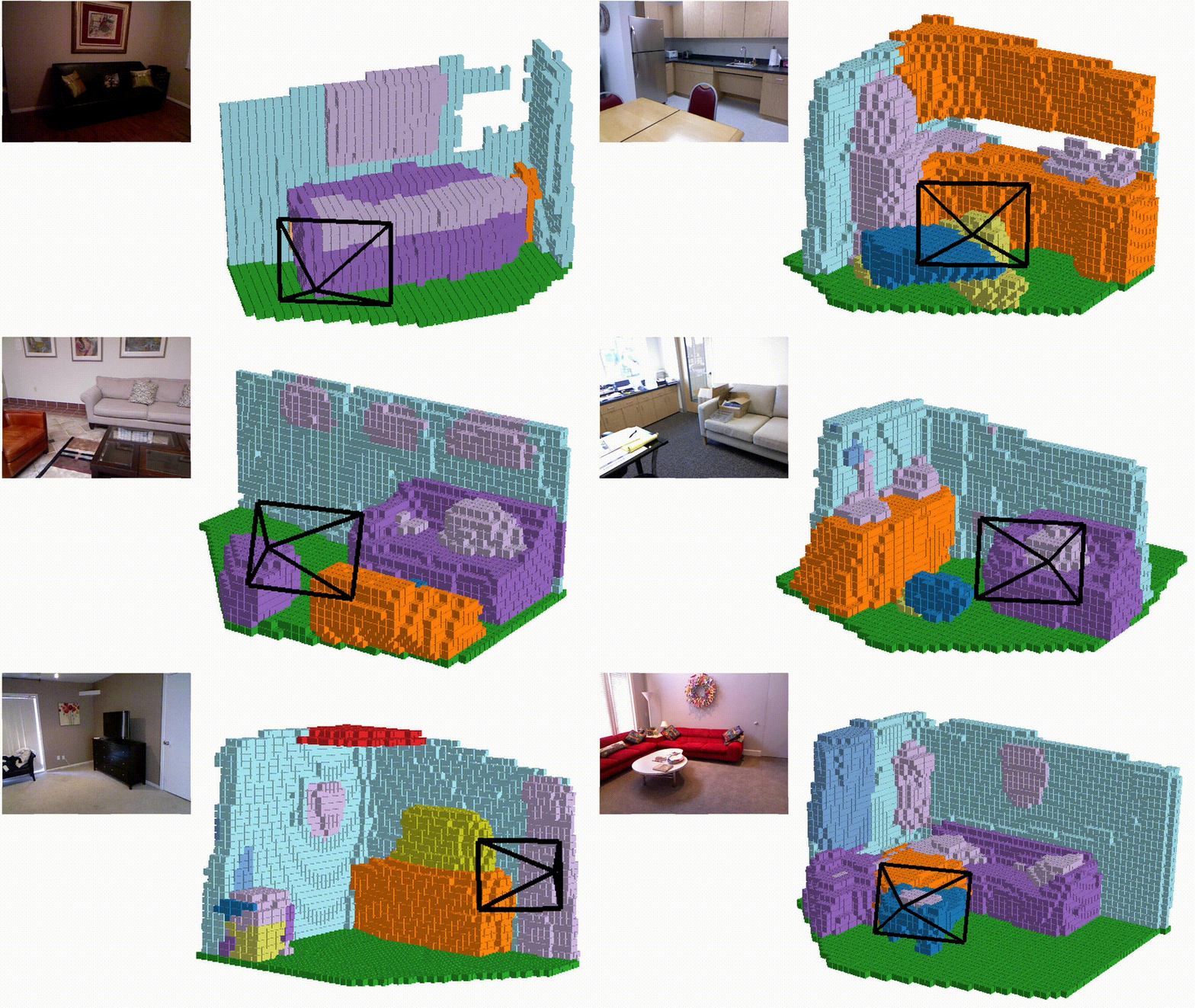
Table of Content
- News
- Preparing MonoScene
- Running MonoScene
- Inference & Visualization
- Related camera-only 3D occupancy prediction projects
- License
News
- 25/03/2026: One step towards generalized unified occupnay prediction with OccAny: Generalized Unconstrained Urban 3D Occupancy (CVPR'26)
- 05/12/2023: Check out our recent work PaSCo: Urban 3D Panoptic Scene Completion with Uncertainty Awareness :rotating_light:
- 20/04/2023: Check out other camera-only 3D occupancy prediction projects
- 28/06/2022: We added MonoScene demo on Hugging Face
- 13/06/2022: We added a tutorial on How to define viewpoint programmatically in mayavi
- 12/06/2022: We added a guide on how to install mayavi
- 09/06/2022: We fixed the installation errors mentioned in https://github.com/astra-vision/MonoScene/issues/18
Preparing MonoScene
Installation
- Create conda environment:
$ conda create -y -n monoscene python=3.7
$ conda activate monoscene
- This code was implemented with python 3.7, pytorch 1.7.1 and CUDA 10.2. Please install PyTorch:
$ conda install pytorch==1.7.1 torchvision==0.8.2 torchaudio==0.7.2 cudatoolkit=10.2 -c pytorch
- Install the additional dependencies:
$ cd MonoScene/
$ pip install -r requirements.txt
- Install tbb:
$ conda install -c bioconda tbb=2020.2
- Downgrade torchmetrics to 0.6.0
$ pip install torchmetrics==0.6.0
- Finally, install MonoScene:
$ pip install -e ./
Datasets
SemanticKITTI
-
You need to download
- The Semantic Scene Completion dataset v1.1 (SemanticKITTI voxel data (700 MB)) from SemanticKITTI website
- The KITTI Odometry Benchmark calibration data (Download odometry data set (calibration files, 1 MB)) and the RGB images (Download odometry data set (color, 65 GB)) from KITTI Odometry website.
- The dataset folder at /path/to/semantic_kitti should have the following structure:
└── /path/to/semantic_kitti/ └── dataset ├── poses └── sequences -
Create a folder to store SemanticKITTI preprocess data at
/path/to/kitti/preprocess/folder. -
Store paths in environment variables for faster access (Note: folder 'dataset' is in /path/to/semantic_kitti):
$ export KITTI_PREPROCESS=/path/to/kitti/preprocess/folder
$ export KITTI_ROOT=/path/to/semantic_kitti
- Preprocess the data to generate labels at a lower scale, which are used to compute the ground truth relation matrices:
$ cd MonoScene/
$ python monoscene/data/semantic_kitti/preprocess.py kitti_root=$KITTI_ROOT kitti_preprocess_root=$KITTI_PREPROCESS
NYUv2
-
Download the NYUv2 dataset.
-
Create a folder to store NYUv2 preprocess data at
/path/to/NYU/preprocess/folder. -
Store paths in environment variables for faster access:
$ export NYU_PREPROCESS=/path/to/NYU/preprocess/folder
$ export NYU_ROOT=/path/to/NYU/depthbin
- Preprocess the data to generate labels at a lower scale, which are used to compute the ground truth relation matrices:
$ cd MonoScene/
$ python monoscene/data/NYU/preprocess.py NYU_root=$NYU_ROOT NYU_preprocess_root=$NYU_PREPROCESS
KITTI-360
-
We only perform inference on KITTI-360. You can download either the Perspective Images for Train & Val (128G) or the Perspective Images for Test (1.5G) at http://www.cvlibs.net/datasets/kitti-360/download.php.
-
Create a folder to store KITTI-360 data at
/path/to/KITTI-360/folder. -
Store paths in environment variables for faster access:
$ export KITTI_360_ROOT=/path/to/KITTI-360
Pretrained models
Download MonoScene pretrained models on SemanticKITTI and on NYUv2, then put them in the folder /path/to/MonoScene/trained_models.
Running MonoScene
Training
To train MonoScene with SemanticKITTI, type:
SemanticKITTI
-
Create folders to store training logs at /path/to/kitti/logdir.
-
Store in an environment variable:
$ export KITTI_LOG=/path/to/kitti/logdir
- Train MonoScene using 4 GPUs with batch_size of 4 (1 item per GPU) on Semantic KITTI:
$ cd MonoScene/
$ python monoscene/scripts/train_monoscene.py \
    dataset=kitti \
    enable_log=true \
    kitti_root=$KITTI_ROOT \
    kitti_preprocess_root=$KITTI_PREPROCESS\
    kitti_logdir=$KITTI_LOG \
    n_gpus=4 batch_size=4
NYUv2
-
Create folders to store training logs at /path/to/NYU/logdir.
-
Store in an environment variable:
$ export NYU_LOG=/path/to/NYU/logdir
- Train MonoScene using 2 GPUs with batch_size of 4 (2 item per GPU) on NYUv2:
$ cd MonoScene/
$ python monoscene/scripts/train_monoscene.py \
    dataset=NYU \
    NYU_root=$NYU_ROOT \
    NYU_preprocess_root=$NYU_PREPROCESS \
    logdir=$NYU_LOG \
    n_gpus=2 batch_size=4
Evaluating
SemanticKITTI
To evaluate MonoScene on SemanticKITTI validation set, type:
$ cd MonoScene/
$ python monoscene/scripts/eval_monoscene.py \
    dataset=kitti \
    kitti_root=$KITTI_ROOT \
    kitti_preprocess_root=$KITTI_PREPROCESS \
    n_gpus=1 batch_size=1
NYUv2
To evaluate MonoScene on NYUv2 test set, type:
$ cd MonoScene/
$ python monoscene/scripts/eval_monoscene.py \
    dataset=NYU \
    NYU_root=$NYU_ROOT\
    NYU_preprocess_root=$NYU_PREPROCESS \
    n_gpus=1 batch_size=1
Inference & Visualization
Inference
Please create folder /path/to/monoscene/output to store the MonoScene outputs and store in environment variable:
export MONOSCENE_OUTPUT=/path/to/monoscene/output
NYUv2
To generate the predictions on the NYUv2 test set, type:
$ cd MonoScene/
$ python monoscene/scripts/generate_output.py \
    +output_path=$MONOSCENE_OUTPUT \
    dataset=NYU \
    NYU_root=$NYU_ROOT \
    NYU_preprocess_root=$NYU_PREPROCESS \
    n_gpus=1 batch_size=1
Semantic KITTI
To generate the predictions on the Semantic KITTI validation set, type:
$ cd MonoScene/
$ python monoscene/scripts/generate_output.py \
    +output_path=$MONOSCENE_OUTPUT \
    dataset=kitti \
    kitti_root=$KITTI_ROOT \
    kitti_preprocess_root=$KITTI_PREPROCESS \
    n_gpus=1 batch_size=1
KITTI-360
Here we use the sequence 2013_05_28_drive_0009_sync, you can use other sequences. To generate the predictions on KITTI-360, type:
$ cd MonoScene/
$ python monoscene/scripts/generate_output.py \
    +output_path=$MONOSCENE_OUTPUT \
    dataset=kitti_360 \
    +kitti_360_root=$KITTI_360_ROOT \
    +kitti_360_sequence=2013_05_28_drive_0009_sync  \
    n_gpus=1 batch_size=1
Visualization
NOTE: if you have trouble using mayavi, you can use an alternative visualization code using Open3D.
We use mayavi to visualize the predictions. Please install mayavi following the official installation instruction. Then, use the following commands to visualize the outputs on respective datasets.
If you have trouble installing mayavi, you can take a look at our mayavi installation guide.
If you have trouble fixing mayavi viewpoint, you can take a look at our tutorial.
You also need to install some packages used by the visualization scripts using the commands:
pip install tqdm
pip install omegaconf
pip install hydra-core
NYUv2
$ cd MonoScene/
$ python monoscene/scripts/visualization/NYU_vis_pred.py +file=/path/to/output/file.pkl
Semantic KITTI
$ cd MonoScene/
$ python monoscene/scripts/visualization/kitti_vis_pred.py +file=/path/to/output/file.pkl +dataset=kitt
KITTI-360
$ cd MonoScene/
$ python monoscene/scripts/visualization/kitti_vis_pred.py +file=/path/to/output/file.pkl +dataset=kitti_360
Related camera-only 3D occupancy prediction projects
- NDC-Scene: Boost Monocular 3D Semantic Scene Completion in Normalized Device Coordinates Space, ICCV 2023.
- OG: Equip vision occupancy with instance segmentation and visual grounding, arXiv 2023.
- FB-OCC: 3D Occupancy Prediction based on Forward-Backward View Transformation, CVPRW 2023.
- Symphonize 3D Semantic Scene Completion with Contextual Instance Queries, arXiv 2023.
- OVO: Open-Vocabulary Occupancy, arXiv 2023.
- OccNet: Scene as Occupancy, ICCV 2023.
- SceneRF: Self-Supervised Monocular 3D Scene Reconstruction with Radiance Fields, ICCV 2023.
- Behind the Scenes: Density Fields for Single View Reconstruction, CVPR 2023.
- VoxFormer: Sparse Voxel Transformer for Camera-based 3D Semantic Scene Completion, CVPR 2023.
- OccDepth: A Depth-aware Method for 3D Semantic Occupancy Network, arXiv 2023.
- StereoScene: BEV-Assisted Stereo Matching Empowers 3D Semantic Scene Completion, arXiv 2023.
- Tri-Perspective View for Vision-Based 3D Semantic Occupancy Prediction, CVPR 2023.
- A Simple Attempt for 3D Occupancy Estimation in Autonomous Driving, arXiv 2023.
- OccFormer: Dual-path Transformer for Vision-based 3D Semantic Occupancy Prediction, ICCV 2023.
- SurroundOcc: Multi-Camera 3D Occupancy Prediction for Autonomous Driving, ICCV 2023.
- PanoOcc: Unified Occupancy Representation for Camera-based 3D Panoptic Segmentation, arXiv 2023.
- PointOcc: Cylindrical Tri-Perspective View for Point-based 3D Semantic Occupancy Prediction, arXiv 2023.
- RenderOcc: Vision-Centric 3D Occupancy Prediction with 2D Rendering Supervision, arXiv 2023.
Datasets/Benchmarks
- PointSSC: A Cooperative Vehicle-Infrastructure Point Cloud Benchmark for Semantic Scene Completion, arXiv 2023.
- OpenOccupancy: A Large Scale Benchmark for Surrounding Semantic Occupancy Perception, ICCV 2023.
- Occupancy Dataset for nuScenes, Github 2023
- Occ3D: A Large-Scale 3D Occupancy Prediction Benchmark for Autonomous Driving, arXiv 2023.
- OccNet: Scene as Occupancy, ICCV 2023.
- SSCBench: A Large-Scale 3D Semantic Scene Completion Benchmark for Autonomous Driving, arXiv 2023.
License
MonoScene is released under the Apache 2.0 license.