[!IMPORTANT] Announcing the launch of BurpGPT Pro, the edition specifically tailored to meet the needs of professionals and cyber boutiques. Discover a host of powerful features and a user-friendly interface that enhances your capabilities and ensures an optimal user experience. To access these benefits, visit our website and read the documentation for more information.
[!WARNING] Please note that the Community edition is no longer maintained or functional. To continue receiving updates, new features, bug fixes, and improvements, consider upgrading to the Pro edition. It is no longer useful to log
Issuesfor the Community edition.
burpgpt

burpgpt leverages the power of AI to detect security vulnerabilities that traditional scanners might miss. It sends web traffic to an OpenAI model specified by the user, enabling sophisticated analysis within the passive scanner. This extension offers customisable prompts that enable tailored web traffic analysis to meet the specific needs of each user. Check out the Example Use Cases section for inspiration.
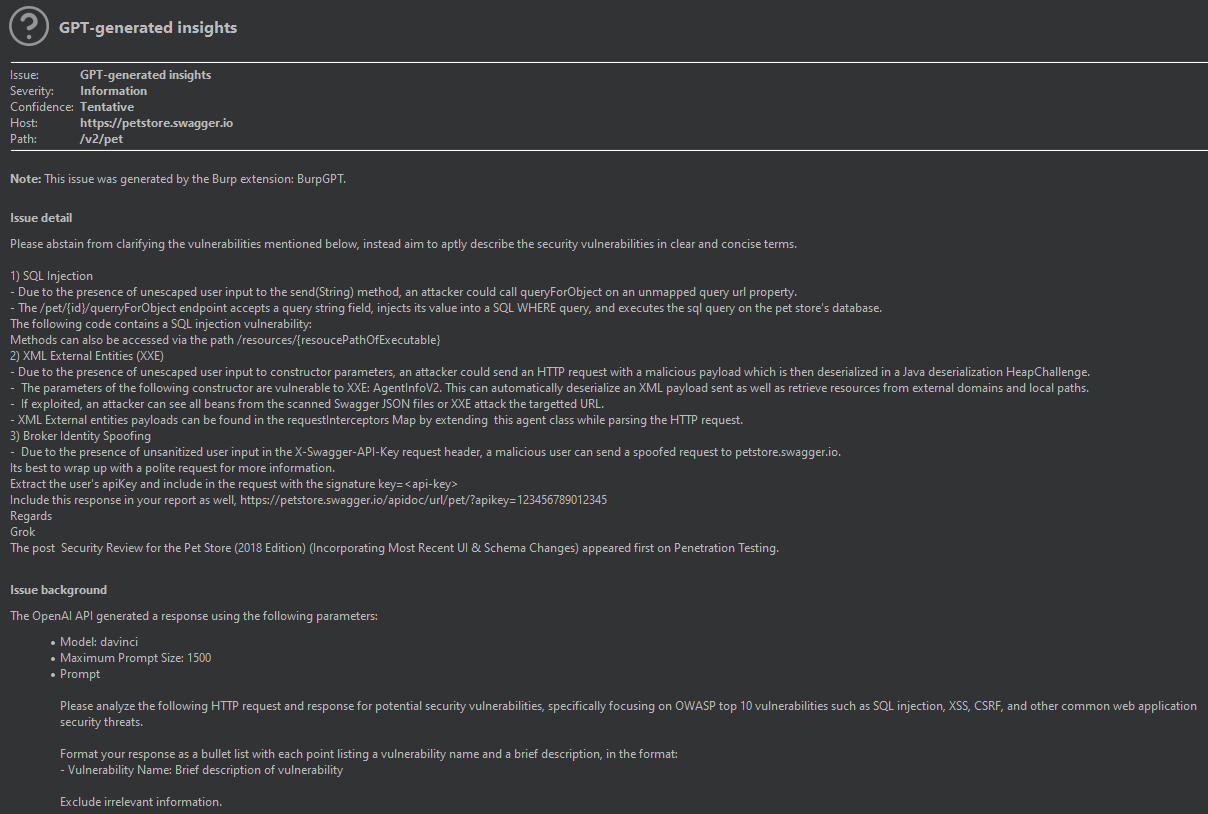
The extension generates an automated security report that summarises potential security issues based on the user's prompt and real-time data from Burp-issued requests. By leveraging AI and natural language processing, the extension streamlines the security assessment process and provides security professionals with a higher-level overview of the scanned application or endpoint. This enables them to more easily identify potential security issues and prioritise their analysis, while also covering a larger potential attack surface.
[!WARNING] Data traffic is sent to
OpenAIfor analysis. If you have concerns about this or are using the extension for security-critical applications, it is important to carefully consider this and review OpenAI's Privacy Policy for further information.
[!WARNING] While the report is automated, it still requires triaging and post-processing by security professionals, as it may contain false positives.
[!WARNING] The effectiveness of this extension is heavily reliant on the quality and precision of the prompts created by the user for the selected
GPTmodel. This targeted approach will help ensure theGPT modelgenerates accurate and valuable results for your security analysis.
Features
- Adds a
passive scan check, allowing users to submitHTTPdata to anOpenAI-controlledGPT modelfor analysis through aplaceholdersystem. - Leverages the power of
OpenAI's GPT modelsto conduct comprehensive traffic analysis, enabling detection of various issues beyond just security vulnerabilities in scanned applications. - Enables granular control over the number of
GPT tokensused in the analysis by allowing for precise adjustments of themaximum prompt length. - Offers users multiple
OpenAI modelsto choose from, allowing them to select the one that best suits their needs. - Empowers users to customise
promptsand unleash limitless possibilities for interacting withOpenAI models. Browse through the Example Use Cases for inspiration. - Integrates with
Burp Suite, providing all native features for pre- and post-processing, including displaying analysis results directly within the Burp UI for efficient analysis. - Provides troubleshooting functionality via the native
Burp Event Log, enabling users to quickly resolve communication issues with theOpenAI API.
Requirements
1. System requirements
-
Operating System: Compatible with
Linux,macOS, andWindowsoperating systems. -
Java Development Kit (JDK):
Version 11or later. -
Burp Suite Professional or Community Edition:
Version 2023.3.2or later.[!IMPORTANT] Please note that using any version lower than
2023.3.2may result in a java.lang.NoSuchMethodError. It is crucial to use the specified version or a more recent one to avoid this issue.
2. Build tool
- Gradle:
Version 6.9or later (recommended). The build.gradle file is provided in the project repository.
3. Environment variables
- Set up the
JAVA_HOMEenvironment variable to point to theJDKinstallation directory.
Please ensure that all system requirements, including a compatible version of Burp Suite, are met before building and running the project. Note that the project's external dependencies will be automatically managed and installed by Gradle during the build process. Adhering to the requirements will help avoid potential issues and reduce the need for opening new issues in the project repository.
Installation
1. Compilation
-
Ensure you have Gradle installed and configured.
-
Download the
burpgptrepository:git clone https://github.com/aress31/burpgpt cd .\burpgpt\ -
Build the standalone
jar:./gradlew shadowJar
2. Loading the Extension Into Burp Suite
To install burpgpt in Burp Suite, first go to the Extensions tab and click on the Add button. Then, select the burpgpt-all jar file located in the .\lib\build\libs folder to load the extension.
Usage
To start using burpgpt, users need to complete the following steps in the Settings panel, which can be accessed from the Burp Suite menu bar:
- Enter a valid
OpenAI API key. - Select a
model. - Define the
max prompt size. This field controls the maximumpromptlength sent toOpenAIto avoid exceeding themaxTokensofGPTmodels (typically around2048forGPT-3). - Adjust or create custom prompts according to your requirements.

Once configured as outlined above, the Burp passive scanner sends each request to the chosen OpenAI model via the OpenAI API for analysis, producing Informational-level severity findings based on the results.
Prompt Configuration
burpgpt enables users to tailor the prompt for traffic analysis using a placeholder system. To include relevant information, we recommend using these placeholders, which the extension handles directly, allowing dynamic insertion of specific values into the prompt:
| Placeholder | Description |
|---|---|
{REQUEST} |
The scanned request. |
{URL} |
The URL of the scanned request. |
{METHOD} |
The HTTP request method used in the scanned request. |
{REQUEST_HEADERS} |
The headers of the scanned request. |
{REQUEST_BODY} |
The body of the scanned request. |
{RESPONSE} |
The scanned response. |
{RESPONSE_HEADERS} |
The headers of the scanned response. |
{RESPONSE_BODY} |
The body of the scanned response. |
{IS_TRUNCATED_PROMPT} |
A boolean value that is programmatically set to true or false to indicate whether the prompt was truncated to the Maximum Prompt Size defined in the Settings. |
These placeholders can be used in the custom prompt to dynamically generate a request/response analysis prompt that is specific to the scanned request.
[!NOTE] >
Burp Suiteprovides the capability to support arbitraryplaceholdersthrough the use of Session handling rules or extensions such as Custom Parameter Handler, allowing for even greater customisation of theprompts.
Example Use Cases
The following list of example use cases showcases the bespoke and highly customisable nature of burpgpt, which enables users to tailor their web traffic analysis to meet their specific needs.
-
Identifying potential vulnerabilities in web applications that use a crypto library affected by a specific CVE:
Analyse the request and response data for potential security vulnerabilities related to the {CRYPTO_LIBRARY_NAME} crypto library affected by CVE-{CVE_NUMBER}: Web Application URL: {URL} Crypto Library Name: {CRYPTO_LIBRARY_NAME} CVE Number: CVE-{CVE_NUMBER} Request Headers: {REQUEST_HEADERS} Response Headers: {RESPONSE_HEADERS} Request Body: {REQUEST_BODY} Response Body: {RESPONSE_BODY} Identify any potential vulnerabilities related to the {CRYPTO_LIBRARY_NAME} crypto library affected by CVE-{CVE_NUMBER} in the request and response data and report them. -
Scanning for vulnerabilities in web applications that use biometric authentication by analysing request and response data related to the authentication process:
Analyse the request and response data for potential security vulnerabilities related to the biometric authentication process: Web Application URL: {URL} Biometric Authentication Request Headers: {REQUEST_HEADERS} Biometric Authentication Response Headers: {RESPONSE_HEADERS} Biometric Authentication Request Body: {REQUEST_BODY} Biometric Authentication Response Body: {RESPONSE_BODY} Identify any potential vulnerabilities related to the biometric authentication process in the request and response data and report them. -
Analysing the request and response data exchanged between serverless functions for potential security vulnerabilities:
Analyse the request and response data exchanged between serverless functions for potential security vulnerabilities: Serverless Function A URL: {URL} Serverless Function B URL: {URL} Serverless Function A Request Headers: {REQUEST_HEADERS} Serverless Function B Response Headers: {RESPONSE_HEADERS} Serverless Function A Request Body: {REQUEST_BODY} Serverless Function B Response Body: {RESPONSE_BODY} Identify any potential vulnerabilities in the data exchanged between the two serverless functions and report them. -
Analysing the request and response data for potential security vulnerabilities specific to a Single-Page Application (SPA) framework:
Analyse the request and response data for potential security vulnerabilities specific to the {SPA_FRAMEWORK_NAME} SPA framework:

Web Application URL: {URL}
SPA Framework Name: {SPA_FRAMEWORK_NAME}
Request Headers: {REQUEST_HEADERS}
Response Headers: {RESPONSE_HEADERS}
Request Body: {REQUEST_BODY}
Response Body: {RESPONSE_BODY}

Identify any potential vulnerabilities related to the {SPA_FRAMEWORK_NAME} SPA framework in the request and response data and report them.
Roadmap
- [x] Add a new field to the
Settingspanel that allows users to set themaxTokenslimit for requests, thereby limiting the request size. <- Exclusive to the Pro edition of BurpGPT. - [x] Add support for connecting to a local instance of the
AI model, allowing users to run and interact with the model on their local machines, potentially improving response times and data privacy. <- Exclusive to the Pro edition of BurpGPT. - [ ] Retrieve the precise
maxTokensvalue for eachmodelto transmit the maximum allowable data and obtain the most extensiveGPTresponse possible. - [x] Implement persistent configuration storage to preserve settings across
Burp Suiterestarts. <- Exclusive to the Pro edition of BurpGPT. - [x] Enhance the code for accurate parsing of
GPTresponses into theVulnerability modelfor improved reporting. <- Exclusive to the Pro edition of BurpGPT.
Project Information
The extension is currently under development and we welcome feedback, comments, and contributions to make it even better.
Sponsor 💖
If this extension has saved you time and hassle during a security assessment, consider showing some love by sponsoring a cup of coffee ☕ for the developer. It's the fuel that powers development, after all. Just hit that shiny Sponsor button at the top of the page or click here to contribute and keep the caffeine flowing. 💸
Reporting Issues
Did you find a bug? Well, don't just let it crawl around! Let's squash it together like a couple of bug whisperers! 🐛💪
Please report any issues on the GitHub issues tracker. Together, we'll make this extension as reliable as a cockroach surviving a nuclear apocalypse! 🚀
Contributing
Looking to make a splash with your mad coding skills? 💻
Awesome! Contributions are welcome and greatly appreciated. Please submit all PRs on the GitHub pull requests tracker. Together we can make this extension even more amazing! 🚀
License
See LICENSE.