
Anse
Anse is a fully optimized UI for AI Chats.
- 🍿 Live preview: https://anse.app
- 📖 Documentation: https://docs.anse.app
- ✨ Release Notes: https://github.com/anse-app/anse/releases
Features
- 🚀 Powerful Plugin System - Powered by
Provider plugin, easy to extend AI platforms such as OpenAI, Replicate, and also supports custom model parameters. - 💬 Session Record Saving - We use
IndexDBto store local data, it will not be uploaded to the server, security issues are guaranteed. - 🎉 Multiple Session Modes - Provides different conversations modes,support
Single Conversation,Continuous Conversation,OpenAI Image Generation、Stable Diffusionand more. - 💎 Improved UI Experience - We have refactored the website UI for the previous version, optimized a lot of details, and also adapted to
mobile endanddark mode. - 🌈 One-Click Deployment - Support one-click deployment, abandoned use environment variables, you can refer to our documentation to deploy the website to Vercel, Netlify,
Docker,Nodeand other platforms.
Running Locally
Pre environment
- Node: Check that both your development environment and deployment environment are using
Node v18or later. You can use nvm to manage multiplenodeversions locally。node -v - PNPM: We recommend using pnpm to manage dependencies. If you have never installed pnpm, you can install it with the following command:
npm i -g pnpm - OPENAI_API_KEY: Before running this application, you need to obtain the API key from OpenAI. You can register the API key at https://beta.openai.com/signup.
Getting Started
- Install dependencies
pnpm install - Run the application, the local project runs on
http://localhost:3000/pnpm run dev - Add your OpenAI API key to the settings panel, then enjoy it!
How to deploy
For more details, please refer to this document: https://docs.anse.app/self-deploy
Enable Automatic Updates
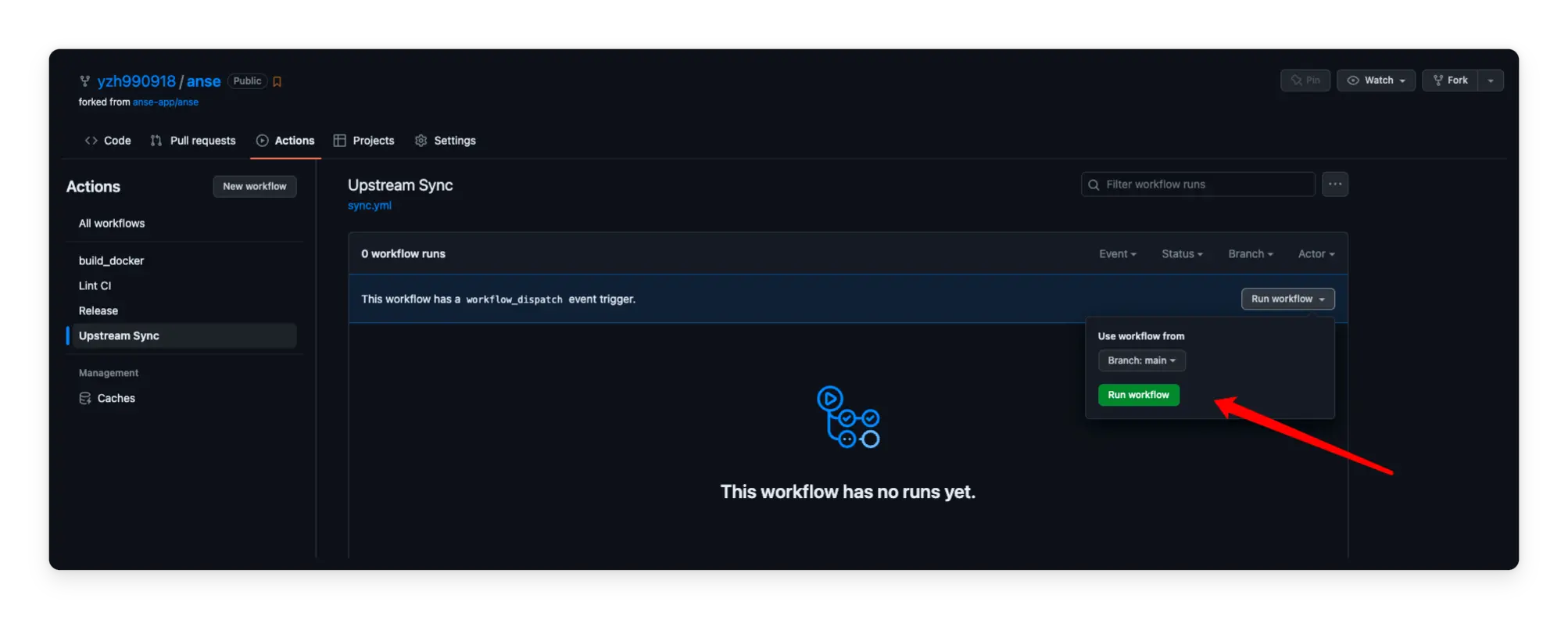
After forking the project, you need to manually enable Workflows and Upstream Sync Action on the Actions page of the forked project. Once enabled, automatic updates will be scheduled every day:
Frequently Asked Questions
Q: TypeError: fetch failed (can't connect to OpenAI Api)
A: Reference: https://github.com/anse-app/chatgpt-demo/issues/34
Q: throw new TypeError(${context} is not a ReadableStream.)
A: The Node version needs to be v18 or later,reference: https://github.com/anse-app/chatgpt-demo/issues/65
Q: Accelerate domestic access without the need for proxy deployment tutorial?
A: You can refer to this tutorial: https://github.com/anse-app/chatgpt-demo/discussions/270
Contributing
This project exists thanks to all those who contributed.
Thank you to all our supporters!🙏
License
MIT © ddiu8081