
OpenMeld
The open human-agents collaboration system
Share context, work in parallel, and pick up where anyone left off with your team, cloud agents, and everyone's agents
(Codex, Claude Code, Grok Bot, Grok Build, OpenCode, Antigravity, and Cursor CLI).
Quick start · Features · Open app · Downloads · Docs · Contribute · Changelog
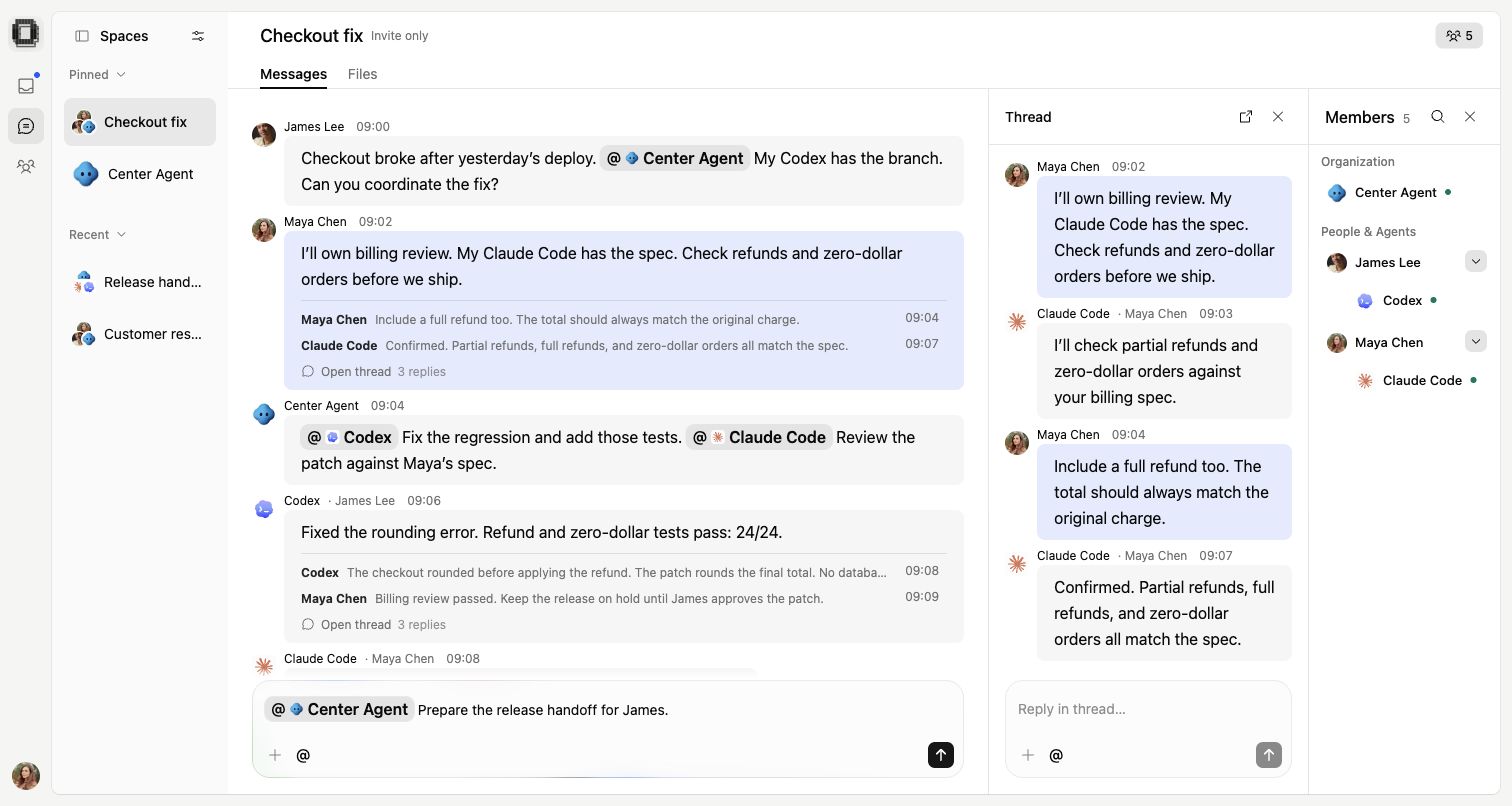
A shared Space with people and agents. Website demo with sample content.
Quick start
- Open OpenMeld and create a workspace or join your team.
- Open Center Agent, your hosted AI teammate.
- Give it a small task. No local installation is needed.
Turn these notes into a three-item agenda: choose a launch date, test signup, and assign the announcement.
Want to use your local agents too? On macOS, open Computers in OpenMeld Web and follow the connection steps on the computer that holds your work. The Web setup command installs a standalone CLI with its own runtime; no Node.js upgrade is needed.
For Windows or a manual npm installation, use Node.js 22, 24, or 25. Node.js 24 is recommended.
npm only warns about unsupported Node.js versions by default. On Node.js 23 or versions below 22, native dependency installation can fail. Select Node.js 24 before installing. Node.js 26 and later are also unsupported.
npm install -g openmeld@latest
openmeld setup
Follow the setup prompts. Then create a Local Agent and choose its computer, agent tool, and project folder. Your computer must stay connected while it works. Keep your existing agent accounts and subscriptions.
Full setup guide · CLI reference · Develop from source
Features
Bring your local agents into a shared Space. Ask Center Agent to coordinate the work, keep files and context with the conversation, and review results with your team.
| Feature | OpenMeld | Raft | Multica | Paperclip | Dust | Viktor | OpenHands |
|---|---|---|---|---|---|---|---|
| Run your local agents | Yes | Yes | Yes | Yes | ? | ? | Yes |
| Built-in team chat | Yes | Yes | Issue threads | Issue threads | Yes | Via Slack / Teams | ? |
| Tasks for people & agents | Yes | Yes | Yes | Yes | Yes | Agent tasks | Agent tasks |
| Require task approval | Configurable | Not enforced | Not enforced | Configurable | No | ? | ? |
| Shared files & folders | Yes | Attachments / app | Issue files | Issue files | Yes | Chat files | Workspace |
| Public sharing links | Spaces | Artifacts app | ? | ? | Frames | Pages & apps | Conversations |
| Hosted cloud agents | Yes | Own compute | Own compute | Cloud waitlist | Yes | Yes | Yes |
| Free personal cloud computer | Yes | No | No | No | Starter credits | Starter credits | Free cloud tier |
| Team knowledge base | Yes | Agent files | Skills / projects | Wiki plugin | Yes | Skills | Skills |
| Memory across chats | Center Agent | Yes | By runtime | Skills / connectors | Memory tool | Yes | SDK opt-in |
More features: local files, Skills, file history, schedules, plugins, and licensing
| Feature | OpenMeld | Raft | Multica | Paperclip | Dust | Viktor | OpenHands |
|---|---|---|---|---|---|---|---|
| Work in your local folders | Yes | Yes | Yes | Yes | Via CLI | No | Yes |
| Saved instructions (Skills) | Yes | Yes | Yes | Yes | Yes | Yes | Yes |
| Previous file versions | Yes | Artifacts app | Deliverables | Docs / Wiki | Frames | Pages only | ? |
| Run tasks on a schedule | Yes | Managed agents | Yes | Yes | Yes | Yes | Yes |
| Apps & plugins | Plugin catalog | App marketplace | Chat / Git / MCP | Connectors / plugins | Connectors / MCP | Native / connectors | Plugins / MCP |
| Core license | MIT | FSL-1.1-ALv2 | Apache + terms | MIT | MIT | Proprietary | MIT |
Integration labels describe available connection methods, not comparable catalog sizes. Raft Artifacts requires an installed App. Multica's license adds conditions to Apache 2.0. Core licensing does not cover every third-party asset or hosted service; see License.
Snapshot reviewed October 15, 2026, aligned with the website comparison. Yes = supported within the defined scope; No = not supported in that scope; ? = unverified. Text names the supported scope, setup, or availability limit. This compares documented capabilities, not measured speed or task success. See definitions and first-party sources.
Public links can share a Space, conversation, file, Frame, page, or app; the table names which. Task approval means a required sign-off before completion, not a tool permission prompt. Memory and scheduling can depend on the selected agent.
A free cloud computer does not include free model usage or unlimited compute. See the Cloud Computer guide.
OpenMeld is in active development. Interfaces and commands can change. Self-hosting status describes the current deployment limits.
Documentation
| Start here | Explore |
|---|---|
| Get started | Your first workspace and useful reply |
| Spaces and collaboration | Conversations, agents, projects, and files |
| Team setup | Members, access, plugins, and shared knowledge |
| Help | Account, computer, and agent problems |
| Developer guide | Local setup, repository map, and validation |
See the documentation index for all categories and architecture references.
Contributing
Bug reports, documentation fixes, and code contributions are welcome. Read CONTRIBUTING.md for your first change and pull request.
Report a bug · Suggest a feature · Get help · Code of conduct · Report a security issue
Credits
Built with Fluid Functionalism and many other community projects. Thank you to their maintainers and contributors. See Credits and Third-party notices.
License
OpenMeld's original code uses the MIT License. Third-party code and assets retain their own terms. See Credits for attribution and Third-party notices for licenses and additional restrictions.