← 开源
aiff22

DPED

Software and pre-trained models for automatic photo quality enhancement using Deep Convolutional Networks

ModelsVision modelsPython
在 GitHub 打开
增长势头
+024 小时新增 Star0.0%
1.71k
Star
364
Fork
+0
本周
1
贡献者
创建于 2017-08-23 · 更新于 2026-10-07 · 今日第 9629 名
主要开发者
aiff22

aiff22/DPED 排名第 9,629,有 1,711 个星标。

同类别比较

aiff22/DPED 排名第 9,629,此处有 8 个同类条目;feizc/FluxMusic 排名第 9,636。

同类别比较
名称排名指标
AvaLovelace1/BrickGPT9,595
语言:
Python
星标数:
1,728
分叉数:
114
简介:
[ICCV 2025 Best Paper] Official repository for BrickGPT, the first approach for generating physically stable toy brick models from text prompts.
svip-lab/impersonator9,617
语言:
Python
星标数:
1,719
分叉数:
304
简介:
PyTorch implementation of our ICCV 2019 paper: Liquid Warping GAN: A Unified Framework for Human Motion Imitation, Appearance Transfer and Novel View Synthesis
allenai/scibert9,619
语言:
Python
星标数:
1,717
分叉数:
231
简介:
A BERT model for scientific text.
One-2-3-45/One-2-3-459,620
语言:
Python
星标数:
1,716
分叉数:
103
简介:
[NeurIPS 2023] Official code of "One-2-3-45: Any Single Image to 3D Mesh in 45 Seconds without Per-Shape Optimization"
feizc/FluxMusic9,636
语言:
Python
星标数:
1,709
分叉数:
128
简介:
Text-to-Music Generation with Rectified Flow Transformers
lukalabs/cakechat9,640
语言:
Python
星标数:
1,708
分叉数:
911
简介:
CakeChat: Emotional Generative Dialog System
imcaspar/gpt2-ml9,651
语言:
Python
星标数:
1,703
分叉数:
325
简介:
GPT2 for Multiple Languages, including pretrained models. GPT2 多语言支持, 15亿参数中文预训练模型
XueFuzhao/OpenMoE9,657
语言:
Python
星标数:
1,702
分叉数:
85
简介:
A family of open-sourced Mixture-of-Experts (MoE) Large Language Models
关键参数与规格
关键参数与规格
参数值
语言Python
类别Models
子类别Vision models
星标数1,711
分叉数364
贡献者1
创建日期2017-08-23
更新日期2026-10-07
1 天星标数0
7 天星标数0
排名9,629
上次排名9,667
排名变化38
7 天星标排名12,365
上次 7 天星标排名12,410
7 天星标排名变化45
总星标排名7,233
上次总星标排名7,228
总星标排名变化-5
README 摘录

DSLR-Quality Photos on Mobile Devices with Deep Convolutional Networks 1. Overview [[Paper]]( [[Project webpage]]( [[Enhancing RAW photos]]( [[Rendering Bokeh Effect]]( The provided code implements the paper that presents an end-to-end deep learning approach for translating ordinary photos from smartphones into DSLR-quality images. The learned model can be applied to photos of arbitrary resolution, while the methodology itself is generalized to any type of digital camera. Prerequisites Python + Pillow, scipy, numpy, imageio packages TensorFlow 1. First steps

Download the pre-trained VGG-19 model and put it into folder Download DPED dataset (patches for CNN training) and extract it into folder. This folder should contain three subolders: , and 4. Train the model Obligatory parameters: : ** **, ** ** or ** ** Optional parameters and their default values: : ** ** - batch size [smaller values can lead to unstable training] : ** ** - the number of training patches randomly loaded each iterations : ** ** - each iterations the model is saved and the training data is reloaded : ** ** - the number of training iterations : ** ** - learning

rate : ** ** - the weight of the content loss : ** ** - the weight of the color loss : ** ** - the weight of the texture [adversarial] loss : ** ** - the weight of the total variation loss : ** ** - path to the folder with DPED dataset : ** ** - path to the pre-trained VGG-19 network Example: 5. Test the provided pre-trained models Obligatory parameters: : ** **, ** ** or ** ** Optional parameters: : ** **,** ** - all 29 or only 5 test images will be processed : ** **,** **,** **,** **,** ** - the resolution of the test images [** ** means original resolution] : ** **,** ** - run models on GPU or CPU

: ** ** - path to the folder with DPED dataset Example: 6. Test the obtained models Obligatory parameters: : ** **, ** ** or ** ** Optional parameters: : ** **,** ** - all 29 or only 5 test images will be processed : ** ** or ** ** - get visual results for all iterations or for the specific iteration, >               ** ** must be a multiple of : ** **,** **,** **,** **,** ** - the resolution of the test images [** ** means original resolution] : ** **,** ** - run models on GPU or CPU : ** ** - path to the folder with

DPED dataset Example: 7. Folder structure - the folder with the DPED dataset - logs and models that are saved during the training process - the provided pre-trained models for ** **, ** ** and ** ** - visual results for small image patches that are saved while training - the folder with the pre-trained VGG-19 network - processed [enhanced] test images - python script that loads training data - architecture of the image enhancement [resnet] and adversarial networks - implementation of the ssim score - implementation of the training procedure - applying the

pre-trained models to test images - auxiliary functions - loading the pre-trained vgg-19 network 8. Problems and errors Your GPU does not have enough memory. If this happens during the training process: Decrease the size of the training batch [ ]. Note however that smaller values can lead to unstable training. If this happens while testing the models: Run the model on CPU (set the parameter to ** **). Note that this can take up to 5 minutes per image. Use cropped images

, set the parameter to: ** ** - center crop of size pixels ** ** - center crop of size pixels ** ** - center crop of size pixels ** ** - center

常见问题

记录了多少星标和分叉?

aiff22/DPED 有 1,711 个星标和 364 个分叉。

仓库排名是多少?

aiff22/DPED 排名第 9,629。

记录的语言和类别是什么?

aiff22/DPED 有 1,711 个星标,语言为 Python,类别为 Models。

哪个仓库排名最接近?

aiff22/DPED 与 feizc/FluxMusic 比较,后者排名第 9,636,有 1,709 个星标。

README

DSLR-Quality Photos on Mobile Devices with Deep Convolutional Networks
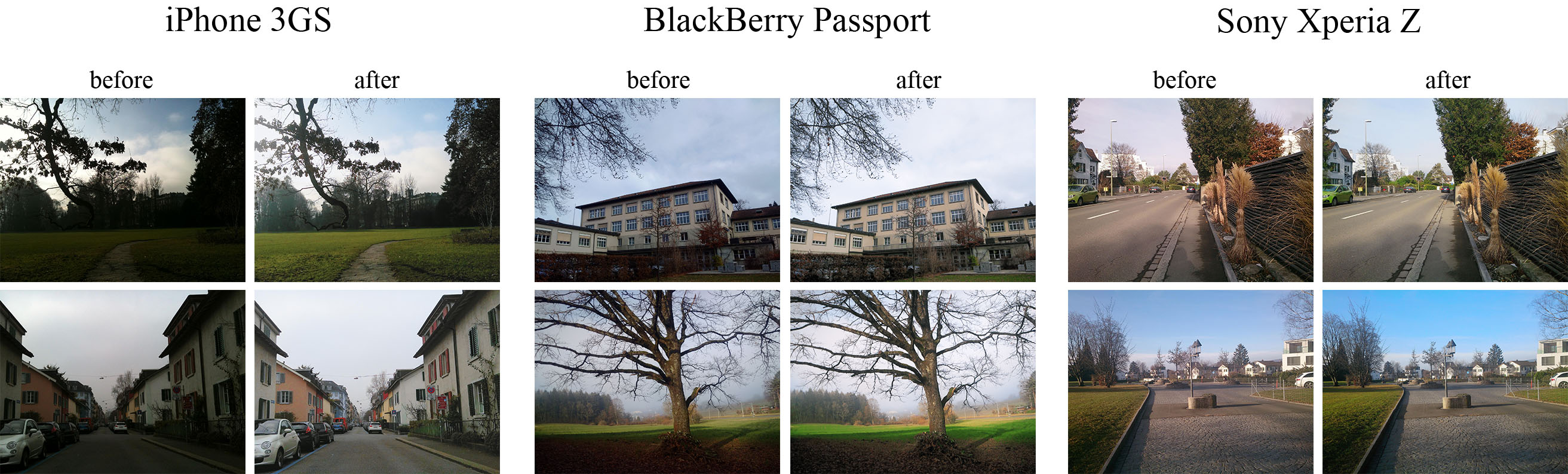
1. Overview [Paper] [Project webpage] [Enhancing RAW photos] [Rendering Bokeh Effect]

The provided code implements the paper that presents an end-to-end deep learning approach for translating ordinary photos from smartphones into DSLR-quality images. The learned model can be applied to photos of arbitrary resolution, while the methodology itself is generalized to any type of digital camera. More visual results can be found here.

2. Prerequisites

3. First steps

  • Download the pre-trained VGG-19 model and put it into vgg_pretrained/ folder
  • Download DPED dataset (patches for CNN training) and extract it into dped/ folder.
    This folder should contain three subolders: sony/, iphone/ and blackberry/

4. Train the model

python train_model.py model=

Obligatory parameters:

model: iphone, blackberry or sony

Optional parameters and their default values:

batch_size: 50   -   batch size [smaller values can lead to unstable training]

train_size: 30000   -   the number of training patches randomly loaded each eval_step iterations

eval_step: 1000   -   each eval_step iterations the model is saved and the training data is reloaded

num_train_iters: 20000   -   the number of training iterations

learning_rate: 5e-4   -   learning rate

w_content: 10   -   the weight of the content loss

w_color: 0.5   -   the weight of the color loss

w_texture: 1   -   the weight of the texture [adversarial] loss

w_tv: 2000   -   the weight of the total variation loss

dped_dir: dped/   -   path to the folder with DPED dataset

vgg_dir: vgg_pretrained/imagenet-vgg-verydeep-19.mat   -   path to the pre-trained VGG-19 network

Example:

python train_model.py model=iphone batch_size=50 dped_dir=dped/ w_color=0.7

5. Test the provided pre-trained models

python test_model.py model=

Obligatory parameters:

model: iphone_orig, blackberry_orig or sony_orig

Optional parameters:

test_subset: full,small   -   all 29 or only 5 test images will be processed

resolution: orig,high,medium,small,tiny   -   the resolution of the test images [orig means original resolution]

use_gpu: true,false   -   run models on GPU or CPU

dped_dir: dped/   -   path to the folder with DPED dataset

Example:

python test_model.py model=iphone_orig test_subset=full resolution=orig use_gpu=true

6. Test the obtained models

python test_model.py model=

Obligatory parameters:

model: iphone, blackberry or sony

Optional parameters:

test_subset: full,small   -   all 29 or only 5 test images will be processed

iteration: all or **   -   get visual results for all iterations or for the specific iteration,                ** must be a multiple of eval_step

resolution: orig,high,medium,small,tiny   -   the resolution of the test images [orig means original resolution]

use_gpu: true,false   -   run models on GPU or CPU

dped_dir: dped/   -   path to the folder with DPED dataset

Example:

python test_model.py model=iphone iteration=13000 test_subset=full resolution=orig use_gpu=true

7. Folder structure

dped/   -   the folder with the DPED dataset

models/   -   logs and models that are saved during the training process

models_orig/   -   the provided pre-trained models for iphone, sony and blackberry

results/   -   visual results for small image patches that are saved while training

vgg-pretrained/   -   the folder with the pre-trained VGG-19 network

visual_results/   -   processed [enhanced] test images

load_dataset.py   -   python script that loads training data

models.py   -   architecture of the image enhancement [resnet] and adversarial networks

ssim.py   -   implementation of the ssim score

train_model.py   -   implementation of the training procedure

test_model.py   -   applying the pre-trained models to test images

utils.py   -   auxiliary functions

vgg.py   -   loading the pre-trained vgg-19 network

8. Problems and errors

What if I get an error: "OOM when allocating tensor with shape [...]"?

   Your GPU does not have enough memory. If this happens during the training process:

  • Decrease the size of the training batch [batch_size]. Note however that smaller values can lead to unstable training.

   If this happens while testing the models:

  • Run the model on CPU (set the parameter use_gpu to false). Note that this can take up to 5 minutes per image.

  • Use cropped images, set the parameter resolution to:

high   -   center crop of size 1680x1260 pixels

medium   -   center crop of size 1366x1024 pixels

small   -   center crop of size 1024x768 pixels

tiny   -   center crop of size 800x600 pixels

   The less resolution is - the smaller part of the image will be processed

9. Citation

@inproceedings{ignatov2017dslr,
  title={DSLR-Quality Photos on Mobile Devices with Deep Convolutional Networks},
  author={Ignatov, Andrey and Kobyshev, Nikolay and Timofte, Radu and Vanhoey, Kenneth and Van Gool, Luc},
  booktitle={Proceedings of the IEEE International Conference on Computer Vision},
  pages={3277--3285},
  year={2017}
}

10. Any further questions?

Please contact Andrey Ignatov (andrey.ignatoff@gmail.com) for more information
排名相邻
同类项目