
RAVE: Realtime Audio Variational autoEncoder
Official implementation of RAVE: A variational autoencoder for fast and high-quality neural audio synthesis (article link) by Antoine Caillon and Philippe Esling.
If you use RAVE as a part of a music performance or installation, be sure to cite either this repository or the article !
If you want to share / discuss / ask things about RAVE and other research from ACIDS, you can do so in our discord server !
Please check the FAQ before posting an issue!
RAVE VST RAVE VST for Windows, Mac and Linux is available as beta on the corresponding Forum IRCAM webpage. For problems, please write an issue here or on the Forum IRCAM discussion page.
Tutorials : new tutorials are available on the Forum IRCAM webpage, and video versions are coming soon!
- Tutorial: Neural Synthesis in a DAW with RAVE
- Tutorial: Neural Synthesis in Max 8 with RAVE
- Tutorial: Training RAVE models on custom data
Previous versions
The original implementation of the RAVE model can be restored using
git checkout v1
Installation
Install RAVE using
pip install acids-rave
Warning It is strongly advised to install torch and torchaudio before acids-rave, so you can choose the appropriate version of torch on the library website. For future compatibility with new devices (and modern Python environments), rave-acids does not enforce torch==1.13 anymore.
You will need ffmpeg on your computer. You can install it locally inside your virtual environment using
conda install ffmpeg
Colab
A colab to train RAVEv2 is now available thanks to hexorcismos !

Usage
Training a RAVE model usually involves 3 separate steps, namely dataset preparation, training and export.
Dataset preparation
You can know prepare a dataset using two methods: regular and lazy. Lazy preprocessing allows RAVE to be trained directly on the raw files (i.e. mp3, ogg), without converting them first. Warning: lazy dataset loading will increase your CPU load by a large margin during training, especially on Windows. This can however be useful when training on large audio corpus which would not fit on a hard drive when uncompressed. In any case, prepare your dataset using
rave preprocess --input_path /audio/folder --output_path /dataset/path --channels X (--lazy)
Training
RAVEv2 has many different configurations. The improved version of the v1 is called v2, and can therefore be trained with
rave train --config v2 --db_path /dataset/path --out_path /model/out --name give_a_name --channels X
We also provide a discrete configuration, similar to SoundStream or EnCodec
rave train --config discrete ...
By default, RAVE is built with non-causal convolutions. If you want to make the model causal (hence lowering the overall latency of the model), you can use the causal mode
rave train --config discrete --config causal ...
New in 2.3, data augmentations are also available to improve the model's generalization in low data regimes. You can add data augmentation by adding augmentation configuration files with the --augment keyword
rave train --config v2 --augment mute --augment compress
Many other configuration files are available in rave/configs and can be combined. Here is a list of all the available configurations & augmentations :
Type
Name
Description
Architecture
v1
Original continuous model (minimum GPU memory : 8Go)
v2
Improved continuous model (faster, higher quality) (minimum GPU memory : 16Go)
v2_small
v2 with a smaller receptive field, adpated adversarial training, and noise generator, adapted for timbre transfer for stationary signals (minimum GPU memory : 8Go)
v2_nopqmf
(experimental) v2 without pqmf in generator (more efficient for bending purposes) (minimum GPU memory : 16Go)
v3
v2 with Snake activation, descript discriminator and Adaptive Instance Normalization for real style transfer (minimum GPU memory : 32Go)
discrete
Discrete model (similar to SoundStream or EnCodec) (minimum GPU memory : 18Go)
onnx
Noiseless v1 configuration for onnx usage (minimum GPU memory : 6Go)
raspberry
Lightweight configuration compatible with realtime RaspberryPi 4 inference (minimum GPU memory : 5Go)
Regularization (v2 only)
default
Variational Auto Encoder objective (ELBO)
wasserstein
Wasserstein Auto Encoder objective (MMD)
spherical
Spherical Auto Encoder objective
Discriminator
spectral_discriminator
Use the MultiScale discriminator from EnCodec.
Others
causal
Use causal convolutions
noise
Enables noise synthesizer V2
hybrid
Enable mel-spectrogram input
Augmentations
mute
Randomly mutes data batches (default prob : 0.1). Enforces the model to learn silence
compress
Randomly compresses the waveform (equivalent to light non-linear amplification of batches)
gain
Applies a random gain to waveform (default range : [-6, 3])
Export
Once trained, export your model to a torchscript file using
rave export --run /path/to/your/run (--streaming)
Setting the --streaming flag will enable cached convolutions, making the model compatible with realtime processing. If you forget to use the streaming mode and try to load the model in Max, you will hear clicking artifacts.
Prior
For discrete models, we redirect the user to the msprior library here. However, as this library is still experimental, the prior from version 1.x has been re-integrated in v2.3.
Training
To train a prior for a pretrained RAVE model :
rave train_prior --model /path/to/your/run --db_path /path/to/your_preprocessed_data --out_path /path/to/output
this will train a prior over the latent of the pretrained model path/to/your/run, and save the model and tensorboard logs to folder /path/to/output.
Scripting
To script a prior along with a RAVE model, export your model by providing the --prior keyword to your pretrained prior :
rave export --run /path/to/your/run --prior /path/to/your/prior (--streaming)
Pretrained models
Several pretrained streaming models are available here. We'll keep the list updated with new models.
Realtime usage
This section presents how RAVE can be loaded inside nn~ in order to be used live with Max/MSP or PureData.
Reconstruction
A pretrained RAVE model named darbouka.gin available on your computer can be loaded inside nn~ using the following syntax, where the default method is set to forward (i.e. encode then decode)
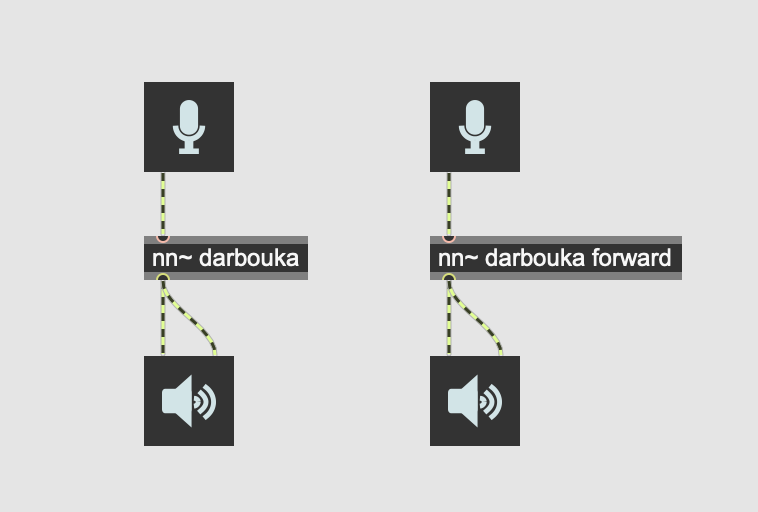
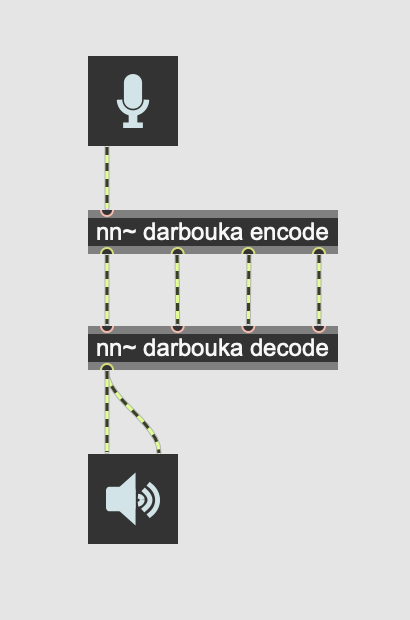
This does the same thing as the following patch, but slightly faster.
High-level manipulation
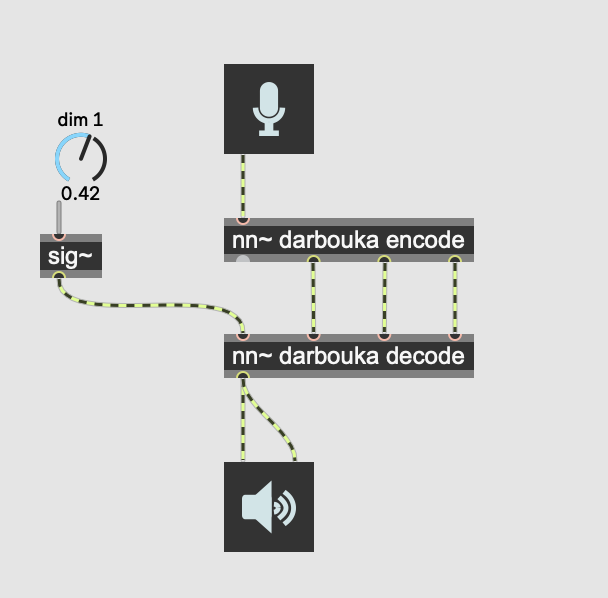
Having an explicit access to the latent representation yielded by RAVE allows us to interact with the representation using Max/MSP or PureData signal processing tools:
Style transfer
By default, RAVE can be used as a style transfer tool, based on the large compression ratio of the model. We recently added a technique inspired from StyleGAN to include Adaptive Instance Normalization to the reconstruction process, effectively allowing to define source and target styles directly inside Max/MSP or PureData, using the attribute system of nn~.
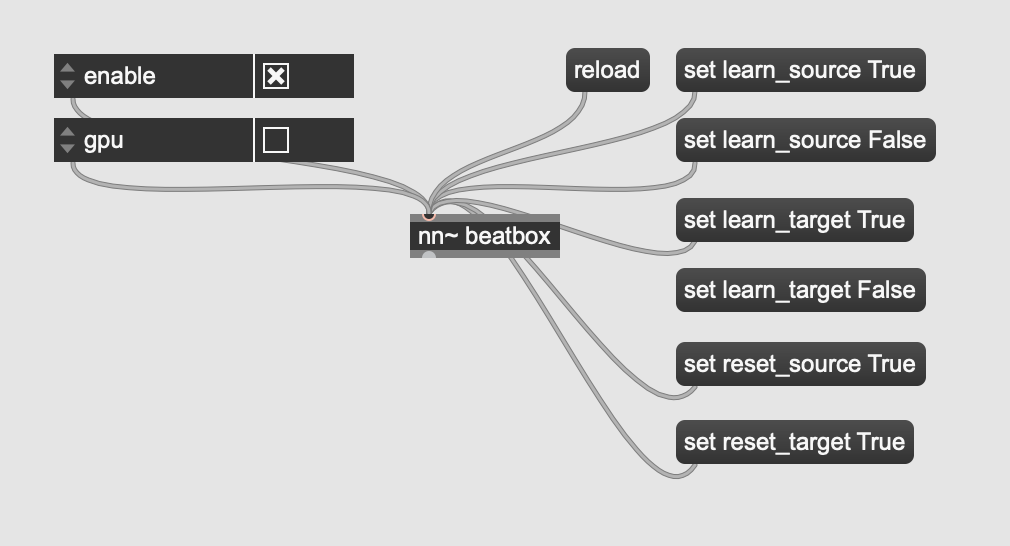
Other attributes, such as enable or gpu can enable/disable computation, or use the gpu to speed up things (still experimental).
Offline usage
A batch generation script has been released in v2.3 to allow transformation of large amount of files
rave generate model_path path_1 path_2 --out out_path
where model_path is the path to your trained model (original or scripted), path_X a list of audio files or directories, and out_path the out directory of the generations.
Discussion
If you have questions, want to share your experience with RAVE or share musical pieces done with the model, you can use the Discussion tab !
Demonstration
RAVE x nn~
Demonstration of what you can do with RAVE and the nn~ external for maxmsp !
embedded RAVE
Using nn~ for puredata, RAVE can be used in realtime on embedded platforms !

Frequently Asked Question (FAQ)
Question : my preprocessing is stuck, showing 0it[00:00, ?it/s]
Answer : This means that the audio files in your dataset are too short to provide a sufficient temporal scope to RAVE. Try decreasing the signal window with the --num_signal XXX(samples) with preprocess, without forgetting afterwards to add the --n_signal XXX(samples) with train
Question : During training I got an exception resembling ValueError: n_components=128 must be between 0 and min(n_samples, n_features)=64 with svd_solver='full'
Answer : This means that your dataset does not have enough data batches to compute the intern latent PCA, that requires at least 128 examples (then batches).
Funding
This work is led at IRCAM, and has been funded by the following projects
- ANR MakiMono
- ACTOR
- DAFNE+ N° 101061548
