Image Matching WebUI
Matching Keypoints between two images


Description
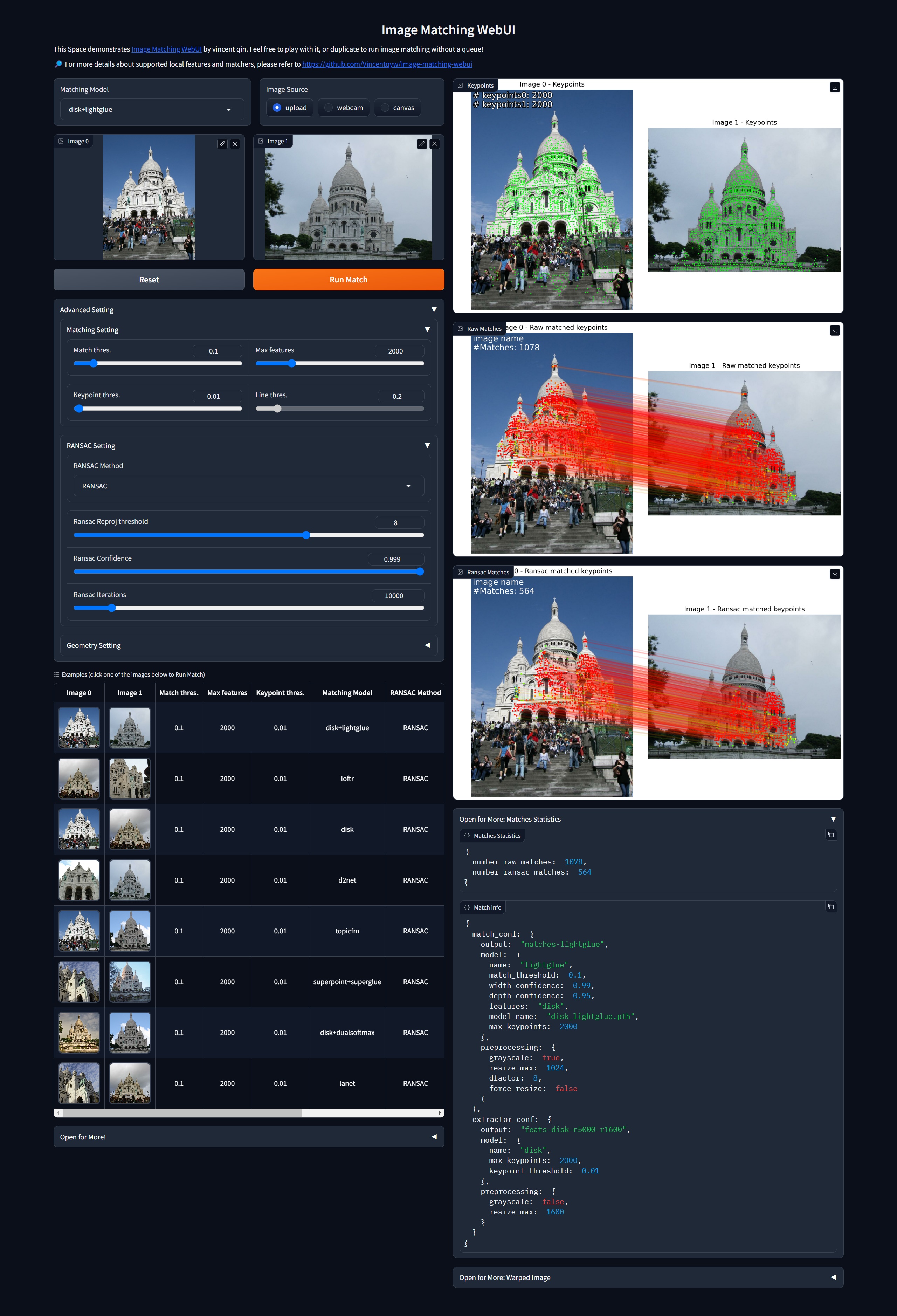
Image Matching WebUI (IMCUI) efficiently matches image pairs using multiple famous image matching algorithms. The tool features a Graphical User Interface (GUI) designed using gradio. You can effortlessly select two images and a matching algorithm and obtain a precise matching result.
Note: the images source can be either local images or webcam images.
Try it on

Here is a demo of the tool:
The tool currently supports various popular image matching algorithms, namely:
| Algorithm | Supported | Conference/Journal | Year | GitHub Link |
|---|---|---|---|---|
| LoMa | ✅ | ECCV | 2026 | Link |
| RaCo | ✅ | 3DV | 2026 | Link |
| RIPE | ✅ | ICCV | 2025 | Link |
| RDD | ✅ | CVPR | 2025 | Link |
| LiftFeat | ✅ | ICRA | 2025 | Link |
| DaD | ✅ | ARXIV | 2025 | Link |
| MINIMA | ✅ | ARXIV | 2024 | Link |
| XoFTR | ✅ | CVPR | 2024 | Link |
| EfficientLoFTR | ✅ | CVPR | 2024 | Link |
| MASt3R | ✅ | CVPR | 2024 | Link |
| DUSt3R | ✅ | CVPR | 2024 | Link |
| OmniGlue | ✅ | CVPR | 2024 | Link |
| XFeat | ✅ | CVPR | 2024 | Link |
| RoMa | ✅ | CVPR | 2024 | Link |
| DeDoDe | ✅ | 3DV | 2024 | Link |
| Mickey | ❌ | CVPR | 2024 | Link |
| GIM | ✅ | ICLR | 2024 | Link |
| ALIKED | ✅ | ICCV | 2023 | Link |
| LightGlue | ✅ | ICCV | 2023 | Link |
| DarkFeat | ✅ | AAAI | 2023 | Link |
| SFD2 | ✅ | CVPR | 2023 | Link |
| SphereGlue | ✅ | CVPRW | 2023 | Link |
| IMP | ✅ | CVPR | 2023 | Link |
| ASTR | ❌ | CVPR | 2023 | Link |
| SEM | ❌ | CVPR | 2023 | Link |
| DeepLSD | ❌ | CVPR | 2023 | Link |
| GlueStick | ✅ | ICCV | 2023 | Link |
| ConvMatch | ❌ | AAAI | 2023 | Link |
| LoFTR | ✅ | CVPR | 2021 | Link |
| SOLD2 | ✅ | CVPR | 2021 | Link |
| LineTR | ❌ | RA-L | 2021 | Link |
| DKM | ✅ | CVPR | 2023 | Link |
| NCMNet | ❌ | CVPR | 2023 | Link |
| TopicFM | ✅ | AAAI | 2023 | Link |
| AspanFormer | ✅ | ECCV | 2022 | Link |
| LANet | ✅ | ACCV | 2022 | Link |
| LISRD | ✅ | ECCV | 2022 | Link |
| REKD | ❌ | CVPR | 2022 | Link |
| CoTR | ✅ | ICCV | 2021 | Link |
| ALIKE | ✅ | TMM | 2022 | Link |
| RoRD | ✅ | IROS | 2021 | Link |
| SGMNet | ✅ | ICCV | 2021 | Link |
| SuperPoint | ✅ | CVPRW | 2018 | Link |
| SuperGlue | ✅ | CVPR | 2020 | Link |
| D2Net | ✅ | CVPR | 2019 | Link |
| R2D2 | ✅ | NeurIPS | 2019 | Link |
| DISK | ✅ | NeurIPS | 2020 | Link |
| Key.Net | ❌ | ICCV | 2019 | Link |
| OANet | ❌ | ICCV | 2019 | Link |
| SOSNet | ✅ | CVPR | 2019 | Link |
| HardNet | ✅ | NeurIPS | 2017 | Link |
| SIFT | ✅ | IJCV | 2004 | Link |
How to use
HuggingFace / Lightning AI
Just try it on
or deploy it locally following the instructions below.
Requirements
Install from pip [NEW]
Update: now support install from pip, just run:
pip install imcui
Install from source
git clone --recursive https://github.com/Vincentqyw/image-matching-webui.git
cd image-matching-webui
conda env create -f environment.yaml
conda activate imcui
pip install -e .
or using docker:
docker pull vincentqin/image-matching-webui:latest

# Start the WebUI service
docker-compose up webui

# Or run in the background
docker-compose up -d webui
More Docker Compose Commands (click to expand)
# Build and start the WebUI service
docker-compose up --build webui

# Check the status of the WebUI service
docker-compose ps webui

# View logs for the WebUI service
docker-compose logs webui
docker-compose logs -f webui  # Follow logs in real time

# Stop the WebUI service
docker-compose stop webui

# Restart the WebUI service
docker-compose restart webui

# Remove the WebUI service container
docker-compose rm webui

# Remove all containers
docker-compose down
Deploy to Railway
Deploy to Railway, setting up a Custom Start Command in Deploy section:
python -m imcui.api.server
Run demo
# Using the package CLI (recommended)
imcui

# Or using the direct script
python app.py
then open http://localhost:7860 in your browser.
Command Line Interface
The imcui package provides a powerful command-line interface with various options:
Basic Usage
Basic Usage Commands (click to expand)
# Install the package
pip install imcui

# Run with default settings
imcui

# Run with verbose output
imcui --verbose

# Run on a specific port
imcui -p 7860

# Run on a specific host
imcui -s 127.0.0.1

# Help
imcui --help
Command Line Options
Basic Usage Commands (click to expand)
| Option | Short | Default | Description |
|---|---|---|---|
--server-name |
-s |
0.0.0.0 |
Hostname or IP address to bind the server to |
--server-port |
-p |
7860 |
Port number to run the server on |
--config |
-c |
Auto-detected | Path to custom configuration YAML file |
--example-data-root |
-d |
imcui/datasets |
Root directory containing example datasets |
--verbose |
-v |
False |
Enable verbose output for debugging |
--version |
Show version information and exit |
Add your own feature / matcher
I provide an example to add local feature in imcui/hloc/extractors/example.py. Then add feature settings in confs in file imcui/hloc/extract_features.py. Last step is adding some settings to matcher_zoo in your configuration file.
For a detailed step-by-step guide, see CLAUDE.md and the integrate-matcher skill at .claude/skills/integrate-matcher/SKILL.md.
Configuration file locations (in priority order):
- Custom config file specified with
--configparameter config.yamlin current directoryconfig/config.yamlin current directory- Package default config (
imcui/config/app.yaml)
Upload models
IMCUI hosts all models on Huggingface. You can upload your model to Huggingface and add it to the Realcat/imcui_checkpoints repository.
Contributions welcome!
External contributions are very much welcome. Please follow the PEP8 style guidelines using a linter like flake8. This is a non-exhaustive list of features that might be valuable additions:
- [x] support pip install command
- [x] add CPU CI
- [x] add webcam support
- [x] add line feature matching algorithms
- [x] example to add a new feature extractor / matcher
- [x] ransac to filter outliers
- [ ] add rotation images options before matching
- [ ] support export matches to colmap (#issue 6)
- [x] add config file to set default parameters
- [x] dynamically load models and reduce GPU overload
Adding local features / matchers as submodules is very easy. For example, to add the GlueStick:
git submodule add https://github.com/cvg/GlueStick.git imcui/third_party/GlueStick
If remote submodule repositories are updated, don't forget to pull submodules with:
git submodule update --init --recursive  # init and download
git submodule update --remote  # update
If you only want to update one submodule, use git submodule update --remote imcui/third_party/GlueStick.
To remove a submodule, follow these steps:
More Remove Submodule Commands (click to expand)
git submodule deinit -f imcui/third_party/GlueStick
git rm -f imcui/third_party/GlueStick
rm -rf .git/modules/imcui/third_party/GlueStick
git add .gitmodules && \
git commit -m "Remove submodule imcui/third_party/dust3r"
To format code before committing, run:
pre-commit run -a # Auto-checks and fixes
Contributors
Resources
Acknowledgement
This code is built based on Hierarchical-Localization. We express our gratitude to the authors for their valuable source code.