whatisit-nl2sh

Ask for a shell command in plain English. Runs on your own machine on CPU, no GPU, and your requests never leave it. Answers in about a second. Optionally any OpenAI-compatible endpoint instead.
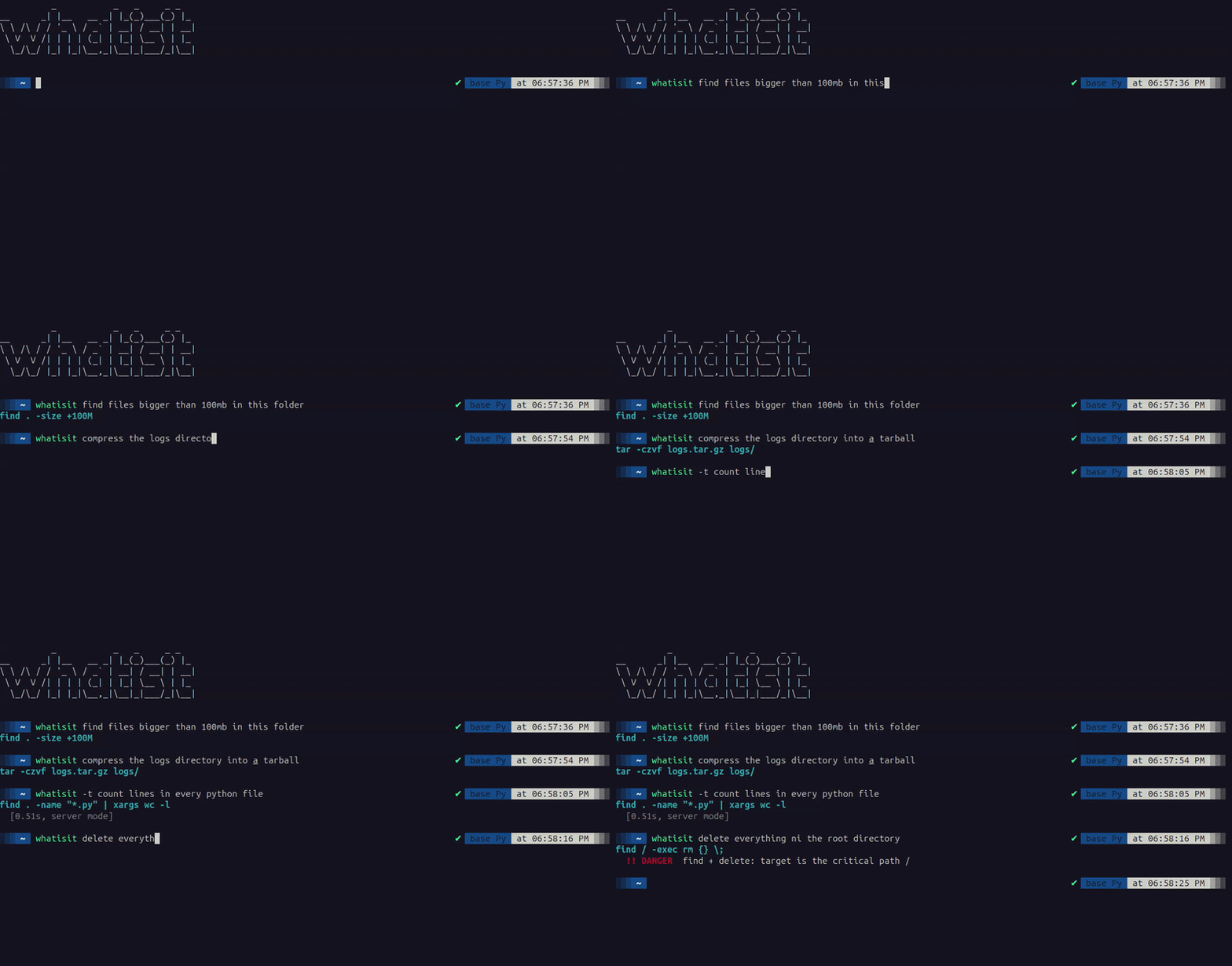
$ whatisit find files bigger than 100MB in this folder
find . -size +100M -exec ls -lh {} \;

$ whatisit compress the logs directory into a tarball
tar -czf logs.tar.gz logs/

$ whatisit delete everything in the root directory
  !! DANGER  recursive force-delete of a critical path
rm -rf /
The model is 941 MB and runs through llama.cpp. By default nothing you type
leaves the machine, so it works offline, and on boxes where piping shell context
to a cloud API isn't allowed.
Install
pipx install whatisit
whatisit setup
pip install whatisit works too, inside a virtualenv or on conda.
setup works out what your machine needs, tells you the size of each download
and asks before starting it, then checks the files it fetched. On Linux with a
glibc older than 2.34 it picks a compatibility build, since the upstream
llama.cpp binaries will not start there.
That's it. If you'd rather choose the pieces yourself, read on.
Setting it up by hand
Three pieces: the CLI, the model file, and a llama.cpp build to run it.
1. The CLI.
pipx install whatisit
Or from source, if you want to hack on it:
git clone https://github.com/ThorOdinson246/whatisit-nl2sh
cd whatisit-nl2sh && pip install ./whatisit_pkg
2. The model, 941 MB.
pip install -U huggingface_hub
hf download ThorOdinson246/nl2sh-1.5b-Q4_K_M nl2sh-1.5b-Q4_K_M.gguf --local-dir .
If hf isn't found, your huggingface_hub predates the rename. Either upgrade
it, or use huggingface-cli download with the same arguments.
3. A llama.cpp build. Grab the release archive for your platform from
llama.cpp releases and unzip
it. You need llama-server (and llama-cli for the fallback path). These
builds need glibc 2.34 or newer. Building from source or installing via
Homebrew works too, just note where llama-server ended up.
4. Point whatisit at both.
whatisit setup --model ./nl2sh-1.5b-Q4_K_M.gguf --bin-dir /path/to/llama.cpp/bin
whatisit doctor
--bin-dir is the directory containing llama-server, not the binary itself.
doctor tells you which of the three pieces is missing if something's off.
Python 3.9+, Linux or macOS. The CLI has no dependencies of its own.
Nix
nix run github:ThorOdinson246/whatisit-nl2sh -- setup
nix profile install github:ThorOdinson246/whatisit-nl2sh
The flake wires in llama.cpp from nixpkgs, so setup only fetches the model.
On NixOS, add the flake to your inputs and pull packages..default.
Use
Type the request as plain arguments. No quoting needed:
whatisit list files changed in the last week
| flag | what it does |
|---|---|
-e, --execute |
run the command after you confirm it |
-n N |
show N alternative commands instead of one |
-q, --quiet |
print only the bare command, for $(...) substitution |
-t, --timing |
report how long generation took |
-p, --prefill-command |
open the command in an editable prompt, then run what you submit |
Nothing runs unless you ask for it. A generated command flagged DANGER is
refused. See Safety for what gets flagged
and what the checker can't see.
-p needs an interactive terminal and does not work on Windows.
# use the result inline
cd "$(whatisit -q the directory holding the largest log file)"

# review, then run
whatisit -e remove every .pyc file under this tree

# edit before running
whatisit -p remove every .pyc file under this tree
whatisit stop shuts down the resident model server. whatisit config --set threads=4
changes settings.
Putting the command on your prompt
Add this to ~/.zshrc or ~/.bashrc:
eval "$(whatisit shell-init)"
Then whatisit puts the command on your next prompt instead of
printing it, so you can edit it and run it with Enter in your own shell. cd
sticks and it lands in your history. In bash, which can't prefill the prompt,
it's printed and put in history, so press Up to get it. Subcommands and flags
like -n 3 work as before, and a command flagged DANGER is not put anywhere.
Unloading the model automatically
The resident server holds the model in RAM. On a tight box, have it unload itself once it has been idle for a while:
whatisit --idle-timeout 300 show disk usage   # this invocation only
whatisit config --set idle_timeout=300        # persist it (0 = never, default)
A watchdog stops the server at the deadline and frees the memory it was holding; the next query pays a cold start. The deadline is re-armed on every query, including one still running.
Update notices
Once a day, in the background, whatisit asks pypi.org for the latest version
and tells you after an answer if there's a newer one, or if a newer model
ships and whatisit setup would fetch it. Your requests are never sent. To
turn it off:
whatisit config --set update_check=false
Remote endpoints
To use a hosted API, Ollama, or a llama.cpp server you already have running:
whatisit config --set openai_base_url=http://127.0.0.1:8080/v1 openai_model=your-model-name
export WHATISIT_OPENAI_API_KEY=sk-...   # optional; prefer env over the config file
openai_model is required. Empty WHATISIT_OPENAI_BASE_URL= (or
openai_base_url=) returns to local mode. Extra knobs: openai_timeout
(default 120 s) and openai_max_tokens (default 512, for reasoning models).
This sends your request off the machine, so it is opt-in and whatisit prints a
warning to stderr on every remote call. Prefer https://.
How it works
First call starts a small llama.cpp server and leaves it resident, so later
calls skip model loading.
Numbers from a laptop, an Intel i5-11320H with 4 cores, using 4 threads:
| generation | 39.5 tok/s |
| answer latency, warm | 0.59s median over 12 queries |
| cold start | 2.1s |
| resident memory | 1.6 GB |
It's a 1.5B at Q4_K_M, so what matters is how many threads you give it, not what they're in. Decoding is greedy at temperature 0, so the same question always gives the same command.
Training setup
For anyone who wants to reproduce or fork this.
Base is Qwen2.5-Coder-1.5B-Instruct. LoRA fine-tune, merged into the base weights in bf16, converted to f16 GGUF, then quantized to Q4_K_M.
| LoRA rank / alpha / dropout | 32 / 64 / 0.05 |
| target modules | all linear (q,k,v,o,gate,up,down) |
| LR / schedule | 2e-4, cosine, 3% warmup |
| epochs | 2, packing off |
| batch | 16 x 2 grad accum, seq len 512 |
| precision | bf16, seed 42 |
| hardware | one A100 80GB, about an hour |
| data | 125,770 NL/command pairs |
Benchmarks
Measured on InterCode-ALFA, the benchmark from the NAACL 2025 NL2SH paper. It runs each generated command in a container and diffs the resulting filesystem and stdout against a reference command. 300 tasks, pass or fail per task.
| model | size on disk | pass rate |
|---|---|---|
| GPT-4o, cloud API † | 0.73 | |
| nl2sh-3b (optional, see below) | 1.9 GB | 0.657 |
| whatisit (this tool, default) | 941 MB | 0.620 |
| Qwen2.5-Coder-7B, untuned | 4.4 GB | 0.613 |
| Qwen2.5-Coder-1.5B, untuned (the base) | 941 MB | 0.540 |
Same base, same 300 tasks, 0.540 to 0.620. That's +0.080 paired, p = 0.004 on an exact McNemar test.
Against the untuned 7B the difference is 0.007, which 300 tasks can't resolve (95% CI -0.050 to +0.063). The honest reading is "roughly a 7B", not "beats a 7B". GPT-4o is about 11 points ahead and it's a cloud service you hand your shell context to.
† GPT-4o's number is the one published by the benchmark authors. Every other
row I measured myself with the unmodified upstream scorer at temperature 0,
max_tokens=64, embedding heuristic at threshold 0.75, icalfa 0.3.6.
Community Models
While I keep iterating on the shipped model, here are community-trained alternatives worth trying — same base model family, different training recipes.
| model | size | InterCode-ALFA (reported) |
|---|---|---|
| nl2sh-qwen25-coder-1.5b | 941 MB | 0.6567 |
Thanks to lydorianP!
Two sizes
The default is the 1.5B. There's also a 3B, same recipe and same training data, if you'd rather have accuracy than speed.
| nl2sh-1.5b (default) | nl2sh-3b | |
|---|---|---|
| size on disk | 941 MB | 1.9 GB |
| pass rate | 0.620 | 0.657 |
| generation | 39.5 tok/s | 17.3 tok/s |
| resident memory | 1.6 GB | ~3.4 GB |
| cold start | ~2 s | ~4 s |
To switch:
whatisit setup --size 3b
whatisit stop     # drop the resident server; the next call loads the new model
Or download the file yourself and point whatisit setup at it:
hf download ThorOdinson246/nl2sh-3b-Q4_K_M nl2sh-3b-Q4_K_M.gguf --local-dir .
whatisit setup --model ./nl2sh-3b-Q4_K_M.gguf
whatisit stop
Switching back is the same two commands with the other file. Both models live
wherever you downloaded them; setup just points whatisit at one of them.
Use whatisit doctor for configuration status and health check.
What it gets wrong
This is still in development and will get things wrong. It assumes you know your way around a terminal well enough to spot a bad command and fix it.
- Single-turn. No memory of your last command, no shell state.
- Output is capped at 64 tokens. So it can generate a command and is not usable for a script.
- English only, and measured on one 300-task benchmark, which is not the same as being good at shell.
Safety
Every generated command is checked before it's printed. The checker flags
recursive deletes of critical paths, writes to raw block devices, chmod and
chown across system paths, fork bombs, remote content piped into a shell or
interpreter, crontab wipes, firewall flushes, private key exposure, reverse
shells, credential exfiltration, and the same patterns hidden behind sudo,
env, nohup, quoting tricks or .. traversal. Findings come back as
DANGER (never auto-run) or CAUTION (warned, still yours to approve). 477
regression cases run in CI on Python 3.9 through 3.13, on Linux, macOS and
Windows.
It's a denylist over a Turing-complete language, not a sandbox. Every rule in it came from a command this model actually produced during testing, which means it covers the mistakes I've seen and not the ones I haven't. Read the command before you run it.
Development
cd whatisit_pkg
pip install -e ".[dev]"
pytest
Tests cover the CLI, the extraction parser, the engine and the safety checker.
Licence
Apache-2.0 for this code. The model derives from Qwen2.5-Coder-1.5B-Instruct, also Apache-2.0.
Training data, by measured row share of the 125,770-row pool:
| source | share | licence |
|---|---|---|
| Fig autocomplete specs | 32.8% | MIT |
| tldr-pages | 23.1% | CC-BY-4.0 |
| NL2SH-ALFA training split | 18.0% | MIT |
| cli-commands-explained | 11.8% | CC0-1.0 (declared, unverified) |
| command-generation | 7.3% | Apache-2.0 (declared, unverified) |
| git-instruction | 7.1% | MIT (declared, unverified) |
Complete training dataset is releasing soon. Keep an eye for it. 👀
Attribution: includes content from
tldr-pages under
CC-BY-4.0 (page content is
CC-BY-4.0, only scripts/ is MIT).