QwQ

💜 [Qwen Chat](https://chat.qwen.ai/)   |   🤗 [Hugging Face](https://huggingface.co/Qwen/QwQ-32B)   |   🤖 [ModelScope](https://modelscope.cn/organization/qwen)   |   📑 [Blog](https://qwenlm.github.io/blog/qwq-32b/)  
🖥️ Demo   |   💬 WeChat (微信)   |   🫨 Discord   |   📑 API  
Introduction
QwQ is the reasoning-specialized model within the Qwen series. Unlike traditional instruction-tuned models, QwQ leverages advanced reasoning and critical thinking abilities to achieve superior performance on downstream tasks, especially those involving complex problem-solving. Our latest release, QwQ-32B, is a mid-sized model that competes effectively with top-tier reasoning models like DeepSeek-R1 and o1-mini, delivering robust and competitive results.
Note: Please review the Usage Guidelines before deploying QwQ models, especially if you encounter endless repetitions or significant performance issues.
Performance
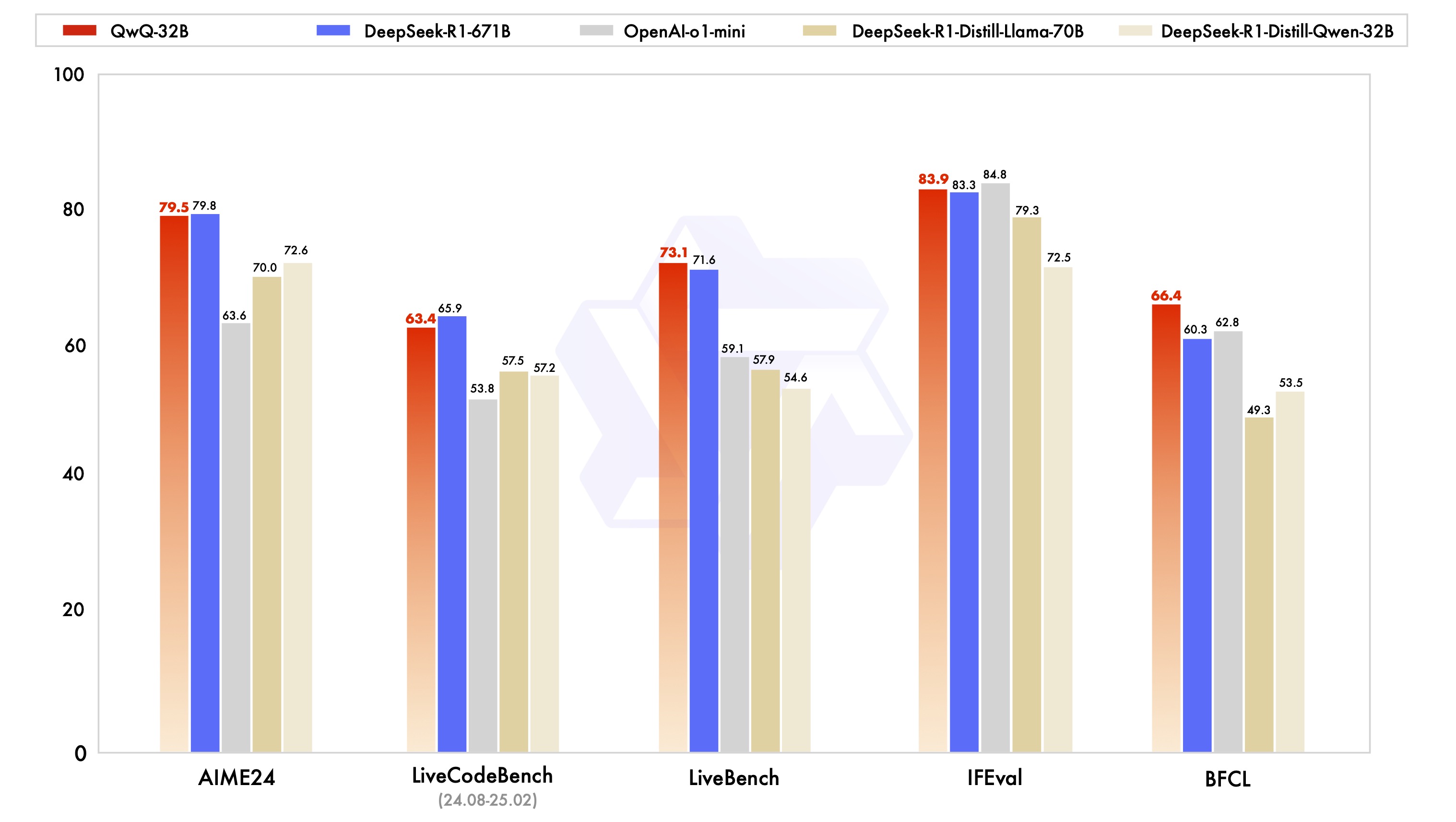
To reproduce the results, please refer to our evaluation code.
Quickstart with HuggingFace's transformers
QwQ is based on Qwen2.5, which has been in the latest Huggingface transformers. We advise you to use the latest version of transformers.
With transformers<4.37.0, you will encounter the following error:
KeyError: 'qwen2'
Here provides a code snippet with apply_chat_template to show you how to load the tokenizer and model and how to generate contents.
from transformers import AutoModelForCausalLM, AutoTokenizer
model_name = "Qwen/QwQ-32B"
model = AutoModelForCausalLM.from_pretrained(
    model_name,
    torch_dtype="auto",
    device_map="auto"
)
tokenizer = AutoTokenizer.from_pretrained(model_name)
prompt = "How many r's are in the word \"strawberry\""
messages = [
    {"role": "user", "content": prompt}
]
text = tokenizer.apply_chat_template(
    messages,
    tokenize=False,
    add_generation_prompt=True
)
model_inputs = tokenizer([text], return_tensors="pt").to(model.device)
generated_ids = model.generate(
    **model_inputs,
    max_new_tokens=32768
)
generated_ids = [
    output_ids[len(input_ids):] for input_ids, output_ids in zip(model_inputs.input_ids, generated_ids)
]
response = tokenizer.batch_decode(generated_ids, skip_special_tokens=True)[0]
print(response)
Usage Guidelines
To achieve optimal performance, we recommend the following settings:
-
Enforce Thoughtful Output: Ensure the model starts with "\n" to prevent generating empty thinking content, which can degrade output quality. If you use
apply_chat_templateand setadd_generation_prompt=True, this is already automatically implemented, but it may cause the response to lack the \ tag at the beginning. This is normal behavior. -
Sampling Parameters:
- We recommend using Temperature=0.6, TopP=0.95, MinP=0, TopK=40, and no repetition penalty for optimal performance.
- Do NOT use Greedy decoding under any circumstances! It will lead to endless repetitions.
- You can adjust the TopK value between 20 and 40 to balance filtering out rare token occurrences and enhancing the diversity of the generated output.
- For supported frameworks, you can adjust the
presence_penaltyparameter between 0 and 2 to reduce endless repetitions. However, a higher value may occasionally result in language mixing and a slight decrease in performance.
-
No Thinking Content in History: In multi-turn conversations, the historical model output should only include the final output part and does not need to include the thinking content. This feature is already implemented in
apply_chat_template. -
Standardize Output Format: We recommend using prompts to standardize model outputs when benchmarking.
- Math Problems: Include "Please reason step by step, and put your final answer within \boxed{}." in the prompt.
- Multiple-Choice Questions: Add the following JSON structure to the prompt to standardize responses: "Please show your choice in the
answerfield with only the choice letter, e.g.,\"answer\": \"C\"." in the prompt.
-
Handle Long Inputs: For inputs exceeding 8,192 tokens, enable YaRN to improve the model's ability to capture long-sequence information effectively.
For supported frameworks, you could add the following to
config.jsonto enable YaRN:{ ..., "rope_scaling": { "factor": 4.0, "original_max_position_embeddings": 32768, "type": "yarn" } }For deployment, we recommend using vLLM. Please refer to our Documentation for usage if you are not familiar with vLLM. Presently, vLLM only supports static YARN, which means the scaling factor remains constant regardless of input length, potentially impacting performance on shorter texts. We advise adding the
rope_scalingconfiguration only when processing long contexts is required.
Ollama and Llama.cpp
To run the Qwen/QwQ-32B-GGUF model with Ollama, use the following command.
ollama run hf.co/Qwen/QwQ-32B-GGUF:Q4_K_M # select one from Q8_0; Q6_K; Q5_K_M; Q5_0; Q4_K_M; Q4_0; Q3_K_M; Q2_K.
# For modelscope User
ollama run modelscope.cn/Qwen/QwQ-32B-GGUF:Q4_K_M
If you're using Llama.cpp, you can run the model with the following command. This example uses the Q4_K_M quantization:
./llama-cli \
    --model QwQ-32B-GGUF/qwq-32b-q4_k_m.gguf \
    --threads 32 \
    --ctx-size 32768 \
    --seed 1234 \
    --temp 0.6 \
    --min-p 0.0 \
    --top-k 40 \
    --top-p 0.95 \
    -no-cnv \
    --samplers "top_k;top_p;min_p;temperature;" \
    --prompt "<|im_start|>user\nHow many r's are in the word \"strawberry\"<|im_end|>\n<|im_start|>assistant\n\n"
You can also consult Unsloth's Guide to see if their approach meets your needs. (Thanks to the Unsloth team!)
Try QwQ with API
If you face issues in deploying QwQ, we encourage you to test our API service provided by Alibaba Cloud Model Studio.
from openai import OpenAI
import os

# Initialize OpenAI client
client = OpenAI(
    # If the environment variable is not configured, replace with your API Key: api_key="sk-xxx"
    # How to get an API Key:https://help.aliyun.com/zh/model-studio/developer-reference/get-api-key
    api_key=os.getenv("DASHSCOPE_API_KEY"),
    base_url="https://dashscope.aliyuncs.com/compatible-mode/v1"
)

reasoning_content = ""
content = ""

is_answering = False

completion = client.chat.completions.create(
    model="qwq-32b",
    messages=[
        {"role": "user", "content": "Which is larger, 9.9 or 9.11?"}
    ],
    stream=True,
    # Uncomment the following line to return token usage in the last chunk
    # stream_options={
    #     "include_usage": True
    # }
)

print("\n" + "=" * 20 + "reasoning content" + "=" * 20 + "\n")

for chunk in completion:
    # If chunk.choices is empty, print usage
    if not chunk.choices:
        print("\nUsage:")
        print(chunk.usage)
    else:
        delta = chunk.choices[0].delta
        # Print reasoning content
        if hasattr(delta, 'reasoning_content') and delta.reasoning_content is not None:
            print(delta.reasoning_content, end='', flush=True)
            reasoning_content += delta.reasoning_content
        else:
            if delta.content != "" and is_answering is False:
                print("\n" + "=" * 20 + "content" + "=" * 20 + "\n")
                is_answering = True
            # Print content
            print(delta.content, end='', flush=True)
            content += delta.content
Citation
If you find our paper and code useful in your research, please consider giving a star :star: and citation :pencil: :)
@misc{qwq32b,
    title = {QwQ-32B: Embracing the Power of Reinforcement Learning},
    url = {https://qwenlm.github.io/blog/qwq-32b/},
    author = {Qwen Team},
    month = {March},
    year = {2025}
}

@article{qwen2.5,
      title={Qwen2.5 Technical Report},
      author={An Yang and Baosong Yang and Beichen Zhang and Binyuan Hui and Bo Zheng and Bowen Yu and Chengyuan Li and Dayiheng Liu and Fei Huang and Haoran Wei and Huan Lin and Jian Yang and Jianhong Tu and Jianwei Zhang and Jianxin Yang and Jiaxi Yang and Jingren Zhou and Junyang Lin and Kai Dang and Keming Lu and Keqin Bao and Kexin Yang and Le Yu and Mei Li and Mingfeng Xue and Pei Zhang and Qin Zhu and Rui Men and Runji Lin and Tianhao Li and Tianyi Tang and Tingyu Xia and Xingzhang Ren and Xuancheng Ren and Yang Fan and Yang Su and Yichang Zhang and Yu Wan and Yuqiong Liu and Zeyu Cui and Zhenru Zhang and Zihan Qiu},
      journal={arXiv preprint arXiv:2412.15115},
      year={2024}
}