onnx2tf
A tool for converting ONNX files to LiteRT/TFLite/TensorFlow, PyTorch native code (nn.Module), TorchScript (.pt), state_dict (.pt), Exported Program (.pt2), and Dynamo ONNX. It also supports direct conversion from LiteRT to PyTorch.
You should use LiteRT Torch rather than onnx2tf. https://github.com/google-ai-edge/litert-torch and https://github.com/google-ai-edge/ai-edge-quantizer





tf_converter supported layers
- https://github.com/onnx/onnx/blob/main/docs/Operators.md
- :heavy_check_mark:: Supported :white_check_mark:: Partial support Help wanted: Pull Request are welcome
See the list of supported layers
| OP | Status |
|---|---|
| Abs | :heavy_check_mark: |
| Acosh | :heavy_check_mark: |
| Acos | :heavy_check_mark: |
| Add | :heavy_check_mark: |
| AffineGrid | :heavy_check_mark: |
| And | :heavy_check_mark: |
| ArgMax | :heavy_check_mark: |
| ArgMin | :heavy_check_mark: |
| Asinh | :heavy_check_mark: |
| Asin | :heavy_check_mark: |
| Atanh | :heavy_check_mark: |
| Atan | :heavy_check_mark: |
| Attention | :heavy_check_mark: |
| AveragePool | :heavy_check_mark: |
| BatchNormalization | :heavy_check_mark: |
| Bernoulli | :heavy_check_mark: |
| BitShift | :heavy_check_mark: |
| BitwiseAnd | :heavy_check_mark: |
| BitwiseNot | :heavy_check_mark: |
| BitwiseOr | :heavy_check_mark: |
| BitwiseXor | :heavy_check_mark: |
| BlackmanWindow | :heavy_check_mark: |
| Cast | :heavy_check_mark: |
| Ceil | :heavy_check_mark: |
| Celu | :heavy_check_mark: |
| CenterCropPad | :heavy_check_mark: |
| Clip | :heavy_check_mark: |
| Col2Im | :white_check_mark: |
| Compress | :heavy_check_mark: |
| ConcatFromSequence | :heavy_check_mark: |
| Concat | :heavy_check_mark: |
| ConstantOfShape | :heavy_check_mark: |
| Constant | :heavy_check_mark: |
| Conv | :heavy_check_mark: |
| ConvInteger | :white_check_mark: |
| ConvTranspose | :heavy_check_mark: |
| Cosh | :heavy_check_mark: |
| Cos | :heavy_check_mark: |
| CumProd | :heavy_check_mark: |
| CumSum | :heavy_check_mark: |
| DeformConv | :white_check_mark: |
| DepthToSpace | :heavy_check_mark: |
| Det | :heavy_check_mark: |
| DequantizeLinear | :heavy_check_mark: |
| DFT | :white_check_mark: |
| Div | :heavy_check_mark: |
| Dropout | :heavy_check_mark: |
| DynamicQuantizeLinear | :heavy_check_mark: |
| Einsum | :heavy_check_mark: |
| Elu | :heavy_check_mark: |
| Equal | :heavy_check_mark: |
| Erf | :heavy_check_mark: |
| Expand | :heavy_check_mark: |
| Exp | :heavy_check_mark: |
| EyeLike | :heavy_check_mark: |
| Flatten | :heavy_check_mark: |
| Floor | :heavy_check_mark: |
| FusedConv | :heavy_check_mark: |
| GatherElements | :heavy_check_mark: |
| GatherND | :heavy_check_mark: |
| Gather | :heavy_check_mark: |
| Gelu | :heavy_check_mark: |
| Gemm | :heavy_check_mark: |
| GlobalAveragePool | :heavy_check_mark: |
| GlobalLpPool | :heavy_check_mark: |
| GlobalMaxPool | :heavy_check_mark: |
| GreaterOrEqual | :heavy_check_mark: |
| Greater | :heavy_check_mark: |
| GridSample | :white_check_mark: |
| GroupNormalization | :heavy_check_mark: |
| GRU | :heavy_check_mark: |
| HammingWindow | :white_check_mark: |
| HannWindow | :white_check_mark: |
| Hardmax | :heavy_check_mark: |
| HardSigmoid | :heavy_check_mark: |
| HardSwish | :heavy_check_mark: |
| Identity | :heavy_check_mark: |
| If | :heavy_check_mark: |
| ImageDecoder | :white_check_mark: |
| Input | :heavy_check_mark: |
| InstanceNormalization | :heavy_check_mark: |
| Inverse | :heavy_check_mark: |
| IsInf | :heavy_check_mark: |
| IsNaN | :heavy_check_mark: |
| LayerNormalization | :heavy_check_mark: |
| LeakyRelu | :heavy_check_mark: |
| LessOrEqual | :heavy_check_mark: |
| Less | :heavy_check_mark: |
| Log | :heavy_check_mark: |
| LogSoftmax | :heavy_check_mark: |
| Loop | :heavy_check_mark: |
| LpNormalization | :heavy_check_mark: |
| LpPool | :heavy_check_mark: |
| LRN | :heavy_check_mark: |
| LSTM | :heavy_check_mark: |
| MatMul | :heavy_check_mark: |
| MatMulInteger | :heavy_check_mark: |
| MaxPool | :heavy_check_mark: |
| Max | :heavy_check_mark: |
| MaxRoiPool | :heavy_check_mark: |
| MaxUnpool | :heavy_check_mark: |
| Mean | :heavy_check_mark: |
| MeanVarianceNormalization | :heavy_check_mark: |
| MelWeightMatrix | :heavy_check_mark: |
| Min | :heavy_check_mark: |
| Mish | :heavy_check_mark: |
| Mod | :heavy_check_mark: |
| Mul | :heavy_check_mark: |
| Multinomial | :heavy_check_mark: |
| Neg | :heavy_check_mark: |
| NegativeLogLikelihoodLoss | :heavy_check_mark: |
| NonMaxSuppression | :heavy_check_mark: |
| NonZero | :heavy_check_mark: |
| Optional | :heavy_check_mark: |
| OptionalGetElement | :heavy_check_mark: |
| OptionalHasElement | :heavy_check_mark: |
| Not | :heavy_check_mark: |
| OneHot | :heavy_check_mark: |
| Or | :heavy_check_mark: |
| Pad | :heavy_check_mark: |
| Pow | :heavy_check_mark: |
| PRelu | :heavy_check_mark: |
| QLinearAdd | :heavy_check_mark: |
| QLinearAveragePool | :heavy_check_mark: |
| QLinearConcat | :heavy_check_mark: |
| QLinearConv | :heavy_check_mark: |
| QGemm | :heavy_check_mark: |
| QLinearGlobalAveragePool | :heavy_check_mark: |
| QLinearLeakyRelu | :heavy_check_mark: |
| QLinearMatMul | :heavy_check_mark: |
| QLinearMul | :heavy_check_mark: |
| QLinearSigmoid | :heavy_check_mark: |
| QLinearSoftmax | :heavy_check_mark: |
| QuantizeLinear | :heavy_check_mark: |
| RandomNormalLike | :heavy_check_mark: |
| RandomNormal | :heavy_check_mark: |
| RandomUniformLike | :heavy_check_mark: |
| RandomUniform | :heavy_check_mark: |
| Range | :heavy_check_mark: |
| Reciprocal | :heavy_check_mark: |
| ReduceL1 | :heavy_check_mark: |
| ReduceL2 | :heavy_check_mark: |
| ReduceLogSum | :heavy_check_mark: |
| ReduceLogSumExp | :heavy_check_mark: |
| ReduceMax | :heavy_check_mark: |
| ReduceMean | :heavy_check_mark: |
| ReduceMin | :heavy_check_mark: |
| ReduceProd | :heavy_check_mark: |
| ReduceSum | :heavy_check_mark: |
| ReduceSumSquare | :heavy_check_mark: |
| RegexFullMatch | :heavy_check_mark: |
| Relu | :heavy_check_mark: |
| Reshape | :heavy_check_mark: |
| Resize | :heavy_check_mark: |
| ReverseSequence | :heavy_check_mark: |
| RNN | :heavy_check_mark: |
| RoiAlign | :heavy_check_mark: |
| RotaryEmbedding | :heavy_check_mark: |
| Round | :heavy_check_mark: |
| ScaleAndTranslate | :heavy_check_mark: |
| Scatter | :heavy_check_mark: |
| ScatterElements | :heavy_check_mark: |
| ScatterND | :heavy_check_mark: |
| Scan | :heavy_check_mark: |
| Selu | :heavy_check_mark: |
| SequenceAt | :heavy_check_mark: |
| SequenceConstruct | :heavy_check_mark: |
| SequenceEmpty | :heavy_check_mark: |
| SequenceErase | :heavy_check_mark: |
| SequenceInsert | :heavy_check_mark: |
| SequenceLength | :heavy_check_mark: |
| Shape | :heavy_check_mark: |
| Shrink | :heavy_check_mark: |
| Sigmoid | :heavy_check_mark: |
| Sign | :heavy_check_mark: |
| Sinh | :heavy_check_mark: |
| Sin | :heavy_check_mark: |
| Size | :heavy_check_mark: |
| Slice | :heavy_check_mark: |
| Softmax | :heavy_check_mark: |
| SoftmaxCrossEntropyLoss | :heavy_check_mark: |
| Softplus | :heavy_check_mark: |
| Softsign | :heavy_check_mark: |
| SpaceToDepth | :heavy_check_mark: |
| Split | :heavy_check_mark: |
| SplitToSequence | :heavy_check_mark: |
| Sqrt | :heavy_check_mark: |
| Squeeze | :heavy_check_mark: |
| STFT | :white_check_mark: |
| StringConcat | :heavy_check_mark: |
| StringNormalizer | :heavy_check_mark: |
| StringSplit | :heavy_check_mark: |
| Sub | :heavy_check_mark: |
| Sum | :heavy_check_mark: |
| Tan | :heavy_check_mark: |
| Tanh | :heavy_check_mark: |
| TensorScatter | :heavy_check_mark: |
| TfIdfVectorizer | :white_check_mark: |
| ThresholdedRelu | :heavy_check_mark: |
| Tile | :heavy_check_mark: |
| TopK | :heavy_check_mark: |
| Transpose | :heavy_check_mark: |
| Trilu | :heavy_check_mark: |
| Unique | :heavy_check_mark: |
| Unsqueeze | :heavy_check_mark: |
| Upsample | :heavy_check_mark: |
| Where | :heavy_check_mark: |
| Xor | :heavy_check_mark: |
flatbuffer_direct execution path
flatbuffer_direct is now the default backend. It is faster and has a higher success rate than tf_converter for the supported direct path. The simplest conversion command now outputs only a LiteRT model by default, but if you add --flatbuffer_direct_output_saved_model, it will also output a saved_model. Unlike the legacy tf_converter path, this SavedModel is built from the LiteRT-side ModelIR.
[!IMPORTANT]
flatbuffer_directis the current default backend. Use--tflite_backend tf_converteronly when you explicitly need the legacy TensorFlow Lite Converter compatibility path.
With the default flatbuffer_direct backend, onnx2tf uses a direct fast path for both ONNX input and -it/--input_tflite_file_path input:
- ONNX graph preprocessing (
tflite_builder.preprocess) and direct lowering (lower_onnx_to_ir) - Direct FlatBuffer export (
*_float32.tflite,*_float16.tflite, and optional quantized variants) - Optional direct reports/evaluation (
*_op_coverage_report.json, tensor correspondence, ONNX/TFLite check)
In this fast path, the per-node TensorFlow conversion (op.make_node() over all ONNX nodes) is skipped.
This removes the long debug traces such as:
INFO: /INFO: onnx_op_type: ...INFO: tf_op_type: ...
Measured example (same model, float32 TFLite write stage):
tf_converter:~24.947sflatbuffer_direct:~0.239sflatbuffer_directwas approximately 107x faster thantf_converterin this case.
Actual speedup depends on model structure, enabled options, and runtime environment.
Direct export can also generate TF-side artifacts without falling back to tf_converter:
--output_h5--output_keras_v3--output_tfv1_pb--flatbuffer_direct_output_pytorch
These artifacts are generated from an internal SavedModel bridge built from float32 ModelIR. If direct export fails, conversion stops with an explicit error.
-inimc / -onimc also stay on the direct path in flatbuffer_direct.
For ONNX input and -it input, these options crop the imported/lowered ModelIR
at the specified boundary tensor names instead of splitting the ONNX graph.
-dgc, -ebu, and -eru also stay on the direct path in flatbuffer_direct.
For ONNX input they are applied during lowering or as post-lowering ModelIR rewrites.
For -it input they are applied to imported ModelIR before SavedModel bridge,
split planning, or rewritten TFLite export.
If the requested rewrite cannot be applied safely, conversion stops with an explicit error.
-me also stays on the direct path in flatbuffer_direct.
For ONNX MeanVarianceNormalization, direct lowering uses primitive builtin ops
and applies mvn_epsilon to the internal variance + epsilon term without
falling back to tf_converter.
--disable_model_save also stays on the direct path. In flatbuffer_direct, it means the conversion can still run internal validation and temporary staging, but no final artifacts are left in the requested output directory.
Invalid combinations are rejected explicitly:
--disable_model_savewith--output_h5,--output_keras_v3, or--output_tfv1_pb--enable_auto_split_modelwith--output_h5,--output_keras_v3, or--output_tfv1_pb
SavedModel direct export from flatbuffer_direct ModelIR is available with
--flatbuffer_direct_output_saved_model.
PyTorch package direct export is available with
--flatbuffer_direct_output_pytorch.
These options have the following constraints:
--tflite_backend flatbuffer_directis required for both--flatbuffer_direct_output_saved_modelcannot be combined with--disable_model_saveCUSTOMops are rejected with an explicit error
| INT8 ONNX | INT8 TFLite(LiteRT) |
|---|---|
-
e.g. LiteRT only output
onnx2tf \ -i iat_llie_180x320.onnx \ -tb flatbuffer_direct -
e.g. Generate additional
saved_modelfrom LiteRT after LiteRT outputonnx2tf \ -i iat_llie_180x320.onnx \ -tb flatbuffer_direct \ -fdosm -
e.g. Generate
saved_modeldirectly from an existing LiteRT (.tflite) fileonnx2tf \ -it iat_llie_180x320_float32.tflite \ -tb flatbuffer_direct -
e.g. Generate
.h5directly from an existing LiteRT (.tflite) file withouttf_converterfallbackonnx2tf \ -it iat_llie_180x320_float32.tflite \ -tb flatbuffer_direct \ -oh5 -
e.g. Generate a PyTorch package directly from an existing LiteRT (
.tflite) fileonnx2tf \ -it iat_llie_180x320_float32.tflite \ -o tmp_iat_llie_180x320_from_tflite \ -tb flatbuffer_direct \ -fdopt -
e.g. Compare the input LiteRT model and the generated PyTorch package with the same seeded inputs
onnx2tf \ -it iat_llie_180x320_float32.tflite \ -o tmp_iat_llie_180x320_from_tflite \ -tb flatbuffer_direct \ -fdopt \ -cotofThis outputs:
iat_llie_180x320_float32_pytorch/iat_llie_180x320_float32_pytorch_accuracy_report.json(TFLite↔PyTorch)iat_llie_180x320_float32_accuracy_comparison_report.json
[Ultra experimental] PyTorch export example (yolox_s.onnx)
flatbuffer_direct can emit a native PyTorch package together with optional
TorchScript, Dynamo ONNX, and ExportedProgram artifacts in one run.
Generate all PyTorch-side artifacts plus TFLite and accuracy reports:
onnx2tf \
-i yolox_s.onnx \
-o tmp_yolox_s \
-tb flatbuffer_direct \
-cotof \
-fdopt \
-fdots \
-fdodo \
-fdoep
The output directory contains:
yolox_s_float32.tfliteyolox_s_float16.tfliteyolox_s_accuracy_report.json(ONNX↔TFLite)yolox_s_pytorch_accuracy_report.json(ONNX↔PyTorch)yolox_s_accuracy_comparison_report.jsonyolox_s_pytorch/model.pyruntime.pystate_dict.pthmetadata.jsonyolox_s_pytorch/yolox_s_jit.ptyolox_s_pytorch/yolox_s_dynamo.onnxyolox_s_pytorch/yolox_s_ep.pt2
The generated PyTorch package is a normal torch.nn.Module package. You can
load it and run eager inference directly:
import sys

import torch

sys.path.append("tmp_yolox_s")
from yolox_s_pytorch import load_model

model = load_model(device="cpu", eval_mode=True)
x = torch.zeros((1, 3, 640, 640), dtype=torch.float32)

with torch.no_grad():
    output = model(x)

print("input :", tuple(x.shape))
print("output:", tuple(output.shape))
print(model.forward_named(x).keys())
Expected output for the current yolox_s package:
input : (1, 3, 640, 640)
output: (1, 8400, 85)
dict_keys(['output'])
You can also load the bundled state_dict.pth explicitly with standard
PyTorch APIs:
import sys
from pathlib import Path

import torch

sys.path.append("tmp_yolox_s")
from yolox_s_pytorch.model import Model

package_dir = Path("tmp_yolox_s/yolox_s_pytorch")
model = Model(load_weights=False, eval_mode=True)
state_dict = torch.load(package_dir / "state_dict.pth", map_location="cpu")
model.load_state_dict(state_dict, strict=True)
The generated state_dict.pth is saved in load_state_dict-compatible format
for native PyTorch packages.
For native packages, raw torch.onnx.export(..., dynamo=True) and raw
torch.export.save(torch.export.export(...)) are intended to produce the same
graph structure as the helper-generated *_dynamo.onnx and *_ep.pt2.
Example: raw torch.onnx.export
from pathlib import Path
import importlib
import logging
import sys
import torch

package_dir = Path("tmp_yolox_s/yolox_s_pytorch").resolve()
sys.path.insert(0, str(package_dir.parent))
pkg = importlib.import_module(package_dir.name)

model = pkg.load_model(device="cpu", eval_mode=True)
model.eval()

example_inputs = (torch.randn(1, 3, 640, 640),)
logging.getLogger("torch.onnx._internal.exporter._registration").setLevel(logging.ERROR)

with torch.no_grad():
    torch.onnx.export(
        model,
        example_inputs,
        str(package_dir / "raw_dynamo.onnx"),
        dynamo=True,
        input_names=model.input_names,
        output_names=model.output_names,
    )
Example: raw torch.export.save
from pathlib import Path
import importlib
import sys
import torch

package_dir = Path("tmp_yolox_s/yolox_s_pytorch").resolve()
sys.path.insert(0, str(package_dir.parent))
pkg = importlib.import_module(package_dir.name)

model = pkg.load_model(device="cpu", eval_mode=True)
model.eval()

example_inputs = (torch.randn(1, 3, 640, 640),)

with torch.no_grad():
    exported_program = torch.export.export(model, example_inputs)

torch.export.save(
    exported_program,
    str(package_dir / "raw_exported_program.pt2"),
)
Both examples require a concrete example input shape. For dynamic public inputs,
use the same concrete shape/data that you would provide to -fdodo or -fdoep
via --shape_hints, --test_data_nhwc_path, or -cind.
[!CAUTION] Native PyTorch packages generated by
--flatbuffer_direct_output_pytorchare intended primarily for inference, not for training as-is.Detailed reasons:
- The exporter is designed to preserve inference behavior of the converted TFLite/ModelIR graph, not to reconstruct the original training-time PyTorch model semantics.
- The generated graph may include inference-oriented rewrites such as layout normalization, constant folding, reshapes/transposes inserted for runtime compatibility, and decomposition into primitive ops. These are correct for forward inference but are not guaranteed to be ideal or even stable for gradient-based optimization.
- Some generated models include postprocessing or task-specific inference logic such as
argmax,non_max_suppression, score filtering, indexing-heavy tensor selection, or shape-control branches. These are typically non-differentiable or poor training targets.- Native export may emit helper paths that are semantically equivalent for inference but were not designed with training ergonomics in mind, such as strict shape/layout alignment, bridge shims for 1D/2D/3D convolution compatibility, or graph-local runtime helpers.
- Fallback-backed packages (
tflite,saved_model,string_normalizer) are wrappers around non-PyTorch execution backends and therefore should be treated as inference-only.- Even native packages are emitted with
eval_mode=Trueas the normal usage path. The exporter does not currently guarantee training-safe reconstruction of modules such as normalization layers, recurrent state handling, or control-flow-heavy blocks in the same form expected by optimizers and schedulers.state_dict.pthisload_state_dict-compatible for native packages, but compatibility of weight loading does not imply that the generated module is a faithful training architecture suitable for fine-tuning.Practical guidance:
- Use generated PyTorch packages for inference validation, packaging, and side-by-side output comparison.
- If you want to train or fine-tune a model, treat the generated package as a reference implementation only, and rebuild or simplify the architecture into a training-oriented PyTorch model before optimization.
Click to expand
- Scope: ONNX ops listed in the ``tf_converter
supported layerstable above. - Source of truth:
onnx2tf/tflite_builder/op_registry.pyand--report_op_coverageoutput. - Current summary:
- Listed ONNX ops in the builtin table below:
192 - Policy counts are generated in
*_op_coverage_report.json(schema_policy_counts). - Check each conversion run with
--report_op_coveragefor the latest numbers.
- Listed ONNX ops in the builtin table below:
Notes:
flatbuffer_directsupports only a subset of ONNX ops as TFLite builtins.- Some ops are conditionally supported (rank/attribute/constant-input constraints).
- For model-specific results, use
--report_op_coverageand check*_op_coverage_report.json.
Builtin supported (ONNX -> TFLite) in flatbuffer_direct
| ONNX OP | TFLite OP | Key constraints (flatbuffer_direct) |
|---|---|---|
| Abs | ABS (or NEG + MAXIMUM for INT64) | For INT64 input, lowered as NEG + MAXIMUM because TFLite ABS kernel does not support INT64 |
| Acos | MUL + SUB + SQRT + ATAN2 | Input/output dtype must be FLOAT16 or FLOAT32 |
| Acosh | SUB + ADD + SQRT + MUL + LOG | Input/output dtype must be FLOAT16 or FLOAT32 |
| Add | ADD | - |
| AffineGrid | BATCH_MATMUL + TRANSPOSE + RESHAPE | size input must be constant rank-1 length 4 or 5 with static positive values; theta must be rank-3 float tensor with shape [N,2,3] or [N,3,4]; output shape must match size; align_corners in {0,1} |
| And | LOGICAL_AND | - |
| ArgMax | ARG_MAX (+ optional RESHAPE for keepdims) | axis must be in range, keepdims must be 0 or 1, select_last_index=0, output dtype must be INT32 or INT64 |
| ArgMin | ARG_MIN (+ optional RESHAPE for keepdims) | axis must be in range, keepdims must be 0 or 1, select_last_index=0, output dtype must be INT32 or INT64 |
| Attention | RESHAPE + TRANSPOSE + BATCH_MATMUL + MUL + SOFTMAX + CAST | Canonical 3-input form only (query/key/value); single output only; q_num_heads == kv_num_heads > 0; is_causal=0; qk_matmul_output_mode=0; softcap=0; rank-3 float tensors only |
| Asin | MUL + SUB + SQRT + ATAN2 | Input/output dtype must be FLOAT16 or FLOAT32 |
| Asinh | MUL + ADD + SQRT + LOG | Input/output dtype must be FLOAT16 or FLOAT32 |
| Atan | ATAN2 | Input/output dtype must be FLOAT16 or FLOAT32 |
| Atanh | ADD + SUB + DIV + LOG + MUL | Input/output dtype must be FLOAT16 or FLOAT32 |
| AveragePool | AVERAGE_POOL_2D (+ optional PAD/PADV2 + divisor correction DIV) | 2D only (rank=4), ceil_mode in {0,1}, count_include_pad in {0,1}. Supports auto_pad in {NOTSET,VALID,SAME_*,SAME_LOWER} and explicit pads. For count_include_pad=0 with non-zero effective pads, a correction path (AVERAGE_POOL_2D on mask + DIV) is applied |
| BatchNormalization | MUL + ADD | All parameter inputs (scale, bias, mean, var) must be constant |
| Bernoulli | SHAPE + RANDOM_UNIFORM + LESS (+ optional CAST) | Input dtype must be FLOAT16/FLOAT32; output dtype must be BOOL or numeric |
| BitShift | RIGHT_SHIFT (RIGHT) or MUL-based (LEFT) | LHS/RHS must be integer tensors, direction must be LEFT or RIGHT; LEFT requires constant shift input |
| BitwiseAnd | LOGICAL_AND | BOOL tensors only |
| BitwiseNot | LOGICAL_NOT / SUB + CAST | Input dtype must be BOOL or integer |
| BitwiseOr | LOGICAL_OR | BOOL tensors only |
| BitwiseXor | BITWISE_XOR | Input dtypes must match and be BOOL/integer |
| BlackmanWindow | CAST + SQUEEZE + RANGE + MUL + DIV + COS + SUB + ADD + MAXIMUM | Input must be scalar-like rank-1 length-1 integer tensor; output dtype must be FLOAT16/FLOAT32 |
| Cast | CAST | - |
| CastLike | CAST | - |
| Ceil | CEIL | - |
| Celu | MAXIMUM + MINIMUM + DIV + EXP + SUB + MUL + ADD | Input/output dtype must be FLOAT16 or FLOAT32 |
| CenterCropPad | SLICE + PAD (+ optional RESHAPE passthrough) | Target shape input must be constant rank-1; axes must be in range and length must match target shape; output rank must match input rank; string dtype unsupported in builtin path |
| Clip | RELU / RELU6 / MAXIMUM + MINIMUM | General constant clip ranges are supported via MAXIMUM/MINIMUM decomposition. ReLU fast-path: min=0,max=+inf; ReLU6 fast-path: min=0,max=6 |
| Col2Im | RESHAPE + TRANSPOSE + TRANSPOSE_CONV + SLICE + CAST | Input/output dtype must be FLOAT16/FLOAT32; input/output ranks must be 3/4; image_shape and block_shape must be constant 2-elements; static positive dimensions required |
| Concat | CONCATENATION | - |
| ConstantOfShape | CAST + FILL | Shape input must be rank-1 integer tensor; value attribute must be scalar (or omitted for zero-fill) |
| Conv | CONV_2D / DEPTHWISE_CONV_2D / CONV_3D | 2D: rank=4, constant weights, grouped conv only regular/depthwise, zero pads or auto_pad=SAME_*. 3D: rank=5, constant rank-5 weights, group=1, strides/dilations length=3, auto_pad in {NOTSET,VALID,SAME_UPPER} (SAME_LOWER unsupported); explicit pads are handled via VALID+pad/crop path |
| ConvInteger | CAST + SUB + PAD + CONV_2D / DEPTHWISE_CONV_2D + TRANSPOSE | Input must be integer tensor, output dtype must be INT32/INT64, weights must be constant rank-4, and grouped conv must be regular/depthwise only |
| ConvTranspose | TRANSPOSE_CONV / CONV_3D_TRANSPOSE (+ optional ADD bias; 1D uses EXPAND_DIMS/SQUEEZE shim) |
1D/2D/3D supported (1D: input rank=3 + weight rank=3 const, 2D: input rank=4 + weight rank=4 const, 3D: input rank=5 + weight rank=5 const), group=1, dilations must be all-ones, and output_padding must satisfy 0 <= output_padding < stride (1D len=1, 2D len=2, 3D len=3). auto_pad supports SAME_*, VALID, and NOTSET; explicit non-zero pads are handled by post-crop when output shape is static |
| Compress | NOT_EQUAL + WHERE + RESHAPE + CAST + GATHER | Condition input must be rank-1 BOOL or integer tensor; axis may be omitted (flattened output) or be in range; when axis is specified and static, condition length must match that axis dimension |
| Cos | COS | - |
| Cosh | SUB + EXP + ADD + MUL | Input/output dtype must be FLOAT16 or FLOAT32 |
| CumProd | RANGE + LESS/LESS_EQUAL + RESHAPE + TILE + FILL + SELECT_V2 + REDUCE_PROD (+ optional REVERSE_V2) | Input/output dtype must be FLOAT16 or FLOAT32; input shape must be fully static positive; axis must be scalar constant (or attr) and in range; exclusive/reverse must be 0 or 1 |
| DFT | RESHAPE + BATCH_MATMUL + CONCATENATION (+ optional CAST) | Current builtin path supports real input [..., N, 1] only with onesided=1, inverse=0, and transform axis=rank-2; input/output shapes must be static positive; optional dft_length and axis inputs must be constant scalars; output shape must be [..., N//2 + 1, 2] |
| CumSum | CUMSUM | Input rank must be >=1; axis must be scalar constant (or attr) and in range; exclusive/reverse must be 0 or 1 |
| DeformConv | PAD + RESHAPE + TRANSPOSE + SHAPE + RANGE + SQUEEZE + GATHER + FLOOR + MAXIMUM/MINIMUM + CAST + MUL + ADD + SUB + BATCH_MATMUL | Constrained 2D float path only: input/output/offset/mask rank=4, input/offset/output(/mask) dtype FLOAT16/FLOAT32, weights and optional bias must be constant, kernel/channel/spatial dims must be static positive, and builtin lowering is limited to group=1 and offset_group=1 for LiteRT runtime safety. Grouped patterns remain custom-op candidates |
| DequantizeLinear | DEQUANTIZE | scale must be constant, zero_point (if provided) must be constant, per-axis axis must be in range |
| DepthToSpace | DEPTH_TO_SPACE (DCR) / RESHAPE + TRANSPOSE + RESHAPE (CRD) | Rank-4 only, blocksize > 1, mode in {DCR,CRD} |
| Det | GATHER + RESHAPE + MUL + SUB + ADD | Input/output dtype must be FLOAT16/FLOAT32; builtin lowering currently supports static square 2x2 / 3x3 matrices only |
| Div | DIV or MUL (when divisor is constant reciprocal) | For non-floating outputs, lowered as CAST -> MUL(reciprocal) -> CAST to preserve output dtype without using unsupported integer DIV paths |
| Dropout | RESHAPE (+ optional SHAPE + FILL for mask output) | Inference-time no-op in flatbuffer_direct; inputs ratio/training_mode are ignored |
| DynamicQuantizeLinear | NEG + REDUCE_MAX + MINIMUM + MAXIMUM + SUB + DIV + ADD + CAST | Input dtype must be FLOAT16/FLOAT32, output dtypes must be Y=UINT8, Y_Scale=FLOAT16/FLOAT32, Y_ZeroPoint=UINT8; scale/zero-point outputs must be scalar |
| Einsum | FULLY_CONNECTED | Rank-2 matmul-style equation only (ij,jk->ik), rhs input must be constant weights |
| Elu | ELU | - |
| Equal | EQUAL | - |
| Erf | ABS + SIGN + MUL + ADD + DIV + EXP + SUB | Input/output dtype must be FLOAT16 or FLOAT32 |
| Exp | EXP | - |
| Expand | RESHAPE + MUL (broadcast via const ones) | Output shape must be statically known, non-negative, and broadcast-compatible with input shape (current direct lowering uses static RESHAPE + MUL) |
| EyeLike | RESHAPE (from const eye) | Output must be rank-2 with fully static positive shape |
| Flatten | RESHAPE | Input rank must be >= 1 |
| Floor | FLOOR | - |
| FusedConv | CONV_2D / DEPTHWISE_CONV_2D + fused activation | Supports Relu/Tanh/Sigmoid/LeakyRelu/Clip/HardSigmoid activations with valid scalar params; convolution constraints follow builtin Conv/FusedConv validator |
| FusedMatMul | BATCH_MATMUL (+ optional MUL for alpha) |
Input rank >= 2, dtypes FLOAT16/FLOAT32 only, transA/transB must be 0 or 1, finite alpha required |
| Gather | GATHER | batch_dims=0 only |
| GatherElements | CAST + RESHAPE + CONCATENATION + GATHER_ND | Data/indices ranks must match, output shape must equal indices shape, static positive output dims required, axis must be in range |
| GatherND | CAST + GATHER_ND | batch_dims=0 only; indices must be integer type; indices last dim must be static positive and <= params_rank |
| Gelu | GELU | - |
| Gemm | FULLY_CONNECTED | Input rank=2, weight rank=2 + constant, transA=0 only |
| Greater | GREATER | - |
| GreaterOrEqual | GREATER_EQUAL | - |
| GridSample | PAD + RESHAPE + TRANSPOSE + SQUEEZE + SLICE + ADD/SUB/MUL + FLOOR + MAXIMUM/MINIMUM + CAST + GATHER | Rank-4/5 with static positive dims; mode=bilinear; padding_mode in {zeros,border}; align_corners in {0,1}. When grid is graph input, keep shape metadata (e.g. -kat grid) |
| GlobalAveragePool | MEAN | Input rank must be >=3 |
| GlobalLpPool | ABS + POW + SUM + RESHAPE (+ optional CAST) | Input rank must be >=3; input/output dtype must be FLOAT16/FLOAT32; p must be finite and > 0 |
| GlobalMaxPool | REDUCE_MAX | Input rank must be >=3 |
| GroupNormalization | RESHAPE + MEAN + SUB + MUL + ADD + SQRT + DIV (+ optional CAST) | Input/output dtype must be FLOAT16/FLOAT32; scale/bias must be constant length=C; num_groups > 0 and must divide channel dim; channel/spatial dims must be static positive |
| GRU | TRANSPOSE + SLICE + SQUEEZE + BATCH_MATMUL + ADD + MUL + SUB + LOGISTIC + TANH + RESHAPE + CONCATENATION + EXPAND_DIMS | layout=0; direction in {forward, reverse, bidirectional}; sequence_lens unsupported; W/R must be constant rank-3; linear_before_reset in {0,1}; activations [Sigmoid,Tanh]; clip=0 |
| Hardmax | TRANSPOSE + ARG_MAX + ONE_HOT | axis must be in range; target axis size must be static positive |
| HardSigmoid | MUL + ADD + MAXIMUM + MINIMUM | Input/output dtype must be FLOAT16 or FLOAT32 |
| HardSwish | HARD_SWISH | Input/output dtype must be FLOAT16 or FLOAT32 |
| HammingWindow | CAST + SQUEEZE + RANGE + MUL + DIV + COS + SUB + MAXIMUM | Input must be scalar-like rank-1 length-1 integer tensor; output dtype must be FLOAT16/FLOAT32 |
| HannWindow | CAST + SQUEEZE + RANGE + MUL + DIV + COS + SUB + MAXIMUM | Input must be scalar-like rank-1 length-1 integer tensor; output dtype must be FLOAT16/FLOAT32 |
| MelWeightMatrix | const-folded builtin tensor materialization | All five inputs must be constant scalars; output dtype must be FLOAT16/FLOAT32; output shape is [dft_length // 2 + 1, num_mel_bins]; requires 0 <= lower_edge_hertz < upper_edge_hertz <= sample_rate / 2 |
| Identity | RESHAPE | - |
| If | CONCATENATION + REDUCE_MAX + CAST + ADD + MUL + RESHAPE + NON_MAX_SUPPRESSION_V4/V5 + SLICE + GATHER + SHAPE + SUB + SELECT/SELECT_V2 | Built-in lowering supports constrained patterns: NMS-guard pattern (empty then-branch + NMS else-branch), axis0 Add-branch pattern (single Add per branch, same trailing dims, different static first dim), SequenceConstruct Add-branch pattern (branch-local Constant/Add with terminal SequenceConstruct), and nested ReduceMin/Add pattern (else-branch ReduceMin/Greater with nested Add/Add If). In control-flow branch lowering, dynamic-condition If is additionally supported when both branches are single-output initializer-only constants (lowered via Where) |
| InstanceNormalization | MEAN + SUB + MUL + MEAN + ADD + SQRT + DIV + MUL + ADD | Input/output dtype must be FLOAT16 or FLOAT32; input rank must be >=3; scale and bias inputs must be constant |
| IsInf | ABS + EQUAL / LESS + GREATER + LOGICAL_AND | Input dtype must be FLOAT16/FLOAT32; output dtype must be BOOL; detect_negative / detect_positive are honored |
| IsNaN | NOT_EQUAL | Input dtype must be FLOAT16/FLOAT32; output dtype must be BOOL |
| MeanVarianceNormalization | MEAN + SUB + MUL + MEAN + ADD + SQRT + DIV | Input/output dtype must be FLOAT16 or FLOAT32; mvn_epsilon is applied directly in builtin lowering; default axes follow ONNX channel-first semantics and rank <3 reduces over axis 0 |
| Inverse | SLICE + MUL + SUB + ADD + NEG + CONCATENATION + DIV (+ optional CAST in/out) | Input/output dtype must be FLOAT16 or FLOAT32; input rank must be >=2; matrix last dimensions must resolve to square 2x2 or 3x3 |
| LeakyRelu | LEAKY_RELU | Input/output dtype must be FLOAT16 or FLOAT32 |
| Less | LESS | - |
| LessOrEqual | LESS_EQUAL | - |
| Log | LOG | Input/output dtype must be FLOAT16 or FLOAT32 |
| LogSoftmax | SOFTMAX + LOG (+ transpose in/out for non-last axis) | axis must be in range (negative axis normalized) |
| Loop | WHILE (+ subgraph-local ADD/LESS/LOGICAL_AND/RESHAPE and lowered body ops) | Built-in lowering supports either static-unroll patterns (constant trip_count/cond, loop-carried outputs only) or WHILE patterns with loop-carried outputs only (no scan outputs). max_trip_count input dtype must be INT32 or INT64 |
| LpPool | ABS + POW + AVERAGE_POOL_2D + MUL + RESHAPE (+ optional CAST) | Rank-4 only; input/output dtype must be FLOAT16/FLOAT32; kernel_shape/strides/dilations must be 2D; dilations=[1,1]; p must be finite and > 0; non-zero pads require count_include_pad=1 |
| LpNormalization | L2_NORMALIZATION | p=2, axis=last only |
| LRN | LOCAL_RESPONSE_NORMALIZATION (+ transpose in/out) | Input rank must be 4, size must be a positive odd integer |
| LayerNormalization | MEAN + SUB + MUL + ADD + SQRT + DIV (+ optional CAST) | axis and stash_type are honored; optional ONNX outputs (mean, inv_std_dev) are supported |
| LSTM | UNIDIRECTIONAL_SEQUENCE_LSTM / BIDIRECTIONAL_SEQUENCE_LSTM + REVERSE_V2 + SPLIT + SQUEEZE + SLICE + RESHAPE/EXPAND_DIMS + CONCATENATION | direction in {forward,reverse,bidirectional}, layout=0, input_forget=0; W/R must be constant rank-3 with num_directions matching direction; optional B must be constant shape [num_directions, 8*hidden_size]; initial_h/initial_c are optional (when provided, shape must be [num_directions, batch, hidden]; runtime tensor inputs are supported); sequence_lens and peephole input P unsupported; projection (R.shape[2] != hidden_size) unsupported |
| MatMul | BATCH_MATMUL (+ CAST/RESHAPE/SQUEEZE helpers) | Supports standard rank>=2 matmul, vector lhs/rhs forms, vector dot, and scalar multiply patterns |
| MatMulInteger | CAST + SUB + BATCH_MATMUL | A/B input rank must be >=2 (rank=1 placeholder allowed), A/B dtypes must be integer tensor types (INT8/UINT8/INT16/UINT16/INT32), output dtype must be INT32/INT64; optional zero-point inputs must be scalar/1D and shape-compatible |
| Max | MAXIMUM (chained for >2 inputs) | At least 2 inputs |
| MaxPool | MAX_POOL_2D | 2D only (rank=4), ceil_mode in {0,1}, zero pads or auto_pad=SAME_* |
| MaxRoiPool | TRANSPOSE + SLICE + MAX_POOL_2D + CONCATENATION | Current builtin path supports rank-4 input/output only with constant rois; input/output dtype must be FLOAT16/FLOAT32; all shapes must be static positive; pooled_shape must be length-2 positive and match output spatial dims; output channels must match input channels; output batch must equal the number of constant rois |
| MaxUnpool | CAST + RESHAPE + SCATTER_ND | Input/indices/output must be rank-4; input and indices shapes must match; input/output dtype must match and indices must be integer; output shape must be static positive with matching batch/channel; kernel_shape and strides must be length-2 positive; zero pads only; optional output_shape input must be a constant length-4 tensor matching the graph output shape |
| Mean | ADD + DIV (+ optional CAST) | All inputs and output must be FLOAT16/FLOAT32 |
| NegativeLogLikelihoodLoss | TRANSPOSE + CAST + EQUAL + SELECT_V2 + ONE_HOT + MUL + SUM + SUB (+ optional GATHER/MEAN/DIV) | Input/output dtype must be FLOAT16/FLOAT32; target dtype must be integer; input rank must be >=2 with static positive class dim at axis 1; optional weight must be rank-1 float tensor of length C; reduction in {none,sum,mean}; ignore_index supported |
| Min | MINIMUM (chained for >2 inputs) | At least 2 inputs |
| Mish | EXP + ADD + LOG + TANH + MUL | Input/output dtype must be FLOAT16 or FLOAT32 |
| Mod | FLOOR_MOD | fmod=0 only |
| Mul | MUL | - |
| MultiHeadAttention | RESHAPE + TRANSPOSE + BATCH_MATMUL + MUL + SOFTMAX + CAST | num_heads > 0, unidirectional=0, query/key/value must be rank-3 same dtype (FLOAT16/FLOAT32), hidden dims must be static positive and divisible by num_heads |
| Neg | NEG | - |
| NonMaxSuppression | NON_MAX_SUPPRESSION_V4/V5 + SLICE + GATHER + SUB + CAST + RESHAPE + CONCATENATION (+ optional ARG_MAX + REDUCE_MAX) | Rank-3 boxes/scores only; center_point_box=0; currently batch=1; boxes last dim must be 4; static positive num_boxes; scores_shape[2] == boxes_shape[1]; optional thresholds/max_output must be scalar constants; output dtype must be INT32 or INT64; when --output_nms_with_argmax is disabled, class dim must be static positive (class dim >1 is supported via class-wise NMS). --switch_nms_version (-snms) selects V4 or V5. |
| NonZero | NOT_EQUAL + WHERE + TRANSPOSE + CAST | Input rank must be >=1; output rank must be 2 |
| Not | LOGICAL_NOT | - |
| OneHot | CAST + ADD + FLOOR_MOD + ONE_HOT | depth input must be constant scalar and >0; values input must be constant 2-element tensor [off_value,on_value]; normalized axis must be in range |
| OptionalHasElement | const-fold (BOOL scalar) |
Built-in lowering supports determinable-presence cases only: non-optional tensor inputs are folded to true; inputs produced by Optional (empty/value) are folded to false/true; runtime-optional graph inputs are not supported in builtin path |
| Or | LOGICAL_OR | - |
| Pad | PAD / PADV2 / MIRROR_PAD (+ dynamic pads bridge: CAST + RESHAPE + TRANSPOSE) | mode in {constant,reflect}; reflect is lowered to MIRROR_PAD(REFLECT). pads may be constant or dynamic rank-1 tensor of length 2*rank (integer type, internally cast to INT32). For mode=constant, constant zero is lowered as PAD; constant non-zero is lowered as PADV2 (non-quantized tensors only) |
| Pow | POW | Output dtype must be FLOAT16 or FLOAT32 |
| PRelu | PRELU | slope must be constant (scalar or per-channel) |
| QGemm | FULLY_CONNECTED | Input rank=1 or 2, weight must be constant rank=2, bias must be constant, quantization params must be constant, transA=0, transB in {0,1} |
| QLinearAdd | ADD | All quantization params (a/b/c scale, a/b/c zero_point) must be constant |
| QLinearAveragePool | DEQUANTIZE + TRANSPOSE + AVERAGE_POOL_2D + TRANSPOSE + QUANTIZE | Input rank=4 only, all quantization params (x scale/zero_point, y scale/zero_point) must be constant, kernel_shape/strides must be 2D, dilations=[1,1], ceil_mode in {0,1} (ceil_mode=1 has stricter pad/auto_pad constraints), and count_include_pad=0 |
| QLinearConcat | DEQUANTIZE + CONCATENATION + QUANTIZE | y scale/zero_point and each input triplet (x scale/zero_point) must be constant, input ranks must match, axis must be in range |
| QLinearConv | CONV_2D / DEPTHWISE_CONV_2D | Input/output rank=4, weight must be constant rank=4, all quantization params constant, group conv only regular/depthwise (depthwise detection uses group and weight shape), optional bias must be constant |
| QLinearGlobalAveragePool | AVERAGE_POOL_2D (preferred) / DEQUANTIZE + MEAN + QUANTIZE (fallback) | All quantization params (x scale/zero_point, y scale/zero_point) must be constant, input rank >= 3, channels_last must be 0 or 1. Quantized AVERAGE_POOL_2D path is used for rank-4 with static spatial dims and per-tensor quantization |
| QLinearLeakyRelu | DEQUANTIZE + PRELU + QUANTIZE | All quantization params (x/y scale, x/y zero_point) must be constant |
| QLinearMatMul | FULLY_CONNECTED | Input rank=1 or 2, weight must be constant rank=2, all quantization params constant |
| QLinearMul | MUL | All quantization params (a/b/c scale, a/b/c zero_point) must be constant |
| QLinearSigmoid | DEQUANTIZE + LOGISTIC + QUANTIZE | All quantization params (x scale/zero_point, y scale/zero_point) must be constant |
| QLinearSoftmax | DEQUANTIZE + SOFTMAX + QUANTIZE | All quantization params (x/y scale, x/y zero_point) must be constant; axis must be last dimension |
| QuantizeLinear | QUANTIZE | scale must be constant, zero_point (if provided) must be constant, per-axis axis must be in range |
| RandomNormal | RANDOM_STANDARD_NORMAL (+ optional MUL + ADD + CAST) | shape attribute must be present and non-empty; output dtype must be FLOAT16/FLOAT32; seed is mapped to TFLite random options when provided |
| RandomNormalLike | SHAPE + RANDOM_STANDARD_NORMAL (+ optional MUL + ADD + CAST) | Rank inferred from input shape; output dtype must be supported numeric type (FLOAT16/FLOAT32/INT*/UINT*). seed is mapped to TFLite random options when provided |
| RandomUniform | RANDOM_UNIFORM (+ optional MUL + ADD + CAST) | shape attribute must be present and non-empty; output dtype must be FLOAT16/FLOAT32; seed is mapped to TFLite random options when provided |
| RandomUniformLike | SHAPE + RANDOM_UNIFORM (+ optional MUL + ADD + CAST) | Input rank is used only to materialize the runtime shape; output dtype must be FLOAT16/FLOAT32; seed is mapped to TFLite random options when provided |
| Range | CAST + SQUEEZE + RANGE | Each of start/limit/delta must be scalar-like rank-1 length-1 tensor |
| Reciprocal | DIV | Input/output dtype must be FLOAT16 or FLOAT32 |
| ReduceL1 | ABS + SUM | Reduce axes must be constant when provided via input tensor |
| ReduceL2 | MUL + SUM + SQRT + CAST | Reduce axes must be constant when provided via input tensor |
| ReduceLogSum | SUM + LOG (+ optional CAST) | Input/output dtype must be FLOAT16/FLOAT32; reduce axes must be constant when provided via input tensor |
| ReduceLogSumExp | EXP + SUM + LOG (+ optional CAST) | Input/output dtype must be FLOAT16/FLOAT32; reduce axes must be constant when provided via input tensor |
| ReduceMax | REDUCE_MAX | Reduce axes must be constant when provided via input tensor |
| ReduceMean | MEAN | Reduce axes must be constant when provided via input tensor |
| ReduceMin | REDUCE_MIN | Reduce axes must be constant when provided via input tensor |
| ReduceProd | REDUCE_PROD | Reduce axes must be constant when provided via input tensor |
| ReduceSumSquare | MUL + SUM (+ optional CAST) | Input/output dtype must be FLOAT16/FLOAT32; reduce axes must be constant when provided via input tensor |
| ReduceSum | SUM | Reduce axes must be constant when provided via input tensor |
| Relu | RELU | - |
| Reshape | RESHAPE | Shape input must be constant |
| Resize | RESIZE_NEAREST_NEIGHBOR / RESIZE_BILINEAR / (cubic) RESHAPE + BATCH_MATMUL + RESHAPE + BATCH_MATMUL | Rank-4 only. nearest/linear: builtin resize path (limited attr combinations), parameters must be constant scales/sizes or dynamic rank-1 integer sizes (INT32/INT64). cubic: strict ONNX cubic decomposition (no FlexResizeBicubic), supports coordinate_transformation_mode in {align_corners, asymmetric, half_pixel, pytorch_half_pixel} and honors cubic_coeff_a/exclude_outside; requires static input C/H/W and static output H/W. Batch dimension is preserved through the cubic decomposition path |
| ReverseSequence | CAST + REVERSE_SEQUENCE | Input rank must be >=2; seq_lengths must be rank-1 integer tensor; batch_axis/time_axis must be in range and different |
| RoiAlign | CAST + GATHER + PAD + RESHAPE + ADD/SUB/MUL/DIV + MAXIMUM/MINIMUM + FLOOR + TILE + AVERAGE_POOL_2D / MAX_POOL_2D + TRANSPOSE | Input/output rank=4 only; rois rank=2 ([...,4]), batch_indices rank=1 integer; input C/H/W must be static positive; mode in {avg,max}; coordinate_transformation_mode in {half_pixel,output_half_pixel}; output_height/output_width must be positive |
| RotaryEmbedding | TRANSPOSE + SLICE + RESHAPE + CAST + MUL + SUB + ADD + CONCATENATION | Current builtin path supports rank-4 input/output only, interleaved=0, and no position_ids input; all tensor dtypes must be FLOAT16/FLOAT32 with output dtype matching input; shapes must be static positive; cos/sin must be rank-2 with shape [seq_len, rotary_embedding_dim/2]; rotary_embedding_dim must be even and <= head_size |
| RNN | UNIDIRECTIONAL_SEQUENCE_RNN + REVERSE_V2 + CONCATENATION + TRANSPOSE + EXPAND_DIMS + SLICE + SQUEEZE + RESHAPE | direction in {forward,reverse,bidirectional}, layout=0; sequence_lens unsupported; W/R must be constant rank-3 with num_directions matching direction; optional B must be constant shape [num_directions, 2*hidden_size]; optional initial_h shape must be [num_directions, batch, hidden] (runtime tensor inputs are supported); activations in {tanh,relu,sigmoid}; clip=0 |
| Round | ROUND | - |
| Scatter | CAST + LESS + SELECT + SHAPE + GATHER + RANGE + RESHAPE + TILE + CONCATENATION + MUL + ADD + SUB + FILL + SCATTER_ND | Alias of ScatterElements; reduction=none only; axis must be in range; indices dtype must be integer; updates/output dtype must match data dtype |
| ScatterND | CAST + SHAPE + FILL + MUL + SCATTER_ND + SUB + ADD | reduction=none only; data/updates/output dtypes must match (numeric), indices dtype must be integer, indices last dim must be static positive and <= data rank |
| ScatterElements | CAST + LESS + SELECT + SHAPE + GATHER + RANGE + RESHAPE + TILE + CONCATENATION + MUL + ADD + SUB + FILL + SCATTER_ND | reduction=none only; data/indices/updates must have same rank; axis must be in range; indices dtype must be integer; updates/output dtype must match data dtype; output shape must match data shape |
| TensorScatter | CAST + GATHER + RESHAPE + ADD (+ FLOOR_MOD for mode=circular) + CONCATENATION + FILL + MUL + SUB + SCATTER_ND |
data/updates/output rank must match and updates shape must be static positive; axis must be in range; mode in {linear,circular}; optional write_indices must be rank-1 integer tensor with length >= updates.shape[0]; output dtype must match data dtype; mode=circular requires static positive axis dim |
| Selu | MAXIMUM + MINIMUM + EXP + SUB + MUL + ADD | Input/output dtype must be FLOAT16 or FLOAT32 |
| Shape | SHAPE (+ SLICE for start/end) |
Output dtype must be INT32 or INT64; start/end slicing follows ONNX normalization |
| Shrink | ADD + SUB + LESS + GREATER + SELECT_V2 (+ optional CAST) | Input/output dtype must be FLOAT16 or FLOAT32 |
| Sigmoid | LOGISTIC | - |
| Sign | SIGN | - |
| Sin | SIN | - |
| Sinh | SUB + EXP + MUL | Input/output dtype must be FLOAT16 or FLOAT32 |
| Size | SHAPE + REDUCE_PROD (+ optional CAST) | Computes tensor element count via Shape -> ReduceProd; output dtype follows ONNX output type (INT32/INT64) |
| StringNormalizer | RESHAPE (no-op) / EQUAL + LOGICAL_OR + LOGICAL_NOT + WHERE + GATHER (+ EXPAND_DIMS for rank-2) / const-fold | Input/output dtype must be STRING, locale must be '' or en_US. Runtime path supports only case_change_action=NONE (or empty). For non-constant input, stopword filtering is supported only when is_case_sensitive=1 and input rank is 1 or 2 (rank=2 follows current onnx2tf behavior and processes the first row). Constant-input path is folded at conversion time and supports LOWER/UPPER, case-insensitive matching, and empty-result fallback ("") semantics. |
| Slice | SLICE / STRIDED_SLICE / REVERSE_V2 | starts must be constant input/attr. ends is usually constant input/attr; dynamic ends is supported only for rank-1 axis-0 prefix slice (start=0, step=1). steps=0 unsupported. Negative steps are supported only for full-axis reverse pattern (start=-1, very negative end, step=-1) via REVERSE_V2 |
| Softmax | SOFTMAX (+ transpose in/out for non-last axis) | axis must be in range (negative axis normalized) |
| SoftmaxCrossEntropyLoss | TRANSPOSE + SOFTMAX + LOG + CAST + EQUAL + SELECT_V2 + ONE_HOT + MUL + SUM + SUB (+ optional GATHER/MEAN/DIV) | Input/output dtype must be FLOAT16/FLOAT32; labels dtype must be integer; input rank must be >=2 with static positive class dim at axis 1; optional weight must be rank-1 float tensor of length C; reduction in {none,sum,mean}; optional output[1] log-prob tensor is supported |
| Softplus | EXP + ADD + LOG | Input/output dtype must be FLOAT16 or FLOAT32 |
| Softsign | ABS + ADD + DIV | Input/output dtype must be FLOAT16 or FLOAT32 |
| STFT | SLICE + MUL + RESHAPE + BATCH_MATMUL + CONCATENATION (+ optional CAST) | Current builtin path supports rank-2 signal input only with onesided=1; frame_step, window, and frame_length inputs must be constant; shapes must be static positive with signal_length >= frame_length; window length must equal frame_length; output shape must be [batch, num_frames, frame_length//2 + 1, 2] |
| SpaceToDepth | SPACE_TO_DEPTH | blocksize > 1, rank=4 (NCHW) |
| Split | SLICE | axis must be in range; explicit split sizes (input/attr) must be constant and count must match outputs; without explicit split sizes, axis dim must be known and divisible by output count |
| Sqrt | SQRT | - |
| Squeeze | SQUEEZE | Axes must be constant when provided via input tensor |
| Sub | SUB | - |
| Sum | ADD (chained for >2 inputs) | At least 2 inputs |
| Tan | SIN + COS + DIV | Input/output dtype must be FLOAT16 or FLOAT32 |
| Tanh | TANH | - |
| ThresholdedRelu | GREATER + CAST + MUL | Input/output dtype must be FLOAT16 or FLOAT32 |
| Tile | CAST + TILE | multiples must be rank-1 integer tensor; if input rank is static, len(multiples) must match input rank; constant multiples must be non-negative |
| TopK | TOPK_V2 (+ optional TRANSPOSE + NEG + CAST + SQUEEZE) | Input rank must be >=1; input dtype must be FLOAT16/FLOAT32; axis must be in range; largest must be 0 or 1; sorted must be 1; k must be scalar-like ([] or [1]) and integer dtype; indices output dtype must be INT32 or INT64 |
| Transpose | TRANSPOSE | Permutation input must be constant |
| Trilu | MUL / LOGICAL_AND | Input rank must be >=2; matrix dims must be static positive; optional k input must be constant |
| Unique | CAST + FLOOR_MOD + UNIQUE + CONCATENATION | Input dtype must be integer; output[0] dtype must be integer; sorted must be 0 or 1; when axis is specified, only axis=0 is supported and input must be rank-2 with static positive second dimension; builtin path supports output[0] only (other outputs must be unused) |
| Unsqueeze | RESHAPE | Axes must be constant and unique. Axis normalization follows output-rank semantics (output_rank = input_rank + len(axes)), so opset8-style patterns such as input_rank=2, axes=[2,3] are supported |
| Upsample | RESIZE_NEAREST_NEIGHBOR / RESIZE_BILINEAR / (cubic) RESHAPE + BATCH_MATMUL + RESHAPE + BATCH_MATMUL | Legacy alias of Resize lowered by the same builder. Rank-4 only; supports constrained nearest/linear builtin resize and constrained cubic decomposition path. Parameter input follows Upsample 2-input form (scales/sizes) with the same constant/dynamic integer constraints as Resize |
| Where | CAST + SELECT | Condition input dtype must be BOOL or numeric |
| Xor | NOT_EQUAL | - |
Custom-op candidates in flatbuffer_direct (opt-in)
| ONNX OP | Default policy | When enabled |
|---|---|---|
| DeformConv | builtin_supported on constrained standard 2D float pattern (group=1, offset_group=1); otherwise explicit_error (custom_op_candidate_disabled) |
Grouped or otherwise unsupported patterns can be lowered to TFLite CUSTOM when --flatbuffer_direct_allow_custom_ops is enabled and allowlist passes |
| DynamicQuantizeLinear | builtin_supported on constrained float-input/uint8-output pattern; otherwise explicit_error (custom_op_candidate_disabled) |
Unsupported patterns can be lowered to TFLite CUSTOM when --flatbuffer_direct_allow_custom_ops is enabled and allowlist passes |
| Einsum | builtin_supported on constrained equations; otherwise explicit_error (custom_op_candidate_disabled) |
Unsupported equations can be lowered to TFLite CUSTOM when --flatbuffer_direct_allow_custom_ops is enabled and allowlist passes |
| GridSample | builtin_supported on constrained rank-4/5 bilinear pattern; otherwise explicit_error (custom_op_candidate_disabled) |
Unsupported GridSample patterns can be lowered to TFLite CUSTOM when --flatbuffer_direct_allow_custom_ops is enabled and allowlist passes |
| If | builtin_supported on constrained patterns (NMS-guard, axis0 Add-branch, SequenceConstruct Add-branch, and nested ReduceMin/Add); otherwise explicit_error (custom_op_candidate_disabled) |
Unsupported If patterns can be lowered to TFLite CUSTOM when --flatbuffer_direct_allow_custom_ops is enabled and allowlist passes |
| LogSoftmax | builtin_supported on constrained axis pattern; otherwise explicit_error (custom_op_candidate_disabled) |
Unsupported patterns can be lowered to TFLite CUSTOM when --flatbuffer_direct_allow_custom_ops is enabled and allowlist passes |
| Loop | builtin_supported on constrained patterns (static-unroll / WHILE loop-carried forms); otherwise explicit_error (custom_op_candidate_disabled) |
Unsupported Loop patterns can be lowered to TFLite CUSTOM when --flatbuffer_direct_allow_custom_ops is enabled and allowlist passes |
| LSTM | builtin_supported on constrained forward/reverse/bidirectional pattern; otherwise explicit_error (custom_op_candidate_disabled) |
Unsupported patterns can be lowered to TFLite CUSTOM when --flatbuffer_direct_allow_custom_ops is enabled and allowlist passes |
| NonMaxSuppression | builtin_supported on constrained rank-3 boxes/scores pattern; otherwise explicit_error (custom_op_candidate_disabled) |
Unsupported patterns can be lowered to TFLite CUSTOM when --flatbuffer_direct_allow_custom_ops is enabled and allowlist passes |
| QLinearConv | builtin_supported on constrained regular/depthwise pattern; otherwise explicit_error (custom_op_candidate_disabled) |
Unsupported grouped patterns can be lowered to TFLite CUSTOM when --flatbuffer_direct_allow_custom_ops is enabled and allowlist passes |
| RoiAlign | builtin_supported on constrained pattern; otherwise explicit_error (custom_op_candidate_disabled) |
Unsupported RoiAlign patterns can be lowered to TFLite CUSTOM when --flatbuffer_direct_allow_custom_ops is enabled and allowlist passes |
| Scan | explicit_error (custom_op_candidate_disabled) |
Lowered to TFLite CUSTOM when --flatbuffer_direct_allow_custom_ops is enabled and allowlist passes |
| ScatterElements | builtin_supported on constrained pattern; otherwise explicit_error (custom_op_candidate_disabled) |
Unsupported ScatterElements patterns can be lowered to TFLite CUSTOM when --flatbuffer_direct_allow_custom_ops is enabled and allowlist passes |
| SequenceAt | explicit_error (custom_op_candidate_disabled) |
Lowered to TFLite CUSTOM when --flatbuffer_direct_allow_custom_ops is enabled and allowlist passes |
| SequenceConstruct | explicit_error (custom_op_candidate_disabled) |
Lowered to TFLite CUSTOM when --flatbuffer_direct_allow_custom_ops is enabled and allowlist passes |
| SequenceErase | explicit_error (custom_op_candidate_disabled) |
Lowered to TFLite CUSTOM when --flatbuffer_direct_allow_custom_ops is enabled and allowlist passes |
| SequenceInsert | explicit_error (custom_op_candidate_disabled) |
Lowered to TFLite CUSTOM when --flatbuffer_direct_allow_custom_ops is enabled and allowlist passes |
| SequenceLength | explicit_error (custom_op_candidate_disabled) |
Lowered to TFLite CUSTOM when --flatbuffer_direct_allow_custom_ops is enabled and allowlist passes |
| TopK | builtin_supported on constrained float-input/scalar-k pattern; otherwise explicit_error (custom_op_candidate_disabled) |
Unsupported patterns can be lowered to TFLite CUSTOM when --flatbuffer_direct_allow_custom_ops is enabled and allowlist passes |
| Unique | builtin_supported on constrained integer pattern (output[0]-only); otherwise explicit_error (custom_op_candidate_disabled) |
Unsupported patterns can be lowered to TFLite CUSTOM when --flatbuffer_direct_allow_custom_ops is enabled and allowlist passes |
Notes:
Einsumis now treated asbuiltin_supportedwhen it matches builtin constraints; unsupportedEinsumpatterns may still fallback toCUSTOMif custom-op mode is enabled.QLinearConvis treated asbuiltin_supportedfor regular/depthwise patterns; unsupported grouped patterns may still fallback toCUSTOMwhen custom-op mode is enabled.LogSoftmaxis now treated asbuiltin_supportedwhen builtin constraints pass; unsupported patterns may still fallback toCUSTOMif custom-op mode is enabled.LSTMis now treated asbuiltin_supportedfor constrained forward/reverse/bidirectional patterns; unsupported patterns may still fallback toCUSTOMif custom-op mode is enabled.NonMaxSuppressionis now treated asbuiltin_supportedwhen builtin constraints pass; unsupported patterns may still fallback toCUSTOMif custom-op mode is enabled.DynamicQuantizeLinearis now treated asbuiltin_supportedfor constrained float-input/uint8-output patterns; unsupported patterns may still fallback toCUSTOMif custom-op mode is enabled.Ifis now treated asbuiltin_supportedfor constrained patterns (NMS-guard, axis0 Add-branch, SequenceConstruct Add-branch, and nested ReduceMin/Add); unsupported patterns may still fallback toCUSTOMif custom-op mode is enabled.Loopis now treated asbuiltin_supportedfor constrained static-unroll/WHILE loop-carried patterns; unsupported patterns may still fallback toCUSTOMif custom-op mode is enabled.StringNormalizeris now treated asbuiltin_supportedunder constrained runtime patterns (case_change_action=NONE, locale''/en_US, rank1/2). Unsupported runtime patterns (e.g.LOWER/UPPERor case-insensitive stopword filtering) may still fallback toCUSTOMif custom-op mode is enabled.StringNormalizerconstant-input graphs are now folded at conversion time with string-constant buffer serialization support in flatbuffer_direct (including stopword filtering andLOWER/UPPERcase conversion).OptionalHasElementis now treated asbuiltin_supportedfor determinable-presence cases (non-optional inputs andOptionalproducer lineage), reducingONNX_OPTIONALHASELEMENTcustom-op fallbacks.OneHot,MatMulInteger,Pow,Reciprocal, andInverseare now treated asbuiltin_supportedwhen builtin constraints pass.ReduceMinis now treated asbuiltin_supportedunder builtin constraints.MinandTopKare now treated asbuiltin_supportedunder builtin constraints, reducingONNX_MIN/ONNX_TOPKcustom-op fallbacks.DepthToSpaceandHardSwishare now treated asbuiltin_supportedunder builtin constraints (HardSwishis lowered directly as TFLiteHARD_SWISH).Padbuiltin path now supports dynamicpadsinput (rank-1 length2*rank) viaCAST + RESHAPE + TRANSPOSEbridge beforePAD.Padbuiltin path now supportsmode=reflectby lowering to TFLiteMIRROR_PAD(REFLECTmode).Padbuiltin path now supports constant non-zero padding values by lowering to TFLitePADV2(non-quantized tensors).Unsqueezebuiltin path now normalizes axes using output-rank semantics (output_rank = input_rank + len(axes)), supporting opset8-style cases such asaxes=[2,3]for rank-2 input and reducingONNX_UNSQUEEZEcustom-op fallback.ConvTransposebuiltin path has been expanded: constrained 1D lowering (EXPAND_DIMS -> TRANSPOSE_CONV -> SQUEEZE), relaxedoutput_paddinghandling (0 <= output_padding < stride), and explicit non-zero pad handling via post-crop when output shape is static.Convnow includes rank-5CONV_3Dbuiltin lowering (group=1, constant weights), reducingONNX_CONVcustom-op fallbacks on 3D conv subgraphs.ConvTransposenow includes rank-5CONV_3D_TRANSPOSEbuiltin lowering (group=1,dilations=[1,1,1], constrainedoutput_padding), reducingONNX_CONVTRANSPOSEcustom-op fallbacks on 3D deconv subgraphs.NonMaxSuppressionbuiltin path now supports class dim>1without forcing--output_nms_with_argmaxby using per-classNON_MAX_SUPPRESSION_V4/V5(selected by--switch_nms_version) and concatenating[batch, class, index]triplets (matching defaultonnx2tf/ops/NonMaxSuppression.pybehavior when-onwais not set).AveragePoolbuiltin path now supports explicit pads andcount_include_padin{0,1}; whencount_include_pad=0with non-zero effective pads, divisor correction is applied to keep ONNX semantics.- Leading input transpose passthrough optimization now treats
CASTas passthrough, reducing redundantTranspose -> Cast -> (Sub/Mul/...) -> Transposechains. - Newly added builtin-covered ops in this update include:
Abs,Acos,Acosh,And,ArgMin,Asin,Asinh,Atan,Atanh,BitShift,BitwiseAnd,BitwiseNot,BitwiseOr,BitwiseXor,Ceil,Celu,Cos,Cosh,Elu,Equal,EyeLike,Floor,GatherND,Gelu,Greater,GRU,Hardmax,Less,LessOrEqual,Mish,NonZero,Not,Or,Range,ReduceL1,ReduceL2,RNN,Round,Selu,Sign,Sin,Sinh,Softplus,Softsign,Tan,Trilu,Where, andXor. - Additional builtin-covered ops added in subsequent commits include:
Erf,GlobalAveragePool,GlobalMaxPool,QLinearLeakyRelu,QLinearSoftmax,ScatterND,Slice,Split, andTile. - Newly builtin-covered ops added in this update include:
Log,Max,RoiAlign, andScatterElements. Resizebuiltin path now accepts dynamic rank-1 integersizesinput in addition to constantscales/sizes.Resize(cubic)now uses strict ONNX cubic semantics (includingcubic_coeff_aandexclude_outside) in bothtf_converterandflatbuffer_direct.GreaterOrEqual,RandomNormalLike, and constrainedGridSample(rank-4/5,bilinear,padding_modein{zeros,border},align_cornersin{0,1}) are now treated asbuiltin_supportedunder builtin constraints.Slicebuiltin path now supports additional constrained patterns: rank-1 dynamic-end prefix slice and full-axis reverse (step=-1) viaREVERSE_V2.Absbuiltin path now avoids unsupportedABS(INT64)by loweringINT64input toNEG + MAXIMUM.tf_converternow prefers a non-Flex cubic lowering (RESHAPE + BATCH_MATMUL + RESHAPE + BATCH_MATMUL) when rank-4 input and static spatial sizes are available, reducingFlexResizeBicubicgeneration.flatbuffer_directcubic lowering now preserves batch metadata on intermediate tensors and output tensors (no batch-dimension drop inRESHAPE/BATCH_MATMULchain).- NHWC propagation around Conv-family outputs has been tightened:
CONV_2D/DEPTHWISE_CONV_2D/TRANSPOSE_CONVoutputs now avoid redundant immediate post-transpose insertion when layout is already NHWC. - Added direct NHWC passthrough optimization for
TRANSPOSE(0,3,1,2) -> MEAN(keepDims=True) -> TRANSPOSE(0,2,3,1)by removing both transposes and remapping reduction axes. - HardSigmoid-related transpose passthrough has been strengthened (including expanded
MUL+ADD+RELU_0_TO_1form), reducing redundant transpose wrappers in activation/residual chains. - Added PReLU transpose passthrough optimization for
TRANSPOSE(0,3,1,2) -> PRELU -> TRANSPOSE(0,2,3,1)style chains (including per-channel slope remap). - Extended pre-concat transpose-chain optimization to handle broader unary ops and singleton-channel reshape adapters before
CONCATENATION. - Added ShuffleNet-style transpose-shuffle optimization to reduce long
Transpose/Reshape/Transpose/Reshape/Gatherchains while preserving downstream layout contracts. - Added SiNet-tail NHWC optimization for Softmax-mask residual blocks: removes redundant pre/post transpose adapters around
MUL/ADD/PRELU + SOFTMAX + REDUCE_MAX + RESHAPE + MUL + ADDand remaps axis/shape constants to NHWC to avoid terminal transpose bridges. - Added affine fold for single-path conv chains:
CONV_2D -> MUL(const) -> ADD(const)is folded into Conv weights/bias when the Conv output is not multi-fanout. - Added clamp canonicalization:
MAXIMUM(0.0) -> MINIMUM(1.0)is rewritten toRELU_0_TO_1to reduce op count and improve downstream transpose/activation fusion opportunities. - Added unary clamp canonicalization:
MAXIMUM(x, 0.0)is rewritten toRELU(x)when the second input is singleton zero (input2=0) to reduce op count. - Recurrent lowering practical notes:
LSTMbuiltin supportsdirectionin{forward, reverse, bidirectional}and supports optional runtimeinitial_h/initial_cinputs andY_h/Y_coutputs (under builtin shape constraints).GRUbuiltin supportsforward/reverse/bidirectional, but requires activations[Sigmoid,Tanh],clip=0, and nosequence_lens.RNNbuiltin supportsdirectionin{forward, reverse, bidirectional}(layout=0, nosequence_lens).
tf_converter vs flatbuffer_direct (operational differences)
| Item | tf_converter (default) |
flatbuffer_direct |
|---|---|---|
| Final backend | TensorFlow Lite Converter | Direct FlatBuffer builder (schema.fbs) |
| Primary conversion path | Build TF graph (op.make_node) then convert |
Direct lowering from ONNX IR without TF graph build (fast path) |
| Model optimization source | Large set of existing TF-path graph rewrites/heuristics | Dedicated direct preprocess pipeline + direct dispatch constraints |
| Failure behavior | Often absorbed by TF-side graph lowering | Explicit reason_code-based failure on unsupported patterns |
| Custom op handling | Typically avoided by TF-side replacement when possible | Opt-in only (--flatbuffer_direct_allow_custom_ops) with allowlist |
| Diagnostics | Standard conversion logs | *_op_coverage_report.json (dispatch_mode, unsupported_reason_counts, custom_op_policy, preprocess_report) |
| Fallback | N/A | N/A (no fallback) |
| SavedModel direct output | Generated from TF conversion path | Optional --flatbuffer_direct_output_saved_model from float32 ModelIR (no fallback, CUSTOM unsupported) |
flatbuffer_direct preprocess absorption scope
flatbuffer_direct runs staged preprocess rules before lowering. Current major coverage:
pattern_fusion_wave2Relu -> Clip(min=0,max=6)chain normalization- GELU chain fusion (
Div -> Erf -> Add -> Mul -> Mul) Reshape -> Transpose -> ReshapetoSpaceToDepth
quant_chain_fusion_wave3DequantizeLinear -> BatchNormalization -> PRelu -> QuantizeLinearchain rewrite- BatchNormalization parameter folding into
Mul + Add
pseudo_ops_wave1LeakyRelu, limitedPow, andMatMulIntegerrewrites to builtin-friendly forms
constant_fold_a5- Limited constant folding for shape/axes and arithmetic helper chains
- Includes
DequantizeLinear(axis/block-size aware) and downstreamReshapefolding for constant-weight subgraphs
normalize_attrs_a5- Normalize
perm/axes/negative-axis forms and softmax-axis bridge rewrites
- Normalize
Notes:
- This reduces, but does not fully match, the TF-path replacement coverage.
- To inspect what was applied, use
--report_op_coverageand checkpreprocess_report.applied_rules.
Known constraints and workaround options
Symptom (reason_code) |
Meaning | Recommended action |
|---|---|---|
unsupported_onnx_op |
No direct builtin/custom path for the node | Use --tflite_backend tf_converter or rewrite/export the model to supported patterns |
requires_constant_input |
Node requires compile-time constant input (e.g., axes/perm/shape) | Pre-fold ONNX graph (onnxsim) or rewrite model to constantize the input |
unsupported_attribute_value |
Attribute/rank/value not accepted by direct builtin constraints | Adjust ONNX export options or rewrite offending subgraph before conversion |
custom_op_candidate_disabled |
Op is in custom-candidate set but custom lowering is disabled | Enable --flatbuffer_direct_allow_custom_ops when runtime supports the custom op |
custom_op_not_in_allowlist |
Custom lowering enabled but op is not allowlisted | Add op to --flatbuffer_direct_custom_op_allowlist explicitly |
Demo
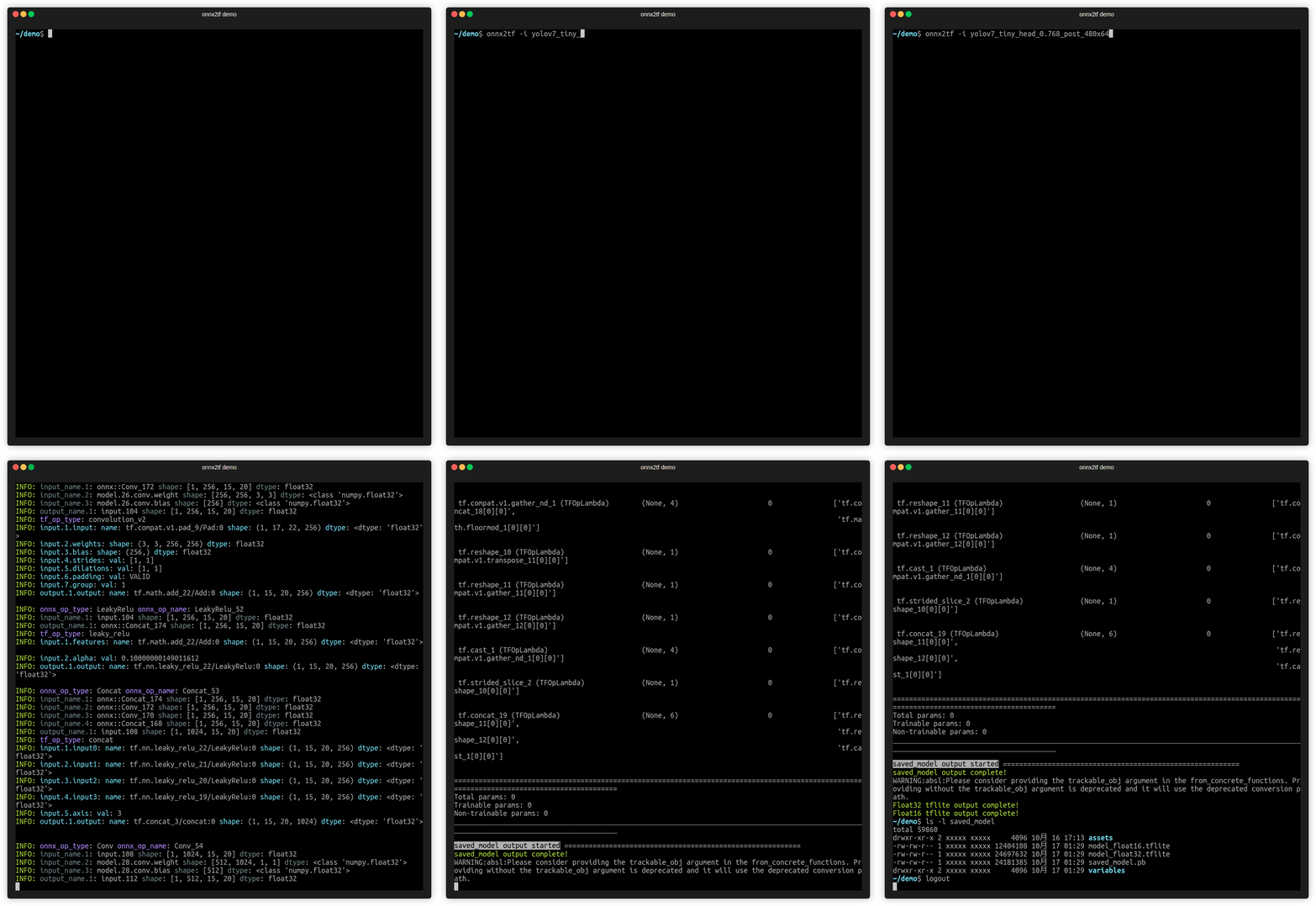
Video speed is adjusted approximately 50 times slower than actual speed.
Environment
- Linux / Windows
- Python>=3.12
- numpy==2.2.6
- onnx==1.20.1
- onnxruntime==1.26.0
- opencv-python==4.13.0.92
- onnxsim==0.6.5
- onnxoptimizer==0.4.2
- onnxscript==0.6.2
- ai-edge-litert==2.1.2
- sne4onnx==2.0.1
- sng4onnx==2.0.1
- psutil==5.9.5
- protobuf==7.35.1
- h5py==3.14.0
- ml_dtypes==0.5.4
- setuptools==81.0.0
- flatbuffers==25.12.19
- tqdm==4.67.1
- pytest==9.0.2
Optional:
- tensorflow==2.21.0 (TensorFlow-backed export / tf_converter only)
- tf-keras==2.21.0 (TensorFlow-backed export / tf_converter only)
- keras==3.15.0 (TensorFlow-backed export / tf_converter only)
- torch==2.11.0 (PyTorch-backed export / validation only)
Sample Usage
1. Install
Note:
1. If you are using TensorFlow v2.13.0 or earlier, use a version older than onnx2tf v1.17.5. onnx2tf v1.17.6 or later will not work properly due to changes in TensorFlow's API.
2. The latest onnx2tf implementation is based on Keras API 3 and will not work properly if you install TensorFlow v2.15.0 or earlier.
3. Starting with onnx2tf v2.0.0, due to onnxruntime issues, onnx2tf will no longer support environments older than Python 3.10. Accordingly, the Docker Image has been upgraded to Ubuntu 24.04. The dependency on onnx-graphsurgeon has also been completely removed. onnxruntime v1.24.1: https://github.com/microsoft/onnxruntime/releases/tag/v1.24.1
- HostPC
Click to expand
-
When using GHCR, see
Authenticating to the Container registry
# PAT authentication is required to pull from GHCR.
docker login ghcr.io

Username (xxxx): {Enter}
Password: {Personal Access Token}
Login Succeeded

# Start an interactive session on the terminal.
docker run --rm -it \
-v `pwd`:/workdir \
-w /workdir \
ghcr.io/pinto0309/onnx2tf:2.6.9

or

# Authentication is not required for pulls from Docker Hub.
# Start an interactive session on the terminal.
docker run --rm -it \
-v `pwd`:/workdir \
-w /workdir \
docker.io/pinto0309/onnx2tf:2.6.9
or

# Direct execution in Docker
# The model conversion is performed within Docker,
# but the model is output to the host PC's storage.
docker run --rm \
--user $(id -u):$(id -g) \
-v $(pwd):/work \
docker.io/pinto0309/onnx2tf:2.6.9 \
onnx2tf -i /work/densenet-12.onnx -o /work/saved_model

or

curl -LsSf https://astral.sh/uv/install.sh | sh
uv python install 3.12.12
uv venv -p 3.12.12 .venv
source .venv/bin/activate
uv pip install -U onnx2tf

or

# Install TensorFlow-backed features too (tf_converter, SavedModel/H5/Keras exports).
uv pip install -U 'onnx2tf[tensorflow]'

or

# Install PyTorch-backed features too (native package / TorchScript / Dynamo ONNX / ExportedProgram).
uv pip install -U 'onnx2tf[torch]'

or

# Install all optional features at once.
uv pip install -U 'onnx2tf[tensorflow,torch]'

or

curl -LsSf https://astral.sh/uv/install.sh | sh
uv python install 3.12.12
uv venv -p 3.12.12 .venv
source .venv/bin/activate
uv sync

or

# Sync with TensorFlow-backed features enabled.
uv sync --extra tensorflow

or

# Sync with PyTorch-backed features enabled.
uv sync --extra torch

or

# Sync with all optional features enabled.
uv sync --all-extras

or

pip install -e .

or

pip install -e '.[tensorflow]'

or

pip install -e '.[torch]'

or

pip install -e '.[tensorflow,torch]'

or

docker buildx build \
--platform linux/amd64 \
--build-arg BUILD_ARCH=linux/amd64 \
--progress=plain \
-t onnx2tf:amd64 \
--load .

or

# It is possible to cross-compile an arm64 environment on an x64 environment.
docker buildx build \
--platform linux/arm64 \
--build-arg BUILD_ARCH=linux/arm64 \
--progress=plain \
-t onnx2tf:arm64 \
--load .
2. Run test
Only patterns that are considered to be used particularly frequently are described. In addition, there are several other options, such as disabling Flex OP and additional options to improve inference performance. See: CLI Parameter
# Float32, Float16
# This is the fastest way to generate tflite.
# Add `-fdosm` if you also want SavedModel output on the default backend.
# Also, starting from v1.24.0, efficient TFLite can be generated
# without unrolling `GroupConvolution`. e.g. YOLOv9, YOLOvN
# Conversion to other frameworks. e.g. TensorFlow.js, CoreML, etc
# https://github.com/PINTO0309/onnx2tf#19-conversion-to-tensorflowjs
# https://github.com/PINTO0309/onnx2tf#20-conversion-to-coreml
wget https://github.com/PINTO0309/onnx2tf/releases/download/0.0.2/resnet18-v1-7.onnx
onnx2tf -i resnet18-v1-7.onnx -fdosm

ls -lh saved_model/

assets
fingerprint.pb
resnet18-v1-7_float16.tflite
resnet18-v1-7_float32.tflite
saved_model.pb
variables

TF_CPP_MIN_LOG_LEVEL=3 \
saved_model_cli show \
--dir saved_model \
--signature_def serving_default \
--tag_set serve

The given SavedModel SignatureDef contains the following input(s):
  inputs['data'] tensor_info:
      dtype: DT_FLOAT
      shape: (-1, 224, 224, 3)
      name: serving_default_data:0
The given SavedModel SignatureDef contains the following output(s):
  outputs['output_0'] tensor_info:
      dtype: DT_FLOAT
      shape: (-1, 1000)
      name: PartitionedCall:0
Method name is: tensorflow/serving/predict

# In the interest of efficiency for my development and debugging of onnx2tf,
# the default configuration shows a large amount of debug level logs.
# However, for most users, a large number of debug logs are unnecessary.
# If you want to reduce the amount of information displayed in the conversion log,
# you can change the amount of information in the log by specifying the
# `--verbosity` or `-v` option as follows.
# Possible values are "debug", "info", "warn", and "error".
wget https://github.com/PINTO0309/onnx2tf/releases/download/0.0.2/resnet18-v1-7.onnx
onnx2tf -i resnet18-v1-7.onnx -v info

# Override undefined batch size or other dimensions with static values.
# If the model has undefined dimensions, rewriting them to a static size will significantly
# improve the success rate of the conversion.
# The `-b` option overwrites the zero-dimensional batch size with the number specified
# without input OP name.
# Note that if there are multiple input OPs, the zero dimension of all input OPs is
# forced to be rewritten.
# The `-sh/--shape-hints` option provides shape hints for input tensors with undefined
# dimensions, significantly improving the conversion success rate for models with dynamic
# input shapes. Specifying this option in combination with the `-b` option will further
# improve the success rate of model conversion. The `-sh` option does not change ONNX
# input OPs to static shapes.
# The `-ois/--overwrite_input_shape` option allows undefined dimensions in all dimensions,
# including the zero dimensionality, to be overwritten to a static shape, but requires
# the input OP name to be specified.
# e.g. -ois data1:1,3,224,224 data2:1,255 data3:1,224,6
wget https://github.com/PINTO0309/onnx2tf/releases/download/0.0.2/resnet18-v1-7.onnx
onnx2tf -i resnet18-v1-7.onnx -b 1
or
onnx2tf -i resnet18-v1-7.onnx -sh data:1,3,224,224 -b 1
or
onnx2tf -i resnet18-v1-7.onnx -ois data:1,3,224,224

# Suppress automatic transposition of input OPs from NCW, NCHW, NCDHW to NWC, NHWC, NDHWC.
# onnx2tf is a specification that automatically transposes the input OP to [N,H,W,C] format
# before converting the model. However, since onnx2tf cannot determine from the structure of
# the model whether the input data is image, audio data, or something else, it unconditionally
# transposes the channels. Therefore, it is the models of STT/TTS models where the input is
# not NHWC that tend to have particular problems with the automatic transposition of the
# input OP.
# If you do not want input OPs to be automatically transposed, you can disable automatic
# transposition of input OPs by specifying the `-kat` option.
wget https://github.com/PINTO0309/onnx2tf/releases/download/1.1.28/double_gru.onnx
# INPUT OPs: "spec": float32[1,3,257,1], "states_in": float32[2,1,32]
# The following command suppresses the automatic transposition of "states_in" and converts it.
onnx2tf -i double_gru.onnx -kat states_in

# Keras h5 format
# .h5, .json, .keras, .weights.h5, .weights.keras, .data-00000-of-00001, .index
wget https://github.com/PINTO0309/onnx2tf/releases/download/0.0.2/resnet18-v1-7.onnx
onnx2tf -i resnet18-v1-7.onnx -oh5

# Keras keras_v3 format (TensorFlow v2.12.0 or later only)
wget https://github.com/PINTO0309/onnx2tf/releases/download/0.0.2/resnet18-v1-7.onnx
onnx2tf -i resnet18-v1-7.onnx -okv3

# TensorFlow v1 (.pb) format
wget https://github.com/PINTO0309/onnx2tf/releases/download/0.0.2/resnet18-v1-7.onnx
onnx2tf -i resnet18-v1-7.onnx -otfv1pb

# Automatic JSON generation only
# Generates an optimal parameter replacement JSON file for model conversion.
# The JSON file is saved to {model_name}_auto.json when conversion errors occur
# or accuracy issues are detected and the feature is explicitly enabled.
onnx2tf -i model.onnx -agj

# Accuracy validation only (no JSON generation)
# Validates the accuracy between ONNX and TensorFlow outputs without generating
# any parameter replacement JSON file.
onnx2tf -i model.onnx -cotof

# Accuracy validation + automatic JSON generation
# First generates an optimal parameter replacement JSON file, then uses it
# to validate the model accuracy. This ensures the best possible conversion accuracy.
onnx2tf -i model.onnx -agj -cotof

# Accuracy validation with opt-in JSON generation on error
# Generates a parameter replacement JSON only when accuracy errors greater than 1e-2
# are detected during validation.
onnx2tf -i model.onnx -cotof -agje

# INT8 Quantization, Full INT8 Quantization
# INT8 Quantization with INT16 activation, Full INT8 Quantization with INT16 activation
# Dynamic Range Quantization
wget https://github.com/PINTO0309/onnx2tf/releases/download/1.1.1/emotion-ferplus-8.onnx
# INT8 Quantization (per-channel)
onnx2tf -i emotion-ferplus-8.onnx -oiqt
# INT8 Quantization (per-tensor)
onnx2tf -i emotion-ferplus-8.onnx -oiqt -qt per-tensor

# Split the model at the middle position for debugging
# Specify the input name of the OP
wget https://github.com/PINTO0309/onnx2tf/releases/download/1.25.0/cf_fus.onnx
onnx2tf -i cf_fus.onnx -inimc 448

# Split the model at the middle position for debugging
# Specify the output name of the OP
wget https://github.com/PINTO0309/onnx2tf/releases/download/1.25.0/cf_fus.onnx
onnx2tf -i cf_fus.onnx -onimc dep_sec

# Split the model at the middle position for debugging
# Specify the input/output name of the OP
wget https://github.com/PINTO0309/onnx2tf/releases/download/1.25.0/cf_fus.onnx
onnx2tf -i cf_fus.onnx -inimc 448 -onimc velocity

# Suppress generation of Flex OP and replace with Pseudo-Function
# [
#     Asin, Acos, Atan, Abs, PReLU,
#     LeakyReLU, Power, GatherND,
#     Neg, HardSwish, Erf, GeLU, MatMulInteger,
# ]
# Below is a sample of replacing Erf with another set of operations.
wget https://s3.ap-northeast-2.wasabisys.com/temp-models/onnx2tf_readme/Erf_11.onnx
onnx2tf -i Erf_11.onnx -rtpo Erf

# High-dimensional Transpose decomposition
# If you do not like FlexTranspose being generated, try `-nodaftc`.
# Suppresses the generation of FlexTranspose by decomposing Transpose
# to the specified number of dimensions.
# In TensorFlow v2.12.0 and later, up to 6 dimensions are converted to normal Transpose;
# in v2.11.0 and earlier, up to 5 dimensions are converted to normal Transpose.
# Note that specifying `2` for the `-nodaftc` option causes all Transpose OPs to disappear
# from the model structure.
# Below is an example of decomposing a Transpose of 5 or more dimensions into a Transpose
# of 4 dimensions.
onnx2tf -i xxxx.onnx -nodaftc 4

# High-dimensional Slice(StridedSlice) decomposition
# If your special circumstances do not allow you to deploy a `StridedSlice` with more than
# 5 dimensions to a device, you can use the `-nodafsc` option to decompose the `StridedSlice`
# into a process with 4 or fewer dimensions.
# Below is an example of decomposing a `StridedSlice` of 5 or more dimensions into a
# `StridedSlice` of 4 dimensions.
onnx2tf -i xxxx.onnx -nodafsc 4

# Float16 inference doubling on devices with ARM64 ARMv8.2 or higher instruction set
# Double the inference speed with Float16 precision tflite models on devices with
# high-performance CPUs such as Snapdragon.
# (Pixel 3a, Pixel 5a, Pixel 7, Galaxy M12 and Galaxy S22, ...)
# XNNPACK float16 inference on certain ARM64 cores is 2x faster.
# Unfortunately, Float16 inference cannot be accelerated when using the RaspberryPi4's
# ARM64 CPU.
onnx2tf -i xxxx.onnx -eatfp16

# Parameter replacement (Resize,Transpose,Softmax)
rm replace.json
wget https://github.com/PINTO0309/onnx2tf/releases/download/1.1.27/human_segmentation_pphumanseg_2021oct.onnx
wget https://github.com/PINTO0309/onnx2tf/releases/download/1.1.27/replace.json
onnx2tf -i human_segmentation_pphumanseg_2021oct.onnx -prf replace.json
3. Accuracy check
Click to expand
Perform error checking of ONNX output and TensorFlow output. Verify that the error of all outputs, one operation at a time, is below a certain threshold. Automatically determines before and after which OPs the tool's automatic conversion of the model failed. Know where dimensional compression, dimensional expansion, and dimensional transposition by Reshape and Traspose are failing. Once you have identified the problem area, you can refer to the tutorial on Parameter replacement to modify the tool's behavior.
After many upgrades, the need for JSON parameter correction has become much less common, but there are still some edge cases where JSON correction is required. If the PC has sufficient free space in its RAM, onnx2tf will convert the model while carefully performing accuracy checks on all OPs. Thus, at the cost of successful model conversion, the conversion speed is a little slower. If the amount of RAM required for the accuracy check is expected to exceed 80% of the total available RAM capacity of the entire PC, the conversion operation will be performed without an accuracy check. Therefore, if the accuracy of the converted model is found to be significantly degraded, the accuracy may be automatically corrected by re-conversion on a PC with a large amount of RAM. For example, my PC has 128GB of RAM, but the StableDiffusion v1.5 model is too complex in its structure and consumed about 180GB of RAM in total with 50GB of SWAP space.
-ois an option to overwrite the input OP to a static size if it has undefined dimensions. -cotof option checks the accuracy of all OPs one by one. -cotoa is the error value of the threshold for determining an accuracy error. If there are undefined dimensions in the input OP, it is better to fix them to the static geometry to improve the accuracy of the accuracy measurement.
Also, you can use the -cind option to specify custom input for -cotof, instead of using the default dummy input. Otherwise, all input values will be set to 1. You can override the dummy input values with --value_hints (scalar only, *:default supported). For more information about the -cind option, please refer to here. If your input is image data in NHWC format, you can also use --test_data_nhwc_path to provide fixed test samples for validation. For -fdots, the recommended way to resolve dynamic trace shapes is --shape_hints. --test_data_nhwc_path is also accepted for eligible 4D RGB inputs, and -cind remains available when per-input custom data is needed.
Quick difference between -tdnp and -cind:
-tdnp(--test_data_nhwc_path): Validation-only test data for accuracy checks. Expects one NHWC RGB.npy([N,H,W,3]). Nomean/std. For multi-input models, this single array is reused across inputs (per-input mapping is not supported). Also accepted by-fdotsfor eligible 4D RGB inputs.-cind(--custom_input_op_name_np_data_path): Per-input custom data mapping by input name. Supports multi-input/non-image inputs. Also used for-fdotstrace inputs and INT8 calibration (-oiqt) with optionalmean/std.
The -cotof option evaluates Float32 accuracy only. On the default flatbuffer_direct path, the base report is ONNX↔TFLite. When --tflite_backend tf_converter is explicitly used, it checks ONNX against TensorFlow/TFLite outputs. If --flatbuffer_direct_output_pytorch is also enabled, onnx2tf additionally emits ONNX↔PyTorch and combined comparison reports using the same input samples.
onnx2tf -i mobilenetv2-12.onnx -ois input:1,3,224,224 -cotof -cotoa 1e-1

or

onnx2tf -i mobilenetv2-12.onnx -b 1 -cotof -cotoa 1e-1

or

onnx2tf -i mobilenetv2-12.onnx -cotof -cotoa 1e-1 -cind "input" "/your/path/x.npy"

or

onnx2tf -i mobilenetv2-12.onnx -cotof -cotoa 1e-1 -tdnp "/your/path/test_data_nhwc.npy"

or

onnx2tf -i mobilenetv2-12.onnx -cotof -cotoa 1e-1 --value_hints "input:0.5" "*:1.0"


4. Match tflite input/output names and input/output order to ONNX
Click to expand
If you want to match tflite's input/output OP names and the order of input/output OPs with ONNX, you can use the interpreter.get_signature_runner() to infer this after using the -coion / --copy_onnx_input_output_names_to_tflite option to output tflite file. See: https://github.com/PINTO0309/onnx2tf/issues/228
onnx2tf automatically compares the final input/output shapes of ONNX and the generated TFLite and tries to automatically correct the input/output order as much as possible if there is a difference. However, if INT8 quantization is used and there are multiple inputs and outputs with the same shape, automatic correction may fail. This is because TFLiteConverter shuffles the input-output order by itself only when INT8 quantization is performed.
import torch
import onnxruntime
import numpy as np
import onnx2tf
import tensorflow as tf
from ai_edge_litert.interpreter import Interpreter

class Model(torch.nn.Module):
    def forward(self, x, y):
        return {
            "add": x + y,
            "sub": x - y,
        }

# Let's double check what PyTorch gives us
model = Model()
pytorch_output = model.forward(10, 2)
print("[PyTorch] Model Predictions:", pytorch_output)

# First, export the above model to ONNX
torch.onnx.export(
    Model(),
    {"x": 10, "y": 2},
    "model.onnx",
    opset_version=16,
    input_names=["x", "y"],
    output_names=["add", "sub"],
)

# And check its output
session = onnxruntime.InferenceSession("model.onnx")
onnx_output = session.run(["add", "sub"], {"x": np.array(10), "y": np.array(2)})
print("[ONNX] Model Outputs:", [o.name for o in session.get_outputs()])
print("[ONNX] Model Predictions:", onnx_output)

# Now, let's convert the ONNX model to TF
onnx2tf.convert(
    input_onnx_file_path="model.onnx",
    output_folder_path="model.tf",
    copy_onnx_input_output_names_to_tflite=True,
    non_verbose=True,
)

# Now, test the newer TFLite model
interpreter = Interpreter(model_path="model.tf/model_float32.tflite")
tf_lite_model = interpreter.get_signature_runner()
inputs = {
  'x': np.asarray([10], dtype=np.int64),
  'y': np.asarray([2], dtype=np.int64),
}
tf_lite_output = tf_lite_model(**inputs)
print("[TFLite] Model Predictions:", tf_lite_output)
[PyTorch] Model Predictions:
  {
    'add': 12,
    'sub': 8
  }
[ONNX] Model Outputs:
  [
    'add',
    'sub'
  ]
[ONNX] Model Predictions:
  [
    array(12, dtype=int64),
    array(8, dtype=int64)
  ]
[TFLite] Model Predictions:
  {
    'add': array([12]),
    'sub': array([8])
  }

5. Rewriting of tflite input/output OP names and signature_defs
Click to expand
If you do not like tflite input/output names such as serving_default_*:0 or StatefulPartitionedCall:0, you can rewrite them using the following tools and procedures. It can be rewritten from any name to any name, so it does not have to be serving_default_*:0 or StatefulPartitionedCall:0.
https://github.com/PINTO0309/tflite-input-output-rewriter
# Install tfliteiorewriter
pip install -U tfliteiorewriter
-
Before
tfliteiorewriter \ -i xxxx.tflite \ -r serving_default_input_1:0 aaa \ -r StatefulPartitionedCall:0 bbb -
After
6. Embed metadata in tflite
Click to expand
If you want to embed label maps, quantization parameters, descriptions, etc. into your tflite file, you can refer to the official tutorial and try it yourself. For now, this tool does not plan to implement the ability to append metadata, as I do not want to write byte arrays to the tflite file that are not essential to its operation.
-
Adding metadata to TensorFlow Lite models

7. If the accuracy of the INT8 quantized model degrades significantly
Click to expand
It is a matter of model structure. The activation function (SiLU/Swish), kernel size and stride for Pooling, and kernel size and stride for Conv should be completely revised. See: https://github.com/PINTO0309/onnx2tf/issues/269
If you want to see the difference in quantization error between SiLU and ReLU, please check this Gist by @motokimura who helped us in our research. Thanks Motoki!
Gist: Quantization error simulation of SiLU (Swish) activation
The accuracy error rates after quantization for different activation functions are shown in the figure below. The graph plots the distribution of absolute error, so a position with a higher value on the horizontal axis indicates a larger error. The vertical axis is the number of samples. SiLU (Swish) produces catastrophic errors after INT8 quantization.
- e.g. YOLOX-Nano
- https://github.com/motokimura/yolox-ti-lite_tflite
- https://github.com/TexasInstruments/edgeai-yolox
Before After Swish/SiLU
 |
|ReLU
 |
|
|
|DepthwiseConv2D
 |
|Conv2D
 |
|
|
|MaxPool, kernel_size=5x5,9x9,13x13
 |
|MaxPool, kernel_size=3x3
 |
|
```
### Float32 - YOLOX-Nano
(1, 52, 52, 85)
array([[[
    [ 0.971787,  0.811184,  0.550566, ..., -5.962632, -7.403673, -6.735206],
    [ 0.858804,  1.351296,  1.231673, ..., -6.479690, -8.277064, -7.664936],
    [ 0.214827,  1.035119,  1.458006, ..., -6.291425, -8.229385, -7.761562],
        ...,
    [ 0.450116,  1.391900,  1.533354, ..., -5.672194, -7.121591, -6.880231],
    [ 0.593133,  2.112723,  0.968755, ..., -6.150078, -7.370633, -6.874294],
    [ 0.088263,  1.985220,  0.619998, ..., -5.507928, -6.914980, -6.234259]]]]),

### INT8 - YOLOX-Nano
(1, 52, 52, 85)
array([[[
    [ 0.941908,  0.770652,  0.513768, ..., -5.993958, -7.449634, -6.850238],
    [ 0.856280,  1.284420,  1.198792, ..., -6.507727, -8.391542, -7.792146],
    [ 0.256884,  0.941908,  1.455676, ..., -6.336471, -8.305914, -7.877774],
        ...,
    [ 0.342512,  1.370048,  1.541304, ..., -5.737075, -7.192750, -7.107122],
    [ 0.513768,  2.226327,  1.027536, ..., -6.165215, -7.449634, -7.021494],
    [ 0.085628,  2.055072,  0.685024, ..., -5.480191, -7.021494, -6.422099]]]]),
```
-
Other recommended replacement OP
Before After HardSwish
 |
|ReLU
 |
|
|
|ReLU6

Paper: A Quantization-Friendly Separable Convolution for MobileNets https://arxiv.org/pdf/1803.08607.pdf|`ReLU`
|
-
Quantization range collapse due to non-zero constant padding
If padding is performed with a constant other than zero, the padding value may destroy the quantization range of the input tensor. For example, the pattern is shown in the figure below. The
MaxPool2Dis done after padding the 4 sides of the input tensor with the minimum value of Float32. It seems that if INT8 quantization is performed with this structure, the quantization range is determined byMaxPool2Dduring quantization, including the values padded to the tensor. See: #444Therefore, the following two similar examples are equally likely to result in divergent output values for the model after INT8 quantization, with all output values being Nan or zero.
-
Pattern with fixed value
-255.0padded on 4 sides of tensor -
Pattern with fixed value
-128.0padded on 4 sides of tensor
-
8. Calibration data creation for INT8 quantization
Click to expand
Calibration data (.npy) for INT8 quantization (-cind) is generated as follows. This is a sample when the data used for training is image data. See: https://github.com/PINTO0309/onnx2tf/issues/222
https://www.tensorflow.org/lite/performance/post_training_quantization
import cv2
import glob
import numpy as np

# Not used during data generation ################################
# You will need to do the calculations yourself using the test data
MEAN = np.asarray([[[[0.485, 0.456, 0.406]]]], dtype=np.float32) # [1,1,1,3]
STD = np.asarray([[[[0.229, 0.224, 0.225]]]], dtype=np.float32) # [1,1,1,3]
# Not used during data generation ################################

files = glob.glob("data/*.png")
img_datas = []
for idx, file in enumerate(files):
    bgr_img = cv2.imread(file)
    rgb_img = cv2.cvtColor(bgr_img, cv2.COLOR_BGR2RGB)
    resized_img = cv2.resize(rgb_img, dsize=(200,112))
    extend_batch_size_img = resized_img[np.newaxis, :]
    normalized_img = extend_batch_size_img / 255.0 # 0.0 - 1.0
    print(
        f'{str(idx+1).zfill(2)}. extend_batch_size_img.shape: {extend_batch_size_img.shape}'
    ) # [1,112,200,3]
    img_datas.append(extend_batch_size_img)
calib_datas = np.vstack(img_datas)
print(f'calib_datas.shape: {calib_datas.shape}') # [10,112,200,3]
np.save(file='data/calibdata.npy', arr=calib_datas)

loaded_data = np.load('data/calibdata.npy')
print(f'loaded_data.shape: {loaded_data.shape}') # [10,112,200,3]

"""
-cind INPUT_NAME NUMPY_FILE_PATH MEAN STD
int8_calib_datas = (loaded_data - MEAN) / STD # -1.0 - 1.0

e.g. How to specify calibration data in CLI or Script respectively.
1. CLI
  -cind "pc_dep" "data/calibdata.npy" "[[[[0.485,0.456,0.406]]]]" "[[[[0.229,0.224,0.225]]]]"
  -cind "feat" "data/calibdata2.npy" "[[[[0.123,...,0.321]]]]" "[[[[0.112,...,0.451]]]]"

2. Script
  custom_input_op_name_np_data_path=[
      ["pc_dep", "data/calibdata.npy", [[[[0.485,0.456,0.406]]]], [[[[0.229,0.224,0.225]]]]],
      ["feat", "data/calibdata2.npy", [[[[0.123,...,0.321]]]], [[[[0.112,...,0.451]]]],
  ]
"""
9. INT8 quantization of models with multiple inputs requiring non-image data
Click to expand
If you do not need to perform INT8 quantization with this tool alone, the following method is the easiest.
On the default flatbuffer_direct backend, combine -fdosm with -osd to output a saved_model.pb in the saved_model folder with the full size required for quantization. That is, a default signature named serving_default is embedded in .pb. If you need the legacy behavior instead, use --tflite_backend tf_converter explicitly. The -b option is used to convert the batch size by rewriting it as a static integer.
Note: INT8 TFLite generated by following this procedure as is will result in a model with significantly degraded accuracy. This tutorial only demonstrates the INT8 quantization procedure; if you wish to correct for accuracy, please refer to Parameter replacement to correct for transposition errors in the operation.
# Ref: https://github.com/onnx/models/tree/main/text/machine_comprehension/bert-squad
wget https://s3.ap-northeast-2.wasabisys.com/temp-models/onnx2tf_248/bertsquad-12.onnx

onnx2tf -i bertsquad-12.onnx -b 1 -fdosm -osd -cotof

Use the saved_model_cli command to check the saved_model signature. INT8 quantization calibration using signatures allows correct control of the input order of data for calibration. Therefore, calibration with signatures is recommended for INT8 quantization of models with multiple inputs.
saved_model_cli show --dir saved_model/ --tag_set serve --signature_def serving_default

The given SavedModel SignatureDef contains the following input(s):
  inputs['input_ids_0'] tensor_info:
      dtype: DT_INT64
      shape: (1, 256)
      name: serving_default_input_ids_0:0
  inputs['input_mask_0'] tensor_info:
      dtype: DT_INT64
      shape: (1, 256)
      name: serving_default_input_mask_0:0
  inputs['segment_ids_0'] tensor_info:
      dtype: DT_INT64
      shape: (1, 256)
      name: serving_default_segment_ids_0:0
  inputs['unique_ids_raw_output___9_0'] tensor_info:
      dtype: DT_INT64
      shape: (1)
      name: serving_default_unique_ids_raw_output___9_0:0
Calibrate by specifying the input OP name displayed in inputs. The np.ones([xxx], dtype=np.int64) part must be replaced with the correct calibration test data. In practice, several pieces of data used for training are extracted and used.
import tensorflow as tf
import numpy as np

def representative_dataset():
    unique_ids = np.ones([10, 256], dtype=np.int64)
    segment_ids = np.ones([10, 256], dtype=np.int64)
    input_masks = np.ones([10, 256], dtype=np.int64)
    input_ids = np.ones([10], dtype=np.int64)

    for unique_id, segment_id, input_mask, input_id \
        in zip(unique_ids, segment_ids, input_masks, input_ids):

        yield {
            "unique_ids_raw_output___9_0": unique_id,
            "segment_ids_0": segment_id,
            "input_mask_0": input_mask,
            "input_ids_0": input_id,
        }

converter = tf.lite.TFLiteConverter.from_saved_model('saved_model')
converter.optimizations = [tf.lite.Optimize.DEFAULT]
converter.representative_dataset = representative_dataset
converter.target_spec.supported_ops = [tf.lite.OpsSet.TFLITE_BUILTINS_INT8]
converter.inference_input_type = tf.int8  # or tf.uint8
converter.inference_output_type = tf.int8  # or tf.uint8
tflite_quant_model = converter.convert()

with open('saved_model/int8_model.tflite', 'wb') as w:
    w.write(tflite_quant_model)

https://www.tensorflow.org/lite/performance/post_training_quantization
See: https://github.com/PINTO0309/onnx2tf/issues/248
10. Fixing the output of NonMaxSuppression (NMS)
Click to expand
PyTorch's NonMaxSuppression (torchvision.ops.nms) and ONNX's NonMaxSuppression are not fully compatible. TorchVision's NMS is very inefficient. Therefore, it is inevitable that converting ONNX using NMS in object detection models and other models will be very redundant and will be converted with a structure that is difficult for TensorFlow.js and TFLite models to take advantage of in devices. This is due to the indefinite number of tensors output by the NMS. In this chapter, I share how to easily tune the ONNX generated using TorchVision's redundant NMS to generate an optimized NMS.
-
There are multiple issues with TorchVision's NMS. First, the batch size specification is not supported; second, the
max_output_boxes_per_classparameter cannot be specified. Please see the NMS sample ONNX part I generated. Themax_output_boxes_per_classhas been changed to896instead of-Infinity. The biggest problem with TorchVision NMS is that it generates ONNX withmax_output_boxes_per_classset to-Infinityor9223372036854775807 (Maximum value of INT64), resulting in a variable number of NMS outputs from zero to infinite. Thus, by rewriting-Infinityor9223372036854775807 (Maximum value of INT64)to a constant value, it is possible to output an NMS that can be effortlessly inferred by TFJS or TFLite.
Here you will find committed ONNX components optimized for various devices. https://github.com/PINTO0309/components_of_onnx/tree/main/components_of_onnx/ops
-
In the following example, the
max_output_boxes_per_classof NMS in the post-processing generated by YOLOv7 is changed from-Infinityor9223372036854775807 (Maximum value of INT64)to20, as shown in the figure below. The namemain01_max_output_boxes_per_classhas been rewritten by me for clarity, but it originally appears asmax_output_boxes_per_class.
Simply execute the following command. The command rewrites the specified attribute value of the OP specified by ONNX.
pip install sam4onnx

sam4onnx \
--op_name main01_nonmaxsuppression11 \
--input_onnx_file_path yolov7.onnx \
--output_onnx_file_path nms_yolov7_update.onnx \
--input_constants main01_max_output_boxes_per_class int64 [20]
A tutorial on one of my ONNX modification tools,
sam4onnx, can be found here.https://github.com/PINTO0309/sam4onnx
Many detailed tutorials are provided below, so if you are interested, please play with them.
https://github.com/PINTO0309/PINTO_model_zoo/tree/main/307_YOLOv7/post_process_gen_tools
-
Finally, simply convert ONNX to TFLite or saved_model or TFJS using onnx2tf. onnx2tf performs an internal operation to automatically optimize the NMS output to a fixed shape if
max_output_boxes_per_classis set to a value other than-Infinityand9223372036854775807 (Maximum value of INT64). Specify--output_nms_with_dynamic_tensoror-onwdtif you do not want to optimize for a fixed shape. If you want to shrink class scores in NMS from[B, C, N]to[B, 1, N], enable--output_nms_with_argmaxor-onwa.onnx2tf -i nms_yolov7_update.onnx -fdosm -osd -cotofI would be happy if this is a reference for Android + Java or TFJS implementations. There are tons more tricky model optimization techniques described in my blog posts, so you'll have to find them yourself. I don't dare to list the URL here because it is annoying to see so many
issuesbeing posted. And unfortunately, all articles are in Japanese.
11. RNN (RNN, GRU, LSTM) Inference Acceleration
Click to expand
TensorFlow's RNN has a speedup option called unroll. The network will be unrolled, else a symbolic loop will be used. Unrolling can speed-up a RNN, although it tends to be more memory-intensive. Unrolling is only suitable for short sequences. onnx2tf allows you to deploy RNNs into memory-intensive operations by specifying the --enable_rnn_unroll or -eru options. The --enable_rnn_unroll option is available for RNN, GRU, and LSTM.
- Keras https://keras.io/api/layers/recurrent_layers/lstm/
- TensorFlow https://www.tensorflow.org/api_docs/python/tf/keras/layers/LSTM
An example of BidirectionalLSTM conversion with the --enable_rnn_unroll option is shown below. Please ignore that the shapes of the input and output tensors do not match, since the samples are shown by picking up separate models.
-
ONNX
LSTM (Bidirectional)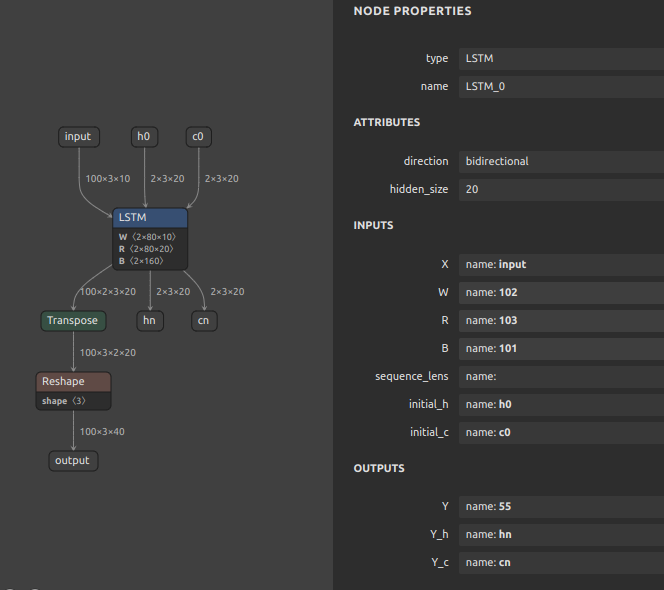
-
BidirectionalLSTMwith--enable_rnn_unrolloption unspecifiedRecurrent layer is implemented from scratch.

-
BidirectionalLSTMwith--enable_rnn_unrolloption
12. If the accuracy of the Float32 model degrades significantly
Click to expand
The pattern of accuracy degradation of the converted model does not only occur when INT8 quantization is performed. A special edge case is when there is a problem with the implementation of a particular OP on the TFLite runtime side. Below, I will reproduce the problem by means of a very simple CNN model and further explain its workaround. Here is the issue that prompted me to add this explanation. [Conv-TasNet] Facing issue in converting Conv-TasNet model #447
Download a sample model for validation.
curl \
-L https://github.com/PINTO0309/onnx2tf/files/12367312/prelu_check.onnx.zip \
-o prelu_check.onnx.zip

unzip prelu_check.onnx.zip
The part of the downloaded model where the problem occurs is the PRelu part in the figure below.
-
ONNX
Reproduce the problem. The following command converts an ONNX file to a TFLite file.
onnx2tf -i prelu_check.onnx -cotof
The conversion was successful and, as shown in the figure below, the inference test results from ONNX and the inference results for the Float32 model in TensorFlow (Keras) match perfectly. It is important to note that the comparison of inference results between ONNX and TensorFlow transformed models is comparing ONNX models with TensorFlow (Keras) models, not ONNX models with TFLite models.
-
Conversion results
-
tflite
Now, let's try inference with the TFLite runtime instead of the TensorFlow runtime.
test.pyimport time import numpy as np np.random.seed(0) from ai_edge_litert.interpreter import Interpreter # Load TFLite model interpreter = Interpreter(model_path="./saved_model/prelu_check_float32.tflite") interpreter.allocate_tensors() tensor_shape = (256, 20) input_data = {'waveform': np.random.randn(*tensor_shape).astype(np.float32)} # Load and preprocess input_details = interpreter.get_input_details() input_shape = input_details[0]['shape'] print(input_shape) # Run inference interpreter.set_tensor(input_details[0]['index'], input_data["waveform"]) separate_time = time.time() interpreter.invoke() print("Done! {:.3f} s".format(time.time() - separate_time)) output_details = interpreter.get_output_details() output_data = interpreter.get_tensor(output_details[0]['index']) output_data = [] for output_detail in output_details: output_data.append(interpreter.get_tensor(output_detail['index'])) print(output_data)
Oddly enough, the output value of PReLU contains multiple nan. However, as can be seen by converting the ONNX model to the middle of the model using the -onimc option, nan does not occur until just before PReLU. Thus, it is clear that the PReLU OP in the TFLite runtime has a problem with divergent inference results.
-
TFLite inference results
The following is a work-around to avoid this problem. Use the -rtpo option to replace PReLU with a similar primitive operation when transforming a model, and then perform the model transformation.
onnx2tf -i prelu_check.onnx -cotof -rtpo PReLU
As before, the inference results from ONNX and TensorFlow (Keras) match perfectly.
-
Conversion results
However, -rtpo PReLU will generate a .tflite file with the PRelu OP replaced by a primitive OP combination.
-
tflite
Again, run the test code to check the inference results. The figure below shows that no nan occurs when inference is performed by replacing the PReLU OP with only combinations of primitive operations. In other words, it is important to know that large arithmetic errors are not only due to the broken structure of the model, but can also be caused by internal implementations such as the TFLite runtime. I have implemented the -rtpo option to replace operators as a work-around to avoid such runtime problems.
-
TFLite inference results
13. Problem of extremely large calculation error in InstanceNormalization
Click to expand
Even if the conversion is successful, InstanceNormalization tends to have very large errors. This is an ONNX specification.
- See.1: https://discuss.pytorch.org/t/understanding-instance-normalization-2d-with-running-mean-and-running-var/144139
- See.2: https://github.com/pytorch/pytorch/issues/72057
I verified this with a very simple sample model. There are more than 8 million elements, and the calculation error reached 1e-2.
14. Inference with dynamic tensors in TFLite
Click to expand
For some time now, TFLite runtime has supported inference by dynamic tensors. However, the existence of this important function is not widely recognized. In this chapter, I will show how I can convert an ONNX file that contains dynamic geometry in batch size directly into a TFLite file that contains dynamic geometry and then further infer it in variable batch conditions. The issue that inspired me to add this tutorial is here. [Dynamic batch / Dynamic shape] onnx model with dynamic input is converted to tflite with static input 1 #441, or Cannot use converted model with dynamic input shape #521
First, download the sample ONNX file.
wget https://s3.ap-northeast-2.wasabisys.com/temp-models/onnx2tf_441/osnet_x0_25_msmt17.onnx
This model calculates the similarity of features by cosine similarity. The batch size dimension of the input tensor is batch, allowing various numbers of images to be input simultaneously. This is often used, for example, to achieve tracking by calculating the similarity of people or objects reflected between successive video frames. However, the total number of objects to be tracked changes rapidly with each video frame because the number of people and objects in the image constantly increases and decreases. Therefore, there is a very significant use case for generating models with variable settings for the number of input images (batch size) of the model.
Convert the downloaded OSNet to tflite and saved_model as a variable batch. If you do not specify the -b or -ois options, onnx2tf does not change the batch size as N. The only important point is to convert the model with the -osd and -coion options.
onnx2tf -i osnet_x0_25_msmt17.onnx -fdosm -osd -coion
-
.tfliteWhen viewing tflite in Netron, the batch size appears to be fixed at
1. -
saved_modelHowever, checking the structure of
saved_model, the batch size is correctly set to-1.saved_model_cli show --dir saved_model/ --all MetaGraphDef with tag-set: 'serve' contains the following SignatureDefs: signature_def['__saved_model_init_op']: The given SavedModel SignatureDef contains the following input(s): The given SavedModel SignatureDef contains the following output(s): outputs['__saved_model_init_op'] tensor_info: dtype: DT_INVALID shape: unknown_rank name: NoOp Method name is: signature_def['serving_default']: The given SavedModel SignatureDef contains the following input(s): inputs['images'] tensor_info: dtype: DT_FLOAT shape: (-1, 256, 128, 3) name: serving_default_images:0 The given SavedModel SignatureDef contains the following output(s): outputs['output'] tensor_info: dtype: DT_FLOAT shape: (-1, 512) name: PartitionedCall:0 Method name is: tensorflow/serving/predict
To prove that the tflite structure has been converted correctly, I will convert the tflite to JSON and look at the structure.
(The flatc command below is only for manual inspection in the tflite2json2tflite container, not a requirement for onnx2tf conversion.)
docker run --rm -it \
-v `pwd`:/home/user/workdir \
ghcr.io/pinto0309/tflite2json2tflite:latest

./flatc -t \
--strict-json \
--defaults-json \
-o workdir \
./schema.fbs -- workdir/saved_model/osnet_x0_25_msmt17_float32.tflite

ls -l workdir

-rw-rw-r-- 1 user user   921564 Aug  4 10:24 osnet_x0_25_msmt17.onnx
-rw-r--r-- 1 user user 10369524 Aug  4 10:30 osnet_x0_25_msmt17_float32.json
drwxrwxr-x 4 user user     4096 Aug  4 10:26 saved_model
-
osnet_x0_25_msmt17_float32.json"shape_signature"is correctly set to-1. However,"shape"is set to1. This could be a problem with TFLiteConverter, or it could be a problem with Netron's graphical display capabilities.
In other words, although onnx2tf converts TFLiteConverer as specified, with the batch size of -1 without any model processing, only Netron's display is broken. This is a problem I have known for quite some time. However, the inference itself does not cause the problem.
If you want to infer in variable batches, you need to infer using signature. In such cases, the -coion option must be specified when converting the model. Note that I have identified a problem with quantization with the -coion option, which can corrupt tflite files. https://github.com/PINTO0309/onnx2tf/issues/429
https://github.com/PINTO0309/onnx2tf#4-match-tflite-inputoutput-names-and-inputoutput-order-to-onnx
You can use signature_runner to handle dynamic input tensors by performing inference using signature. Below I show that both batch_size=5 and batch_size=3 tensors can be inferred with the same model.
test.py- Batch size:5import numpy as np from ai_edge_litert.interpreter import Interpreter from pprint import pprint interpreter = Interpreter(model_path="saved_model/osnet_x0_25_msmt17_float32.tflite") tf_lite_model = interpreter.get_signature_runner() inputs = { 'images': np.ones([5,256,128,3], dtype=np.float32), } tf_lite_output = tf_lite_model(**inputs) print(f"[TFLite] Model Predictions shape: {tf_lite_output['output'].shape}") print(f"[TFLite] Model Predictions:") pprint(tf_lite_output)- Results
[TFLite] Model Pr