
Muesli
Local-by-default dictation & meeting transcription for macOS
On-device speech-to-text by default · Optional OpenAI or OpenRouter dictation · Privacy by default

What is Muesli?
Muesli is a lightweight native macOS app that combines WisprFlow-style dictation and Granola-style meeting transcription in one tool. Dictation and meeting transcription run locally on Apple Silicon by default. Optional hosted dictation sends audio to OpenAI or through OpenRouter to your selected model. Hosted cleanup, Quill, summaries, and hosted Computer Use send the input needed for those features when selected. The experimental on-device Computer Use planner runs with downloaded Gemma models without ChatGPT. iCloud sync transfers text and sync metadata, never audio.
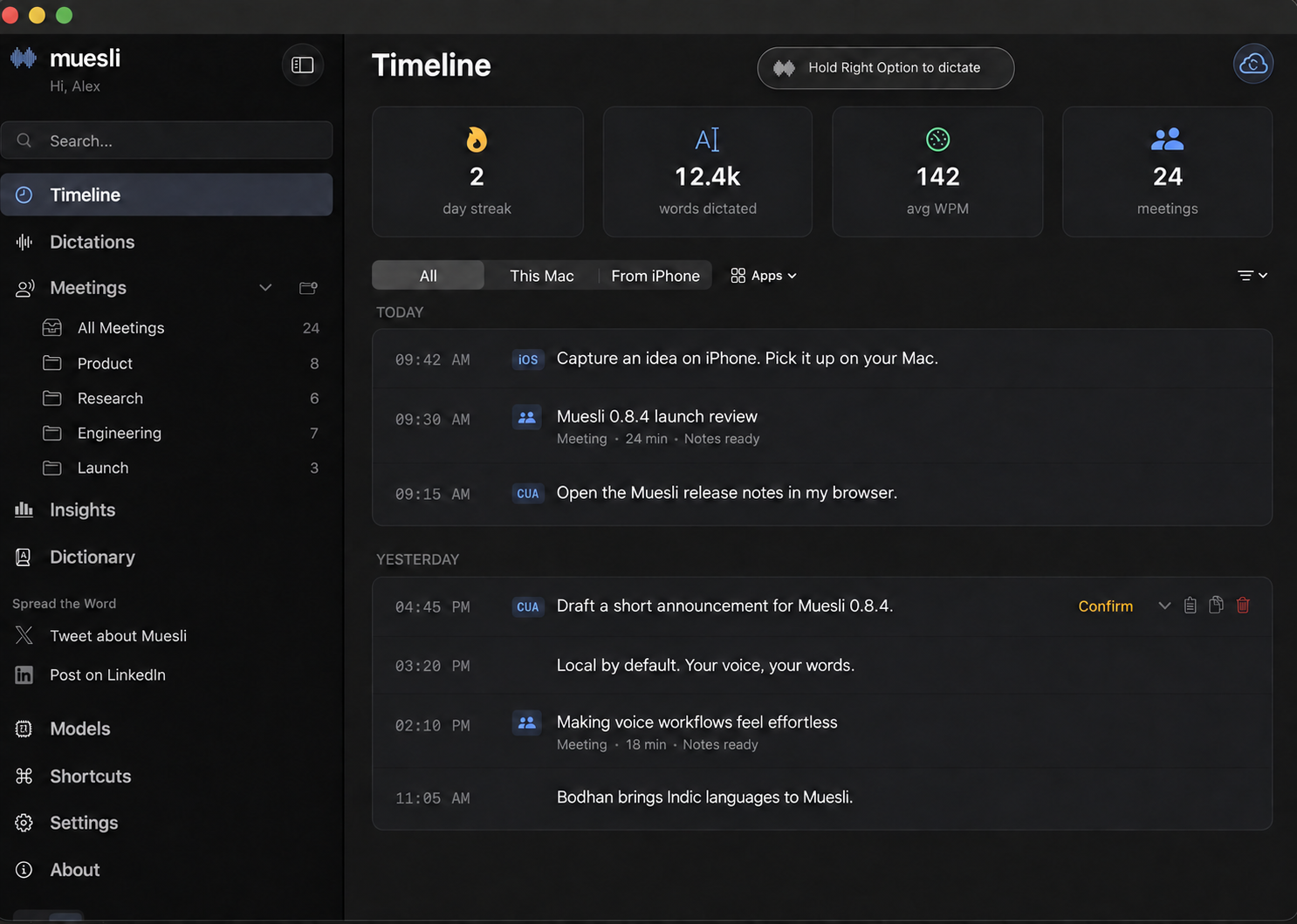
Illustrative entries and usage statistics. Personal content has been replaced.
New in 0.8.4
| Feature | What you can do |
|---|---|
| Quill | Ask a question, rewrite selected text, or create text at the cursor with your voice. |
| Bodhan for Indic languages | Dictate across Indic languages and English, including code-switching. Bodhan Flex also offers romanized output in Latin letters. |
| Live meeting transcripts | Use Apple Speech on macOS 26+. Live transcription is off by default. |
| Re-summarize meetings | Choose a different summary model for a saved meeting. |
| BYOK dictation | Use OpenAI or OpenRouter when you want hosted transcription. Local by default. |
This release also adds S1-mini English cleanup, Apple Shortcuts and Siri actions, clearer macOS calendar management, and iCloud reconnection recovery. Read the full 0.8.4 release notes.
Dictation
Hold your hotkey (or double-tap for hands-free mode) → speak → release → transcribed text is pasted at your cursor. ~0.13 second latency via Parakeet TDT on the Apple Neural Engine.
By default, dictation uses an on-device model. You can instead opt into OpenAI Speech-to-Text with your own API key, which streams microphone audio directly to OpenAI over a Realtime WebSocket, or connect OpenRouter and explicitly choose a transcription model. OpenRouter dictation sends the completed recording through OpenRouter to the selected upstream model. Muesli retains the local recording only long enough to fall back to a compatible installed on-device model if the hosted request fails; streaming-only models are excluded from fallback.
Quill
Select text and speak an instruction to rewrite it, or ask a question and generate text at the cursor with no selection. Choose your model in Models → Quill. If a required local model is missing or a selected account is signed out, Muesli prompts you to download the model or sign in before use.
Meeting Transcription
Start a meeting recording → Muesli captures your mic (You) and system audio (Others) simultaneously → VAD-driven chunked transcription happens during the meeting at natural speech boundaries → speaker diarization identifies individual remote speakers (Speaker 1, Speaker 2, etc.) → when you stop, the transcript is ready in seconds, not minutes. Generate structured meeting notes via OpenAI or Anthropic API keys, free OpenRouter models, your ChatGPT Plus/Pro subscription, Claude Code, or local Ollama models.
For Anthropic API summaries, choose Anthropic in Settings → Meetings → Meeting Summaries, enter your API key, and select a Claude model. A key not scoped to one Anthropic workspace also needs its workspace ID. Non-empty ANTHROPIC_API_KEY and ANTHROPIC_WORKSPACE_ID values override the saved values in the app and headless CLI. Claude Code sign-in remains a separate provider.
The default OpenAI and ChatGPT meeting summary model is now GPT-6.1 Sol, and the default ChatGPT transcript cleanup model is GPT-6 Luna. Existing explicit model selections remain saved; accounts that left either model on its default will use the new default on their next request. Check the model choice in Settings if you prefer a different speed or price point.
Live meeting transcripts have two explicit modes. Nemotron 3.5 and Apple Speech supply live captions and the normal final raw transcript before diarization and note generation. The existing recorded-audio transcription pipeline remains available for missing or incomplete streaming results. Parakeet Realtime EOU provides provisional live previews while a separately selected meeting model creates the final transcript. Apple Speech adds system-supported languages on macOS 26+, while Parakeet Realtime EOU remains the low-latency English option. Settings always shows which model owns the final transcript.
Live transcription is off by default. Choose Apple Speech, or download Parakeet Realtime EOU or Nemotron 3.5, from Models and then select one under Settings → Meetings → Transcription. The waveform-hover preview can be enabled separately from the same section. Making a live model available does not activate it automatically.
Features
- Native macOS architecture — Swift, AppKit, and SwiftUI app code with in-process CoreML/ANE, Metal, and LiteRT-LM inference.
- Multiple ASR providers — Apple Speech (system-managed on macOS 26+), Parakeet TDT and Nemotron 3.5 (Neural Engine), Cohere Transcribe 2B (mixed precision CoreML), multilingual Whisper Tiny/Small/Large Turbo (CoreML/ANE via WhisperKit), Qwen3 ASR, SenseVoice Small, Bodhan Core/Flex for Indic and English speech (Flex includes native, mixed-script, and romanized output), and experimental Gemma 4 E2B.
- Hold-to-talk & hands-free — Hold hotkey for quick dictation, or double-tap for sustained recording.
- Quill voice writing and answers — Highlight text to rewrite it from a spoken instruction, or generate new text at the cursor with no selection. Quill supports local and hosted models, hands-free activation, and an independent toggle for its activation and release sounds.
- Apple Shortcuts & Siri — Six preconfigured actions out of the box: Start/Stop Dictation (latched hands-free mode, same as double-tapping the hotkey), Start/Stop Meeting Recording, Get Last Dictation, and Get Last Meeting Notes. Trigger them from Spotlight, Siri ("Start a meeting recording in Muesli"), keyboard shortcuts, or Shortcuts automations — e.g. auto-record when a calendar event starts, or pipe your last dictation into Notes, Messages, or Files.
- Meeting recording — Captures mic + system audio (including Bluetooth/AirPods) with a CoreAudio process tap by default and ScreenCaptureKit fallback. System audio from Zoom, Teams, and other call clients stays on the Others side of the transcript.
- Live meeting transcript — Choose Nemotron 3.5 or system-managed Apple Speech (macOS 26+) for multilingual live-and-final transcripts, or Parakeet Realtime EOU for an English live preview paired with a separate final meeting model.
- VAD-driven chunk rotation — Silero VAD detects natural speech boundaries in real-time, splitting mic audio at pauses instead of fixed intervals. No mid-sentence cuts.
- Speaker diarization — Identifies individual speakers in system audio (Speaker 1, Speaker 2, etc.) using FluidAudio's pyannote-based CoreML diarization model.
- Camera-based meeting detection — Detects when your webcam + mic activate in a recognized meeting app (Zoom, Chrome, Teams, FaceTime, Slack, WhatsApp). Camera alone (e.g. Photo Booth) won't trigger false positives.
- Join & Transcribe — Extracts meeting URLs from calendar events (Zoom, Google Meet, Teams, Webex, Chime, FaceTime). Split-button notification: "Join & Transcribe" opens the meeting + starts transcription, "Join Only" opens without transcribing, "Transcribe Only" starts transcription without joining. Platform icons (Zoom, Meet) in the notification panel.
- macOS Calendar integration — See upcoming meetings from calendars connected to your Mac, including iCloud, Google, and Exchange, in the Coming Up section and status bar. Choose whether Muesli watches today, two days, or three days of upcoming events. Event-driven notifications via
EKEventStoreChangedNotificationfor instant calendar change detection. Pre-meeting countdowns via Marauder's Map easter egg. - Import Audio — Import m4a, mp4, wav, or mp3 files for offline transcription, speaker diarization, title generation, summaries, and saved meeting history.
- Meeting export — Export meeting notes or transcripts as PDF (paginated US Letter) or Markdown. Format picker in the save panel, auto-opens the exported file.
- Meeting templates — Built-in and custom templates for meeting notes. Choose a template before or after recording — re-summarize any meeting with a different template.
- Dismiss calendar events — Hide irrelevant events from Coming Up, status bar, and menu bar. Dismissed events are pruned automatically.
- iCloud Text Sync & iPhone Bridge — Privately sync dictation text, meeting transcripts, notes, summaries, and manual notes with Muesli for iPhone through iCloud. Audio recordings are never synced.
- Optional transcript cleanup — Refine dictated text locally with S1-mini by Superwhisper, Muesli's GGUF cleanup models, or on-device Gemma 4 E2B; hosted providers are also available when preferred. S1-mini is for English dictation. Missing local cleanup models prompt a download and open Models → Cleanup.
- Filler word removal — Automatically strips "uh", "um", "er", "hmm" and verbal disfluencies.
- AI meeting notes — BYOK with OpenAI or Anthropic, connect OpenRouter, sign in with ChatGPT, use your local Claude Code installation and sign-in, or run Ollama. Anthropic uses the Messages API with your own key; Claude Code runs
claude -pthrough your configured account or proxy. Neither runs the model on-device. Auto-generated meeting titles. Re-summarize any saved meeting with a different summary model. - Custom LLM gateways — Configure additional headers and an optional API Key Command for short-lived credentials. Commands run via
/bin/shwith your user permissions; use absolute executable paths. Non-empty output takes precedence over the static key; failures fall back to it.muesli-cliusesCUSTOM_LLM_API_KEYor the static key without executing configured commands. For a server on your LAN or elsewhere, use HTTPS with a certificate trusted by your Mac, directly or through a reverse proxy such as Caddy. Plain HTTP network endpoints can be blocked by macOS transport security. Thehttp://localhost:8080/v1example is for a server running on the same Mac. - ChatGPT OAuth — Sign in with your existing ChatGPT subscription via browser-based OAuth (PKCE). Tokens stored in the app support directory with owner-only file permissions.
- Computer Use planner — Optional voice-driven planner that can execute local app and browser actions from dictated commands with configurable model and timeout settings. Use the CUA shortcut to change supported Muesli settings by voice, such as “switch to the notch” or “change the Quill shortcut to Left Control.” Ambiguous settings requests offer choices and a free-form answer; changes are validated and saved before showing Done. Download Gemma 4 E2B or E4B in Models, then select its on-device entry under Settings → Computer Use → Planner model (macOS 15+). Local planning initially uses Accessibility text and explicit coordinates, not screenshot vision; it never falls back to ChatGPT. CUA delegates writing and rewriting in supported text fields to Quill’s shared Writing model; choose an on-device Writing model for local CUA.
- Post-meeting hooks — Run a user-supplied executable after completed meetings. Hooks receive a JSON payload on stdin and log results in the app support directory.
- Personal dictionary — Add custom words, phrase matches, and replacement pairs. Jaro-Winkler fuzzy matching auto-corrects transcription output.
- Model management — Download, delete, and switch between models from the Models tab. Background downloads that don't block the app.
- Configurable hotkeys — Choose any modifier key (Cmd, Option, Ctrl, Fn, Shift) for dictation.
- Onboarding — First-launch wizard with model selection, real OS permission verification, hotkey configuration, smoother Accessibility handoff, live dictation test to verify the full pipeline works, and optional summary setup for ChatGPT, OpenAI, Anthropic, OpenRouter, or Ollama. Claude Code is offered when its CLI is already installed, with a sign-in status check. Progress saved on every step — survives crashes and manual quits.
- Launch at Login — Start Muesli automatically with macOS login items, with approval-state refresh in Settings.
- Dark & light mode — Adaptive theme with toggle in sidebar.
- SwiftUI dashboard — Dictation history, meeting notes (Notes-style split view), meeting folders, dictionary, models, shortcuts, settings, about page.
- Floating indicator — Frosted glass pill with dynamic waveform, accent color customization, and click-to-stop for meetings.
Install
Download (recommended)
Download the latest .dmg from Releases, open it, and drag Muesli to Applications — or double-click to install automatically.
Homebrew
brew install --cask muesli
Current Homebrew also resolves brew install muesli to the official cask; the
--cask form is shown to make the app install explicit.
Build from source
Build requirements: Xcode 26.6 (Swift 6.3) on a compatible macOS 26 build host. The app deployment target remains macOS 14.2.
# Clone
git clone https://github.com/Muesli-HQ/muesli.git
cd muesli

# Build the bundled echo-cancellation runtime once
./scripts/build_localvqe.sh

# Build and install to /Applications
./scripts/build_native_app.sh

# Contributor dev build without the maintainer Developer ID certificate
MUESLI_SKIP_SIGN=1 ./scripts/dev-test.sh
Release builds are signed by the maintainer Developer ID certificate. External
contributors can use the unsigned dev build for local testing; it installs
MuesliDev.app with a separate bundle ID and app data directory.
See CONTRIBUTING.md for the full local development workflow.
The selected transcription model downloads on demand (~565 MB for the default English Parakeet Unified; ~450 MB for multilingual Parakeet v3). The app bundle also includes the arm64 LiteRT-LM runtime (~61 MB) for experimental Gemma 4 support; its ~2.6 GB model weights download only when Gemma is selected.
Agent CLI
Muesli bundles an agent-friendly local CLI inside the app bundle:
- Installed path:
/Applications/Muesli.app/Contents/MacOS/muesli-cli - Dev path:
native/MuesliNative/.build/arm64-apple-macosx/debug/muesli-cli - Future Homebrew alias:
mueslionce the official cask exposes the bundled binary as a command
The CLI is designed for coding agents such as Codex and Claude Code. It exposes meetings, dictations, raw transcripts, stored notes, and local audio-file transcription. Existing data commands return stable JSON so an agent can analyze them with its own model and write notes back without requiring a user-supplied OpenAI or OpenRouter key. transcribe prints plain transcript text by default so it works naturally in shell pipelines.
What agents should do
- Discover the CLI:
command -v muesli-cli || echo "/Applications/Muesli.app/Contents/MacOS/muesli-cli" - Inspect the command contract:
/Applications/Muesli.app/Contents/MacOS/muesli-cli spec - Transcribe a local audio file:
Homebrew users should eventually be able to use:/Applications/Muesli.app/Contents/MacOS/muesli-cli transcribe file.mp3muesli transcribe file.mp3 - List recent meetings or dictations:
/Applications/Muesli.app/Contents/MacOS/muesli-cli meetings list --limit 10 /Applications/Muesli.app/Contents/MacOS/muesli-cli dictations list --limit 10 - Fetch a full record:
/Applications/Muesli.app/Contents/MacOS/muesli-cli meetings get 125 /Applications/Muesli.app/Contents/MacOS/muesli-cli dictations get 42 - Summarize or analyze locally in the agent.
- Write improved meeting notes back:
cat notes.md | /Applications/Muesli.app/Contents/MacOS/muesli-cli meetings update-notes 125 --stdin
Commands
muesli-cli specmuesli-cli infomuesli-cli transcribe [--format text|json|markdown] [--model parakeet-v3|parakeet-v2|parakeet-eou-320ms|sensevoice|qwen3-asr|nemotron35|whisper-tiny|whisper-tiny-english|whisper-small|whisper-small-english|whisper-medium-english|whisper-large-turbo] [--dictionary PATH] [--summarize] [--save-meeting] [--title TITLE] [--output PATH]muesli-cli meetings list [--limit N] [--folder-id ID]muesli-cli meetings getmuesli-cli meetings update-notes (--stdin | --file )muesli-cli dictations list [--limit N]muesli-cli dictations get
Audio transcription
Supported input files: .mp3, .mp4, .m4a, and .wav.
Default output is transcript text only:
muesli-cli transcribe interview.mp3
Agent-friendly JSON output uses the normal CLI envelope:
muesli-cli transcribe interview.m4a --format json
{
  "ok": true,
  "command": "muesli-cli transcribe",
  "data": {
    "transcript": "Raw transcript text...",
    "summary": null,
    "durationSeconds": 123.4,
    "wordCount": 420,
    "model": "parakeet-v3",
    "warnings": [],
    "savedMeetingID": null,
    "title": "interview"
  },
  "meta": {
    "schemaVersion": 1,
    "generatedAt": "2026-07-08T00:00:00Z",
    "dbPath": "/Users/example/Library/Application Support/Muesli/muesli.db",
    "warnings": []
  }
}
Generate markdown notes with the configured API/local summary backend when available:
muesli-cli transcribe interview.mp4 --summarize --format markdown --output notes.md
--summarize uses configured Claude Code, OpenAI, Anthropic, OpenRouter, Ollama, LM Studio, or Custom LLM settings. When Claude Code is already installed, Muesli offers it under Settings → Meeting Summaries. Muesli passes the prompt on stdin, disables Claude's tools and MCP servers for this call, and does not save a Claude session. Your Claude Code user settings, including any configured provider or hooks, still apply. If the configured backend is unavailable in headless CLI mode, Muesli keeps the transcript and reports a warning instead of discarding the transcription.
Save the import into Muesli as source = audio_import:
muesli-cli transcribe interview.wav --save-meeting --title "Customer Interview"
Dictionary import and export
The app's Dictionary tab supports importing and exporting the personal dictionary as JSON. Import merges entries by match word, updates an existing match when the imported definition differs, and appends new words. Export produces the same portable format accepted by muesli-cli --dictionary:
[
  {
    "word": "museli",
    "replacement": "muesli",
    "matching_threshold": 0.85
  }
]
The CLI also accepts an app config.json directly when it contains a custom_words array:
muesli-cli transcribe interview.wav --dictionary ~/Library/Application\ Support/Muesli/config.json
parakeet-eou-320ms is available for batch file transcription. The CLI chunks the audio internally and returns the completed transcript; it does not expose streaming partials for file transcription.
Direct app-bundle fallback path:
/Applications/Muesli.app/Contents/MacOS/muesli-cli transcribe file.mp3
JSON contract
Data commands return JSON on stdout. transcribe returns plain text by default; pass --format json to use the envelope below.
Success shape:
{
  "ok": true,
  "command": "muesli-cli meetings get",
  "data": {},
  "meta": {
    "schemaVersion": 1,
    "generatedAt": "2026-03-17T00:00:00Z",
    "dbPath": "/Users/example/Library/Application Support/Muesli/muesli.db",
    "warnings": []
  }
}
Failure shape:
{
  "ok": false,
  "command": "muesli-cli meetings get 999",
  "error": {
    "code": "not_found",
    "message": "No meeting exists with id 999.",
    "fix": "Run `muesli-cli meetings list` to find a valid ID."
  },
  "meta": {
    "schemaVersion": 1,
    "generatedAt": "2026-03-17T00:00:00Z",
    "dbPath": "",
    "warnings": []
  }
}
Important meeting fields:
rawTranscriptformattedNotesnotesStatecalendarEventIDmicAudioPathsystemAudioPath
notesState values:
missingraw_transcript_fallbackstructured_notes
Notes for agent authors
- The CLI is JSON-first and intended to be machine-consumed.
transcribeis text-first by default; use--format jsonfor structured agent workflows.formattedNotesis the only write-back surface in v1.rawTranscriptis read-only and should be treated as source material.- If
notesStateismissingorraw_transcript_fallback, agents should prefer summarizing fromrawTranscript. - Use
--db-pathor--support-dironly when the default Muesli data location is wrong. - Read the SQLite database guide before adding tables, columns, migrations, direct queries, or new sync fields.
Models
| Model | Backend | Runtime | Size | Languages | Latency |
|---|---|---|---|---|---|
| Apple Speech | SpeechAnalyzer / SpeechTranscriber | System-managed | No Muesli model download | System-supported locales | Dictation, live + final meetings on macOS 26+ |
| Parakeet Unified (default for English) | FluidAudio | CoreML / Neural Engine | ~565 MB | English | Offline batch |
| Parakeet v3 (multilingual) | FluidAudio | CoreML / Neural Engine | ~450 MB | 25 languages | ~0.13s |
| Parakeet v2 | FluidAudio | CoreML / Neural Engine | ~450 MB | English only | ~0.13s |
| Parakeet Realtime EOU | FluidAudio | CoreML / Neural Engine | ~430 MB | English only | Live preview |
| Cohere Transcribe 2B | CoreML | FP16 encoder + INT8 decoder | ~3.8 GB | 14 languages | ~1s |
| Nemotron 3.5 Multilingual | FluidInference | CoreML / Neural Engine | ~665 MB | 100+ locales | Live + final |
| SenseVoice Small | FluidAudio | INT8 CoreML / Neural Engine | ~240 MB | 50+ languages | ~1s |
| Qwen3 ASR | FluidAudio | CoreML / Neural Engine | ~1.3 GB | 52 languages | ~2-3s |
| Bodhan Core | CoreML + MLX | CoreML encoder + autoregressive decoder | ~2.46 GB FP16 / ~1.27 GB INT8 weights | 25 languages, including English; auto-detect | Final transcription |
| Bodhan Flex | CoreML + MLX | CoreML encoder + autoregressive decoder | ~2.46 GB FP16 / ~1.27 GB INT8 weights | 27 languages, including English; auto-detect; native, mixed-script, or romanized output | Final transcription |
| Gemma 4 E2B | LiteRT-LM | Metal GPU decoder + CPU audio encoder | ~2.6 GB | Multilingual | Experimental |
| Whisper Tiny Multilingual | WhisperKit | CoreML / Neural Engine | ~153 MB | Multilingual | Fastest Whisper option |
| Whisper Tiny English | WhisperKit | CoreML / Neural Engine | ~153 MB | English only | Fastest English Whisper option |
| Whisper Small Multilingual | WhisperKit | CoreML / Neural Engine | ~250 MB | Multilingual | ~1-2s |
| Whisper Small English | WhisperKit | CoreML / Neural Engine | ~250 MB | English only | ~1-2s |
| Whisper Medium English | WhisperKit | CoreML / Neural Engine | ~1.5 GB | English only | Slower, more accurate English option |
| Whisper Large Turbo Multilingual | WhisperKit | CoreML / Neural Engine | ~626 MB | Multilingual | ~2-4s |
Bodhan Core and Flex replace the former seven-language AI4Bharat IndicASR integration. Core uses native-script output, including many English terms spoken within Indic utterances. Flex offers Native, Mixed, and Romanized output. Mixed keeps Indic words in their native script and English terms in Latin letters, with spoken-number formatting; Romanized writes the spoken language in Latin letters. Select the output mode on the Flex card or in transcription settings; Mixed remains the default. Both precisions support all three modes without an additional model download. Output quality varies, so try both from the production model catalog. Each card has a precision dropdown beside the language selector, with independently downloadable FP16 and INT8 choices. Both require macOS 15 or later and warm up before the app reports readiness. Longer recordings are processed in overlapping chunks.
Both FP16 and INT8 use a CoreML encoder and a native MLX decoder. The precision dropdown changes weight precision for both components, with no development settings required. Fresh FP16 downloads include the MLX decoder instead of the older CoreML decoder and cross-projection packages. The variants have separate downloads and can be removed independently. INT8 is weight-only quantization: activations and KV cache remain floating point. The 1.27 GB figure covers encoder and MLX decoder weights, excluding compilation caches. These are storage sizes, not RAM requirements: runtime memory also includes activations, decoder KV cache, and CoreML/MLX allocations. CoreML device placement is runtime-dependent; Neural Engine execution is not guaranteed.
Existing saved IndicASR selections migrate to Bodhan Flex, preserving their language preference. Previously downloaded legacy model files are not automatically deleted.
Apple Speech uses the system SpeechAnalyzer and SpeechTranscriber APIs on
macOS 26 and compatible Apple hardware. Its language assets are managed by the
operating system rather than downloaded into Muesli's model cache; older macOS
versions continue to use Muesli's downloadable local ASR backends.
Whisper's Tiny and Small sizes are available as either multilingual or English-only downloads. The multilingual variants auto-detect the spoken language by default and also let you pin a language; the English variants stay focused on English and therefore do not show a language control. Medium English is available when English accuracy matters more than download size and speed, while Large Turbo is the strongest multilingual choice for accents, background noise, and mixed-language audio. Every variant can be downloaded, deleted, and downloaded again from the Models tab.
The app and muesli-cli share Nemotron 3.5's model cache at
~/.cache/muesli/models/nemotron35-multilingual-2240ms; downloading it in one
surface makes it available to the other without a second copy.
Cohere Transcribe is a 2B parameter model (#1 on Open ASR Leaderboard) running in mixed precision — FP16 FastConformer encoder on the Neural Engine with INT8 quantized decoders. Includes VAD-gated silence detection to prevent hallucination. Best for high-accuracy multilingual dictation.
Gemma 4 E2B is an experimental multimodal LiteRT-LM backend for direct transcription or on-device transcript cleanup. It is not an ASR-tuned model, so assistant-style outputs are rejected and Parakeet remains the recommended transcription backend. Gemma cannot be selected for ASR and cleanup at the same time.
Meeting echo cancellation uses LocalVQE by default. Release builds ship the
bundled localvqe-v1.2-1.3M-f32.gguf model plus the LocalVQE shared libraries,
so users do not need to download an AEC model before their first meeting
transcription. DTLN remains available as the fallback AEC path when LocalVQE
cannot load.
Source/dev builds need the LocalVQE runtime built once with
./scripts/build_localvqe.sh (the model is committed; the dylibs under
native/MuesliNative/LocalVQE/lib/ are not). Signed packaging refuses to proceed without the complete runtime, including
liblocalvqe and its required libggml libraries. A warm SwiftPM cache does not
supply these gitignored libraries. See CONTRIBUTING.md.
Models download on demand from HuggingFace. Manage them from the Models tab in the dashboard.
Permissions
Muesli needs these macOS permissions (guided during onboarding):
| Permission | Why |
|---|---|
| Microphone | Record audio for dictation and meetings |
| System Audio Recording | Capture call audio from Zoom/Meet/Teams |
| Accessibility | Simulate Cmd+V to paste transcribed text |
| Input Monitoring | Detect hotkey presses globally |
| Camera (implicit) | Detect webcam activation for meeting detection |
| Calendar (optional) | Read calendars connected to macOS to show upcoming meetings and reminders |
Calendar setup and management
Muesli uses macOS Calendar through EventKit. A direct Google Calendar sign-in is not currently available in Muesli.
- In System Settings → Internet Accounts, add your Google, Exchange, or other calendar account and enable Calendars. Accounts already available in Apple Calendar can be used by Muesli.
- Allow Muesli full Calendar access during onboarding or from Settings → Meetings → Calendars. If access was denied, use Open Calendar Privacy Settings… to enable it in macOS. Calendar access is optional; you can choose Not now during onboarding.
- In Muesli's Settings → Meetings → Calendars, select which calendars to include. Unchecking a calendar hides its meetings and notifications in Muesli without deleting calendar data.
Manage accounts… opens macOS Internet Accounts, where you can add or remove accounts. Account changes there also affect other apps on your Mac. Open Calendar… opens Apple Calendar, where you can create or delete individual calendars and manage subscriptions. Muesli refreshes its calendar list when you return from macOS settings.
Tech Stack
| Component | Technology |
|---|---|
| App | Swift, AppKit, SwiftUI |
| Primary ASR | FluidAudio and FluidInference models (Parakeet TDT, Nemotron 3.5, SenseVoice Small, and Qwen3 ASR on CoreML/ANE) |
| Cohere ASR | Cohere Transcribe (FP16 encoder + INT8 decoder on CoreML) |
| Bodhan ASR | Bodhan AI Core/Flex with a CoreML encoder and native MLX Swift decoder |
| Gemma ASR / cleanup | Google LiteRT-LM with Gemma 4 E2B (Metal GPU decoder + CPU audio encoder) |
| Whisper ASR | WhisperKit (CoreML/ANE) |
| Voice activity | Silero VAD via FluidAudio (streaming, event-driven) |
| Speaker diarization | pyannote via FluidAudio (CoreML on ANE) |
| Camera detection | CoreMediaIO property listeners (event-driven) |
| System audio | CoreAudio process tap by default; ScreenCaptureKit (SCStream) fallback |
| Meeting notes | OpenAI / Anthropic (BYOK), OpenRouter, ChatGPT subscription (OAuth), Claude Code, or Ollama |
| Calendar | Apple EventKit (macOS Calendar accounts) |
| Sync | CloudKit private database for text-only iCloud sync |
| Automation | Computer Use planner and post-meeting executable hooks |
| Export | PDF (NSPrintOperation, paginated US Letter) + Markdown |
| Word correction | Jaro-Winkler similarity (native Swift) |
| Storage | SQLite (WAL mode) |
| Signing | Developer ID + hardened runtime (notarization ready) |
Contributing
Contributions welcome! To get started:
git clone https://github.com/Muesli-HQ/muesli.git
cd muesli
swift build --package-path native/MuesliNative --scratch-path "$HOME/Library/Caches/muesli-spm/contributor" -c release
swift test --package-path native/MuesliNative --scratch-path "$HOME/Library/Caches/muesli-spm/contributor"
./scripts/test_packaged_cli.sh
The test suite covers model configuration, custom word and phrase matching, filler removal, transcription routing, data persistence, CLI contract/path-resolution logic, speaker diarization alignment, token consolidation, camera-based meeting detection, CoreAudio system capture, ChatGPT OAuth logic, Ollama summaries, update-flow policy, launch at login, paste/clipboard safety, meeting export, meeting navigation, upcoming-meeting window behavior, and calendar meeting URL extraction.
Current test scope:
- Covered by tests: CLI command contract generation, CLI path-resolution logic, SQLite read/write behavior, note-state classification, meeting/dictation retrieval/update flows, update-flow policy, CoreAudio cleanup, paste/clipboard safety, launch at login, Ollama summary routing, and Computer Use planner foundations.
- Not covered by Swift unit tests: app-bundle packaging and copying
muesli-cliinto/Applications/Muesli.app/Contents/MacOS. - Packaging is verified by
scripts/test_packaged_cli.sh, which builds an isolated app bundle, checks thatContents/MacOS/muesli-cliexists and is executable, and runsmuesli-cli specfrom the packaged path.
Please open an issue before submitting large PRs.
Support
If Muesli saves you time, consider supporting development:
Acknowledgements
Muesli has been possible because of the generosity of companies such as:




- FluidAudio — CoreML speech models for Apple devices (Parakeet TDT, Qwen3 ASR, Silero VAD, speaker diarization)
- localai-org/LocalVQE — on-device acoustic echo cancellation for meeting transcription
- WhisperKit — Swift Whisper inference on CoreML/ANE
- Core Audio by Apple — system audio process taps
- ScreenCaptureKit by Apple — system audio fallback capture
- NVIDIA Parakeet — FastConformer TDT speech recognition model
- Cohere Transcribe — 2B parameter autoregressive ASR (#1 Open ASR Leaderboard)
- Qwen3-ASR — Multilingual speech recognition (52 languages)
- Bodhan AI Core and Flex — multilingual Indic/English ASR; community Core and Flex CoreML/MLX conversions
- MLX Swift — native Apple-silicon decoding for both FP16 and INT8 Bodhan hybrid runtimes
- Google LiteRT-LM — Native on-device Gemma runtime with Swift APIs and Metal acceleration
- Gemma 4 E2B LiteRT-LM — Experimental multimodal transcription and cleanup model
- pyannote — Speaker diarization (via FluidAudio CoreML conversion)
License
MIT — free and open source.
Resources
- Apple Neural Engine speech-to-text on Mac — how Muesli uses Apple Silicon, CoreML, and local ASR for fast dictation.
- Local speech-to-text glossary — ASR, VAD, diarization, acoustic echo cancellation, Parakeet, Whisper, and Qwen3 ASR.
- Best dictation apps for Mac — a practical comparison of Mac dictation tools.
- Offline dictation for Mac — why local-first voice typing matters.
- Local meeting transcription for Mac — meeting notes without adding a bot.