OpenMobius-skill
Multi-school trading knowledge for AI coding agents — strict ICT/SMC market analysis by default
A SKILL.md-standard skill bringing 2008 curated knowledge cards, real-time
market data, technical indicators, and chart generation to
Claude Code, Codex, OpenClaw, Hermes, Cursor, and
WorkBuddy.


🤖 AI agents — when a user asks you to install this skill, follow
README_AGENT.mdfor the step-by-step procedure (pre-flight checks, install command, verification, error handling).
Community
Overview
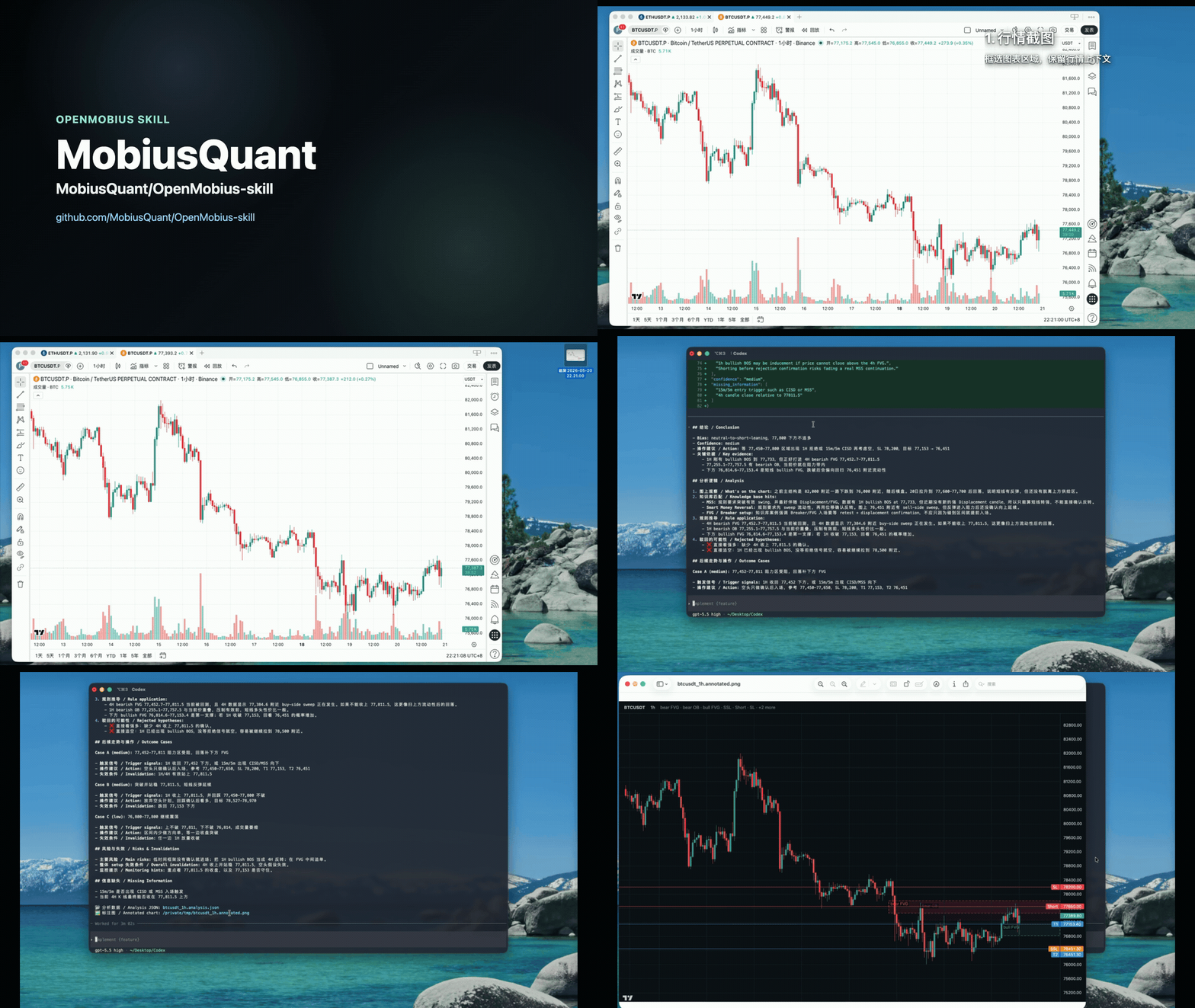
Works on Claude Code, Codex, OpenClaw, Hermes, Cursor, and WorkBuddy.
Drop this skill into your AI coding agent and ask trading questions in plain language. Knowledge Q&A is grounded inside the selected School/source scope. Supported current-market requests pass a capability gate before adding fresh, current-turn data and computed structure; unsupported routes stop instead of silently borrowing another School's analysis.
| You ask | The skill does |
|---|---|
| "What analysis models can I use?" | Reads the current capability registry and dynamically separates native market-analysis profiles, Q&A-only lenses, and knowledge categories; also reports strict / augment / compare, without fetching market data or presenting categories as analysis models |
| "What is Fair Value Gap, how to trade it?" | No selector means strict ICT/SMC; retrieves only attributable ICT/SMC knowledge and answers with cited rules |
| "Explain 中枢 using ChanLun only" | Uses the isolated 缠论 School projection; explicit selectors never silently fall back to ICT/SMC |
| "Explain Order Block using Wuyuan's SMC material only" | Hard-filters atomic evidence by both school=SMC and source=Teach-Wuyuan; an empty intersection fails closed |
| "Compare ICT and ChanLun definitions of market structure" | Runs separate, attributed Q&A branches; conflicting definitions remain separate |
| "Use SMC as primary and Wuyuan as a reference to analyze BTC 1h" | Uses augment: SMC alone controls bias and trade levels; Wuyuan evidence is clearly labelled supporting context |
| "Analyze BTC 1h using ChanLun" | Stops before market-data or chart work because no native ChanLun market analyzer exists; never relabels SMC output as ChanLun |
| Attach a BTCUSDT 1h chart + "analyze this" | After the route passes its capability gate, readable asset/timeframe data may be refreshed and cross-checked; if the supported route cannot identify them reliably, the result stays visual-only and discloses its limits |
| "How is BTC 1h looking?" (no chart) | Defaults to strict ICT/SMC, fetches current-turn data, runs the built-in SMC structural indicator, and generates a grounded chart unless the user opts out |
| "What's on BTC?" (user names a specific indicator) | Pass-through to the indicator API — no auto-fetch of indicators the user did not name |
| Paste a CSV of OHLCV | Preserves that snapshot, extracts structure locally, and never replaces it with a different live series merely to render a chart |
| "Generate a chart with my entry/SL/target" | Rendered chart via Playwright + lightweight-charts |
Quick start
OPENMOBIUS_SRC="$(mktemp -d "${TMPDIR:-/tmp}/openmobius-src.XXXXXX")"
git clone https://github.com/MobiusQuant/OpenMobius-skill.git "$OPENMOBIUS_SRC"
cd "$OPENMOBIUS_SRC"
python3 install.py --platform claude-code     # or codex / openclaw / hermes / cursor
# On Linux/macOS, `all` installs all five local-path hosts. WorkBuddy uses local ZIP import.

cd "${TMPDIR:-/tmp}"
rm -rf -- "$OPENMOBIUS_SRC"                    # ✓ exact mktemp directory only
On Windows, clone into a writable directory and run
py -3 install.py --platform claude-code (or use .\install.ps1).
The installer copies source files into ~/.claude/skills/openmobius-skill/
(or your chosen platform's skills dir), then in that directory:
- Creates
.venv/and installs dependencies - Downloads Playwright chromium (~280 MB, into your OS's user-global cache)
- Downloads the pinned
nomic-embed-text-v1.5weights (~547 MB / 522 MiB, into your HuggingFace cache) - Loads bundled canonical vectors and the verified release seed for independent School/evidence vectors, then builds and verifies all three collections. Only locally changed or missing documents are embedded and cached.
- Generates the platform-specific
SKILL.md - Runs a health check
Each installer-managed local copy is self-contained: it owns its own
.venv and _index. The clone is just a one-shot source bundle.
First run: dependency/model downloads plus seed-accelerated index build · Subsequent runs: unchanged records use the release seed or local embedding cache
After install, try capability discovery plus the default, scoped, and composed routes directly:
# Default: strict ICT/SMC
"What is Liquidity Sweep?"
"How is ETH 4h looking?"

# Discover the installed capabilities (no market-data request)
"What analysis models can I use?"

# Select an exact School or source
"Explain 中枢 using ChanLun only"
"Explain Order Block using Wuyuan's SMC material only"

# Compose or compare
"Compare ICT and ChanLun definitions of market structure"
"Use SMC as primary and Wuyuan as a reference to analyze BTC 1h"
Other Schools can scope knowledge Q&A when attributable material exists. Current-market analysis additionally requires a native analyzer; unsupported routes stop before market-data or chart work. Capability-discovery questions read the installed registry dynamically and report native market profiles, Q&A-only lenses, knowledge categories, and the available composition modes as separate concepts; they do not fetch market data or describe a category as an analysis model.
Prerequisites: Python 3.10+. See INSTALL.md for details.
Analysis lenses and routing
The skill resolves both the user's intent and analysis route before knowledge retrieval, market-data calls, or drawing:
User request
  → choose intent: Q&A / chart analysis / annotation / K-line analysis
  → resolve mode + lens + School/source scope
  → capability gate
  → scoped knowledge retrieval
  → supported market analyzer and fresh data, when required
  → grounded answer and chart, or an explicit capability-gap response
Default: when neither the current request nor an established conversation
route supplies a lens, School, source, exclusion, or composition mode, the
route is strict ICT/SMC. A current explicit selector overrides an inherited
preference and is never silently widened or replaced.
| Dimension | What it controls | Example |
|---|---|---|
| Lens/profile | The methodology allowed to interpret structure and form market conclusions | ict_smc; future native analyzers may add other lenses |
| School | The attributable knowledge boundary | ICT, SMC, 缠论, Wyckoff, Price Action |
| Source | A teacher, course, or material collection | Teach-Wuyuan; a source does not select a lens |
Composition modes
| Mode | Meaning | Behavior |
|---|---|---|
strict |
Use only the selected boundary | A single explicit selector is strict by default; without one, use ICT/SMC |
augment |
Use A as primary and B as supporting context | The primary lens alone owns bias, entry, stop, targets, and the primary chart; secondary contributions are labelled confirmation, challenge, or risk context |
compare |
Compare A and B independently | Supported for Q&A only in Phase 1; branches use equal queries and remain separately attributed |
Current capability boundary
| Selection | Knowledge Q&A | Market/chart/annotation |
|---|---|---|
| ICT and/or SMC | Supported | Supported by the native ICT/SMC structural analyzer |
| Other registered Schools/categories | Supported when attributable knowledge exists | Unsupported unless that School has a native analyzer |
| Exact source | Supported as an exact evidence scope and may intersect a School | Requires a separately selected, supported primary lens |
Multi-School compare |
Supported as isolated Q&A branches | Not supported in Phase 1; stops before data or artifact generation |
The complete installed taxonomy is deliberately broader than the native market-analysis models:
- Native market-analysis lens:
ICT,SMC(oneict_smcanalyzer). - Q&A knowledge lenses:
缠论,Price Action,Order Flow,Volume Analysis,Elliott Wave,Wyckoff,The Strat. - Knowledge categories, not analysis models:
Indicator Based,Risk Management,General,On-chain,Market Structure. - Evidence-only category:
Scalping; it occurs in attributable source evidence but is not a top-level canonical-card School.
Unknown selectors, empty strict scopes, empty School/source intersections,
missing exact-filter support, missing native analyzers, and market compare
requests fail closed when they affect a required strict or primary branch:
the skill explains the gap and does not fall back to canonical, another
School/source, or default ICT/SMC. In augment, an unavailable secondary may
be omitted or labelled knowledge-only while a supported primary continues.
Follow-up annotation inherits the prior analysis route. A new explicit School/source/profile requires re-evaluating the analysis; existing levels are not merely relabelled. See the full route contract and capability matrix for aliases, precedence, partial-support rules, and exact failure behavior.
Platform support
python3 install.py --platform
| Platform | Flag | Default path / setup route |
|---|---|---|
| Claude Code | --platform claude-code (default) |
~/.claude/skills/openmobius-skill/ |
| Codex | --platform codex |
~/.agents/skills/openmobius-skill/ |
| OpenClaw (Linux/macOS) | --platform openclaw |
/skills/openmobius-skill/ |
| Hermes (Linux/macOS) | --platform hermes |
/skills/market-data/openmobius-skill/ |
| Cursor | --platform cursor |
~/.cursor/skills/openmobius-skill/ |
| WorkBuddy | local ZIP import / marketplace | Skills → Add Skill → Upload Skill; published copies install from the marketplace |
| Auto-detect | --platform auto |
detects supported local host roots |
| All local hosts (Linux/macOS) | --platform all |
installs to the five local paths above; excludes WorkBuddy |
Each local-path platform install is fully self-contained (its own .venv,
its own _index). The nomic model and Playwright chromium live in your OS's
user-global cache, shared across platforms — so installing on N platforms
doesn't N× the download.
OPENCLAW_STATE_DIR and HERMES_HOME override the corresponding roots when
set. The current OpenClaw and Hermes adapters/manifests target Linux and
macOS; on Windows, select Claude Code, Codex, or Cursor explicitly instead of
using --platform all. Cursor Cloud Agents, remote SSH sessions, and other
remote environments do not receive local user skills from ~/.cursor/skills;
place the skill in the repository's .cursor/skills/openmobius-skill/ for
those environments.
WorkBuddy is not CodeBuddy. Its public documentation does not define a fixed
filesystem directory that a third-party installer can write to for automatic
discovery, so --platform all intentionally excludes it. Choose the workflow
that matches your goal:
| Goal | Official route |
|---|---|
| Import this repository's local package | In WorkBuddy, open Skills → Add Skill → Upload Skill, then drag or select the generated ZIP. WorkBuddy configures it after import. |
| Install a published Skill | Open Experts · Skills · Connectors → Skills → Skill Marketplace, then click the + on its card. |
| Publish a Skill for other users | Use the WorkBuddy Open Platform. Creation, ZIP parsing, review, and publication are separate from local import. |
Build this repository's local-import ZIP with:
python3 scripts/build_workbuddy_package.py \
  --output /tmp/openmobius-skill-workbuddy.zip
The WorkBuddy Skill format currently accepts .zip packages up to 3 MB. The
builder uses the conservative 3,000,000-byte boundary and fails before
replacing an existing artifact if the package is too large. Local installation
is complete only when the import succeeds and the Skill appears under
Installed. A successful Open Platform parse or submission does not by
itself mean that the Skill is installed locally or published in the marketplace.
--platform workbuddy --target-dir is available only for developer
staging and validation. It does not register a locally discoverable WorkBuddy
Skill and is not the normal installation route.
To fit that package-size boundary without discarding attributable knowledge, the ZIP uses a checksummed compact corpus that reconstructs all 2,144 School projections and all 18,645 exact-source evidence records. It supports lexical BM25/exact-alias retrieval with hard School and source filters using the system Python alone. A manifest binds the compact corpus, School registry, and alias map by size and SHA-256, allowing the standard retriever to run even when a read-only host forbids first-run lock-file creation. The canonical fused-card layer, vector index, embedding cache, and model seed are intentionally omitted; canonical and auto/hybrid/semantic routes fail closed in the WorkBuddy package. The ZIP does not bundle Python, create a virtual environment, or install packages. Script-backed features require Python 3.10+. WorkBuddy 4.6.3 and later can detect missing Python/Node.js from Settings and offer one-click installation; verify that the installed Python still meets this Skill's 3.10+ minimum. If no suitable Python launcher is available, script-backed knowledge/market operations must be reported unavailable. Q&A and text-market workflows need only the standard library, while PNG rendering and image annotation additionally require host-provided Playwright/Chromium or Pillow, respectively.
The implementation follows the common Agent Skills specification and each host's official documentation: Claude Code, Codex, OpenClaw, Hermes, Cursor, WorkBuddy local Skill guide, WorkBuddy Skill format/marketplace, WorkBuddy Open Platform, and WorkBuddy changelog.
Features
Knowledge base — 726 concepts + 1282 cases
Distilled from 300+ teaching videos and live lessons across 12 curated
source collections, cross-merged with model-audited term fusion and
content-level deduplication. Across concept and case cards there are 14
top-level School/category labels: ICT, SMC, Price Action, Indicator Based,
ChanLun (缠论), Risk Management, General, Order Flow, Volume Analysis/VSA,
Elliott Wave, Wyckoff, The Strat, On-chain, and Market Structure. The registry
exposes 15 retrievable labels in total: those 14 top-level labels plus the
non-canonical, source-evidence-derived Scalping category. Each concept card carries:
identification rules, trading
implications, common mistakes, related concepts, per-source definitions.
Each case card carries: market context, key observation, analysis steps,
lessons, and source time-range provenance. Retrieved via local ChromaDB +
multilingual nomic-embed-text-v1.5 — no API key needed for retrieval.
The index exposes three layers with different roles:
| Layer | Records | Role |
|---|---|---|
| Canonical | 2,008 | Backward-compatible fused exploration; never proof of strict School isolation |
| School | 2,144 | Exact School-scoped Q&A and grounding |
| Evidence | 18,645 | Atomic source scope and exact School/source/type intersections |
School and evidence content is included only when it can be safely attributed. Ambiguous cross-School fused rules are skipped and counted, not guessed. See knowledge-base architecture for the data model, registry, schemas, and rebuild process.
Each School/evidence record now has an embedding of its own scoped document;
vectors are cached by exact content hash and model identity, so incremental
updates embed only misses. v2 queries default to hybrid retrieval: BM25 and
semantic candidates are generated inside the hard-filtered scope and fused by
reciprocal rank, while exact canonical-term/alias matches remain first. Use
--search-mode lexical for a model-free search or --search-mode semantic for
the vector-only baseline.
Real-time data + 60+ indicators
Crypto (Binance, Bybit, OKX, Hyperliquid), China A-shares, Hong Kong stocks,
US stocks, forex. Each indicator carries built-in analysis dimensions
(summary_focus) that the agent reads to structure its answer rather than
dumping raw numbers.
Two chart-generation paths
| Path | Method | Output |
|---|---|---|
| Annotate user's image | PIL | Annotated copy preserving the original chart |
| Generate fresh chart | lightweight-charts in headless chromium | New K-lines + FVG/OB rectangles + sweep lines + swing markers |
Intent routing + analysis-profile routing
The SKILL.md description field triggers on natural-language questions. The
skill first identifies the user's intent, then resolves the independently
selected analysis profile before executing the workflow.
| Intent | Typical trigger | Workflow |
|---|---|---|
| Knowledge Q&A | Concept, definition, rule, or comparison without a chart/data request | Q&A |
| Chart analysis | An attached trading chart plus a request to analyze it | Analyze |
| Annotation | An explicit request to draw, or an annotation follow-up | Annotate |
| K-line analysis | Pasted OHLCV, or an asset + timeframe market request | K-lines |
Intent and analysis profile are separate: the same Q&A workflow can run in
strict, augment, or compare mode, while the capability gate decides
whether a requested market workflow has a native analyzer. An annotation
follow-up inherits the prior route; changing a selector explicitly causes a
fresh analysis rather than relabeling the previous result.
Roadmap
Knowledge base
- ICT/SMC coverage completion — Rounds 1–2 distilled the ICT trunk plus SMC supplements from 300+ teaching videos; upcoming rounds complete ICT sub-schools (Inner Circle Mentorship, Silver Bullet, Power of 3 variants) and full SMC coverage.
- Fundamental knowledge base — interpretation methodologies for news, policy reads, economic releases (CPI / NFP / FOMC) and earnings seasons.
- Multi-school coverage deepening — Wyckoff, VSA/Volume Analysis, Price Action, ChanLun (缠论), and other Schools are already retrievable; upcoming rounds deepen their coverage, provenance, and attribution quality.
- Native multi-school analyzers — knowledge scope is not the same as a
market-analysis engine. New School-native profiles and overlays will be
added before market
compareexpands beyond Q&A.
Indicators & tools
- Expanded SMC indicator coverage — the built-in SMC structural indicator covers BOS/CHoCH, Order Blocks, FVGs, equal H/L, premium- discount zones and strong/weak pivot labels today. Upcoming: Killzone windows, Stop Run / Inducement events, and per-event probability scoring as computable signals.
Access surfaces
- Non-CLI entry points — chat-bot integrations for users who don't run a coding agent, so the knowledge base is reachable without the CLI.
Architecture
OpenMobius-skill/
├── SKILL.md                          # main entry (LLM reads this)
├── SKILL.body.md                     # shared body (platform-neutral)
├── platforms/                        # per-platform frontmatter
│   └── claude-code.yaml / codex.yaml / openclaw.yaml / hermes.yaml / cursor.yaml / workbuddy.yaml
├── agents/
│   └── openai.yaml                      # Codex UI and invocation metadata
├── workflows/
│   ├── qna.md / analyze.md / annotate.md / klines.md  # intent workflows
│   └── analysis_profiles.md          # route contract + capability gate
├── scripts/                          # CLI tools
│   ├── kb_retrieve.py                # hard-scoped hybrid retrieval
│   ├── kb_klines.py                  # API client + feature extraction
│   ├── kb_draw_annotation.py         # PIL annotation
│   ├── kb_phase_b_to_c.py            # analysis JSON → annotated PNG
│   ├── build_knowledge_v2.py         # audit/export School + source-evidence records
│   ├── build_index.py                # build all three vector collections
│   ├── export_v2_embedding_seed.py   # publish verified native-vector shards
│   ├── build_workbuddy_package.py    # deterministic WorkBuddy local-import ZIP builder
│   ├── evaluate_retrieval.py         # reproducible retrieval benchmark
│   ├── kb_doctor.py                  # env health check
│   ├── chart_render/                 # lightweight-charts + headless chromium
│   └── _lib/                         # embedder + retriever
├── evals/                            # versioned retrieval cases + baseline reports
├── knowledge_base/                   # cards + registry + schemas + release seed
├── install.py                        # cross-platform installer
└── README.md / INSTALL.md
Update / Uninstall
# Update
python3 install.py --update
python3 install.py --update --rebuild-index    # also rebuild vector index

# Uninstall the entire self-contained platform install (.venv + index included)
python3 install.py --uninstall
python3 install.py --uninstall --platform all  # Linux/macOS: all five local hosts

# Full purge (also delete shared chromium + nomic caches — these may be
# used by other projects on your machine, so confirm before running)
python3 install.py --uninstall --purge --yes-i-know
--full is still accepted for backward compatibility, but is deprecated and
has no effect: standard uninstall already removes .venv and the vector index.
See INSTALL.md for all flags.
Troubleshooting
.venv/bin/python scripts/kb_doctor.py
Reports the state of: venv, deps, nomic model, vector index, CJK fonts, skill registration, API connectivity.
Common issues:
| Symptom | Fix |
|---|---|
| Chinese labels render as boxes | Install fonts-noto-cjk (Linux); macOS/Windows usually bundled |
| API request fails | Check network; see api.mobiusquant.ai/api/health |
| Skill not auto-invoking in Claude Code | Check ~/.claude/skills/openmobius-skill exists. Claude Code watches an existing skills directory live; if that top-level directory was newly created, start a new session. |
| Skill missing in Codex | Check ~/.agents/skills/openmobius-skill exists; restart Codex |
| Skill missing in OpenClaw or Hermes | Check the effective OPENCLAW_STATE_DIR or HERMES_HOME, then run kb_doctor.py from that installed copy |
| Cursor Cloud/remote cannot see the user skill | Copy/install it under the repository's .cursor/skills/openmobius-skill/; local ~/.cursor/skills is not synchronized |
| WorkBuddy cannot discover a local folder | Do not guess a local path. Build the ZIP, then use Skills → Add Skill → Upload Skill and select it; confirm it appears under Installed |
chroma.sqlite3 not found |
.venv/bin/python scripts/build_index.py |
| ChanLun/Wyckoff market analysis stops | These Schools are retrievable for Q&A but do not yet have a native market analyzer; use Q&A or a supported lens |
Market compare stops before fetching data |
Phase 1 supports compare for Q&A only; this is the capability gate working as designed |
License
Apache 2.0 — see LICENSE. Third-party components: see ATTRIBUTION.md.
Contributing
Issues and PRs welcome at .
Built for AI coding agents · Apache 2.0