JadeAI
AI-Powered Smart Resume Builder
Build professional resumes with drag-and-drop editing, real-time AI optimization, 50 templates, and multi-format export.

Community
Join our groups for discussion and support:
Recent Updates
v0.5.0 · Desktop Client
- Desktop client released: macOS (Apple Silicon / Intel) and Windows x64 installers — zero config, no account, data stays local
- Built-in update notice that downloads the installer for your machine
- Web and desktop now ship together: one tag produces both the Docker image and all three installers
- Fixed PDF export failing after the container had been up for a while (#95)
- Resume items can be moved up/down and inserted above (#89, thanks @Silas-Zhu)
v0.3.4 · Brand Color System & Theme Switching
- Introduced semantic
--brand-*CSS tokens; replaced hardcodedpink-*across 60+ files - New brand switcher in the user menu with three presets: Mint (default), Blue, Pink
- SSR-safe anti-flicker hydration; legacy values auto-migrated via
localStorage - Added a Mint resume preset to the theme editor
- Export pipelines (PDF / HTML / DOCX) now read from
src/lib/brand-constants.ts
v0.3.3 · Mobile Experience & Interview Report Stability
- Mobile-friendly template preview and bottom action bars for preview/share pages
- Fixed mobile scroll: canvas/preview roots use
h-fullinstead offlex-1 - Improved stability of interview report generation
v0.3.2 · Runtime Environment Variables
- Removed all
NEXT_PUBLIC_*build-time variables in favor of runtime env
v0.3.1 · Auth Runtime Flag
- Changed
NEXT_PUBLIC_AUTH_ENABLEDto runtimeAUTH_ENABLED
Screenshots
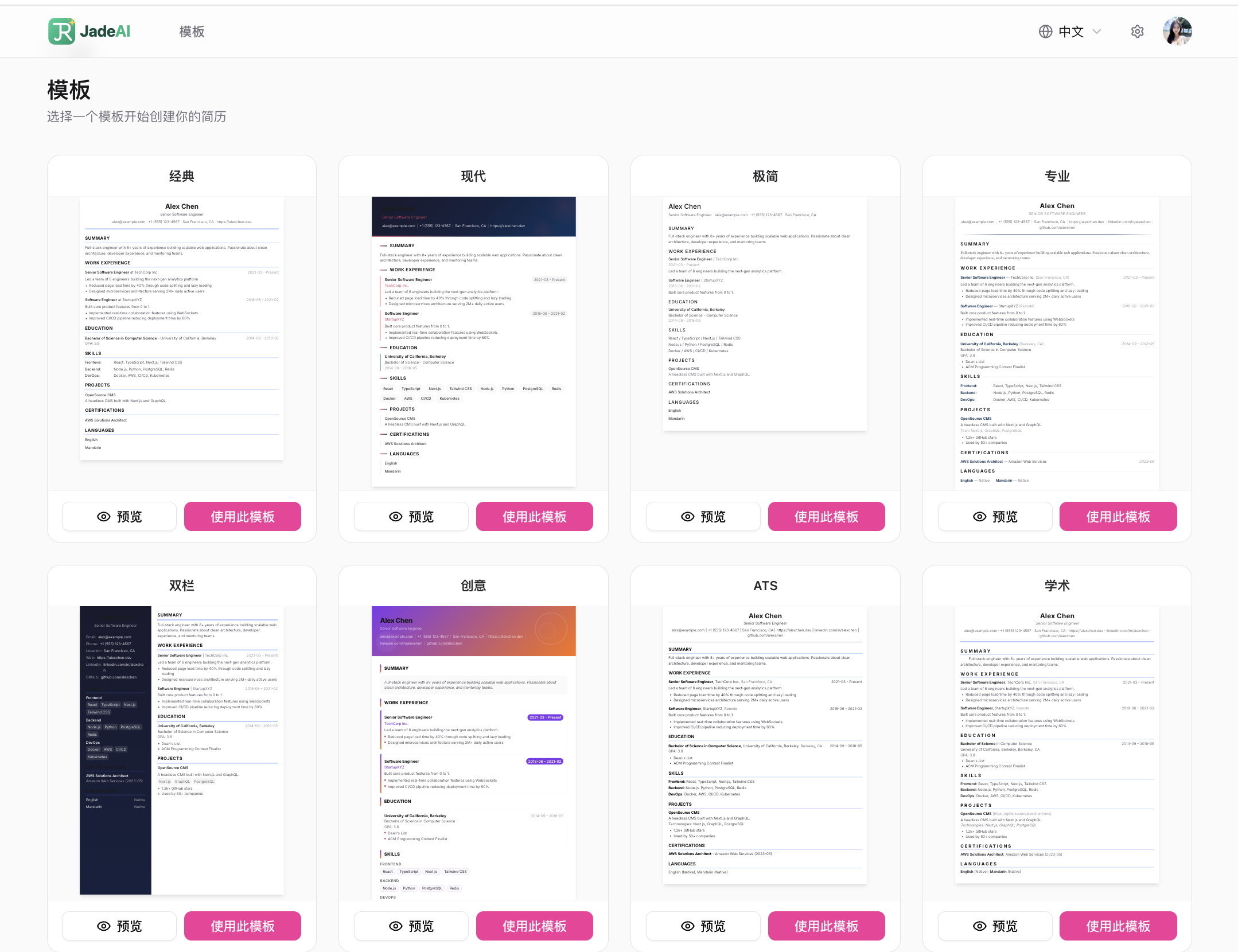
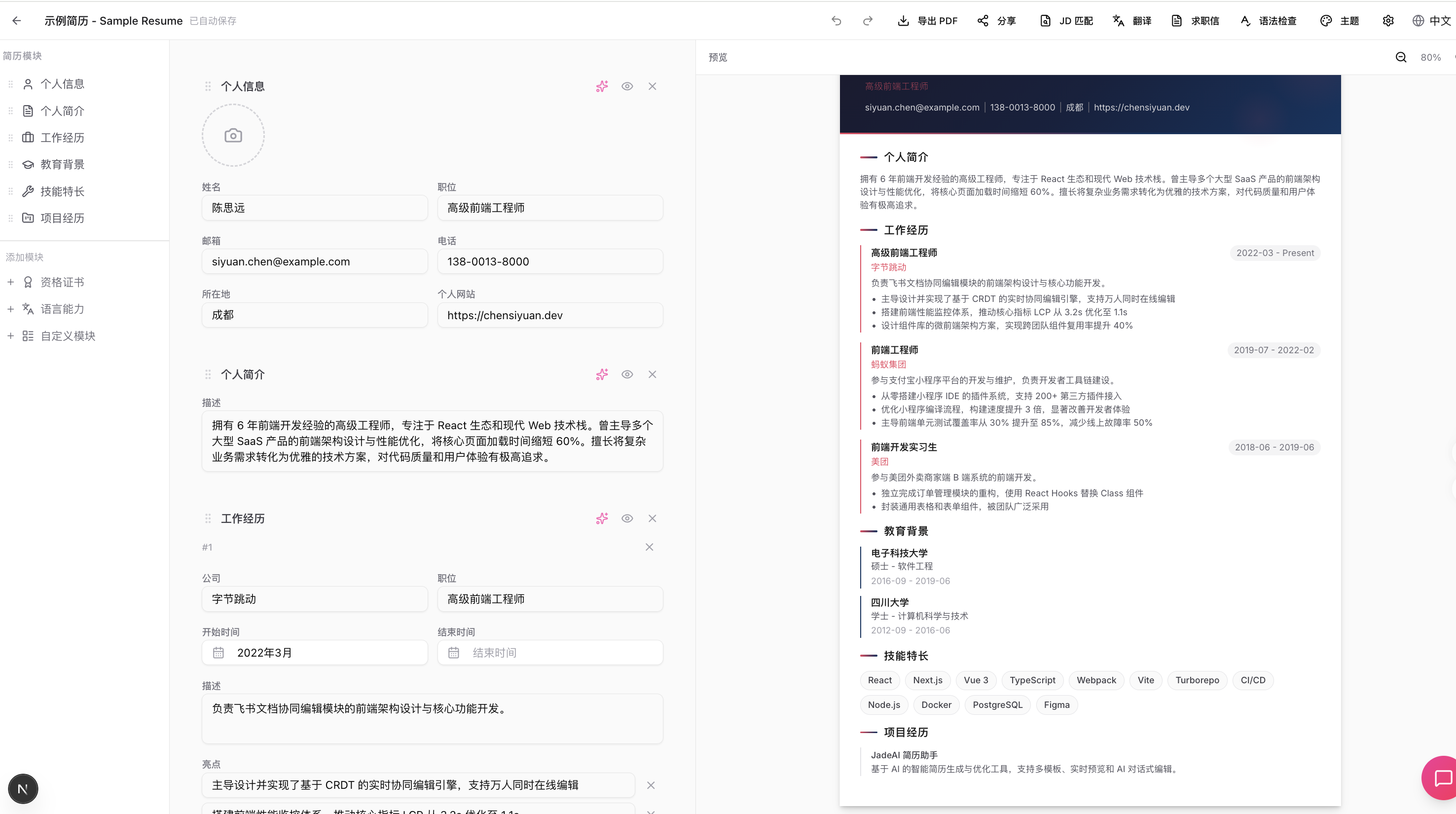
| Template Gallery | Resume Editor |
|---|---|
 |
 |
| AI Resume Generation | AI Resume Parsing (Image) |
|---|---|
 |
 |
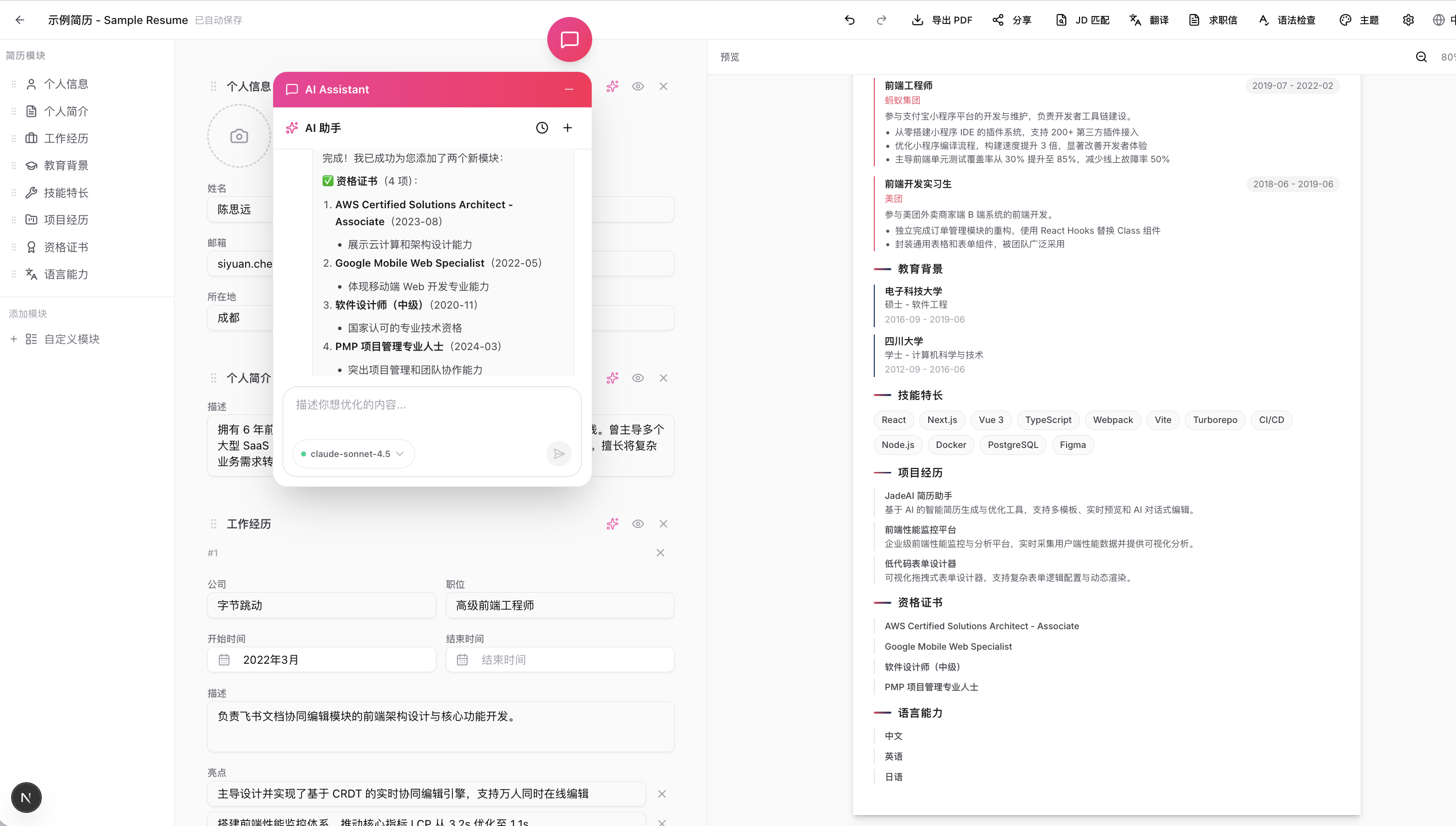
| AI Optimization | Grammar Check |
|---|---|
 |
 |
| Grammar Auto-Fix | JD Match Analysis |
|---|---|
 |
 |
| Multi-Format Export | Share Link |
|---|---|
 |
 |
| Shared Resume Page | AI Professional Photo |
|---|---|
 |
 |
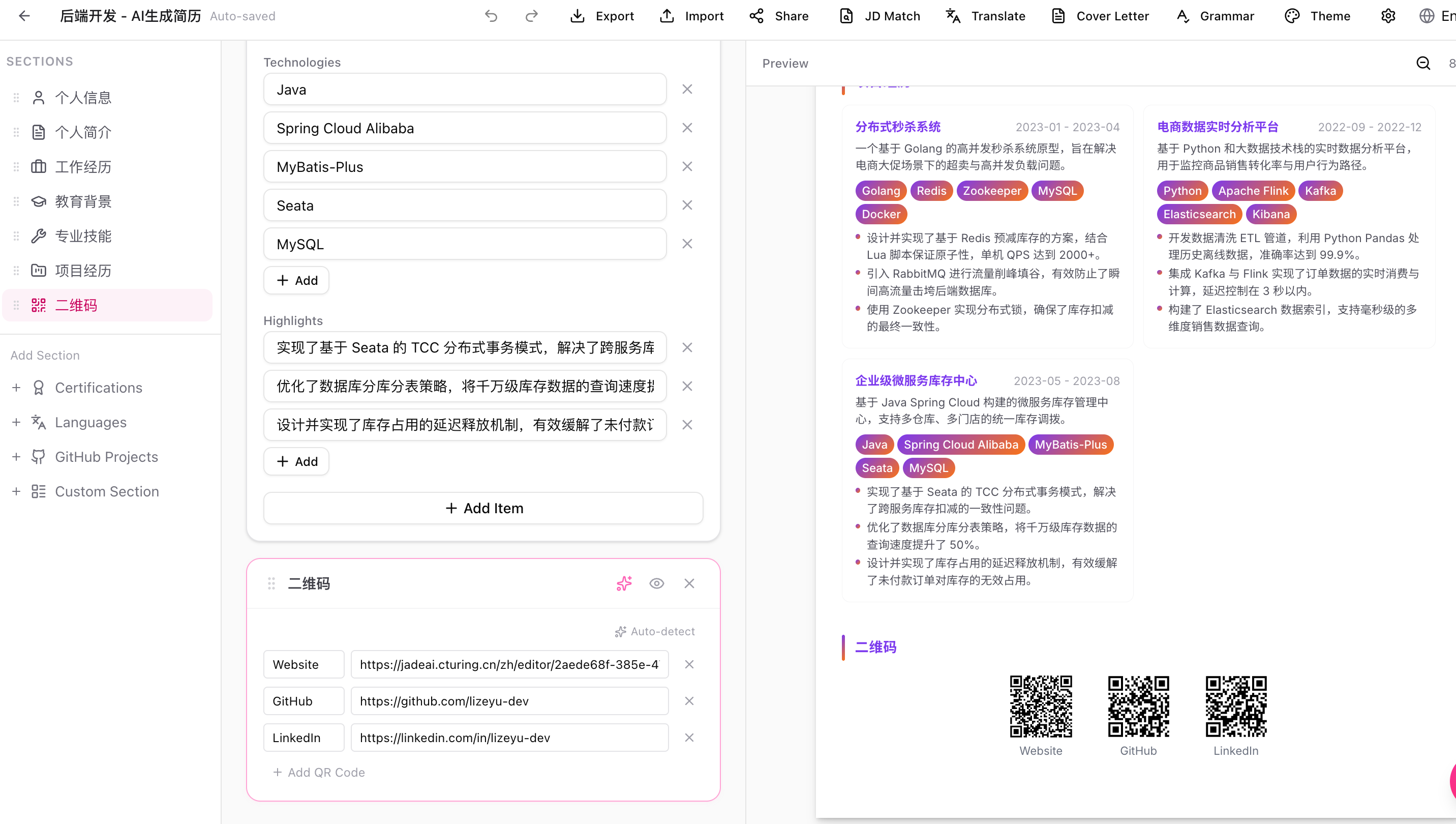
| QR Code Section |
|---|
 |
| Interview Setup | Mock Interview |
|---|---|
 |
 |
| Interview List | Interview Report |
|---|---|
 |
 |
Deployment Video
Watch the full deployment walkthrough on Bilibili:

Features
Resume Editing
- Drag & Drop Editor — Visually arrange and reorder resume sections and items
- Inline Editing — Click any field to edit directly on the canvas
- 50 Professional Templates — Classic, Modern, Minimal, Creative, ATS-Friendly, Timeline, Nordic, Swiss, and more
- Theme Customization — Colors, fonts, spacing, and margins with live preview
- Undo / Redo — Full edit history (up to 50 steps)
- Auto Save — Configurable interval (0.3s–5s), with manual save option
- Markdown Support — Use Markdown syntax in text fields to format content (e.g.,
**bold**for bold text)
Markdown Formatting
The following resume sections support Markdown syntax:
| Section | Supported Fields |
|---|---|
| Summary | Content text |
| Work Experience | Description, Highlights |
| Education | Highlights |
| Projects | Description, Highlights |
| Custom Section | Description |
| Languages | Description |
| GitHub | Description |
Supported syntax:
**bold text**    → bold
`code text`      → inline code
- item           → bullet list
Skills, Certifications, and Personal Info fields do not support Markdown.
AI Capabilities
- AI Chat Assistant — Conversational AI integrated in the editor, with multi-session support and persistent history
- AI Resume Generation — Generate a complete resume from job title, experience, and skills
- Resume Parsing — Upload an existing PDF or image, AI extracts all content automatically
- JD Match Analysis — Compare resume against a job description: keyword matching, ATS score, and improvement suggestions
- Cover Letter Generation — AI-tailored cover letter based on resume and JD, with tone selection (formal / friendly / confident)
- Grammar & Writing Check — Detect weak verbs, vague descriptions, and grammar issues; returns a quality score
- Translation — Translate resume content across 10 languages while preserving technical terms
- Flexible AI Provider — Supports OpenAI, Anthropic, and any OpenAI-compatible endpoint (such as OrcaRouter, which exposes 200+ models behind one key); each user configures their own key in-app
Mock Interview
- JD-Based Interview Simulation — Paste a job description, AI plays different interviewer roles in sequence
- 6 Preset Interviewers — HR, Technical, Scenario, Behavioral, Project Deep Dive, Leader — each with unique personality and questioning style
- Custom Interviewers — Create your own interviewer with custom focus areas and style
- Smart Follow-ups — AI adapts questions based on answer quality, probing deeper when needed
- Interview Controls — Skip questions, request hints, mark for review, pause/resume
- Detailed Report — Per-question scoring, competency radar chart, improvement plan with resources
- History Comparison — Track score trends and dimension progress across interviews
- PDF & Markdown Export — Export interview reports for offline review
Export & Sharing
- Multi-Format Export — PDF (Puppeteer + Chromium), Smart One-Page PDF (auto-fit to single page), DOCX, HTML, TXT, JSON
- JSON Import — Import a previously exported JSON file to restore or create a resume; supported both in the editor (overwrite current) and on the dashboard (create new)
- Link Sharing — Token-based shareable links with optional password protection
- View Counter — Track how many times a shared resume has been viewed
Management
- Multi-Resume Dashboard — Grid and list views, search, sort (by date, name)
- Import from JSON — Create a new resume from a JSON export directly on the dashboard
- Duplicate & Rename — Quick resume management actions
- Interactive Tours — Step-by-step onboarding for first-time users
Other
- Bilingual UI — Full Chinese (zh) and English (en) interface
- Dark Mode — Light, dark, and system theme support
- Flexible Auth — Google OAuth or browser fingerprint (zero-config)
- Local SQLite Storage — Zero-config, file-based database
Tech Stack
| Layer | Technology |
|---|---|
| Framework | Next.js 16 (App Router, Turbopack) |
| UI | React 19, Tailwind CSS 4, shadcn/ui, Radix UI |
| Drag & Drop | @dnd-kit |
| State | Zustand |
| Database | Drizzle ORM (SQLite) |
| Auth | NextAuth.js v5 + FingerprintJS |
| AI | Vercel AI SDK v6 + OpenAI / Anthropic |
| Puppeteer Core + @sparticuz/chromium | |
| i18n | next-intl |
| Validation | Zod v4 |
Desktop Client
Try the desktop app — nothing to deploy, no account, no network. Download, install, start writing.
It runs the same application as the web version — all 50 templates, AI polish, JD matching, mock interviews, every export format. The difference is only where it runs:
- Zero config — no Docker, no database, no
AUTH_SECRET. Install and open. - No account — one local user, no sign-in, no fingerprinting
- Your data stays put — resumes live in a SQLite file on your machine and never reach a server
- Your own AI key — set it in Settings → AI; requests go straight to the provider you configured
- Update notices — a small panel appears when a new version is out and downloads the installer built for your machine
The only outbound request it makes is asking GitHub whether a newer version exists, and that can be turned off (see Updates below).
Download
Grab the build for your system from the latest release:
| Platform | File |
|---|---|
| macOS (Apple Silicon) | JadeAI-*-mac-arm64.dmg |
| macOS (Intel) | JadeAI-*-mac-x64.dmg |
| Windows (x64) | JadeAI-*-win-x64-setup.exe |
First launch
The installers carry an ad-hoc signature — valid, but anonymous. There is no Apple Developer ID and no notarization, so the OS blocks the first launch. This is expected.
macOS. Run this once, then open the app normally:
xattr -dr com.apple.quarantine /Applications/JadeAI.app
Or via the GUI: after the launch is blocked, open System Settings → Privacy & Security and click Open Anyway near the bottom.
Do not rely on right-click → Open. macOS 15 removed that bypass for un-notarized apps; it no longer does anything.
If you see "JadeAI is damaged and can't be opened" rather than "cannot be verified", the download is incomplete or was tampered with — re-download it. A correctly built release reports "cannot be verified", which is clearable.
Windows. On the SmartScreen prompt, click More info → Run anyway.
Where your data lives
| Platform | Path |
|---|---|
| macOS | ~/Library/Application Support/JadeAI/ |
| Windows | %APPDATA%\JadeAI\ |
jade.db is the SQLite database; jade-settings.json holds window state and
preferences. Uninstalling the app does not delete either — remove the folder to
erase your data.
Updates
On launch the app asks GitHub once whether a newer version exists. If there is one, a small panel appears in the corner of the window — not a modal dialog — offering to download the installer built for your machine, so you don't pick between three files. Progress shows in the panel; when it finishes you can open the installer or reveal it in your file manager. It can be collapsed, dismissed, or silenced for that version.
It stops there: installing is still a manual step (drag to Applications, or run
the .exe). Silent install would need Squirrel, which refuses an ad-hoc signed
app. Your data is untouched by an update.
This is the only outbound request the app makes. To turn it off, set
"updateCheckEnabled": false in jade-settings.json (see the paths above) and
restart.
Getting Started
Docker (Recommended)
# Generate a secret key first
openssl rand -base64 32

docker run -d -p 3000:3000 \
  -e AUTH_SECRET= \
  -v jadeai-data:/app/data \
  twwch/jadeai:latest
Open http://localhost:3000. Database auto-migrates and seeds on first start.
AUTH_SECRETis required for session encryption. Generate one withopenssl rand -base64 32.
AI Configuration: No server-side AI env vars needed. Each user configures their own API Key, Base URL, and Model in Settings > AI within the app. If you don't have a provider key yet, OrcaRouter gives you 200+ models through a single OpenAI-compatible endpoint — see AI provider setup.
With Google OAuth
docker run -d -p 3000:3000 \
  -e AUTH_ENABLED=true \
  -e AUTH_SECRET=your-secret \
  -e GOOGLE_CLIENT_ID=xxx \
  -e GOOGLE_CLIENT_SECRET=xxx \
  -v jadeai-data:/app/data \
  twwch/jadeai:latest
Local Development
Prerequisites
- Node.js 18+
- pnpm 9+
Installation
git clone https://github.com/twwch/JadeAI.git
cd JadeAI

pnpm install
cp .env.example .env.local
Configure Environment
Edit .env.local:
# Auth (defaults to fingerprint mode, no config needed)
AUTH_ENABLED=false
AI Configuration: No server-side env vars needed. Each user configures their own API Key, Base URL, and Model in Settings > AI within the app. See AI provider setup for using OrcaRouter to access 200+ models with one key.
See .env.example for all available options (Google OAuth, custom SQLite path, etc.).
Initialize Database & Run
# Generate and run migrations
pnpm db:generate
pnpm db:migrate

# (Optional) Seed with sample data
pnpm db:seed

# Start dev server
pnpm dev
Open http://localhost:3000.
AI Provider Setup
All AI features (chat, resume generation, JD matching, mock interview, translation…) need an API key. JadeAI never stores keys on the server — you fill them in under Settings > AI in the app, and they stay in your browser's local storage.
Any OpenAI-compatible endpoint works. Point it at OpenAI, Anthropic, a self-hosted gateway, or a router.
Using OrcaRouter (200+ models, one key)
OrcaRouter is an OpenAI-compatible AI gateway: one key gives you access to 200+ models (OpenAI, Anthropic, Gemini, DeepSeek, Qwen and more) at provider pricing with no per-token markup, plus automatic failover between providers. Handy if you'd rather not sign up with every vendor separately, or want to switch models inside JadeAI without swapping keys.
- Register at orcarouter.ai (free tier, no credit card) and create an API key.
- In JadeAI, open Settings > AI and fill in:
| Field | Value |
|---|---|
| Base URL | https://api.orcarouter.ai/v1 |
| API Key | your OrcaRouter key (sk-...) |
| Model | any model ID from the model list |
- Save, then use any AI feature in the editor.
To use OpenAI or Anthropic directly instead, just fill in that provider's base URL, key, and model ID in the same panel.
Environment Variables
| Variable | Required | Default | Description |
|---|---|---|---|
AUTH_SECRET |
Yes | — | Secret key for session encryption |
SQLITE_PATH |
No | ./data/jade.db |
SQLite database file path |
AUTH_ENABLED |
No | false |
Enable Google OAuth (true) or use fingerprint mode (false) |
JADE_RUNTIME |
No | — | Set to desktop for single local-user mode (skips fingerprint and NextAuth; the database has a single user with id local) |
GOOGLE_CLIENT_ID |
When OAuth | — | Google OAuth client ID |
GOOGLE_CLIENT_SECRET |
When OAuth | — | Google OAuth client secret |
APP_NAME |
No | JadeAI |
Application display name |
DEFAULT_LOCALE |
No | zh |
Default language: zh or en |
Scripts
| Command | Description |
|---|---|
pnpm dev |
Start dev server with Turbopack |
pnpm build |
Production build |
pnpm start |
Start production server |
pnpm lint |
Run ESLint |
pnpm type-check |
TypeScript type checking |
pnpm db:generate |
Generate Drizzle migrations |
pnpm db:migrate |
Execute database migrations |
pnpm db:studio |
Open Drizzle Studio (database GUI) |
pnpm db:seed |
Seed database with sample data |
Project Structure
src/
├── app/                        # Next.js App Router
│   ├── [locale]/               # i18n routes (/zh/..., /en/...)
│   │   ├── dashboard/          # Resume list & management
│   │   ├── editor/[id]/        # Resume editor
│   │   ├── preview/[id]/       # Full-screen preview
│   │   ├── templates/          # Template gallery
│   │   └── share/[token]/      # Public shared resume viewer
│   └── api/
│       ├── ai/                 # AI endpoints
│       │   ├── chat/           #   Streaming chat with tool calls
│       │   ├── generate-resume/#   AI resume generation
│       │   ├── jd-analysis/    #   JD match analysis
│       │   ├── grammar-check/  #   Grammar & writing check
│       │   ├── cover-letter/   #   Cover letter generation
│       │   ├── translate/      #   Resume translation
│       │   └── models/         #   List available AI models
│       ├── resume/             # Resume CRUD, export, parse, share
│       ├── share/              # Public share access
│       ├── user/               # User profile & settings
│       └── auth/               # NextAuth handlers
├── components/
│   ├── ui/                     # shadcn/ui base components
│   ├── editor/                 # Editor canvas, sections, fields, dialogs
│   ├── ai/                     # AI chat panel & bubble
│   ├── preview/templates/      # 50 resume templates
│   ├── dashboard/              # Dashboard cards, grid, dialogs
│   └── layout/                 # Header, theme provider, locale switcher
├── lib/
│   ├── db/                     # Schema, repositories, migrations, adapters
│   ├── auth/                   # Auth configuration
│   └── ai/                     # AI prompts, tools, model config
├── hooks/                      # Custom React hooks (7 hooks)
├── stores/                     # Zustand stores (resume, editor, settings, UI, tour)
└── types/                      # TypeScript type definitions
Templates
JadeAI includes 50 professionally designed resume templates covering a wide range of styles and industries:
View all 50 templates
| # | Template | # | Template | # | Template |
|---|---|---|---|---|---|
| 1 | Classic | 18 | Clean | 35 | Material |
| 2 | Modern | 19 | Bold | 36 | Medical |
| 3 | Minimal | 20 | Timeline | 37 | Luxe |
| 4 | Professional | 21 | Nordic | 38 | Retro |
| 5 | Two-Column | 22 | Gradient | 39 | Card |
| 6 | ATS | 23 | Magazine | 40 | Rose |
| 7 | Academic | 24 | Corporate | 41 | Teacher |
| 8 | Creative | 25 | Consultant | 42 | Coder |
| 9 | Elegant | 26 | Swiss | 43 | Zigzag |
| 10 | Executive | 27 | Metro | 44 | Neon |
| 11 | Developer | 28 | Architect | 45 | Scientist |
| 12 | Designer | 29 | Japanese | 46 | Blocks |
| 13 | Startup | 30 | Artistic | 47 | Ribbon |
| 14 | Formal | 31 | Sidebar | 48 | Engineer |
| 15 | Infographic | 32 | Finance | 49 | Watercolor |
| 16 | Compact | 33 | Berlin | 50 | Mosaic |
| 17 | Euro | 34 | Legal |
API Reference
View all API endpoints
Resume
| Method | Endpoint | Description |
|---|---|---|
GET |
/api/resume |
List all resumes for current user |
POST |
/api/resume |
Create a new resume |
GET |
/api/resume/[id] |
Get resume detail with all sections |
PUT |
/api/resume/[id] |
Update resume metadata or sections |
DELETE |
/api/resume/[id] |
Delete a resume |
POST |
/api/resume/[id]/duplicate |
Duplicate a resume |
GET |
/api/resume/[id]/export |
Export resume (pdf, docx, html, txt, json) |
POST |
/api/resume/parse |
Parse resume from PDF or image upload |
POST |
/api/resume/[id]/share |
Create share link |
GET |
/api/resume/[id]/share |
Get share settings |
DELETE |
/api/resume/[id]/share |
Remove share link |
Share
| Method | Endpoint | Description |
|---|---|---|
GET |
/api/share/[token] |
Access a publicly shared resume |
AI
| Method | Endpoint | Description |
|---|---|---|
POST |
/api/ai/chat |
Stream chat messages with resume context |
GET |
/api/ai/chat/sessions |
List chat sessions for a resume |
POST |
/api/ai/chat/sessions |
Create a new chat session |
GET |
/api/ai/chat/sessions/[id] |
Get paginated messages for a session |
DELETE |
/api/ai/chat/sessions/[id] |
Delete a chat session |
POST |
/api/ai/generate-resume |
Generate resume from job title & experience |
POST |
/api/ai/jd-analysis |
Analyze resume against a job description |
POST |
/api/ai/grammar-check |
Check grammar and writing quality |
POST |
/api/ai/cover-letter |
Generate a tailored cover letter |
POST |
/api/ai/translate |
Translate resume content |
GET |
/api/ai/models |
List available AI models |
User
| Method | Endpoint | Description |
|---|---|---|
GET |
/api/user |
Get current user profile |
PUT |
/api/user |
Update user profile |
GET |
/api/user/settings |
Get user settings |
PUT |
/api/user/settings |
Update user settings |
Contributing
Contributions are welcome! Here's how to get started:
- Fork the repository
- Create a feature branch:
git checkout -b feat/your-feature - Commit your changes:
git commit -m 'feat: add your feature' - Push to the branch:
git push origin feat/your-feature - Open a Pull Request
FAQ
How does AI configuration work?
JadeAI does not require server-side AI API keys. Each user configures their own AI provider (OpenAI, Anthropic, or any OpenAI-compatible endpoint), API key, and model in Settings > AI within the app. API keys are stored in the browser's local storage and are never sent to the server for storage.
If you want a single key that covers 200+ models, use OrcaRouter with Base URL https://api.orcarouter.ai/v1. Full steps in AI provider setup.
How does authentication work without OAuth?
When AUTH_ENABLED=false (default), JadeAI uses browser fingerprinting via FingerprintJS. A unique fingerprint ID is generated for each browser and used as the user identifier. No login screen is shown — users can start building resumes immediately.
How is PDF export implemented?
PDF export uses Puppeteer Core with @sparticuz/chromium. Each of the 50 templates has a dedicated server-side export handler that renders the resume to high-fidelity PDF. DOCX, HTML, TXT, and JSON exports are also supported.