
HASS.Agent
HASS.Agent is a Windows-based client (companion) application for Home Assistant, developed in .NET 6.
Click here to download the latest installer.
C# or Python developer? Please read this: lab02-research.org/2023-04-01-help-wanted
HASS.Agent is in need of your help! :heart:
Agora o HASS.Agent está em português do Brasil para brasileiros e usuários de língua portuguesa!
Clique aqui para baixar o instalador mais recente com a tradução! Obrigado @LeandroIssa :)
HASS.Agent is completely free, and will always stay that way without restrictions.
However, developing and maintaining this tool (and everything that surrounds it) takes up a lot of time. Like most developers, I run on caffeïne - so a cup of coffee is always very much appreciated!
 |
 |
 |
|---|
Contents
- Sponsors
- Why?
- Functionality
- Screenshots
- Installation
- Help and Documentation
- Articles
- What it's not
- Issue Tracker
- Helping Out
- Wishlist
- Credits and Licensing
- Legacy
Sponsors
I'd like to thank everyone that's been donating! It's not always easy to pick up work for HASS.Agent (next to a full time job), but people taking the time to donate really motivates a lot. It says that you enjoy the work I've been putting in, and makes the trouble worthwhile :)
A big big thank you to the monthly sponsors, you absolutely rock :heart:




Why?
The main reason I built this is that I wanted to receive notifications on my PC, including images, and to quickly perform actions (e.g. to toggle a lamp). There weren't any software-based solutions for this, so I set out to build one myself.
Functionality
Summary of the core functions:
-
Notifications: receive notifications, show them using Windows builtin toast popups, and optionally attach images. Supports actionable notifications: add buttons so you can easily interact with Home Assistant, without having to open anything.
- This requires the installation of the HASS.Agent integration.
-
Media Player: use HASS.Agent as a mediaplayer device: see and control what's playing and send text-to-speech.
- This requires the installation of the HASS.Agent integration.
-
Quick Actions: use a keyboard shortcut to quickly pull up a command interface, through which you can control Home Assistant entities - or, assign a keyboard shortcut to individual Quick Actions for even faster triggering.
-
Commands (currently 24): control your PC (or other Windows based device) through Home Assistant using custom- or built-in commands.
-
Sensors (currently 37): send your PC's sensors to Home Assistant to monitor every aspect of your device.
-
WebView: quickly show any website, anywhere - no browser required, for instance a HA dashboard.
-
Satellite Service: use the service to collect sensordata and execute commands, even when you're not logged in.
-
All entities are dynamically acquired from your Home Assistant instance.
-
Commands and sensors are automatically added to your Home Assistant instance.
Screenshots
Notification examples:

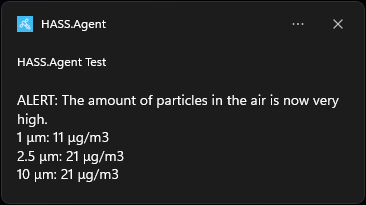
WebView example, showing a dashboard when right-clicking the tray icon:

This is the Quick Action window you'll see when using the hotkey. This window automatically resizes to the amount of buttons you've added:
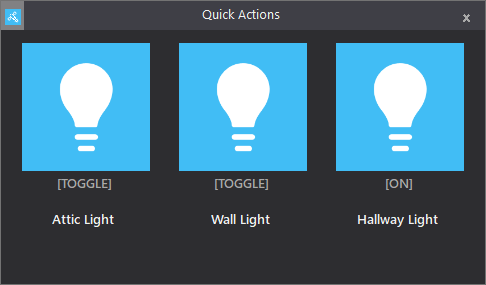
You can easily configure a new Quick Action, HASS.Agent will fetch your entities for you:

The sensors configuration screen:
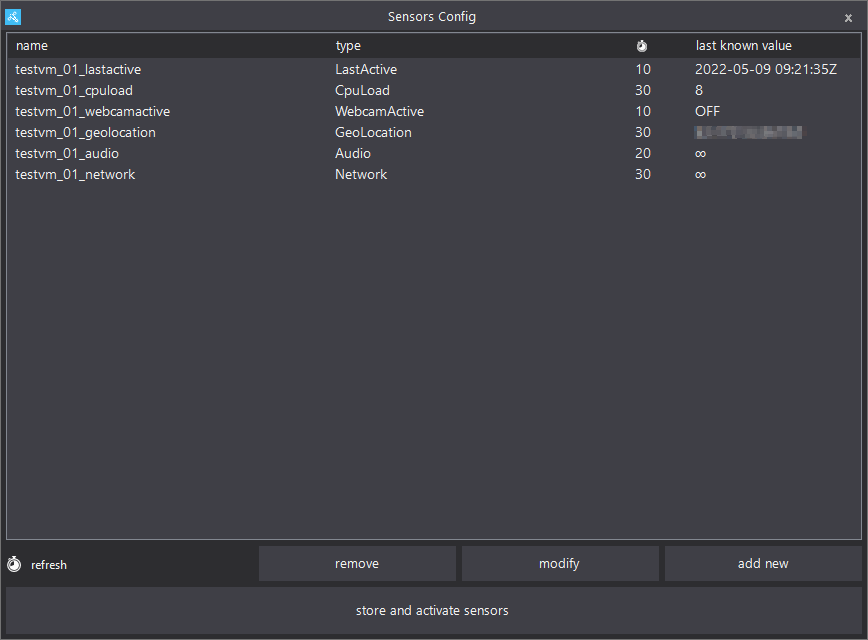
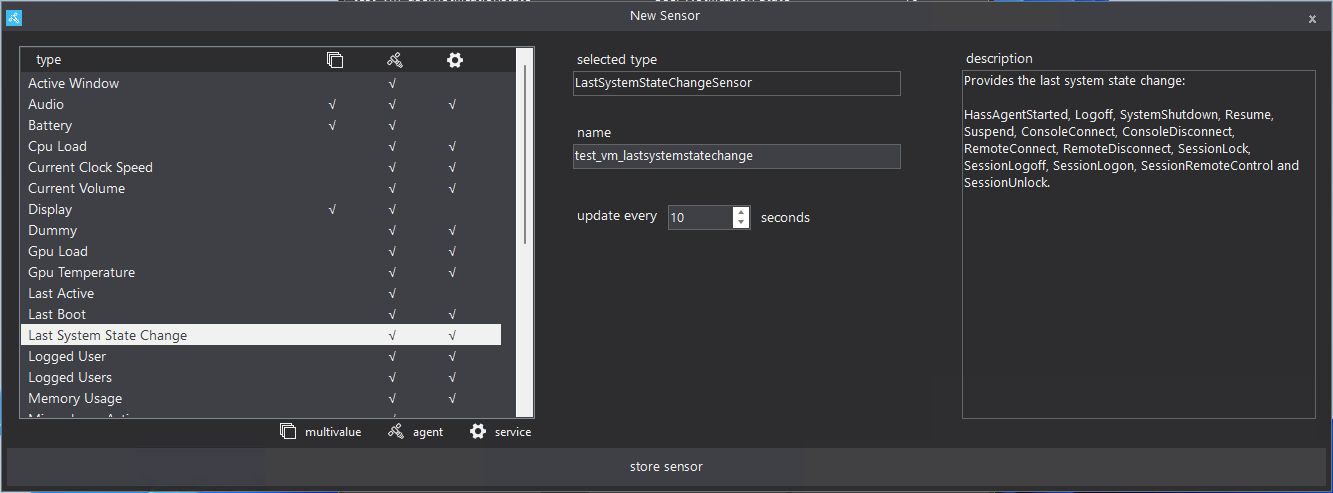
Adding a new sensor is just as easy:
Easily manage the satellite service through HASS.Agent:

You'll be guided through the configuration options during onboarding:

For more, check the screenshots page in the docs.
Installation
Installing HASS.Agent is easy; just download the latest installer, run it and you're done! The installer is signed and won't download or do weird stuff - it just places everything where it should, and launches with the right parameter.
After installing, the onboarding process will help you get everything configured, step by step. If you want an introduction into HASS.Agent, be sure to read the introduction docs.
Click here to download the latest installer
If you want to install manually, there are .zip packages available for every release. Read the manual for more info.
Help and Documentation
Stuck while installing or using HASS.Agent, need some help integrating the sensors/commands or have a great idea for the next version? There are a few channels through which you can reach out:
-
Github Tickets: Report bugs, feature requests, ideas, tips, ..
-
Documentation: Installation, configuration and usage documentation, as well as examples.
-
LAB02 Research Site: Release info, development backstories, misc. posts.
-
Discord: Get help with setting up and using HASS.Agent, report bugs or just talk about whatever.
-
Home Assistant forum: Bit of everything, with the addition that other HA users can help as well.
Starting from zero, and want to learn what HASS.Agent's about and how to start? Be sure to check the introduction article, and optionally the command basics.
EverythingSmartHome's youtube video is a great guide as well: Control Your Windows PC With Home Assistant!
If you want to help with the development of HASS.Agent, check out the Helping Out section for (translating) info.
Articles
Liam Alexander Colman from Home Assistant Guide was kind enough to write an article about HASS.Agent: Integrate Home Assistant with Windows using HASS.Agent. The website's full of useful articles, worth having a look :)
Youtuber EverythingSmartHome made a great video about HASS.Agent: Control Your Windows PC With Home Assistant!. I recommend having a look at his other videos as well, great stuff!
What it's not
A Linux/macOS client!
This question comes up a lot, understandably. However it's currently focussed on being a Windows-based client. Even though .NET 6 allows for Linux/macOS development, it's not as easy as pressing a button. The interface would have to be redesigned from the ground up, sensors and commands would need multiple codebases for each OS, testing would take way more time, every OS handles notifications differently, etc.
Since this is a sparetime project, next to a fulltime job, it's just not realistic. I'd love to tinker with it in the future, perhaps as a testcase for Microsoft's new MAUI platform, but it won't happen anytime soon. By focussing on Windows, I can make sure it really excels there instead of being meh everywhere.
You can use the official companion app for macOS, or IoPC which runs on Linux. Note: I haven't tested either.
Issue Tracker
To centrally manage all issues (community provided, GitHub tickets, and things I come up with), the HASS.Agent project uses JetBrain's YouTrack platform.
There you can see all open issues (bugs, cosmetics, nice-to-haves, etc), and which issues are currently worked on. It's read-only, please use GitHub to post tickets because that's where users will look first :)
Helping Out
The best way to help out is to test as much as you can (or even join the beta program), and report any weird or failing behavior by opening a ticket.
Same goes for sharing ideas for new (or improved) functionality! If you want, you can join on Discord to discuss your ideas.
Another great way is to help translating HASS.Agent. It's easy thanks to POEditor - no coding knowledge required, everything's done online. For more info, check out the translating documentation. You can work on an existing language, or suggest a new one.
If you want to tinker with the source code, awesome, please start by reading the dev docs.
Wishlist
The wishlist has moved to the HASS.Agent YouTrack Dashboard. You can see all open ideas (and issues) on the right column, and the ones that are actively worked on for the next release on the left. If your idea isn't on there yet, please create a ticket or discuss on Discord.
Credits and Licensing
First: thanks to the entire team that's developing Home Assistant - such an amazing platform!
Second: I learned a lot from sleevezipper's HASS Workstation Service. Thank you for sharing your hard work. Thanks to POEditor for providing a free opensource license for their excellent translation platform!
And a big thank you to all other packages:
CoreAudio, HotkeyListener, MQTTnet, Syncfusion, Octokit, Cassia, Grapevine, LibreHardwareMonitor, Newtonsoft.Json, Serilog, CliWrap, HADotNet, Microsoft.Toolkit.Uwp.Notifications, GrpcDotNetNamedPipes, gRPC, ByteSize.
Please consult their individual licensing if you plan to use any of their code.
Everything on the HASS.Agent platform is released under the MIT license.
Legacy
HASS.Agent is a .NET 6 application. If for some reason you can't install .NET 6, you can use the last .NET Framework 4.8 version:
It's pretty feature complete if you just want commands, sensors, quickactions and notifications.
You'll need to have .NET Framework 4.8 installed on your PC, which you can download here.
If you find any bugs, feel free to create a ticket and I'll try to patch it.