Official implementation of Cold-Diffusion for different transformations in pytorch.
关键参数与规格
关键参数与规格
参数
值
语言
Python
类别
Model Development
子类别
Dataset engineering
关键词
Benchmarks, Object detection
星标数
2,969
分叉数
916
贡献者
12
创建日期
2018-03-08
更新日期
2026-10-16
1 天星标数
-2
7 天星标数
-1
排名
19,301
上次排名
8,291
排名变化
-11,010
7 天星标排名
16,821
上次 7 天星标排名
9,320
7 天星标排名变化
-7,501
总星标排名
4,571
上次总星标排名
4,563
总星标排名变化
-8
国家
UK
README 摘录
mAP (mean Average Precision) This code will evaluate the performance of your neural net for object recognition. In practice, a **higher mAP** value indicates a **better performance** of your neural net, given your ground-truth and set of classes. Citation This project was developed for the following paper, please consider citing it: Table of contents Explanation Prerequisites Quick start Running the code Authors Explanation The performance of your neural net will be judged using the mAP criterium defined in the
PASCAL VOC 2012 competition. We simply adapted the official Matlab code into Python (in our tests they both give the same results). **), we calculate the Average Precision (AP), for each of the classes present in the ground-truth. **), we calculate the mAP (mean Average Precision) value. Calculate AP For each class: First, your neural net **detection-results** are sorted by decreasing confidence and are assigned to **ground-truth objects**. We have "a match" when they share the **same label and
an IoU >= 0. 5** (Intersection over Union greater than 50%). This "match" is considered a true positive if that ground-truth object has not been already used (to avoid multiple detections of the same object). Using this criterium, we calculate the precision/recall curve. g: Then we compute a version of the measured precision/recall curve with **precision monotonically decreasing** (shown in light red), by setting the precision for recall to the maximum precision obtained for any recall . Finally, we
compute the AP as the **area under this curve** (shown in light blue) by numerical integration. No approximation is involved since the curve is piecewise constant. Calculate mAP We calculate the mean of all the AP's, resulting in an mAP value from 0 to 100%. g: Prerequisites You need to install: Python Optional: **plot** the results by installing Matplotlib - Linux, macOS and Windows: show **animation** by installing OpenCV: Quick-start To start using the mAP you need to clone the
repo: Running the code Step by step: 1. Copy the ground-truth files into the folder **input/ground-truth/** 3. Copy the detection-results files into the folder **input/detection-results/** 5. Run the code: Optional (if you want to see the **animation**): 6. Insert the images into the folder **input/images-optional/** PASCAL VOC, Darkflow and YOLO users In the scripts/extra folder you can find additional scripts to convert **PASCAL VOC**, **darkflow** and **YOLO** files into the required
format. Create the ground-truth files Create a separate ground-truth text file for each image. Use **matching names** for the files (e. In these files, each line should be in the following format: The parameter is optional, use it if you want the calculation to ignore a specific detection. txt": Create the detection-results files Create a separate detection-results text file for each image. Use **matching names** for the files (e. In these files, each line should be
in the following format: E.
常见问题
记录了多少星标和分叉?
Cartucho/mAP 有 2,969 个星标和 916 个分叉。
仓库排名是多少?
Cartucho/mAP 排名第 19,301。
记录的语言和类别是什么?
Cartucho/mAP 有 2,969 个星标,语言为 Python,类别为 Model Development。
This code will evaluate the performance of your neural net for object recognition.
In practice, a higher mAP value indicates a better performance of your neural net, given your ground-truth and set of classes.
Citation
This project was developed for the following paper, please consider citing it:
@INPROCEEDINGS{8594067,
  author={J. {Cartucho} and R. {Ventura} and M. {Veloso}},
  booktitle={2018 IEEE/RSJ International Conference on Intelligent Robots and Systems (IROS)},
  title={Robust Object Recognition Through Symbiotic Deep Learning In Mobile Robots},
  year={2018},
  pages={2336-2341},
}
The performance of your neural net will be judged using the mAP criterium defined in the PASCAL VOC 2012 competition. We simply adapted the official Matlab code into Python (in our tests they both give the same results).
First (1.), we calculate the Average Precision (AP), for each of the classes present in the ground-truth. Finally (2.), we calculate the mAP (mean Average Precision) value.
1. Calculate AP
For each class:
First, your neural net detection-results are sorted by decreasing confidence and are assigned to ground-truth objects. We have "a match" when they share the same label and an IoU >= 0.5 (Intersection over Union greater than 50%). This "match" is considered a true positive if that ground-truth object has not been already used (to avoid multiple detections of the same object).
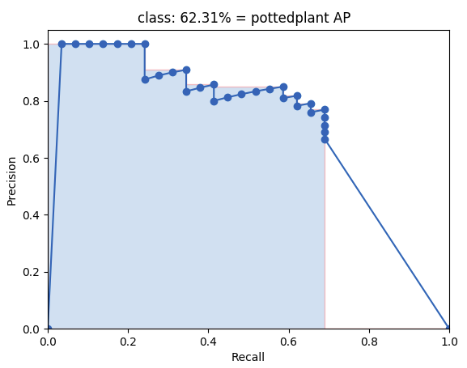
Using this criterium, we calculate the precision/recall curve. E.g:
Then we compute a version of the measured precision/recall curve with precision monotonically decreasing (shown in light red), by setting the precision for recall r to the maximum precision obtained for any recall r' > r.
Finally, we compute the AP as the area under this curve (shown in light blue) by numerical integration.
No approximation is involved since the curve is piecewise constant.
2. Calculate mAP
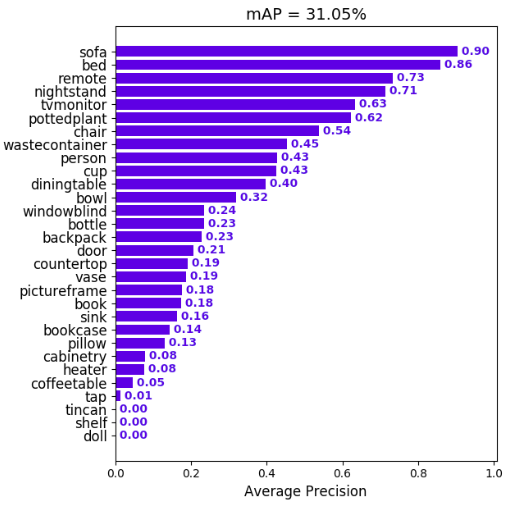
We calculate the mean of all the AP's, resulting in an mAP value from 0 to 100%. E.g: