One-stop data intelligence agent, providing insights from all mainstream data formats in a single dialogue box, including documents, databases, business systems, and images.一站式数据智能体,一个对话框提供所有主流格式数据的见解,包括文档、数据库、业务系统和图像。
PureChat 是一款全面的聊天应用程序,它将传统的即时消息与高级 AI 功能集成在一起。其模块化架构、可扩展的 AI 集成系统和灵活的配置选项使其成为强大的应用程序,也是 AI 增强通信应用程序的坚实基础。支持OpenAI,Ollama,DeepSeek等大语言模型,Markdown 渲染,聊天记录生成截图,主题切换,助力开发者快速掌握现代技术。
关键参数与规格
关键参数与规格
参数
值
语言
Python
类别
Applications
子类别
Content creation
关键词
Audio production, Music
星标数
545
分叉数
46
贡献者
4
创建日期
2023-07-26
更新日期
2026-10-10
1 天星标数
0
7 天星标数
1
排名
17,311
上次排名
17,093
排名变化
-218
7 天星标排名
11,403
上次 7 天星标排名
11,468
7 天星标排名变化
65
总星标排名
18,098
上次总星标排名
18,066
总星标排名变化
-32
README 摘录
🎵 WavJourney: Compositional Audio Creation with LLMs We are actively seeking research and commercial cooperation in advancing AI-assisted multimedia storytelling. If you are interested, please email xubo. :open_hands: This repository contains the official implementation of "WavJourney: Compositional Audio Creation with Large Language Models". Starting with a text prompt, WavJourney can create audio content with engaging storylines encompassing personalized speakers, lifelike speech in context, emotionally resonant music compositions, and impactful sound effects that enhance the auditory experience. Welcome to share
your creation with Discord or the HuggingFace community! (Optional) You can modify the default configuration in , check the details described in the configuration file. Pre-download the models (might take some time): 5. Set the WAVJOURNEY_OPENAI_KEY in the environment variable for accessing GPT-4 API [Guidance] 6. Set environment variables for using API services. , Text-to-Speech, Text-to-Audio) Web APP Commandline Usage Kill the services You can kill the running services via this command: (Advanced features
) Speaker customization You can add voice presets to WavJourney to customize the voice actors. Simply provide the voice id, the description and a sample wav file, and WavJourney will pick the voice automatically based on the audio script. Predefined system voice presets are in . Specifically, if you want to add voice to voice presets. Run the script via command line below: What makes for good voice prompt? Hardware requirement The VRAM of the GPU in the default configuration should be
greater than 16 GB. Citation If you find this work useful, you can cite the paper below: Appreciation Bark for a zero-shot text-to-speech synthesis model. AudioCraft for state-of-the-art audio generation models. Disclaimer We are not responsible for audio generated using semantics created by this model.
🎵 WavJourney: Compositional Audio Creation with LLMs
We are actively seeking research and commercial cooperation in advancing AI-assisted multimedia storytelling. If you are interested, please email xubo.liu@surrey.ac.uk for more details! :open_hands:
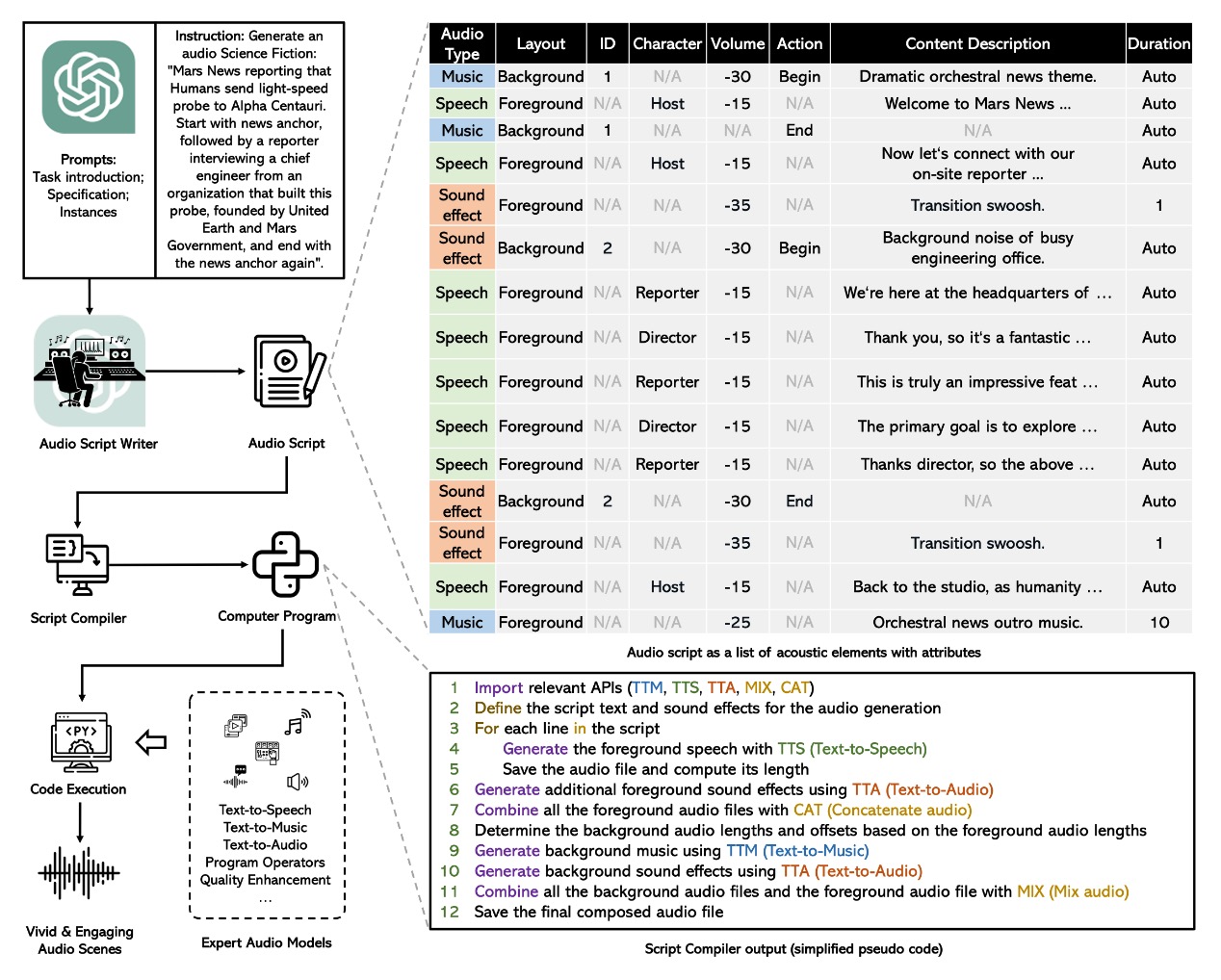
Starting with a text prompt, WavJourney can create audio content with engaging storylines encompassing personalized speakers, lifelike speech in context, emotionally resonant music compositions, and impactful sound effects that enhance the auditory experience.
Welcome to share your creation with Discord or the HuggingFace community!
Preliminaries
Install the environment:
bash ./scripts/EnvsSetup.sh
Activate the conda environment:
conda activate WavJourney
(Optional) You can modify the default configuration in config.yaml, check the details described in the configuration file.
Pre-download the models (might take some time):
python scripts/download_models.py
Set the WAVJOURNEY_OPENAI_KEY in the environment variable for accessing GPT-4 API [Guidance]
export WAVJOURNEY_OPENAI_KEY=your_openai_key_here
Set environment variables for using API services.
# Set the port for the WAVJOURNEY service to 8021
export WAVJOURNEY_SERVICE_PORT=8021

# Set the URL for the WAVJOURNEY service to 127.0.0.1
export WAVJOURNEY_SERVICE_URL=127.0.0.1

# Limit the maximum script lines for WAVJOURNEY to 999
export WAVJOURNEY_MAX_SCRIPT_LINES=999
Start Python API services (e.g., Text-to-Speech, Text-to-Audio)
bash scripts/start_services.sh
Web APP
bash scripts/start_ui.sh
Commandline Usage
python wavjourney_cli.py -f --input-text "Generate a one-minute introduction to quantum mechanics"
Kill the services
You can kill the running services via this command:
python scripts/kill_services.py
(Advanced features) Speaker customization
You can add voice presets to WavJourney to customize the voice actors. Simply provide the voice id, the description and a sample wav file, and WavJourney will pick the voice automatically based on the audio script. Predefined system voice presets are in data/voice_presets.
You can manage voice presets via UI. Specifically, if you want to add voice to voice presets. Run the script via command line below:
What makes for good voice prompt? See detailed instructions here.
Hardware requirement
The VRAM of the GPU in the default configuration should be greater than 16 GB.
Operation system: Linux.
Citation
If you find this work useful, you can cite the paper below:
@article{liu2023wavjourney,
    title   = {WavJourney: Compositional Audio Creation with Large Language Models},
    author  = {Liu, Xubo and Zhu, Zhongkai and Liu, Haohe and Yuan, Yi and Huang, Qiushi and Liang, Jinhua and Cao, Yin and Kong, Qiuqiang and Plumbley, Mark D and Wang, Wenwu},
    journal = {arXiv preprint arXiv:2307.14335},
    year    = {2023}
}
Appreciation
Bark for a zero-shot text-to-speech synthesis model.
AudioCraft for state-of-the-art audio generation models.
Disclaimer
We are not responsible for audio generated using semantics created by this model. Just don't use it for illegal purposes.