dsh-worktable 🖥️
English · 简体中文
An agent-project workbench for DeepSeek Harness — a sidebar app drawer that turns every project into dockable windows, plus a built-in control room that watches them all in real time.
📸 Screenshots
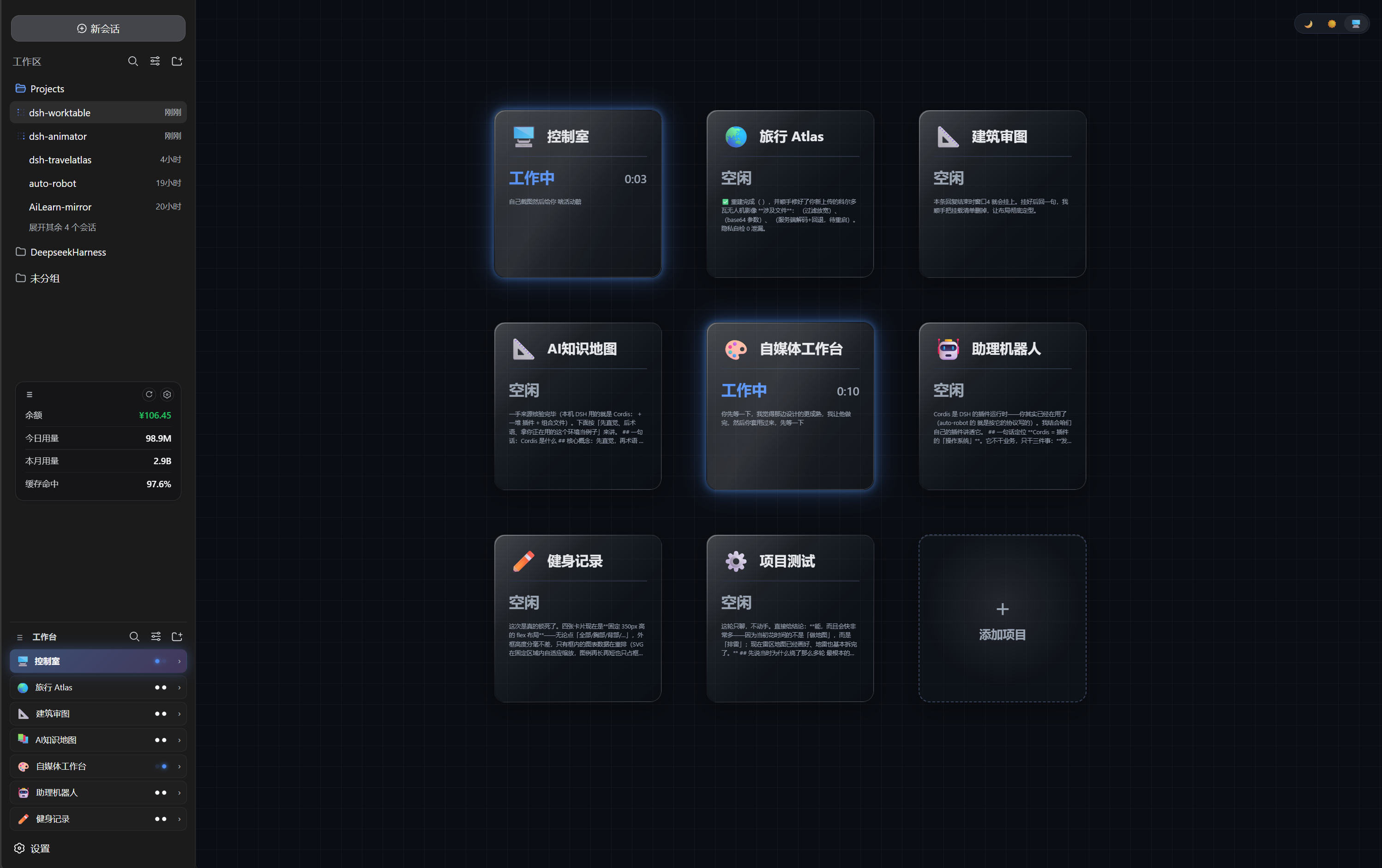 |
🖥️ Control room — the built-in default project: a live card grid watching every project (working / needs you / done) with glassmorphism cards on a blueprint grid |
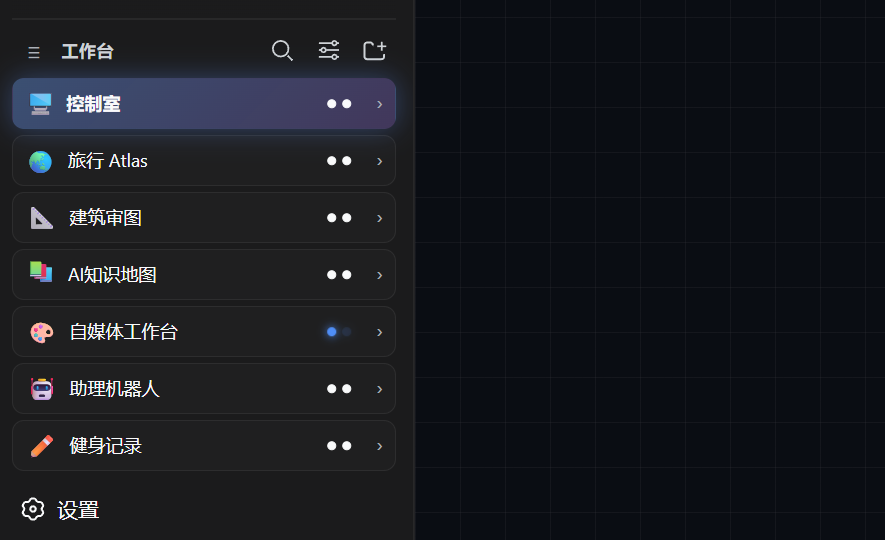 |
🧩 Worktable sidebar — the app drawer: projects, shortcuts and the pinned control-room entry |
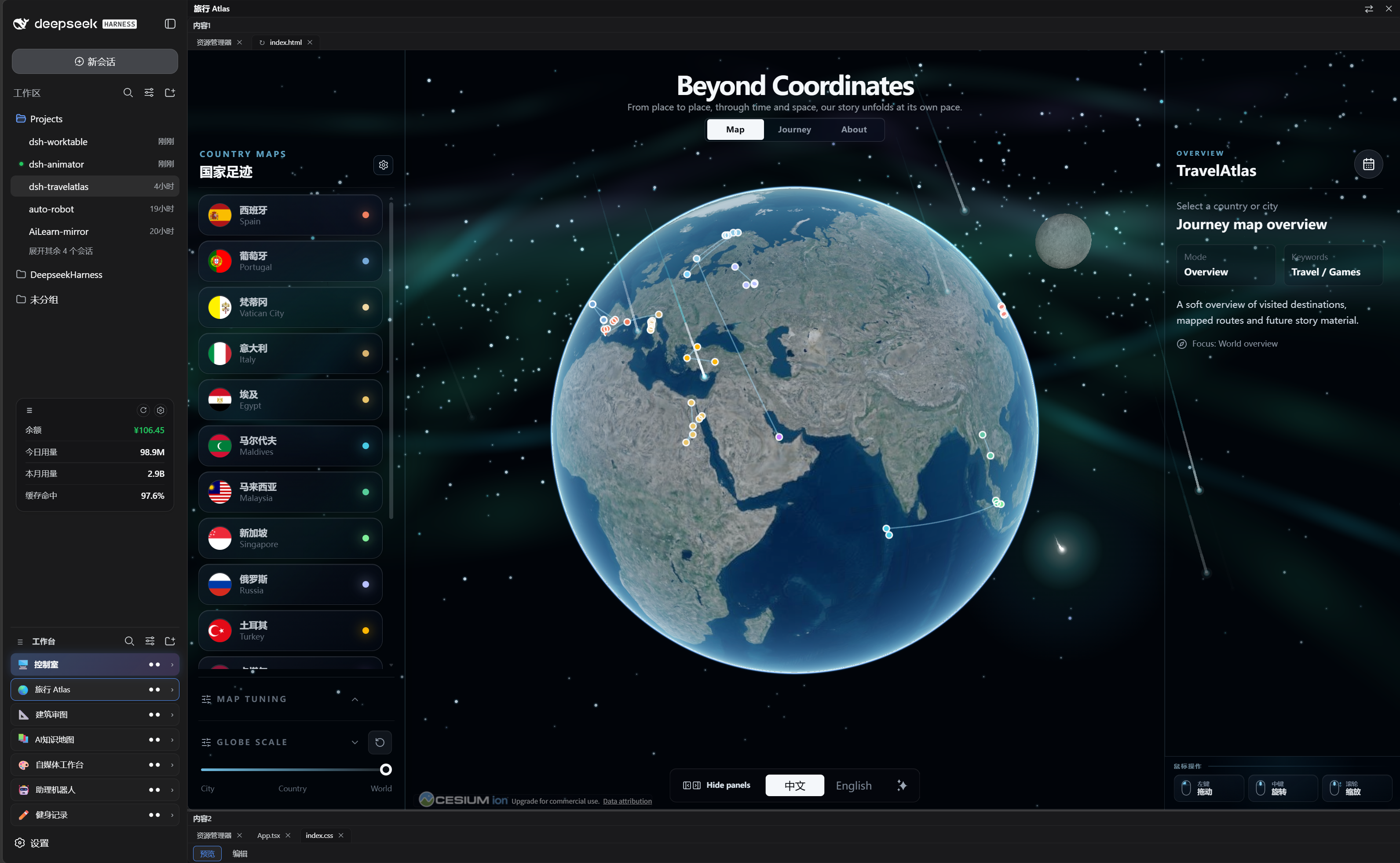 |
🪟 Our projects — every project opens as a dockable split workspace (resident apps like Travel Atlas included) |
✨ Feature tour
🧩 Sidebar app drawer
- Collects your self-hosted projects (and resident plugins like dsh-travelatlas) in one place
- Rename / icon / reorder / hide each project; per-project folder; project ↔ conversation binding — opening a project switches the chat pane to its bound conversation
- Collapse the sidebar and every project becomes a tappable square tile (icon only)
🪟 Dockable split workspace
- Declarative layout presets (left column / top row / main grid + right chat pane)
- Draggable dividers, per-pane tabs, per-layout width persistence
- Built-in panes: file explorer, terminal, browser, animation site, custom window
- Custom window: send a requirement to a new or existing conversation; the agent builds it and the result auto-mounts into the window (locked)
🖥️ Control room (built-in default project)
- A pinned, undeletable first project — bind one management conversation on first open
- A configurable card grid mirrors visible projects: working / needs you / done with available runtime and a cleaned message preview
- Event-driven host snapshot mirroring; status monitoring does not call a model
- Glassmorphism cards, dark / light / system theme, neon status glows and a rotating comet on busy cards
At a glance
| 🧩 Plugin type | Cordis plugin — host routes + web client, pure additive (no official plugin replaced) |
| 🪟 Workspace engine | Self-built split engine rendered into the host shell overlay seat |
| 💬 Chat pane | Reuses the host conversation; navigation uses the host's new or legacy session API |
| 📡 Status data | Mirror of the host session runtime snapshots (subscription-driven) |
| 💾 State | Projects/layouts/bindings in localStorage; media in IndexedDB; file panes access configured project directories |
| 🎨 UI | TypeScript + React (host externals) + vanilla CSS, dark-first with light theme |
Quick start
v0.4.0 adds Windows official Desktop support within the tested scope below. Web compatibility lists only DSH 0.1.1-rc.2 / 0.1.2-rc.1 / 0.2.0-rc.2; Desktop checks cover Windows + 0.2.0-rc.2. Desktop page checks and targeted regressions do not establish full final-package Desktop end-to-end acceptance. Older versions rely on prior page checks plus code regressions, not a newly repeated full GUI suite. Back up important data and check other plugins before upgrading; GitHub Release is the publication authority.
-
Install (pick one):
A · one-liner (recommended) — straight from the GitHub Release tarball, no Git needed:
dsh plugin --profile web add "https://github.com/Aisland-SJL/dsh-worktable/releases/latest/download/dsh-worktable.tgz"B · local clone (for hacking on the source) —
link:accepts a local absolute path only (no spaces in the path):git clone https://github.com/Aisland-SJL/dsh-worktable.git dsh plugin --profile web add "link:/01_content" # e.g. cloned into D:\tools → dsh plugin --profile web add "link:D:/tools/dsh-worktable/01_content"Either way the
addcommand registersdsh-worktablein the profile bundle list (writes to~/.dsh, may ask for authorization). If thedshcommand is missing, usenpx @deepseek-ai/dshinstead. -
Restart the DSH web process, refresh the GUI
-
Open the control room: click the pinned 🖥️ control-room card → bind one conversation (join existing or create new) → you get the live card grid
-
Create projects: sidebar + → pick a layout preset, set a project folder
Windows official Desktop
Save your tasks, fully exit the app from its menu/tray (closing the window is not enough), replace the installation-directory placeholder, run in PowerShell, then reopen the app manually:
& "\resources\runtime\cli\bin\dsh.cmd" plugin --profile desktop add "https://github.com/Aisland-SJL/dsh-worktable/releases/download/v0.4.0/dsh-worktable-0.4.0.tgz"
Use the Desktop-bundled CLI and desktop profile, not an unpinned npx or Web CLI. Preserve the actual DSH_HOME. Browser-local projects/layouts/media do not automatically sync between Web and Desktop origins, even when sessions share one data home.
Explicit Ungrouped in a custom-window task no longer silently joins a workspace. For a blank control-room conversation, the tested DSH 0.2 host disables the ungrouped composer: choose a group or join a usable existing conversation. The plugin explains this and blocks that blank creation, without changing your choice or sending an activation message. An empty existing-group selection cannot silently default either; legacy ungrouped creation stays unchanged.
Architecture
One package ships the host Cordis plugin and the web client:
- host:
/api/worktable/*routes — health, file system, git, file read/write, site serving, mkdir, workspaces, native skin template; WebSocket/api/worktable/termfor the terminal pane (PowerShell on Windows) - client: injected into the sidebar and the shell overlay via the slot protocol; the split engine, tab model, drag/drop and persistence are self-built
- control room: reads the host session list snapshot (running / pending / completed, jobs, subagent catalogs) — an event-driven mirror, no model involvement
- window tasks: custom tasks register project/pane/binding ownership and write a dedicated result under
.dsh-worktable/project-/; sharing a folder does not make a new project inherit another project's windows
Development & testing
cd 01_content
npm install
npm run build     # lib/index.js + lib/client.js
node --check lib/index.js
- Build must run inside
01_content— building from the repo root writeslib/to the wrong place while the host keeps loading the old bundle - The client bundle keeps the
window.__ModuleLoader__.loadhandshake;reactand@deepseek-ai/*stay external - Regression:
04_test/functional-diag.cjs(20 steps, strict gate) plus targeted probes (control room, bind panel, collapsed rail, model inheritance), the path matrix (04_test/pathutil-matrix.cjs) and update-check scenarios (04_test/probe-update-scenarios.cjs) - In the release pipeline: split-anchor DOM regression
04_test/anchor-dom.test.mjs(8 scenarios, both host conversation-root shapes) and data-home resolution regression04_test/server-home.test.mjs(3 groups: no-cycle fallback, path expansion, official-branch fixture) - Release packaging uses
npm run packonly. It also runs 98 input/session/details/transport/widget regressions, installation and client-factory gates.npm run test:widgetcovers 26 ownership, session-isolation, shared-folder, late-result and retry cases; after uploading, runnpm run verify:remote -- --expect-sha v0.4.0and checklatestseparately.
Troubleshooting
Q: After a DeepSeek Harness update, the worktable fails to open / the service fails to start?
Projects, bindings and layouts live in browser localStorage; media lives in IndexedDB, and project files remain in your project directories. Back up important data before changing your installation, and keep the same browser origin when you want to retain its worktable state.
Case A: Harness works, only the worktable needs updating
-
Open the worktable "Settings" → click "Check now"; when the amber update badge appears next to the worktable title, click it and choose "Copy AI prompt" to hand the upgrade to your AI assistant;
-
For Web, re-run the install command (installs the latest published release), then restart dsh web and refresh. Desktop users must follow the Desktop instructions above:
dsh plugin --profile web add "https://github.com/Aisland-SJL/dsh-worktable/releases/latest/download/dsh-worktable.tgz"
Case B: Harness itself is down (service fails to start / "Failed to load plugins")
- Record the actual DSH version, plugin version, profile/data-home location and the first complete error. Restart the process fully before checking again.
- Missing exports or failed imports require checking the named plugin against the installed host version. A newer host can change APIs; upgrading everything blindly is not a diagnosis.
- An ancestor
node_modulesjunction was a local workaround for a particular oldlink:loader issue. Do not create one as a general fix; remove an existing workaround only after verifying that the installed plugins no longer depend on it, preserving its target directory. - A model request returning HTTP 400 is a separate request problem. This plugin package does not include host-level repairs for it.
Point-to-annotate 📌
Every window title bar has a small annotate button (chat-bubble with a plus) next to the collapse toggle. Click it, your cursor becomes a blue speech bubble — click anywhere in a window to drop an input box, type what you want changed ("make this text bigger"), and hit ✓. The message is packaged (window number + coordinates + the clicked element + your request), filled into the chat input without sending — press Enter when ready, and the agent works through the annotation protocol (verify with a screenshot or the window, or ask one targeted question instead of guessing).
- Point and speak — no verbal location description needed.
- The payload is self-explaining: any agent, in any conversation, can pick it up.
- Same behavior for every user — no local setup, no special tools.
- Same family of polish: the console gains a 5th dock button Changelog (version notes / check for updates / copy-upgrade command) and ships two default background presets (aurora gradient + coastal view) in the custom background library.
Known limits
- Platform: Windows Web and the official Windows Desktop have the version/flow limits above. Full final-package Desktop end-to-end acceptance is not complete; macOS is experimental and has not been tested end to end on real hardware.
- State lives in the browser (localStorage and IndexedDB) — projects, bindings, views and media do not sync across machines
- The terminal pane is a plain PowerShell host on Windows (no PTY feature parity with the native terminal app)
- Auto-mount requires a registered custom task and its matching v2 result file. Old saved windows remain; unowned root-level
widget-result.jsonfiles are not imported. To re-enable an old conversation, send one task via the target window's Custom → Send to conversation action. Later edits in that conversation may reuse the binding. Manually closing/replacing content revokes it; existing mistakenly mounted tabs must be closed once. Shared-folder projects can still overwrite the same artifact if explicitly told to write the same physical file. - The control room monitors projects that are bound to a conversation; unbound projects show as idle
Privacy
The plugin does not add an analytics service. Update checks use a read-only GitHub Releases request and can be disabled in Settings. It also communicates with host APIs/WebSockets, loads user-selected pages, and provides an interactive terminal whose commands can access files and the network. Preferences and media use browser storage. See the permissions and external-services disclosure for file access, inherited terminal environment and other limits.
License
MIT
Related
- dsh-reminder — cross-window completion & approval notifications
- dsh-usage — persistent balance/usage dock