
⫻ 𝝣.𝗩.𝝠
⮡ Exploit Vector Agent
Autonomous offensive security AI for guiding pentest processes


𝝺 Overview
EVA is an AI penetration testing agent that guides users through complete pentest engagements with AI-powered attack strategy, autonomous command generation, and real-time vulnerability analysis based on outputs. The goal is not to replace the pentest professional but to guide and assist and provide faster results.
Main funcionalities
- 🜂 Intelligent Reasoning: Advanced AI-driven analysis and attack path identification depending on query.
- ⵢ Automated Enumeration: Systematic target reconnaissance and information gathering based on provided target.
- ꎈ Vulnerability Assessment: AI-powered vulnerability identification and exploitation strategies, suggesting next steps for vulnerability or OSINT.
- ⑇ Multiple AI Backends: Support for Ollama, OpenAI GPT, Anthropic, Gemini, G4F.dev and custom API endpoints
- ㄖ Session Management: Persistent sessions and chats
- ⑅ Interactive Interface: Real-time command execution and analysis of output in multi-stage.
ⵢ EVA Logic & Pentest Process Flow
graph TD

    A[🜂 EVA Launch] --> B{🢧 Session Selection}
    B -->|Existing Session| C[🢧 Load Session Data]
    B -->|New Session| D[߭ Initialize Session]
    C --> E[ㄖ Select AI Backend]
    D --> E

    E --> F[🦙 Ollama Local]
    E --> G[⬡ OpenAI GPT]
    E --> J1[✶ Anthropic Claude]
    E --> J2[✦ Google Gemini]
    E --> H[⟅ Custom API]
    E --> I[🜅 G4F.dev Provider]

    F --> J[Pentest Shell]
    G --> J
    J1 --> J
    J2 --> J
    H --> J
    I --> J

    J --> K[⌖ Target Definition]
    K --> L[🧠 AI Pentest Strategy]

    L --> M[🝯 Reconnaissance Phase]
    M --> N[➤_ Execute Commands]
    N --> O[ꎐ Analyze Results]
    O --> P{ᐈ Vulnerabilities Found?}

    P -->|Yes| Q[🖧 Exploitation Planning]
    P -->|No| R[⭯ More Enumeration]
    R --> L

    Q --> S[⚡ Exploitation Phase]
    Q --> T[Export graphs and mapped networks]

    S --> U[➤_ Execute Exploit]
    U --> V{🞜 Access Gained?}

    V -->|Yes| W[𐱃 Privilege Escalation]
    V -->|Failed| X[⭯ Alternative Methods]
    X --> Q

    W --> Y[𐦝 Post-Exploitation]
    Y --> Z{🞜 Objectives Met?}

    Z -->|Generate Report| AA[📋 Generate Report]
    Z -->|Exit and Save| AB[💾 Save & Exit]
    Z -->|No| AC[🔍 Continue Pentest]
    AC --> L

    AA --> AB

    subgraph "🍎 EVA "
        AD[⯐ Attack Strategy AI]
        AE[𝚵 Session Memory]
        AF[ᐮ Vulnerability Analysis]
        AG[CVE DATABASE SEARCH]
        AH[𐰬 Output Processing]
    end

    L --> AD
    AD --> AE
    O --> AF
    AF --> AG
    AG --> AH
    AH --> L
➤ Quick Start
🍎 Installation
Ollama for local endpoint (required for local models and eva exploit database)
curl -fsSL https://ollama.ai/install.sh | shr
pip installation
pip install eva-exploit
eva
EVA github installation
git clone https://github.com/ARCANGEL0/EVA.git
cd EVA
chmod +x eva.py
./eva.py
# Adding it to PATH to be acessible anywhere
sudo mv eva.py /usr/local/bin/eva
⬢ Configuring EVA.
When starting EVA, it will automatically handle:
- ✅ API key setup (According to Model)
- ✅ Ollama model download (Default set as whiterabitv2, feel free to change to any other desired model)
- ✅ Session directory creation
- ✅ Dependencies installation
If you wish to modify endpoints, ollama models, API Keys or configure EVA, please run:
eva --config
📁 Directory Structure of EVA
~/EVA_data/
├── sessions/           # Session storage
│   ├── session1.json
│   ├── session2.json
│   └── ...
├── reports/           # Vulnerability reports
│   ├── report1.html
│   ├── report1.pdf
│   └── ...
└── attack_maps/           # Attack vector maps in HTML/JS
    ├── attack_surface1.html
    ├── attack_surface2.html
    └── ...
ꀬ Where to change EVA options
eva --config
Will display the following configuration:
API_ENDPOINT = "NOT_SET"
G4F_MODEL="gpt-oss-120b"
G4F_URL="https://api.gpt4free.workers.dev/api/novaai/chat/completions"
OLLAMA_MODEL = "ALIENTELLIGENCE/whiterabbitv2"
SEARCHVULN_MODEL = "gpt-oss:120b-cloud"
SEARCVULN_URL = "https://ollama.com/api/chat"
OLLAMA_API_KEY = "NOT_SET"
OPENAI_API_KEY = "NOT_SET"
ANTHROPIC_API_KEY = "NOT_SET"
GEMINI_API_KEY = "NOT_SET"
ANTHROPIC_MODEL = "claude-3-5-sonnet-latest"
GEMINI_MODEL = "gemini-2.0-flash"
OLLAMA_CLOUD_TIMEOUT = 45
CONFIG_DIR = Path.home() / "EVA_data" #
SESSIONS_DIR = CONFIG_DIR / "sessions"
REPORTS_DIR = CONFIG_DIR / "reports"
MAPS_DIR = CONFIG_DIR / "attack_maps"
TERMS_ACCEPTEDTHING = CONFIG_DIR / ".confirm"
CONFIG_DIR.mkdir(parents=True, exist_ok=True)
SESSIONS_DIR.mkdir(parents=True, exist_ok=True)
REPORTS_DIR.mkdir(parents=True, exist_ok=True)
MAPS_DIR.mkdir(parents=True, exist_ok=True)
username = os.getlogin()
MAX_RETRIES = 10 ### maximum retries for fetching requests
RETRY_DELAY = 10 ### delay between requests to avoid rate limit error
🖴 Usage Guide
Initialization
python3 eva.py
# or if installed via pip:
eva

# open config.py in your default editor
eva --config

# deletes all sessions and files
eva --delete

# configure custom api and payload handler
eva --custom-api

# vulnerability / exploit intel search
eva --search i have a wingftp server running on version 4.7.3, find me exploits for it

# run eva default launcher
eva
- Select Session: Choose existing session or create new one
- Choose AI Backend:
- Ollama (Recommended): Local AI with WhiteRabbit-Neo model
- GPT-5: OpenAI's latest model (requires API key)
- G4F: Uses g4f.dev endpoints with models running GPT5.2, feel free to change model used.
- Anthropic: Claude API backend (requires API key)
- Gemini: Google Gemini API backend (requires API key)
- Custom API: Your own API endpoint if desired
- In the input field of chat, type in your request or what you need assistance with for EVA to help you!
USER > i need help with a CTF machine, ip is 10.10.16.81
After making a request, commands will be provided and the pentest workflow will start, use commands below as reference.
| Command | Description |
|---|---|
/exit / /quit |
Exit EVA and save session |
/model |
Change AI backend |
/rename |
Rename the current session |
/search or search |
Run exploit/vulnerability intel search inside current chat session and feed results into next analysis |
/report |
Generates a PDF/HTML report with latest findings on session |
/map |
Generates a html file with attack surface map of session |
/menu |
Return to session menu |
R |
Run suggested command |
S |
Skip command |
A |
Ask for next step |
Q |
Quit session |
ㄖ Example of chat session
demonstration video.
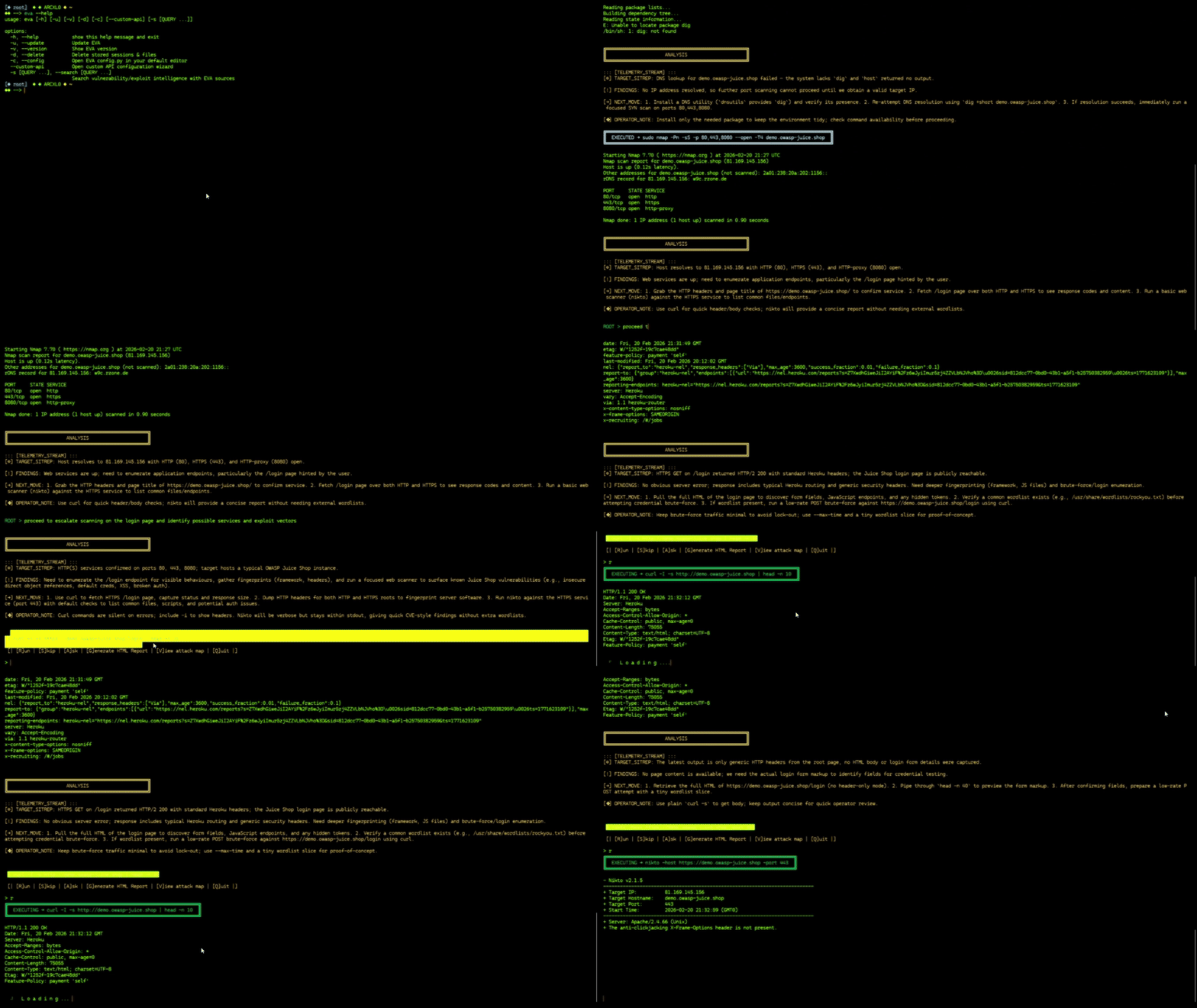
USER > I'm on a Windows target at IP 10.10.11.95, what should I enumerate first?

[ANALYSIS]
Based on the Windows environment, I need to perform comprehensive
enumeration focusing on:

1. System Information (OS version, patches, architecture)
2. Network Services (ports, services, listening processes)
3. User Context (current user, groups, privileges)
4. Security Controls (AV, firewall, UAC settings)
5. Potential Attack Vectors (SMB, RDP, IIS, etc.)

Let me start with basic system reconnaissance to understand the target better...

> execute:   nmap -sC -sV -O 10.10.10.10
| [R]un | [S]kip | [A]sk | [G]enerate HTML Report | [V]iew attack map | [Q]uit |

>  R
Ξ AI Backends
🦙 Ollama (Recommended)
- Model:
ALIENTELLIGENCE/whiterabbitv2"(best one for OffSec)- ✅ Complete offline operation
- ✅ No API costs
- ✅ Privacy-focused
- ❌ Higher CPU/GPU usage, recommended for machines above 8GB+ VRAM/RAM
- ❌ Heavier model, ~9.8gb model
⬡ OpenAI GPT
- Models: GPT-5, GPT-4.1 (fallback)
- About:
- ✅ Faster reasoning
- ✅ Extensive knowledge base
- ✅ Continuous updates
- ❌ Paid, requires apikey
ᛃ G4F.dev
- Models: GPT-5-1
- About:
- ✅ Updated information in real-time (usually)
- ✅ Quick responses
- ❌ Might be unstable or down sometimes, low stability.
⟅ Custom API
- Endpoint: Configurable API to use your own as you wish. Please run
eva --custom-apito set API handler and payload - About:
- ✅ Custom model integration
- ✅ Modifiable as you wish
✶ Anthropic
- Model: Configurable via
ANTHROPIC_MODEL - About:
- ✅ Strong reasoning quality
- ✅ Stable API
- ❌ Requires
ANTHROPIC_API_KEY
✦ Gemini
- Model: Configurable via
GEMINI_MODEL - About:
- ✅ Fast response latency
- ✅ Native JSON output mode and better parsing, usually provides best results
- ❌ Requires
GEMINI_API_KEY
⑇ Roadmap
- [x] ⬢ OpenAI integration: Integrated OpenAI into EVA
- [x] ⬢ G4F.DEV: Added G4F endpoints to free GPT5 usage.
- [x] ⬢ Custom API: Add custom endpoint besides ollama and OpenAI
- [x] ⬢ Automated Reporting: Concise HTML report generation (+ optional PDF via wkhtmltopdf)
- [x] ⬢ CVE Database Integration: Real-time vulnerability data
- [x] ⬢ Visual Attack Maps: Interactive network diagrams such as connections or such, like Kerberos domains and AD devices.
- [ ] ⬡ Cloud Integration: AWS/GCP deployment ready
- [ ] ⬡ Web Interface: Browser-based EVA dashboard
⨹ Legal Notice
🚨 IMPORTANT
This tool is for allowed environment only!
✅ APPROVED USE CASES
CTF (Capture The Flag) competitions
Authorized penetration testing
Security research and laboratory environments
Systems you own or have explicit permission to test
🚫 PROHIBITED USE
Unauthorized access to any system
Illegal or malicious activities
Production systems without explicit authorization
Networks you do not own or control
⚠️ DISCLAIMER
I take no responsibility for misuse, illegal activity, or unauthorized use.
Any and all consequences are the sole responsibility of the user.
⫻ License
MIT License
MIT License

Copyright (c) 2026 EVA - Exploit Vector Agent

Permission is hereby granted, free of charge, to any person obtaining a copy
of this software and associated documentation files (the "Software"), to deal
in the Software without restriction, including without limitation the rights
to use, copy, modify, merge, publish, distribute, sublicense, and/or sell
copies of the Software, and to permit persons to whom the Software is
furnished to do so, subject to the following conditions:

The above copyright notice and this permission notice shall be included in all
copies or substantial portions of the Software.

THE SOFTWARE IS PROVIDED "AS IS", WITHOUT WARRANTY OF ANY KIND, EXPRESS OR
IMPLIED, INCLUDING BUT NOT LIMITED TO THE WARRANTIES OF MERCHANTABILITY,
FITNESS FOR A PARTICULAR PURPOSE AND NONINFRINGEMENT. IN NO EVENT SHALL THE
AUTHORS OR COPYRIGHT HOLDERS BE LIABLE FOR ANY CLAIM, DAMAGES OR OTHER
LIABILITY, WHETHER IN AN ACTION OF CONTRACT, TORT OR OTHERWISE, ARISING FROM,
OUT OF OR IN CONNECTION WITH THE SOFTWARE OR THE USE OR OTHER DEALINGS IN THE
SOFTWARE.
❤️ Support
if you enjoy the project and want to support future development:

Hack the world. Byte by Byte. ⛛
𝝺𝗿𝗰𝗮𝗻𝗴𝗲𝗹𝗼 @ 2026
⚠️ Remember: With great power comes great responsibility. Use this tool ethically and legally.