PICK-PyTorch
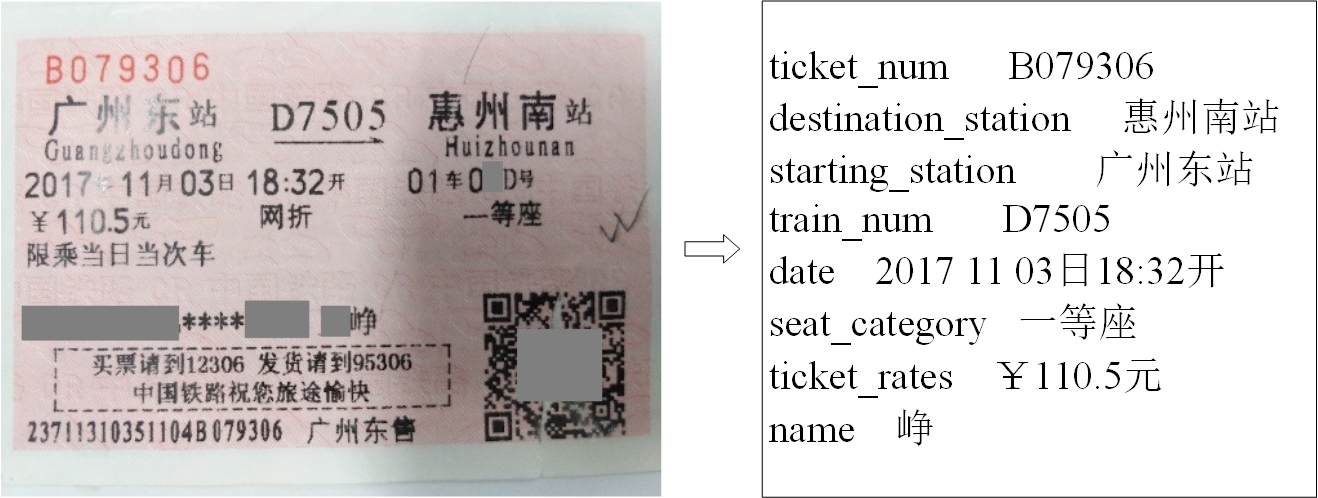
***** Updated on Feb 6th, 2021: Train Ticket dataset is now available for academic research. You can download from Google Drive or OneDrive. It contains 1,530 synthetic images and 320 real images for training, and 80 real images for testing. Please refer to our paper for more details about how to sample training/testing set from EATEN and generate the corresponding annotations.*****
***** Updated on Sep 17th, 2020: A training example on the large-scale document understanding dataset, DocBank, is now available. Please refer to examples/DocBank/README.md for more details. Thanks TengQi Ye for this contribution.*****
PyTorch reimplementation of "PICK: Processing Key Information Extraction from Documents using Improved Graph Learning-Convolutional Networks" (ICPR 2020). This project is different from our original implementation.
- Contents
Introduction
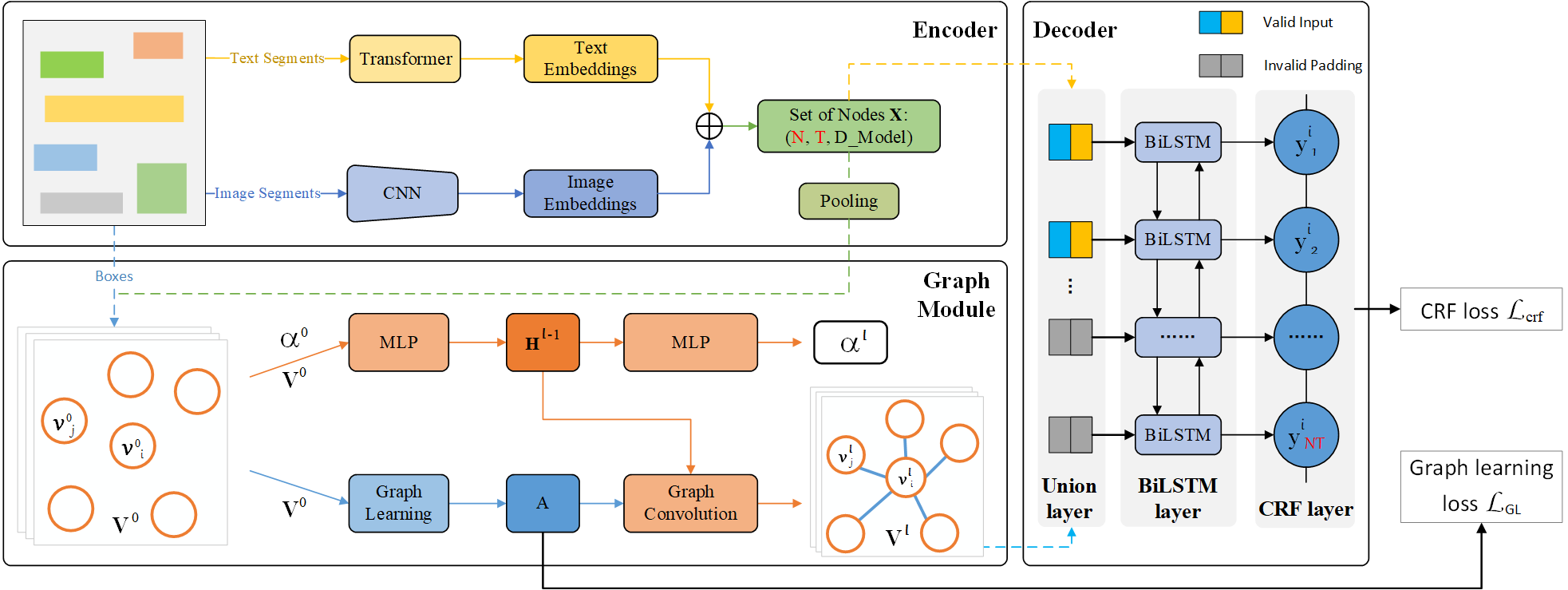
PICK is a framework that is effective and robust in handling complex documents layout for Key Information Extraction (KIE) by combining graph learning with graph convolution operation, yielding a richer semantic representation containing the textual and visual features and global layout without ambiguity. Overall architecture shown follows.
Requirements
- python = 3.6
- torchvision = 0.6.1
- tabulate = 0.8.7
- overrides = 3.0.0
- opencv_python = 4.3.0.36
- numpy = 1.16.4
- pandas = 1.0.5
- allennlp = 1.0.0
- torchtext = 0.6.0
- tqdm = 4.47.0
- torch = 1.5.1
pip install -r requirements.txt
Usage
Distributed training with config files
Modify the configurations in config.json and dist_train.sh files, then run:
bash dist_train.sh
The application will be launched via launch.py on a 4 GPU node with one process per GPU (recommend).
This is equivalent to
python -m torch.distributed.launch --nnodes=1 --node_rank=0 --nproc_per_node=4 \
--master_addr=127.0.0.1 --master_port=5555 \
train.py -c config.json -d 1,2,3,4 --local_world_size 4
and is equivalent to specify indices of available GPUs by CUDA_VISIBLE_DEVICES instead of -d args
CUDA_VISIBLE_DEVICES=1,2,3,4 python -m torch.distributed.launch --nnodes=1 --node_rank=0 --nproc_per_node=4 \
--master_addr=127.0.0.1 --master_port=5555 \
train.py -c config.json --local_world_size 4
Similarly, it can be launched with a single process that spans all 4 GPUs (if node has 4 available GPUs) using (don't recommend):
CUDA_VISIBLE_DEVICES=1,2,3,4 python -m torch.distributed.launch --nnodes=1 --node_rank=0 --nproc_per_node=1 \
--master_addr=127.0.0.1 --master_port=5555 \
train.py -c config.json --local_world_size 1
Using Multiple Node
You can enable multi-node multi-GPU training by setting nnodes and node_rank args of the commandline line on every node.
e.g., 2 nodes 4 gpus run as follows
Node 1, ip: 192.168.0.10, then run on node 1 as follows
CUDA_VISIBLE_DEVICES=1,2,3,4 python -m torch.distributed.launch --nnodes=2 --node_rank=0 --nproc_per_node=4 \
--master_addr=192.168.0.10 --master_port=5555 \
train.py -c config.json --local_world_size 4
Node 2, ip: 192.168.0.15, then run on node 2 as follows
CUDA_VISIBLE_DEVICES=2,4,6,7 python -m torch.distributed.launch --nnodes=2 --node_rank=1 --nproc_per_node=4 \
--master_addr=192.168.0.10 --master_port=5555 \
train.py -c config.json --local_world_size 4
Resuming from checkpoints
You can resume from a previously saved checkpoint by:
python -m torch.distributed.launch --nnodes=1 --node_rank=0 --nproc_per_node=4 \
--master_addr=127.0.0.1 --master_port=5555 \
train.py -d 1,2,3,4 --local_world_size 4 --resume path/to/checkpoint
Debug mode on one GPU/CPU training with config files
This option of training mode can debug code without distributed way. -dist must set to false to
turn off distributed mode. -d specify which one gpu will be used.
python train.py -c config.json -d 1 -dist false
Testing from checkpoints
You can test from a previously saved checkpoint by:
python test.py --checkpoint path/to/checkpoint --boxes_transcripts path/to/boxes_transcripts \
               --images_path path/to/images_path --output_folder path/to/output_folder \
               --gpu 0 --batch_size 2
Customization
Training custom datasets
You can train your own datasets following the steps outlined below.
- Prepare the correct format of files as provided in
datafolder.- Please see data/README.md an instruction how to prepare the data in required format for PICK.
- Modify
train_datasetandvalidation_datasetargs inconfig.jsonfile, includingfiles_name,images_folder,boxes_and_transcripts_folder,entities_folder,iob_tagging_typeandresized_image_size. - Modify
Entities_listinutils/entities_list.pyfile according to the entity type of your dataset. - Modify
keys.txtinutils/keys.txtfile if needed according to the vocabulary of your dataset. - Modify
MAX_BOXES_NUMandMAX_TRANSCRIPT_LENindata_tuils/documents.pyfile if needed.
Note: The self-build datasets our paper used cannot be shared for patient privacy and proprietary issues.
Checkpoints
You can specify the name of the training session in config.json files:
"name": "PICK_Default",
"run_id": "test"
The checkpoints will be saved in save_dir/name/run_id_timestamp/checkpoint_epoch_n, with timestamp in mmdd_HHMMSS format.
A copy of config.json file will be saved in the same folder.
Note: checkpoints contain:
{
  'arch': arch,
  'epoch': epoch,
  'state_dict': self.model.state_dict(),
  'optimizer': self.optimizer.state_dict(),
  'monitor_best': self.monitor_best,
  'config': self.config
}
Tensorboard Visualization
This project supports Tensorboard visualization by using either torch.utils.tensorboard or TensorboardX.
-
Install
If you are using pytorch 1.1 or higher, install tensorboard by 'pip install tensorboard>=1.14.0'.
Otherwise, you should install tensorboardx. Follow installation guide in TensorboardX.
-
Run training
Make sure that
tensorboardoption in the config file is turned on."tensorboard" : true -
Open Tensorboard server
Type
tensorboard --logdir saved/log/at the project root, then server will open athttp://localhost:6006
By default, values of loss will be logged. If you need more visualizations, use add_scalar('tag', data), add_image('tag', image), etc in the trainer._train_epoch method.
add_something() methods in this project are basically wrappers for those of tensorboardX.SummaryWriter and torch.utils.tensorboard.SummaryWriter modules.
Note: You don't have to specify current steps, since WriterTensorboard class defined at logger/visualization.py will track current steps.
Results on Train Ticket
TODOs
- [ ]
Dataset cache mechanism to speed up training loop - [x] Multi-node multi-gpu setup (DistributedDataParallel)
Citations
If you find this code useful please cite our paper:
@inproceedings{Yu2020PICKPK,
  title={{PICK}: Processing Key Information Extraction from Documents using
  Improved Graph Learning-Convolutional Networks},
  author={Wenwen Yu and Ning Lu and Xianbiao Qi and Ping Gong and Rong Xiao},
  booktitle={2020 25th International Conference on Pattern Recognition (ICPR)},
  year={2020}
}
License
This project is licensed under the MIT License. See LICENSE for more details.
Acknowledgements
This project structure takes example by PyTorch Template Project.