
Explainer videos made by your AI agent.
Free and open source. The voice, the timing and the rendering run on your computer.
Website · Example videos · Docs · AGENTS.md
https://github.com/user-attachments/assets/6dd5dc32-c975-4e0e-8cd4-2ef3ccc11e61
A coding agent made this video with explainroo. You can also watch it on explainroo.com.
Make a video
[!TIP] Give your coding agent this repo and tell it what the video should explain. It works with Claude Code, Codex, Pi and other coding agents. Right now it works best with Claude Code and Opus 5.5.
Copy this into your agent and put your topic in place of the brackets:
Make me a short explainer video about [your topic].
Use explainroo for it: clone https://github.com/vincentsch/explainroo,
read its AGENTS.md and follow the steps.
The agent sets up explainroo, makes the video and checks it. You get an MP4 file.
How does it work?
An explainer video is a short video where a voice explains a topic and
drawings appear while it speaks. For explainroo, the agent writes two files.
script.md has the words the voice says. scenes.js draws the pictures with
a bit of JavaScript, and each drawing can appear on a word from the script.
explainroo does the rest:
- Voice. Kokoro, an open voice model, reads the script aloud in English, Spanish, French, Italian, Brazilian Portuguese, Hindi, Japanese or Mandarin Chinese. It has 54 voices and needs no account or API key. You can also use an ElevenLabs voice or record the narration yourself.
- Timing. Whisper listens to the narration and notes when each word is spoken.
- Pictures. Chrome runs in the background and draws the frames. The lines can look hand drawn (Rough.js), and there are 1,800 icons from Lucide. A scene can also show charts, math formulas, code that changes step by step, your own screenshots and video clips such as screen recordings.
- Sound. explainroo makes its own background music for each video and adds small sound effects. The music gets quieter while the voice speaks.
- File. ffmpeg puts it all together into an MP4, with subtitle files, YouTube chapters and a cover image.
An agent can't watch a video, so explainroo gives it other ways to check its
work. It saves stills of the scenes and a sheet of small frames for the whole
video. A layout check finds text that is cut off or overlaps, and a speech
check finds words the voice got wrong. For a feed-sized player,
explainroo check videos/ --view-width 854 also flags small text.
None of this leaves your computer, and it costs nothing. Your coding agent is a separate service with its own terms and prices. If you want, the agent can also make illustrations with an AI image model through OpenRouter, and you pay for each image.
Looks
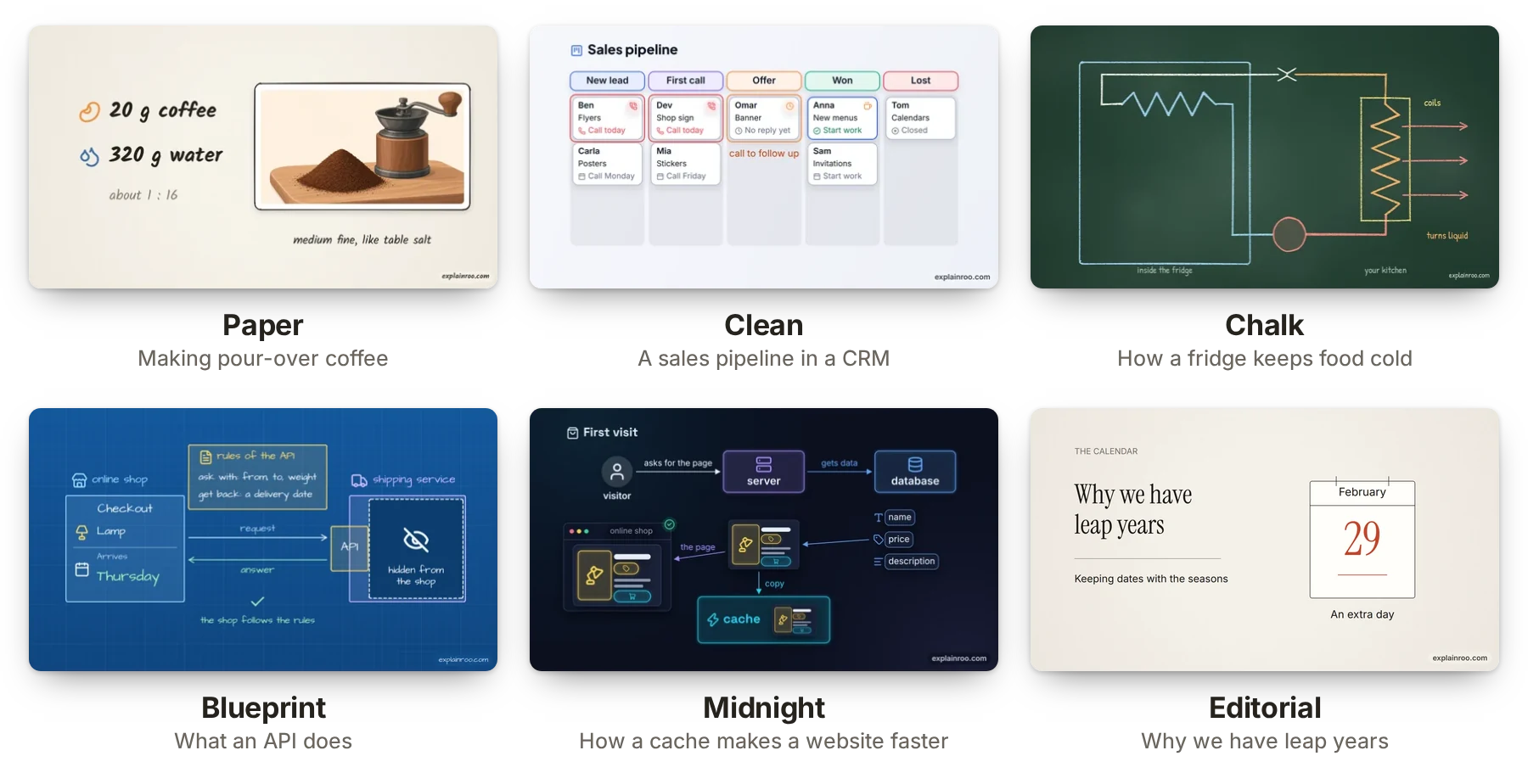
There are six looks: paper, clean, chalk, blueprint, midnight and editorial.
You change a video's look with one setting in video.json. A project can also
bring its own look, a small JSON file with its colors, fonts and background.
Here is one frame in each built-in look, from the example videos.
Sizes
You pick the size for the place the video goes. YouTube videos are wide, and Shorts, TikTok and Reels are tall. Instagram and LinkedIn posts use 4:5, and there is a square size too. Shorts, TikTok and Reels put their own buttons over the video, and explainroo keeps your text out of those spots.
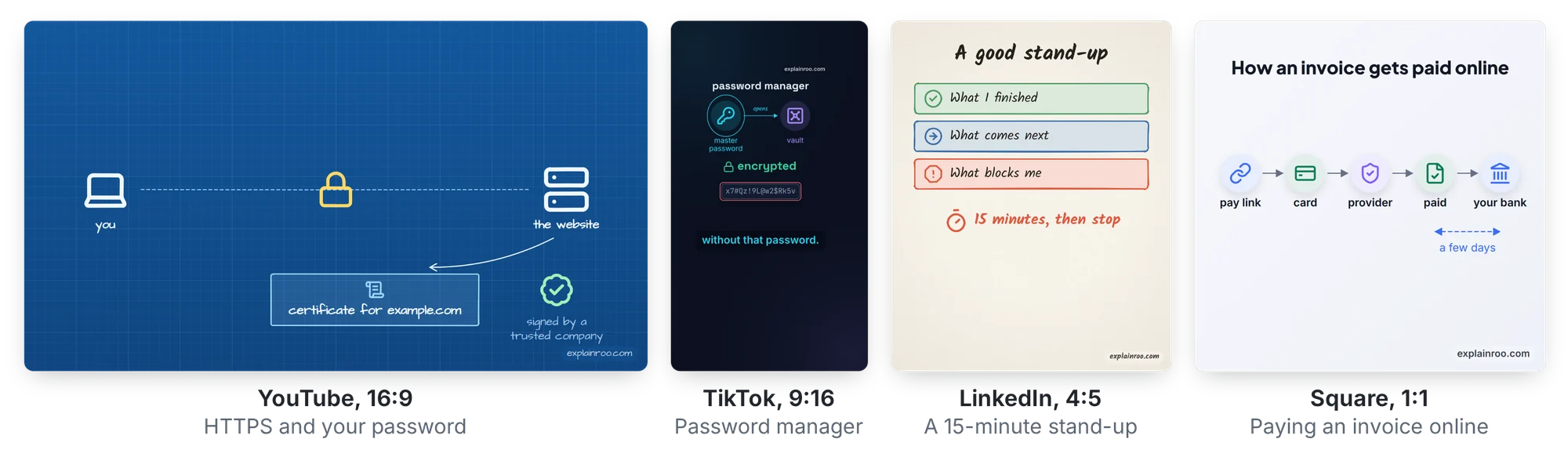
Tall, 4:5 and square videos get captions that light up word by word. One
project can render several sizes: explainroo render videos/demo --size tiktok
writes the TikTok version next to the wide one.
More than an MP4
Every render also writes subtitle files (.srt and .vtt) that YouTube and
LinkedIn accept, a cover image for the thumbnail, and YouTube chapters when
the script names them. --format gif makes a GIF for a README or a post.
--transparent --format mov makes a video with a transparent background, for
putting a diagram over camera footage in a video editor. explainroo export
writes a small web player that draws the video sharp at any size and embeds
with an iframe.
Pace
"pace": 1.2 in a video's video.json makes the voice, the pauses and the
animations 20% quicker. The music gets a little quicker too. Pace goes from
0.7 to 1.6, and 1 is normal.
Product demos
explainroo can also make product demos, the videos software companies make to
show their app. The agent rebuilds the app's screens from its code or its
website, with the same colors, fonts and button labels. A mouse pointer then
clicks through the screens and types into the fields. Tell your agent which
product it is and where to find its code or website. explainroo capture
saves the live site's screenshots, colors, fonts, logo and wording first, and
a real screen recording can play inside a scene too.
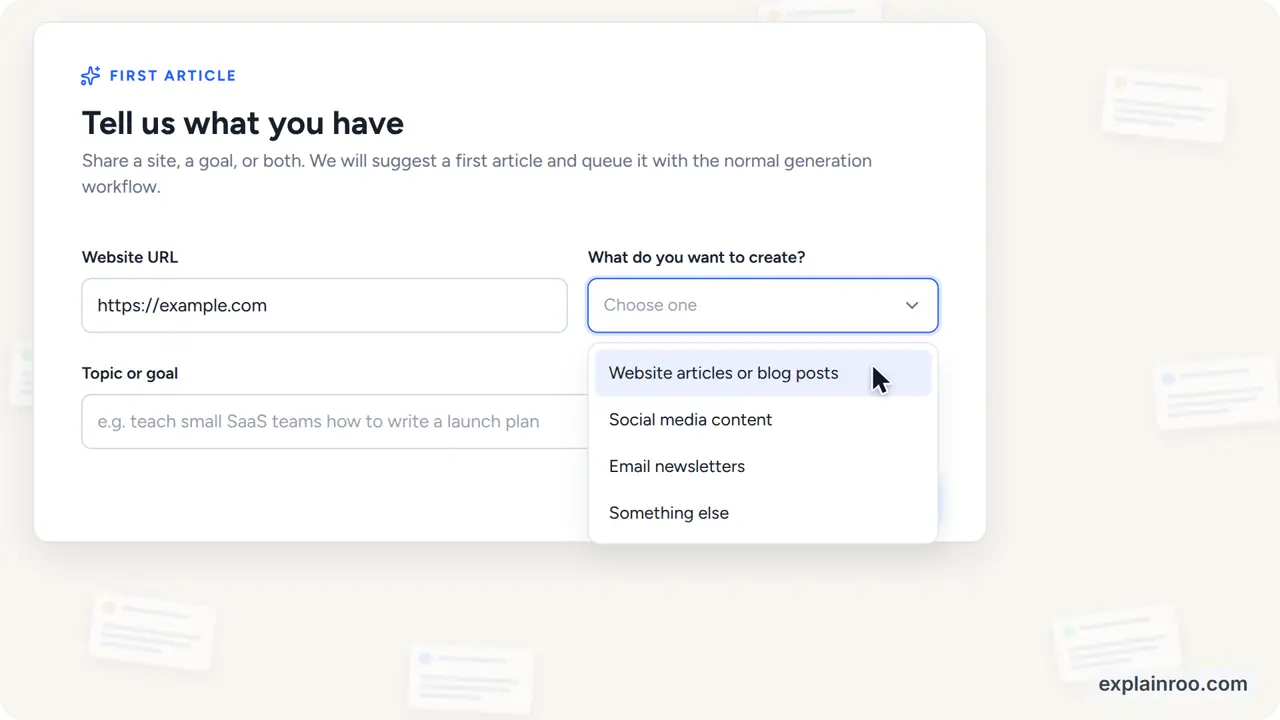
Here are the demos for Unspar and Vroni, two of my own products. The files for the Unspar demo are in examples/unspar-demo. explainroo.com also has unofficial demos of Gmail, ChatGPT and Claude.
Install it yourself
You need Node.js 20.11 or newer, ffmpeg, and Chrome or Chromium. The first setup downloads the voice and timing models once, about 400 MB together. You don't need a graphics card. I develop explainroo on Linux, and its tests run on Linux, macOS and Windows for every change.
git clone https://github.com/vincentsch/explainroo.git
cd explainroo
npm install
node bin/explainroo.js doctor --fetch
For narration in Spanish, French, Italian, Portuguese or Hindi, also install
espeak-ng, for example with
sudo apt install espeak-ng or brew install espeak-ng. Japanese and
Chinese need Python with misaki instead,
as described in AGENTS.md.
Then start your agent in the explainroo folder and ask for a video, for
example "Make a 60 second video about how HTTPS keeps a password secret." The
agent follows AGENTS.md and saves the video as
videos//out/video.mp4. The example videos are in
examples/, and the full documentation is on
explainroo.com.
The watermark
Each video has a small "explainroo.com" in one corner. "watermark": false in
video.json turns it off. Please keep it if you can, because that is how
other people find explainroo.
Credits and license
explainroo is MIT licensed. The voice comes from Kokoro, and the word timing from Whisper through Transformers.js. The drawings use Rough.js and Lucide icons. MathJax typesets the formulas. Playwright runs Chrome, and ffmpeg makes the video file. For other languages, explainroo runs espeak-ng as a separate program, with phoneme rules from Kokoro's misaki, and misaki itself for Japanese and Chinese. OpenCC and pinyin-pro help the speech check compare Chinese, and HarfBuzz keeps web player fonts small. The fonts, including Noto Sans CJK for Japanese and Chinese, are under the SIL Open Font License.