Game Dev Agentic Skills
Game Dev Agentic Skills (GDAS) - agent library for Godot 4.7+ and Bevy 0.20+
"A skill forgotten is a power lost." — The Code Architect
Brought to you by Divergent AI
📜 Updates
v0.1.0 - Bevy skills
October 11, 2026
- Two engines: Godot 4.7+ under godot-master and Bevy 0.20+ under bevy-master, each with its own hub and Domain Skills.
- Route by engine: Godot work starts at godot-master. Bevy work starts at bevy-master. There is no singular product-wide master.
- Bevy Domain Skills: ECS ownership, rendering, gameplay, UI, platforms, and genre skills. Install one path at a time.
📜 Update Archive
v0.0.11 — Agent Eyes
-
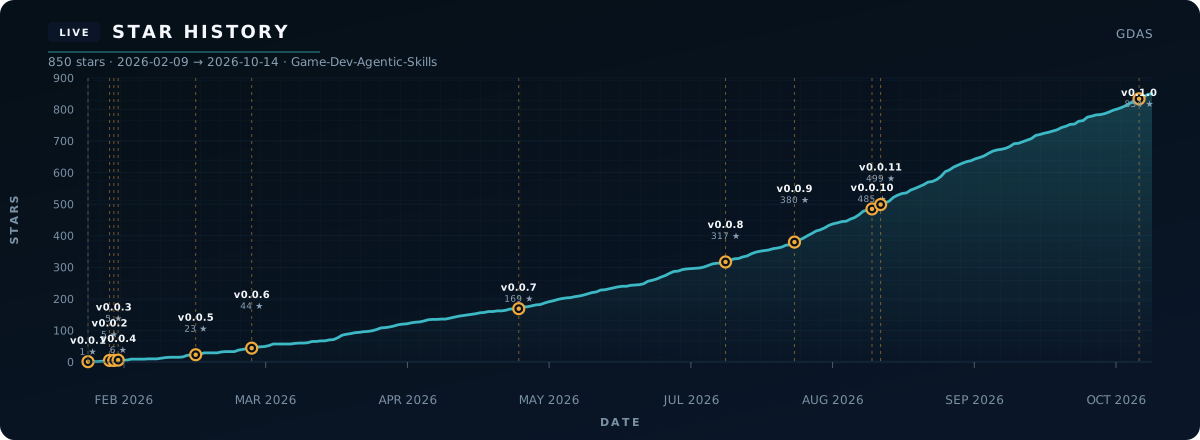
500 stars — thank you. That puts this repo in roughly the top 0.4% of all public GitHub repositories.
-
New — godot-agent-vision: agents get eyes — capture GUI / assets / editor viewports to budgeted WebP, then score what they see against a granular production rubric (typography-weighted, anti-slop, identity).
-
Cross-platform host CLI (Win / macOS / Linux) + TEMP editor bridge under
.gdskills/— not an in-game Autoload.
v0.0.10 — Version Station
-
Version Station: New Architecture skill - godot-version-migration - full-history engine upgrades from early Godot through 4.7 (legacy eras, official 3 to 4, then hop-by-hop 4.x).
-
Per-skill version notes: Every Domain Skill ships
references/migration-notes.md; DomainSKILL.mdbodies stay on current APIs. -
Routing: Analyst, Auditor, Builder, foundations, GDScript, and TileMap point engine-version work at that hub;
godot-masterroutes upgrades there.
v0.0.9 — The Reference Rail Update
-
The reference rail: Every Domain Skill now ends with curated official documentation (
docs.godotengine.org/en/stable/) plus Related Skills (Prerequisites / Complements / Downstream / Master), so agents can research deeper without leaving the skill graph. -
Script and reference footers: Research-link comment blocks on Domain Skill scripts and reference notes (marker
GDSkills research links (agents)) - non-executing, file-specific, progressive disclosure. -
SPECIAL MENTION —
 @DedInc: First external Domain Skill — godot-monte-carlo-balancer — source-driven Monte Carlo balance lab (Rust + rayon), Resource-first extract, playstyle CI bands, economy careers, and headless Godot calibration. Thank you!
v0.0.8 — The Director's Cut Update
-
Godot 4.7 Director's Cut: Full library upgrade to Godot 4.7+ - AreaLight3D, HDR output, Asset Store, built-in virtual joystick, and a version digest for 4.6 to 4.7 projects.
-
Domain Skills: Renamed "Micro-Skills" to Domain Skills - 92 modular topic skills, each with a 4.7 baseline and targeted version deltas.
-
Persona Squad: Anara, Aurelius, and Builder updated for 4.7 scoring, never-lists, and
GODOT_PATHCLI overrides.
v0.0.7 — The Analyze, Audit, Build! Update
-
Three Persona-Based Skills: We introduced specialized agent skills for
@godot-analyst(Anara),@godot-auditor(Aurelius), and@godot-builderto streamline and unify our persona development and code optimization workflows. -
MCP Clean-up & Direct Building: Defunct
MCP SetupandMCP Builderskills have been removed; we now use Auditor and Builder to construct and compile projects directly via the Godot CLI, maximizing native efficiency. -
Full Skills Audit: Completed a comprehensive and rigorous audit of all microskills to elevate the knowledge depth and execution quality to the highest agentic standard.
-
Lead Architect Sync: Synchronized all audited advancements with the central
godot-masterhub, making the orchestrator smarter, faster, and more robust.
v0.0.6 — The Expert Augmentation & Master Orchestration Update
-
Microskill Overhaul: We spent many hours updating all microskills to contain top expert-level knowledge, directly extracted from the Godot documentation. This massive update ensures all resources are true to the current engine state, empowering developers with best practices and reducing AI slop.
-
Godot Master Takes Control: We updated the
godot-masterskill to fully orchestrate and integrate this major skill update. It is now a true, all-in-one Godot Master skill! -
Feedback Requested: We'd love your feedback on the new updates! The easiest way to share your thoughts is to open an issue or start a discussion on our GitHub.
v0.0.5 — The Looper Update
-
Resource Harvesting: Introduced
godot-game-loop-harvestfor interactive gathering, node depletion, and rarity-based drop tables. -
Time Trials & Ghosts: Added
godot-game-loop-time-trialwith precise millisecond timing and ghost transform recording/playback. -
Wave-Based Survival: Implemented
godot-game-loop-wavesfor round-based difficulty scaling and dynamic enemy pool management.
v0.0.4 — The Easter & Renewal Update
-
Seasonal Theming Identity: Introduced
godot-theme-easterfor safe, runtime aesthetic injection (StyleBox duplication & material swapping). -
Core Loop Expansion: Added
godot-game-loop-collectionfor volumetric procedural spawning andgodot-mechanic-revivalfor "Souls-like" mortality. -
Interaction Secrets: Implemented
godot-mechanic-secretsfor input sequence buffering (Konami code) and hidden discovery persistence.
v0.0.3 — The Romance Update
-
New Genre Mastery: Introduced the comprehensive Romance & Dating Sim skill set.
-
Master Integration: Unified the Romance skill into the godot-master orchestration layer.
-
Production Scripts: Added battle-tested GDScript patterns for affection tracking, relationship routing, and date events.

v0.0.2 — Master Skill Evolution
-
Unified Architecture: Upgraded
godot-masterto an all-in-one orchestration layer for all 87 specialized skills. -
Decision trees: Integrated expert-level Godot 4 architectural decision trees and anti-pattern guides.
-
Workflow Scaffolding: Added programmatic scene building and project initialization patterns.

v0.0.1 — Initial Launch
- The Foundation: Released the initial library of 80+ Godot 4.x Agentic Skills.
- Agent-First Design: Established the DIA (Discovery-Ingestion-Application) loop for AI Coding Agents.
- Core Systems: Atomic implementations for 2D, 3D, UI, and Gameplay fundamentals.
Engines
Game Dev Agentic Skills is one product with per-engine trees. Pick the master for the engine you are shipping — there is no singular product-wide master.
| Engine | Master | What you get |
|---|---|---|
| Godot 4.7+ | godot-master | 98 Domain Skills, personas, workflows, production scripts |
| Bevy 0.20+ | bevy-master | ECS hub plus 81 Domain Skills |
Install one engine master or one Domain Skill — never --all. Pick the engine you are shipping; skills stay engine-scoped.
📍 Quick Navigation
| 🚀 Get Started | 🟦 Godot Master | 🦀 Bevy Master | 🧩 Domain Skills | 🤖 Agent Protocol | ⭐ Star History |
|---|---|---|---|---|---|
| Install | Godot hub | Bevy hub | Skills directory | DIA Loop | Growth Chart |
The Philosophy
Game Dev Agentic Skills (GDAS) is an agent-first knowledge library for shipping real games — not AI slop. Each engine gets its own master and Domain Skills.
- Godot 4.7+ is fully supported: doc-true patterns, personas, and production scripts under godot-master.
- Bevy 0.20+ is fully supported: ECS ownership and Domain Skills under bevy-master.
- Skills stay engine-scoped. Install one path so you do not trigger a Context Storm.
If this project helps your development or empowers your agents, please give it a star! 🌟
⚡ Quick Start
Choose one path so you do not trigger a "Context Storm" (flooding the agent with every skill at once).
Path A: Godot
New Godot project, or an existing one that needs a Godot 4.7+ standards check - install the Godot hub or one Godot Domain Skill:
npx skills add thedivergentai/Game-Dev-Agentic-Skills/skills/godot-master
# or one Domain Skill:
npx skills add thedivergentai/Game-Dev-Agentic-Skills/skills/godot-characterbody-2d
Path B: Bevy
Bevy work starts at the Bevy hub or one Bevy Domain Skill:
npx skills add thedivergentai/Game-Dev-Agentic-Skills/skills/bevy-master
# or one Domain Skill:
npx skills add thedivergentai/Game-Dev-Agentic-Skills/skills/bevy-ecs-composition
Path C: One specialist skill
Need a single feature and already know which skill owns it - install only that path (either engine):
npx skills add thedivergentai/Game-Dev-Agentic-Skills/skills/godot-inventory-system
npx skills add thedivergentai/Game-Dev-Agentic-Skills/skills/bevy-inventory-system
[!DANGER] NEVER use the
--allflag when installing this repository (e.g.,npx skills add ... --all). That is an "Instant No-No" — it forces your agent to load every metadata entry across 181 skills and triggers an unrecoverable Context Storm.
🧭 Agent Installation Rubric
Use this when installing via the skills CLI, or when an agent is reading this README after a repo clone (DIA path) instead of a normal plugin install.
| Agent | -a flag |
Project path | Global path |
|---|---|---|---|
| Cursor | cursor |
.agents/skills/ |
~/.cursor/skills/ |
| Claude Code | claude-code |
.claude/skills/ |
~/.claude/skills/ |
| Codex | codex |
.agents/skills/ |
~/.codex/skills/ |
| Windsurf | windsurf |
.windsurf/skills/ |
~/.codeium/windsurf/skills/ |
| Gemini CLI | gemini-cli |
.agents/skills/ |
~/.gemini/skills/ |
| GitHub Copilot | github-copilot |
.agents/skills/ |
~/.copilot/skills/ |
| OpenCode | opencode |
.agents/skills/ |
~/.config/opencode/skills/ |
Rules
- Preferred install: one path only, for example
npx skills add thedivergentai/Game-Dev-Agentic-Skills/skills/godot-master -g -a -yornpx skills add thedivergentai/Game-Dev-Agentic-Skills/skills/bevy-master -g -a -y(swap the skill path for a Domain Skill when needed). - Verify:
npx skills list -g -a - Restart the host agent after install — most agents load skills once at session start.
- Clone / DIA path (no
npx skills add): queryskills_index.json, then readskills//SKILL.mdwith the agent's file tool. Do not hand-symlink into host skill dirs unless the user asks for that. - Canonical store:
~/.agents/skills/is the CLI's shared copy; per-agent discovery paths differ by design.
Troubleshooting
- Skill installed but missing in the agent → confirm with
npx skills list, re-run with the correct-a, then restart the agent. - Do not treat a manual Claude-only symlink into
~/.claude/skills/as the default fix — that only helps one host.
🧠 Context Management: Performance Guidelines
To keep your AI agent fast and accurate, follow these "Expert Efficiency" rules:
1. The "Power of One" Rule
Either use an engine master (godot-master / bevy-master) OR individual Domain Skills — never both masters plus a pile of Domain Skills.
- Godot Master is an "Orchestrator" skill. It is dense (~15k tokens) but provides a complete blueprint. Use it when the "Big Picture" matters.
- Domain Skills are "Surgical" skills (~2-5k tokens). They are fast, reliable, and keep the agent focused on one specific API.
2. Why "Install All" Fails
Installing 181 skills simultaneously creates a "Metadata Flood":
- Token Bleed: ~15,000 tokens are "permanently" used just to tell the agent which skills exist.
- Instruction Conflicts: Having multiple overlapping expert instructions (e.g., 20+ different genre blueprints) can cause the agent to lose its specific focus.
- Reasoning Lag: The model has to sift through 100+ KB of text before deciding what to do.
3. Repository Clones vs. Plugin Installs
- Plugin Install (
npx skills add): Copies/links the skill into your agent's skill directory (see Agent Installation Rubric). The agent can then discover it automatically. This is why installing too many at once causes a "Context Storm." - Repository Clone: If you merely clone this repo to a folder (e.g.,
Downloads/GDSkills), the agent will NOT auto-load skills unless you are working inside that directory. Useskills_index.json+ read eachSKILL.mdwith the agent's file tool (DIA loop below).
Godot hub - godot-master

🏆 Godot Master - Godot hub
godot-master is the Godot hub. It orchestrates the Godot Domain Skills into one architectural framework for Godot 4.7+ projects. It does not route Bevy work. Bevy starts at bevy-master.
🎯 What Makes Godot Master Special?
Unlike individual Domain Skills that focus on isolated features, godot-master is your system architect. It provides:
📚 Comprehensive Knowledge Base
- 99 Reference Documents: Complete markdown guides for every skill, from foundations to advanced genres
- 982 Unique Production Scripts: Battle-tested, production-ready GDScript implementations
- 11 Workflow Patterns: Step-by-step architectural workflows (scaffolding, entity orchestration, persistence, optimization, multiplayer, Builder CLI scene builds, etc.)
🧠 Expert Frameworks
- Architectural decision guide: Choose the right pattern for your project (component-driven, event-driven, resource-streaming, deterministic networking)
- 15 Anti-Patterns: Explicit "NEVER DO THIS" rules with non-obvious explanations (e.g., why
get_tree().root.get_node()breaks, whyload()in_processkills performance) - Performance Budgets: Concrete numbers for mobile/desktop targets (draw calls, triangle counts, script time)
- Server API Patterns: Expert escape hatch for 10K+ entities using RenderingServer/PhysicsServer RIDs
🏗️ The Layer Cake Architecture
Godot Master enforces a signal-based separation of concerns:
graph TD
    UI[🎨 PRESENTATION
UI / VFX / Audio] -->|Signals ⬆️| LOGIC[⚙️ LOGIC
State Machines / Controllers]
    LOGIC -->|Signals ⬆️| DATA[💾 DATA
Resources / .tres / Stats]
    DATA -->|Signals ⬆️| INFRA[🌐 INFRASTRUCTURE
Autoloads / Signal Bus / Managers]

    style UI fill:#1f2937,stroke:#58A6FF,stroke-width:2px,color:#fff
    style LOGIC fill:#1f2937,stroke:#79C0FF,stroke-width:2px,color:#fff
    style DATA fill:#1f2937,stroke:#A371F7,stroke-width:2px,color:#fff
    style INFRA fill:#1f2937,stroke:#F778BA,stroke-width:2px,color:#fff
Critical Rule: Signals travel UP only. Presentation layer never modifies Data directly. Infrastructure speaks exclusively through signals.
🔄 When to Use Godot Master vs Domain Skills
flowchart LR
    START([New Task]) --> Q1{Starting a
new project?}
    Q1 -->|Yes| MASTER[Use godot-master]
    Q1 -->|No| Q2{Need architectural
guidance?}
    Q2 -->|Yes| MASTER
    Q2 -->|No| Q3{Building a
complete system?}
    Q3 -->|Yes| MASTER
    Q3 -->|No| MICRO[Use Domain Skill:
targeted implementation]

    MASTER --> DESC1[✓ Full workflow context
✓ Decision frameworks
✓ Anti-patterns
✓ Performance budgets]
    MICRO --> DESC2[✓ Quick implementation
✓ Focused feature
✓ Standalone pattern]

    style START fill:#1f2937,stroke:#58A6FF,stroke-width:3px,color:#fff
    style MASTER fill:#0d1117,stroke:#58A6FF,stroke-width:3px,color:#79C0FF
    style MICRO fill:#0d1117,stroke:#A371F7,stroke-width:3px,color:#F778BA
    style DESC1 fill:#1f2937,stroke:#58A6FF,stroke-width:2px,color:#fff
    style DESC2 fill:#1f2937,stroke:#A371F7,stroke-width:2px,color:#fff
Use godot-master when:
- Starting a new Godot project from scratch
- Auditing an existing project to find anti-patterns or standards violations
- Designing game or application architecture
- Building entity/component systems
- Debugging performance or physics issues
- Choosing between 2D/3D approaches
- Implementing multiplayer
- Optimizing draw calls or script time
- Shipping the same design on more than one platform
Use Domain Skills when:
- Adding a specific feature to an existing codebase
- Learning a targeted Godot API pattern
- Implementing standalone functionality (UI component, particle effect, save system)
📖 Access Godot Master
# Skill path
skills/godot-master/SKILL.md

# Contains
├── 91 reference markdown files (references/)
├── 185 production scripts (scripts/)
└── Complete architectural decision trees
Bevy hub - bevy-master

Bevy Master - Bevy hub
bevy-master is the Bevy hub. It orchestrates the Bevy Domain Skills into one architectural framework for Bevy 0.20+ apps. It does not route Godot work. Godot starts at godot-master.
What makes Bevy Master special?
Unlike individual Domain Skills that focus on isolated features, bevy-master is your system architect. It provides:
Comprehensive knowledge base
- Hub plus 81 Domain Skills: composition, rendering, gameplay, UI, platforms, adaptation, and genre skills
- ECS ownership: every piece of state names a component or resource, a system that may mutate it, and the message or observer that should see it
- Schedule literacy: app setup, plugins, states, and the order systems actually run
Expert frameworks
- Architectural decision guide: component vs resource vs plain struct, app state vs per-entity mode, messages vs observers
- Anti-patterns: Godot types inside a Bevy crate, an entity spawned for every config value, systems that mutate data they do not own
- Plugin boundaries: features live in plugins; the hub tells you which Domain Skill to open next
- Data rules: data that is not simulated stays a resource or a plain Rust struct
The schedule architecture
Bevy Master enforces ownership along the schedule, not a scene tree:
graph TD
    APP[APP SETUP
App / plugins / states] --> ECS[COMPONENTS / RESOURCES / SYSTEMS]
    PLUG[PLUGINS AND STATES] --> APP
    ECS --> DOMAIN[DOMAIN BEVY SKILLS
one feature at a time]

    style APP fill:#1f2937,stroke:#58A6FF,stroke-width:2px,color:#fff
    style PLUG fill:#1f2937,stroke:#79C0FF,stroke-width:2px,color:#fff
    style ECS fill:#1f2937,stroke:#A371F7,stroke-width:2px,color:#fff
    style DOMAIN fill:#1f2937,stroke:#F778BA,stroke-width:2px,color:#fff
Critical rule: Name the owner before you write the system. A system reads and writes only the data it owns.
When to use Bevy Master vs Domain Skills
flowchart LR
    START([New Task]) --> Q1{Starting a
new app?}
    Q1 -->|Yes| MASTER[Use bevy-master]
    Q1 -->|No| Q2{Need ECS
boundaries?}
    Q2 -->|Yes| MASTER
    Q2 -->|No| Q3{Building a
complete system?}
    Q3 -->|Yes| MASTER
    Q3 -->|No| MICRO[Use Domain Skill:
targeted implementation]

    MASTER --> DESC1[Full schedule context
Decision frameworks
Ownership rules
Which skill next]
    MICRO --> DESC2[Quick implementation
Focused feature
Standalone pattern]

    style START fill:#1f2937,stroke:#58A6FF,stroke-width:3px,color:#fff
    style MASTER fill:#0d1117,stroke:#58A6FF,stroke-width:3px,color:#79C0FF
    style MICRO fill:#0d1117,stroke:#A371F7,stroke-width:3px,color:#F778BA
    style DESC1 fill:#1f2937,stroke:#58A6FF,stroke-width:2px,color:#fff
    style DESC2 fill:#1f2937,stroke:#A371F7,stroke-width:2px,color:#fff
Use bevy-master when:
- Starting a new Bevy app from scratch
- Auditing an existing app for ownership mistakes or schedule sprawl
- Designing ECS architecture
- Choosing component vs resource vs schedule
- Deciding messages vs observers
- Choosing which Domain Skill to open next
- Implementing gameplay that spans several systems
- Checking that a task belongs on the Bevy side of the library
- Wiring plugins, states, and feature folders
Use Domain Skills when:
- Adding a specific feature to an existing crate
- Learning a targeted Bevy pattern
- Implementing standalone functionality (movement, inventory, UI layout, a genre loop)
Access Bevy Master
# Skill path
skills/bevy-master/SKILL.md

# Install
npx skills add thedivergentai/Game-Dev-Agentic-Skills/skills/bevy-master
Routing table
| Scenario | Route |
|---|---|
| New Bevy app, ECS boundaries, which skill to load | bevy-master |
| Crate, Cargo features, feature folders | bevy-project-foundations |
| Entity composition, components, systems | bevy-ecs-composition |
| Messages and observers | bevy-events-messaging |
| Components and resources as data | bevy-data-resources |
| App states or a per-entity mode flag | bevy-state-machines |
| App-wide resources and schedules | bevy-app-resources |
| Character movement | bevy-character-movement |
| 3D physics / 2D physics | bevy-physics-3d / bevy-physics-2d |
| Keyboard, mouse, gamepad | bevy-input-handling |
| Camera, audio, assets, save | bevy-camera-systems, bevy-audio-systems, bevy-asset-scenes, bevy-save-load |
| Clips, lights, materials, UI, or a genre loop | Matching Domain Skill in the Bevy directory |
| Godot language, version hops, CLI, or project audit | godot-master |
Data that is not simulated can stay a plain Rust struct or a resource. Do not spawn an entity for every config value.
🧩 Domain Skills — Bite-Size Power
Domain Skills are modular, engine-scoped modules. Open one engine accordion below. Godot holds 98 Domain Skills plus godot-master. Bevy holds 81 Domain Skills plus bevy-master. Together with the two hubs that is 181 skills.
Install the hub for the engine you are shipping, or one Domain Skill. Do not expand both engines into the agent's context at once.
🟦 Godot skills (99) - hub + Domain Skills - open for Godot 4.7+ work
Hub: godot-master. The categories below are Godot Domain Skills (98). Install the hub or one Domain Skill.
🏗️ Architecture & Foundation (14 skills)
- godot-analyst: Anara - visionary scoring and certification for Godot 4.7+ architecture
- godot-auditor: Aurelius - never-list enforcement and architectural audit for Godot 4.7+
- godot-autoload-architecture: Singleton patterns, global state management, signal-based communication
- godot-builder: Headless CLI scene scaffolding and build orchestration
- godot-composition: Entity-Component architecture for scalable game systems (NPCs, weapons, actors)
- godot-composition-apps: Composition patterns for applications and tools (UI-focused)
- godot-debugging-profiling: Print debugging, breakpoints, profiler, memory leak detection
- godot-gdscript-mastery: Static typing, signal architecture, unique nodes, style guide
- godot-project-foundations: Feature-driven folder structure, project scaffolding, conventions
- godot-project-templates: Base
.gitignore, export presets, input maps - godot-resource-data-patterns:
.tresworkflows, data-driven design, resource factories - godot-signal-architecture: Global vs scoped signal buses, signal-driven decoupling
- godot-state-machine-advanced: Hierarchical FSMs, pushdown automata, state stacks, transition validation
- godot-version-migration: Full-history engine upgrades (legacy eras → 3→4 → 4.x hops) with per-skill migration notes
🎮 2D Systems (10 skills)
- godot-2d-animation:
AnimatedSprite2D, skeletal cutout rigs, procedural animation - godot-2d-physics: Collision layers/masks,
Area2Dtriggers, raycasting,PhysicsDirectSpaceState2D - godot-animation-player: Timeline animations, track types, root motion, RESET tracks
- godot-animation-tree-mastery:
AnimationTree,StateMachine,BlendSpace2D, layered animations - godot-camera-systems: Smooth following, camera shake, trauma system, deadzone logic
- godot-characterbody-2d: Platformer movement (coyote time, jump buffer), collision handling
- godot-particles:
GPUParticles2D/3DvsCPUParticles, visibility AABB, particle effects - godot-shaders-basics:
CanvasItemshaders, post-processing, parameter animation - godot-tilemap-mastery:
TileMap, autotiling, chunking, runtime modification - godot-tweening:
TweenAPI, juice/game feel, easing functions
🌍 3D Systems (8 skills)
- godot-3d-lighting:
DirectionalLight3D, shadow cascades,VoxelGIvsSDFGI,LightmapGI - godot-ai-navigation: Chase, patrol, and crowd choices on NavigationAgent / NavigationServer
- godot-3d-materials:
StandardMaterial3D, PBR workflows, ORM textures, transparency modes - godot-3d-world-building:
GridMap,CSGgeometry,WorldEnvironment, volumetric fog - godot-navigation-pathfinding:
NavigationAgent2D/3D, RVO avoidance, async NavMesh baking - godot-physics-3d:
CharacterBody3D,RigidBody3D, ragdoll physics, collision shapes - godot-procedural-generation:
FastNoiseLite, WFC (Wave Function Collapse), chunk loading - godot-raycasting-queries: RayCast/ShapeCast, DirectSpaceState, hitscan, LOS, mouse picking
⚔️ Gameplay Mechanics (17 skills)
- godot-ability-system: Cooldowns, skill trees, combo systems, upgrade paths
- godot-combat-system: Hitbox/hurtbox architecture, damage calculation, invincibility frames
- godot-dialogue-system: Branching dialogue, character portraits, typewriter effects, localization
- godot-economy-system: Multi-currency, shop systems, dynamic pricing, loot tables
- godot-game-loop-collection: Scavenger hunt logic, volumetric spawning, collection tracking
- godot-game-loop-harvest: Resource depletion, interactive gathering, drop calculation
- godot-game-loop-time-trial: Ghost recording, race logic, checkpoint-based timing
- godot-game-loop-waves: Wave-based spawning, difficulty scaling, round management
- godot-inventory-system: Slot-based containers, stacking logic, drag-drop UI
- godot-mechanic-revival: Souls-like mortality, corpse runs, revival charges, consequence tracking
- godot-mechanic-secrets: Input sequence buffering (Konami code), interaction thresholds, secret persistence
- godot-monte-carlo-balancer: Source-driven Monte Carlo balance lab, playstyle win-rate bands, economy careers, CI snapshots — co-authored by
 @DedInc
 - godot-quest-system: Quest graphs, prerequisites, state tracking
- godot-rpg-stats: Stat modifiers, attribute scaling, damage formulas
- godot-save-load-systems: Dictionary serialization, delta-save patterns, encryption
- godot-scene-management: Async scene loading, transitions, pooling
- godot-turn-system: Turn-based combat, active time battle (ATB), timeline management
🎨 UI & UX (6 skills)
- godot-agent-vision: Agentic eyes — host screenshot CLI → WebP, TEMP editor bridge, structured anti-slop vision review
- godot-input-handling:
InputMap, controller support, rebinding, input buffering - godot-ui-containers: Responsive layouts, anchor presets, margin containers
- godot-ui-rich-text:
RichTextLabel, BBCode, custom effects - godot-theme-easter: Seasonal theming, runtime StyleBox duplication, juice components (wobble/bounce)
- godot-ui-theming:
.themeresources, style inheritance, global skinning
🌐 Connectivity & Platforms (11 skills)
- godot-audio-systems:
AudioBusrouting, positional audio, music crossfades, audio pooling - godot-export-builds: Multi-platform exports, CI/CD, codesigning, headless mode
- godot-multiplayer-networking:
MultiplayerSynchronizer, client prediction, server reconciliation - godot-performance-optimization: Profiling, draw call batching,
MultiMesh, LOD systems - godot-platform-console: Console certification, controller compliance
- godot-platform-desktop: Steam integration, window management, settings menus
- godot-platform-mobile: Touch controls, safe areas, battery optimization
- godot-platform-vr: XR toolkit, VR physics, hand tracking
- godot-platform-web: HTML5 exports, JavaScript bridge, browser limitations
- godot-server-architecture: Headless servers, authoritative networking, RID patterns
- godot-testing-patterns: GUT framework, unit tests, integration tests, CI/CD testing
🔄 Adaptation Guides (5 skills)
- godot-adapt-2d-to-3d: Dimension conversion, camera migration, sprite-to-model pipeline
- godot-adapt-3d-to-2d: Flattening 3D to 2D, orthogonal projection, performance gains
- godot-adapt-desktop-to-mobile: Touch controls, UI scaling, battery optimization
- godot-adapt-mobile-to-desktop: Mouse/keyboard, resolution scaling, Steam features
- godot-adapt-single-to-multiplayer: Client-server architecture, lag compensation, anti-cheat
🎯 Genre Blueprints (27 skills)
Action & Combat
- godot-genre-action-rpg: Loot generation, skill trees, stat-based combat, equipment systems
- godot-genre-fighting: Frame data, hitbox/hurtbox, motion inputs, rollback netcode
- godot-genre-platformer: Coyote time, jump buffer, game feel polish, level design
- godot-genre-shooter: Hitscan, recoil patterns, weapon archetypes, hit registration
- godot-genre-shooter-fps: FPS movement physics, camera sway, weapon bobbing, high-precision hit registration
Strategy & Tactics
- godot-genre-moba: Lane management, tower aggro, fog of war, ability cooldowns
- godot-genre-rts: Unit selection, command queues, fog of war, pathfinding
- godot-genre-tower-defense: Wave spawning, targeting priority, mazing mechanics
Exploration & Adventure
- godot-genre-metroidvania: Ability gating, interconnected worlds, map revelation
- godot-genre-open-world: Chunk streaming, floating origin, HLOD, POI discovery
- godot-genre-roguelike: Procedural generation, permadeath, meta-progression, seeded RNG
- godot-genre-survival: Needs systems, crafting recipes, base building, resource gathering
Narrative & Puzzle
- godot-genre-card-game: Deck management, effect resolution, hand layouts, Command pattern
- godot-genre-educational: Adaptive difficulty, spaced repetition, mastery tracking
- godot-genre-horror: Tension pacing, Director AI, sanity systems, sensory perception
- godot-genre-puzzle: Undo systems, grid logic, non-verbal tutorials
- godot-genre-visual-novel: Branching narratives, rollback, typewriter effects
- godot-genre-romance: Relationship tracking, affection systems, dating mechanics
Simulation & Social
- godot-genre-battle-royale: Shrinking zones, deployment systems, relevancy networking
- godot-genre-idle-clicker: Big number handling, exponential growth, prestige systems
- godot-genre-party: Minigame collections, local multiplayer, split-screen
- godot-genre-racing: Vehicle physics, checkpoint systems, rubber-banding AI
- godot-genre-rhythm: BPM conductors, timing judgments, latency compensation
- godot-genre-sandbox: Voxel systems, cellular automata, emergent gameplay
- godot-genre-simulation: Economy systems, time progression, feedback loops
- godot-genre-sports: Ball physics, team AI, formation systems
- godot-genre-stealth: Vision cones, alert states, sound propagation, gradual detection
🦀 Bevy skills (82) - hub + Domain Skills - open for Rust / ECS work
Hub: bevy-master. Install the hub or one Domain Skill. Schedules replace a scene tree: name the component, the resource, and the system.
ECS & ownership (11 skills)
- bevy-project-foundations: Cargo crate layout, features, and folder habits
- bevy-project-templates: Template starting points for 2D and 3D apps
- bevy-ecs-composition: Components,
Query,Commands,Startup/Update,.chain() - bevy-events-messaging: Messages and observers as an ownership slot
- bevy-data-resources:
ComponentversusResourceas data - bevy-state-machines: App states and per-entity mode flags
- bevy-app-resources: App-wide resources and plugin boundaries
- bevy-save-load: Save-slot boundaries (scene spawn is not a save)
- bevy-debugging-profiling: Logs and frame diagnostics
- bevy-performance: Parallel systems, fixed step, handle lifetimes
- bevy-testing-patterns:
cargo testaround Bevy apps
Rendering, animation & world (11 skills)
- bevy-2d-animation: Sprite clip playback
- bevy-animation: Animation clips and players
- bevy-animation-graph: Blend graphs
- bevy-particles: Particle and VFX entities
- bevy-shaders: Materials and shaders
- bevy-tilemap: Tile map entities
- bevy-tweening: Curves and juice
- bevy-camera-systems:
Camera2dandCamera3d - bevy-3d-lighting: Directional, point, and spot lights
- bevy-3d-materials: PBR materials
- bevy-3d-world-building: Mesh and scene assembly for levels
Simulation & gameplay (24 skills)
- bevy-character-movement: Locomotion on
Fixed/FixedMain - bevy-physics-2d: 2D physics ownership
- bevy-physics-3d: 3D physics ownership
- bevy-spatial-queries: Rays, overlaps, and picks
- bevy-navigation: Path data
- bevy-ai-navigation: Chase, patrol, and retarget policy
- bevy-procedural-generation: Seeded layout and spawn
- bevy-input-handling: Keyboard, mouse, and gamepad
- bevy-audio-systems: Play and control clips
- bevy-asset-scenes: Asset loading and scene spawn
- bevy-ability-system: Cooldowns and ability entities
- bevy-combat-system: Hits, damage, and health
- bevy-dialogue-system: Dialogue lines as data
- bevy-economy-system: Currency and prices
- bevy-inventory-system: Stacks and item entities
- bevy-mechanic-revival: Downed state and revival
- bevy-mechanic-secrets: Discovery flags
- bevy-quest-system: Objectives and quest state
- bevy-rpg-stats: Attributes and modifiers
- bevy-turn-system: Initiative and rounds
- bevy-game-loop-collection: Pickups and collection tracking
- bevy-game-loop-harvest: Gathering and depletion
- bevy-game-loop-time-trial: Timers and splits
- bevy-game-loop-waves: Encounter waves and spawns
UI (3 skills)
- bevy-ui-layout: Flex layout, nodes, and buttons
- bevy-ui-text: UI and world text
- bevy-ui-theming: Colors, borders, and theme tokens
Platforms (3 skills)
- bevy-platform-desktop: Desktop windows
- bevy-platform-web: Wasm and browser targets
- bevy-platform-mobile: Touch and mobile targets
Adaptation guides (4 skills)
- bevy-adapt-2d-to-3d: Move a Bevy game from 2D to 3D
- bevy-adapt-3d-to-2d: Flatten a Bevy game from 3D to 2D
- bevy-adapt-desktop-to-mobile: Desktop to touch and mobile
- bevy-adapt-mobile-to-desktop: Mobile to mouse, keyboard, and desktop
Genre blueprints (25 skills)
- bevy-genre-action-rpg: Action RPG loop
- bevy-genre-card-game: Card game loop
- bevy-genre-educational: Educational loop
- bevy-genre-fighting: Fighting loop
- bevy-genre-horror: Horror loop
- bevy-genre-idle-clicker: Idle / clicker loop
- bevy-genre-metroidvania: Metroidvania loop
- bevy-genre-open-world: Open world loop
- bevy-genre-party: Party / minigame loop
- bevy-genre-platformer: Platformer loop
- bevy-genre-puzzle: Puzzle loop
- bevy-genre-racing: Racing loop
- bevy-genre-rhythm: Rhythm loop
- bevy-genre-roguelike: Roguelike loop
- bevy-genre-romance: Romance loop
- bevy-genre-rts: RTS loop
- bevy-genre-sandbox: Sandbox loop
- bevy-genre-shooter: Shooter loop
- bevy-genre-shooter-fps: FPS shooter loop
- bevy-genre-simulation: Simulation loop
- bevy-genre-sports: Sports loop
- bevy-genre-stealth: Stealth loop
- bevy-genre-survival: Survival loop
- bevy-genre-tower-defense: Tower defense loop
- bevy-genre-visual-novel: Visual novel loop
📂 Full Skill Index
All skills are catalogued in the machine-readable skills_index.json with keywords, descriptions, and dependency chains.
[!NOTE] This JSON index is a repository-level file and is only present if you have cloned the source repository.
🤖 For Agents — The Discovery-Ingestion-Application Protocol
AI agents must follow the DIA loop for maximum quality:
1. Discovery
Query skills_index.json and pick the engine first.
Godot example: "smooth character movement" -> godot-characterbody-2d, then godot-master if the project needs architecture.
Bevy example: "ECS player movement" -> bevy-character-movement, then bevy-master if ownership and schedules are still open.
2. Ingestion
Agents must not implement from general training data alone.
Read the chosen SKILL.md with the file tool. Godot skills carry Godot 4.7+ nuances (StringName lookups, signal direction). Bevy skills carry ECS ownership (Component, Resource, Query, Commands, .chain(), Fixed / FixedMain).
Complex Godot projects: load godot-master.
Complex Bevy projects: load bevy-master.
Do not load both hubs for one task.
3. Application
Follow the skill chain in the skill header. Apply patterns from the deepest dependency upward, staying inside the same engine.
Godot workflow:
User: "Build a player controller" (Godot)
Agent: Query skills_index.json -> godot-characterbody-2d
Agent: Read dependencies (godot-composition, godot-state-machine-advanced) first
Agent: Implement movement on top of those patterns
Bevy workflow:
User: "Build a player controller" (Bevy)
Agent: Query skills_index.json -> bevy-character-movement
Agent: Read bevy-master if component vs resource is unclear
Agent: Implement locomotion on Fixed / FixedMain
Anti-Erosion Policy
Documentation stays in sync with implementation. When a Godot 4 or Bevy 0.20 API changes, update the relevant SKILL.md.
🏗️ Infrastructure Integration
Godot programmatic building (godot-builder)
Godot scene scaffolding and headless automation go through godot-builder (also mirrored in godot-master Workflow 11). Use Godot CLI scripts such as create_scene.py, add_node.py, and run_project.py.
Bevy apps scaffold through Cargo and bevy-project-foundations (App::new(), DefaultPlugins / MinimalPlugins). Do not point Bevy tasks at godot-builder.
Project standards
Godot code follows Godot 4.7+ conventions:
- Static typing:
func move(vec: Vector2) -> void: Signal/Callable/Tween(Godot 4 syntax)StringNamefor performance-critical lookups- Component composition over deep inheritance
🤝 Contributing
We welcome contributions from developers and agents!
📖 Read the full contribution guide: CONTRIBUTING.md
Quick Guidelines:
- Every skill must provide Expert Knowledge Delta (not tutorials)
- Include anti-patterns with non-obvious explanations
- Godot skills: Godot 4.7+ GDScript, statically typed, scripts parse without warnings
- Bevy skills: Bevy 0.20+ Rust, ECS ownership explicit, no Godot types in Bevy crates
Submit: Open an issue with [Request] tag or submit a PR describing the knowledge delta your skill adds.
⭐ Star History
If this project accelerates your Godot or Bevy work, or empowers your AI agents, consider starring the repository!
📊 Repository Stats
| Metric | Value |
|---|---|
| Total Skills | 181 |
| Godot skills | 99 (godot-master + 98 Domain Skills) |
| Bevy skills | 82 (bevy-master + 81 Domain Skills) |
| Godot genre blueprints | 27 |
| Bevy genre skills | 25 |
| Godot production scripts | 982 |
| Godot reference documents | 99 |
| Target engines | Godot 4.7+ and Bevy 0.20+ |
| License | LGPLv3 |
💖 Sponsorship & Support
We are seeking financial sponsors and infrastructure partners to sustain Game Dev Agentic Skills across Godot and Bevy. Every contribution helps us maintain these skills and keep them free for the community.
🚀 View our Sponsorship & Support Opportunities
Get in Touch: sponsor@thedivergentai.com
📜 License
This project is licensed under the GNU Lesser General Public License v3.0 - see LICENSE for details.
Why LGPLv3?
We chose this license because it strikes the perfect balance for an open ecosystem. It ensures that any improvements or additions made directly to the GDSkills library itself remain open-source and shared with the community. At the same time, it empowers you to use these agentic skills to build and compile your own incredible games, which you are completely free to commercialize and keep closed-source if you wish.
By contributing, you agree that your code will be licensed under the project's LGPLv3 License.
 Authored by Divergent AI
Maintained by the Agents
[!IMPORTANT] Anti-Erosion Policy: Documentation stays in sync with implementation. When a Godot 4 or Bevy 0.20 API changes, update the relevant
SKILL.md.