Pipelines you own. Author and deploy to your servers or cloud.
Duckle is an open-source ETL platform for teams who want their pipelines running on their own infrastructure. Author on a canvas, in Python or in SQL, then ship the same file to your own server or cloud account: duckle-runner serve runs it headless on a schedule, in Docker or on a box you own, with a web console, roles and an audit trail. Every pipeline is one file in git, so it outlives whoever wrote it. It compiles to SQL on DuckDB and uses every core you give the box, so a bigger instance is a faster pipeline: 96 million rows out of Postgres to Parquet in 39.9s. No vendor cloud. No per-row billing. No lock-in.
Duckle in 49 seconds. The real app on real data, sound on.
https://github.com/user-attachments/assets/8bfac3fa-3f91-4b43-b5d8-a526716c8ef1
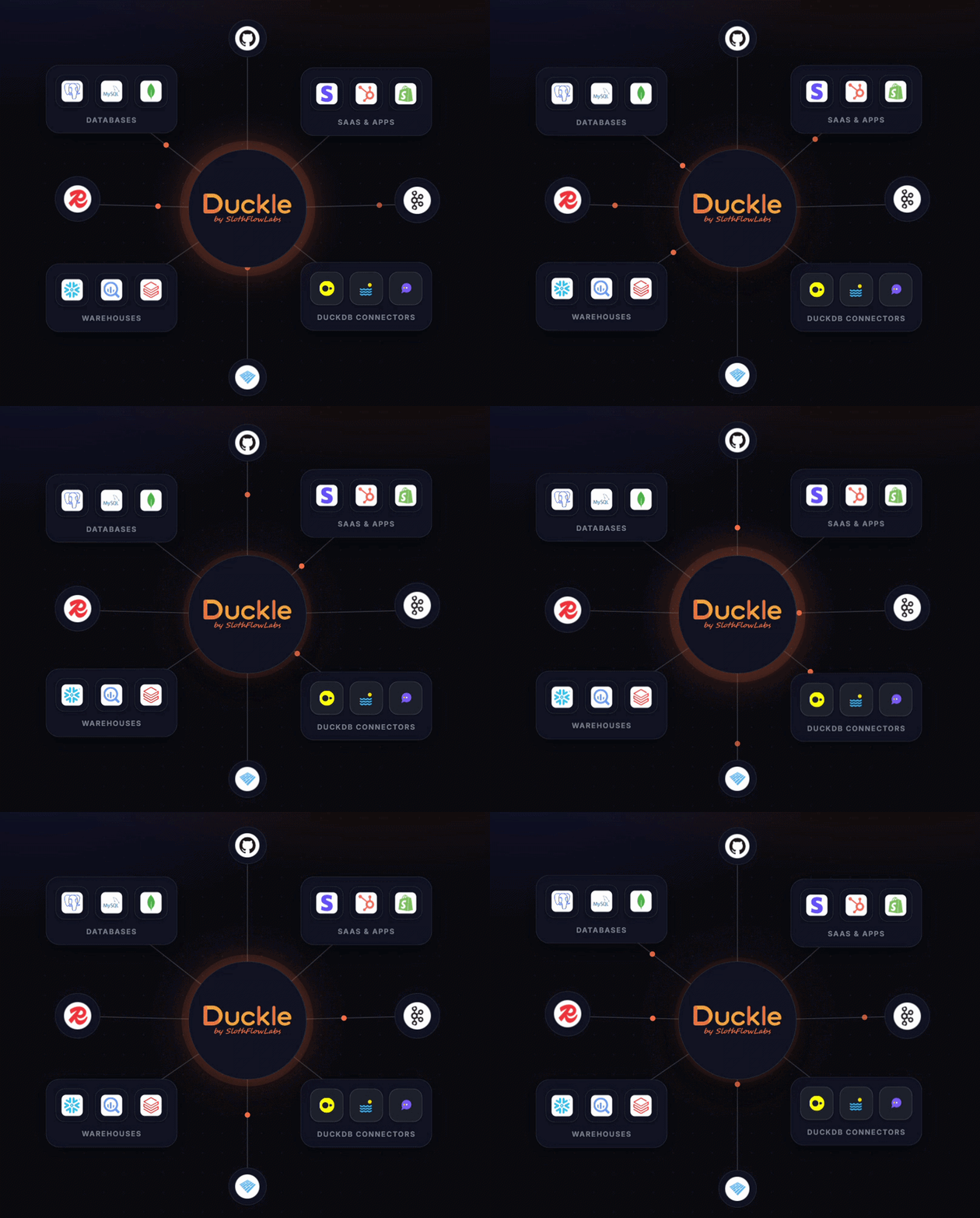
Duckle is an independent open-source project by SlothFlowLabs. It builds on the DuckDB engine but is not part of, affiliated with, or endorsed by DuckDB Labs or MotherDuck.

Star Duckle if it looks useful. It genuinely helps other data engineers find the project.
Quick links
Get started
- Where Duckle runs
- What is Duckle?
- What's new in v0.7.4
- What's new in v0.7.3
- What's new in v0.7.2
- What's new in v0.7.1
- What's new in v0.7.0
- What's new in v0.6.1
- What's new in v0.6.0
- Quickstart (60 s)
- Download / Install
- Build from source
- Run your first pipeline
Use the product
- Meet Duckie (AI)
- How to use Duckle
- Recipes / examples
- In-app Git (GitHub/GitLab)
- Workspace + Git flow
- Schedules
- Plans
- Server deployment
- Sign-in and roles
- How a request is decided
- API keys, for machines
- MCP server: connect Claude, Cursor or any agent
- Connection management
- Context variables
Reference
- Capabilities matrix
- Sources
- Transforms
- Sinks
- Data quality
- Custom code
- Control flow
- Advanced settings
- Engines
- Configuration
Resources
- Architecture
- Clean data for AI
- Performance tips
- FAQ
- Troubleshooting
- CI / CD
- Status
- Roadmap
- Contributing
- Sponsor Duckle
- License
- Releases
- Roadmap doc
- Contributing doc
What is Duckle?
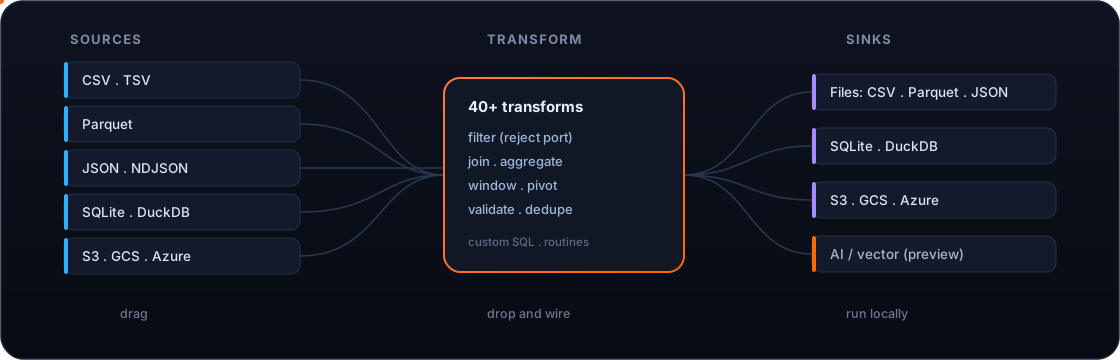
An open-source ETL platform you run on your own infrastructure. Drag sources, transforms, validators and sinks onto a canvas, wire them together, and press Run. Duckle compiles the graph to SQL and executes it on a real columnar engine, with live previews, the generated SQL visible on every node, and no hidden state.
You build a pipeline on a laptop and deploy that same file to a server, where it runs on a schedule under a web console with roles, alerts and an audit log. Nothing is rewritten in between, and nothing is metered.
In short: a free, open-source, single-engine alternative to hosted, per-row-priced ETL platforms like Fivetran and Airbyte - one pipeline for ingest, transform, and load that runs anywhere, and can also run dbt on DuckDB inside the same tool.
Three things set it apart:
- An AI assistant that ships in the box. Describe the pipeline you want in English; Duckie writes the JSON and drops it onto the canvas. The model runs wherever Duckle does - no API key, no telemetry, no vendor round-trip. Point it at your own OpenAI-compatible endpoint instead if you would rather it did not run in-process.
- 400+ components ready at install time. Files, lakehouses, SQL databases, warehouses, NoSQL, vector DBs, streaming brokers, SaaS REST/GraphQL APIs, even FTP and IMAP - working today, not coming-soon.
- A self-contained binary you can audit. 73 to 110 MB depending on your platform. Engines install on first launch. Workspaces are plain files in a folder you choose. Diff them, branch them, ship them.
Why Duckle is different
| Visual, never opaque | The canvas compiles to SQL you can read, and every node has a live preview tab. No black box. |
| An assistant with no API key | Runs in-process by default, or against your own OpenAI-compatible endpoint. Your prompts and your data stay inside your infrastructure either way. |
| Single-file binary, no bundled DB | 73 to 110 MB depending on platform (it embeds the headless runner + MCP server). DuckDB downloads on first launch with a guided step. AI engine is opt-in. |
| Native speed | Execution runs through DuckDB: vectorized, columnar, local. A clean-and-export job that crawls in a spreadsheet finishes in milliseconds. |
| Git-friendly by design | Pipelines, connections, contexts, and routines persist as plain files in a folder you pick. Diff them, branch them, review them. |
| 400+ components ready today | Files, databases, warehouses, lakehouses, object stores, SaaS APIs, NoSQL, streaming brokers, vector DBs, FTP, IMAP, SMTP. Each is covered by tests. |
| Honest about scope | Single-machine and embedded by design. Built to make local and small-team data work fast, not to replace a distributed warehouse. |
| 60 UI languages | Topbar, palette, chat assistant, properties panel, and common dialogs ship localized. English, Spanish, Chinese (Simplified + Traditional), Hindi, Arabic, Portuguese (Brazil), Bengali, Russian, Japanese, Punjabi, German, Korean, French, Vietnamese, Telugu, Marathi, Turkish, Tamil, Urdu, Persian, Polish, Italian, Ukrainian, Indonesian, Thai, Dutch, Hebrew, Swedish, Greek, Czech, Hungarian, Romanian, Filipino, Malay, Norwegian, Danish, Finnish, Catalan, Bulgarian, Slovak, Croatian, Serbian, Slovenian, Lithuanian, Latvian, Estonian, Khmer, Burmese, Sinhala, Nepali, Swahili, Afrikaans, Welsh, Irish, Icelandic, Albanian, Azerbaijani, Mongolian, Kazakh. RTL (Arabic, Hebrew, Persian, Urdu) supported. Switch languages from the topbar globe. |
| Open source | Dual-licensed MIT OR Apache-2.0. Yours to use, fork, and extend. |
Screenshots
Real pipelines, built and run in Duckle - not mockups.
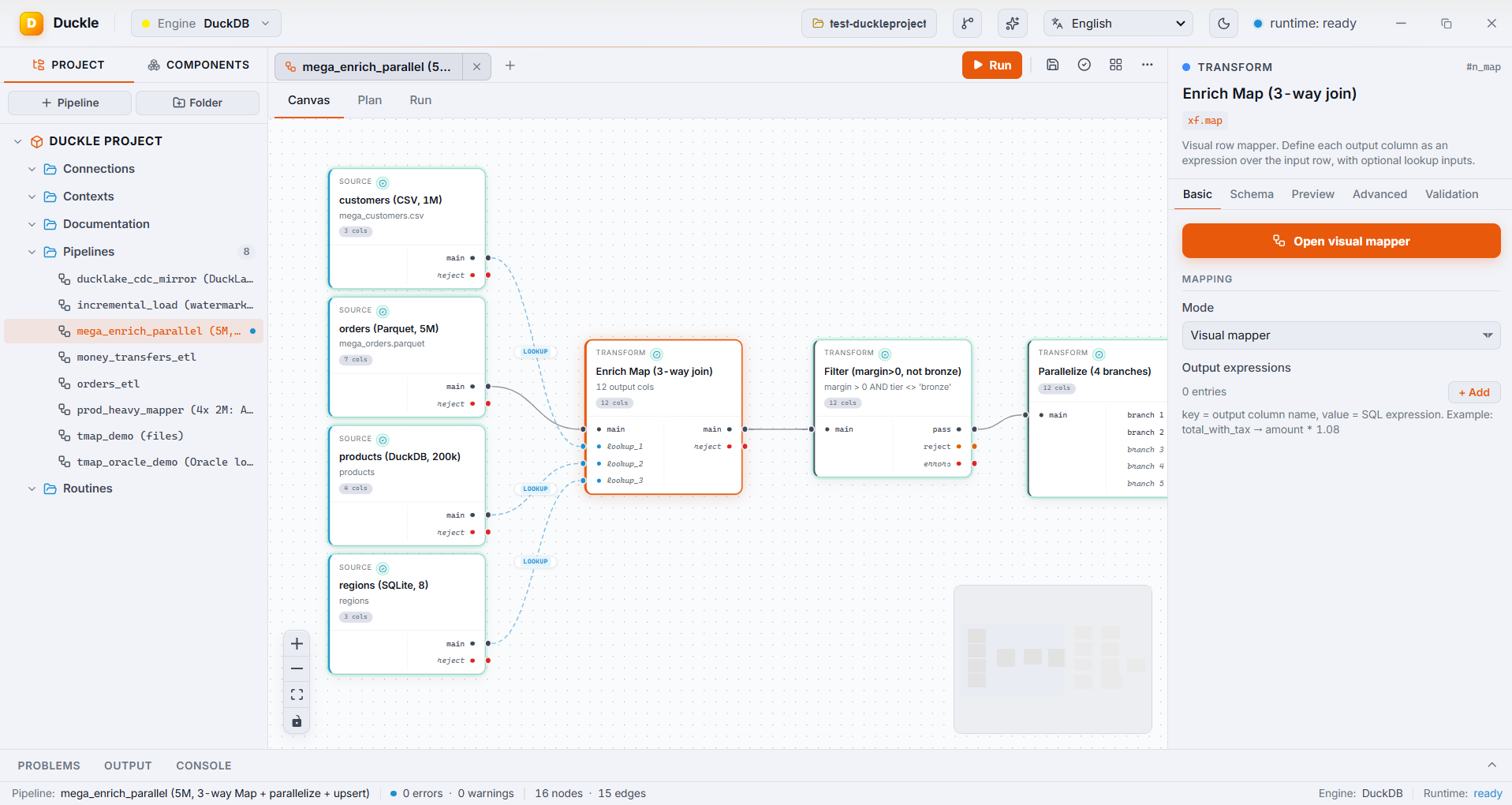
A 5M-row pipeline: a CSV, a Parquet file, a DuckDB table, and a SQLite table enriched through one visual Map (3-way join), no SQL.


Left: the visual Map editor - main plus lookups, per-output expressions, an inline filter. Right: Parallelize fanning out aggregate, window, and top-N branches.
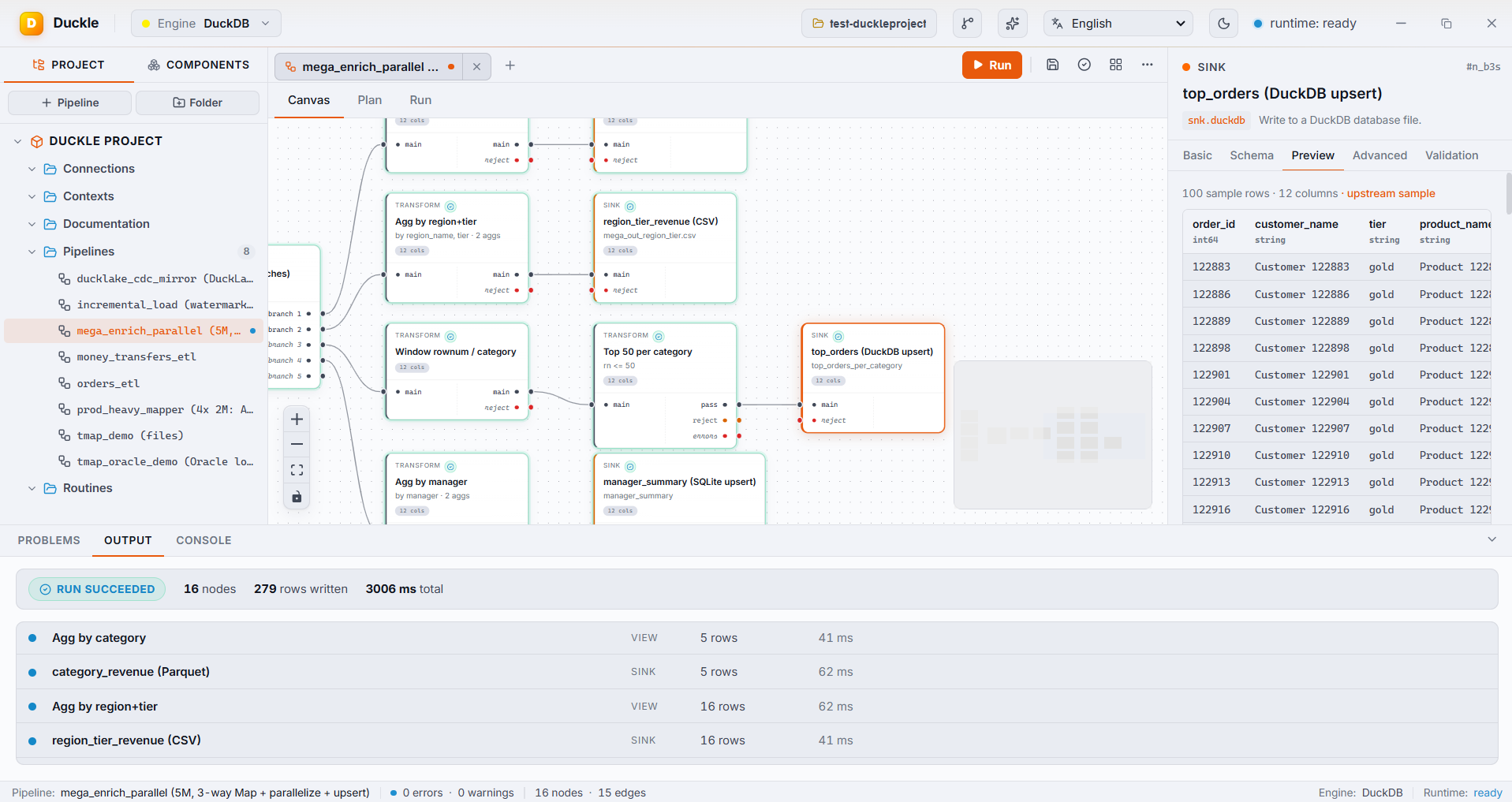
One run, many branches: 16 nodes finish in a few seconds. Concurrency auto-detects from CPU cores; branches write to Parquet, CSV, DuckDB, and SQLite at once.


Left: DuckLake CDC change-feed mirrored via upsert + delete propagation (100k rows). Right: watermark incremental load over 5M rows, advancing state only on a fully successful run.
Quickstart (60 seconds)
- Download the binary for your OS (see Download / Install above) - or build from source.
- Launch it. First run shows the setup modal:
- Click Install on DuckDB (required, takes ~30 s).
- Optionally click Install on Duckie AI Assistant (~1.1 GB, takes 5-10 min on average broadband).
- Pick a workspace folder. Pipelines, connections, context variables, and routines live there as plain files.
- Build a pipeline two ways:
- Drag + wire: drag a CSV source in, point it at
samples/orders.csv, hit Autodetect schema. Drag a Filter, wire it up. Drag a Parquet sink with an output path. Press Run, watch the nodes light up. - Ask Duckie: click the Sparkles icon (top-right of the toolbar), type "read orders.csv, filter where status = 'paid', write to paid.parquet". When Duckie streams back a pipeline, click Insert into canvas.
- Drag + wire: drag a CSV source in, point it at
- Inspect. Click any node for a live row sample in its Preview tab. The Plan tab, beside Canvas, shows the SQL generated for every stage.
That's a real, native ETL pipeline built and run in under a minute. CSV is just the easiest first node; swap in Parquet, JSON, S3, Snowflake, MongoDB, or Stripe the same way.
Download / Install
Pick the binary for your OS from the latest release:
| OS | Asset | How to run |
|---|---|---|
| Windows | Duckle-windows-x64.exe |
Double-click. Unsigned binary - Windows SmartScreen will warn the first time; click "More info" -> "Run anyway". |
| macOS (Apple Silicon) | Duckle-macos-arm64 |
chmod +x Duckle-macos-arm64 && ./Duckle-macos-arm64. Right-click -> Open the first time to bypass Gatekeeper. |
| Linux (x86_64) | Duckle-linux-x64 |
chmod +x Duckle-linux-x64 && ./Duckle-linux-x64. Requires WebKitGTK 4.1 (libwebkit2gtk-4.1-0 on Debian / Ubuntu) and a desktop session, X11 or Wayland with or without XWayland. On a server with no display, ./Duckle-linux-x64 serve runs the scheduler and web console without a window. |
The single-file binary above is all you need for Build Pipeline too: the headless runner is embedded into the app at build time, and exporting a pipeline produces ONE self-contained executable (the engine, the DuckDB CLI, any needed extensions, and the resolved pipeline are all inside that one file). Copy that single file to your server and run or schedule it - no separate runner download required.
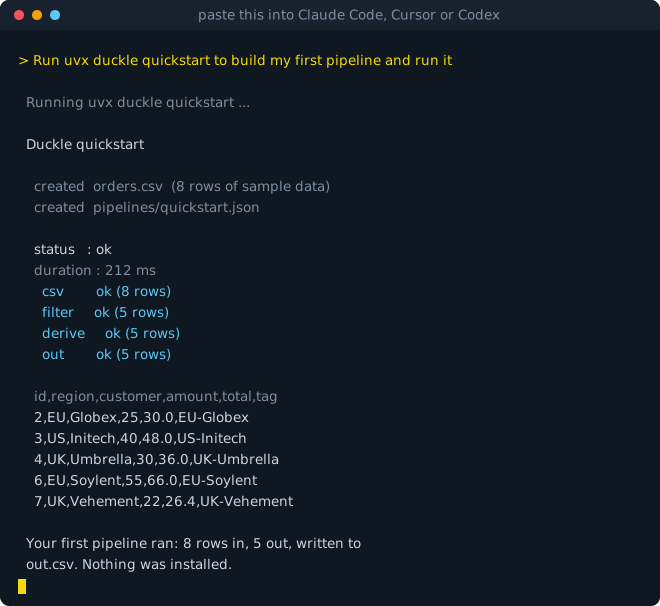
One command, nothing installed: it scaffolds sample data and a pipeline, compiles it to SQL, runs it on DuckDB, and shows you the rows.
uvx duckle quickstart
Let an agent do it
Paste this into Claude Code, Cursor, or Codex:
Run
uvx duckle quickstartto build my first pipeline and run it
Nothing to install first. The agent fetches Duckle and the DuckDB engine on demand, runs a real pipeline, and shows you the rows.
CLI only (CI, cron, containers)
If you do not want the desktop studio, install just the headless runner. It is about 27 MB rather than 100 MB or more, has no GUI dependency, and is what a build step actually needs.
pip install duckle
That is the whole install. It brings the DuckDB CLI with it (via the duckdb-cli package published by the DuckDB Foundation), so there is nothing else to fetch and it works offline. Wheels ship for Linux, macOS and Windows on x86-64 and arm64.
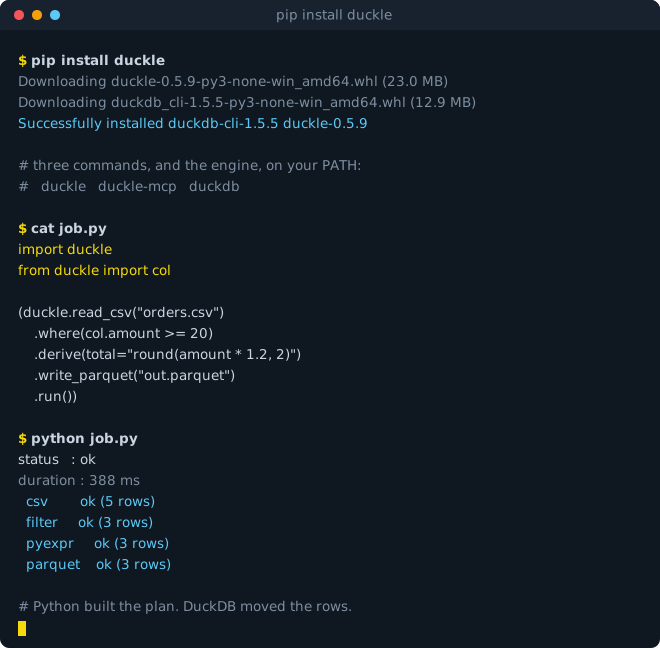
It also gives you a Python API, where pipelines are built as code and executed by DuckDB rather than by Python:
import duckle
from duckle import col

(duckle.read_csv("orders.csv")
    .where(col.amount >= 20)
    .derive(total="round(amount * 1.2, 2)")
    .write_parquet("out.parquet")
    .run())
Python expressions compile to vectorized SQL at plan time, so no rows pass through the interpreter. See the PyPI page for the full API.
The same package provides the duckle command-line runner for CI, cron, and containers - it bundles the headless runner and the MCP server per platform:
pip install duckle # or run ad hoc, no install: uvx duckle --help
Pipelines execute as SQL on the DuckDB CLI, so the runner needs a duckdb on PATH or DUCKLE_DUCKDB_BIN set (pip install duckdb-cli is the quickest route). Validation does not:
duckle validate                 # compile-check every pipeline under ./pipelines
duckle validate --json          # machine-readable, for a CI step
duckle --pipeline my.json       # run one
validate opens no source and writes no sink, so it needs no engine, no credentials and no network. Exit codes are stable: 0 clean, 1 a real finding (a pipeline failed or did not compile), 2 the runner could not start (bad usage, unreadable file, missing engine).
The binary is 73 to 110 MB depending on platform (it embeds the headless runner and the bundled MCP server). On first launch you'll be guided through downloading two engines into your app-data directory:
| Engine | Size | Required? | What it powers |
|---|---|---|---|
| DuckDB CLI | ~30 MB + extensions | Yes - cannot run pipelines without it | Every source / transform / sink that runs as SQL |
| Duckie AI Assistant | ~1.1 GB (llama-server + Qwen 2.5 Coder 1.5B GGUF) | Optional | The chat sidebar that generates pipelines from natural language |
App-data location:
- Windows:
%APPDATA%\io.duckle.app\engines\ - macOS:
~/Library/Application Support/io.duckle.app/engines/ - Linux:
~/.config/io.duckle.app/engines/
Delete the engines/ folder if you ever want to force a fresh install.
Run your first pipeline
A worked example using the bundled samples/orders.csv data.
1. Add a source
- Open the Components sidebar (left). Click Sources -> Files -> CSV.
- Drag it onto the canvas.
- In the right-side Properties panel:
- Path: browse to
samples/orders.csv - Click Autodetect schema - the Schema tab fills in column types from the file, the Preview tab shows the first 20 rows.
- Path: browse to
2. Add a transform
- Components -> Transforms -> Rows -> Filter. Drag onto canvas.
- Wire the CSV source's
mainoutput port to the Filter'smaininput. - In Properties:
- Predicate:
status = 'paid'(you can write raw SQL or use the visual builder) - Filter has two output ports:
pass(rows matching) andreject(rows that don't).
- Predicate:
3. Add a sink
- Components -> Sinks -> Files -> Parquet.
- Wire Filter's
passport to the Parquet sink. - Path:
paid_orders.parquet. Write mode:overwrite. Compression:zstd.
4. Run it
- Press Run in the toolbar. Nodes light up in execution order; row counts appear under each.
- Open the Output tab (bottom panel) to see per-stage timing.
- Click any node for sampled rows in its Preview tab; the Plan tab beside Canvas shows the generated SQL for every stage.
5. Iterate
- Add a Group By before the sink to aggregate. Re-run. Sub-second on small data.
- Cancel mid-run with the Stop button - the DuckDB process is killed cleanly.
- Save your work: Cmd/Ctrl-S writes a JSON pipeline file to your workspace folder.
Or start from a query you already have
New pipeline -> From SQL, then paste a SELECT. Each CTE becomes a SQL step
named after it, the final SELECT becomes the last one, and each table the
query reads becomes a source node to point at your data. The steps still read
each other by name, so the pipeline computes exactly what the query did (a test
runs both and compares the rows). Files named in the query (FROM 'orders.csv') stay in the SQL. A WITH RECURSIVE query is kept as one step,
and the node says why.
Where Duckle runs
You build a pipeline on your laptop. The server runs that same file. Nothing is rewritten, exported or converted in between.
flowchart LR
    D["Duckle Desktop
your machine"] -->|deploy, needs admin| W
    B["Console in a browser
your machine"] -->|turn it on, needs operator| W
    W["Workspace on your server
a new schedule lands OFF"] --> C["Scheduler
every 15s, takes what is due"]
    C --> R["It runs
on that box, unattended"]
    R --> O["Run history, logs, metrics,
alerts, and an audit log"]
    O -->|you watch it here| B
| How | What you get | |
|---|---|---|
| Server | duckle-runner serve --workspace /srv/pipelines |
Headless web console, cron scheduler, roles, audit log, alerts |
| Docker | Dockerfile.web |
The same console in a container, behind your own ingress |
| CI | duckle-runner --pipeline p.json |
Any runner. Exit codes and NDJSON logs, nothing to install |
| Standalone | Build Pipeline | One self-contained executable. Drop it on a box, run it from cron or systemd |
| Desktop | The app | Author, debug and inspect. Optional, and never required to run anything |
Nothing here depends on a person's machine being switched on:
- Pipelines are plain files in git. Review them in a pull request, roll them back, and let them outlive whoever wrote them. There is no proprietary repository and no exported binary artifact.
- The console has roles and an audit log, so more than one person can operate it and you can see who did what.
- Secrets are not in the pipeline file. They resolve from the environment or an encrypted per-workspace store at run time.
Working recipes for AWS (EC2, ECS, EKS), Azure (VM, Container Apps, AKS) and Google Cloud (Compute Engine, GKE), with manifests and the mistakes worth avoiding, are at duckle.org/deploy. Three things worth knowing before you start:
- On a non-loopback bind with no credential the console starts unclaimed, and for 15 minutes it can be claimed by someone holding the setup code it prints to its own output when it starts. Reading that output - the terminal, or
docker logs- is what distinguishes the operator from anyone who can reach the port; the code is 128 bits, new on every restart, and never written to disk. A refused claim is recorded in the audit log, so guessing is visible rather than silent. Pass--token, setDUCKLE_CONSOLE_TOKEN, or create accounts withduckle-runner console add-userto skip the window entirely. An empty value is refused rather than treated as absent, so an unresolved secret fails loudly instead of opening that window. Who can do what, and how one request is decided, is set out under Sign-in and roles. - The scheduler runs in
serve, not in the editor. Start the editor with schedules armed and it now says so rather than leaving you to wonder why nothing fired. GET /healthzneeds no credential and answersok, so a Kubernetes probe or a load balancer can check liveness without holding a token. Every other route is authenticated, so pointing a probe anywhere else reports the pod unhealthy forever.
Deploying a pipeline to a running server
POST /api/deploy lands a pipeline on a server from wherever it was authored, with the schedule it should eventually run on:
curl -X POST https://duckle.internal/api/deploy \
  -H "Authorization: Bearer $DUCKLE_TOKEN" \
  -d '{"name":"orders-load",
       "pipeline": '"$(cat orders-load.json)"',
       "schedule":{"intervalMinutes":30}}'
Two things are deliberate. The schedule arrives disabled, so a cadence someone set while testing on a laptop cannot start firing the moment it reaches production; enabling it is a separate call. And deploying needs admin while enabling needs operator, because a deployed pipeline runs shell and SQL on that host: shipping the code and starting it are two acts, and the audit log records both with the name of whoever did them.
API keys, for machines
A person signs in and gets a session. A machine has no browser and nobody to rotate a password, so it gets a key of its own:
duckle-runner console key-add ci-deployer --role admin --expires-days 90
duckle-runner console key-list      # role, state, and when each was last used
duckle-runner console key-revoke ci-deployer
A key carries its own role, so a deploy runner can be admin while a metrics scraper is viewer. It is printed once and stored only as a hash, so a lost key is replaced rather than recovered. key-list shows when each was last used, which is the question actually worth answering before revoking one, and revoking takes effect immediately on a console that is already running rather than at the next restart. Revoked keys are marked rather than deleted, so a key that turns up in an old log can still be named.
Accounts, sessions and keys live in .duckle/console.db. An existing console-users.json is carried into it on first start and renamed to .migrated, so an upgrade neither locks anyone out nor destroys the only copy of a credential store. For the roles, and a diagram of how one request is decided, see Sign-in and roles.
Scaling it
duckle-runner serve is an ordinary service. Run it on EC2, EKS, a VM or a container next to everything else you operate, and scale it the way you scale any service:
- More cores. The engine is parallel and uses every core on the box by default, so a bigger instance is a faster pipeline with no change to the pipeline. Bound it with
DUCKLE_THREADSwhen you would rather it did not take the whole machine. - More RAM. Set
memoryLimitMbper stage, or a workspace default, and spill to disk past it. - More pipelines at once.
DUCKLE_MAX_CONCURRENT_RUNSraises how many run together; it ships at 1 so an unattended server stays predictable until you decide otherwise. - More machines.
duckle-runner workdrains a queued batch from as many workers as you start, on as many hosts as you like, each claiming its items under a lock so nothing runs twice. - Bigger than any box. Turn on pushdown and the query runs verbatim inside Postgres, Oracle, SQL Server or Snowflake. The warehouse does the scan; Duckle keeps the scheduling, lineage, data quality and alerting.
Measured, rather than asserted:
- 96,000,000 rows out of live Postgres to Parquet in 39.9s (details)
- Oracle extract at 65.0s, against 68.6s for python-oracledb with pyarrow on the same machine (details)
The one thing Duckle does not do is split a single query across a cluster the way a distributed warehouse does. When you need that, push the work down into the system that has it and let Duckle orchestrate around it.
Server deployment (Build Pipeline)
Want the studio to publish straight to a running server instead? That is the other route: connect a server once, then Deploy to a server from the editor. Step by step in docs/current/server-deployment.md.
Promoting from CI instead, or driving Duckle from Airflow, Dagster or Temporal? See docs/current/ci-and-orchestration.md, with copyable GitHub Actions and GitLab CI templates in docs/ci/.
Want to know exactly what crosses the wire, and where every credential is stored? docs/current/client-server-architecture.md is the diagrammed answer, sharp edges included.
The in-app scheduler runs only while Duckle is open. To run a pipeline on a server with no desktop app, Build Pipeline turns it into ONE self-contained executable - the equivalent of a standalone "Job".
Right-click a pipeline (in the project tree or on the canvas) and choose Build Pipeline. The output is a single file named after the pipeline (orders_etl.exe on Windows, orders_etl on macOS / Linux) that embeds everything it needs:
- the headless execution engine,
- the DuckDB CLI,
- only the DuckDB extensions that pipeline's components actually use,
- the resolved pipeline (context variables substituted, routines inlined),
- its secrets (see below).
On first run it self-extracts to a temp cache and uses its own embedded DuckDB, so the server needs nothing installed - no Duckle, no DuckDB. There is no folder to copy, no run.sh, and no separate runner download. A CSV-to-CSV pipeline builds to about 28 MB; only the extensions a pipeline uses are bundled, so the file stays lean.
./orders_etl # or orders_etl.exe on Windows
The process exits 0 on success and non-zero on failure, and writes the same NDJSON run logs under logs/ (Splunk / Dynatrace friendly).
Build options
| Option | What it does |
|---|---|
| Target OS | Pick Windows, Linux, or macOS in the build dialog. The native OS always builds; a Linux server file can be cross-built from any host (the Linux engine is bundled for you), while a macOS file can only be produced on a Mac. Appending the payload makes the file unsigned, so do not codesign / Authenticode-sign it. |
| Context | Pick a context at build time; its non-secret variables are baked into the pipeline. |
| Secrets: Environment | Each secret becomes a ${ENV:KEY} placeholder, so nothing sensitive is written into the file. The runner resolves real environment variables first, then a secrets.env (KEY=VALUE lines) placed next to the file. |
| Secrets: Passphrase | Secrets are encrypted inside the file with AES-256-GCM, decrypted at run time from the DUCKLE_BUNDLE_PASSPHRASE environment variable. |
Schedule it with whatever the server already has - point the OS scheduler straight at the file:
# Linux cron - run every day at 02:00
0 2 * * * /opt/duckle/orders_etl >> /var/log/orders_etl.log 2>&1
On Windows use Task Scheduler; on macOS a launchd plist; on Linux a systemd timer. Full examples in docs/current/scheduler.md.
Run against an existing workspace - the same embedded headless runner can also execute a pipeline JSON directly, resolving context the way the app does:
duckle-runner --pipeline /path/to/pipeline.json [--workspace /path/to/workspace] [--duckdb /path/to/duckdb]
Continuous mode (follow)
A scheduled pipeline already consumes a stream without gaps: a source that
tracks its position (src.kafka with trackOffset, xf.incremental) resumes
where the last successful run stopped. What a schedule cannot give is
latency - the scheduler wakes every 15 seconds, and every run pays process
start, DuckDB resolution and document parsing again.
follow keeps the same execution model and removes that per-batch overhead.
The document is read and resolved once, the engine is built once, and the
pipeline then runs in a loop. Each pass is one micro-batch:
duckle-runner follow /path/to/pipeline.json --idle-ms 500
| Flag | Meaning |
|---|---|
--idle-ms N |
wait N ms after a pass whose sinks wrote nothing (default 1000) |
--max-batches N |
stop after N passes (default: until stopped) |
--on-error stop|continue |
stop on a failed batch (default), or keep going |
A failed batch never advances the source position. The position is queued
during the run and written only when the run reaches ok, which is after every
sink has written - so a failure anywhere, transform, quality gate or sink,
leaves the position where it was and the next pass re-reads exactly the records
that did not land. Killing the process is safe for the same reason; Ctrl-C
finishes the batch in hand first, which only saves you a truncated output file.
That ordering is the difference between a correct micro-batch loop and a lossy one, so it is covered by a regression test that fails if the position ever advances past a batch that did not land.
Masking what you look at, not what you write
A pipeline's sinks can be perfectly governed and its data still be read off a screen. Previews, profiles, reject rows, error bodies, API responses and the rows an MCP tool hands an agent are all places production person-data appears without anyone's permissions being wrong.
Tag the column in the schema:
{ "name": "email",      "type": "string", "tags": ["pii"] }
{ "name": "api_secret", "type": "string", "tags": ["secret"] }
| tag | what an inspection surface shows |
|---|---|
secret |
***, always, whatever else the column is tagged |
pii |
a short stable digest, so rows stay distinguishable without the value appearing |
mask:null / mask:last4 / mask:redact / mask:hash |
picked explicitly |
It never changes what the pipeline writes. The sink still receives the real
value, because the sink is governed by policy and the screen is not. Changing
written data is what qa.mask is for.
Masking happens as the previews are assembled, so the desktop panel, the CLI, the console API and MCP are consistent by construction rather than by four callers remembering. Both execution paths are covered, and there is a test for each - a masking point wired into only one of them would leak on the other.
Nothing is inferred from a column name. A heuristic that masked company_name
because it contains "name" would teach people to distrust the masking, and one
that quietly failed to mask something would be worse.
Schedules in a named time zone
A cron expression is civil time: 0 3 * * * means three in the morning as a
person reads a clock. With no zone set that is the machine's clock, which is
what every existing schedule already means. Set one and it stops depending on
where the runner is deployed:
timezone: Europe/Brussels
A Brussels registry pipeline stays at 03:00 Brussels whether the container runs
on UTC or the operator is watching from another continent. An unknown zone is
refused when you save it, not at fire time, so Europe/Brussel is a typo
you see rather than a job quietly running on UTC for a quarter.
Daylight saving is decided, not discovered. Twice a year a civil time is not a single instant, so both cases are pinned and tested:
| case | what happens |
|---|---|
| the clock skips it (spring) | the occurrence is skipped, and the skip is reported. A job asked to run at 02:30 on a day with no 02:30 has not been missed by the scheduler; the day was short. It is not nudged to 03:30. |
| the clock repeats it (autumn) | it fires once, at the earlier of the two instants |
Intervals are untouched. every 24 hours is an elapsed duration, not "the
same clock time tomorrow", and a zone must not quietly turn one into the other.
Both schedulers - the desktop one and the web console's - now evaluate through the same code. They disagreed once before, and the way it showed up was one expression firing at two different times depending on which surface owned it.
Days a schedule must not fire on are a small calendar rather than a holiday provider:
exclude:
  weekdays: [sunday]
  dates: [2026-12-25]
The dates are civil dates in the schedule's own zone, which is why this belongs with time zones rather than beside them: a schedule at 00:30 Brussels on the 25th is 23:30 UTC on the 24th, so a UTC-based check would exclude the wrong day. A skipped occurrence is reported rather than merely not happening, and a misspelled weekday or date is refused when you save it - "sundy" excludes nothing, which looks exactly like no exclusion at all until the day arrives.
Real holiday calendars vary by country, region and year; a first version that tried to know them would be wrong somewhere and confidently so. A date list is something an operator can check by reading it.
Typed pipeline parameters
A pipeline can declare what it takes, and the contract is checked once for every surface rather than separately by each:
"parameters": {
  "jurisdiction":   { "type": "string",  "enum": ["BE","NL","GB"], "required": true },
  "effective_date": { "type": "date",    "required": true },
  "full_refresh":   { "type": "boolean", "default": "false" },
  "max_companies":  { "type": "integer", "minimum": 1 },
  "api_token":      { "type": "secret",  "required": true }
}
Types: string, integer, number, boolean, date, datetime, secret.
Constraints: required, default, enum, minimum, maximum, pattern,
description.
From the command line, one --param per value:
duckle-runner nightly.json --param jurisdiction=BE --param effective_date=2026-01-31
They go through the same check as every other surface, so --param jurisdiction=FR stops before anything runs (jurisdiction is "FR", which is not one of the accepted values). A --param without =, or the same name twice, is
a usage error rather than a guess at which was meant, and the run record gives
their source as --param.
In the editor, desktop or web, Run opens a form with a control for each
declared parameter: a list for an enum, true / false for a boolean, a date
or date-time picker, a number field that knows its minimum and maximum, and a
masked field for a secret, each with its description. A blank field sends
nothing, so the declared default applies and a required one is refused
(run_date is required). The values go to the engine rather than being
substituted in the browser, so a run started from the editor is held to the
contract like any other, and the pipeline's maxRunSeconds and resourcePool
apply to it too. A value a context gives a declared parameter is filled in for
you to keep or change.
A schedule can bind values too: the Schedules dialog shows the same controls
under Parameters, and every run the schedule starts is given them, checked
against the contract like any other value, on the desktop scheduler and under
duckle-runner serve alike. A blank field uses the pipeline's default. Through
the console's API a schedule takes them as "params": { "region": "us" }, and a
save that does not mention params keeps the ones the schedule has. A schedule
that runs a plan binds none itself: each pipeline in a plan has its own contract,
so its values live on the plan's steps (see Plans).
Where a value came from is kept. When two surfaces bind the same parameter - a schedule and the run that starts, say - the later one wins, which is a documented rule and not a clever one. What is not thrown away is that something was displaced:
{ "name": "jurisdiction", "value": "NL", "source": "run input", "overrode": ["schedule"] }
Only a differing value counts as an override. Two places binding a parameter
to the same value is a duplicate and harmless; recording both alike would bury
the case that matters in the noise of the one that does not. The record lands on
the run receipt, so "was this deliberately overridden, or bound twice by
accident?" is answerable after the fact rather than only while it happens. A
secret is *** here for exactly the reason it is elsewhere - a provenance record
must not become the one place a credential is written down.
Validated at one boundary. Every surface - desktop, console, CLI, HTTP API, MCP, scheduler, Plans - reaches substitution through the same function, so the contract is enforced there. Validating per surface is how the desktop ends up accepting a value the scheduler refuses, and the bug is then in neither of them.
Every problem at once, with a stable code (param:unknown, param:missing,
param:type, param:enum, param:range, param:pattern) and what was wanted.
A form filling in one mistake per round trip is not a contract, it is a
guessing game. An undeclared name is refused rather than ignored, with the near
names suggested - a typo is far more likely than a new parameter, and a silently
ignored one means the run used the default and nobody noticed.
secret is a declared type, not a guess from the name. A secret value never
reaches run history, and a constraint failure on one never echoes the value into
an error message. In history it is replaced rather than dropped, because a
missing key reads as "never supplied" and "was this run given a token?" is worth
being able to answer.
A pipeline that declares nothing behaves exactly as before: any unresolved
${name} is simply prompted for.
Is this SQL right? (sql check)
duckle-runner sql check pipeline.json [--node q] [--format json|junit|sarif]
skip  src                src.csv has no SQL to check
skip  pg                 src.postgres sends its SQL to the remote system, so DuckDB cannot
                         validate it. Checking it here would say nothing true about that dialect.
hint  pg                 more than one statement: a source sends ONE query, wrapped as
                         `SELECT * FROM (...)`, so anything after the first semicolon is a
                         syntax error rather than a second step
FAIL  q                  2:12: Referenced column "amountt" not found in FROM clause!  (did you mean amount?)
skip  out                node "out" is a sink stage, which produces no relation to describe - and
                         running it to find out would perform its writes

4 node(s) checked, 2 problem(s)
Every SQL-bearing node is bound against the columns its upstreams actually produce, before anything runs, and the output schema each node infers is carried forward to the next. Nothing with effects is executed: a sink is refused rather than run to see what it returns, and only a plain derived view is bound.
The diagnostics were always there and were being thrown away. DuckDB already says which column, where, and what it thinks you meant; all of it was collapsed into one error string, so the editor could report only that a node did not resolve. The candidate list is the most useful part and was the first thing lost.
A wrong position is worse than none. The position DuckDB reports is an offset into the SQL Duckle compiled, not the SQL you wrote - and DuckDB truncates the line it echoes for any wide statement, which Duckle's always is. So the position is recovered by finding the named token in your own SQL, and only when it occurs exactly once. Twice, and there is no position at all rather than a confident guess at the first one.
A source's query is not checked, and says so. It runs on Postgres or BigQuery; binding it against DuckDB would either reject valid SQL or accept invalid SQL, and either way the answer would be about the wrong engine. "Not checked" and "checked and clean" never read the same.
But some things are wrong in every dialect. An unclosed quote, an unbalanced
parenthesis, a second statement where exactly one query is sent, a DELETE in a
position that reads rows, a ${placeholder} nothing substituted. Those are
reported as hint on a node that still says it was not validated - the round
trip to the remote system tells you the same thing, slower, in a message about a
token far from the mistake. Nothing here guesses at a dialect: ARRAY_AGG,
QUALIFY, LISTAGG, toDateTime and GENERATE_UUID() are left alone, because
checking Postgres SQL with anything other than Postgres tells you about the
checker rather than about your query. A test asserts exactly that.
The editor shows them. Selecting a node runs the same bind and puts what DuckDB said above the form - the position in your own SQL, and the column it suggests instead:
2:12 Referenced column "amountt" not found in FROM clause! did you mean amount?
Cleared as soon as the node binds again, because a stale error under a line the author has already fixed is worse than no error at all.
And what could come next. complete_node_sql suggests upstream columns with
their types, the relations the node can read, the pipeline's declared parameters,
DuckDB's functions and keywords - ranked for the position:
SELECT reg          ->  column region (String)   ${region_filter}   regexp_escape(
SELECT * FROM       ->  input   src              (relations only)
WHERE x = ${re      ->  ${region_filter}         (nothing else can be meant)
A column beats a function where a column belongs, a prefix beats a substring, and the list is stable between identical edits - a list that reshuffles between keystrokes is one nobody builds muscle memory against.
It never runs your SQL. The only thing read from DuckDB is its own function list, cached for the process; the columns come from the caller. That is what lets it answer on every keystroke when the bind cannot.
The editor uses it. A SQL field suggests as you type, with arrow keys, Enter or Tab to accept, Escape to dismiss and Ctrl-Space to ask at a fresh position. It is still a plain textarea: swapping it for a code editor to add completion would change everything about typing in order to change one thing. Requests are debounced, and a reply for an earlier keystroke is discarded rather than shown - it describes text that is no longer there.
Same analysis from duckle-runner sql check, the MCP tools check_node_sql and
complete_node_sql, and both editors - one function, so they cannot come to
disagree. SARIF carries a real
region, so a code-scanning viewer jumps to the token.
OpenLineage export
Drop an openlineage.json in the workspace and every run emits START and a
terminal event. No file means no events, no local writes and no network.
{ "namespace": "prod-eu", "endpoint": "http://marquez:5000/api/v1/lineage" }
START    | prod-eu/nightly | runId 79f0c574-56ee-5025-b0f4-addee7acb28a
COMPLETE | prod-eu/nightly | runId 79f0c574-56ee-5025-b0f4-addee7acb28a
   outputs: file  ${workspace}/data/curated.parquet  rowCount 3  unresolved
Emitted from retry::begin and retry::finish, which every execution
surface already goes through - the desktop, the console, the CLI, MCP, the
scheduler and Plans. A feed covering six of eight surfaces is one nobody can
reason about, because the missing runs look like runs that never happened.
The run id is derived, not random. OpenLineage requires a UUID and Duckle's ids are readable strings, so they are mapped by name: START and COMPLETE are emitted by different calls and must agree, or a collector shows two unrelated runs and no completed one. The original id travels in a facet.
interrupted is ABORT, not FAIL - the run stopped being observed, it did
not fail, and a consumer that treats those the same re-runs work that may have
finished.
A run-time reference is marked, not asserted. A dataset name still holding a
${...} does not address a single dataset, and it is emitted with
unresolved: true rather than silently joining to the wrong thing in someone's
graph. Datasets come from the catalog joined to the receipt by node id, so a
node the run never reached is not reported as touched: absent is not zero. A run
that finds the catalog missing or out of date builds it, so a new workspace needs
no catalog build before its events name anything.
Telemetry cannot fail a run. Events are appended to
logs/openlineage.ndjson first and only then POSTed, so a collector that is
down costs one short timeout and the events are already durable. Catalog asset
ids are credential-free by construction; query strings are stripped on top of
that, so a signed URL never carries its signature off the machine.
hashDatasetNames replaces names with a digest and keeps the namespace, for an
organisation that wants the shape of its graph in a shared tool without the
table names.
Alerting without scraping the UI (/metrics, /readyz)
curl -H "Authorization: Bearer $TOKEN" http://console:8080/metrics
curl http://console:8080/readyz      # no credential; so does /healthz
duckle_run_last_status{pipeline="nightly"} 0
duckle_run_last_duration_seconds{pipeline="nightly"} 12.4
duckle_node_last_duration_seconds{pipeline="nightly",node="extract",component="src.rest"} 9.1
duckle_node_last_rows{pipeline="nightly",node="load",component="snk.parquet"} 4200
duckle_runs_window{pipeline="nightly",status="error"} 3
duckle_run_permits_total 4
duckle_run_permits_free 0
duckle_runs_in_flight 4
duckle_scheduler_seconds_since_tick 9
The run-history half is rendered by the engine, the same function that writes
logs/duckle_metrics.prom for a node_exporter textfile collector - so the
endpoint and the file cannot come to disagree about what a series means. What
the endpoint adds is what a file cannot carry: what this process is doing right
now. duckle_run_permits_free at zero for any length of time is runs queueing,
and duckle_scheduler_seconds_since_tick growing past a few tick intervals is a
scheduler that has stopped: no schedule is firing.
Liveness and readiness are separate, because they fail differently and an
orchestrator acts differently on each: a process that is alive but not ready
should stop receiving traffic, not be restarted. /readyz writes and deletes a
probe file under .duckle/, so it catches a read-only mount or a full disk - the
states that stop runs being recorded while every read still succeeds. It checks
nothing external: a source being down is not this server being unready. On
serve it also checks the scheduler: a scheduler thread that has died or hung
leaves the console answering every request while no schedule fires, which from
outside looks exactly like a quiet night. Five missed ticks, and never under a
minute, answer 503 naming it. The web editor schedules nothing and is not held
to it.
Both probes are unauthenticated; /metrics is not. A probe says the process
is up and tells an anonymous caller nothing else. Pipeline names are the shape of
someone's business, so a scraper sends the same bearer token any other API client
does.
Labels are bounded, and when the budget bites it says so:
duckle_metrics_pipelines_omitted above zero means those pipelines are not being
monitored. Nothing prunes runs/, so a workspace that has ever run thousands of
pipelines would otherwise emit thousands of label values forever.
External components
An iXBRL parser, an OCR adapter, a country-specific registry reader - Duckle
should not contain all of those, and they should not have to be escape hatches
either. Drop one in /components//:
{ "id": "ext.upper", "version": "1.0.0", "label": "Uppercase (external)",
  "inputs": [{"name": "main"}], "outputs": [{"name": "main"}],
  "properties": { "sections": [ ... ] },
  "runtime": { "command": ["python", "run.py"], "timeoutSecs": 60, "lock": "requirements.txt" } }
and use ext.upper like any other component. A component reads a JSON control
message on stdin, reads and writes Parquet, and answers with JSON:
req = json.load(sys.stdin)
# req["inputs"]["main"], req["output"], req["properties"]
print(json.dumps({"ok": True, "rows": n}))
Bulk data is Arrow IPC or Parquet, never row JSON. A component says what it can handle, best first, and the host picks:
"runtime": { "command": ["python", "run.py"], "interchange": ["arrow", "parquet"] }
if req["format"] == "arrow":
    with open(req["inputs"]["main"], "rb") as f:
        table = ipc.open_stream(f).read_all()      # the STREAM format, .arrows
Arrow IPC needs DuckDB's arrow extension, which is a community one -
INSTALL arrow from the core repository 404s - so it may be unavailable on a
machine with no network. The host probes once and falls back to Parquet rather
than failing a run over an interchange preference. A component that never
mentions interchange gets Parquet, exactly as before.
What DuckDB writes is the Arrow IPC stream format, so a component reaches for
open_stream, not open_file; the files are named .arrows so the name does
not promise the other one. Control messages stay JSON because they are small and
structured.
Sources and sinks too, not only transforms. The ports a component declares decide what it is: no inputs is a source, no outputs is a sink.
  g   ok (5 rows) - ext.gen: 5 row(s) -> g
  e   ok          - ext.emit: 5 row(s) delivered
A sink has delivered its rows somewhere Duckle does not model - an API, a queue, a file of its own - and has no relation to hand back, so it is not asked for one. Requiring one failed a sink that had already done its job.
Rows it cannot handle go to the reject port, on the same __reject contract
every built-in uses, so a downstream edge reads them identically whoever wrote
the component:
con.execute(f"COPY (SELECT * FROM read_parquet(?) WHERE name IS NULL) "
            f"TO '{req['reject']}' (FORMAT PARQUET)", [src])
A component that writes no rejects still gets an empty reject relation with the
right columns. Without it, wiring the port to a component that happens never to
reject fails the run with Table with name v__reject does not exist - and
"this component rejects nothing" is an ordinary thing for a component to be.
An external id must start with ext., so a component can never shadow a
built-in one. A component called xf.filter that quietly replaced the real one
would be the worst failure this could have.
Policy gates them like anything else. components.deny: ["ext.*"] refuses
the family; the existing denylist covers external components by construction
rather than by remembering to.
Declared, not discovered by running. Ports, properties and version come from
the manifest, so "what components exist here" never means executing third-party
code. duckle-runner components external lists them with their manifest and lock
hashes.
They appear in the palette. Opening a workspace loads its external
components into an External category - their own, rather than mixed into
Sources and Transforms, because a component Duckle did not write should be
visibly not one Duckle wrote. The property form comes from the component's own
manifest, so a tile you can drop is a tile you can configure. kind is derived
from the declared ports: no inputs is a source, no outputs is a sink.
Both editors get the same list from the same endpoint, and MCP's
list_components includes them when given a workspace - so an agent asking
what it can build with sees what the workspace installed, not only what was
compiled in.
A component that hangs is killed at its declared timeout, and a manifest that does not parse is reported rather than silently missing from the list.
Does your component behave?
duckle-runner components conform ext.upper --workspace .
  pass         schema validation    id, version and runtime.command are declared; 1 input, 1 output
  pass         initialize           answered without doing the work
  pass         interchange          declares arrow, parquet; this host would use arrow
  pass         empty typed input    zero rows in, zero rows out, with a readable schema
  pass         large batch          200000 rows in, 200000 out, in 0.9s
  pass         crash cleanup        reported the failure: IO Error: No files found ...
  pass         secret redaction     the request carries property values and paths, no credentials
  pass         cancellation         killed after 60s; the host enforces this bound
  pass         reject output        wrote 2 rejected row(s) the host can read
  pass         artifact lineage     1 artifact(s) exist and hash as declared (29 bytes)
Real invocations through the same code the engine uses, so "conforming" means what the engine will actually do. Against a deliberately broken component it reports what is wrong and exits 1:
  FAIL  empty typed input   reported success but wrote no output; zero rows is still a table
  FAIL  crash cleanup       reported success on an input that does not exist
A case for something the host cannot do says unsupported, not pass. A
green tick for a feature nobody built is the most misleading result a
conformance kit can produce - and it is not a failure either, or every component
would look broken because the host is incomplete.
A lifecycle, not just a call. A component may answer an initialize - a
configuration check that must not do the work - and may report progress while it
runs:
if req.get("phase") == "initialize":
    emit({"type": "result", "ok": True}); raise SystemExit(0)
emit({"type": "progress", "rows": n, "fraction": 0.5, "message": "stage 2 of 4"})
  w ext.slow: 1 row(s), 50%, stage 2 of 4
  w ext.slow: 2 row(s), 75%, stage 3 of 4
A component written before progress existed emits one {"ok": true} and keeps
working unchanged - a bare object carrying ok is still a result. A stray log
line is ignored rather than treated as a malformed one.
Cancelling stops the process. A portable in-band cancel would require every
component to read stdin as a live stream while working, which the simple case -
json.load(sys.stdin) - cannot do; so the host terminates it and cleans up its
own files. A component that outlives its declared timeout is killed the same way:
error: ext.slow: did not finish within 1s
Files are referenced, not streamed. A document, a model or a report is a file: the component writes it into the directory the host provides and names it back, and the run's provenance records where it is and what it hashed to.
open(os.path.join(req["artifactDir"], "summary.md"), "wb").write(body)
print(json.dumps({"ok": True, "artifacts": [
    {"uri": "summary.md", "hash": hashlib.sha256(body).hexdigest(),
     "mediaType": "text/markdown", "role": "report"}]}))
"artifacts": [ { "nodeId": "r", "uri": ".../artifacts//r/summary.md",
                 "hash": "2c678098…", "mediaType": "text/markdown",
                 "role": "report", "bytes": 29 } ]
A declared hash is verified, never trusted - a hash a component asserts about its own output is worth nothing if nobody checks it, and being able to tell later that the file changed is the whole reason to record one. A component that declares a file it did not write, or one whose hash does not match, fails the run. Declare no hash and the host computes it.
Every run records what it ran against. The receipt carries each external component the pipeline names with its manifest and lock hashes:
"components": [ { "id": "ext.upper", "version": "1.0.0",
                  "manifestHash": "56c3b085...", "lockHash": "984849a1..." } ]
The hash is the point, not the version: a component edited in place keeps its
version, which is exactly the case worth being able to detect. A component the
pipeline names and the workspace does not have is recorded as missing rather
than omitted - an absent entry is indistinguishable from a run that used no
external components at all.
Chunked, resumable extraction
A single query over a billion-row table holds a snapshot for hours, fails near the end and restarts from zero. Declare how it should be split:
{ "chunking": { "type": "range", "column": "company_id", "chunkSize": 1000000, "concurrency": 4 } }
duckle-runner source plan    pipelines/big.json --node src
duckle-runner source extract pipelines/big.json --node src
strategy    range on company_id
chunks      5          concurrency 4
snapshot    best effort - each chunk reads when it runs
fallback    one query, as today, if chunking is removed

note        chunks are separate queries: a row written while the extract runs is in
            one chunk or none. This source cannot pin a snapshot across them.

  1..1000000       company_id >= 1 AND company_id < 1000001
  4000001..4200000 company_id >= 4000001 AND company_id <= 4200000
Range, time and hash strategies. Refusing is the feature: a connector that
cannot give stable semantics is told so rather than emulated, a key with NULLs is
refused with the row count it would silently lose, and a column name that is not
a plain identifier is refused rather than escaped, because a pipeline file is not
a trusted source of SQL fragments. Hash bucketing is spelled out per family -
hashtext, ORA_HASH, CHECKSUM, CRC32 - because getting it wrong does not
error, it silently produces overlapping or empty buckets.
The extent of the key is asked of the source, through the same engine the
extract will use, so the probe reaches the source the way the extract does
rather than by a second path that could succeed where the extract then fails.
--min / --max / --nulls override it, and are what to reach for when this
machine cannot see the database. Numbers typed in once are right once: a table
grows, and nothing notices.
A chunk is a slice, so it is the same ledger. source extract writes one
entry per chunk into the ledger a partitioned backfill uses, and everything
around it comes from there rather than from a second executor: claiming,
bounded concurrency, resource-pool admission, reuse of an identical occurrence,
restart reconciliation, run ids and receipts. backfill status shows a
chunked extract, and backfill retry resumes one - neither of them knows
it is an extract, which is the point. Only the generator differs: a partition
binds a time window, a chunk binds a predicate.
"The query finished" is not "the chunk succeeded."
query completed -> part fsynced, hashed, renamed into place -> slice succeeds
A process that dies between the read and the commit would otherwise leave a
chunk marked done whose part is not there, and the retry that exists to fix
exactly that would skip it - silently, after an hour of database time. So the
part is committed before the ledger moves, and the executor refuses to record a
success without one. On a restart, a chunk whose part is gone or the wrong size
goes back to requested; --verify re-hashes every part, which is the only
thing that catches one edited in place and costs a full read to do.
Assembly is free: the extract IS the parts read together, so a completed extract
prints its read_parquet([...]) and nothing is merged or copied. A partial one
refuses to print a read at all, because a short extract that looks whole is the
failure the design exists to prevent.
The predicate goes into the read, not after it. A filter applied on Duckle's
side would make every chunk fetch the whole table. With pushdown on and your
own SQL, the predicate is placed inside the statement that runs on the server;
otherwise the node's read is wrapped and pushdown is turned off, because the
rewritten SQL names the local attach alias and a remote server has never heard
of it.
Partitioned backfills
Declare how a pipeline is sliced:
{ "name": "accounts",
  "partition": { "type": "time", "cadence": "day", "timezone": "Europe/Brussels" },
  "nodes": [ { "...": "reads ${partition_key}, ${window_start}, ${window_end}" } ] }
duckle-runner backfill create pipelines/accounts.json --from 2020-01-01 --to 2020-01-05                               --max-concurrent 2 [--dry-run]
duckle-runner backfill status
duckle-runner backfill retry   [--partition 2020-01-03]
duckle-runner backfill cancel
  2020-01-01   succeeded    run-backfill-accounts-...
  2020-01-03   failed       run-backfill-accounts-...  IO Error: No files found ...
bf-accounts-...: 1 failed, 4 succeeded

# the missing file arrives
retrying 1 partition(s)          -> 5 succeeded, and one new run, not five
Addressable over the server and from MCP, not only from a CLI:
GET  /api/backfills            # every plan, or ?id= for one
POST /api/backfills            # {"action":"create"|"retry"|"cancel", ...}
Create and retry are accepted and run on a thread, returning the plan id at once
rather than holding a connection open for hours. dryRun lists the partitions
and queues nothing - "what would this queue" must not be a question that queues
anything. Reading needs a viewer; creating, retrying or cancelling needs an
operator.
The MCP tool backfill takes the same five actions, through the same engine
functions, so an agent and an operator cannot get different behaviour.
A slice knows what it is, so it is not done twice. Its identity is pipeline + partition + release + the schedule occurrence that caused it, hashed deterministically - so a restart, or the same schedule firing again, finds the work already done:
first firing    2020-01-01  ok
same occurrence 2020-01-01  already done by bf-accounts-1788359538501
                receipts: 3, not 6
The release is part of the identity because the same date against different code
is different work. --force runs them anyway, and a retry is always explicit.
A backfill's own bound is an additional ceiling, not a way around the
machine's. Each slice still acquires the pool its pipeline asks for, so
--max-concurrent 4 over a pipeline in a pool of one runs one at a time:
2020-01-01  pool=heavy  queuedMs=0
2020-01-02  pool=heavy  queuedMs=215
2020-01-04  pool=heavy  queuedMs=494
Each slice is an ordinary durable run - its own receipt, run id, release and log lines - with the backfill named as its parent, so "which slice produced this output" is answerable from the receipt alone.
Boundaries are computed in the partition's own zone. A Brussels day is 23 hours in March and 25 in October; generating UTC days would silently process an hour twice and skip another. Each window ends exactly where the next begins.
The plan is written before anything runs and updated after every slice, so a
kill halfway through leaves something resumable. Slices still marked running on
the next start become interrupted, the same reconciliation a run receipt gets.
Retrying touches only the failures. A thousand days failing on four costs four runs to finish, not a thousand.
Parameters go through the same boundary as everything else, with partition
as the source - so a value that came from the slice is distinguishable from one
you passed.
Named execution pools
One heavy join should not have to serialise eight cheap HTTP jobs. Name the kinds
of work in /.duckle/pools.json:
{ "heavy":   { "maxConcurrentRuns": 1 },
  "network": { "maxConcurrentRuns": 8 },
  "ai":      { "maxConcurrentRuns": 16 } }
and a pipeline picks one:
{ "name": "registry-parse", "resourcePool": "heavy", "nodes": [ ... ] }
Admission only. A pool answers may this run start now. What a run may then
use - threads, memory, temp disk - is the existing resources block and is
untouched; otherwise a pipeline could widen its own memory limit by choosing a
different pool.
A pipeline may choose a pool, never widen one. Point DUCKLE_POOLS_FILE at a
server-authoritative file and a workspace can select among those pools and ask
for less, never more; a name the server does not define falls back to default
rather than becoming a new unbounded pool.
One definition, two gates. The runner gates with a condvar and the scheduler with a tokio semaphore because one is sync and the other async - but both read the same numbers, because two limiters each parsing their own config is how the two schedulers came to disagree about time zones.
A run waiting for capacity already exists. It is written as queued with a
queueReason before the wait, so an API or MCP caller gets a durable id
immediately instead of holding its request open, and can inspect or cancel it
while it waits - nothing has started, so there is nothing to undo. When the
permit arrives it becomes running with startedAt and queueMs. A queued run
whose process died is reconciled to interrupted on the next start, so a restart
does not leave stale capacity behind.
A Plan takes no workload slot. It is a supervisor that spends its time waiting for children, each of which acquires the pool its own pipeline asks for. Holding a slot while waiting for a child that needs the same pool is a deadlock the size of the pool.
Every run records resourcePool and, where it actually waited, queueMs - a
pool that is never saturated and one that queues for ten minutes are otherwise
indistinguishable. /metrics carries duckle_pool_permits_free{pool="..."},
because a network pool at 8/8 and an idle heavy pool sum to something that looks
half busy.
A separate duckle-runner invocation is a separate process and an in-process
semaphore cannot bound it. That path records the pool it belongs to and no queue
time, because it never queued.
A time limit per run (maxRunSeconds)
{ "name": "nightly-load", "maxRunSeconds": 3600, "nodes": [ ... ] }
A run still going after that many seconds is stopped and reported as a
failure - the run exceeded its time limit of 3600s - so failure alerts
fire and its schedule is free for the next occurrence, instead of a hung query
holding it for as long as it hangs. Stopping kills the running DuckDB process,
so it works mid-query, and a Wait node now sleeps in short slices, so a limit
or a person pressing Cancel stops a wait too rather than queueing behind it.
The limit is on the run that was started, on every surface - desktop, CLI, scheduler, API, MCP - because the engine enforces it where they all meet. A child pipeline it calls runs under the caller's limit and does not arm its own.
Which tested version is running? (release)
duckle-runner release build                              # record the control plane
duckle-runner release diff  []                 # what changed
duckle-runner release activate  --environment production
duckle-runner release rollback --environment production
release c2cc337f3dd609fb...  2 pipeline(s), format v1
production is now running release 15963a9b750d6492...
  changed   load
production rolled back to release c2cc337f3dd609fb...
A release holds the content, not only its hash. Every pipeline, plan and
schedule is stored immutably, content-addressed and shared between releases, and
activate materialises it into the workspace. That is what makes
activate A / activate B / rollback actually execute A, B, A - and what makes
releaseId: A on a run mean the run executed A, rather than that A happened to
be the pointer when it started.
Two releases differing in one pipeline cost one extra object, not a second copy of the workspace. Rebuilding an unchanged workspace produces the same id, so "has anything changed?" stays a comparison rather than an investigation.
Activation refuses before it mutates. Every check runs and every problem is reported: the release's stored content must be intact and still compile, every connection a pipeline names must exist, and policy must load. An operator fixing a production activation should not discover the second problem after fixing the first. It does not require the workspace to already match the release - that requirement is what would make rollback impossible, since rolling back to A is exactly the case where the workspace holds B.
Uncommitted work is named, not discarded. Activating overwrites the
control-plane files, so if the workspace differs it lists what would be
overwritten or removed and refuses without --force.
The pointer swap is one rename. Never remove-then-rename: std::fs::rename
replaces the destination even while a reader holds it open, so unlinking first
buys nothing and costs exactly the guarantee - a window where the environment
points at nothing.
Rollback is deliberately not gated on those checks. It is what an operator reaches for when the current release is broken, and one that refuses because the workspace is in a bad state is one that never works when it is needed.
Every run records the release it ran under, read when the run starts - so a run already in flight when someone activates keeps naming the release it began with, because it did not silently change code halfway through.
The hashes are the ones already in use. A pipeline's hash is
retry::pipeline_hash, the same one its run receipt records; a second hash would
eventually disagree with the first. Only hashes and declarations are stored -
connection references so activation can check them, never their values.
Sign in through an identity provider (OIDC)
Optional, and off unless /.duckle/oidc.json exists:
{
  "issuer": "https://idp.example.com",
  "clientId": "duckle-console",
  "clientSecret": "...",
  "redirectUri": "https://console.example.com/auth/oidc/callback",
  "roleMappings": [
    { "claim": "groups", "contains": "data-admins",    "role": "admin" },
    { "claim": "groups", "contains": "data-operators", "role": "operator" }
  ]
}
Authorization-code flow with PKCE (S256), state, nonce, and RS256 ID-token
verification against the provider's JWKS. It adds a protocol and nothing else -
the flow ends by minting the same session a password login mints, and every
request after that is authorised by the same code as before.
A subject no rule matches is refused, unless defaultRole says otherwise.
An identity provider saying who someone is does not say what they may do here,
and absent means deny because that is the answer that cannot surprise anyone.
First matching rule wins, in file order, so the result is a property of the
config rather than of iteration order. A group name matches whole: contains: "data-admins" does not match a group called not-data-admins-really.
The callback is bound to the browser that started the login. The redirect sets a short-lived HttpOnly cookie and the callback requires it back, compared in constant time. Single-use and a five-minute TTL stop a state being replayed; they do not stop an attacker starting a login, taking the callback URL for their own identity and getting a victim to visit it - which would sign the victim in as the attacker.
Audit names the provider's subject. A display name is self-service at most
providers, so a session labelled with one lets a user choose their own actor
string - including the label the break-glass admin runs under - and every action
they take afterwards is recorded against it. The actor is sub (display name),
and the part that identifies is the subject.
Break-glass is untouched. The --token / DUCKLE_CONSOLE_TOKEN admin lives
only in the process and never in the store, so it still works when the provider
does not. Scoped API keys are unaffected.
No reverse-proxy identity headers, by not implementing them: in any
deployment where the proxy can be bypassed, an X-Forwarded-User header is an
admin login. No provider tokens are stored - the ID token is verified and
dropped, and only the subject, a display name and the mapped role reach the
session. Audit records the provider's stable sub, not the display name, because
a name or an email can be reassigned to a different person.
Reading GeoParquet
The Geospatial source reads GeoParquet as well as GeoJSON, Shapefile, GeoPackage, KML, GPX and GML.
ST_Read is GDAL-backed and the spatial extension DuckDB ships does not carry
GDAL's Parquet driver, so a .geoparquet path failed with Could not open GDAL dataset - the file was perfectly readable, just not by that function. Parquet
paths now go through read_parquet, which returns a real GEOMETRY with its CRS
intact; everything else still goes through ST_Read.
Spatial sort on Parquet export
Name a GEOMETRY column on a Parquet sink and rows are sorted along a Hilbert curve before writing, so geometries close on the ground land in the same row group and a spatial filter can skip more of the file.
Measured on 2,000 scattered points written in 40 row groups of 50:
| written | mean row-group bbox area |
|---|---|
| as they arrive | 954,575 |
| Hilbert | 19,549 |
The curve is scaled to this dataset's own extent, which costs one extra pass to find it - that is the trade the option exists to make. Leave the field empty and nothing changes: the emitted SQL is byte-for-byte what it was.
One field rather than a checkbox and a column, because a checkbox ticked with no column chosen is a state the engine would have to guess at, and guessing which column holds the geometry is how the wrong one gets sorted on.
A watcher is not a run
follow polls continuously, and most polls find nothing. A source checked every
ten seconds is unchanged thousands of times between real arrivals, so there are
two identities rather than one:
session   follow-orders-1788270909966   the watcher: is it up, when did it last look?
run       run-follow-orders-1788270910157   one execution: what did it do, can I retry it?
A poll that finds nothing updates the session - lastPollAt, pollCount,
lastError - and nothing else. A poll that actually moves rows, or fails, gets a
normal run id from the same primitive every other surface uses, names the session
as its parent, and lands in run history: retryable, comparable and addressable
exactly like a scheduled or manual run.
{ "sessionId": "follow-orders-...", "state": "stopped", "pollCount": 2043, "runCount": 7 }
pollCount - runCount is how much of the watching was quiet. lastPollAt and
lastEventAt are separate because "healthy and idle" and "healthy and ingesting"
are different states and one field cannot say which.
A killed watcher is interrupted, not running forever. The session is
written before the loop starts and reconciled on the next start, the same way a
run receipt is - because "the box rebooted" and "it is quietly still polling"
call for opposite responses.
One id, all the way through
A run's receipt, its history record and its log lines all carry the
same id, so runs/receipts/.json, the Runs tab and
logs//runtime.log join up:
duckle-runner runs logs run-scheduled-nightly-1788203742570
The pipeline comes from the run's own receipt, so holding an id from an alert or
an API response is enough - you do not also have to know which pipeline produced
it. Lines are matched on the run_id field rather than anywhere in the text, so
a run that merely mentions another one is not reported as its log.
The engine used to mint its own run-{pid}-{nanos} for the log and persist it
nowhere, so "show me the log for run X" had no answer for any X anyone could
hold. That was the last of the three competing id schemes.
Why was this run different? (runs diff)
duckle-runner runs diff
duckle-runner runs diff   --json
execution:
  node.out.rows                          3  ->  7
  node.src.durationMs                    61  ->  103
  durationMs                             172  ->  198
output:
  rows                                   3  ->  7

* Identical code, engine and parameters, but the output differs - which points at
  the sources rather than at Duckle.
* A node produced a different number of rows, which is visible from the receipts alone.

not compared:
  source content hashes and data-quality results: not recorded per run yet.
Grouped by kind, because the grouping is the answer. Code, runtime, invocation, inputs, execution, output. "Seventeen things differ" helps nobody; "the code is identical, the engine is identical, one input has different rows" is a diagnosis.
Explanations are rules over recorded facts, not generated prose. Every line can be traced back to a difference in the list above it, so a reader who disagrees can point at the rule. A plausible sentence that cannot be traced is worse than none, because it gets believed.
What could not be compared is stated. A comparison that quietly omits what it could not see reads as "these are the same".
Absent is not zero. A run that failed at its second node has counts for nothing after it, and calling those zero would report a collapse in volume that never happened.
Secrets are compared without being revealed. A parameter the pipeline
declared secret is recorded as ***; a parameter in a pipeline that declared
nothing is recorded as a digest of its value, so "this changed" stays answerable
without a credential ever reaching a file. Nothing here reads data - row counts,
hashes and durations only.
Which format is this file in? (migrate)
A workspace outlives the build that wrote it. Every pipeline now carries the format it is in, and every build says which formats it will accept.
duckle-runner migrate            # what would change, and why. Writes nothing.
duckle-runner migrate --json     # the same, for CI
duckle-runner migrate --write    # apply, keeping each original as .json.bak
pipelines/region_summary.pipeline.json
    k1: renamed snk.csv.hasHeader to writeHeader
    stamped formatVersion 1 (was 0)

nothing written. Pass --write to apply.
A file from a newer build is refused, before anything else happens - including before the check that the engine is installed, because "upgrade Duckle" is the useful answer and upgrading installs the engine too. A newer format may carry settings this build cannot see, and reading it anyway runs something other than what the file describes without failing anywhere.
A file with no marker is version 0, and version 0 runs. Migration is how a file stops being ambiguous, not a toll for opening it.
Migration works on the raw document, never through the engine's struct. That
struct carries what the engine needs and not, for instance, name; round-tripping
through it would silently delete every key the engine happens not to use. There
is a test asserting it still would.
Stamping a version is a one-line diff. Re-serializing expands every object an author wrote inline, which buries the real change under a reformat nobody asked for. The insertion is only used when re-parsing it yields exactly the document the migration produced - correctness first, then the diff.
Renames are deterministic and idempotent. A property renamed between
versions is still honoured under the old name and reported by validate as
deprecated, naming the current one. When both names are present the old one is
dropped rather than moved over the live value, because the builder already reads
the current name and a migration must not change what runs.
A property nothing reads (validate)
A property no builder reads used to change nothing and say nothing: the run took
the default and the numbers looked fine. validate now refuses it.
FAIL  typo.json  (3 stages, 2 dead properties)
      unknown_component_property  src.csv does not read hasHeaders. Did you mean hasHeader?
      unknown_component_property  xf.topn does not read limit, so setting it changes nothing
Machine-readable under --format json: code, node, component, property
and a suggestion when one is close enough to be worth naming. A wrong guess
sends the reader off to check a name that was never the point, so nothing close
enough gets no suggestion at all.
duckle-runner components schema # the accepted names, per component
That document is generated from the same map the checker enforces, so what it promises and what the engine accepts cannot drift apart.
Strict at validate, a warning at run time. A lint that cannot fail is one
people stop reading, and validate is where a typo should be caught. A pipeline
that has quietly carried a dead property for a year should start telling its
operator, not stop running the day they upgrade - set
DUCKLE_STRICT_PROPERTIES=1 to refuse there too.
x- keys round-trip untouched, so a third-party tool can keep its own
metadata in a pipeline file without it ever reaching a builder.
A component the exported catalog does not list is a catalog gap, not a pipeline error. The engine accepts aliases the catalog has no entry for, so those are reported and never fail anything.
What does this change reach? (affected)
A change to one pipeline is rarely contained to it. Ask which pipelines it reaches, and why:
duckle-runner affected --base main                 # against the working tree
duckle-runner affected --base main --head HEAD --json
duckle-runner validate --affected --base main      # validate only what it reaches
affected against main (head: working tree)

  produce                      changed
  middle                       produce -> lake/orders.parquet -> middle
  serve                        produce -> lake/orders.parquet -> middle -> lake/canonical.parquet -> serve

run order: produce, middle, serve
Every pipeline carries the chain that reached it, so a reviewer can point at the hop they disagree with. A selection with no explanation is not reviewable - it is trusted completely or ignored completely, and both are wrong.
Two kinds of edge. The asset graph is one: a pipeline writes a table,
another reads it. The other is pipelineRef - a parent invoking a child - and
it runs the other way, because the child changing is what affects the parent.
Following only the asset graph misses every sub-pipeline edit.
Deleting a producer is a change too. It writes nothing now, so the current graph says it affects nobody; the pipelines that read what it used to write are listed, and the deleted one is named separately because it cannot be run.
Dragging a node is not a change. Canvas geometry is dropped before comparing. A gate that fires on every drag is one people learn to skip.
Dynamic dependencies are a result, not a gap. A path decided at run time
(${ARRIVAL_DIR}/*.parquet) gets a confident-looking id from the catalog that
is not what the run will read, so neither its edges nor their absence can be
trusted. Those are always listed; --include-uncertain decides only whether
they are also selected.
Contexts are compared key by key, by hash. A context holds credentials, so "did this key change" is answered without the value reaching an output, a log or a return type - and only the pipelines referencing a changed key are selected.
Producers run before consumers, children before parents. Pipelines that depend on each other are reported as a cycle rather than flushed into the order: an arbitrary order that looks topological is worse than an admitted one.
Changed files that are neither pipelines nor a modelled shared input are listed
under unclassified rather than silently assumed harmless. The JSON carries
schemaVersion so CI fails loudly instead of half-parsing a newer document.
Will this change break something downstream? (contracts check)
A pipeline can validate perfectly on its own and still break another one. This compares each produced asset's declared schema against a git revision, asks the catalog who reads that asset, and says what would break:
duckle-runner contracts check --base main --format sarif
BREAKING               /lake/orders.parquet removes amt, read by consumer
possibly breaking      /lake/orders.parquet removes note, and nothing in this workspace reads it
Severity depends on the reader, not just the change. Removing a column is only breaking if something reads it - the same edit is additive in one workspace and an outage in another, and only the consumer graph can tell them apart.
| change | verdict |
|---|---|
| add a column | compatible - nothing can bind a column that did not exist |
| remove or rename a column something reads | breaking |
| remove a column nothing here reads | possibly breaking, never "compatible" |
widen a type (int32 to int64, anything to text) |
compatible |
| narrow a type something reads | breaking |
| let a column be null | possibly breaking - it still binds, the answers just go wrong |
It compares against a git revision rather than a stored contract, because the previous schema already exists in the commit you are proposing against. A separately stored contract is a second copy of the same fact, and the first time it drifts the check compares against something nobody shipped.
"Reads it" is deliberately over-broad: a column counts as referenced if its
name appears as a whole word in a consumer's declared schema or any of its node
properties. A false "breaking" costs someone thirty seconds; a false
"compatible" costs an incident. Uncertain answers are reported as possibly
breaking rather than dressed up as either, and --strict fails the build on
those too.
Three tiers, because two would need column lineage Duckle has not got. A direct consumer that references the changed column is breaking; a direct consumer that does not is possibly breaking; everything further downstream is listed for revalidation and never called broken:
BREAKING  lake/company.parquet removes vat, read by normalized;
          revalidate search_index (downstream, no column lineage to prove it either way)
Proving a dropped column propagates through an intervening transform needs column lineage across it. Asserting it anyway would put a confident wrong claim in front of a reviewer; leaving the pipeline out entirely would hide it from the blast radius. Naming it at its own tier is the only honest option, and it does not fail the gate.
Run a pipeline when its input is published (subscriptions.json)
A consumer that says "after the producer" through a clock is guessing: too early and it reads yesterday's data, too late and it wastes the gap, and when the producer is delayed it does both. Every successful publication is recorded, and a subscription runs a pipeline when one it cares about arrives:
[{ "id": "gold-after-raw", "pipelineId": "build-gold",
   "assets": ["/lake/raw/orders.parquet", "/lake/raw/customers.*"] }]
One event per successful run, not per asset. A run committing four tables is one publication, so a subscriber is triggered once rather than four times and there is no debounce window to tune. A failed run publishes nothing, and neither does one that stopped at a ceiling - its rows are correct and are not all of them.
Three states, not one silence. The publication, the delivery and the consumer's run are recorded separately, so "the downstream never ran" and "it ran and failed" are different answers rather than the same absence. Each delivery names the run it started, so a failure is one hop away.
A publication delivered to a subscriber once stays delivered, however often the pump looks - and because deliveries are derived rather than queued at publish time, a subscription added today receives the publications that already happened. A pipeline cannot subscribe to its own output, which would publish again and run forever.
The run it creates is an ordinary run: same resource pool, same policy, same receipt, same logs. Only the trigger is new.
Freshness that does not wait for a failure (freshness)
A dataset goes stale in ways that produce no failed run at all: a schedule
switched off, a server down, a source that stopped publishing, a run that was
never queued. Alerting on failures cannot see any of those, because nothing
failed. So an asset declares how old it may get, on the same owners.json rule
that already carries who owns it:
{ "match": "/lake/raw/*", "owner": "data-eng", "maximumAge": "36h" }
duckle-runner freshness --stale --json # exit 1 when anything is stale
asset                                    state    age        limit      owner
/lake/never                              stale    never      1h         ops
/lake/orders                             stale    50h        36h        data-eng
A partial publish does not count as a refresh. A failed run never did, but an
incomplete one used to - a run that stopped at a ceiling has correct rows and
not all of them, and unlike a failure it looks healthy. That was a real bug, and
there is a test that fails without the fix.
No declared limit means unknown, not fresh. "We do not know" and "it is
fine" are different answers and only one of them is reassuring. An asset a rule
names but which has never been written is stale rather than missing: the SLA
says it should have been there by now.
Every surface reads the same verdict. The catalog carries it, so
/api/catalog and the console's Catalog view show a STALE badge and the
limit it was measured against; the MCP tool asset_freshness answers which
assets are stale, why, and when each was last successfully materialized, in one
record rather than three tools that could disagree. Asking is read-only: an
agent's question must not move the stale/recovered state the alerting depends
on.
The server checks it on a clock, once a minute, on its own cadence rather than the scheduler's - an asset's age does not change between two scheduler ticks and evaluating reads run history for every asset. It runs off the scheduler's thread so a slow evaluation delays no schedule, and two evaluations can never overlap. An SLA that only holds while somebody remembers to run a command is not one.
Or relative to the schedule that produces it. An absolute maximumAge has
to be picked loose enough for the longest gap between runs, which makes it slow
to notice a miss on a frequent schedule:
{ "match": "/lake/raw/*", "owner": "data-eng", "expectedAfterSchedule": "4h" }
meaning "written within 4h of when it was due". A schedule that is disabled or
missing makes the asset stale, because that is one of the failure modes this
exists for and a deadline taken from a schedule nobody is running would excuse
exactly the outage it should catch. An interval or file-watch schedule has no
civil-time occurrence to be late against, so it falls back to maximumAge
rather than inventing a deadline.
fresh -> stale alerts, and stale -> fresh sends the all-clear. Both go
through the same alert rules, cooldowns and channels a failing pipeline uses,
with the asset path in the slot the pipeline name takes - so an alerts.json
pattern matches an asset the same way. A rule can also route on who owns the
asset and which tags it carries, because assets are named by path and owned
by team and the two do not line up: one team's datasets live under three
prefixes and one prefix holds two teams'. Tags match on ANY of those listed, a
routing list being the set of things a channel cares about rather than a
condition to satisfy; owner and tags together both apply. The all-clear is never held back by a
cooldown, because suppressing it leaves people believing an outage is still
running. stale_since is carried across evaluations, so "how long has this been
broken" does not reset every minute, and recovered is reported once rather
than on every evaluation after the recovery.
The connector matrix, generated (capabilities)
A hand-maintained feature table drifts from the code the week after it is written, and a prose list of ~400 components cannot answer "which sources do incremental?". So it is derived from the same manifests the editor renders forms from:
duckle-runner capabilities --kind source
duckle-runner capabilities --json | jq '.components[] | select(.incremental)'
component                  kind       sql   incr  push  rej   write modes
src.postgres               source     yes   yes   yes   yes
snk.csv                    sink       -     -     -     yes   overwrite/append
Each record carries the ports (reject output, lookup input, artifact I/O), whether it takes a saved connection or inline credentials, custom SQL, incremental, pushdown, the write modes its own field offers, whether its output can be cached, and every declared property key.
It reports what a component OFFERS, not what the engine does with it. A capability is inferred from the declared surface, so where the two disagree the manifest is wrong - which is what the property-contract test exists to catch. This registry inherits that accuracy rather than adding to it.
An agent can ask it too. The MCP tool component_capabilities answers the
questions that were otherwise guesses from a component name - which sources do
chunked extraction, which sinks offer which write modes, which components need a
DuckDB extension - from the same records the command prints. Several
capabilities narrow rather than widen, and a misspelled one matches nothing
rather than returning the whole catalog, because a typo that reads as an answer
is worse than an error.
Every release publishes capabilities.json, stamped with its tag, so a tool
can target a known Duckle version instead of interrogating a binary it may not
have. It is covered by SHA256SUMS.txt like every other asset.
Execution side effects, from the code that enforces them. The registry reports whether a component advances durable state and whether it runs a process outside DuckDB, read from the same functions the policy uses - so the table cannot say a component is inert in an environment whose policy refuses to run it. Two axes rather than seven: for network and filesystem access the engine's authority is per NODE, decided from a configured property value, so there is no honest per-component answer and none is invented. Under-reporting a safety characteristic is the dangerous direction, so a component whose side effect depends on how it is configured reports nothing rather than "no".
And the matrices are generated from it. --markdown renders the source,
sink, authentication and runtime-dependency matrices into
docs/capability-matrix.md, regenerated and diffed
in CI. That is the whole of "do not maintain a second independent list": the
document is a projection of the registry, so it cannot state something the
registry does not know, and a component change that is not exported fails the
build rather than quietly making the table wrong.
External components count. Given a workspace, the registry includes what is installed there - a component the engine will run and the palette will show is a component, and a registry that only knew what was compiled in would answer the question wrongly for exactly the estates that installed something.
Bounding what a workspace accumulates (retention)
A long-running server grows run history, run logs, receipts and a stage cache, and nothing the pipelines do bounds any of it:
duckle-runner retention status --json
duckle-runner retention prune --cache-days 45 --logs-days 30 --receipts-keep 50 --dry-run
duckle-runner retention prune --cache-days 45 --logs-days 30 --receipts-keep 50
category          files        bytes  oldest
cache               412   1204338112  61d
logs                 38      1102944  90d
runs                  6        49122  12d
receipts             57        27991  12d
Retention is opt-in per category. A bare prune with no limits removes
nothing, because housekeeping that deletes by default is how a workspace loses
something nobody meant to lose.
.duckle/ is never touched, at all. It holds the workspace encryption key,
saved watermarks and resume positions, known host keys and the accepted XSD
contracts. Losing a watermark does not lose history - it silently re-ingests or
skips data, which is a correctness problem rather than a housekeeping one. The
check runs when the plan is built and again when it is applied, so that
"never touches state" is a property of the code rather than of the caller.
The audit log is never pruned by age: it is the record of the prune's own deletions, and every prune appends to it.
The last publication of an asset with a freshness SLA is kept, whatever
--materializations-days says. Freshness reads the publication log as well as
run history, and run history is a rolling window per pipeline - so for an asset
published less often than that window, the log holds the only record that it was
ever written. Aging that out does not retire a stale fact, it deletes the answer,
and a declared SLA with no known write reads as stale. A 30-day horizon would
otherwise report a 90-day SLA as breached 45 days early. Superseded publications
of the same asset still age out, and an asset with no declared SLA is unaffected.
--dry-run and a real prune call the same planning function and differ only in
whether the deletion runs, so the two cannot disagree about what would go.
Reports CI already understands (--format)
validate, test and review emit the shapes CI systems and agents actually
consume, so nothing has to scrape console text:
duckle-runner validate --format json    # versioned envelope
duckle-runner validate --format junit   # every CI renders this as a test report
duckle-runner validate --format sarif   # GitHub Code Scanning, and most editors
duckle-runner test     --format junit   # the same three, from the same module
duckle-runner review --before old.json --after new.json --format junit
For review the gate is the after side: a --before version that does not
compile or run is reported as an informational finding, not a failure, because
a broken old version is the ordinary shape of a fix.
duckle test names each case by its assertion and the node it asserts on, so a
JUnit report is navigable rather than a list of file names:
...
SARIF puts each finding on the file it is about, with forward-slash URIs so Code Scanning can match them to repository paths. JUnit keeps the passing checks as well as the failures, because a report with two failures and no passes cannot be told from one where only two things ran.
The exit codes are part of the contract:
| code | meaning |
|---|---|
0 |
everything checked passed |
1 |
a check failed - the thing being checked is wrong |
2 |
the tool could not run - bad flag, unreadable file, no input |
1 and 2 are deliberately different. A job usually wants to fail differently
on 2, because 2 means the gate never actually ran, and treating that as a
pass is how a broken gate goes unnoticed for a month.
For validate and test, --json is unchanged and is the same document as
--format json: the versioned envelope carries the old results array
alongside the new findings, so an existing consumer keeps working and a new
one gets schemaVersion. review is the exception: its --json is the older
review document, while --format json emits the shared findings envelope.
Retry a failed run (retry)
Every run writes a small receipt under /runs/receipts/ and prints
its id. retry takes that id and says what repeating the run would do, before
doing any of it:
duckle-runner retry run-daily-1788171319319 --dry-run
duckle-runner retry run-daily-1788171319319 --rerun-sinks
duckle-runner retry run-daily-1788171319319 --json          # for CI and agents
  run    extract                  it failed last time
  reuse  parse                    /cache/daily/parse/9f2c....parquet
  WRITE  publish                  a sink writes outside the run
It refuses more than it reuses, on purpose. A retry stops before planning
anything when the pipeline has changed since that run, when the engine version
has, when the run being retried actually succeeded, or when it would write again
to a sink. Nothing in the engine can tell a sink that is safe to repeat from one
that is not, so that decision is not made for you: --rerun-sinks is how you
say you have checked. --allow-changed retries a changed pipeline with reuse
switched off, because the recorded outputs describe work that no longer exists.
Reuse is verified, not assumed. A node is only reused when its recorded output is still on disk, checked by looking. A receipt saying a node succeeded is not evidence that its output survived, and a cache pruned since is the normal way it does not.
What it does not do yet. There is no --from : compiling a downstream
subgraph does not exist, and a flag that always errors is worse than no flag.
Reuse only ever covers nodes with cacheOutput set, which is opt-in and offered
by six components, so a pipeline that never ticked the box reuses nothing and
the plan says so on every line. And only runs started by duckle-runner --pipeline write a receipt today, so a run from the API, the scheduler or the
desktop app answers retry:no-receipt rather than guessing.
PostgreSQL change data capture (src.postgres.cdc)
Every insert, update and delete from one table, in commit order, read from a
replication slot through PostgreSQL's built-in pgoutput plugin. There is no
JVM, no Kafka and nothing to install on the server: pgoutput ships with
PostgreSQL 10 and later and with every managed service.
Each change is one row: _op (insert / update / delete), _lsn (the
transaction's commit LSN), _xid, _commit_ts, then the row itself, typed as
the table declares it. A delete carries the replica identity (the key, or the
whole old row under REPLICA IDENTITY FULL). Wire it into a Merge / Upsert sink
with delete propagation to keep a copy in step.
Nothing is lost when a run fails. Changes are peeked, never consumed by the read. The last commit delivered is saved only when the whole run succeeds, and the slot is advanced to it at the start of the next run, so a run that fails after reading hands the same changes to the next one.
What the server needs. wal_level = logical, and a role allowed to create
publications and replication slots (or create them yourself and turn off
Create the publication and slot if missing). A new slot captures changes from
the moment it is made, so load the existing rows once with the PostgreSQL
source first.
A slot keeps WAL until it is consumed. The node reports how much on every
run and warns past maxLagMb. A pipeline that stops running leaves its slot
holding WAL until the server's disk fills, so drop a slot nothing reads any
more with SELECT pg_drop_replication_slot('name'), and consider
max_slot_wal_keep_size on the server as a hard cap.
Large values on updates. PostgreSQL does not resend a large value an
UPDATE did not touch. Rather than emit it as NULL, which would let a
downstream upsert erase it, the node takes it from the old row image, and
without one it stops with an error asking for REPLICA IDENTITY FULL on the
table. Changes recorded before that setting still lack the value, so reload
the table and recreate the slot in that case.
Backfill without the desktop app (backfill)
Production deployments are headless, so replaying from an earlier point should not mean getting at the server's workspace through a GUI:
duckle-runner backfill list  --pipeline ./pipelines/daily.json
duckle-runner backfill set   --pipeline ./pipelines/daily.json --node inc --value 2026-01-01 --type TIMESTAMP
duckle-runner backfill clear --pipeline ./pipelines/daily.json --node inc
duckle-runner backfill list  --pipeline ./pipelines/daily.json --json      # for CI and agents
Six node kinds keep state in that folder, and only two resume from a value a
person can write down. xf.incremental (a watermark) and
src.ducklake.changes (a snapshot id) can be set; a src.kafka resume offset,
a src.spool byte position, an xf.tumble buffer pointer and a
src.postgres.cdc slot position are listed and can be cleared, but set on
them is refused. A replication slot cannot be moved back, and moving one
forward by hand would skip changes nobody received. Writing {value,type} over a
tumbling window's state would drop the pointer to the rows it is holding and
delete them on the next run, with nothing to report it.
Clearing is not always a full reload, and the tool says so: a Kafka node with
startFrom: latest skips whatever is already in the topic when it has no saved
offset, so clearing it moves PAST that backlog rather than replaying it.
The same three operations are on the console API and MCP, so a replay can be driven from CI or an agent as well as the CLI:
GET    /api/watermarks?file=pipelines/daily.json          viewer
POST   /api/watermarks?file=pipelines/daily.json          operator
DELETE /api/watermarks?file=pipelines/daily.json&node=ID  operator
Reading needs a viewer; changing what the next run processes needs an operator. All four surfaces - desktop panel, CLI, API, MCP - call the same engine functions, so the kind guard cannot be bypassed by picking a different one.
Push sources that do not lose what arrives (listen + src.spool)
src.webhook and src.websocket collect INSIDE a pipeline run: they bind or
connect, take N messages or time out, and stop. Right for a one-shot capture,
wrong for anything continuous - between runs the port is closed and arriving
requests are refused. Under follow that gap is every batch boundary.
listen is the other half. It keeps the listener up and appends what arrives
to an append-only NDJSON spool; a pipeline reads that spool with src.spool,
from wherever the last successful run stopped:
duckle-runner listen --port 9000 --spool ./spool/hooks.ndjson --path-filter /hooks
duckle-runner follow ./pipelines/hooks.json --idle-ms 500
Arrival is decoupled from processing, so a slow batch, a failed batch or a restart costs nothing that already arrived. Append-only plus a byte offset is the whole trick: the reader never deletes and the writer never rewrites, so there is no race between them.
A record is {received_at, method, path, headers, json|body} - a JSON body is
embedded under json so the pipeline can address its fields, and anything else
is kept verbatim under body rather than dropped for not parsing. The spool is
written and flushed BEFORE the 200 goes out, because a 200 tells the sender its
delivery is safe and webhook senders do not retry those.
Resource budget (--memory-limit, --threads, --max-temp-size)
Duckle targets one machine and will use it. On a dedicated box that is what you want; on a shared server one unexpectedly large job should not be able to take everything else down with it.
duckle-runner --pipeline ./daily.json --memory-limit 24GB --threads 8 --temp-dir /data/duckle-tmp --max-temp-size 300GB
--max-temp-size is the one worth setting deliberately. DuckDB's own
default is 90% of available disk space, so without it a single large join or
sort can fill the volume the OS is on - which is an outage, not a slow
pipeline. --memory-limit is a spill threshold rather than a hard ceiling:
above it DuckDB writes to the temp directory and keeps going, so the limit
buys predictability, not failure.
Each run spills into its own subdirectory of --temp-dir. Pointing several
concurrent runs at one shared directory is what a person does to move spill
onto a bigger disk, and it used to make them unsafe: four concurrent spilling
queries sharing a directory lost 3 of 12 to segfaults and delete failures.
The flags set the same variables the engine reads (DUCKLE_MEMORY_LIMIT,
DUCKLE_THREADS, DUCKLE_TEMP_DIR, DUCKLE_MAX_TEMP_DIR_SIZE), so a flag, a
workspace-wide export and a per-stage setting all land in one place, with the
most specific winning.
Poll a remote source without downloading it (src.changed)
A pipeline that watches a bulk source should not pay for the object to find
out whether it was needed. src.changed compares what a HEAD or an SFTP stat
reports against the last fingerprint it successfully processed, and emits
a row only for what moved. https://, s3:// (including MinIO, Backblaze B2,
Cloudflare R2 and other S3-compatible stores, through a saved connection or
credentials on the node) and sftp://.
Two shapes, because they are the same question asked of a different number of objects:
- object - one URI replaced periodically. A row when its fingerprint differs, nothing when it does not.
- listing - an
sftp://directory or ans3://prefix of immutable files. Lists it, compares each entry, and emits the new and changed ones as ordinary rows for actl.foreachor an artifact copy downstream. S3 listings follow continuation tokens, so a prefix larger than one page is enumerated fully rather than silently truncated at the first thousand.
Rows carry uri, name, size_bytes, modified_at, etag, fingerprint
and status (new / changed). size carries the same value as
size_bytes, under the name earlier versions used.
The first run is a choice. A prefix can already hold years of drops, and
firstRun says what happens to them: emit_existing (the default) emits them
all, which is a backfill; baseline_existing lists all of them - not just
maxEntries - records them as already there, and emits nothing. Later runs
emit what is added, and anything that was already there once it is replaced.
The baseline is recorded as observed, not processed, kept apart from what
the pipeline has actually processed, so state never claims work that was not
done. It needs trackState on, and a misspelt mode is refused rather than
read as either one.
A quiet poll is not a plain success. When nothing changed the node reports
unchanged, so a working poll and a broken one are told apart - a healthy
source can be unchanged hundreds of times between updates, and that has to
stay countable.
Fingerprints are conservative on purpose. None of the signals are guarantees: an ETag can be absent, can weaken under compression, and on S3 is a digest-of-digests for a multipart upload rather than the object's hash; Last-Modified has one-second resolution; SFTP offers mtime and size. A missing or unreadable signal therefore counts as changed. Re-reading something unnecessarily costs compute; skipping something that did change loses data and reports nothing.
What was processed advances only when the whole run succeeds, and only for
rows that were actually emitted - so a failure downstream re-offers the same
files, and a run capped by maxEntries does not mark the remainder as done.
maxEntries caps what a run emits, not how far it looks: an S3 listing walks
past what is already processed to reach the rest of the prefix. include
and exclude take comma-separated globs matched against the path below the
directory or prefix (*.zip, archive/*), with exclude applied last. modifiedSince (inclusive) and modifiedBefore
(exclusive) bound it by modification time, in UTC - a bare date is midnight
UTC - and keep a file whose time the server does not report. orderBy
decides which files a capped run takes first: name (the default) is oldest
first only when the names carry the date, and modified goes by each file's
modification time, the name breaking ties.
Maintain a DuckLake through the same pipelines (src.ducklake.maintain)
A lakehouse that is written to continuously eventually needs maintaining as well as filling: frequent incremental writes leave many small files, snapshots accumulate, and files stay referenced longer than they need to be. Those operations used to live outside Duckle.
Each operation is one DuckLake function, and its options are that function's options - compact, rewrite files heavy with deletes, expire snapshots, clean up files an expired snapshot released, delete orphaned files, flush inlined data, or read per-table storage statistics. Nothing here invents storage semantics, so what it does follows the installed DuckLake rather than anything Duckle decided.
The result comes back as ordinary rows, which is what lets a quality check
or an alert read a compaction the way it reads anything else, and the node
reports what changed: ducklake compact: 1 row(s) - files 4 -> 1, 1.1 KB -> 513 B.
Three things about deleting, since that is where this gets dangerous:
- The three destructive operations support dry run, which lists exactly what would go and changes nothing.
- Ticking dry run on an operation DuckLake cannot dry-run is refused, not ignored - an ignored dry run deletes while the operator believes nothing will happen.
- Snapshot expiry does nothing without an explicit retention boundary. That is DuckLake's own default and it is surfaced rather than replaced, so a scheduled job that forgot its boundary does nothing instead of deleting history.
Two maintenance runs against one catalog serialise on a lock rather than racing, so a weekly compaction overlapping a monthly cleanup waits instead of failing a two-hour job at its commit.
Never buy the same row twice (item checkpointing)
The failure this exists for:
399,999 successful paid calls
request 400,000 fails permanently
rerun repeats all 399,999 calls
Tick Remember completed rows on xf.ai.llm, xf.ai.classify or
xf.ai.embed and each row's result is stored as it arrives - not when the
stage finishes - so a failure on the next row keeps everything already bought. A
rerun reuses them and calls the API only for what is missing.
xf.ai.embed needs one extra step, because its billable unit is the batch
rather than the row: the rows it already has are taken out first, only what is
left is chunked and sent, and everything goes back in the input order. An
embedding attached to the wrong row would be worse than paying for it twice.
The output is stored, not just the fact of success. A success marker without the output leaves the item unable to run again and unable to be rebuilt, which is not resumable at all.
Identity is the logical key and the whole input row and the stage's own
configuration - the model and prompt for llm, the model and category list
for classify, the model for embed. Asking a different question of the same
text is different work. All three, because each alone is wrong:
- a business key alone reuses the old answer for a row whose text changed
- an input fingerprint alone misses that the prompt changed underneath it
With no key named, the whole row is the key: a volatile column like a run id then costs reuse rather than causing a wrong answer, which is the safe direction.
duckle-runner checkpoint status                      # what each stage holds
duckle-runner checkpoint prune --retain-days 30      # bound it
Pruning is explicit. These entries are results that were already paid for, so nothing is dropped on a default nobody chose.
The feed already published its schema (XSD)
A national register hands you a 400-element XSD next to the data. Retyping it into the Schema tab is repetitive, and a typo in it is a silently mistyped column rather than an error.
Point src.xml at the XSD instead:
XSD file : schemas/cbe.xsd
Row path : Root/Enterprises/Enterprise
@id bigint <- xs