
Blazing fast AI coding with static context
VS Code · Cursor · AntigravityChatbots · APIs · CLIsFree, independent, and privacy-first.
Privacy-first
100% local operation means no code, prompts, or usage data are collected.
Introduction
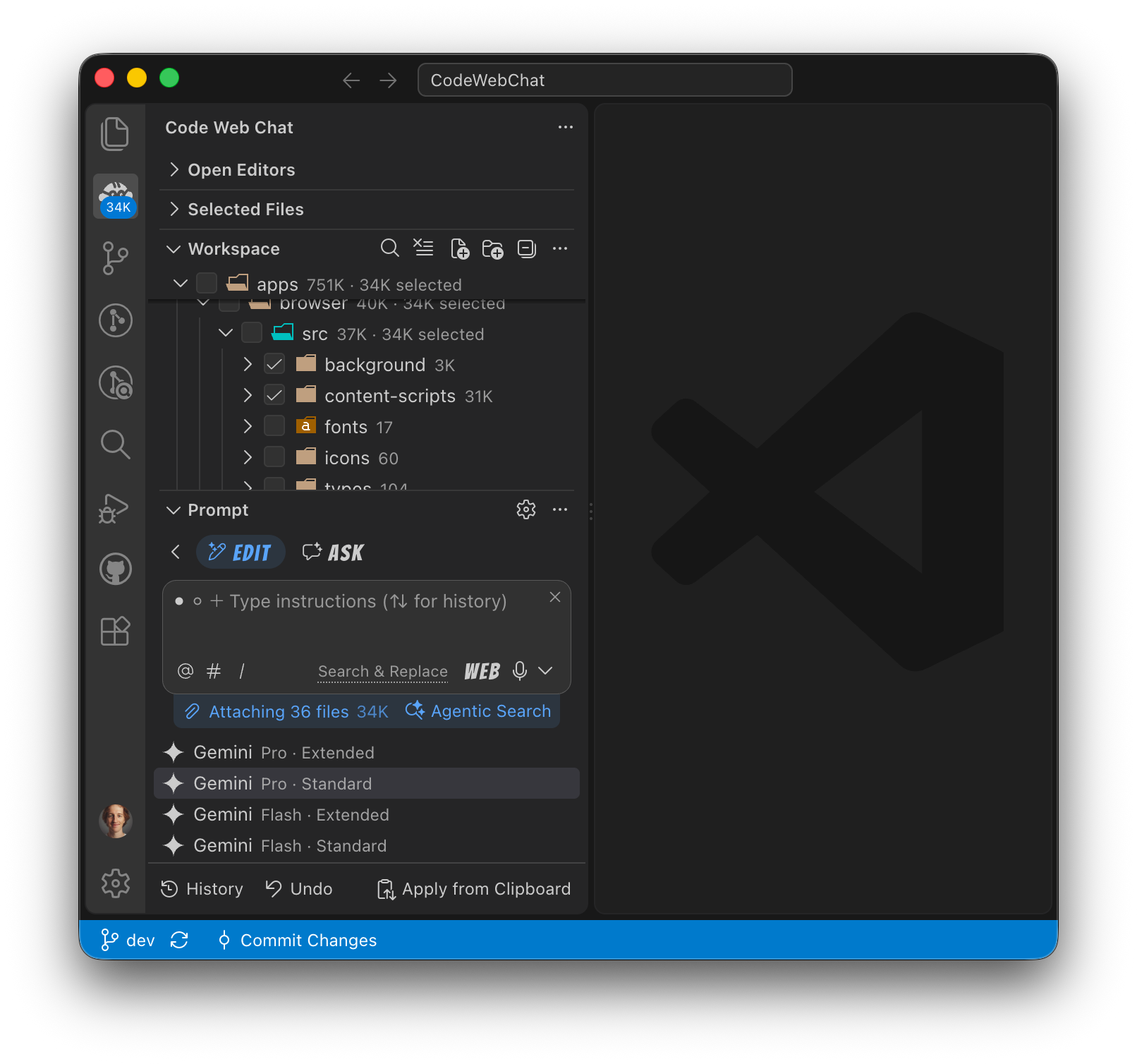
Use popular chatbots in your browser, send API requests, or invoke agentic CLIs with CWC-constructed, lean markdown prompts. Simply tick checkboxes on a file tree or use built-in tools to set the context for the task. By sending selected files with task instructions, you get accurate responses in seconds.
[!TIP]
Click ▶ to expand.
Automated context selection
CWC can invoke your favorite agentic CLI with the Agentic Search prompt using the current task instructions or a custom query. Irrelevant keyword-matched files are filtered out so they don't clutter the context window.
First-class support for prompt caching
To maximize prompt cache hits when including selected files, unchanged files are placed first, followed by recently modified ones, and task instructions are placed at the very end.
Effective steering with examples
Replace most skills with a simple checkbox tick. Providing examples can make your task instructions simpler and guide the model toward outputs you're looking for.
Markdown Prompts
📄 Agentic Search
Let your favorite agentic harness find task-relevant files.
CLI
# Task

In the project, find the complete set of primary and structural files relevant to the query.

# Output formatting

Output strictly as a bulleted list of file paths without explanations or any other text (e.g., - `path/to/file.ext`).

# Query

[INSTRUCTIONS]
📄 Editing
Implement new features, fix bugs, refactor code.
WEB/API
# Files

[SELECTED FILES]

# Output formatting

Whenever showing a new, updated, renamed, or deleted file, provide a brief explanation, then print the path in a markdown heading (e.g. ### New file: `src/examples/hello.py`, ### Updated file: `src/examples/hello.py`, ### Renamed file: `src/examples/hello.py` (old) `src/welcome.py` (new), ### Deleted file: `src/examples/hello.py`), followed by a markdown code block showing the original and updated code snippets with Git-style merge conflict syntax. Example:

[EXAMPLE]

# Task

[INSTRUCTIONS]
CLI
# Files

[SELECTED FILES]

# Requirements

- All necessary files for the [task](#task) were preloaded to [files](#files). Reading other files is FORBIDDEN.
- Using tools or shell commands for discovery or information gathering (e.g., grep, glob, ls, git, etc.) is FORBIDDEN.
- Exception: If [task](#task) includes *.png image paths, read them using the appropriate tool.
- Exception: Perform file system operations (create, update, delete, rename, move) required to complete the [task](#task).

# Task

[INSTRUCTIONS]
📄 Asking
Get explanations, plan features.
WEB/API
# Files

[SELECTED FILES]

# Task

[INSTRUCTIONS]
CLI
# Files

[SELECTED FILES]

# Requirements

- All necessary files for the [task](#task) were preloaded to [files](#files). Reading other files is FORBIDDEN.
- Using tools or shell commands for discovery or information gathering (e.g., grep, glob, ls, git, etc.) is FORBIDDEN.
- Exception: If [task](#task) includes *.png image paths, read them using the appropriate tool.

# Task

[INSTRUCTIONS]
📄 Intelligent Search
Narrow-down broader file selection.
WEB
# Files

[WORKSPACE FILES, A FOLDER OR SELECTED FILES]

# Task

Among the attached files, find the complete set of primary and structural files relevant to the query.

# Output formatting

Your response must begin with "**Intelligent file search results:**", then a bulleted list of file paths, followed by a brief explanation. Example:

**Intelligent file search results:**

- `src/index.ts`
- `src/greetings/hello.ts`
- `src/greetings/welcome.ts`

These files contain the core greeting logic and module exports.

# Query

[INSTRUCTIONS]
API
# Files

[WORKSPACE FILES, A FOLDER OR SELECTED FILES]

# Task

Among the attached files, find the complete set of primary and structural files relevant to the query.

# Output formatting

Output strictly as a bulleted list of file paths without explanations or any other text. Example:

- `src/index.ts`
- `src/greetings/hello.ts`
- `src/greetings/welcome.ts`

# Query

[INSTRUCTIONS]
CLI
# Files

[WORKSPACE FILES, A FOLDER OR SELECTED FILES]

# Task

Among the attached files, find the complete set of primary and structural files relevant to the query.

# Output formatting

Output strictly as a bulleted list of file paths without explanations or any other text. Example:

- `src/index.ts`
- `src/greetings/hello.ts`
- `src/greetings/welcome.ts`

# Requirements

- All necessary files for the [task](#task) were preloaded to [files](#files). Reading other files is FORBIDDEN.
- Using tools or shell commands for discovery or information gathering (e.g., grep, glob, ls, git, etc.) is FORBIDDEN.

# Query

[INSTRUCTIONS]
📄 Code at Cursor
Quality TAB completions from reasoning models.
WEB
# Files

[SELECTED FILES]

### File: `[ACTIVE FILE PATH]`

```
[PREFIX][INSTRUCTIONS][SUFFIX]
```

# Output formatting

Your response must begin with a markdown heading identifying the file and the cursor position, followed by a markdown code block containing the replacement text, followed by a brief explanation. The heading must be: "### Code at cursor: `[ACTIVE FILE PATH]` (ROW:COL)". Always refer to the symbol "" as "cursor position" and "replacement" as "completion". Example:

[EXAMPLE]

# Task

Find correct replacement text for the  symbol.
API
# Files

[SELECTED FILES]

### File: `[ACTIVE FILE PATH]`

```
[PREFIX][INSTRUCTIONS][SUFFIX]
```

# Output formatting

Respond with replacement text within "replacement" XML tags, without explanations or any other text.
Example:
!== undefined

# Task

Find correct replacement text for the  symbol.
CLI
# Files

[SELECTED FILES]

### File: `[ACTIVE FILE PATH]`

```
[PREFIX][INSTRUCTIONS][SUFFIX]
```

# Output formatting

Respond with replacement text within "replacement" XML tags, without explanations or any other text.
Example:
!== undefined

# Requirements

- All necessary files for the [task](#task) were preloaded to [files](#files). Reading other files is FORBIDDEN.
- Using tools or shell commands for discovery or information gathering (e.g., grep, glob, ls, git, etc.) is FORBIDDEN.

# Task

Find correct replacement text for the  symbol.
📄 Commit Messages
Get change summaries adhering to your preferred style.
WEB/API
# Files

[SELECTED FILES WHEN EDITS WERE ACCEPTED]

# Changes

[STAGED CHANGES]

# Output formatting

Your response must begin with "**Commit message:**", then proceed with the message. Example:

**Commit message:** Bump version to 1.0.1

# Task

Write a brief and precise summary for the changes, limited to a single sentence. Because the summary will be used for a commit message, don't use any markdown formatting and don't include a trailing dot. Use an imperative tone to ensure clarity and focus on the primary change or purpose.
CLI
# Files

[SELECTED FILES WHEN EDITS WERE ACCEPTED]

# Changes

[STAGED CHANGES]

# Output formatting

Your response must begin with "**Commit message:**", then proceed with the message. Example:

**Commit message:** Bump version to 1.0.1

# Requirements

- All project's files were preloaded to [files](#files). You must work strictly within the provided context.
- Calling tools, including shell commands (e.g. grep, glob, ls, git, etc.) is FORBIDDEN.

# Task

Write a brief and precise summary for the changes, limited to a single sentence. Because the summary will be used for a commit message, don't use any markdown formatting and don't include a trailing dot. Use an imperative tone to ensure clarity and focus on the primary change or purpose.
📄 Patch Repair
Apply malformed edits.
WEB/API
[ORIGINAL FILE]

[MALFORMED EDITS]

# Output formatting

Your response must begin with a markdown heading identifying the file, followed by a markdown code block containing the updated file. The heading must be: "### Patch repair: `path/to/file.ext`". Example:

[EXAMPLE]

# Task

Apply the attached changes to the file without explanations or any other text.
CLI
# File: `[FILE PATH]`

[ORIGINAL FILE CONTENT]

[MALFORMED EDITS]

# Output formatting

Your response must begin with a markdown heading identifying the file, followed by a markdown code block containing the updated file. The heading must be: "### Patch repair: `path/to/file.ext`". Example:

[EXAMPLE]

# Requirements

- Calling tools, including shell commands (e.g. grep, glob, ls, git, etc.) is FORBIDDEN.

# Task

Apply the attached changes to the file without explanations or any other text.
📄 Voice Input
Transcribe speech-to-text with file awareness.
API
# Files

[FILES SEEN DURING RECORDING]

# Task

Transcribe using clean verbatim. Remove filler words (such as 'um,' 'uh,' 'like'), false starts, and stutters. Preserve the speaker's exact words, slang, and sentence structure, but use natural punctuation and sentence breaks to ensure readability.

# Output formatting

Respond with the audio transcription or the word INAUDIBLE, without explanations or any other text.
CLI
# Files

[FILES SEEN DURING RECORDING]

# Task

Transcribe using clean verbatim. Remove filler words (such as 'um,' 'uh,' 'like'), false starts, and stutters. Preserve the speaker's exact words, slang, and sentence structure, but use natural punctuation and sentence breaks to ensure readability.

Audio file: `[AUDIO_FILE_PATH]`

# Output formatting

Respond with the audio transcription or the word INAUDIBLE, without explanations or any other text.

# Requirements

- All necessary files for the [task](#task) were preloaded to [files](#files). Reading any other files is FORBIDDEN.
- Calling tools, including shell commands (e.g. grep, glob, ls, git, etc.) is FORBIDDEN.
- Exception: If [task](#task) includes *.wav audio file paths, read them using the appropriate tool.
Commands
Code at Cursor
Code at Cursor- Get an inline snippet while using the current context.Code at Cursor using...- Inline snippet with configuration selection.Code at Cursor with Instructions- Inline snippet with instructions.Code at Cursor with Instructions using...- Inline snippet with instructions and configuration selection.
Context
Save File Selection- Save the current context.Restore File Selection- Restore a saved context.Select Workspace File...- Select a file from the workspace.Search Files...- Find files based on a search query.Search in Selected Files...- Find within currently selected files.Agentic Search...- Find task-relevant files using a headless CLI invocation.Select Clipboard Paths...- Select files based on paths in your clipboard.Select Unstaged Files...- Select files with unstaged changes.Select Files of Commit...- Select files modified in a specific commit.
Copy
Copy Markdown- Copy contents of the current file selection.Copy Markdown of Open Editors- Copy contents of file selection in open editors.Copy Paths...- Copy paths of the current file selection.Copy Paths of Open Editors...- Copy paths of file selection in open editors.
Commit messages
Commit Changes- Generate commit message in your preferred style and commit.
History
History- Manage saved states of the workspace.Create New Checkpoint- Create a history entry of the workspace state.
Actions
Apply Chat Response- Integrate LLM response.
Misc
Duplicate Workspace- Copy the extension's state in a new window.
Building from source
Prerequisites
Steps
- Clone the repository:
git clone https://github.com/robertpiosik/CodeWebChat.git && cd CodeWebChat - Install workspace dependencies:
pnpm install - Navigate to the editor app and build the package:
cd apps/editor && pnpm run build - Install the generated
.vsixfile in VS Code: Open the Command Palette (Ctrl+Shift+P/Cmd+Shift+P), run Extensions: Install from VSIX..., and select the newly created file.
Copyright © 2026 Robert Piosik
E-mail: robertpiosik@gmail.com