BambooAI

Hosted version: bambooai.org — the same analyst, nothing to install.
BambooAI is an LLM-driven data analyst that works in a persistent Python kernel, one cell at a time, and reproduces its own results before it reports them. You give it a dataset and a question; it writes and runs code, reads the output, decides the next step, and ends with a report whose cited numbers have been re-executed in a fresh kernel. It runs on your machine with your own model keys, and the code the model writes runs in a container, not under your account.
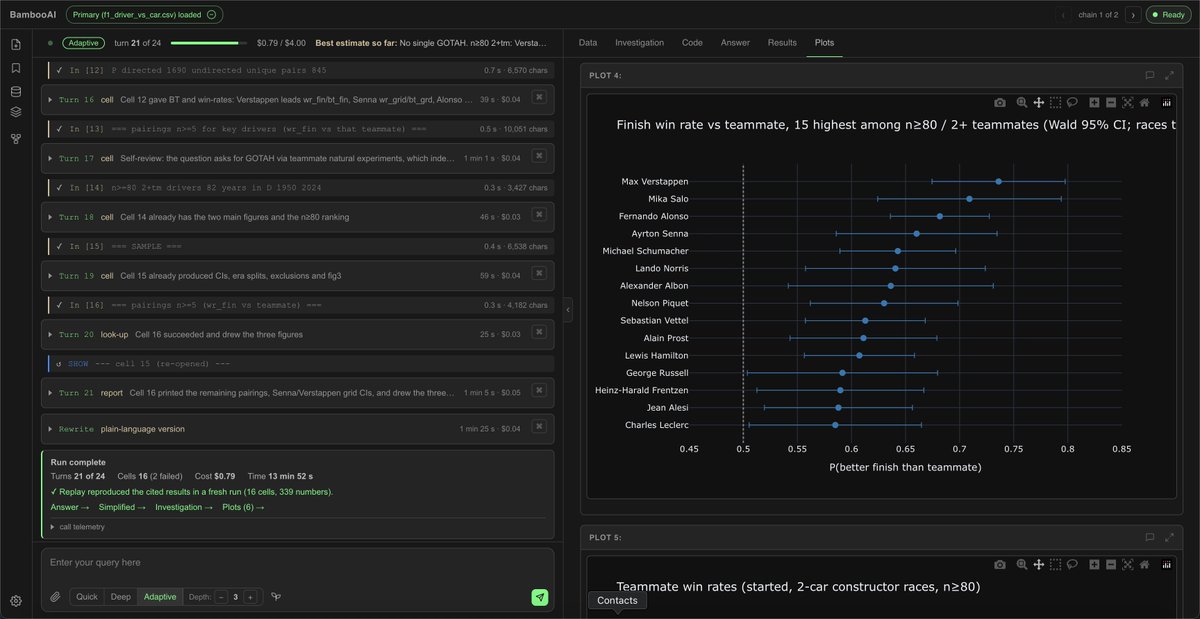
Table of Contents
- Overview
- Features
- How It Works
- Installation
- Quick Start
- Configuration
- Data and Integrations
- Where the Code Runs
- Command Line
- Architecture
- Logging and Usage
- Development
- Contributing
- Contact
Overview
BambooAI is built for people who analyse data for a living and want the work done the way they would do it: in a notebook, step by step, with every intermediate result visible and every final number checked. It is not a chat interface over a code interpreter. The analyst has a fixed set of actions, a one-page contract that is the same for every model, a budget it can see, and a report format it must fill in. The web app streams the run as it happens, keeps the notebook, and lets you ask follow-up questions against the same kernel state.
It came out of sports science — training and physiology data from Intervals.icu, Endura and SweatStack load directly — and applies to any tabular dataset.
Features
- One model, one kernel, one notebook. The analysis is a sequence of Python cells in a persistent kernel with a checkpoint per cell; a failed cell is rolled back and the namespace is exactly as before the attempt.
- A checked report. Before the report is shown, the cells it cites are assembled into a script and executed in a fresh kernel against the original data. The closing card states how many numbers reproduced.
- Three modes. Quick (a lookup, a definition), Deep (a full analysis within a turn budget), Adaptive (a long run, reviewed after every 8th turn by a separate reviewer on a stronger model that can redirect it or end it).
- Follow-ups on a warm kernel. A follow-up question continues with the variables the previous run left; a new question starts fresh. Runs form chains you can step through. If the data loaded has changed since the earlier chain (another window, a replaced file), the follow-up starts in a fresh kernel on the data loaded now: the earlier chains stay in its ledger as context, marked as on other data, and its replay and any routine made from it use its own cells. The same file uploaded again (a new session, a favourite reopened) is the same data, and the follow-up continues as before.
- Ask about a plot. The chat button on a plot sends the picture with your question: the analyst's
model sees it when the config's
model_propertiessays it takes images ("multimodal": "true"); otherwise the question goes alone and the pane says so. - Web search with sources. With a Gemini key, the analyst searches for published figures to compare against (Google AI grounding) and cites them in the report.
- Memory. Saving a run distils what was learned about the dataset — column quirks, approaches that worked — into a memory pack the analyst reads in later runs on the same data.
- Plain-language version. A second, cheaper model rewrites the report for a non-technical reader; both versions are kept.
- Auxiliary datasets and integrations. Several files per analysis; training data loaded from Intervals.icu, Endura and SweatStack; loaded frames paged in the Data tab.
- Documents beside the data. Up to four papers, notes or transcripts a thread (PDF, Word, Markdown, text), parsed into passages with locators; the analyst sees a map of each and reads the text with code, so a dataset is analysed in the context of what was written about it.
- Everything inspectable. Every cell's code and output, every figure, every prompt that produced a turn, the per-call tokens, time and cost.
- Ten providers, per-seat configuration. OpenRouter, OpenAI, Anthropic, Google, Groq, Mistral, xAI, DeepSeek, Ollama and vLLM; each seat (analyst, reviewer, rewriter, …) has its own model and reasoning effort. Local models keep everything on the machine.
- Isolation by default. The model-written code runs in the executor container, built from the Dockerfile in the package and reachable only from your machine.
- Saved chains, labels, usage dashboard, PDF export of the report, light and dark themes.
How It Works
A run is a sequence of turns. In each turn the analyst reads what it has so far — the question, the dataset's description, the cells and their (truncated) outputs, the budget — and takes one action:
| action | effect |
|---|---|
CELL |
run one Python cell in the kernel; the printed output is the next turn's input |
SHOW n |
re-open the full output of an earlier cell |
NAMES |
list the variables the kernel holds |
RECALL |
consult the memory pack for this dataset |
SEARCH |
web search with Google AI grounding, summarised and cited |
ASK |
put one question to the person and wait for the answer |
REPORT |
write the report; the run ends |
The contract that governs this is one page, analyst/contract.md, and is the same for every model.
It asks for a report with a best estimate and its uncertainty, the conditions it holds under,
how it was established, and the cells it rests on. Cells compute and draw nothing; the figures
come after the report.
After REPORT:
- The
Figuresseat is shown the report and the cells and writes one cell that draws the one to three figures the reader needs from what the kernel holds, with Plotly - or answers NONE when a number or a table answers. A cell that fails comes back with its error, three corrections at most; the report gains a Figures section citing the cell, and says so when the figures were not drawn. - The
Rewriterseat writes the plain-language version. - The cited cells, the figures cell among them, are assembled in execution order into a script and run in a fresh kernel against the original data. The numbers the report quotes are compared with the fresh output; the closing card says whether they reproduced (e.g. "replay reproduced 41 numbers in a fresh run"), and the figures that run draws are the Plots tab.
Modes and budgets. Each mode sets a turn budget and a dollar budget the analyst can see. The
budgets are per preset (tier_properties in the configuration). At the performance preset: Quick 4
turns, Deep 15, Adaptive 50 with a review after every 8th turn. In Adaptive mode the review runs on
the Reviewer seat - a stronger model with its own brief - which reads the question, the note, the
results so far, the analyst's turns since its last review and the code and output of the cells the
current answer rests on (handed to it by the session, one call per review), and answers with one
verdict: a test to run, a narrower conclusion, or report now. A verdict to report binds only when every
cell it cites has been checked by a review.
After the report, in Adaptive, the same reviewer reads the report against the question and adds
a short note for the reader.
Memory. When you save a run, the Knowledge Distiller seat writes a card about the dataset —
what the columns mean in practice, what to watch for, what worked — into
memory//memory_pack.yaml. RECALL reads it in later runs.
Installation
Requirements: Python 3.11 or newer, and Docker (Docker Desktop on macOS and Windows, Docker Engine on Linux), running. Docker is where the model-written code runs; see Where the Code Runs for the alternative.
Option 1 — pip (recommended)
pip install bambooai
bambooai serve
Option 2 — from the repository
git clone https://github.com/pgalko/BambooAI.git && cd BambooAI
python3 -m venv .venv && source .venv/bin/activate
pip install -e .
bambooai serve
Option 3 — hosted. bambooai.org runs the same analyst as a service, with nothing to install.
Quick Start
bambooai serve. On first use it creates the working folder~/bambooai, writes a.envthere, builds the executor image from the Dockerfile in the package (several minutes, once: the image installs pandas, numpy, scipy, statsmodels, scikit-learn, matplotlib, plotly and the rest), starts the container, and openshttp://127.0.0.1:5001.- Put at least one model key into
~/bambooai/.env. An OpenRouter key is enough on its own: every model in the default configuration is reachable through OpenRouter. AddGEMINI_API_KEYif you want web search. bambooai serveagain. Upload a CSV, Parquet, JSON or XLSX file and ask a question. Choose Quick, Deep or Adaptive in the composer.- In the app, Models & Compute (gear menu) picks the preset —
cost,performanceormax— and saves it. Usage shows the calls, tokens and cost per run.
The working folder:
~/bambooai/
├── .env                          keys and settings; read at start, never written by the app
├── LLM_CONFIG_template.json      the seats per preset: model, provider, reasoning effort, max_tokens, prices
├── bambooai.sqlite               chains, labels, usage, the saved preset, integration credentials (encrypted)
├── config//LLM_CONFIG.json the configuration built from the template for the chosen preset
├── storage//threads/       one JSON per thread: runs, cells, reports, reproduction results
├── storage//favourites/    saved chains
├── memory//                the memory pack
└── logs//                  bambooai_run_log.json: every model call with tokens, time and cost
serve reads nothing outside this folder. Upgrading the package does not change it; deleting it
starts you fresh. BAMBOO_HOME or bambooai serve --home DIR moves it.
Configuration
Environment Variables
All in ~/bambooai/.env. Lines starting with # are ignored; do not put comments after a value.
| variable | meaning |
|---|---|
OPENROUTER_API_KEY, OPENAI_API_KEY, ANTHROPIC_API_KEY, GEMINI_API_KEY, GROQ_API_KEY, XAI_API_KEY, MISTRAL_API_KEY, DEEPSEEK_API_KEY |
provider keys; only for the providers the seats use |
GEMINI_API_KEY |
also enables web search (Google AI grounding); without it SEARCH is off |
REMOTE_OLLAMA, REMOTE_VLLM |
base URLs of local model servers, e.g. http://localhost:11434 |
BAMBOO_LEVEL |
cost / performance / max: the preset before one is saved in the app |
BAMBOO_COMPUTE |
docker (default) or local |
EXECUTOR_PORT |
the container's published port (default 5055) |
EXECUTION_MODE, EXECUTOR_API_BASE_URL |
to use an executor you run yourself: api and its URL. BAMBOO_COMPUTE is then ignored |
BAMBOO_USER |
the identity that names the per-user folders (default local) |
SWEATSTACK_CLIENT_ID, SWEATSTACK_CLIENT_SECRET |
your own SweatStack app registration; without them the SweatStack integration is not offered |
APP_PORT |
the web app's port (default 5001) |
SESSION_COOKIE_NAME, FLASK_SECRET, LLM_CONFIG_ENCRYPTION_KEY |
the server; the last two are generated on first use |
Models and Seats
LLM_CONFIG_template.json in the working folder defines the seats for each of four presets
(free_agent_configs, cost_agent_configs, performance_agent_configs, max_agent_configs), the
turn budgets per preset (tier_properties), and the properties of every model named
(model_properties). The performance preset as shipped:
"performance_agent_configs": [
  {"agent": "Analyst",                  "details": {"model": "x-ai/grok-4.7",               "provider": "openrouter", "reasoning_effort": "high", "max_tokens": 32000, "temperature": 0}},
  {"agent": "Figures",                  "details": {"model": "deepseek/deepseek-v4.1-flash", "provider": "openrouter", "reasoning_effort": "low",  "max_tokens": 16000, "temperature": 0}},
  {"agent": "Reviewer",                 "details": {"model": "openai/gpt-6.1-sol",          "provider": "openrouter", "reasoning_effort": "high", "max_tokens": 48000, "temperature": 0}},
  {"agent": "Rewriter",                 "details": {"model": "deepseek/deepseek-v4.1-flash", "provider": "openrouter", "reasoning_effort": "low",  "max_tokens": 16000, "temperature": 0}},
  {"agent": "Reader",                   "details": {"model": "deepseek/deepseek-v4.1-flash", "provider": "openrouter", "reasoning_effort": "low",  "max_tokens": 16000, "temperature": 0}},
  {"agent": "Promoter",                 "details": {"model": "x-ai/grok-4.7",               "provider": "openrouter", "reasoning_effort": "medium", "max_tokens": 32000, "temperature": 0}},
  {"agent": "Knowledge Distiller",      "details": {"model": "deepseek/deepseek-v4.1-flash", "provider": "openrouter", "reasoning_effort": "none", "max_tokens": 24000, "temperature": 0}},
  {"agent": "Google Search Executor",   "details": {"model": "gemini-flash-latest",          "provider": "gemini",     "reasoning_effort": "none", "max_tokens": 8000,  "temperature": 0}},
  {"agent": "Google Search Summarizer", "details": {"model": "deepseek/deepseek-v4.1-flash", "provider": "openrouter", "reasoning_effort": "none", "max_tokens": 12000, "temperature": 0}},
  {"agent": "Image Generator",          "details": {"model": "deepseek/deepseek-v4.1-flash", "provider": "openrouter", "reasoning_effort": "none", "max_tokens": 28000, "temperature": 0}}
],
"tier_properties": {
  "performance": {"analyst_turns_quick": 4, "analyst_turns_deep": 15, "analyst_turns_adaptive": 50, "analyst_review_every": 8}
},
"model_properties": {
  "x-ai/grok-4.7": {"capability": "reasoning", "multimodal": "true", "templ_formating": "xml",
                    "prompt_tokens": 0.002, "completion_tokens": 0.006,
                    "reasoning_style": "effort", "reasoning_efforts": ["low", "medium", "high", "xhigh"]}
}
multimodal says whether the model takes a picture with a question (Ask about a plot); the analyst's
seat needs it "true" for the figure to be sent.
The seats:
| seat | role |
|---|---|
Analyst |
runs the analysis: every turn, every cell, the report |
Reviewer |
the reviews - after every 8th turn in Adaptive mode, and after its report; its own brief, a stronger model |
Figures |
the figures, drawn once after the report: one cell from the report and the kernel's objects (a short code reply, so a low effort - a seat that thinks long can spend its allowance and send nothing; the analyst's seat when absent) |
Rewriter |
the plain-language version of the report |
Reader |
reads the thread's documents for the analyst (the READ action): a cheaper model, called once per read over the passages that match the question |
Promoter |
Save as routine: reads a finished chain once and names its inputs as find/replace edits (a JSON reply, so a moderate effort and a roomy max_tokens; the analyst's seat when absent) |
Knowledge Distiller |
writes the memory card when a run is saved |
Google Search Executor |
the grounded search itself (a Gemini model) |
Google Search Summarizer |
condenses search results into a cited digest |
Image Generator |
turns the report into an infographic (a YAML spec rendered to SVG) shown with the answer |
Seat fields: model, provider, reasoning_effort (none, low, medium, high, xhigh;
mapped to each provider's own vocabulary, or to a thinking budget for models that use one),
max_tokens, temperature. Every model a seat names must appear in model_properties, which
supplies its prices per 1K tokens (used for the running cost), its formatting (xml or text) and
its reasoning interface.
Ollama
BambooAI can use models running locally through Ollama, or hosted in Ollama's cloud.
Model configuration
In LLM_CONFIG_template.json, set the agent's provider to ollama and name the model. For example,
to use gpt-oss:20b as the Analyst:
{
  "agent": "Analyst",
  "details": {
    "model": "gpt-oss:20b",
    "provider": "ollama",
    "reasoning_effort": "high",
    "max_tokens": 16000,
    "temperature": 0
  }
}
Add a matching entry under model_properties in the same file:
"gpt-oss:20b": {
  "capability": "reasoning",
  "templ_formating": "text",
  "prompt_tokens": 0.0,
  "completion_tokens": 0.0,
  "context_window": 65536,
  "reasoning_efforts": ["low", "medium", "high"]
}
Context length. For local models, context_window sets the context length used for each request
(Ollama's num_ctx). Set it to at least 32,768 tokens for the Analyst; the example uses 65,536.
Without it, Ollama applies its own default, which depends on the machine's memory and can be as low as
4,096 tokens. A prompt longer than the limit is truncated rather than rejected; BambooAI shows a
warning when it detects this. Cloud models manage their own context length and do not need the
setting.
Reasoning. List the thinking levels the model supports in reasoning_efforts, and pick one with
the agent's reasoning_effort. ollama show lists the levels a model defines. For models
that can only switch thinking on or off, BambooAI sends the switch instead; reasoning_effort: none
turns thinking off where the model allows it. Models without thinking support receive no setting.
Repetition penalty. Ollama penalises recently used tokens by default (repeat_penalty 1.1), which
degrades code and structured output, so BambooAI sends 1.0 (no penalty) with each request. To use a
different value for a model, add repeat_penalty to its model_properties entry.
Costs. Set prompt_tokens and completion_tokens to 0.0 for local models. Cloud usage is
covered by your Ollama account and plan.
Connecting to Ollama
By default, BambooAI connects to Ollama on your own computer at http://localhost:11434. To use
Ollama on another machine, set its address in your .env file:
REMOTE_OLLAMA=http://:11434
All agents using the ollama provider share this connection. Pull local models on the machine
running that Ollama server, and to use cloud models through it, sign in there with ollama signin.
For access from another machine, start the Ollama server with OLLAMA_HOST=0.0.0.0, and restrict
access to a trusted network.
You can also connect to Ollama's cloud directly, without running an Ollama server. Add these settings
to your .env file and choose cloud models in your agent configuration:
REMOTE_OLLAMA=https://ollama.com
OLLAMA_API_KEY=your_api_key
vLLM
BambooAI can use models served by vLLM on a machine with a suitable GPU. vLLM serves a model as an OpenAI-compatible API; BambooAI connects to it the way it connects to any provider.
Serving a model
The command below serves Qwen3.8-27B in 8-bit on a single 48 GB GPU, with a 64k context and the model's thinking returned separately from its answers. It is the configuration BambooAI was tested against (vLLM 0.30, an RTX A6000):
vllm serve ~/models/Qwen3.8-27B \
  --quantization fp8 --linear-backend marlin \
  --language-model-only \
  --compilation-config '{"mode": 0, "cudagraph_mode": "FULL"}' \
  --speculative-config '{"method": "mtp", "num_speculative_tokens": 2}' \
  --max-model-len 65536 --max-num-seqs 8 \
  --reasoning-parser qwen3 \
  --served-model-name qwen3.8-27b \
  --host 0.0.0.0 --port 8000
A few of these flags are worth knowing about. --reasoning-parser is what lets BambooAI show the
model's thinking apart from the answer. --served-model-name gives the model the short name you use
in the agent configuration. --linear-backend marlin selects the 8-bit kernels that run on Ampere
GPUs such as the A6000 and A100; on Ada and Hopper GPUs it is not needed. --language-model-only
skips a model's vision components, which BambooAI does not use. The --compilation-config line runs
the model with CUDA graphs but without torch.compile, which fails on this model; it is markedly
faster than --enforce-eager. The --speculative-config line uses the model's own
multi-token-prediction head to draft tokens: the same output, noticeably faster. Drop it for a
model without an MTP head.
Model configuration
In LLM_CONFIG_template.json, set the agent's provider to vllm and use the served model name:
{
  "agent": "Analyst",
  "details": {
    "model": "qwen3.8-27b",
    "provider": "vllm",
    "reasoning_effort": "high",
    "max_tokens": 16000,
    "temperature": 0
  }
}
Add a matching entry under model_properties:
"qwen3.8-27b": {
  "capability": "reasoning",
  "templ_formating": "text",
  "prompt_tokens": 0.0,
  "completion_tokens": 0.0,
  "context_window": 65536,
  "reasoning_efforts": ["low", "medium", "xhigh"]
}
Context length. vLLM sets the context length when the server starts (--max-model-len) and
refuses a prompt that does not fit, rather than truncating it. Set context_window to the same
value and BambooAI warns before sending a prompt that cannot fit, with the options for fixing it.
Reasoning. With --reasoning-parser, the agent's reasoning_effort is passed to the model;
list the levels it supports in reasoning_efforts, as the model names them (Qwen3.8 takes low,
medium and xhigh). An agent's effort the model does not define is mapped to the nearest level
it does. reasoning_effort: none turns thinking off.
Costs. Set prompt_tokens and completion_tokens to 0.0; the server does not bill.
Connecting to vLLM
Set the server's address in your .env file:
REMOTE_VLLM=http://:8000/v1
If the server was started with --api-key, add VLLM_API_KEY with the same value. With every agent
on Ollama or vLLM and no Gemini key, no request leaves your network.
The app builds config//LLM_CONFIG.json from the template for the chosen preset, and rebuilds
it when the template file is newer than the built one.
Data and Integrations
- Primary dataset: CSV, Parquet, JSON or XLSX, loaded into the kernel as
df. The Data tab pages it. - Auxiliary datasets: further files uploaded alongside; available to the cells by path.
- Intervals.icu and Endura: an API key entered in the app (stored encrypted in the working folder's database). Choose a date range; the data is loaded into the executor and described to the analyst, with the Intervals data model attached as an OWL ontology.
- SweatStack: OAuth; needs your own app registration with SweatStack (
SWEATSTACK_CLIENT_ID,SWEATSTACK_CLIENT_SECRET). - Web search:
GEMINI_API_KEY.
Documents
A thread can carry up to four documents — papers, notes, meeting or interview transcripts — as PDF,
Word (.docx), Markdown or plain text, each up to 10 MB. Attach one from the paperclip menu
(Document). The file is parsed once, into passages with locators: the page for a PDF, the heading
trail for the other formats, each passage numbered D1.17 (document 1, passage 17). Tables become
rows the kernel can load. A blue Documents pill in the top bar shows how many are attached; hover
it to see them and remove one, click it to open the Documents view, which shows each document's map
and its text passage by passage.
The analyst does not receive the text in its prompt. It receives a short map of each document — the
outline, the tables, the figure captions — and in the kernel each document is an object: D1.text,
D1.page(n), D1.grep(pattern, context=1), D1.units(a, b), D1.table(n) (a dataframe),
D1.outline(). A cell can search a transcript for a name, read a section, or load a table and check it
against the paragraph that describes it, and the report cites the cell as usual. For what a search of
the text cannot do, the analyst has one more action, READ: it names a document (or all of them, or
a stretch of one) and what it is looking for; the passages that match go to the Reader seat, which
quotes the ones that answer, each checked word for word against the document and returned with its
locator. The report cites a passage as [D1.17] beside [cell n]; on the page the citation shows the
passage on hover and opens the Documents view at it on click. A READ is a turn, like a web search;
three per run.
Documents are kept as files under the working folder's storage//documents//, not in
the database; every chain in the thread sees them, and they are removed with the thread. The parsers
are pdfplumber and python-docx, installed with the package. A template from before the Reader
seat keeps working: add the seat from the shipped template to yours to turn READ on. A PDF without a
text layer (a scan) is refused: OCR is not supported. Parsed text above 2 MB is refused as well; the
pill shows the reason.
Where the Code Runs
The analysis kernel, the reproduction run and the integrations' data fetching all run in the
executor container: a Flask API in front of the persistent kernel, from containers/executor/.
bambooai serve builds the image (bambooai-executor:) on first use, starts the
container published on 127.0.0.1:5055, waits for its health, and stops it when the app stops
(--keep-executor leaves it running). The Restart control in the app restarts it.
Alternatives:
bambooai serve --compute local(orBAMBOO_COMPUTE=local): the kernel runs in a subprocess of the web app. No Docker needed; no isolation; the integrations are not available, since they fetch inside the executor.- An executor you run yourself —
docker run -p 5055:5000 bambooai-executor:2.0.0on this or another machine — withEXECUTION_MODE=apiandEXECUTOR_API_BASE_URLin.env.
The web app listens on 127.0.0.1 unless started with --host 0.0.0.0. Keys live in .env and are
read at start; the app has no key entry and sends nothing anywhere but the providers you configure.
Command Line
bambooai serve [--home DIR] [--port N] [--host H] [--compute docker|local] [--keep-executor] [--no-browser]
bambooai init  [--home DIR]      create the working folder and its files without starting
bambooai where                   print the working folder
Architecture
browser ── HTTP / SSE ── web_app (Flask) ── HTTP ── executor container (Flask API + persistent kernel)
                            │
                            ├── analyst/     the turn loop (session.py), the contract, the notebook,
                            │                the report, the reproduction run
                            ├── bambooai/    model adapters (models/), log manager, config builder,
                            │                the local store (db/local_store.py, SQLite)
                            ├── delve/       the persistent kernel: a subprocess with a checkpoint per
                            │                committed cell and rollback of a failed one
                            └── containers/executor/   the executor image
analyst/contract.mdis the only prompt the analyst sees;analyst/session.pyis the loop.delve/kernel.pyruns cells in a subprocess and keeps a checkpoint per committed cell.bambooai/models/adapts each provider, including reasoning-effort vocabularies and prompt caching.bambooai/db/local_store.pyis a SQLite client with the same query interface the hosted edition uses against Supabase, so the routes above it are shared between the two.tools/stack/runs the app, an executor and stand-ins for the external services with a scripted analyst, so the product can be driven end to end offline - including Intervals.icu and Endura, served byfake_apis.pyfrom a calendar with the loaders' own variation (FIT files the executor's parser reads, windows without a sensor, a wellness log that ends, a race without power).
Logging and Usage
logs//bambooai_run_log.json: every model call of the current thread — seat, model, prompt, response, tokens, time, cost — overwritten when a new thread starts.logs//consolidated_logs.json: the same across threads, rotated at 5 MB.- In the app: Usage (gear menu) aggregates calls, tokens and cost by seat, model and run; the closing card of every run shows its cells, cost and time and opens the per-call telemetry; the prompt button on any turn shows the exact prompt that produced it.
Development
git clone https://github.com/pgalko/BambooAI.git && cd BambooAI
python3 -m venv .venv && source .venv/bin/activate
pip install -e ".[dev]" && python -m playwright install chromium

./run_battery.sh                                                  # unit suites: analyst, kernel, notebook, report, replay
python tests/e2e/test_stack.py --edition local --compute local    # the real app, page and kernel; a scripted model, no network
python tests/e2e/test_stack.py --edition local --compute direct   # the same against an executor process
python tests/e2e/test_integrations.py                             # the loaders against the fake Intervals.icu and Endura; a routine run on the next window and the next race
python tests/e2e/test_local_store.py                              # the store survives a server restart
python tests/e2e/test_package.py                                  # the wheel in a fresh virtualenv; serve with a docker stand-in
python tools/render_gallery.py --out /tmp/gallery                 # every page state, both themes, for visual comparison
CI (.github/workflows/ci.yml) runs the battery and builds the executor image on every push; the
browser suites and the package test are run locally before a push. A tag v* publishes the package
to PyPI (.github/workflows/release.yml).
Design notes: docs/DESIGN_CHECKLIST.md (what every change must keep true),
docs/OSS_DESIGN.md (the decisions behind this edition), HANDOVER.md (the state of the code).
Contributing
Issues and pull requests are welcome. Keep changes small and readable, run the battery and the end-to-end story before opening a pull request, and say in the description what you tested.
Contact
palo@bambooai.io · Issues · Discussions
BambooAI 1.x was a Python library used from notebooks (from bambooai import BambooAI). Version 2 replaces it. The 1.x releases remain installable with pip install "bambooai<2"; the source is on the v1 branch.