OmniDocBench
English | 简体中文
[📜 arXiv] | [Dataset (🤗Hugging Face)] | [Dataset (OpenDataLab)] | [Official Site (OpenDataLab)]
OmniDocBench is a benchmark for evaluating diverse document parsing in real-world scenarios, featuring the following characteristics:
- Diverse Document Types: This benchmark includes 1651 PDF pages, covering 10 document types, 5 layout types, and 5 language types. It encompasses a wide range of content, including academic papers, financial reports, newspapers, textbooks, and handwritten notes.
- Rich Annotation Information: It contains localization information for 28 block-level (such as text paragraphs, headings, tables, etc.) and 4 span-level (such as text lines, inline formulas, subscripts, etc.) document elements. Each element's region includes recognition results (text annotations, LaTeX annotations for formulas, and both LaTeX and HTML annotations for tables). OmniDocBench also provides annotations for the reading order of document components. Additionally, it includes various attribute tags at the page and block levels, with annotations for 5 page attribute tags, 3 text attribute tags, and 6 table attribute tags.
- High Annotation Quality: The data quality is high, achieved through manual screening, intelligent annotation, manual annotation, and comprehensive expert and large model quality checks.
- Supporting Evaluation Code: It includes end-to-end and single-module evaluation code to ensure fairness and accuracy in assessments.
OmniDocBench is designed for Document Parsing, featuring rich annotations for evaluation across several dimensions:
- End-to-end evaluation
- Layout detection
- Table recognition
- Formula recognition
- Text OCR
Currently supported metrics include:
- Normalized Edit Distance
- BLEU
- METEOR
- TEDS
- COCODet (mAP, mAR, etc.)
Table of Contents
- Table of Contents
- Updates
- Benchmark Introduction
- Evaluation
- Tools
- The evaluation model information
- TODO
- Known Issues
- Acknowledgement
- Copyright Statement
- Citation
Updates
[2026/09/11] Added TeleOCR, OvisOCR2, and Unlimited-OCR leaderboard results.
[2026/07/27] Added a community-maintained EvalScope integration for running OmniDocBench with OpenAI-compatible model endpoints and standardized predictions, metrics, and reports. See the EvalScope guide: https://evalscope.readthedocs.io/en/latest/benchmarks/omni_doc_bench.html
[2026/04/30] Updated from v1.6 to v1.7, added the Qianfan-OCR leaderboard, and supported skills-based evaluation.
[2026/04/10] Major update: Updated from v1.5 to v1.6
- Evaluation code: (1) We propose Multi-Granularity Adaptive Matching (MGAM), which eliminates matching bias through adaptive granularity adjustment on the prediction side. The core principle is to keep the ground truth unchanged and search for the optimal segmentation granularity only on the prediction side. (2) To optimize the deployment of CDM, dependency packages such as Node.js and KaTeX have been rewritten in Python and replaced, resulting in an approximately 3x speed improvement.
- Benchmark dataset: (1) Added 296 new pages, samples are chosen to cover the more challenging scenario categories in document parsing, including complex nested tables, dense mathematical formula layouts, and unconventional layout structures; (2) Fixed typos in some text and table annotations;
- Note: The main branch of evaluation code (this repo) and dataset in HuggingFace and OpenDataLab are now updated to Version v1.6, if you still want to evaluate your model in v1.0 or v1.5, please checkout to specific branch.
[2026/03/31] Update the model evaluation for PaddleOCR-VL-1.5, Youtu-Parsing, FireRed-OCR, Logics-Parsing-v2, Ovis2.6-30B-A3B, MinerU2.5, HunyuanOCR, FD-RL, DeepSeek-OCR-2, MonkeyOCR-pro-3B, OCRVerse, dots.ocr, Dolphin-v2, MonkeyOCR-3B, POINTS-Reader, Gemini-3 Flash, Gemini-3 Pro, Kimi 2.5, GPT5.2, GPT-4o, InternVL3.5, GLM-OCR, OpenDoc and Mathpix. Added inference scripts for the models listed above.
[2025/11/04] Add a Docker runtime environment, including the evaluation environment and the CDM environment.
[2025/10/28] Update PaddleOCR-VL, Qwen3-VL-235B-A22B-Instruct, DeepSeek-OCR, Dolphin-1.5 model evaluation.
[2025/09/25] Major update: Updated from v1.0 to v1.5
- Evaluation code: (1) Updated the hybrid matching algorithm, allowing formulas and text to be matched with each other, which alleviates score errors caused by models outputting formulas as unicode; (2) Integrated CDM calculation directly into the metric section, so users with a CDM environment can compute the metric directly by calling
CDMin config file. The previous interface for outputting formula matching pairs as a JSON file is still retained, now namedCDM_plainin config file. - Benchmark dataset: (1) Increased the image resolution for newspaper and note types from 72 DPI to 200 DPI; (2) Added 374 new pages, balanced the number of Chinese and English pages, and increased the proportion of pages containing formulas; (3) Formulas update language attributes; (4) Fixed typos in some text and table annotations.
- Leaderboard: (1) Removed the Chinese/English grouping, now calculating the average score across all pages; (2) The Overall metric is now calculated as ((1 - text Edit distance) * 100 + table TEDS + formula CDM) / 3;
- Note: The
mainbranch of evaluation code (this repo) and dataset in HuggingFace and OpenDataLab are now updated to Version v1.5, if you still want to evaluate your model in v1.0, please checkout to branchv1_0.
[2025/09/09] Updated Dolphin model evaluation with the latest inference script and model weights; Add Dolphin infer script;
[2025/08/20] Updated PP-StructureV3, MonkeyOCR-pro-1.2B model evaluation; Added Mistral OCR, Pix2text, phocr, Nanonets-OCR-s infer scripts;
[2025/07/31] Added MinerU2-VLM, Marker-1.7.1, PP-StructureV3, MonkeyOCR-pro-1.2B, Dolphin, Nanonets-OCR-s, OCRFlux-3B, Qwen2.5-VL-7B and InternVL3-78B model evaluation; Updated versions of MinerU.
[2025/03/27] Added Pix2Text, Unstructured, OpenParse, Gemini-2.0 Flash, Gemini-2.5 Pro, Mistral OCR, olmOCR, Qwen2.5-VL-72B model evaluation;
[2025/03/10] OmniDocBench has been accepted by CVPR 2025!
[2025/01/16] Updated versions of Marker, Tesseract OCR, and StructEqTable; Added Docling, OpenOCR, and EasyOCR evaluations; Changed the Edit Distance calculation for the Table section to use normalized GTs and Preds; Added evaluation model version information.
Benchmark Introduction
This benchmark includes 1651 PDF pages, covering 10 document types, 5 layout types, and 5 language types. OmniDocBench features rich annotations, containing 28 block-level annotations (text paragraphs, headings, tables, etc.) and 4 span-level annotations (text lines, inline formulas, subscripts, etc.). All text-related annotation boxes include text recognition annotations, formulas contain LaTeX annotations, and tables include both LaTeX and HTML annotations. OmniDocBench also provides reading order annotations for document components. Additionally, it includes various attribute tags at the page and block levels, with annotations for 5 page attribute tags, 3 text attribute tags, and 6 table attribute tags.
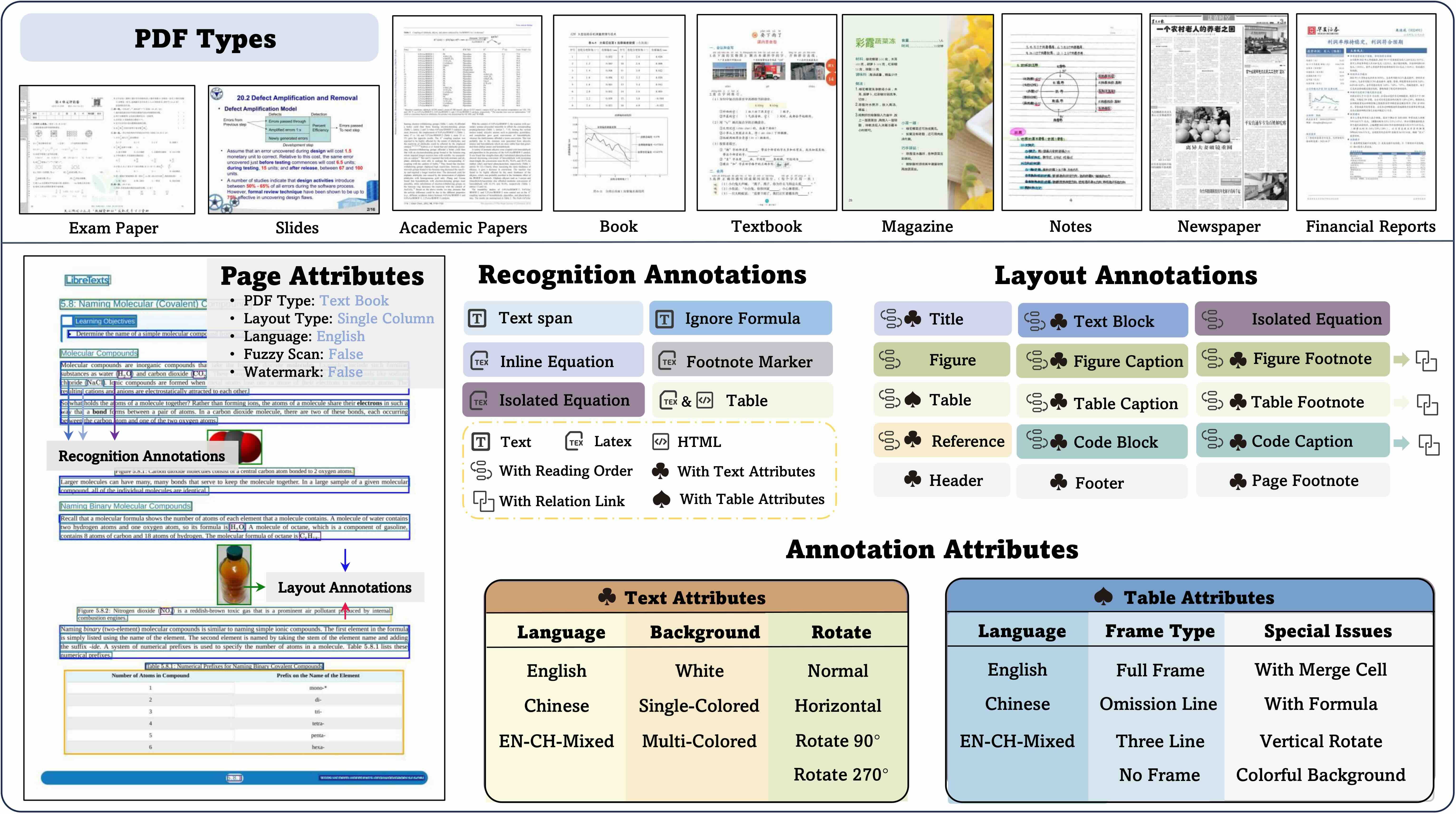
【Dataset Format】
The dataset format is JSON, with the following structure and field explanations:
[{
    "layout_dets": [    // List of page elements
        {
            "category_type": "text_block",  // Category name
            "poly": [
                136.0, // Position information, coordinates for top-left, top-right, bottom-right, bottom-left corners (x,y)
                781.0,
                340.0,
                781.0,
                340.0,
                806.0,
                136.0,
                806.0
            ],
            "ignore": false,        // Whether to ignore during evaluation
            "order": 0,             // Reading order
            "anno_id": 0,           // Special annotation ID, unique for each layout box
            "text": "xxx",          // Optional field, Text OCR results are written here
            "latex": "$xxx$",       // Optional field, LaTeX for formulas and tables is written here
            "html": "xxx",          // Optional field, HTML for tables is written here
            "attribute" {"xxx": "xxx"},         // Classification attributes for layout, detailed below
            "line_with_spans:": [   // Span level annotation boxes
                {
                    "category_type": "text_span",
                    "poly": [...],
                    "ignore": false,
                    "text": "xxx",
                    "latex": "$xxx$",
                 },
                 ...
            ],
            "merge_list": [    // Only present in annotation boxes with merge relationships, merge logic depends on whether single line break separated paragraphs exist, like list types
                {
                    "category_type": "text_block",
                    "poly": [...],
                    ...   // Same fields as block level annotations
                    "line_with_spans": [...]
                    ...
                 },
                 ...
            ]
        ...
    ],
    "page_info": {
        "page_no": 0,            // Page number
        "height": 1684,          // Page height
        "width": 1200,           // Page width
        "image_path": "xx/xx/",  // Annotated page filename
        "page_attribute": {"xxx": "xxx"}     // Page attribute labels
    },
    "extra": {
        "relation": [ // Related annotations
            {
                "source_anno_id": 1,
                "target_anno_id": 2,
                "relation": "parent_son"  // Relationship label between figure/table and their corresponding caption/footnote categories
            },
            {
                "source_anno_id": 5,
                "target_anno_id": 6,
                "relation_type": "truncated"  // Paragraph truncation relationship label due to layout reasons, will be concatenated and evaluated as one paragraph during evaluation
            },
        ]
    }
},
...
]
【Evaluation Categories】
Evaluation categories include:
# Block level annotation boxes
'title'               # Title
'text_block'          # Paragraph level plain text
'figure',             # Figure type
'figure_caption',     # Figure description/title
'figure_footnote',    # Figure notes
'table',              # Table body
'table_caption',      # Table description/title
'table_footnote',     # Table notes
'equation_isolated',  # Display formula
'equation_caption',   # Formula number
'header'              # Header
'footer'              # Footer
'page_number'         # Page number
'page_footnote'       # Page notes
'abandon',            # Other discarded content (e.g. irrelevant information in middle of page)
'code_txt',           # Code block
'code_txt_caption',   # Code block description
'reference',          # References

# Span level annotation boxes
'text_span'           # Span level plain text
'equation_ignore',    # Formula to be ignored
'equation_inline',    # Inline formula
'footnote_mark',      # Document superscripts/subscripts
【Attribute Labels】
Page classification attributes include:
'data_source': #PDF type classification
    academic_literature  # Academic literature
    PPT2PDF # PPT to PDF
    book # Black and white books and textbooks
    colorful_textbook # Colorful textbooks with images
    exam_paper # Exam papers
    note # Handwritten notes
    magazine # Magazines
    research_report # Research reports and financial reports
    newspaper # Newspapers

'language': #Language type
    en # English
    simplified_chinese # Simplified Chinese
    en_ch_mixed # English-Chinese mixed

'layout': #Page layout type
    single_column # Single column
    double_column # Double column
    three_column # Three column
    1andmore_column # One mixed with multiple columns, common in literature
    other_layout # Other layouts

'watermark': # Whether contains watermark
    true
    false

'fuzzy_scan': # Whether blurry scanned
    true
    false

'colorful_backgroud': # Whether contains colorful background, content to be recognized has more than two background colors
    true
    false
Block level attribute - Table related attributes:
'table_layout': # Table orientation
    vertical # Vertical table
    horizontal # Horizontal table

'with_span': # Merged cells
    False
    True

'line': # Table borders
    full_line # Full borders
    less_line # Partial borders
    fewer_line # Three-line borders
    wireless_line # No borders

'language': # Table language
    table_en # English table
    table_simplified_chinese # Simplified Chinese table
    table_en_ch_mixed # English-Chinese mixed table

'include_equation': # Whether table contains formulas
    False
    True

'include_backgroud': # Whether table contains background color
    False
    True

'table_vertical' # Whether table is rotated 90 or 270 degrees
    False
    True
Block level attribute - Text paragraph related attributes:
'text_language': # Text language
    text_en  # English
    text_simplified_chinese # Simplified Chinese
    text_en_ch_mixed  # English-Chinese mixed

'text_background':  # Text background color
    white # Default value, white background
    single_colored # Single background color other than white
    multi_colored  # Multiple background colors

'text_rotate': # Text rotation classification within paragraphs
    normal # Default value, horizontal text, no rotation
    rotate90  # Rotation angle, 90 degrees clockwise
    rotate180 # 180 degrees clockwise
    rotate270 # 270 degrees clockwise
    horizontal # Text is normal but layout is vertical
Block level attribute - Formula related attributes:
'formula_type': # Formula type
    print  # Print
    handwriting # Handwriting

'equation_language' # Formula language
    equation_en  # English
    equation_ch # Chinese
Evaluation
OmniDocBench has developed an evaluation methodology based on document component segmentation and matching. It provides corresponding metric calculations for four major modules: text, tables, formulas, and reading order. In addition to overall accuracy results, the evaluation also provides fine-grained evaluation results by page and attributes, precisely identifying pain points in model document parsing.
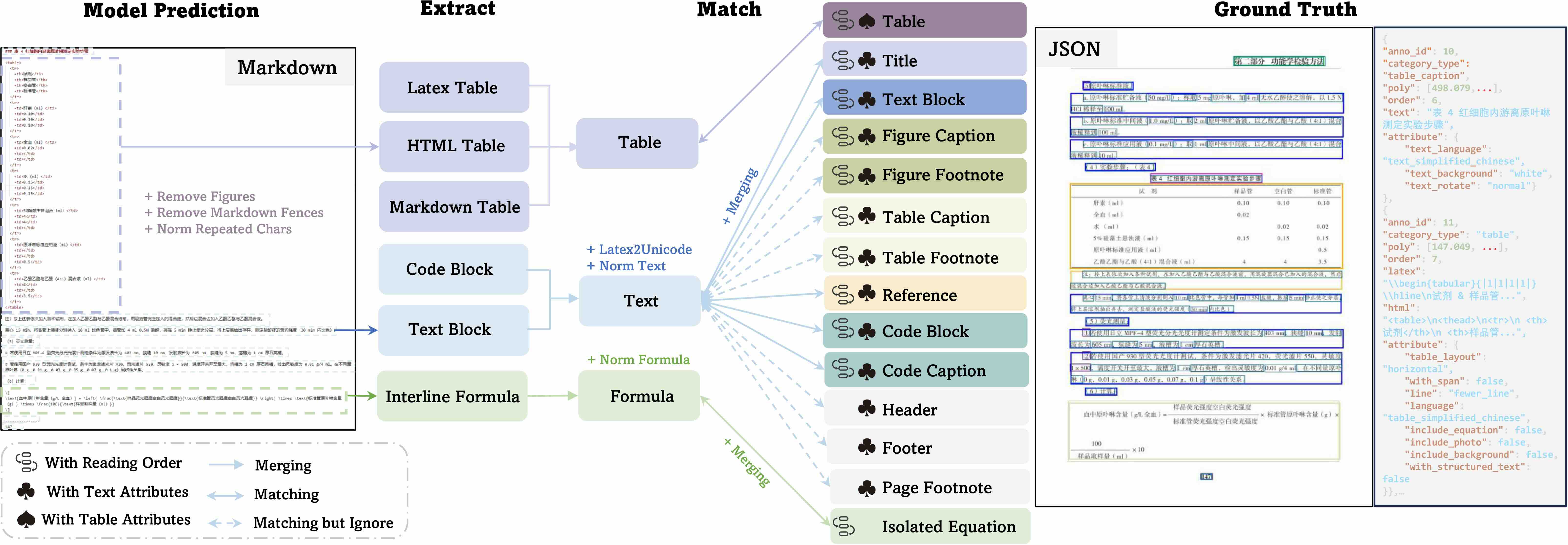
Environment Setup and Running
The evaluation pipeline requires Python 3.10 and several system-level dependencies (TeX Live, ImageMagick, Ghostscript) for CDM formula metrics. Two deployment methods are provided, and the Docker approach is recommended:
Option A: Docker (recommended)
A pre-built Docker image bundles the exact verified runtime (Python 3.10 conda env + TeX Live 2025 + ImageMagick 7.1.1-47 + Ghostscript 9.55.0).
Pull the image
docker pull ghcr.io/zeng-weijun/omnidocbench-eval:repro-ubuntu2204
Run with your own data
docker run --rm \
  --entrypoint bash \
  -v /path/to/your_gt.json:/workspace/gt/your_gt.json:ro \
  -v /path/to/your_predictions:/workspace/data_md/predictions:ro \
  -v /path/to/output:/workspace/result \
  ghcr.io/zeng-weijun/omnidocbench-eval:repro-ubuntu2204 \
  -c 'cat > configs/custom.yaml << "EOF"
end2end_eval:
  metrics:
    text_block:
      metric: [Edit_dist]
    display_formula:
      metric: [Edit_dist, CDM]
    table:
      metric: [TEDS, Edit_dist]
    reading_order:
      metric: [Edit_dist]
  dataset:
    dataset_name: end2end_dataset
    ground_truth:
      data_path: ./gt/your_gt.json
    prediction:
      data_path: ./data_md/predictions
    match_method: quick_match
    match_workers: 4
    quick_match_truncated_timeout_sec: 300
    timeout_fallback_max_chunk_span: 10
    timeout_fallback_order_penalty: 0.10
EOF
python pdf_validation.py --config configs/custom.yaml'
Verify runtime inside the image
docker run --rm --entrypoint bash \
  ghcr.io/zeng-weijun/omnidocbench-eval:repro-ubuntu2204 \
  -lc 'bash script/verify_repro_runtime.sh'
Build from source (optional)
bash script/build_repro_docker_image.sh
Option B: Conda
Requires Ubuntu 22.04 / 20.04, at least 8 GB disk space and 8 GB RAM, root access.
Step 1 — Create environment and install Python dependencies
conda create -n omnidocbench python=3.10 -y
conda activate omnidocbench
git clone  && cd Omnidocbench
pip install -e .
python -c "from src.core.pipeline import run_config_file; print('OK')"
Step 2 — Install Ghostscript
CDM metrics need Ghostscript for PDF-to-PNG conversion via ImageMagick.
sudo apt-get update && sudo apt-get install -y ghostscript
gs --version   # expected: 9.55.0 on Ubuntu 22.04
Step 3 — Install TeX Live 2025
CDM metrics need pdflatex with CJK Chinese font support.
cd ~ && wget http://mirror.ctan.org/systems/texlive/tlnet/install-tl-unx.tar.gz
tar -xzf install-tl-unx.tar.gz && cd install-tl-*/
sudo ./install-tl   # interactive, full install ~7 GB

echo 'export PATH=/usr/local/texlive/2025/bin/x86_64-linux:$PATH' >> ~/.bashrc
source ~/.bashrc
pdflatex --version | head -2   # expected: pdfTeX ... (TeX Live 2025)

# Verify CJK support
kpsewhich CJK.sty && kpsewhich c70gkai.fd
# If missing: sudo tlmgr install cjk cjkutils arphic gkai
Step 4 — Install ImageMagick 7.x (compile from source)
Ubuntu 22.04 ships ImageMagick 6.x; CDM requires 7.x.
sudo apt-get install -y build-essential pkg-config \
  libjpeg-dev libpng-dev libtiff-dev libwebp-dev \
  libfreetype6-dev libfontconfig1-dev

cd /tmp
wget https://github.com/ImageMagick/ImageMagick/archive/refs/tags/7.1.1-47.tar.gz
tar xzf 7.1.1-47.tar.gz && cd ImageMagick-7.1.1-47
./configure --with-modules --enable-shared --with-gslib \
  --with-gs-font-dir=/usr/share/fonts/type1/gsfonts --prefix=/usr/local
make -j$(nproc) && sudo make install && sudo ldconfig
magick --version | head -2   # expected: ImageMagick 7.1.1-47

# Allow PDF read/write
POLICY_FILE=$(find /usr/local/etc/ImageMagick-7 -name policy.xml 2>/dev/null | head -1)
[ -n "$POLICY_FILE" ] && sudo sed -i \
  's|||' \
  "$POLICY_FILE"
Step 5 — Verify and run
python -m pytest tools/test_environment_and_smoke.py::TestEnvironmentVersions -v -s
python pdf_validation.py --config configs/end2end.yaml
Verified versions
| Component | Version |
|---|---|
| Python | 3.10.x |
| TeX Live | 2025 |
| pdflatex | 3.141592653-2.6-1.40.28 |
| ImageMagick | 7.1.1-47 |
| Ghostscript | 9.55.0 |
Worker concurrency
The pipeline has three parallel stages. Set each to 1/3–1/2 of available CPU cores to avoid deadlocks or OOM:
| Stage | Config key | Notes |
|---|---|---|
| Page matching | match_workers |
text alignment |
| CDM rendering | cdm_workers |
~1 GB RAM per worker |
| TEDS tables | teds_workers |
table structure similarity |
Running the evaluation
All evaluation inputs are configured through configs/end2end.yaml. Edit ground_truth.data_path and prediction.data_path to point to your data, then run:
python pdf_validation.py --config
Option C: skills
I need to evaluate an xx model with OmniDocBench using Docker. The GT path is /path/OmniDocBench.json, the prediction result path is /path/predfolder, and CDM is required. Please help me run the evaluation.
End-to-End Evaluation
End-to-end evaluation assesses the model's accuracy in parsing PDF page content. The evaluation uses the model's Markdown output of the entire PDF page parsing results as the prediction. The Overall metric is calculated as:
$$\text{Overall} = \frac{(1-\textit{Text Edit Distance}) \times 100 + \textit{Table TEDS} +\textit{Formula CDM}}{3}$$
Comprehensive evaluation of document parsing on OmniDocBench (v1.6_full)
Model Type
Methods
Size
Overall↑
TextEdit↓
FormulaCDM↑
TableTEDS↑
TableTEDS-S↑
Read OrderEdit↓
TeleOCR
Specialized VLMs
1.2B
96.91
0.0267
96.5895
96.8183
98.1806
0.1184
OvisOCR2
Specialized VLMs
0.8B
96.47
0.0265
97.4854
94.5842
96.9768
0.1120
PaddleOCR-VL-1.6
Specialized VLMs
0.9B
96.34
0.0326
97.5304
94.7619
97.1002
0.1278
MinerU2.5-Pro
Specialized VLMs
1.2B
95.75
0.036
97.45
93.42
95.92
0.120
GLM-OCR
Specialized VLMs
0.9B
95.22
0.044
97.18
92.83
95.39
0.133
PaddleOCR-VL-1.5
Specialized VLMs
0.9B
94.93
0.038
96.89
91.67
94.37
0.130
PaddleOCR-VL
Specialized VLMs
0.9B
94.18
0.040
95.91
90.65
93.74
0.135
Unlimited-OCR
Specialized VLMs
3B
94.00
0.0394
95.7234
90.21
93.3565
0.1281
Youtu-Parsing
Specialized VLMs
2.5B
93.74
0.044
93.63
92.02
95.00
0.116
Qianfan-OCR
Specialized VLMs
4B
93.90
0.04
95.08
90.53
93.31
0.13
Ovis2.6-30B-A3B
General VLMs
30B
93.70
0.035
95.17
89.44
92.40
0.135
Logics-Parsing-v2
Specialized VLMs
4B
93.33
0.041
95.65
88.42
91.98
0.137
ABot-OCR
Specialized VLMs
2B
93.30
0.037
94.86
88.69
91.87
0.137
FireRed-OCR
Specialized VLMs
2B
93.26
0.037
95.44
88.04
91.06
0.131
MinerU-2.5
Specialized VLMs
1.2B
93.04
0.045
95.77
87.88
91.47
0.130
Gemini 3 Pro
General VLMs
92.91
0.064
95.99
89.15
92.96
0.165
Gemini 3 Flash
General VLMs
92.62
0.066
95.16
89.29
93.51
0.172
dots.ocr
Specialized VLMs
3B
90.77
0.048
89.95
87.18
90.58
0.138
OpenDoc-0.1B
Specialized VLMs
0.1B
90.67
0.049
93.02
83.88
87.45
0.140
DeepSeek-OCR 2
Specialized VLMs
3B
90.25
0.050
91.84
83.89
87.75
0.144
HunyuanOCR
Specialized VLMs
1B
89.95
0.088
87.68
91.01
93.23
0.171
Qwen3-VL-235B
General VLMs
235B
89.78
0.063
92.55
83.07
86.75
0.166
Dolphin-v2
Specialized VLMs
3B
89.50
0.069
91.01
84.40
87.44
0.150
OCRVerse
Specialized VLMs
4B
88.60
0.063
89.61
82.44
86.27
0.163
MonkeyOCR-pro-3B
Specialized VLMs
3B
88.57
0.074
88.74
84.35
88.62
0.189
GPT-5.2
General VLMs
86.59
0.114
88.21
82.95
87.93
0.193
Dolphin-1.5
Specialized VLMs
0.3B
86.52
0.094
87.49
81.43
84.82
0.167
MinerU-Pipeline
Pipeline Tools
86.47
0.055
83.07
81.88
88.68
0.153
olmOCR
Specialized VLMs
7B
85.74
0.139
88.10
83.00
87.17
0.216
Mistral OCR
Specialized VLMs
85.66
0.097
89.91
76.78
80.93
0.171
Kimi K2.5
General VLMs
1T
84.53
0.107
83.50
80.76
84.00
0.211
InternVL3.5-241B
General VLMs
241B
83.76
0.130
89.95
74.35
79.78
0.215
Nanonets-OCR-s
Specialized VLMs
3B
83.61
0.108
81.46
80.18
84.51
0.213
POINTS-Reader
Specialized VLMs
3B
83.37
0.096
85.72
73.98
77.40
0.198
Marker
Pipeline Tools
78.44
0.157
85.24
65.77
73.24
0.243
More detailed attribute-level evaluation results are shown in the paper. Or you can use the tools/generate_result_tables.ipynb to generate the result leaderboard.
End-to-End Evaluation Method - end2end
End-to-end evaluation consists of two approaches:
end2end: This method uses OmniDocBench's JSON files as Ground Truth. For config file reference, see: end2endmd2md: This method uses OmniDocBench's markdown format as Ground Truth. Details will be discussed in the next section markdown-to-markdown evaluation.
We recommend using the end2end evaluation approach since it preserves the category and attribute information of samples, enabling special category ignore operations and attribute-level result output.
The end2end evaluation can assess four dimensions. We provide an example of end2end evaluation results in result, including:
- Text paragraphs
- Display formulas
- Tables
- Reading order
【Field explanations for end2end.yaml】
The configuration of end2end.yaml is as follows:
end2end_eval:          # Specify task name, common for end-to-end evaluation
  metrics:             # Configure metrics to use
    text_block:        # Configuration for text paragraphs
      metric:
        - Edit_dist    # Normalized Edit Distance
        - BLEU
        - METEOR
    display_formula:   # Configuration for display formulas
      metric:
        - Edit_dist
        - CDM          # Only supports exporting format required for CDM evaluation, stored in results
    table:             # Configuration for tables
      metric:
        - TEDS
        - Edit_dist
    reading_order:     # Configuration for reading order
      metric:
        - Edit_dist
  dataset:                                       # Dataset configuration
    dataset_name: end2end_dataset                # Dataset name, no need to modify
    ground_truth:
      data_path: ./demo_data/omnidocbench_demo/OmniDocBench_demo.json  # Path to OmniDocBench
    prediction:
      data_path: ./demo_data/end2end            # Folder path for model's PDF page parsing markdown results
    match_method: quick_match                    # Matching method, options: no_split/no_split/quick_match
    filter:                                      # Page-level filtering
      language: english                          # Page attributes and corresponding tags to evaluate
The data_path under prediction is the folder path containing the model's PDF page parsing results. The folder contains markdown files for each page, with filenames matching the image names but replacing the .jpg extension with .md.
CDM now supports direct evaluation, which requires you to set up the CDM environment according to the README and then call CDM directly in the config file. In addition, we still support exporting the JSON format required for CDM evaluation as before: simply add the CDM_plain field in the metric configuration, and the output will be organized into the CDM input format and stored in the result directory.
For end-to-end evaluation, the config allows selecting different matching methods. There are three matching approaches:
no_split: Does not split or match text blocks, but rather combines them into a single markdown for calculation. This method will not output attribute-level results or reading order results.simple_match: Performs only paragraph segmentation using double line breaks, then directly matches one-to-one with GT without any truncation or merging.quick_match: Builds on paragraph segmentation by adding truncation and merging operations to reduce the impact of paragraph segmentation differences on final results, using Adjacency Search Match for truncation and merging. In version 1.5, the evaluation method has been fully upgraded to a Hybrid Matching approach, allowing formulas and text to be matched with each other, which reduces the score impact caused by models outputting formulas in unicode format.
We recommend using quick_match for better matching results. However, if the model's paragraph segmentation is accurate, simple_match can be used for faster evaluation. The matching method is configured through the match_method field under dataset in the config.
The filter field allows filtering the dataset. For example, setting filter to language: english under dataset will evaluate only pages in English. See the Dataset Introduction section for more page attributes. Comment out the filter fields to evaluate the full dataset.
End-to-end Evaluation Method - md2md
The markdown-to-markdown evaluation uses the model's markdown output of the entire PDF page parsing as the Prediction, and OmniDocBench's markdown format as the Ground Truth. Please refer to the config file: md2md. We recommend using the end2end approach from the previous section to evaluate with OmniDocBench, as it preserves rich attribute annotations and ignore logic. However, we still provide the md2md evaluation method to align with existing evaluation approaches.
The md2md evaluation can assess four dimensions:
- Text paragraphs
- Display formulas
- Tables
- Reading order
【Field explanations for md2md.yaml】
The configuration of md2md.yaml is as follows:
end2end_eval:          # Specify task name, common for end-to-end evaluation
  metrics:             # Configure metrics to use
    text_block:        # Configuration for text paragraphs
      metric:
        - Edit_dist    # Normalized Edit Distance
        - BLEU
        - METEOR
    display_formula:   # Configuration for display formulas
      metric:
        - Edit_dist
        - CDM          # Only supports exporting format required for CDM evaluation, stored in results
    table:             # Configuration for tables
      metric:
        - TEDS
        - Edit_dist
    reading_order:     # Configuration for reading order
      metric:
        - Edit_dist
  dataset:                                               # Dataset configuration
    dataset_name: md2md_dataset                          # Dataset name, no need to modify
    ground_truth:                                        # Configuration for ground truth dataset
      data_path: ./demo_data/omnidocbench_demo/mds       # Path to OmniDocBench markdown folder
      page_info: ./demo_data/omnidocbench_demo/OmniDocBench_demo.json          # Path to OmniDocBench JSON file, mainly used to get page-level attributes
    prediction:                                          # Configuration for model predictions
      data_path: ./demo_data/end2end                     # Folder path for model's PDF page parsing markdown results
    match_method: quick_match                            # Matching method, options: no_split/no_split/quick_match
    filter:                                              # Page-level filtering
      language: english                                  # Page attributes and corresponding tags to evaluate
The data_path under prediction is the folder path for the model's PDF page parsing results, which contains markdown files corresponding to each page. The filenames match the image names, with only the .jpg extension replaced with .md.
The data_path under ground_truth is the path to OmniDocBench's markdown folder, with filenames corresponding one-to-one with the model's PDF page parsing markdown results. The page_info path under ground_truth is the path to OmniDocBench's JSON file, mainly used to obtain page-level attributes. If page-level attribute evaluation results are not needed, this field can be commented out. However, without configuring the page_info field under ground_truth, the filter related functionality cannot be used.
For explanations of other fields in the config, please refer to the End-to-end Evaluation - end2end section.
Formula Recognition Evaluation
OmniDocBench contains bounding box information for formulas on each PDF page along with corresponding formula recognition annotations, making it suitable as a benchmark for formula recognition evaluation. Formulas include display formulas (equation_isolated) and inline formulas (equation_inline). Currently, this repo provides examples for evaluating display formulas.
Models
CDM
ExpRate@CDM
BLEU
Norm Edit
GOT-OCR
74.1
28.0
55.07
0.290
Mathpix
86.6
2.8
66.56
0.322
Pix2Tex
73.9
39.5
46.00
0.337
UniMERNet-B
85.0
60.2
60.84
0.238
GPT4o
86.8
65.5
45.17
0.282
InternVL2-Llama3-76B
67.4
54.5
47.63
0.308
Qwen2-VL-72B
83.8
55.4
53.71
0.285
Component-level formula recognition evaluation on OmniDocBench (v1.0) formula subset.
Formula recognition evaluation can be configured according to formula_recognition.
【Field explanations for formula_recognition.yaml】
The configuration of formula_recognition.yaml is as follows:
recogition_eval:      # Specify task name, common for all recognition-related tasks
  metrics:            # Configure metrics to use
    - Edit_dist       # Normalized Edit Distance
    - CDM             # Only supports exporting formats required for CDM evaluation, stored in results
  dataset:                                                                   # Dataset configuration
    dataset_name: omnidocbench_single_module_dataset                         # Dataset name, no need to modify if following specified input format
    ground_truth:                                                            # Ground truth dataset configuration
      data_path: ./demo_data/recognition/OmniDocBench_demo_formula.json      # JSON file containing both ground truth and model prediction results
      data_key: latex                                                        # Field name storing Ground Truth, for OmniDocBench, formula recognition results are stored in latex field
      category_filter: ['equation_isolated']                                 # Categories used for evaluation, in formula recognition, the category_name is equation_isolated
    prediction:                                                              # Model prediction configuration
      data_key: pred                                                         # Field name storing model prediction results, this is user-defined
    category_type: formula                                                   # category_type is mainly used for selecting data preprocessing strategy, options: formula/text
For the metrics section, in addition to the supported metrics, it also supports exporting formats required for CDM evaluation. Simply configure the CDM field in metrics to organize the output into CDM input format, which will be stored in result.
For the dataset section, the data format in the ground_truth data_path remains consistent with OmniDocBench, with just a custom field added under the corresponding formula sample to store the model's prediction results. The field storing prediction information is specified through the data_key under the prediction field in dataset, such as pred. For more details about OmniDocBench's file structure, please refer to the "Dataset Introduction" section. The input format for model results can be found in OmniDocBench_demo_formula, which follows this format:
[{
    "layout_dets": [    // List of page elements
        {
            "category_type": "equation_isolated",  // OmniDocBench category name
            "poly": [    // OmniDocBench position info, coordinates for top-left, top-right, bottom-right, bottom-left corners (x,y)
                136.0,
                781.0,
                340.0,
                781.0,
                340.0,
                806.0,
                136.0,
                806.0
            ],
            ...   // Other OmniDocBench fields
            "latex": "$xxx$",  // LaTeX formula will be written here
            "pred": "$xxx$",   // !! Model prediction result stored here, user-defined new field at same level as ground truth

        ...
    ],
    "page_info": {...},        // OmniDocBench page information
    "extra": {...}             // OmniDocBench annotation relationship information
},
...
]
Here is a model inference script for reference:
import os
import json
from PIL import Image

def poly2bbox(poly):
    L = poly[0]
    U = poly[1]
    R = poly[2]
    D = poly[5]
    L, R = min(L, R), max(L, R)
    U, D = min(U, D), max(U, D)
    bbox = [L, U, R, D]
    return bbox

question = "\nPlease convert this cropped image directly into latex."

with open('./demo_data/omnidocbench_demo/OmniDocBench_demo.json', 'r') as f:
    samples = json.load(f)

for sample in samples:
    img_name = os.path.basename(sample['page_info']['image_path'])
    img_path = os.path.join('./Docparse/images', img_name)
    img = Image.open(img_path)

    if not os.path.exists(img_path):
        print('No exist: ', img_name)
        continue

    for i, anno in enumerate(sample['layout_dets']):
        if anno['category_type'] != 'equation_isolated':   # Filter out equation_isolated category for evaluation
            continue

        bbox = poly2bbox(anno['poly'])
        im = img.crop(bbox).convert('RGB')
        response = model.chat(im, question)  # Modify the way the image is passed in according to the model
        anno['pred'] = response              # Directly add a new field to store the model's inference results under the corresponding annotation

with open('./demo_data/recognition/OmniDocBench_demo_formula.json', 'w', encoding='utf-8') as f:
    json.dump(samples, f, ensure_ascii=False)
Text OCR Evaluation
OmniDocBench contains bounding box information and corresponding text recognition annotations for all text in each PDF page, making it suitable as a benchmark for OCR evaluation. The text annotations include both block-level and span-level annotations, both of which can be used for evaluation. This repo currently provides an example of block-level evaluation, which evaluates OCR at the text paragraph level.
Model Type
Model
Language
Text background
Text Rotate
EN
ZH
Mixed
White
Single
Multi
Normal
Rotate90
Rotate270
Horizontal
Pipeline Tools
&
Expert Vision
Models
PaddleOCR
0.071
0.055
0.118
0.060
0.038
0.085
0.060
0.015
0.285
0.021
OpenOCR
0.07
0.068
0.106
0.069
0.058
0.081
0.069
0.038
0.891
0.025
Tesseract-OCR
0.096
0.551
0.250
0.439
0.328
0.331
0.426
0.117
0.969
0.984
EasyOCR
0.26
0.398
0.445
0.366
0.287
0.388
0.36
0.97
0.997
0.926
Surya
0.057
0.123
0.164
0.093
0.186
0.235
0.104
0.634
0.767
0.255
Mathpix
0.033
0.240
0.261
0.185
0.121
0.166
0.180
0.038
0.185
0.638
GOT-OCR
0.041
0.112
0.135
0.092
0.052
0.155
0.091
0.562
0.966
0.097
Vision Language
Models
Qwen2-VL-72B
0.072
0.274
0.286
0.234
0.155
0.148
0.223
0.273
0.721
0.067
InternVL2-76B
0.074
0.155
0.242
0.113
0.352
0.269
0.132
0.610
0.907
0.595
GPT4o
0.020
0.224
0.125
0.167
0.140
0.220
0.168
0.115
0.718
0.132
Component-level OCR text recognition evaluation on OmniDocBench (v1.0) text subset.
OCR text recognition evaluation can be configured according to ocr.
【The field explanation of ocr.yaml】
The configuration file for ocr.yaml is as follows:
recogition_eval:      # Specify task name, common for all recognition-related tasks
  metrics:            # Configure metrics to use
    - Edit_dist       # Normalized Edit Distance
    - BLEU
    - METEOR
  dataset:                                                                   # Dataset configuration
    dataset_name: omnidocbench_single_module_dataset                         # Dataset name, no need to modify if following the specified input format
    ground_truth:                                                            # Ground truth dataset configuration
      data_path: ./demo_data/recognition/OmniDocBench_demo_text_ocr.json     # JSON file containing both ground truth and model prediction results
      data_key: text                                                         # Field name storing Ground Truth, for OmniDocBench, text recognition results are stored in the text field, all block level annotations containing text field will participate in evaluation
    prediction:                                                              # Model prediction configuration
      data_key: pred                                                         # Field name storing model prediction results, this is user-defined
    category_type: text                                                      # category_type is mainly used for selecting data preprocessing strategy, options: formula/text
For the dataset section, the input ground_truth data_path follows the same data format as OmniDocBench, with just a new custom field added under samples containing the text field to store the model's prediction results. The field storing prediction information is specified through the data_key under the prediction field in dataset, for example pred. The input format of the dataset can be referenced in OmniDocBench_demo_text_ocr, and the meanings of various fields can be found in the examples provided in the Formula Recognition Evaluation section.
Here is a reference model inference script for your consideration:
import os
import json
from PIL import Image

def poly2bbox(poly):
    L = poly[0]
    U = poly[1]
    R = poly[2]
    D = poly[5]
    L, R = min(L, R), max(L, R)
    U, D = min(U, D), max(U, D)
    bbox = [L, U, R, D]
    return bbox

question = "\nPlease convert this cropped image directly into latex."

with open('./demo_data/omnidocbench_demo/OmniDocBench_demo.json', 'r') as f:
    samples = json.load(f)

for sample in samples:
    img_name = os.path.basename(sample['page_info']['image_path'])
    img_path = os.path.join('./Docparse/images', img_name)
    img = Image.open(img_path)

    if not os.path.exists(img_path):
        print('No exist: ', img_name)
        continue

    for i, anno in enumerate(sample['layout_dets']):
        if not anno.get('text'):             # Filter out annotations containing the text field from OmniDocBench for model inference
            continue

        bbox = poly2bbox(anno['poly'])
        im = img.crop(bbox).convert('RGB')
        response = model.chat(im, question)  # Modify the way the image is passed in according to the model
        anno['pred'] = response              # Directly add a new field to store the model's inference results under the corresponding annotation

with open('./demo_data/recognition/OmniDocBench_demo_text_ocr.json', 'w', encoding='utf-8') as f:
    json.dump(samples, f, ensure_ascii=False)
Table Recognition Evaluation
OmniDocBench contains bounding box information for tables on each PDF page along with corresponding table recognition annotations, making it suitable as a benchmark for table recognition evaluation. The table annotations are available in both HTML and LaTeX formats, with this repository currently providing examples for HTML format evaluation.
Model Type
Model
Language
Table Frame Type
Special Situation
Overall
EN
ZH
Mixed
Full
Omission
Three
Zero
Merge Cell(+/-)
Formula(+/-)
Colorful(+/-)
Rotate(+/-)
OCR-based Models
PaddleOCR
76.8
71.8
80.1
67.9
74.3
81.1
74.5
70.6/75.2
71.3/74.1
72.7/74.0
23.3/74.6
73.6
RapidTable
80.0
83.2
91.2
83.0
79.7
83.4
78.4
77.1/85.4
76.7/83.9
77.6/84.9
25.2/83.7
82.5
Expert VLMs
StructEqTable
72.8
75.9
83.4
72.9
76.2
76.9
88
64.5/81
69.2/76.6
72.8/76.4
30.5/76.2
75.8
GOT-OCR
72.2
75.5
85.4
73.1
72.7
78.2
75.7
65.0/80.2
64.3/77.3
70.8/76.9
8.5/76.3
74.9
General VLMs
Qwen2-VL-7B
70.2
70.7
82.4
70.2
62.8
74.5
80.3
60.8/76.5
63.8/72.6
71.4/70.8
20.0/72.1
71.0
InternVL2-8B
70.9
71.5
77.4
69.5
69.2
74.8
75.8
58.7/78.4
62.4/73.6
68.2/73.1
20.4/72.6
71.5
Component-level Table Recognition evaluation on OmniDocBench(v1.0) table subset. (+/-) means with/without special situation.
Table recognition evaluation can be configured according to table_recognition.
For tables predicted to be in LaTeX format, the latexml tool will be used to convert LaTeX to HTML before evaluation. The evaluation code will automatically perform format conversion, and users need to preinstall latexml
【The field explanation of table_recognition.yaml】
The configuration file for table_recognition.yaml is as follows:
recogition_eval:      # Specify task name, common for all recognition-related tasks
  metrics:            # Configure metrics to use
    - TEDS            # Tree Edit Distance based Similarity
    - Edit_dist       # Normalized Edit Distance
  dataset:                                                                   # Dataset configuration
    dataset_name: omnidocbench_single_module_dataset                         # Dataset name, no need to modify if following specified input format
    ground_truth:                                                            # Configuration for ground truth dataset
      data_path: ./demo_data/recognition/OmniDocBench_demo_table.json        # JSON file containing both ground truth and model prediction results
      data_key: html                                                         # Field name storing Ground Truth, for OmniDocBench, table recognition results are stored in html and latex fields, change to latex when evaluating latex format tables
      category_filter: table                                                 # Category for evaluation, in table recognition, the category_name is table
    prediction:                                                              # Configuration for model prediction results
      data_key: pred                                                         # Field name storing model prediction results, this is user-defined
    category_type: table                                                     # category_type is mainly used for data preprocessing strategy selection
For the dataset section, the data format in the ground_truth's data_path remains consistent with OmniDocBench, with only a custom field added under the corresponding table sample to store the model's prediction result. The field storing prediction information is specified through data_key under the prediction field in dataset, such as pred. For more details about OmniDocBench's file structure, please refer to the "Dataset Introduction" section. The input format for model results can be found in OmniDocBench_demo_table, which follows this format:
[{
    "layout_dets": [    // List of page elements
        {
            "category_type": "table",  // OmniDocBench category name
            "poly": [    // OmniDocBench position info: x,y coordinates for top-left, top-right, bottom-right, bottom-left corners
                136.0,
                781.0,
                340.0,
                781.0,
                340.0,
                806.0,
                136.0,
                806.0
            ],
            ...   // Other OmniDocBench fields
            "latex": "$xxx$",  // Table LaTeX annotation goes here
            "html": "$xxx$",  // Table HTML annotation goes here
            "pred": "$xxx$",   // !! Model prediction result stored here, user-defined new field at same level as ground truth

        ...
    ],
    "page_info": {...},        // OmniDocBench page information
    "extra": {...}             // OmniDocBench annotation relationship information
},
...
]
Here is a model inference script for reference:
import os
import json
from PIL import Image

def poly2bbox(poly):
    L = poly[0]
    U = poly[1]
    R = poly[2]
    D = poly[5]
    L, R = min(L, R), max(L, R)
    U, D = min(U, D), max(U, D)
    bbox = [L, U, R, D]
    return bbox

question = "\nPlease convert this cropped image directly into html format of table."

with open('./demo_data/omnidocbench_demo/OmniDocBench_demo.json', 'r') as f:
    samples = json.load(f)

for sample in samples:
    img_name = os.path.basename(sample['page_info']['image_path'])
    img_path = os.path.join('./demo_data/omnidocbench_demo/images', img_name)
    img = Image.open(img_path)

    if not os.path.exists(img_path):
        print('No exist: ', img_name)
        continue

    for i, anno in enumerate(sample['layout_dets']):
        if anno['category_type'] != 'table':   # Filter out the table category for evaluation
            continue

        bbox = poly2bbox(anno['poly'])
        im = img.crop(bbox).convert('RGB')
        response = model.chat(im, question)  # Need to modify the way the image is passed in depending on the model
        anno['pred'] = response              # Directly add a new field to store the model's inference result at the same level as the ground truth

with open('./demo_data/recognition/OmniDocBench_demo_table.json', 'w', encoding='utf-8') as f:
    json.dump(samples, f, ensure_ascii=False)
Layout Detection
OmniDocBench contains bounding box information for all document components on each PDF page, making it suitable as a benchmark for layout detection task evaluation.
Model
Backbone
Params
Book
Slides
Research
Report
Textbook
Exam
Paper
Magazine
Academic
Literature
Notes
Newspaper
Average
DiT-L
ViT-L
361.6M
43.44
13.72
45.85
15.45
3.40
29.23
66.13
0.21
23.65
26.90
LayoutLMv3
RoBERTa-B
138.4M
42.12
13.63
43.22
21.00
5.48
31.81
64.66
0.80
30.84
28.84
DocLayout-YOLO
v10m
19.6M
43.71
48.71
72.83
42.67
35.40
51.44
64.64
9.54
57.54
47.38
SwinDocSegmenter
Swin-L
223M
42.91
28.20
47.29
32.44
20.81
52.35
48.54
12.38
38.06
35.89
GraphKD
R101
44.5M
39.03
16.18
39.92
22.82
14.31
37.61
44.43
5.71
23.86
27.10
DOCX-Chain
30.86
11.71
39.62
19.23
10.67
23.00
41.60
1.80
16.96
21.27
Component-level layout detection evaluation on OmniDocBench (v1.0) layout subset: mAP results by PDF page type.
Layout detection config file reference layout_detection, data format reference detection_prediction.
【The field explanation of layout_detection.yaml】
Here is the configuration file for layout_detection.yaml:
detection_eval:   # Specify task name, common for all detection-related tasks
  metrics:
    - COCODet     # Detection task related metrics, mainly mAP, mAR etc.
  dataset:
    dataset_name: detection_dataset_simple_format       # Dataset name, no need to modify if following specified input format
    ground_truth:
      data_path: ./demo_data/omnidocbench_demo/OmniDocBench_demo.json               # Path to OmniDocBench JSON file
    prediction:
      data_path: ./demo_data/detection/detection_prediction.json                    # Path to model prediction result JSON file
    filter:                                             # Page level filtering
      data_source: exam_paper                           # Page attributes and corresponding tags to be evaluated
  categories:
    eval_cat:                # Categories participating in final evaluation
      block_level:           # Block level categories, see OmniDocBench evaluation set introduction for details
        - title              # Title
        - text               # Text
        - abandon            # Includes headers, footers, page numbers, and page annotations
        - figure             # Image
        - figure_caption     # Image caption
        - table              # Table
        - table_caption      # Table caption
        - table_footnote     # Table footnote
        - isolate_formula    # Display formula (this is a layout display formula, lower priority than 14)
        - formula_caption    # Display formula label
    gt_cat_mapping:          # Mapping table from ground truth to final evaluation categories, key is ground truth category, value is final evaluation category name
      figure_footnote: figure_footnote
      figure_caption: figure_caption
      page_number: abandon
      header: abandon
      page_footnote: abandon
      table_footnote: table_footnote
      code_txt: figure
      equation_caption: formula_caption
      equation_isolated: isolate_formula
      table: table
      refernece: text
      table_caption: table_caption
      figure: figure
      title: title
      text_block: text
      footer: abandon
    pred_cat_mapping:       # Mapping table from prediction to final evaluation categories, key is prediction category, value is final evaluation category name
      title : title
      plain text: text
      abandon: abandon
      figure: figure
      figure_caption: figure_caption
      table: table
      table_caption: table_caption
      table_footnote: table_footnote
      isolate_formula: isolate_formula
      formula_caption: formula_caption
The filter field can be used to filter the dataset. For example, setting the filter field under dataset to data_source: exam_paper will filter for pages with data type exam_paper. For more page attributes, please refer to the "Evaluation Set Introduction" section. If you want to evaluate the full dataset, comment out the filter related fields.
The data_path under the prediction section in dataset takes the model's prediction as input, with the following data format:
{
    "results": [
        {
            "image_name": "docstructbench_llm-raw-scihub-o.O-adsc.201190003.pdf_6",                     // image name
            "bbox": [53.892921447753906, 909.8675537109375, 808.5555419921875, 1006.2714233398438],     // bounding box coordinates, representing x,y coordinates of top-left and bottom-right corners
            "category_id": 1,                                                                           // category ID number
            "score": 0.9446213841438293                                                                 // confidence score
        },
        ...                                                                                             // all bounding boxes are flattened in a single list
    ],
    "categories": {"0": "title", "1": "plain text", "2": "abandon", ...}                                // mapping between category IDs and category names
Formula Detection
OmniDocBench contains bounding box information for each formula on each PDF page, making it suitable as a benchmark for formula detection task evaluation.
The format for formula detection is essentially the same as layout detection. Formulas include both inline and display formulas. In this section, we provide a config example that can evaluate detection results for both display formulas and inline formulas simultaneously. Formula detection can be configured according to formula_detection.
【The field explanation of formula_detection.yaml】
Here is the configuration file for formula_detection.yaml:
detection_eval:   # Specify task name, common for all detection-related tasks
  metrics:
    - COCODet     # Detection task related metrics, mainly mAP, mAR etc.
  dataset:
    dataset_name: detection_dataset_simple_format       # Dataset name, no need to modify if following specified input format
    ground_truth:
      data_path: ./demo_data/omnidocbench_demo/OmniDocBench_demo.json               # Path to OmniDocBench JSON file
    prediction:
      data_path: ./demo_data/detection/detection_prediction.json                     # Path to model prediction JSON file
    filter:                                             # Page-level filtering
      data_source: exam_paper                           # Page attributes and corresponding tags to evaluate
  categories:
    eval_cat:                                  # Categories participating in final evaluation
      block_level:                             # Block level categories, see OmniDocBench dataset intro for details
        - isolate_formula                      # Display formula
      span_level:                              # Span level categories, see OmniDocBench dataset intro for details
        - inline_formula                       # Inline formula
    gt_cat_mapping:                            # Mapping table from ground truth to final evaluation categories, key is ground truth category, value is final evaluation category name
      equation_isolated: isolate_formula
      equation_inline: inline_formula
    pred_cat_mapping:                          # Mapping table from prediction to final evaluation categories, key is prediction category, value is final evaluation category name
      interline_formula: isolate_formula
      inline_formula: inline_formula
Please refer to the Layout Detection section for parameter explanations and dataset format. The main difference between formula detection and layout detection is that under the eval_cat category that participates in the final evaluation, a span_level category inline_formula has been added. Both span_level and block_level categories will participate together in the evaluation.
Tools
We provide several tools in the tools directory:
- json2md for converting OmniDocBench from JSON format to Markdown format;
- visualization for visualizing OmniDocBench JSON files;
- generate_result_tables for generating the result leaderboard of the evaluation;
- The model_infer folder provides some model inference scripts for reference. Please use after configuring the model environment. Including:
_img2md.pyfor calling the models to convert images to Markdown format;_ocr.pyis to invoke the models for text recognition of block-level document text paragraphs;_formula.pyis used to call the models for formula recognition of display formulas (equation_isolated);
The evaluation model information
End2End
Model Name
Official Website
Evaluation Version/Model Weights
MinerU-Pipeline
3.4.0
MinerU2-VLM
HuggingFace MinerU2.0-2505-0.9B
MinerU2.5
HuggingFace MinerU2.5-2509-1.2B
MinerU2.5-Pro
HuggingFace MinerU2.5-Pro-2605-1.2B
ABot-OCR
GLM-OCR
Youtu-Parsing
FireRed-OCR
Qianfan-OCR
TeleOCR
OvisOCR2
Unlimited-OCR
dots.ocr
Logics-Parsing-v2
Ovis2.6-30B-A3B
HunyuanOCR
POINTS-Reader
Marker
1.8.2
Mathpix
PaddleOCR PP-StructureV3
PaddleOCR-VL
PaddleOCR-VL-1.5
FD-RL
Docling
Hugging Face docling-layout-heron
OpenDoc-0.1B
Pix2Text
1.1.2.3
Unstructured
0.16.23
OpenParse
0.7.0
MonkeyOCR-pro-1.2B
HuggingFace MonkeyOCR-pro-1.2B
MonkeyOCR-pro-3B
MonkeyOCR-3B
Dolphin
Dolphin-1.5
Dolphin-v2
Nanonets-OCR-s
OCRFlux
Mistral OCR
2503
GOT-OCR
Nougat
olmOCR
Sglang
SmolDocling
SmolDocling-256M-Preview-transformer
256M-Preview-transformer
GPT-4o
2024-08-06
GPT-5.2
2025-12-11
Gemini-2.0 Flash
Gemini-3.0 Flash
Gemini-2.5 Pro
Gemini-3 Pro
Qwen2-VL-72B
Hugging Face Qwen2-VL-72B-Instruct
Qwen2.5-VL-7B
Hugging Face Qwen2.5-VL-7B-Instruct
Qwen2.5-VL-72B
Hugging Face Qwen2.5-VL-72B-Instruct
Qwen3-VL-235B-A22B-Instruct
Hugging Face Qwen3-VL-235B-A22B-Instruct
InternVL2-Llama3-76B
Hugging Face InternVL2-Llama3-76B
InternVL3-78B
InternVL3_5-241B-A28B
Hugging Face InternVL3_5-241B-A28B
DeepSeek-OCR
DeepSeek-OCR-2
Kimi K2.5
OCRVerse
Text Recognition
Model Name
Official Website
Evaluation Version/Model Weights
PaddleOCR
2.9.1
Tesseract
5.5
OpenOCR
0.0.6
EasyOCR
1.7.2
Surya
0.5.0
Layout
Model Name
Official Website
Evaluation Version/Model Weights
DiT-L
LayoutMv3
DOCX-Chain
DocLayout-YOLO
SwinDocSegmenter
GraphKD
Formula
Model Name
Official Website
Evaluation Version/Model Weights
GOT_OCR
Mathpix
———
Pix2Tex
0.1.2
UniMERNet-B
GPT4o
2024-08-06
InternVL2-Llama3-76B
Huggingface Face InternVL2-Llama3-76B
Qwen2-VL-72B
Hugging Face Qwen2-VL-72B-Instruct
Table
Model Name
Official Website
Evaluation Version/Model Weights
PaddleOCR
RapidTable
StructEqTable
GOT-OCR
Qwen2-VL-7B
Hugging Face Qwen2-VL-7B-Instruct
InternVL2-8B
TODO
- [ ] Integration of
match_fullalgorithm - [ ] Optimization of matching post-processing for model-specific output formats
- [ ] Addition of Unicode mapping table for special characters
Known Issues
- Some models occasionally produce non-standard output formats (e.g., recognizing multi-column text as tables, or formulas as Unicode text), leading to matching failures. This can be optimized through post-processing of model output formats
- Due to varying symbol recognition capabilities across different models, some symbols are recognized inconsistently (e.g., list identifiers). Currently, only Chinese and English text are included in text evaluation. A Unicode mapping table will be added later for optimization
We welcome everyone to use the OmniDocBench dataset and provide valuable feedback and suggestions to help us continuously improve the dataset quality and evaluation tools. For any comments or suggestions, please feel free to open an issue and we will respond promptly. If you have evaluation scheme optimizations, you can submit a PR and we will review and update in a timely manner.
Acknowledgement
- Thank 2077AI for supporting the dataset annotation.
- PubTabNet for TEDS metric calculation
- latexml LaTeX to HTML conversion tool
- Tester Markdown table to HTML conversion tool
Copyright Statement
The PDFs are collected from public online channels and community user contributions. Content that is not allowed for distribution has been removed. The dataset is for research purposes only and not for commercial use. If there are any copyright concerns, please contact [email protected].
Citation
@misc{ouyang2024omnidocbenchbenchmarkingdiversepdf,
      title={OmniDocBench: Benchmarking Diverse PDF Document Parsing with Comprehensive Annotations},
      author={Linke Ouyang and Yuan Qu and Hongbin Zhou and Jiawei Zhu and Rui Zhang and Qunshu Lin and Bin Wang and Zhiyuan Zhao and Man Jiang and Xiaomeng Zhao and Jin Shi and Fan Wu and Pei Chu and Minghao Liu and Zhenxiang Li and Chao Xu and Bo Zhang and Botian Shi and Zhongying Tu and Conghui He},
      year={2024},
      eprint={2412.07626},
      archivePrefix={arXiv},
      primaryClass={cs.CV},
      url={https://arxiv.org/abs/2412.07626},
}