
← Open Source
nrl-ai

llama-assistant

AI-powered assistant to help you with your daily tasks, powered by Llama 3, DeepSeek R1, and many more models on HuggingFace.

ApplicationsPersonalPython
Open on GitHub
Momentum
+0stars in 24 hours0.0%
529
Stars
43
Forks
+0
This week
3
Contributors
Created 2024-09-26 · Updated 2026-09-21 · #17662 today
Top developers

nrl-ai/llama-assistant is ranked 17,662 with 529 stars.

Same-category comparison

nrl-ai/llama-assistant is ranked 17,662 among these 8 peers; clarkerubber/irwin is ranked 17,656.

Same-category comparison
NameRankMetrics
nickvasilescu/hermes-desktop-os117,640
Language:
Swift
Stars:
530
Forks:
91
Description:
Hermes Desktop - OS1 Edition: native macOS workspace for Hermes Agent on Orgo cloud computers and SSH hosts.
tak-bro/aicommit217,642
Language:
TypeScript
Stars:
530
Forks:
47
Description:
A Reactive CLI that generates commit messages for Git and Jujutsu with Ollama, ChatGPT, Gemini, Claude, Mistral and other AI.
allenhutchison/obsidian-gemini17,651
Language:
TypeScript
Stars:
529
Forks:
63
Description:
An obsidian plugin to interact with Google Gemini.
clarkerubber/irwin17,656
Language:
Python
Stars:
529
Forks:
46
Description:
irwin - the protector of lichess from all chess players villainous.
waldo-vision/optical.flow.demo17,668
Language:
Python
Stars:
529
Forks:
24
Description:
A project that uses optical flow and machine learning to detect aimhacking in video clips.
AlexandreSajus/JARVIS17,670
Language:
Python
Stars:
528
Forks:
100
Description:
Your own personal voice assistant: Voice to Text to LLM to Speech, displayed in a web interface.
JunweiLiang/Object_Detection_Tracking17,675
Language:
Python
Stars:
528
Forks:
133
Description:
Out-of-the-box code and models for CMU's object detection and tracking system for multi-camera surveillance videos. Speed optimized Faster-RCNN model. Tensorflow based. Also supports EfficientDet. WACVW'20.
philipperemy/deep-learning-bitcoin17,686
Language:
Python
Stars:
528
Forks:
129
Description:
Exploiting Bitcoin prices patterns with Deep Learning.
Key parameters and specifications
ParameterValue
LanguagePython
CategoryApplications
SubcategoryPersonal
Stars529
Forks43
Contributors3
Created date2024-09-26
Updated date2026-09-21
Stars in 1 day0
Stars in 7 days0
Rank17,662
Previous rank17,442
Rank change-220
7-day stars rank16,223
Previous 7-day stars rank16,231
7-day stars rank change8
Total stars rank18,536
Previous total stars rank18,513
Total stars rank change-23
CountryVietnam
README summary

Llama Assistant Local AI Assistant That Respects Your Privacy! ai AI-powered assistant to help you with your daily tasks, powered by Llama 3. It can recognize your voice, process natural language, and perform various actions based on your commands: summarizing text, rephrasing sentences, answering questions, writing emails, and more. This assistant can run offline on your local machine, and it respects your privacy by not sending any data to external servers. Supported Models 📝 Text-only models: Llama 3. And

other models that LlamaCPP supports via custom models. 🧠 Text-only with reasoning models: DeepSeek-R1-Distill-Qwen-1. DeepSeek-R1-Distill-Llama-8B (4-bit quantized). Besides supported models, you can try other variants via custom models. [x] 🗣️ Add wake word detection: "Hey Llama! [x] 🛠️ Custom models: Add support for custom models. [x] 🖼️ Support 5 other multimodal models. [x] 🎙️ Add offline STT support: WhisperCPP. [x] 🧠 Knowledge database: LlamaIndex [x] ⌖ Screen Spot: Screen capture and analyze with OCR [ ] 🔌 Plugin system for

extensibility. [ ] 📧 Email integration with Gmail and Outlook. [ ] 🎵 Music player and podcast integration. [ ] 🌐 Multi-language support: English, Spanish, French, German, etc. [ ] 📦 Package for Windows, Linux, and macOS. [ ] 🔄 Automated tests and CI/CD pipeline. Features 🎙️ Voice recognition for hands-free interaction. 💬 Natural language processing with Llama 3. ⚡ Global hotkey for quick access (Cmd+Shift+Space on macOS). 🎨 Customizable UI with adjustable transparency. ⚙️ **Custom Actions**: Create, edit, hide, and reorder action buttons with custom prompts. Learn more **Note:** This project is a work

in progress, and new features are being added regularly. Technologies Used Installation **Recommended Python Version:** 3. This is required by the _ library to stream audio from your computer's microphone. PyAudio depends on PortAudio for cross-platform compatibility, and is installed differently depending on the platform. For Mac OS X, you can use _:: **Note**: if you encounter an error when running that indicates it can't find , try running with the following flags:: For Debian / Ubuntu Linux:: Windows may work without having

to install PortAudio explicitly (it will get installed with PyAudio). _Homebrew: **On Windows: Installing the MinGW-w64 toolchain** Download and install with instructions from here. **Install from PyPI:** **Or install from source:** 1. Install the required dependencies and install the package: **Speed Hack for Apple Silicon (M1, M2, M3) users:** 🔥🔥🔥 Install Xcode: Build with METAL support: Usage Run the assistant using the following command: Use the global hotkey (default: ) to quickly access the assistant from anywhere on your system. Configuration

The assistant's settings can be customized by editing the file located in your home directory: . Please feel free to submit a Pull Request. License This project is licensed under the GPLv3 License - see the LICENSE file for details. Acknowledgements This project uses llama. cpp, llama-cpp-python for running large language models. Speech recognition is powered by whisper. Star History Contact **Website:** **Contact Form:**

Frequently asked questions

How many stars and forks are recorded?

nrl-ai/llama-assistant has 529 stars and 43 forks.

What is the repository rank?

nrl-ai/llama-assistant is ranked 17,662.

What language and category are recorded?

nrl-ai/llama-assistant has 529 stars, uses Python and belongs to Applications.

Which repository is closest in rank?

nrl-ai/llama-assistant is compared with clarkerubber/irwin, ranked 17,656 with 529 stars.

README

Llama Assistant

Local AI Assistant That Respects Your Privacy! 🔒

Website: llama-assistant.nrl.ai

AI-powered assistant to help you with your daily tasks, powered by Llama 3.2. It can recognize your voice, process natural language, and perform various actions based on your commands: summarizing text, rephrasing sentences, answering questions, writing emails, and more.

This assistant can run offline on your local machine, and it respects your privacy by not sending any data to external servers.
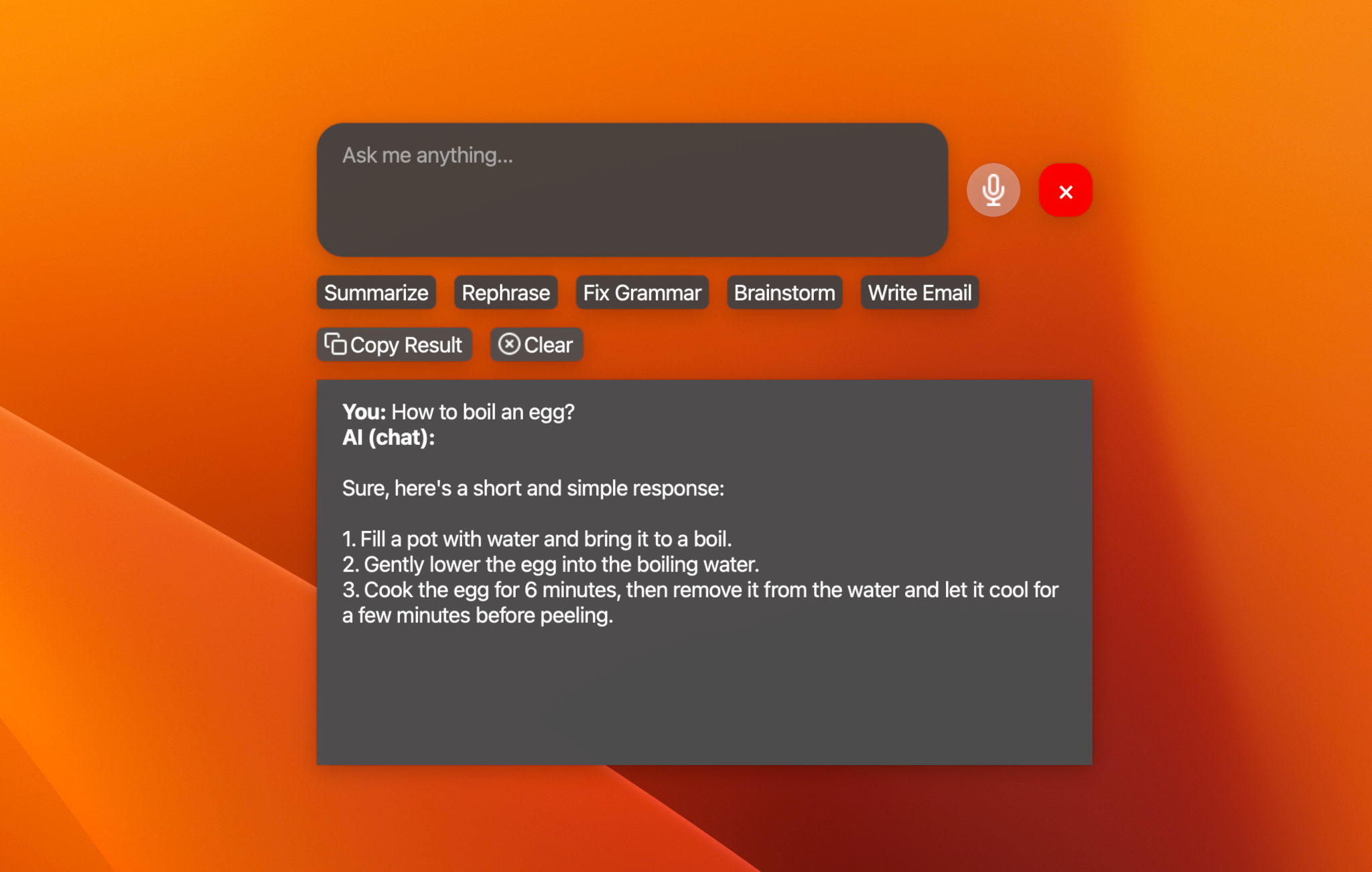
https://github.com/user-attachments/assets/af2c544b-6d46-4c44-87d8-9a051ba213db
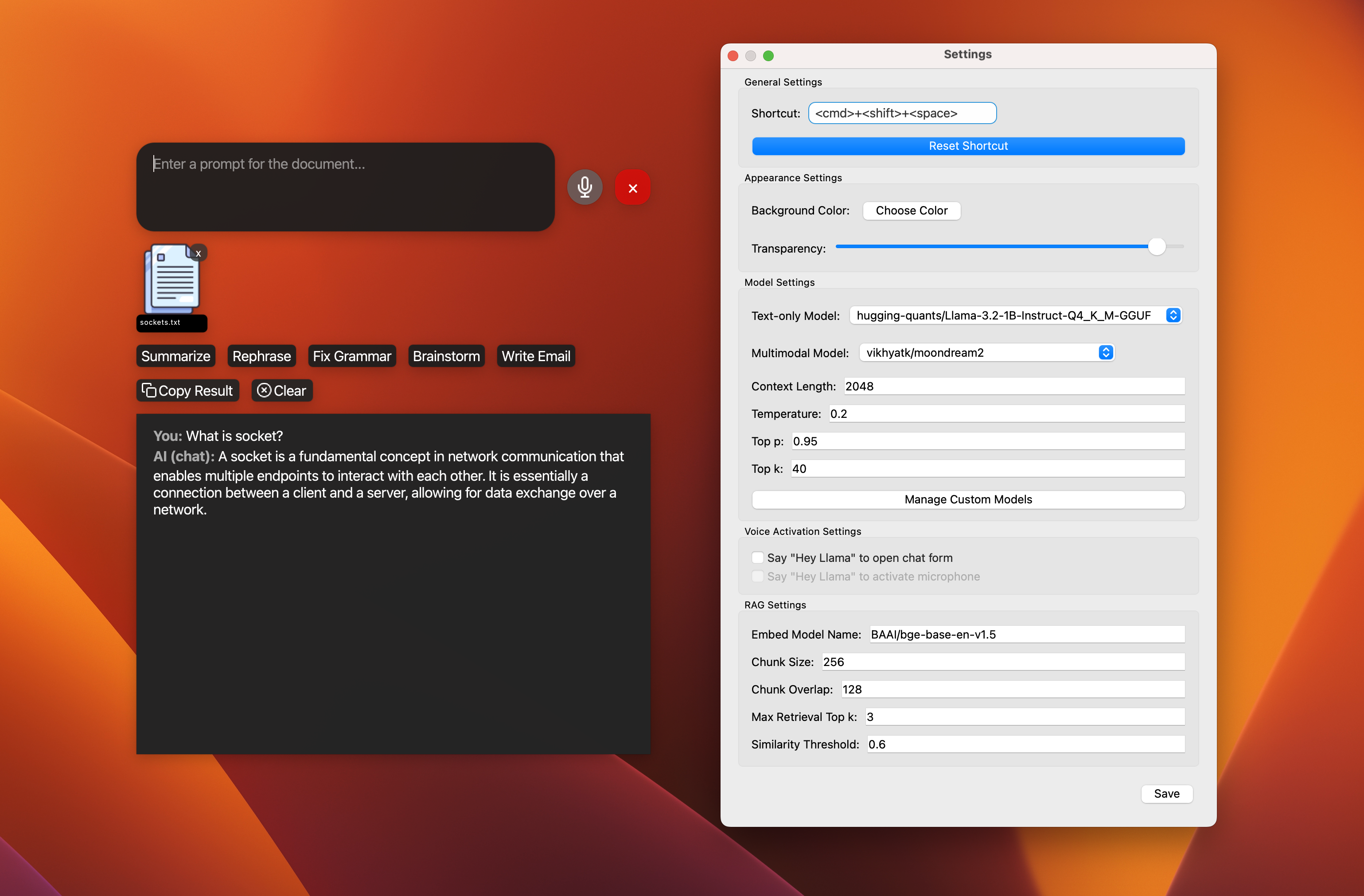
Supported Models

TODO

  • [x] 🖼️ Support multimodal model: moondream2.
  • [x] 🗣️ Add wake word detection: "Hey Llama!".
  • [x] 🛠️ Custom models: Add support for custom models.
  • [x] 📚 Support 5 other text models.
  • [x] 🖼️ Support 5 other multimodal models.
  • [x] ⚡ Streaming support for response.
  • [x] 🎙️ Add offline STT support: WhisperCPP.
  • [x] 🧠 Knowledge database: LlamaIndex
  • [x] ⌖ Screen Spot: Screen capture and analyze with OCR
  • [ ] 🔌 Plugin system for extensibility.
  • [ ] 📰 News and weather updates.
  • [ ] 📧 Email integration with Gmail and Outlook.
  • [ ] 📝 Note-taking and task management.
  • [ ] 🎵 Music player and podcast integration.
  • [ ] 🤖 Workflow with multiple agents.
  • [ ] 🌐 Multi-language support: English, Spanish, French, German, etc.
  • [ ] 📦 Package for Windows, Linux, and macOS.
  • [ ] 🔄 Automated tests and CI/CD pipeline.

Features

  • 🎙️ Voice recognition for hands-free interaction.
  • 💬 Natural language processing with Llama 3.2.
  • 🖼️ Image analysis capabilities (TODO).
  • ⚡ Global hotkey for quick access (Cmd+Shift+Space on macOS).
  • 🎨 Customizable UI with adjustable transparency.
  • ⚙️ Custom Actions: Create, edit, hide, and reorder action buttons with custom prompts. Learn more

Note: This project is a work in progress, and new features are being added regularly.

Technologies Used

Installation

Recommended Python Version: 3.10.

Install PortAudio:

Install PortAudio. This is required by the PyAudio library to stream audio from your computer's microphone. PyAudio depends on PortAudio for cross-platform compatibility, and is installed differently depending on the platform.

  • For Mac OS X, you can use Homebrew_::

    brew install portaudio
    

    Note: if you encounter an error when running pip install that indicates it can't find portaudio.h, try running pip install with the following flags::

    pip install --global-option='build_ext' \
        --global-option='-I/usr/local/include' \
        --global-option='-L/usr/local/lib' \
        pyaudio
    
  • For Debian / Ubuntu Linux::

    apt-get install portaudio19-dev python3-all-dev
    
  • Windows may work without having to install PortAudio explicitly (it will get installed with PyAudio).

For more details, see the PyAudio installation_ page.

.. _PyAudio: https://people.csail.mit.edu/hubert/pyaudio/ .. _PortAudio: http://www.portaudio.com/ .. _PyAudio installation: https://people.csail.mit.edu/hubert/pyaudio/#downloads .. _Homebrew: http://brew.sh

On Windows: Installing the MinGW-w64 toolchain

  • Download and install with instructions from here.
  • Direct download link: MinGW-w64.

Install from PyPI:

pip install pyaudio
pip install git+https://github.com/stlukey/whispercpp.py
pip install llama-assistant

Or install from source:

  1. Clone the repository:
git clone https://github.com/nrl-ai/llama-assistant.git
cd llama-assistant
  1. Install the required dependencies and install the package:
pip install pyaudio
pip install git+https://github.com/stlukey/whispercpp.py
pip install -r requirements.txt
pip install .

Speed Hack for Apple Silicon (M1, M2, M3) users: 🔥🔥🔥

  • Install Xcode:
# check the path of your xcode install
xcode-select -p

# xcode installed returns
# /Applications/Xcode-beta.app/Contents/Developer

# if xcode is missing then install it... it takes ages;
xcode-select --install
  • Build llama-cpp-python with METAL support:
pip uninstall llama-cpp-python -y
CMAKE_ARGS="-DGGML_METAL=on" pip install -U llama-cpp-python --no-cache-dir

# You should now have llama-cpp-python v0.1.62 or higher installed
# llama-cpp-python         0.1.68

Usage

Run the assistant using the following command:

llama-assistant

# Or with a
python -m llama_assistant.main

Use the global hotkey (default: Cmd+Shift+Space) to quickly access the assistant from anywhere on your system.

Configuration

The assistant's settings can be customized by editing the settings.json file located in your home directory: ~/llama_assistant/settings.json.

Contributing

Contributions are welcome! Please feel free to submit a Pull Request.

License

This project is licensed under the GPLv3 License - see the LICENSE file for details.

Acknowledgements

Star History

Contact

Nearby in the ranking
Similar items