NodeTool


Agent-first creative workspace
Create images, video, audio, and text with agents that work alongside you. Describe what you want, let the agent build it, then take over whenever you like.
Download NodeTool Studio · Quick start · Documentation · MCP setup · Contribute
Every model you need, on your own keys
Run local models or connect cloud providers with your own API keys. NodeTool calls the provider with your key, at their price, with no billing unit in between. When a better model ships, add it the day it ships.
Models and Providers lists what runs where.
Why NodeTool
- Agents drive the real editors. They wire the graph and run it. You take the wheel at any point.
- Inspect intermediate results, swap a model, and rerun only what changed.
- The graph, inputs, assets, and edits stay together in your project.
- Run the same workflow from the studio, the CLI, or an external agent over MCP.
Studio is free and runs on macOS, Windows, and Linux. Local models have hardware requirements that depend on the model, and offline work needs the models and assets on your machine. NodeTool Cloud is in alpha and runs on hosted storage and cloud providers.
First run in Studio
- Download the latest release for your operating system and install it. See the installation guide for requirements and per-OS steps.
- Connect providers through Settings → Models & Providers to enable agents and media generation.
- Start a new project and follow along.
One workspace, brief through final cut
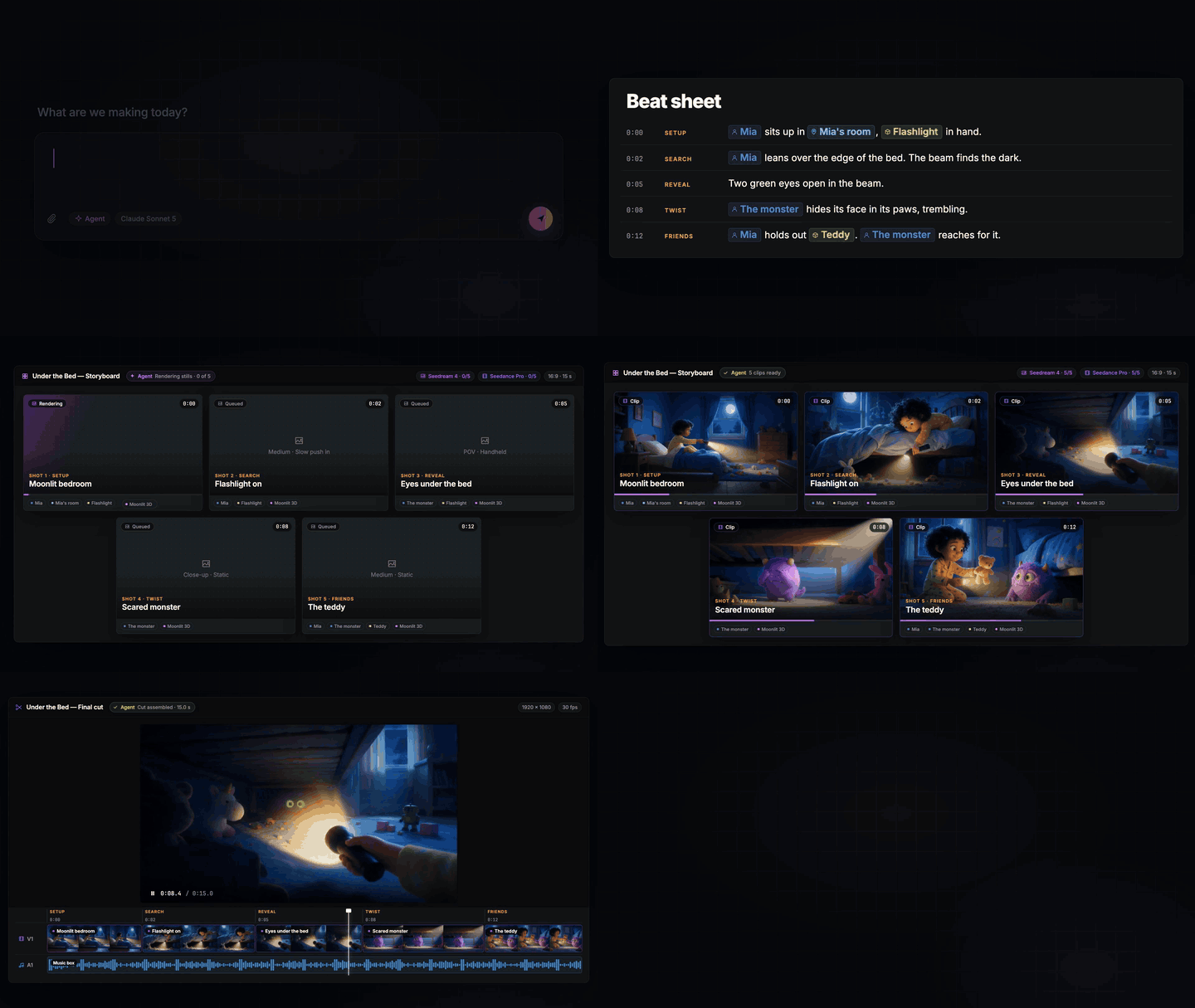
Write a brief and ask the agent for a storyboard. Approve the stills before spending on video, then assemble the clips on a timeline. Trim the cut, add narration, and export an MP4. Revise one shot without regenerating the film. The film quick start walks through each step.
Seven editors share one project, so a piece never leaves the studio to be finished, and an agent drives every one of them through the actions you have.
Storyboard

Board the film shot by shot. Pitch a concept, a style, and a shot count, and you get back a screenplay: one shot per card with action, camera, motion, and duration, plus the logline, style bible, narration, and music direction.
- Cheap stages first. A still costs cents, a clip costs dollars. Generate stills until one looks right, then animate that one.
- Revise one shot, not the reel. "Make it darker, add rain" runs video-to-video on that clip alone and swaps it in place.
- Entities keep the cast steady. Characters, locations, styles, and props paste the same descriptor into every prompt that names them.
- Assemble the cut. One click lays the shots onto a timeline with narration and music, each clip still linked to its shot.
The agent works the same board, with or without the editor open. Creative agent guide →
Script and voice
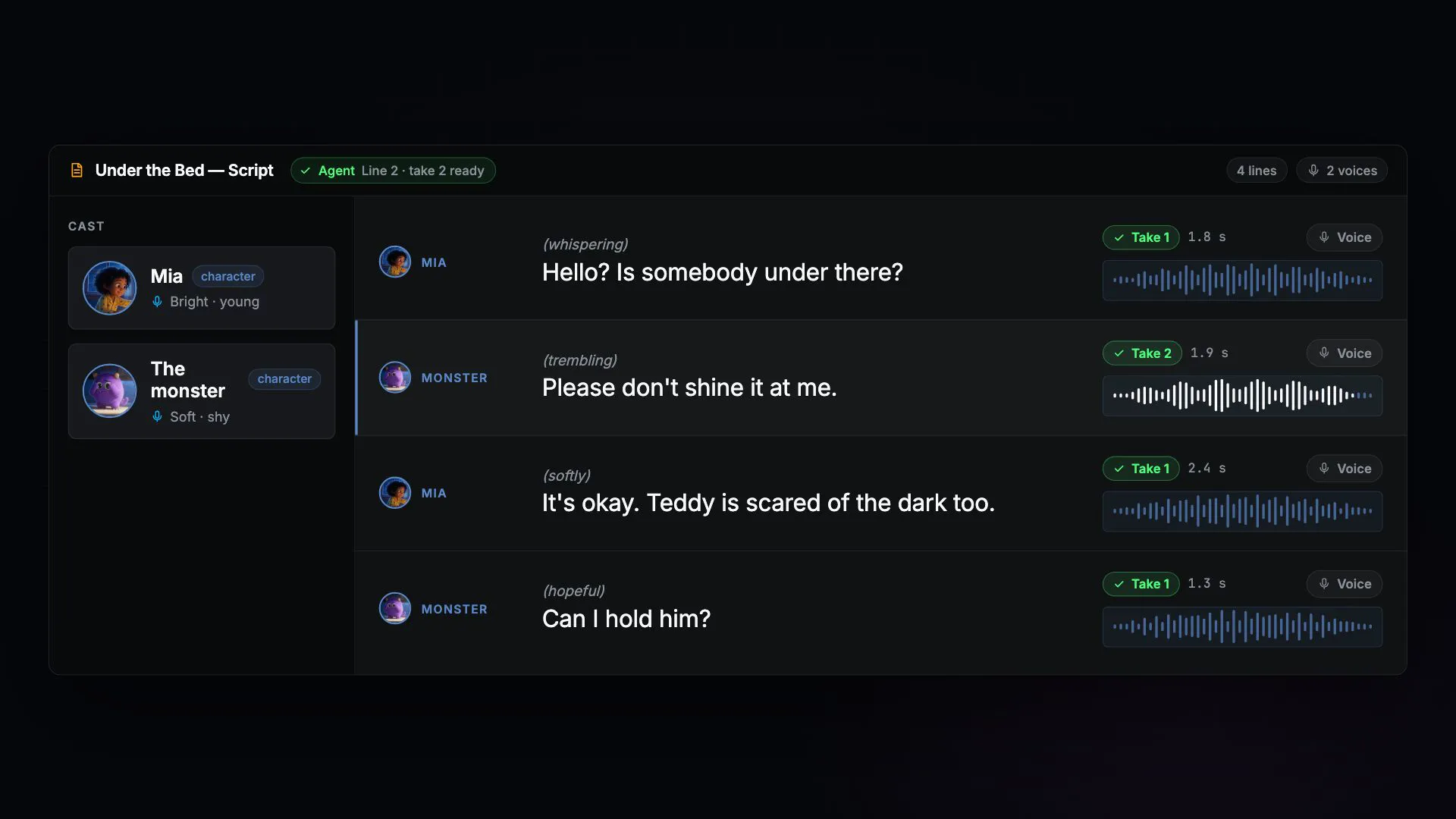
Draft the dialogue, cast a provider, model, and voice per character, and audition alternate readings. Each voicing saves its own take with word timings, and changing the words flags that take stale. The current takes assemble into a sequence, the timings riding along as captions. Ask the agent and it voices every line that still needs it, then cuts the sequence for you.
Timeline

Arrange, trim, and layer video and audio across tracks, down to the frame and the stem. Drop in your own footage, or bind a workflow to a clip and generate in place: change a parameter and the clip regenerates, tweak the workflow and the clip flags itself stale. Export to MP4. The agent edits the same document when you ask it to tighten the opening. Video editor guide →
Sketch

Build a composition in layers with blend modes and masks, then bind a layer to a model or a workflow and generate where you are painting. Change a prompt or an upstream input and the layer flags itself stale. The rest of the workflow receives the flattened image, the mask, and each layer on its own. Sketch editor guide →
3D
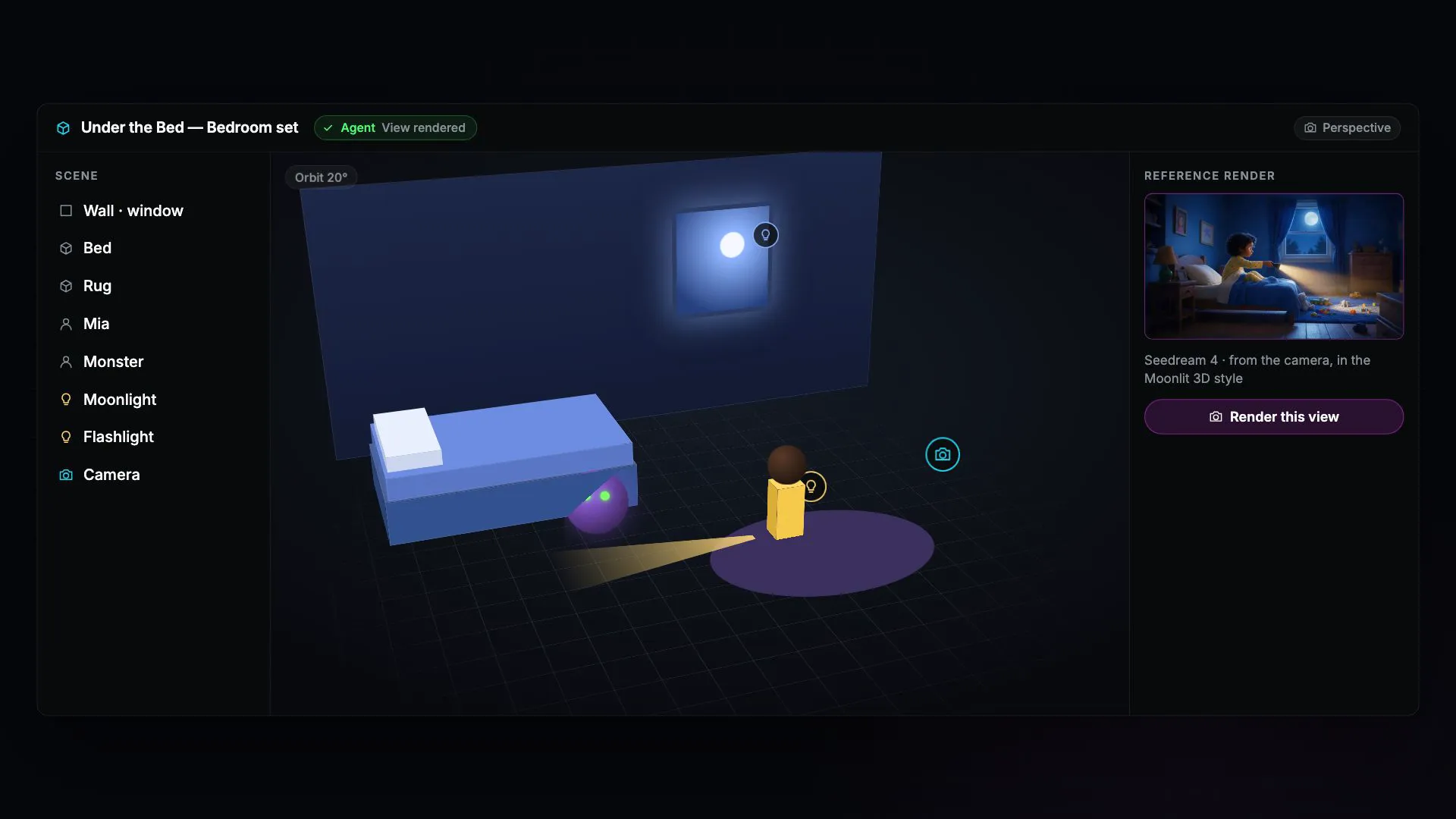
Place primitives and lights in a scene by hand or by asking, then capture a view as a depth or composition reference for an image or video model. The same scene builds and renders with no editor open, so it comes back the same way every time. 3D editor guide →
Game

Build a 2D or 3D game in a workspace tab and play it without leaving the editor. Place entities, give them behaviors or JavaScript, and bind generated sprites, sounds, and models to their slots. Ask the agent for a new enemy or a darker level and it edits the same draft. Publish a revision, then export it as a standalone web player that runs without NodeTool. Game editor guide →
The node editor

Every project is a graph you can open. Drag nodes in, connect typed ports, and read the live output at each step. Double-click the canvas to search for a node, or drag a connection into empty space to see what fits. The editor refuses a mismatch, so an image cannot land in a text field.
Every editor above sits on this canvas.
Example timelines
Each film below is a timeline document that ships with NodeTool, rendered to MP4. Select a poster to watch the film. Open the example in the app to edit every clip, track, and effect.
Serein, the inbox that sorts itself

A 26-second product launch film built from editable scene clips, text, motion, and effects. Watch the film or see the timeline layout.
Kite, savings on autopilot

A 15-second app ad made from motion graphics alone: kinetic type, a drawn-on chart, a filling goal ring, and a logo reveal. Watch the film or see the timeline layout.
Voltra, silent and violent

A 23-second motorcycle launch ad cut to a 120 BPM beat, with generated stills, parallax plates, mattes, and spec gauges. Watch the film or see the timeline layout.
Prism, run in every colour

An 18-second running-shoe ad on a 120 BPM grid, with green-screen stills keyed in the timeline and a prism that splits light. Watch the film or see the timeline layout.
Tidewater, summer jazz on the pier

A 16-second 4:5 risograph poster that moves, on stepped 12 fps time with a swing score. Watch the film or see the timeline layout.
Cadence, a year on two wheels

A vertical year-in-review data story with a route that rides itself, counted stat cards, and animated charts. Watch the film or see the timeline layout.
The showcase and template gallery hold the single workflows these films chain.
How NodeTool compares
The comparison is against the closed AI studios, because that is what a production team chooses between.
| NodeTool | Closed AI studios | |
|---|---|---|
| Models | Every major provider, switched in one click | The list they picked |
| When a better model ships | Add it the day it ships | Wait for them to add it |
| What you pay | Provider list prices, on your own keys | Their credits |
| What you keep | The board, the takes, and the multi-track cut as an editable project | An exported video; the project stays in their app |
| Source | Open, AGPL-3.0 | Closed |
| Where it runs | Desktop app and browser, self-host any time | Their servers only |
Choosing against a node tool instead? See ComfyUI and Figma Weave.
The agent
Most tools bolt a chat panel onto an editor. NodeTool built the editors around the agent: every surface hands it the actions you have — wire a graph, paint a layer, cut a clip, revise a shot, voice a line.
- Build workflows. Describe the pipeline. The agent picks the nodes, wires the edges, and validates the graph, and leaves behind a workflow you own.
- Build apps. Ask for a custom UI. The agent plans the workflow, places widgets, and replays interactions. A judge model grades the result. No passing verdict, no app.
- Repair on the fly. Put an agent on the failure path and it decides whether to retry, repair, skip, or stop, within the cost budget you set.
- Bring your own agent. The toolbelt is exposed over MCP, so Claude Desktop, Claude Code, or Codex can drive the studio.
Underneath, a planner turns an objective into a DAG of steps, executors walk it in parallel, and every LLM call emits an OpenTelemetry span with tokens and cost. See the agent guide and docs/AGENTS.md.
What is underneath
Everything the film surfaces do is reachable on the canvas without the film.
| Mini apps | Give a workflow a screen: inputs, a Run button, the result. Hand it to a teammate who never sees the canvas. |
| Editing tools as nodes | Mask, inpaint, outpaint, relight, upscale, layer, and composite. |
| Every modality | Image, video, audio, and text in one workflow. |
| Every major provider | OpenAI, Anthropic, Gemini, FAL, KIE, Replicate, ElevenLabs, HuggingFace, plus one node for every model on Replicate, fal.ai, and KIE. |
| Open weights | Ollama, MLX (Apple Silicon), and GGUF on your own hardware. |
| Document search | Index and query your files with the built-in vector store. |
| JS scripts | Versioned JavaScript documents with declared ports, saved test cases, and a QuickJS sandbox. |
| MCP server | Point Claude Desktop, Claude Code, Codex, or any MCP agent at the toolbelt. |
| Custom nodes | Extend in TypeScript or Python. |
| Deploy and scale | Self-host with Docker. Rent GPU workers on RunPod or Vast. |
Documentation
- Getting Started — Build your first workflow
- Agents — Let an agent build, run, and repair your workflows
- Mini Apps — Wrap a workflow in an interface
- App Builder — Place widgets, wire them to a workflow, publish
- Creative Agent — Storyboard a film, gate the spend, assemble the cut
- JavaScript Sandbox — What JS scripts and Code nodes can reach
- Video Editor — Sequence and generate clips on a timeline
- Sketch Editor — Draw, mask, and generate on a layered canvas
- 3D Editor — Place objects, lights, and cameras in a glTF scene
- Game Editor — Build, play, and export 2D and 3D games
- Node Packs — Available nodes and integrations
- Custom Nodes — Extend NodeTool
- Provider Guides — Add new models and nodes for any provider
- Deployment — Share your work
- API Reference — Programmatic access
MCP
Use NodeTool from Claude Code, Codex, or OpenCode. One command registers the server with every client it finds. The desktop app is optional:
npx -y --package=@nodetool-ai/cli nodetool mcp install
The command starts the server once to check it, then writes each client's
config. Restart the client and ask it to use NodeTool. For other clients,
nodetool mcp config prints an mcpServers block. See
NodeTool as an MCP Server.
For Claude Desktop, build the source MCP bundle after installing dependencies and building packages:
npm run build:mcpb
# writes dist/nodetool.mcpb
The MCP server can drive workflows and creative editing surfaces. See the MCP production guide and agent architecture.
First run from source
This deterministic example uses the repository's
hello_input_output_cli.json
template. It calls no model, so it needs no API key:
git clone https://github.com/nodetool-ai/nodetool.git
cd nodetool
nvm use                         # Requires nvm, reads the version from .nvmrc
npm install
npm run build:packages
npm run workflow -- ./examples/workflows/hello_input_output_cli.json \
  --input text='hello from NodeTool'
The input node named text connects to a Reroute output node. The command's
JSON summary includes hello from NodeTool in its outputs. See
examples/workflows/README.md for more
examples and expected behavior.
To run an agent or a model-backed workflow, configure a provider first. Export an OpenAI key and use the checked-in OpenAI example:
export OPENAI_API_KEY='your-key'
npm run workflow -- ./examples/workflows/agent_openai_basic_cli.json \
  --input prompt='Write one sentence about workflow testing.'
This makes a paid provider request against GPT-4o. Access and billing depend on your provider account. See Models and Providers and Provider Guides for other providers and local setup. Do not add a key to a committed file.
CLI
Install the CLI with npm install -g @nodetool-ai/cli, using Node.js 22 or later. The
CLI package guide covers running workflows with the
installed command.
To serve the API, run nodetool serve in a separate terminal. Commands that
support remote execution accept --api-url or NODETOOL_API_URL.
For interactive agent chat, connect a provider first as described in the
CLI package guide, then run nodetool-chat.
See the CLI reference and
CLI package guide. A one-off install is available with
npx --package=@nodetool-ai/cli nodetool --help.
Development setup
After the source quick start, start the API and web UI from the prepared checkout:
npm run dev
For an automatic install, build, and launch from a fresh checkout, use
./start.sh full. To start only the API, use ./start.sh. To inspect the
environment without changing it, use ./start.sh doctor. None of these launch
the Electron desktop app.
In a separate terminal, launch the desktop shell with npm run electron.
The Node.js version is pinned in .nvmrc. Python 3.11 and conda are
optional, for Python nodes. For locked-down environments or missing WebGPU, see
development environment.
Testing
After a code change, run these four repository-root checks from the commands in
AGENTS.md:
npm run test:affected
npm run typecheck
npm run lint
npm run dev:nodetool -- harness gate --base origin/main
The web testing guide is at web/TESTING.md. The complete
repository gate is npm run check.
Project layout
| Path | Purpose |
|---|---|
packages/ |
TypeScript runtime, workflow kernel, agents, providers, and nodes |
web/ |
React web UI |
electron/ |
Desktop Studio shell |
mobile/ |
React Native app |
docs/ |
Documentation and development guides |
examples/workflows/ |
Runnable workflow examples |
Contributing
Read AGENTS.md and the
development standards, then open an issue for
larger changes. Pull requests for bug fixes, nodes, providers, workflows, and
documentation are welcome. Run the narrowest relevant checks before opening a
PR and include their results.
License and community
NodeTool is licensed under AGPL-3.0.