Introduction to generative adversarial networks, with code to accompany the O'Reilly tutorial on GANs.
Key parameters and specifications
Key parameters and specifications
Parameter
Value
Language
Python
Category
Tutorials
Subcategory
AIE roadmap
Keywords
Chatbot, RAG
Stars
540
Forks
52
Contributors
2
Created date
2023-03-21
Updated date
2026-10-12
Stars in 1 day
0
Stars in 7 days
0
Rank
17,430
Previous rank
17,211
Rank change
-219
7-day stars rank
16,101
Previous 7-day stars rank
16,106
7-day stars rank change
5
Total stars rank
18,242
Previous total stars rank
18,211
Total stars rank change
-31
Country
Germany
README summary
This repo reached the front page of hacker news on March 22nd 2023, see the discussion here . Your website content -> chatbot / Q&A agent Turn your website content into a question answering bot which can cite your document sources. Alternatively, use it in an interactive chatbot style fashion. All this can be achieved with a tool called langchain which in turn uses the OpenAI API. This simple repository showcases how to apply it on your own website content. To do
so, there are three scripts: create_embeddings. py: this is the main script which loops your website's sitemap. xml to create embeddings (vectors representing the semantics of your data) of your content ask_question. py: after you have the embeddings (a file called was created), this script can be used to directly ask a question. It will answer the question and return the URLs of your website which were used as the source. py: starts a simple chat interface where
you can ask a question and then follow-up on the answer. If the bot is uncertain, it will indicate so. Note that you can tune the query in this script to be more relevant for your content. In my case I mentioned it to be specific to machine learning and technical topics. To install the dependencies, simply run . Create your embeddings This is the most important step and you will need to obtain an OpenAI API key to use
it. Once you have the , you can run in your terminal. This will create your embeddings in a file called . You need to point your website's sitemap. xml to the script and you can filter for URL's to start with filter. If you want to include all pages of your site, you can just set . For more details about this, please check this blog post . Answering a question while getting the answer source documents With the embeddings set up, ask
a question like this: Starting a chatbot on your content With the embeddings set up, start a chatbot like this: . Then when it's running, ask your questions and follow-ups. Zendesk Content Embedding This repository includes an enhancement to the LangChain chatbot project, introducing the for Zendesk feature. This functionality utilizes the Zendesk API to retrieve website content and construct a Faiss knowledge base for improved chatbot responses. How it Works The script performs the following steps: 1. **Zendesk API
Integration:** Retrieves articles using the Zendesk API. **Text Cleaning:** Parses HTML content, extracting and cleaning text for embedding. **Text Splitting:** Breaks down the content into smaller chunks for efficient embedding processing. **Embedding Creation:** Utilizes OpenAI Embeddings to create embeddings for the text chunks. **Faiss Knowledge Base Construction:** Constructs a Faiss store with the generated embeddings, facilitating efficient similarity search. Usage **Zendesk API Credentials:** To create a Faiss knowledge base from Zendesk content, please obtain and configure your Zendesk API credentials
. Running the Script **Execute the Script:** Run the script to generate the Faiss store.
Frequently asked questions
How many stars and forks are recorded?
mpaepper/content-chatbot has 540 stars and 52 forks.
What is the repository rank?
mpaepper/content-chatbot is ranked 17,430.
What language and category are recorded?
mpaepper/content-chatbot has 540 stars, uses Python and belongs to Tutorials.
Which repository is closest in rank?
mpaepper/content-chatbot is compared with blueberrymusic/Deep-Learning-A-Visual-Approach, ranked 17,424 with 540 stars.
README
This repo reached the front page of hacker news on March 22nd 2023, see the discussion here.
Your website content -> chatbot / Q&A agent
Turn your website content into a question answering bot which can cite your document sources.
Alternatively, use it in an interactive chatbot style fashion.
All this can be achieved with a tool called langchain which in turn uses the OpenAI API.
This simple repository showcases how to apply it on your own website content.
To do so, there are three scripts:
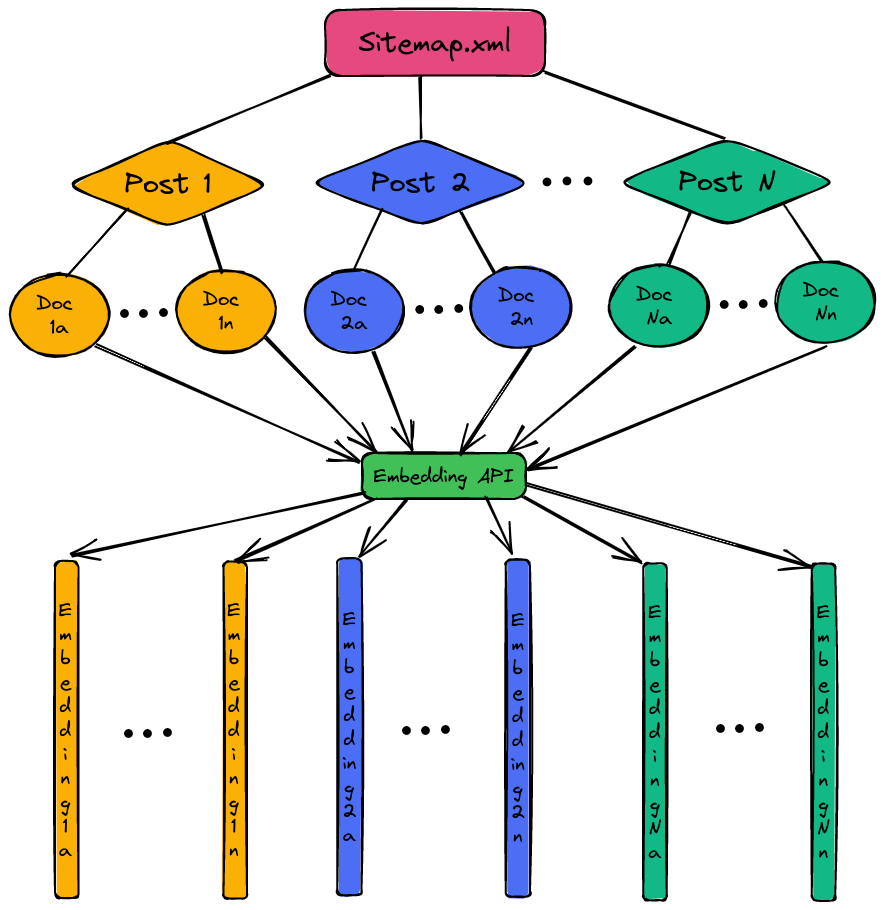
create_embeddings.py: this is the main script which loops your website's sitemap.xml to create embeddings (vectors representing the semantics of your data) of your content
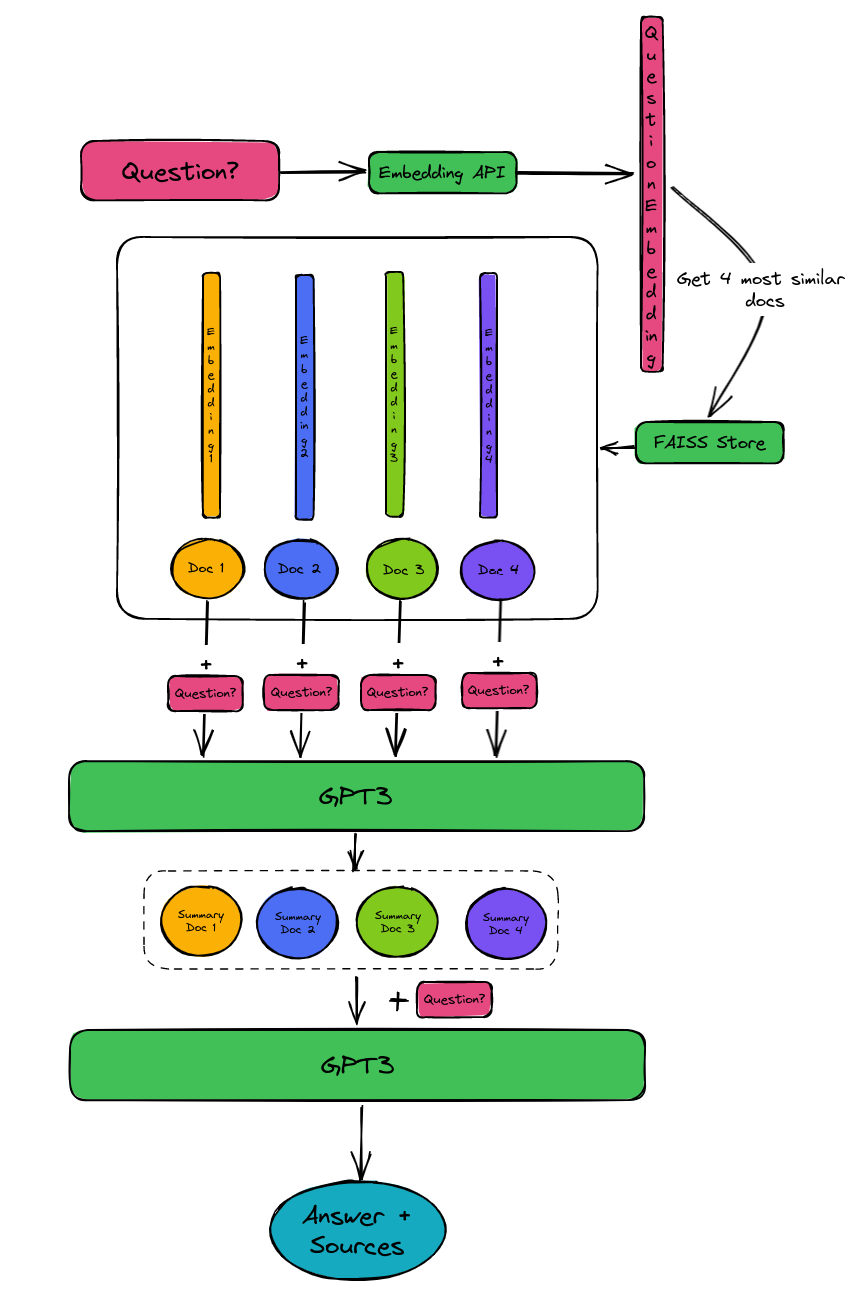
ask_question.py: after you have the embeddings (a file called faiss_store.pkl was created), this script can be used to directly ask a question. It will answer the question and return the URLs of your website which were used as the source.
start_chat_app.py: starts a simple chat interface where you can ask a question and then follow-up on the answer. If the bot is uncertain, it will indicate so. Note that you can tune the query in this script to be more relevant for your content. In my case I mentioned it to be specific to machine learning and technical topics.
To install the dependencies, simply run pip install -r requirements.txt.
Create your embeddings
This is the most important step and you will need to obtain an OpenAI API key to use it.
Once you have the $api_key, you can run export OPENAI_API_KEY='$api_key' in your terminal.
Then simply run python create_embeddings.py --sitemap https://path/to/your/sitemap.xml --filter https://path/to/your/blog/posts.
This will create your embeddings in a file called faiss_store.pkl. You need to point your website's sitemap.xml to the script and you can filter for URL's to start with filter. If you want to include all pages of your site, you can just set --filter https://.
For more details about this, please check this blog post.
Answering a question while getting the answer source documents
With the embeddings set up, ask a question like this: python ask_question.py "How to detect objects in images?"
Answer:

Object detection in images can be done using algorithms such as R-CNN, Fast R-CNN, and data augmentation techniques such as shifting, rotations, elastic deformations, and gray value variations.

Sources:

https://www.paepper.com/blog/posts/deep-learning-on-medical-images-with-u-net/
https://www.paepper.com/blog/posts/end-to-end-object-detection-with-transformers/
Starting a chatbot on your content
With the embeddings set up, start a chatbot like this: python start_chat_app.py. Then when it's running, ask your questions and follow-ups.
Zendesk Content Embedding
This repository includes an enhancement to the LangChain chatbot project, introducing the create_embeddings for Zendesk feature. This functionality utilizes the Zendesk API to retrieve website content and construct a Faiss knowledge base for improved chatbot responses.
How it Works
The create_embeddings script performs the following steps:
Zendesk API Integration: Retrieves articles using the Zendesk API.
Text Cleaning: Parses HTML content, extracting and cleaning text for embedding.
Text Splitting: Breaks down the content into smaller chunks for efficient embedding processing.
Embedding Creation: Utilizes OpenAI Embeddings to create embeddings for the text chunks.
Faiss Knowledge Base Construction: Constructs a Faiss store with the generated embeddings, facilitating efficient similarity search.
Usage
Zendesk API Credentials: To create a Faiss knowledge base from Zendesk content, please obtain and configure your Zendesk API credentials.
Running the Script
Execute the Script: Run the create_embeddings.py script to generate the Faiss store.
Example:
python create_embeddings.py -m zendesk -z "https://your.zendesk.api/" #replace the link