SyncDreamer
SyncDreamer: Generating Multiview-consistent Images from a Single-view Image
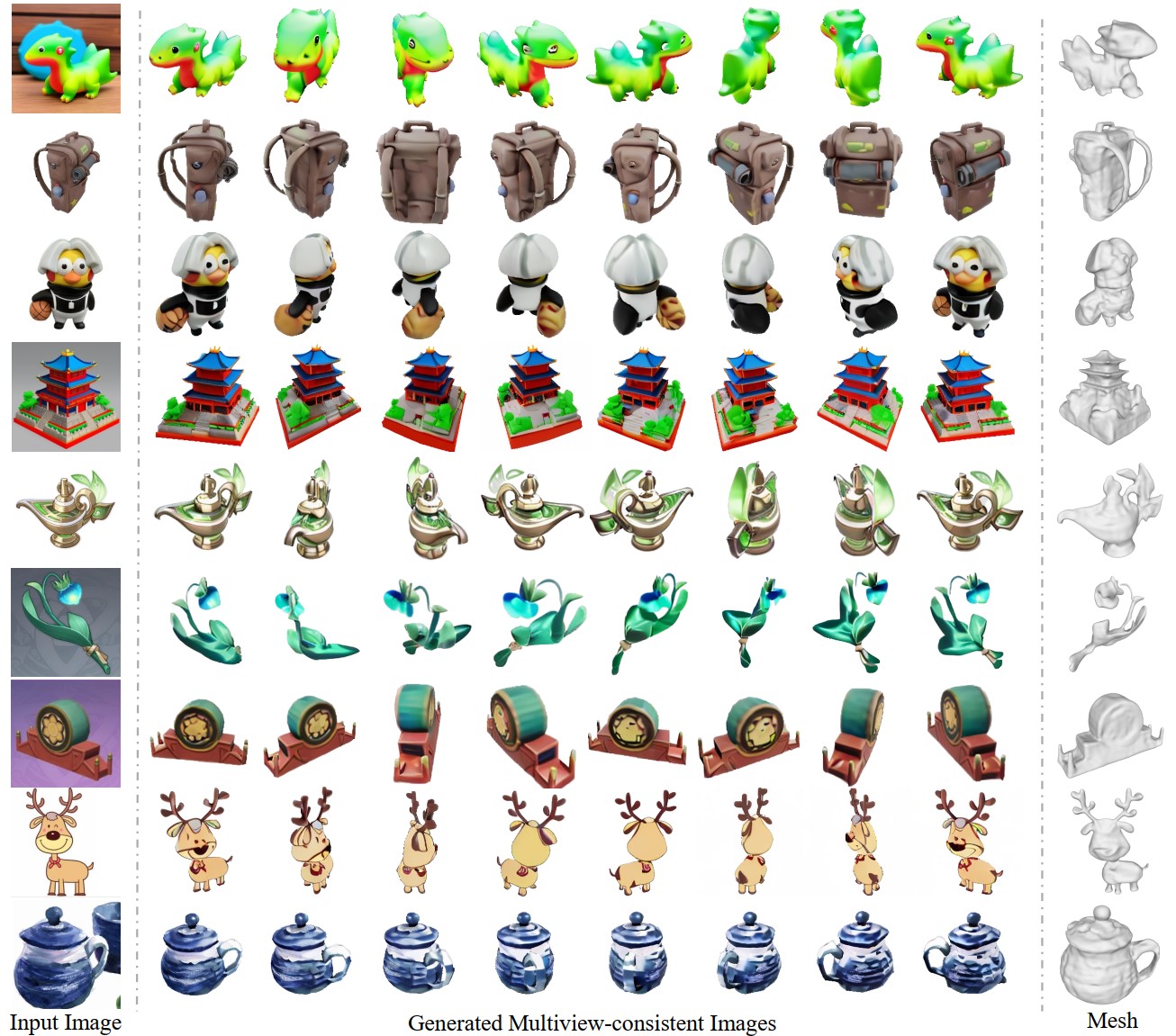
Project page | Paper | Live Demo
- [x] Inference code and pretrained models.
- [x] Training code.
- [x] Training data.
- [x] Evaluation code.
- [ ] New pretrained model without elevation as input
News
- 2023-09-12: Training codes are released. We are still uploading the training data (about 1.6T) to onedrive, which would cost some time.
- 2023-09-09: Inference codes and pretrained models are released.
Preparation for inference
- Install packages in
requirements.txt. We test our model on a 40G A100 GPU with 11.1 CUDA and 1.10.2 pytorch. But inference on GPUs with smaller memory (=10G) is possible.
conda create -n syncdreamer
conda activate syncdreamer
pip install -r requirements.txt
- Download checkpoints here
- A docker env can be found at https://hub.docker.com/repository/docker/liuyuanpal/syncdreamer-env/general.
Inference
- Make sure you have the following models.
SyncDreamer
|-- ckpt
    |-- ViT-L-14.ckpt
    |-- syncdreamer-pretrain.ckpt
- (Optional) Predict foreground mask as the alpha channel. We use Paint3D to segment the foreground object interactively.
We also provide a script
foreground_segment.pyusingcarvekitto predict foreground masks and you need to first crop the object region before feeding it toforeground_segment.py. We may double check the predicted masks are correct or not.
python foreground_segment.py --input --output
- Run SyncDreamer to produce multiview-consistent images.
python generate.py --ckpt ckpt/syncdreamer-pretrain.ckpt \
                   --input testset/aircraft.png \
                   --output output/aircraft \
                   --sample_num 4 \
                   --cfg_scale 2.0 \
                   --elevation 30 \
                   --crop_size 200
Explanation:
--ckptis the checkpoint to load.--inputis the input image in the RGBA form. The alpha value means the foreground object mask.--outputis the output directory. Results would be saved tooutput/aircraft/0.pngwhich contains 16 images of predefined viewpoints perpngfile.--sample_numis the number of instances we will generate.--sample_num 4means we sample 4 instances fromoutput/aircraft/0.pngtooutput/aircraft/3.png.--cfg_scaleis the classifier-free-guidance.2.0is OK for most cases. We may also try1.5.--elevationis the elevation angle of the input image in degree. As shown in the following figure,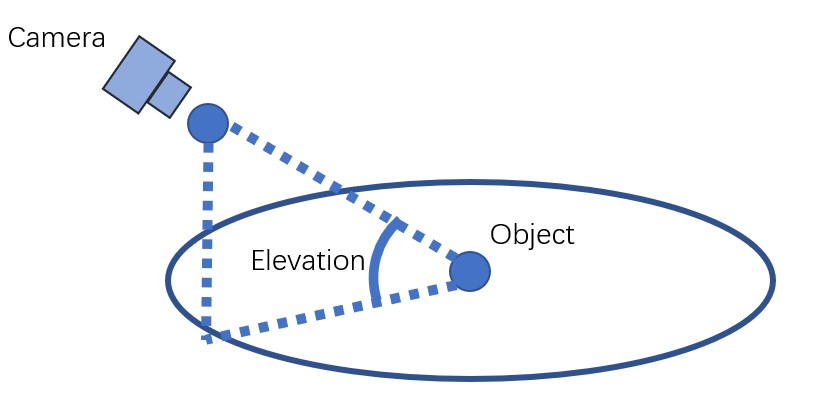
- We assume the object is locating at the origin and the input image is captured by a camera with an elevation angle. Note we don't need a very accurate elevation angle but a rough value in [-10,40] degree is OK, e.g. {0,10,20,30}.
--crop_sizeaffects how we resize the object on the input image. The input image will be resize to 256*256 and the object region is resized tocrop_sizeas follows.crop_size=-1means we do not resize the object but only directly resize the input image to 256*256.crop_size=200works in most cases. We may also try180or150.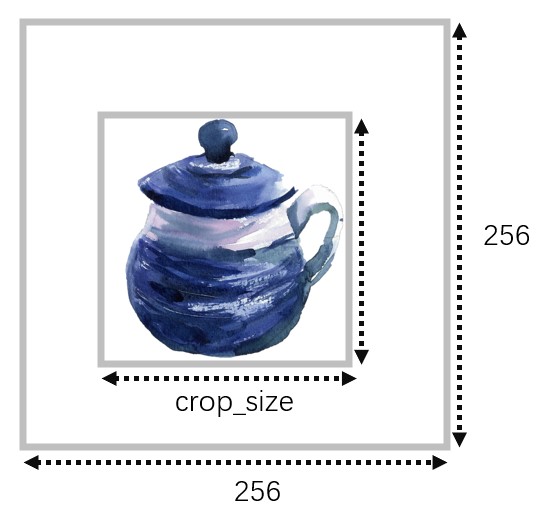
- Suggestion: We may try different
crop_sizeandelevationto get the best result. SyncDreamer does not always produce good results but we may generate multiple times with different--seedand select the most reasonable one. - Limited GPU memory: For users with limited GPU memory, we may try
--sample_num 1and--batch_view_num 4, which samples 1 instance and denoises 4 images on every step. This costs less than 10G GPU memory but is much slower in generation. - testset_parameters.sh contains the command I used to generate results.
- Run a NeuS or a NeRF for 3D reconstruction.
# train a neus
python train_renderer.py -i output/aircraft/0.png \
                         -n aircraft-neus \
                         -b configs/neus.yaml \
                         -l output/renderer
# train a nerf
python train_renderer.py -i output/aircraft/0.png \
                         -n aircraft-nerf \
                         -b configs/nerf.yaml \
                         -l output/renderer
Explanation:
-icontains the multiview images generated by SyncDreamer. Since SyncDreamer does not always produce good results, we may need to select a good generated image set (from0.pngto3.png) for reconstruction.-nmeans the name.-lmeans the log dir. Results will be saved to/i.e.output/renderer/aircraft-neusandoutput/renderer/aircraft-nerf.- Before training, we will run
carvekitto find the foreground mask in_init_dataset()inrenderer/renderer.py. The resulted masked images locate atoutput/renderer/aircraft-nerf/masked-*.png. Sometimes,carvekitmay produce incorrect masks. - A rendering video will be saved at
output/renderer/aircraft-neus/rendering.mp4oroutput/renderer/aircraft-nerf/rendering.mp4. - We will only save a mesh for NeuS but not for NeRF, which is
output/renderer/aircraft-neus/mesh.ply.
Preparation for training
- Generate renderings for training. We provide several objaverse 3D models as examples here. The whole objaverse dataset can be downloaded at Objaverse.
To unzip the
randomdataset, we need tocat z01 zip > zipand then unzip the output file according to the description here
# generate renderings for fixed target views
blender --background --python blender_script.py -- \
  --object_path objaverse_examples/6f99fb8c2f1a4252b986ed5a765e1db9/6f99fb8c2f1a4252b986ed5a765e1db9.glb \
  --output_dir ./training_examples/target --camera_type fixed

# generate renderings for random input views
blender --background --python blender_script.py -- \
  --object_path objaverse_examples/6f99fb8c2f1a4252b986ed5a765e1db9/6f99fb8c2f1a4252b986ed5a765e1db9.glb \
  --output_dir ./training_examples/input --camera_type random
- Organize the renderings like the following. We provide rendering examples here.
SyncDreamer
|-- training_examples
    |-- target
        |--
        |--
        |-- ...
    |-- input
        |--
        |--
        |-- ...
    |-- uid_set.pkl # this is a .pkl file containing a list of uids. Refer to `render_batch.py` for how I generate these files.
Training
python train_syncdreamer.py -b configs/syncdreamer-train.yaml \
                           --finetune_from  \
                           -l   \
                           -c  \
                           --gpus 0,1,2,3,4,5,6,7
Note in configs/syncdreamer-train.yaml, we specify the following directories which contain the training data and the validation data.
target_dir: training_examples/target
input_dir: training_examples/input
uid_set_pkl: training_examples/uid_set.pkl
validation_dir: validation_set
During training, we will run validation to output images to //val every 1k steps.
Evaluation
GT meshes and renderings for the GSO dataset can be found at here.
- Evaluate COLMAP reconstruction:
python eval_colmap.py --dir eval_examples/chicken-pr --project eval_examples/chicken-project --name chicken --colmap
Note the 16 views are relatively very sparse for COLMAP so it sometimes fails to reconstruct.
2. Evaluate novel view synthesis, pip install lpips and
python eval_nvs.py --gt eval_examples/chicken-gt --pr eval_examples/chicken-pr
- Evaluate the mesh quality: install
pip install mesh2sdfand installnvdiffrasthere. Then,
python eval_mesh.py --pr_mesh eval_examples/chicken-pr.ply --pr_name syncdreamer --gt_dir eval_examples/chicken-gt --gt_mesh eval_examples/chicken-mesh/meshes/model.obj --gt_name chicken
Note we manually rotate the example when rendering. The rotations are listed in get_gt_rotate_angle in eval_mesh.py.
Acknowledgement
We have intensively borrow codes from the following repositories. Many thanks to the authors for sharing their codes.
Citation
If you find this repository useful in your project, please cite the following work. :)
@article{liu2023syncdreamer,
  title={SyncDreamer: Generating Multiview-consistent Images from a Single-view Image},
  author={Liu, Yuan and Lin, Cheng and Zeng, Zijiao and Long, Xiaoxiao and Liu, Lingjie and Komura, Taku and Wang, Wenping},
  journal={arXiv preprint arXiv:2309.03453},
  year={2023}
}