Image to LaTeX

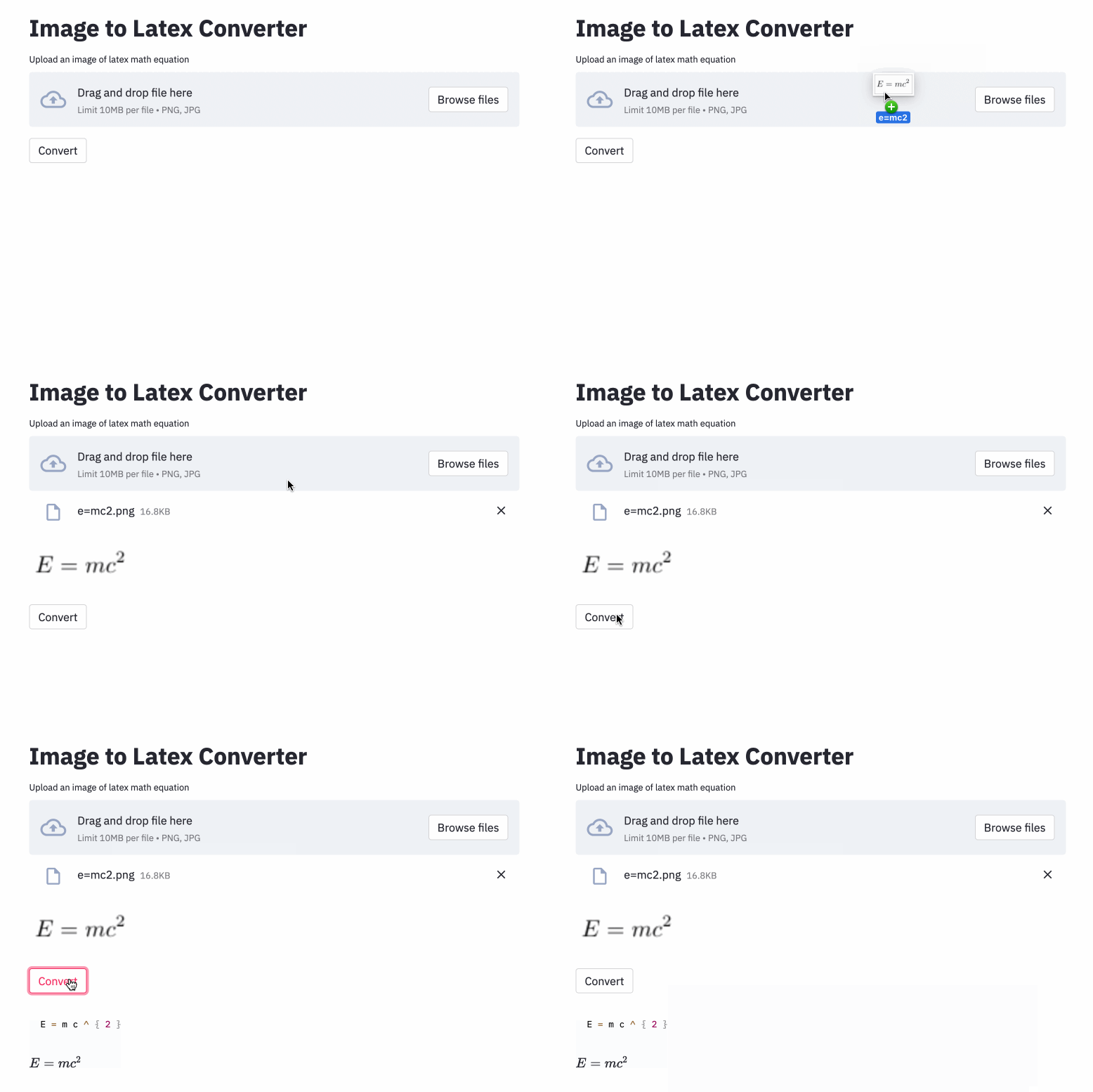
An application that maps an image of a LaTeX math equation to LaTeX code.
Introduction
The problem of image-to-markup generation was attempted by Deng et al. (2016). They extracted about 100K formulas by parsing LaTeX sources of papers from the arXiv. They rendered the formulas using pdflatex and converted the rendered PDF files to PNG format. The raw and preprocessed versions of their dataset are available online. In their model, a CNN is first used to extract image features. The rows of the features are then encoded using a RNN. Finally, the encoded features are used by an RNN decoder with an attention mechanism. The model has 9.48 million parameters in total. Recently, Transformer has overtaken RNN for many language tasks, so I thought I might give it try in this problem.
Methods
Using their dataset, I trained a model that uses ResNet-18 as encoder with 2D positional encoding and a Transformer as decoder with cross-entropy loss. (Similar to the one described in Singh et al. (2021), except that I used ResNet only up to block 3 to reduce computational costs, and I excluded the line number encoding as it doesn't apply to this problem.) The model has about 3 million parameters.
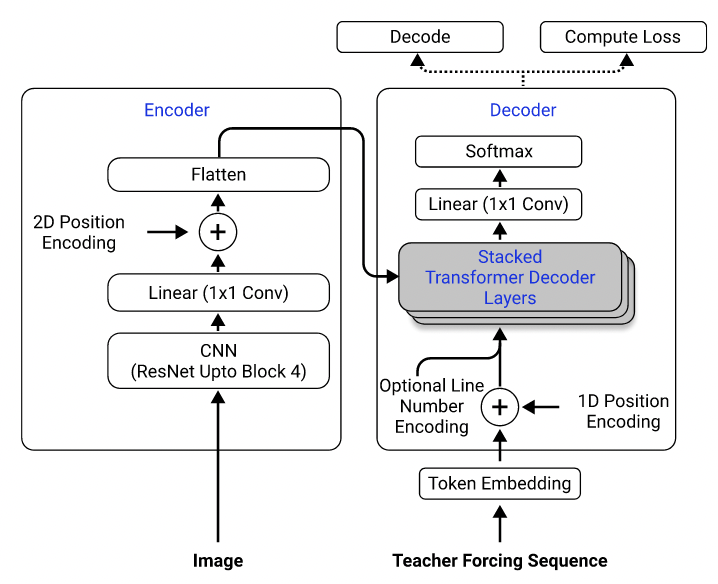
Model architecture. Taken from Singh et al. (2021).
Initially, I used the preprocessed dataset to train my model, because the preprocessed images are downsampled to half of their original sizes for efficiency, and are grouped and padded into similar sizes to facilitate batching. However, this rigid preprocessing turned out to be a huge limitation. Although the model could achieve a reasonable performance on the test set (which was preprocessed the same way as the training set), it did not generalize well to images outside the dataset, most likely because the image quality, padding, and font size are so different from the images in the dataset. This phenomenon has also been observed by others who have attempted the same problem using the same dataset (e.g., this project, this issue and this issue).
To this end, I used the raw dataset and included image augmentation (e.g. random scaling, gaussian noise) in my data processing pipeline to increase the diversity of the samples. Moreover, unlike Deng et al. (2016), I did not group images by size. Rather, I sampled them uniformly and padded them to the size of the largest image in the batch, so that the model must learn how to adapt to different padding sizes.
Additional problems that I faced in the dataset:
- Some latex code produces visually identical outputs (e.g.
\left(and\right)look the same as(and)), so I normalized them. - Some latex code is used to add space (e.g.
\vspace{2px}and\hspace{0.3mm}). However, the length of the space is diffcult to judge even for humans. Also, there are many ways to express the same spacing (e.g. 1 cm = 10 mm). Finally, I don't want the model to generate code on blank images, so I removed them. (I only removed\vspaceand\hspace, but turns out there are a lot of commands for horizontal spacing. I only realized that during error analysis. See below.)
Results
The best run has a character error rate (CER) of 0.17 in test set. Here is an example from the test dataset:
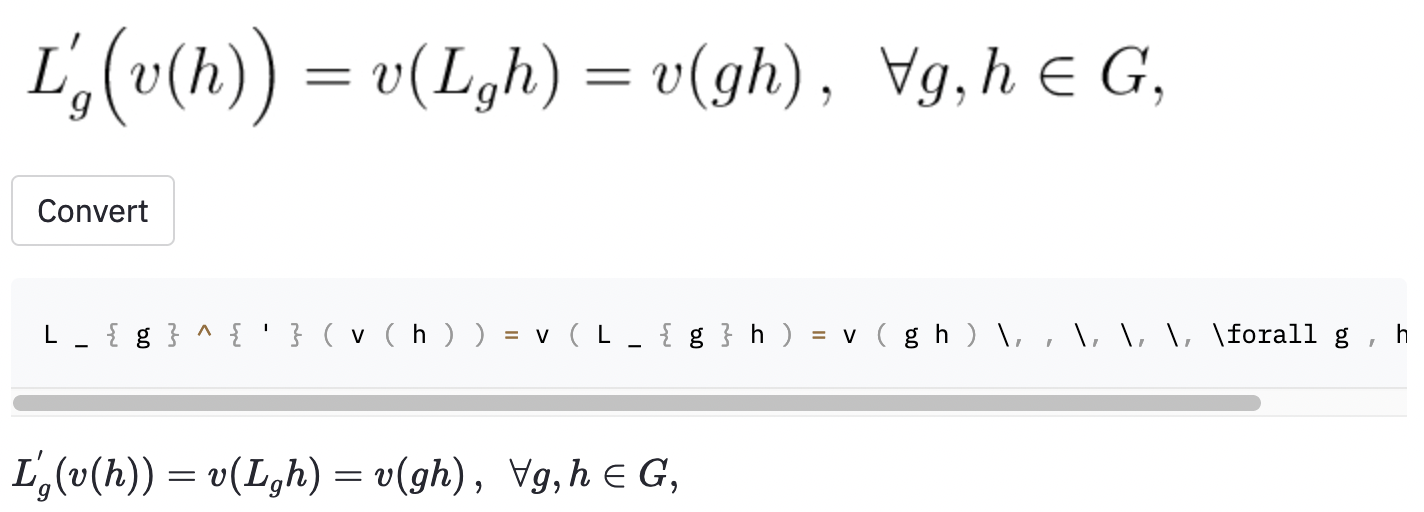
- The input image and the model prediction look identical. But in the ground truth label, the horizontal spacing was created using
~, whereas the model used\,, so this was still counted as an error.
I also took some screenshots in some random Wikipedia articles to see whether the model generalizes to images outside of the dataset:

- The model output is actually correct but for some reason Streamlit can't render code with
\cal.

- Incorrectly bolded some of the symbols.
The model also seems to have some trouble when the image is larger than what those in the dataset. Perhaps I should have increased the range of rescaling factor in the data augmentation process.
Discussion
I think I should have defined the scope of the project better:
- Do I want the model to tell the difference between regular-sized and large parentheses (e.g.
(,\big(,\Big(,\bigg(,\Bigg()? - Do I want the model to recognize horizontal and vertical spacing? (There are over 40 commands for horizontal spacing.)
- Do I want to the model to recognize different font styles? (Here is a list of available font style in LaTex.)
- etc.
These questions should be used to guide the data cleaning process.
I found a pretty established tool called Mathpix Snip that converts handwritten formulas into LaTex code. Its vocabulary size is around 200. Excluding numbers and English letters, the number of LaTex commands it can produce is actually just above 100. (The vocabulary size of im2latex-100k is almost 500). It only includes two horizontal spacing commands (\quad and \qquad), and it doesn't recognize different sizes of parentheses. Perphas confining to a limited set of vocabulary is what I should have done, since there are so many ambiguities in real-world LaTeX.
Obvious possible improvements of this work include (1) training the model for more epochs (for the sake of time, I only trained the model for 15 epochs, but the validation loss is still going down), (2) using beam search (I only implemented greedy search), (3) using a larger model (e.g., use ResNet-34 instead of ResNet-18) and doing some hyperparameter tuning. I didn't do any of these, because I had limited computational resources (I was using Google Colab). But ultimately, I believe having data that don't have ambiguous labels and doing more data augmentation are the keys to the success of this problem.
The model performacne is not as good as I want to be, but I hope the lessons I learned from this project are useful to someone wants to tackle similar problems in the future.
How To Use
Setup
Clone the repository to your computer and position your command line inside the repository folder:
git clone https://github.com/kingyiusuen/image-to-latex.git
cd image-to-latex
Then, create a virtual environment named venv and install required packages:
make venv
make install-dev
Data Preprocessing
Run the following command to download the im2latex-100k dataset and do all the preprocessing. (The image cropping step may take over an hour.)
python scripts/prepare_data.py
Model Training and Experiment Tracking
Model Training
An example command to start a training session:
python scripts/run_experiment.py trainer.gpus=1 data.batch_size=32
Configurations can be modified in conf/config.yaml or in command line. See Hydra's documentation to learn more.
Experiment Tracking using Weights & Biases
The best model checkpoint will be uploaded to Weights & Biases (W&B) automatically (you will be asked to register or login to W&B before the training starts). Here is an example command to download a trained model checkpoint from W&B:
python scripts/download_checkpoint.py RUN_PATH
Replace RUN_PATH with the path of your run. The run path should be in the format of //. To find the run path for a particular experiment run, go to the Overview tab in the dashboard.
For example, you can use the following command to download my best run
python scripts/download_checkpoint.py kingyiusuen/image-to-latex/1w1abmg1
The checkpoint will be downloaded to a folder named artifacts under the project directory.
Testing and Continuous Integration
The following tools are used to lint the codebase:
isort: Sorts and formats import statements in Python scripts.
black: A code formatter that adheres to PEP8.
flake8: A code linter that reports stylistic problems in Python scripts.
mypy: Performs static type checking in Python scripts.
Use the following command to run all the checkers and formatters:
make lint
See pyproject.toml and setup.cfg at the root directory for their configurations.
Similar checks are done automatically by the pre-commit framework when a commit is made. Check out .pre-commit-config.yaml for the configurations.
Deployment
An API is created to make predictions using the trained model. Use the following command to get the server up and running:
make api
You can explore the API via the generated documentation at http://0.0.0.0:8000/docs.
To run the Streamlit app, create a new terminal window and use the following command:
make streamlit
The app should be opened in your browser automatically. You can also open it by visiting http://localhost:8501. For the app to work, you need to download the artifacts of an experiment run (see above) and have the API up and running.
To create a Docker image for the API:
make docker
Acknowledgement
-
This project is inspired by the project ideas section in the final project guidelines of the course Full Stack Deep Learning at UC Berkely. Some of the code is adopted from its labs.
-
MLOps - Made with ML for introducing Makefile, pre-commit, Github Actions and Python packaging.
-
harvardnlp/im2markup for the im2latex-100k dataset.