Maestro

Orchestrate multiple AI coding assistants in parallel
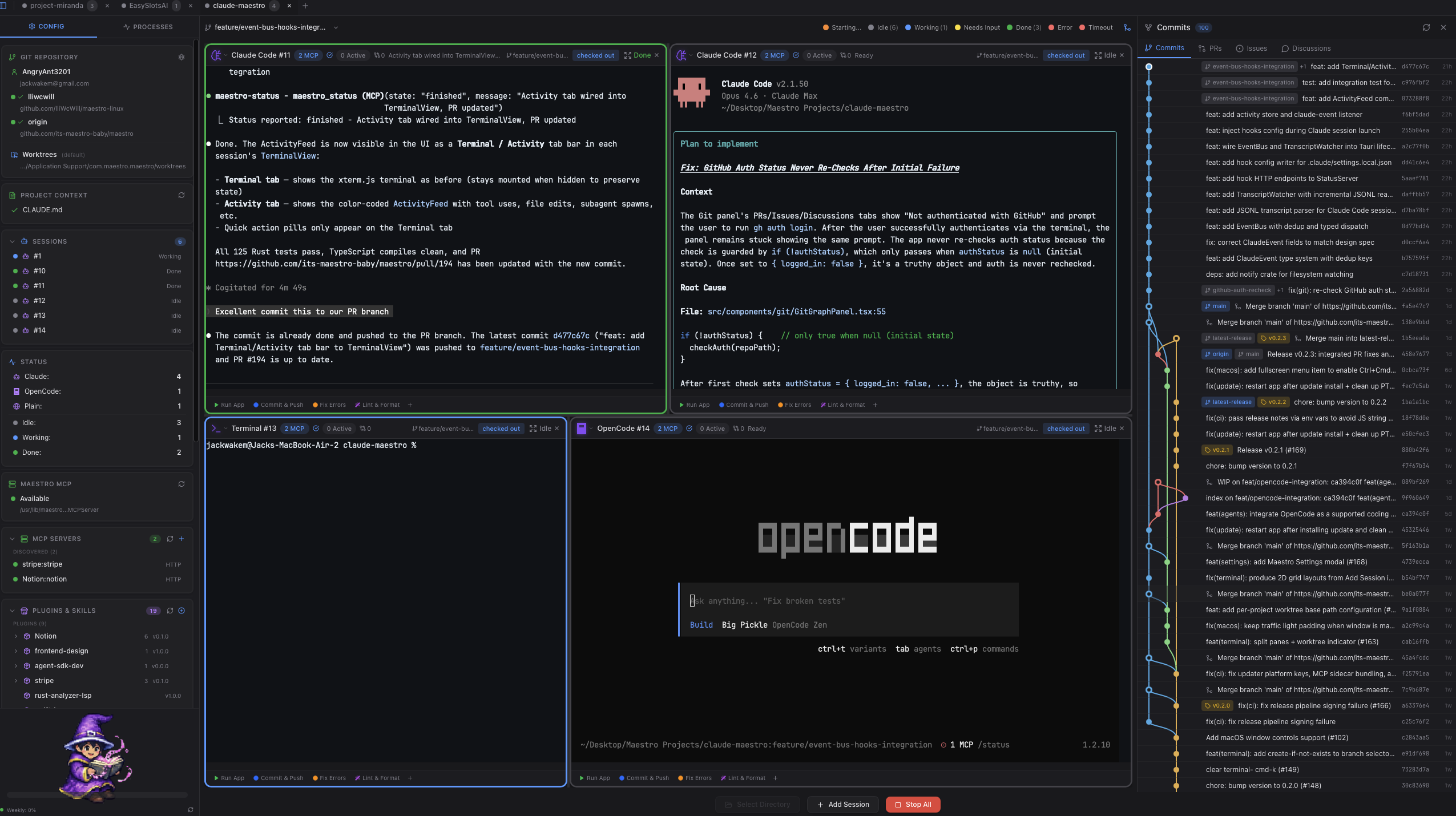
A cross-platform desktop application that lets you run 1-6 Claude Code (or other AI CLI) sessions simultaneously, each in its own isolated git worktree.
Star us on GitHub — your support motivates us a lot!
Table of Contents
- Why Maestro?
- Features
- Keyboard Shortcuts
- Architecture
- Installation
- Usage
- Configuration
- Troubleshooting
- Contributing
- License
- Acknowledgments
Why Maestro?
The Problem: AI coding assistants work on one task at a time. While Claude works on Feature A, you wait. Then you start Feature B. Then you wait again. Context switching is expensive, and your development velocity is bottlenecked by serial execution.
The Solution: Run multiple AI sessions in parallel. Each session gets its own:
- Terminal instance with full shell environment
- Git worktree for complete code isolation
- Assigned branch for focused work
- Port allocation for web development
Core Principles
| Principle | Description |
|---|---|
| Parallel Development | Launch 1-6 AI sessions simultaneously. Work on feature branches, bug fixes, and refactoring all at once. |
| True Isolation | Each session operates in its own git worktree. No merge conflicts, no stepping on each other's changes. |
| AI-Native Workflow | Built specifically for Claude Code, Gemini CLI, OpenAI Codex, and other AI coding assistants. |
| Cross-Platform | Runs on macOS, Windows, and Linux with native performance. |
Features
Multi-Terminal Session Grid
- Dynamic grid layout (1x1 to 2x3) that adapts to your session count
- iTerm2-style split panes within each session (Cmd+D vertical, Cmd+Shift+D horizontal)
- Real-time status indicators: idle, working, waiting for input, done, error
- Per-session mode selection (Claude Code, Gemini CLI, OpenAI Codex, Plain Terminal)
Git Worktree Isolation
- Automatic worktree creation at
~/.claude-maestro/worktrees/ - Each session works on its own branch without conflicts
- Worktrees are pruned on session close
- Visual branch assignment in the sidebar
- "Worktree" badge in the terminal header when a session is running in a worktree
MCP Server Integration
- Built-in MCP server for agent status reporting
- AI sessions report their state (idle, working, needs input, finished, error)
- Real-time status updates displayed in the session grid
- Uses the
maestro_statustool for state communication
Visual Git Graph
- GitKraken-style commit visualization
- Branch relationship view with colored rails
- Commit detail panel with diffs
- See which sessions are working on which branches
Quick Actions
- Custom action buttons per session
- "Run App", "Commit & Push", and custom prompts
- Execute commands via AI assistant
Appearance Settings
- Light and dark theme support
- Terminal font customization with support for:
- System-installed fonts
- Nerd Fonts (icons and glyphs)
- Custom fonts
- Adjustable text size for terminal display
Multi-AI Support
- Claude Code - Anthropic's Claude in the terminal
- Gemini CLI - Google's Gemini AI
- OpenAI Codex - OpenAI's coding assistant
- Plain Terminal - Standard shell without AI
Plugin Marketplace
- Browse and install plugins from marketplace sources
- Plugin types: Skills, Commands, and MCP servers
- Per-session plugin configuration
- Automatic symlink management for commands and skills
- Extend Maestro's capabilities with community plugins
Keyboard Shortcuts
| Shortcut | Action |
|---|---|
| Cmd+T | Add new terminal session |
| Cmd+D | Split pane vertically |
| Cmd+Shift+D | Split pane horizontally |
| Cmd+W | Close focused pane |
| Cmd+1-9 | Jump to terminal 1-9 |
| Cmd+[ / Cmd+] | Cycle previous / next terminal |
| Cmd+K | Clear terminal scrollback |
| Cmd+C | Copy selection (SIGINT if no selection) |
| Cmd+= / Cmd+- | Zoom in / out |
| Cmd+0 | Reset zoom |
| Shift+Enter | Newline without executing |
| Cmd+Left / Cmd+Right | Jump to line start / end |
| Cmd+Backspace | Delete to line start |
| Escape | Exit zoom mode |
Note: Cmd = Ctrl on Windows/Linux
Architecture
┌─────────────────────────────────────────────────────────────────┐
│                    Claude Maestro (Tauri)                       │
│                                                                 │
│  ┌──────────────┐  ┌──────────────┐  ┌──────────────┐          │
│  │  Session 1   │  │  Session 2   │  │  Session 3   │   ...    │
│  │ Claude Code  │  │ Gemini CLI   │  │  Terminal    │          │
│  │ feature/auth │  │ fix/bug-123  │  │    main      │          │
│  └──────┬───────┘  └──────┬───────┘  └──────┬───────┘          │
│         │                 │                 │                   │
│  ┌──────▼─────────────────▼─────────────────▼───────┐          │
│  │              ProcessManager (Rust)               │          │
│  │     ~/.claude-maestro/worktrees/{repo}/{branch}  │          │
│  └──────────────────────────────────────────────────┘          │
│                                                                 │
│  Frontend: React + TypeScript + Tailwind CSS                    │
│  Backend: Rust + Tauri                                          │
└─────────────────────────────────────────────────────────────────┘
                              │
                              │ MCP Protocol (stdio)
                              ▼
┌─────────────────────────────────────────────────────────────────┐
│                    MCP Server (Rust)                            │
│                                                                 │
│  ┌─────────────────────────────────────────────────────────────┐│
│  │                     StatusManager                           ││
│  │  maestro_status tool - agents report their current state    ││
│  │  (idle, working, needs_input, finished, error)              ││
│  └─────────────────────────────────────────────────────────────┘│
└─────────────────────────────────────────────────────────────────┘
Technology Stack
| Component | Technology |
|---|---|
| Desktop App | Tauri 2.0, Rust |
| Frontend | React, TypeScript, Tailwind CSS |
| Terminal Emulator | xterm.js |
| MCP Server | Rust |
| Git Operations | Native git CLI |
Installation
Requirements
- Node.js 18+ and npm
- Rust 1.78+ (for building from source) - install via rustup, not system packages
- Git (for worktree operations)
Platform-Specific Prerequisites
macOS (13 Ventura or later):
# Install Xcode Command Line Tools
xcode-select --install
Windows (10 or later):
- Install Visual Studio Build Tools with the "Desktop development with C++" workload
- Install Rust
- WebView2 Runtime is required (pre-installed on Windows 10 21H2+ and Windows 11; download here for older versions)
Linux (Ubuntu 24.04 LTS / Debian):
# Install Rust via rustup (Ubuntu 24.04's apt packages ship Rust 1.75, which is too old)
curl --proto '=https' --tlsv1.2 -sSf https://sh.rustup.rs | sh
source "$HOME/.cargo/env"

# Install required system dependencies
sudo apt-get update
sudo apt-get install -y build-essential pkg-config libssl-dev \
  libwebkit2gtk-4.1-dev libayatana-appindicator3-dev librsvg2-dev \
  libfontconfig1-dev patchelf
Note: On Ubuntu 24.04, use
libayatana-appindicator3-devinstead oflibappindicator3-devto avoid package conflicts.
Linux (Fedora):
sudo dnf install gcc-c++ pkg-config openssl-devel \
  webkit2gtk4.1-devel libappindicator-gtk3-devel librsvg2-devel
Linux (Arch):
sudo pacman -S base-devel pkgconf openssl \
  webkit2gtk-4.1 libappindicator-gtk3 librsvg
Build from Source
-
Clone the repository:
git clone https://github.com/its-maestro-baby/maestro.git cd maestro -
Install npm dependencies:
npm install -
Build the MCP server:
cargo build --release -p maestro-mcp-serverThis builds the Rust MCP server binary that Tauri bundles with the application.
-
Run in development mode:
npm run tauri dev -
Build for production:
npm run tauri buildThe built application will be in
src-tauri/target/release/bundle/.
Optional: Install AI CLIs
# Claude Code (recommended)
npm install -g @anthropic-ai/claude-code

# Gemini CLI
npm install -g @google/gemini-cli

# OpenAI Codex
npm install -g @openai/codex
Usage
Quick Start
- Launch Claude Maestro
- Select a project directory (ideally a git repository)
- Configure sessions in the sidebar:
- Set the number of terminals (1-6)
- Choose AI mode for each session
- Assign branches to sessions
- Click "Launch" to start all sessions
- Each session opens in its own worktree with the AI ready to work
Session Management
- Add sessions: Click the floating
+button - Close sessions: Click the
×on the session header - Change mode: Use the mode dropdown in the session header
- Assign branch: Select from the branch dropdown
Git Worktree Isolation
When you assign a branch to a session:
- Maestro creates a worktree at
~/.claude-maestro/worktrees/{repo-hash}/{branch} - The session's terminal opens in that worktree
- All file changes are isolated to that worktree
- Worktrees are cleaned up when sessions close
Quick Actions
Each session can have quick action buttons:
- Run App - Tells the AI to run the application
- Commit & Push - Tells the AI to commit and push changes
- Custom - Configure your own prompts
Configuration
MCP Configuration
Copy the example configuration and update paths:
cp .mcp.json.example .mcp.json
Edit .mcp.json to configure the MCP server for agent status reporting.
Troubleshooting
Claude Command Not Found
The Claude CLI must be installed globally and in your PATH:
npm install -g @anthropic-ai/claude-code
which claude  # Should show the path
Worktree Issues
If worktrees get into a bad state:
# List all worktrees
git worktree list

# Remove a specific worktree
git worktree remove /path/to/worktree --force

# Prune stale worktree entries
git worktree prune
Build Issues
If you encounter build issues:
# Clear all Rust build caches
rm -rf src-tauri/target
rm -rf maestro-mcp-server/target

# Clear node modules and reinstall
rm -rf node_modules
npm install

# Rebuild MCP server first, then Tauri app
cargo build --release -p maestro-mcp-server
npm run tauri build
Contributing
Development Setup
- Fork and clone the repository
- Install npm dependencies:
npm install - Build the MCP server:
cargo build --release -p maestro-mcp-server - Run in dev mode:
npm run tauri dev - Make your changes
- Test thoroughly with multiple sessions
Project Structure
maestro/
├── src/                     # React/TypeScript frontend
│   ├── components/          # UI components
│   ├── lib/                 # Utility libraries
│   └── App.tsx              # Main application
├── src-tauri/               # Tauri Rust backend
│   ├── src/
│   │   ├── commands/        # Tauri command handlers
│   │   ├── core/            # Core business logic
│   │   └── lib.rs           # Main Rust entry point
│   ├── Cargo.toml           # Rust dependencies
│   └── tauri.conf.json      # Tauri configuration
├── maestro-mcp-server/      # Rust MCP server (bundled with app)
│   ├── src/
│   │   └── main.rs          # MCP server entry point
│   └── Cargo.toml           # MCP server dependencies
├── Cargo.toml               # Workspace configuration
├── package.json             # Node.js dependencies
└── README.md
License
MIT License - see LICENSE for details.
Acknowledgments
- Tauri - Cross-platform desktop framework
- xterm.js - Terminal emulator for the web
- Model Context Protocol - MCP SDK
- Claude Code - AI coding assistant
Built with Love by Jack