← Open Source
isaiahbjork

Auto-GPT-MetaTrader-Plugin

The AutoGPT MetaTrader Plugin is a software tool that enables traders to connect their MetaTrader 4 or 5 trading account to Auto-GPT.

AI EngineeringGive agent toolsPython
Open on GitHub
Momentum
+0stars in 24 hours0.0%
563
Stars
93
Forks
+-1
This week
2
Contributors
Created 2023-04-21 · Updated 2026-10-14 · #16963 today
Top developers
isaiahbjorkbigguyjones

isaiahbjork/Auto-GPT-MetaTrader-Plugin is ranked 16,963 with 563 stars.

Same-category comparison

isaiahbjork/Auto-GPT-MetaTrader-Plugin is ranked 16,963 among these 8 peers; evelyyyyynnnnn/4.0-Decision-Intelligence-Framework is ranked 16,961.

Same-category comparison
NameRankMetrics
google-agentic-commerce/a2a-x40216,947
Language:
Python
Stars:
564
Forks:
157
Description:
The A2A x402 Extension brings cryptocurrency payments to the Agent-to-Agent (A2A) protocol, enabling agents to monetize their services through on-chain payments. This extension revives the spirit of HTTP 402 "Payment Required" for the decentralized agent ecosystem.
skaldlabs/skald16,949
Language:
TypeScript
Stars:
564
Forks:
38
Description:
Context layer platform in your infrastructure.
watson-developer-cloud/unity-sdk16,951
Language:
C#
Stars:
564
Forks:
204
Description:
:video_game: Unity SDK to use the IBM Watson services.
evelyyyyynnnnn/4.0-Decision-Intelligence-Framework16,961
Language:
Python
Stars:
563
Forks:
88
Description:
A research-oriented framework for building optimization-driven decision intelligence systems, integrating causal inference, risk modeling, and AI pipelines for large-scale socio-technical systems.
realZillionX/InspireSkill16,980
Language:
Python
Stars:
562
Forks:
24
Description:
Agent cockpit for the Inspire ML platform: one command, every operation, straight from chat.
PacificAI/langtest16,991
Language:
Python
Stars:
561
Forks:
54
Description:
Deliver safe & effective language models.
miantiao-me/cloud-code17,007
Language:
TypeScript
Stars:
561
Forks:
64
Description:
Cloud Code (Cloudflare + OpenCode), running OpenCode on Cloudflare to build a dedicated cloud Agent for you.
ogulcancelik/pi-extensions17,008
Language:
TypeScript
Stars:
561
Forks:
57
Description:
Extensions for pi, the terminal-based coding agent.
Key parameters and specifications
ParameterValue
LanguagePython
CategoryAI Engineering
SubcategoryGive agent tools
KeywordsFinance, Plugins, Trading
Stars563
Forks93
Contributors2
Created date2023-04-21
Updated date2026-10-14
Stars in 1 day0
Stars in 7 days-1
Rank16,963
Previous rank16,752
Rank change-211
7-day stars rank17,958
Previous 7-day stars rank17,901
7-day stars rank change-57
Total stars rank17,653
Previous total stars rank17,626
Total stars rank change-27
README summary

Auto-GPT MetaTrader Plugin 📈 The AutoGPT MetaTrader Plugin is a software tool that enables traders to connect their MetaTrader 4 or 5 trading account to Auto-GPT. Try MetaTrader GPT on ChatGPT 💖 Help Support Auto-GPT Plugin's Development 💖 If you can spare a coffee, you can help to cover the costs of developing Auto-GPT Plugins and help to push the boundaries of fully autonomous AI! Development of this free, open-source project is made possible by all the contributors

and sponsors . If you'd like to sponsor this project and have your avatar or company logo appear below click here . Crypto Donations: 0x2457e8746EFa5894b70aE06a1b391474bc928B05 💡 Key Features: 💰 **Place Trades** ℹ️ **Account Information** ⛔️ **Close Trade** ❌ **Close All Trades** 🕯 **Candlestick Data** 📈 **Stock of The Day** 📂 **Red Folder News** % **Community Sentiment** (In-Progress) 📝 **Modify Trades** (In-Progress) 🔧 Installation Follow these steps to configure the Auto-GPT MetaTrader Plugin: 1. Clone the Auto-GPT-MetaTrader-Plugin repository Clone this repository and navigate to the folder in your

terminal: 2. Install required dependencies Execute the following command to install the necessary dependencies: 3. Package the plugin as a Zip file Compress the folder or download the repository as a zip file. Install Auto-GPT If you haven't already, clone the Auto-GPT repository, follow its installation instructions, and navigate to the folder. You might have to run this in the Auto-GPT file if you get an error saying "No Module Found". Copy the Zip file into the

Auto-GPT Plugin folder Transfer the zip file from step 3 into the subfolder within the repo. Locate the file Find the file named in the main folder. Create and rename a copy of the file Duplicate the file and rename the copy to inside the folder. Edit the file Open the file in a text editor. Note: Files starting with a dot might be hidden by your operating system. Add MetaTrader configuration settings Append the following configuration settings to

the end of the file: Create a MetaAPI account and connect to your broker. MT5 accounts will need to have a paid account to access candlestick data. Create a MyFxBook account and connect to your trading accounts. (500 calls/mo for free) Set to your MetaAPI account ID. Set to your MetaAPI region (new-york, london, singapore). Allowlist Plugin In your search for and add this Plugin: 11. Review Available Commands You can review the available commands and indicators here

. 🧪 Test the Auto-GPT MetaTrader Plugin Experience the plugin's capabilities by testing it for placing trades, managing your account, closing trades, and fetching candlestick data. **Configure Auto-GPT:** Set up Auto-GPT with the following parameters: Name: Role: Goals: 2. **Run Auto-GPT:** Launch Auto-GPT, which should use the MetaTrader plugin and it should load the candlestick data. **Sample response:** 📉 Indicators (In-Progress): **Relative Strength Index (RSI)** **Volume** **Moving Averages (SMA, EMA, WMA, MAE, OsMA, MACD)** **Fibonacci Retracement** **Bollinger

Bands** **Money Fund Index (MFI)**

Frequently asked questions

How many stars and forks are recorded?

isaiahbjork/Auto-GPT-MetaTrader-Plugin has 563 stars and 93 forks.

What is the repository rank?

isaiahbjork/Auto-GPT-MetaTrader-Plugin is ranked 16,963.

What language and category are recorded?

isaiahbjork/Auto-GPT-MetaTrader-Plugin has 563 stars, uses Python and belongs to AI Engineering.

Which repository is closest in rank?

isaiahbjork/Auto-GPT-MetaTrader-Plugin is compared with evelyyyyynnnnn/4.0-Decision-Intelligence-Framework, ranked 16,961 with 563 stars.

README

Auto-GPT MetaTrader Plugin 📈

The AutoGPT MetaTrader Plugin is a software tool that enables traders to connect their MetaTrader 4 or 5 trading account to Auto-GPT.

Try MetaTrader GPT on ChatGPT

💖 Help Support Auto-GPT Plugin's Development 💖

If you can spare a coffee, you can help to cover the costs of developing Auto-GPT Plugins and help to push the boundaries of fully autonomous AI! Your support is greatly appreciated. Development of this free, open-source project is made possible by all the contributors and sponsors. If you'd like to sponsor this project and have your avatar or company logo appear below click here.
Crypto Donations: 0x2457e8746EFa5894b70aE06a1b391474bc928B05

💡 Key Features:

  • 💰 Place Trades
  • ℹ️ Account Information
  • ⛔️ Close Trade
  • ❌ Close All Trades
  • 🕯 Candlestick Data
  • 📈 Stock of The Day
  • 📂 Red Folder News
  • % Community Sentiment (In-Progress)
  • 📝 Modify Trades (In-Progress)

🔧 Installation

Follow these steps to configure the Auto-GPT MetaTrader Plugin:

1. Clone the Auto-GPT-MetaTrader-Plugin repository

Clone this repository and navigate to the Auto-GPT-MetaTrader-Plugin folder in your terminal:

git clone https://github.com/isaiahbjork/Auto-GPT-MetaTrader-Plugin.git

2. Install required dependencies

Execute the following command to install the necessary dependencies:

pip install -r requirements.txt

3. Package the plugin as a Zip file

Compress the Auto-GPT-MetaTrader-Plugin folder or download the repository as a zip file.

4. Install Auto-GPT

If you haven't already, clone the Auto-GPT repository, follow its installation instructions, and navigate to the Auto-GPT folder.

You might have to run this in the Auto-GPT file if you get an error saying "No Module Found".

pip install ta myfxbook

5. Copy the Zip file into the Auto-GPT Plugin folder

Transfer the zip file from step 3 into the plugins subfolder within the Auto-GPT repo.

6. Locate the .env.template file

Find the file named .env.template in the main /Auto-GPT folder.

7. Create and rename a copy of the file

Duplicate the .env.template file and rename the copy to .env inside the /Auto-GPT folder.

8. Edit the .env file

Open the .env file in a text editor. Note: Files starting with a dot might be hidden by your operating system.

9. Add MetaTrader configuration settings

Append the following configuration settings to the end of the file:

################################################################################
### METATRADER
################################################################################
META_API_ACCOUNT_ID=
META_API_TOKEN=
META_API_REGION=
LUNAR_CRUSH_API_KEY=
MY_FX_BOOK_USERNAME=
MY_FX_BOOK_PASSWORD=
FCS_API_KEY=
  • Create a MetaAPI account and connect to your broker.
  • MT5 accounts will need to have a paid account to access candlestick data.
  • Create a MyFxBook account and connect to your trading accounts.
  • Create a FCS API account. (500 calls/mo for free)
  • Set META_API_ACCOUNT_ID to your MetaAPI account ID.
  • Set META_API_TOKEN to your MetaAPI token.
  • Set META_API_REGION to your MetaAPI region (new-york, london, singapore).
  • Set LUNAR_CRUSH_API_KEY to your LunarCrush API Key.
  • Set MY_FX_BOOK_USERNAME to your MyFxBook username/email.
  • Set MY_FX_BOOK_PASSWORD to your MyFxBook password.
  • Set FCS_API_KEY to your FCS API KEY.

10. Allowlist Plugin

In your .env search for ALLOWLISTED_PLUGINS and add this Plugin:

################################################################################
### ALLOWLISTED PLUGINS
################################################################################
#ALLOWLISTED_PLUGINS - Sets the listed plugins that are allowed (Example: plugin1,plugin2,plugin3)
ALLOWLISTED_PLUGINS=AutoGPTMetaTraderPlugin

11. Review Available Commands

You can review the available commands and indicators here.

🧪 Test the Auto-GPT MetaTrader Plugin

Experience the plugin's capabilities by testing it for placing trades, managing your account, closing trades, and fetching candlestick data.

Test Fetching Candlestick Data

  1. Configure Auto-GPT: Set up Auto-GPT with the following parameters:

    • Name: TradeGPT
    • Role: fetch candlestick data
    • Goals:
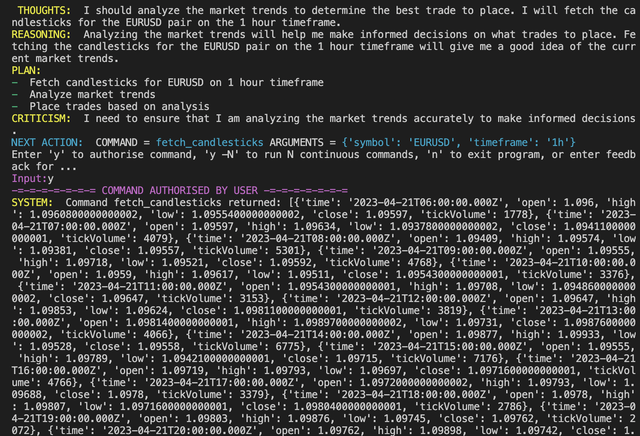
      1. Goal 1: fetch candlestick data for the 1 hour chart on EURUSD
      2. Goal 2: Terminate
  2. Run Auto-GPT: Launch Auto-GPT, which should use the MetaTrader plugin and it should load the candlestick data.

  3. Sample response:

📉 Indicators (In-Progress):

  • Relative Strength Index (RSI)
  • Volume
  • Moving Averages (SMA, EMA, WMA, MAE, OsMA, MACD)
  • Fibonacci Retracement
  • Bollinger Bands
  • Money Fund Index (MFI)
Nearby in the ranking
Similar items