algo-trader
Trading strategies builder, backtester, and real-time trader.
pip install algorithmic-trader
Intro
algo-trader is an implementation of an algorithmic trading strategy executor and backtester. Capable of backtesting strategies locally and trading them in real-time via your broker API.
Please be aware that this is a work in progress and the trader is missing external market data and trade providers. If you'd like to use the trader for real-world trading, you'll have to implement your broker API. Although real-time trading is not finished, backtesting is fully functional, so implemented strategies can be backtested and used in real trading when it will be ready.
algo-trader is written in Python, and its current stack composes of:
- MongoDB as a backend data store for backtesting strategies
- tulipy - Python bindings for Tulip Indicators. Used to provide technical indicators calculations.
- ib_client (Optional) - Python library to communicate with Interactive Brokers gateway. Only needed if you plan on doing real trading via IB.
Architecture
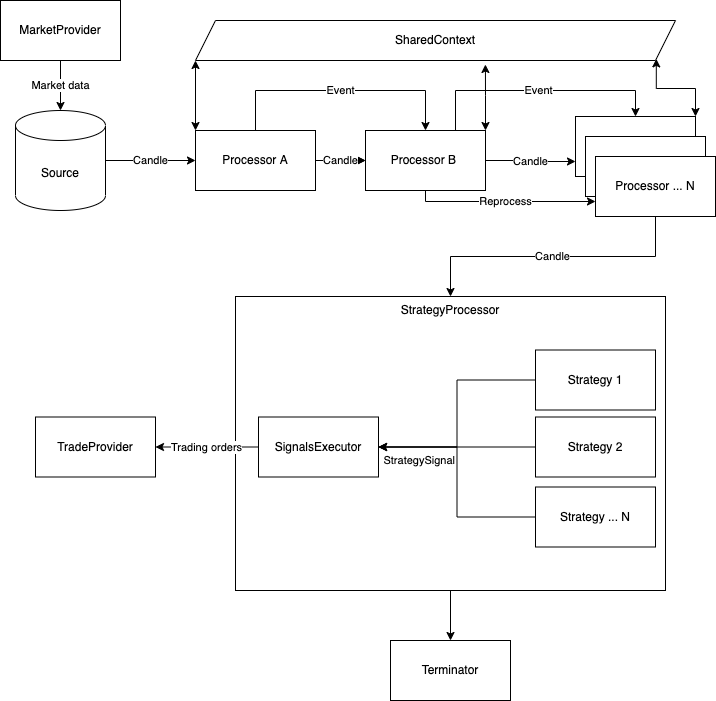
Pipeline
Pipeline is the basic facilitator of the stream. It’s the orchestrator responsible for reading data from the Source and moving it to the processors in the stream. It has no actual logic except for facilitating the processors. A pipeline and all of its child components are JSON serializable, that is for the system to be able to define, load and save entire pipelines with their configurations on file. This feature is an important one as it can be used as a facade for UI/CLI based runners. Example serialized (and runnable) pipelines can be found in the examples/pipeline-templates directory. Example of loading them into Pipeline and running them using the PipelineRunner can be found in main.py
PipelineRunner
A PipelineRunner will accept an initial list or singular Pipeline,
and an optional starting SharedContext. If
a SharedContext is not provided during construction, a new one will be initialized.
Each Pipeline will be called through run() in the order that it was listed with the
previous context. The context will move through each Pipeline allowing for some operations
such as loading, caching and validation to occur before data collection and sink.
Sources
A Source is an implementation of a Candle Iterator. This is the starting point of the pipeline and the "source" for the incoming candles processed.
Processors
Processor is the primary processing unit in the pipeline. Processors can be constructed in any order while Candles are flowing from the source, forward through all processors. Each processor is responsible for sending the candles it processes to the next processor (unless it has a reason not to) .
The process() function gets with each candle also an object called SharedContext.
The context is an instance of an in-memory KV store to share context and information between processors.
Another way to share data between processors is to make use of the attachments field on the Candle itself.
This field is intended for metadata on the candle, like calculations and state relevant to that candle point in time.
Candle attachments are persistent throughout the pipeline.
Reprocessing
Reprocessing is a feature that enables a processor to re-send an already processed candle to the next processor. Reprocessing is useful for processors that do some logic outside the main flow of the pipeline. for example, upon events, external triggers, market/trade provider's events/issues, etc... An example of reprocessing can be found in the AssetCorrelationProcessor
Events
An Event as its name suggests, defines an event that occurred in the system. It follows the same flow as the Candles, passing between processors. Each processor is responsible for propagating the event to the next processor (if needed).
Because pipelines are data-driven and not time-driven, events can be used as checkpoints to indicate something that happened in the data stream. For example, running the same pipeline from a DB source and a real-time market data source can have different effects if the processor were to rely on time.
It is crucial to have the same behavior when fast-running from DB and real-time for backtesting to be useful.
Strategies
Strategies are executed per candle by the StrategyProcessor. A strategy is responsible for executing the trading logic and dispatching Signals (StrategySignal). In the event a strategy is raising a trading signal, the StrategyProcessor will catch and pass it to the SignalsExecutor for execution.
Terminators
A Terminator is an optional final piece of the pipeline. It's executed at the very end of a pipeline when the Source iterator has been fully consumed. Terminators are useful for unit testing, backtesting, and environment cleanups.
Running locally
algo-trader is using MongoDB for data storage. To run Mongo locally use docker-compose.
docker-compose -f docker-compose.yml up -d
CLI
The CLI is a simple interface to run the system. It can be used to run a pipeline, backtest a strategy, or run a
strategy in real-time.
Currently, the CLI is not fully implemented and most of the functionality is to describe and list the available
processors and strategies.
Running the CLI without any arguments will show the help menu.
When the package installed via PIP, the command algo-trader will be available.
If you choose to clone this repo, use python main.py as your entry point.
algo-trader
To list all available processors:
algo-trader processor list
To describe a specific processor:
algo-trader processor describe
Same pattern applies to strategies and sources. In order to run a pipeline, you'll need to create a pipeline template file. and run it using the CLI.
algo-trader pipeline run
Easy to run examples:
-
Data loader from Yahoo finance can be found in src/algotrader/examples/pipeline-templates/build_daily_yahoo_loader.py. Running this example pipeline will load historical data from Yahoo finance to MongoDB:
algo-trader pipeline run examples/pipeline-templates/build_daily_yahoo_loader.json -
Data loader from Binance can be found in src/algotrader/examples/pipeline-templates/build_daily_binance_loader.json. Running this example pipeline will load historical data from Binance to MongoDB:
algo-trader pipeline run examples/pipeline-templates/build_daily_binance_loader.json -
Realtime Crypto pipeline from Binance can be found in src/algotrader/examples/pipeline-templates/build_realtime_binance.json. Running this example pipeline will process realtime, second candles from Binance:
algo-trader pipeline run examples/pipeline-templates/build_realtime_binance.json
Code example
Short code example with comments. This is how one would typically use algo-trader as a library to
load and calculate technical indicators on stocks data from Yahoo finance to MongoDB
from datetime import datetime, timedelta

from algotrader.calc.calculations import TechnicalCalculation
from algotrader.entities.timespan import TimeSpan
from algotrader.pipeline.configs.indicator_config import IndicatorConfig
from algotrader.pipeline.configs.technical_processor_config import TechnicalsProcessorConfig
from algotrader.pipeline.pipeline import Pipeline
from algotrader.pipeline.processors.candle_cache import CandleCache
from algotrader.pipeline.processors.storage_provider_sink import StorageSinkProcessor
from algotrader.pipeline.processors.technicals import TechnicalsProcessor
from algotrader.pipeline.runner import PipelineRunner
from algotrader.pipeline.sources.yahoo_finance_history import YahooFinanceHistorySource
from algotrader.storage.mongodb_storage import MongoDBStorage


def main():
    # create a MongoDB Storage connector
    mongodb_storage = MongoDBStorage()

    # Create a Yahoo finance Source connector
    source = YahooFinanceHistorySource(
        ['AAPL', 'MSFT', 'GOOG'],  # Pass in the list of symbols to fetch
        TimeSpan.Day,  # Choose the candles interval
        datetime.now() - timedelta(days=100),  # Date to start fetching from
        datetime.now()  # The last date to fetch to
    )

    # Create a MongoDB Sink processor that will save all processed candles to mongo
    # using the storage connector.
    sink = StorageSinkProcessor(mongodb_storage)

    # Cache processor acts like an in-memory cache and enable processors to share data between on another
    cache_processor = CandleCache(sink)
    # Create a technical indicators process that will add each candle with indicators data.
    # We then pass the candles to the cache processor, so we can later use this data and share it
    # with other processors if needed.
    technicals_config = TechnicalsProcessorConfig([
        IndicatorConfig('sma5', TechnicalCalculation.SMA, [5]),
        IndicatorConfig('sma20', TechnicalCalculation.SMA, [20]),
        IndicatorConfig('cci7', TechnicalCalculation.CCI, [7]),
        IndicatorConfig('cci14', TechnicalCalculation.CCI, [14]),
        IndicatorConfig('rsi7', TechnicalCalculation.CCI, [7]),
        IndicatorConfig('rsi14', TechnicalCalculation.CCI, [14]),
        IndicatorConfig('stddev5', TechnicalCalculation.STDDEV, [5]),
    ])

    processor = TechnicalsProcessor(technicals_config, cache_processor)

    # Construct the pipline object. This object can be serialized as JSON, saved, and reloaded whenever we need it.
    pipeline = Pipeline(source, processor)

    # Provide the Pipline object to the runner which will execute it.
    # The Runner can execute multiple pipelines one after the other.
    # This enabled the ability to construct a pipelines flow where each pipeline depends on another.
    PipelineRunner(pipeline).run()
Using this repo locally
Virtual environment
It is best to use a virtual environment to run algo-trader.
python3 -m venv run
source run/bin/activate
pip3 install -r requirements.txt
Running tests
- Unit:
./scripts/test-unit.sh - Integration (needs IB gateway running):
./scripts/test-integration.sh - All:
./scripts/test-all.sh
Contributing
Contributions are welcome and much needed. Please refer to the guidelines.