GyoiThon: Next generation penetration test tool



Japanese page is here.
Presentation
- January 25th,2018:JANOG41
- March 23th,2018:Black Hat ASIA 2018 Arsenal
- August 12th,2018:DEFCON26 DemoLabs
- October 24th,2018:OWS in CSS2018
- November 3rd,2018:AV TOKYO 2018 HIVE
- December 22-23th,2018:SECCON YOROZU 2018
- March 28th,2019:Black Hat ASIA 2019 Arsenal
Documents
- Installation
- Usage
- Tips
- Demonstration (Youtube)
Slack
New function!!
The new GyoiThon (version 0.0.4) can list up your subdomain facing on the internet. And if the subdomain is published as a Web service, then GyoiThon executes a health check that a non-destructive vulnerability assessment.
| Note |
|---|
| New function uses a Google custom search API. So if you use a new function, then you have to prepare a API key of Google Custom search. |
- ex) Listing up your subdomain.
First, you have to prepare thedomain_list.csvis following:
"Domain Name"
mbsd.jp
And you execute following command.
root@kali:~/GyoiThon# python3 gyoithon.py -i --domain_list
As a result, you get a list of sundomains associated with the specified domain.
| Index | Domain | Sub-Domain | IP Address | Access Status (http) | Location (http) | Access Status (https) | Location (https) | Whois records |
|---|---|---|---|---|---|---|---|---|
| 1 | mbsd.jp | mbsd.jp | ['40.115.251.148'] | 301 | https://www.mbsd.jp/ | 301 | https://www.mbsd.jp/ | *** |
| 2 | mbsd.jp | www.mbsd.jp | ['40.115.251.148'] | 301 | https://www.mbsd.jp/ | 200 | - | - |
| 3 | mbsd.jp | www2.mbsd.jp | ['40.115.251.148'] | 301 | https://www.mbsd.jp/ | 200 | - | - |
- ex) Listing up your subdomain and executing health check.
GyoiThon executes a list up your subdomain and if the subdomain is published as a Web service (with port 80 or 443 open), then GyoiThon execute a health check that a non-destructive vulnerability assessment.
root@kali:~/GyoiThon# python3 gyoithon.py -i --domain_list --through_health_check --safety
As a result, you get a list of subdomains and assessment report.
| Index | Domain | Sub-Domain | IP Address | Access Status (http) | Location (http) | Access Status (https) | Location (https) | Whois records | Assessment results |
|---|---|---|---|---|---|---|---|---|---|
| 1 | mbsd.jp | mbsd.jp | ['40.115.251.148'] | 301 | https://www.mbsd.jp/ | 301 | https://www.mbsd.jp/ | *** | *** |
| 2 | mbsd.jp | www.mbsd.jp | ['40.115.251.148'] | 301 | https://www.mbsd.jp/ | 200 | - | - | *** |
| 3 | mbsd.jp | www2.mbsd.jp | ['40.115.251.148'] | 301 | https://www.mbsd.jp/ | 200 | - | - | *** |
Overview
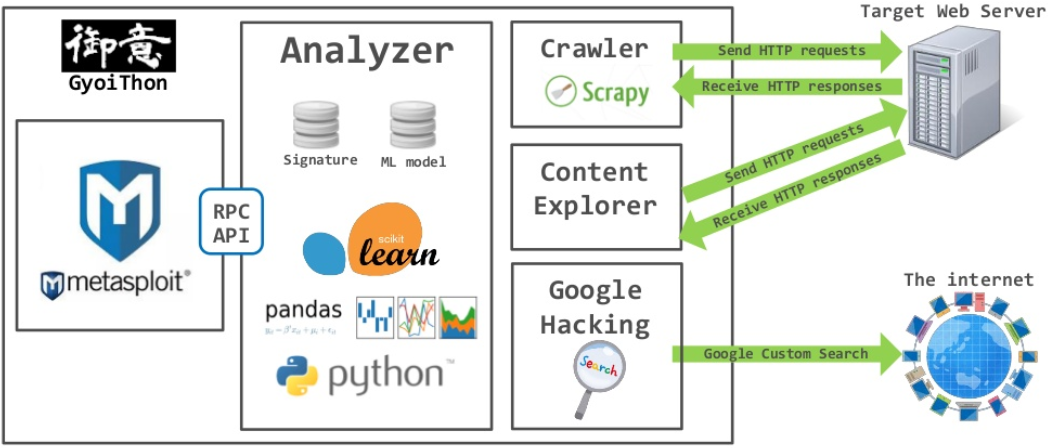
GyoiThon is Intelligence Gathering tool for Web Server.
GyoiThon execute remote access to target Web server and identifies product operated on the server such as CMS, Web server software, Framework, Programming Language etc,. And, it can execute exploit modules to identified products using Metasploit. GyoiThon fully automatically execute above action.
GyoiThon's main features are following.
-
Remote access/Fully automatic
GyoiThon can fully automatically gather the information of target Web server using only remote access. You only execute GyoiThon once for your operation. -
Non-destructive test
GyoiThon can gather information of target Web server using only normally access.
But, when you use a part of option, GyoiThon execute abnormally access such as sending exploit modules. -
Gathering various information
GyoiThon has various intelligence gathering engines such as Web crawler, Google Custom Search API, Censys, explorer of default contents, examination of cloud services etc,. By analyze gathered information using strings pattern matching and machine learning, GyoiThon can identify product/version/CVE number operated on the target web server, unnecceary html comments/debug messages, login page etc,. -
Examination of real vulnerability
GyoiThon can execute exploit modules to identified products using Metasploit.
As a result, it can examine real vulnerability of target web server.
| Note |
|---|
| If you are interested, please use them in an environment under your control and at your own risk. |
Installation
- git clone GyoiThon's repository.
root@kali:~# git clone https://github.com/gyoisamurai/GyoiThon.git
- Get python3-pip.
root@kali:~# apt-get update
root@kali:~# apt-get install python3-pip
- install required python packages.
root@kali:~# cd GyoiThon
root@kali:~/GyoiThon# pip3 install -r requirements.txt
root@kali:~/GyoiThon# apt install python3-tk
- Edit config.ini of GyoiThon.
You have to edit yourconfig.ini.
More information is Usage.
Usage
By using default mode without option and combination of several options, GyoiThon can gather various information of target web server.
usage:
    .\gyoithon.py [-s] [-m] [-g] [-e] [-c] [-p] [-l --log_path=] [--no-update-vulndb]
    .\gyoithon.py [-d --category= --vendor= --package=]
    .\gyoithon.py [-i]
    .\gyoithon.py -h | --help
options:
    -s   Optional : Examine cloud service.
    -m   Optional : Analyze HTTP response for identify product/version using Machine Learning.
    -g   Optional : Google Custom Search for identify product/version.
    -e   Optional : Explore default path of product.
    -c   Optional : Discover open ports and wrong ssl server certification using Censys.
    -p   Optional : Execute exploit module using Metasploit.
    -l   Optional : Analyze log based HTTP response for identify product/version.
    -d   Optional : Development of signature and train data.
    -i   Optional : Explore relevant FQDN with the target FQDN.
    -h --help     Show this help message and exit.
Preparation.
- Edit target file
host.txt.
You have to write target web server to thehost.txt.
Writting format isprotocol FQDN(or IP address) Port Crawling_root_path.
- Example.
https gyoithon.example.com 443 /
If you want to indicate multiple target information, you have to write below.
https gyoithon.example.com 443 /
http 192.168.220.129 80 /vicnum/
https www.example.com 443 /catalog/
| Note |
|---|
You insert / at the beginning and end of Root Path. |
- Edit configuration file
config.ini.
Parameters to be changed by the user are defined in the setting fileconfig.ini.
If you want to change parameters, editconfig.ini.
Detail ofconfig.iniis here.
Execution of GyoiThon.
1. Default mode.
root@kali:~/GyoiThon# python3 gyoithon.py
The default mode gathers following minimum information.
- Gathering of HTTP responses by Web crawling.
- Identification of product/version using string pattern matching.
- Examination of CVE number (from NVD) for identified products.
- Examination of unneccesary HTML/JavaScript comments.
- Examination of unneccesary debug messages.
- Examination of login pages.
- Crawling setting
GyoiThon usesScrapythat Python's library.
By change the parameters inconfig.ini, you can change setting of Scrapy.
| Category | Parameter | Description |
|---|---|---|
| Spider | depth_limit | Maximum depth of crawling. Default value is 2 layer. |
| delay_time | Delay time of crawling. Default value is 3 (sec). |
|
| time_out | Spider close option. Timeout of crawling. Default value is 600 (sec). |
|
| item_count | Spider close option. Maximum items. Default value is 300. |
|
| page_count | Spider close option. Maximum items per page. Default value is 0 (no limit). |
|
| error_count | Spider close option. Maximum errors. Default value is 0 (no limit). |
- Examination speed setting
The examination number and HTTP response size greatly affect examination times.
By change the parameters inconfig.ini, you can adjust examination speed.
| Category | Parameter | Description |
|---|---|---|
| Common | max_target_url | Maximum examination URL number. If the URL number gathered by Web Crawling exceeds this parameter value, excess URL number is discarded. Default value is 100. 0 is unlimited. |
| max_target_byte | Maximum examination response size. If the response size exceeds this parameter value, excess response size is discarded. Default value is 10000 byte. 0 is unlimited. |
|
| scramble | The URL list gathered by Web crawling is randomly ordered. Default value is 1 (validity). 0 is invalid. |
| Note |
|---|
| The examination speed and accuracy are trade-off. |
2. Examination of cloud services mode.
root@kali:~/GyoiThon# python3 gyoithon.py -s
By add -s option, GyoiThon identifies target web server uses cloud service or not in addition to default mode.
Before execution, you must change the below parameter of config.ini.
| Category | Parameter | Description |
|---|---|---|
| CloudChecker | azure_ip_range | Source URL of Azure Datacenter IP Ranges. |
This parameter is source URL of Azure Datacenter IP range. This URL is changed a few per day. So, you must get the latest URL from link "click here to download manually" of page "Microsoft Azure Datacenter IP Ranges" and set it to above parameter before execute GyoiThon.
3. Machine Learning analysis mode.
root@kali:~/GyoiThon# python3 gyoithon.py -m
By add -m option, GyoiThon identifies products/version using Machine Learning (Naive Bayes) in addition to default mode.
4. Google Hacking mode.
root@kali:~/GyoiThon# python3 gyoithon.py -g
By add -g option, GyoiThon identifies products/version using Google Custom Search API in addition to default mode. Before execution, you must set API key and Search engine ID to the below parameters.
| Category | Parameter | Description |
|---|---|---|
| GoogleHack | api_key | API key of Google Custom Search API. |
| search_engine_id | Google search engine ID. |
| Note |
|---|
| You can use free Google Custom Search API of 100 queries per day. But, if you want to use more than 100 queries, you must pay fee the Google Custom Search API service. |
5. Exploration of default contents mode.
root@kali:~/GyoiThon# python3 gyoithon.py -e
By add -e option, GyoiThon explores the default contents of products such as CMS, Web server software in addition to default mode.
By change the parameters in config.ini, you can change setting of exploration.
| Category | Parameter | Description |
|---|---|---|
| ContentExplorer | delay_time | Delay time of exploration. Default value is 1 (sec). |
| Note |
|---|
| When you use this option, may be affected to heavy load of server because of GyoiThon execute numerous accesses (hundreds accesses) against the target web server. In addition, by numerous 404 error logs are wrote to access log, it may be to caught by SOC (Security Operation Center). So, if you use this option, please notify person concerned such as SOC, administrator and use them in an environment under your control and at your own risk and. |
6. Censys cooperation mode.
root@kali:~/GyoiThon# python3 gyoithon.py -c
By add -c option, GyoiThon examines open port number and server certification using Censys.
Before execution, you must set API key and Secret key to the below parameters.
| Category | Parameter | Description |
|---|---|---|
| Censys | api_id | API key of Censys. |
| secret | Secret key of Censys. |
7. Metasploit cooperation mode.
root@kali:~/GyoiThon# python3 gyoithon.py -p
By add -p option, GyoiThon examines real vulnerabilities such as DoS and backdoor using Metasploit in addition to default mode.
Before execution, you must launch RPC server of Metasploit and set below parameters in config.ini.
| Category | Parameter | Description |
|---|---|---|
| Exploit | server_host | Allocated IP address to the RPC Server (msgrpc). |
| server_port | Allocated port number to the RPC Server (msgrpc). |
|
| msgrpc_user | User ID for authorization of msgrpc. |
|
| msgrpc_pass | Password for authorization of msgrpc. |
|
| LHOST | Allocated IP address to the RPC Server (msgrpc). |
| Note |
|---|
| When you use this option, may be heavily affected to server operation because of GyoiThon execute the exploit against the target web server. In addition, this option may be caught by SOC (Security Operation Center) because of exploits are like a real attacks. So, if you use this option, please notify person concerned such as SOC, administrator and use them in an environment under your control and at your own risk and. |
8. Stored logs based analysis mode.
root@kali:~/GyoiThon# python3 gyoithon.py -l --log_path="Full path of stored logs"
By add -l option, GyoiThon executes various examination using stored HTTP responses without web crawling.
This mode assumes the web application that GyoiThon cannot execute web crawling.
GyoiThon can execute various examination similar web crawling of default mode using stored HTTP responses gathered by local proxy tool.
| Note |
|---|
Log file's extension is .log. |
9. Combination of multiple options.
Combination of "Examination of cloud services mode" and "Machine Learning analysis mode".
root@kali:~/GyoiThon# python3 gyoithon.py -s -m
Combination of "Examination of cloud services mode" and "Google Hacking mode".
root@kali:~/GyoiThon# python3 gyoithon.py -s -g
Combination of "Examination of cloud services mode", "Machine Learning analysis mode" and "Google Hacking mode".
root@kali:~/GyoiThon# python3 gyoithon.py -s -m -g
All option.
root@kali:~/GyoiThon# python3 gyoithon.py -s -m -g -e -c -p -l --log_path="Full path of stored logs"
10. Generating signature/train data mode.
root@kali:~/GyoiThon# python3 gyoithon.py -d --category=CMS --vendor=joomla! --package=Joomla!@3.9.4@_origin.tar.zip
By add -d option, GyoiThon generates signatures/train data for detecting Web products operated on the target Web Server.
The options is following.
| Option | Description | Example |
|---|---|---|
| --category | Product's category in signature/train data. | OS or WEB or FRAMEWORK or CMS. |
| --vendor | Product's vendor name in signature/train data. | wordpress, joomla!, drupal. |
| --package | Importing target package file name. You have to separate three fields that product name, version and extension using @. |
WordPress@4.9.8@.tar.gz, Joomla!@3.9.4@_origin.tar.zip, Drupal@8.6.3@.tar.gz. |
Check report.
After finished execution of GyoiThon, reports of each target are generated to the following path.
root@kali:~/GyoiThon/report# ls
gyoithon_report_192.168.220.129_80_1082018338.csv
gyoithon_report_192.168.220.129_80_bodgeit.csv
gyoithon_report_192.168.220.129_80_cyclone.csv
gyoithon_report_192.168.220.129_80_vicnum.csv
gyoithon_report_192.168.220.129_80_WackoPicko.csv
gyoithon_censys_report_www.gyoithon.example.com_443_test.csv
GyoiThon generates following two types report.
gyoithon_report_target FQDN(or IP address)_Port number_Root Path.csv.
This is main report that mainly including product name, version, cve etc,.
Report format isgyoithon_report_target FQDN(or IP address)_Port number_Root Path.csv.
Each column's detail is following.
| Column | Description | Example |
|---|---|---|
| fqdn | FQDN of target web server. | www.gyoithon.example.com |
| ip_addr | IP address of target web server. | 192.168.220.129 |
| port | Port number of target web server. | 80 |
| cloud_type | Cloud service name (Azure or AWS or GCP or Unknown). | AWS |
| method | Examination way of GyoiThon. | Crawling |
| url | Accessed URL. | http://192.168.220.129:80/WackoPicko/admin/index.php?page=login |
| vendor_name | Vendor name of identified products. | apache |
| prod_name | Identified products. | http_server |
| prod_version | Version of identified products. | 2.2.14 |
| prod_trigger | Trigger of identified products. | Apache/2.2.14 |
| prod_type | Product category (Web or CMS or Framework etc..). | Web |
| prod_vuln | CVE number according to identified products (desc CVSS score). | CVE-2017-3167, CVE-2017-3169, CVE-2017-7668 ... |
| origin_login | Login page is existing or not (Log: Analysis using Machine Leaerning, Url: Analysis using string pattern matching in URL. | Log : 37.5 %\nUrl : 100.0 % |
| origin_login_trigger | Trigger of identifed login page. | `Log : name", |
| Login@.*( |
### 3. How to change "Exploit module's option".
When GyoiThon exploits, it uses **default value** of Exploit module options.
If you want to change option values, please input any value to `"user_specify"` in `exploit_tree.json` as following.
root@kali:~/GyoiThon/modules/data/ ls exploit_tree.json root@kali:~/GyoiThon/modules/data/ vim exploit_tree.json
...snip...
"unix/webapp/joomla_media_upload_exec": { "targets": { "0": [ "generic/custom", "generic/shell_bind_tcp", "generic/shell_reverse_tcp",
...snip...
    "TARGETURI": {
        "type": "string",
        "required": true,
        "advanced": false,
        "evasion": false,
        "desc": "The base path to Joomla",
        "default": "/joomla",
        "user_specify": "/my_original_dir/"
    },
Above example is to change value of `TARGETURI` option in exploit module "`exploit/unix/webapp/joomla_media_upload_exec`" to "`/my_original_dir/`" from "`/joomla`".

### 4. How to access via proxy server.
GyoiThon can access to target server via **proxy server**.
If you want to use proxy server, please input proxy server information in `config.ini`.

|Category|Parameter|Description|
|:----|:----|:----|
|Common|proxy|Proxy server information. Format is `scheme://hostname:port` (ex: `http://proxy-example:8083`). |
||proxy_user|If you need the proxy authentication, please input auth user. |
||proxy_pass|If you need the proxy authentication, please input auth password. |

| Note |
|:-----|
| Now, GyoiThon is implemented only Basic Authentication. |

## Operation check environment
 * Kali Linux 2018.2 (for Metasploit)
   * CPU: Intel(R) Core(TM) i5-5200U 2.20GHz
   * Memory: 8.0GB
   * Metasploit Framework 4.16.48-dev
   * Python 3.6.6

## Licence
[Apache License 2.0](https://github.com/gyoisamurai/GyoiThon/blob/master/LICENSE)

## Contact us
 gyoiler3@gmail.com

 * [Masafumi Masuya](https://www.blackhat.com/asia-18/arsenal/schedule/presenters.html#masafumi-masuya-36855)
 [https://twitter.com/gyoizamurai](https://twitter.com/gyoizamurai)
 * [Toshitsugu Yoneyama](https://www.blackhat.com/asia-18/arsenal/schedule/presenters.html#toshitsugu-yoneyama-36864)
 [https://twitter.com/yoneyoneyo](https://twitter.com/yoneyoneyo)
 * [Isao Takaesu](https://www.blackhat.com/asia-18/arsenal/schedule/presenters.html#isao-takaesu-33544)
 [https://twitter.com/bbr_bbq](https://twitter.com/bbr_bbq)