The harness for agentic trading.
Open-source AI agents that research the market, build the thesis,
and trade your own brokerage account within the permissions you set.
Try LangAlpha ↗ · Get started · Agentic trading · Harness design · Full-stack architecture · Security

Why LangAlpha
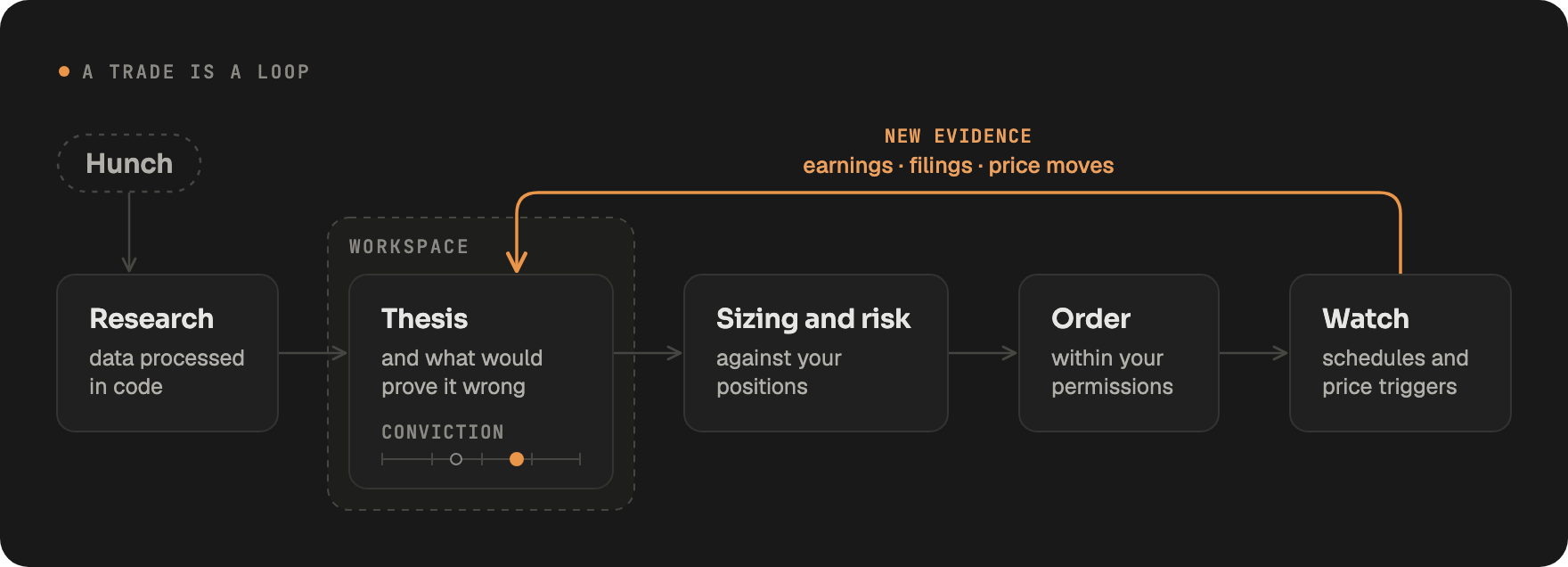
Most AI finance tools answer questions. We believe investment research is Bayesian: you write down a thesis and what would prove it wrong, then every earnings print, filing and price move raises or lowers your conviction, and your position with it. That loop runs for weeks or months, and no single prompt captures it.
Coding agents got good once they had a harness built for code: a codebase that persists, where every commit builds on the last, plus the tools, memory and runtime around the model. LangAlpha brings that harness to markets, from vibe coding to vibe investing. It works with any model, so every better model makes it better. Two convictions shape it:
-
A trade is a loop, not a tool call. The thesis lives in a workspace, and research, sizing, the order and the watch that follows each feed new evidence back into it.
-
Autonomy needs a boundary you set. Agents act within the permissions you grant, and every order takes one governed path.
Feature highlights
Most of these examples come from one workspace on Cerebras (CBRS). See it work in action with this shared conversation, from the first question to the initiation report sent to Slack.
🔎 Research with a team of agents
Ask a question and LangAlpha splits it across parallel analysts that read filings, pull prices, options and macro data, and run the numbers in code. Send a follow-up at any time to redirect them mid-run. On CBRS, the run ended in an HTML primer on what Cerebras sells, how fast it grows and who pays for it.

Subagents: four analysts work the question under the lead agent, each card counting its tools and tokens, and one /html-report turns their findings into the primer on the right
🗂️ Keep every idea in a workspace
One workspace per thesis, sector or portfolio. Files, chats and the agent's own notes are still there tomorrow, so each session builds on the last instead of starting over.
"Build me an interactive dashboard on CBRS from what we've found so far in this workspace: the price with the key events, revenue growth, customer concentration, and how much rides on OpenAI. I want to click around it."
A new thread builds it from the research and files earlier threads left in the workspace: a live dashboard you can play with.

Workspace Files: bulk data lands in files, not the agent's context. Prices, filings and model inputs fill each task's data/ folder in the file tree

Running apps: the agent builds interactive dashboards. Click a bar, marker or row to see its source, drag the OpenAI backlog stress test, or @ another thread's files to merge them in
⏰ Agents that keep watch
Schedule a brief before the open, or wake an agent when a stock crosses a price or moves a set percentage in a day. Results land in one feed, and in Slack, Discord or iMessage if you connect them.
"Keep watch on CBRS for me. Check the model's assumptions every Monday, update it after Q3 results, and tell me if the stock breaks above our bull value or below $95."
The agent sets up four automations in the workspace: a weekly assumption check, a one-time model update the morning after Q3 results, and two price triggers, at the bull-case value from the DCF model and at $95, the level that would change the rating. Each run starts from the model and notes in the workspace and reports to Slack.

Automations: every schedule and price watch on one page, with how far each watch is from firing and where its results go
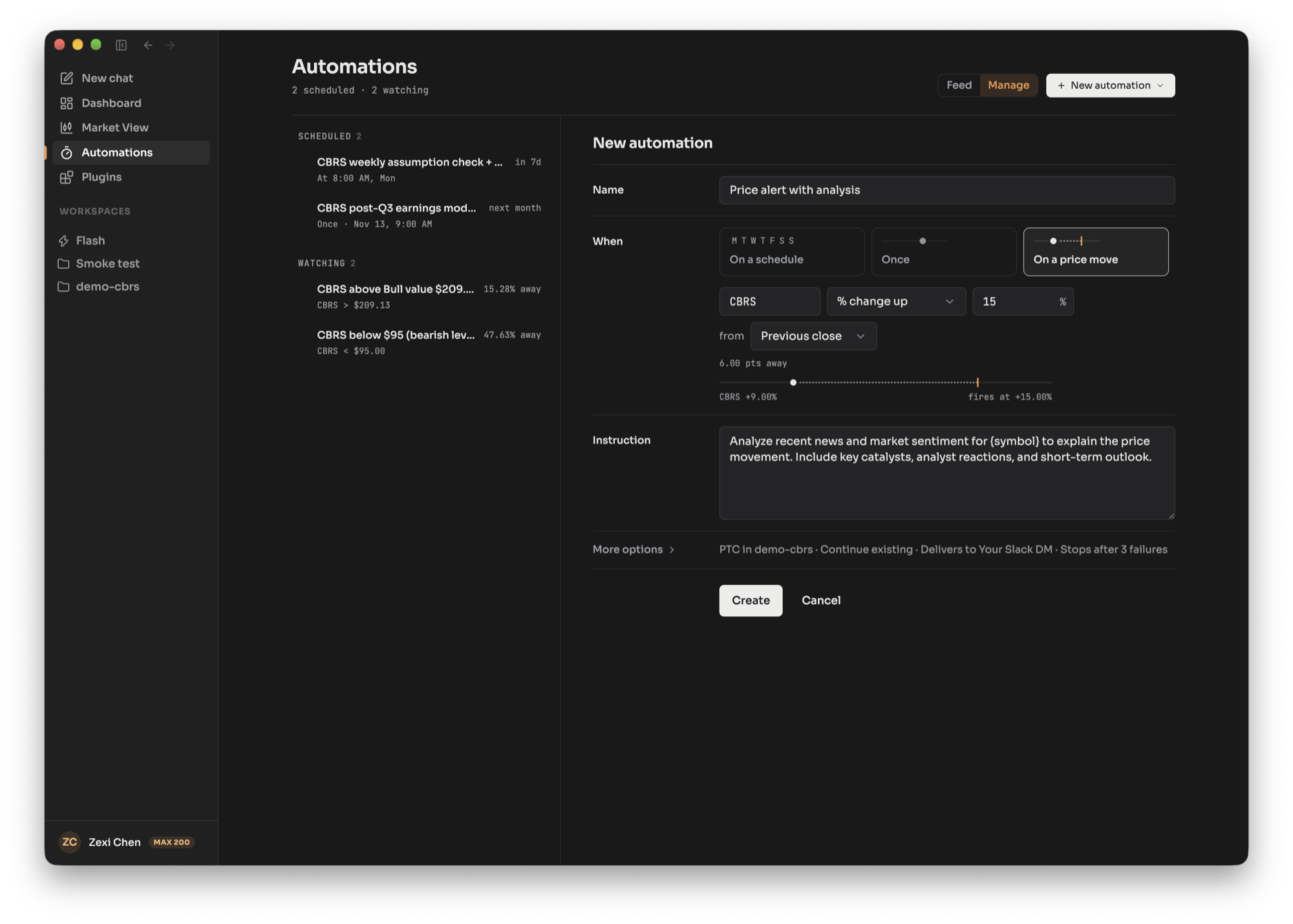
On a price move: wake the agent on a % move from the previous close or the day open, with today's move shown against your threshold
📑 Get the deliverable, not just an answer
Excel models with live formulas, PDF and HTML reports, slide decks and interactive dashboards. Built-in skills cover DCF, comps, earnings previews, initiating coverage, morning notes and trade pitches.
"Write it up like a sell-side initiation on CBRS: rating, price target, the thesis, what the market is pricing in, the scenarios, peers, key risks, and the charts. Use the research and the model we already have."
The initiating-coverage skill builds on the research and the reverse DCF workbook from earlier in the thread, and writes ten pages: a Sell with a $130 target, scenarios, peers, risks and seven charts, as a PDF with an HTML version. Select a range in the spreadsheet panel and send it back to the agent to ask about it. With Slack connected, ask it to send everything over and every file arrives in your DM, ready to open there.

File panel: read the HTML report rendered or as source, with the filings and press releases behind it cited inline

Spreadsheet: a real workbook with live formulas across DCF, WACC, Comps and Checks, beside the research runs that fed its comps

PDF viewer: flip and zoom through the finished PDF beside the chat, here on the page that tests the bull case against peer multiples and margins

Slack: the whole package in two messages, deliverables then research notes, each file in its own threaded reply
📈 Chart with the agent
Live market charts the agent can read and draw on from any chat: support and resistance, trendlines, Fibonacci levels and event markers, saved per symbol and timeframe. Outside Market View, the drawing arrives as a chart card that opens the same chart beside the conversation.
"Chart CBRS since its IPO and mark what moved it: earnings, deals, analyst calls and lock-ups."
The agent works out what moved the stock on each big day, then draws it on the live chart: 18 event badges, 4 lock-up markers, and lines at the $185 IPO price and the consensus target. Hover a badge to read its note.

Live chart: each note sits on the day the stock reacted, and the chat lists every move in a table with the source behind it
🧾 See the evidence behind every answer
A Sources panel lists each filing, web page, data call and file the agent touched in a turn, even the data calls made from its own Python and Bash, so you can check the work instead of trusting it.
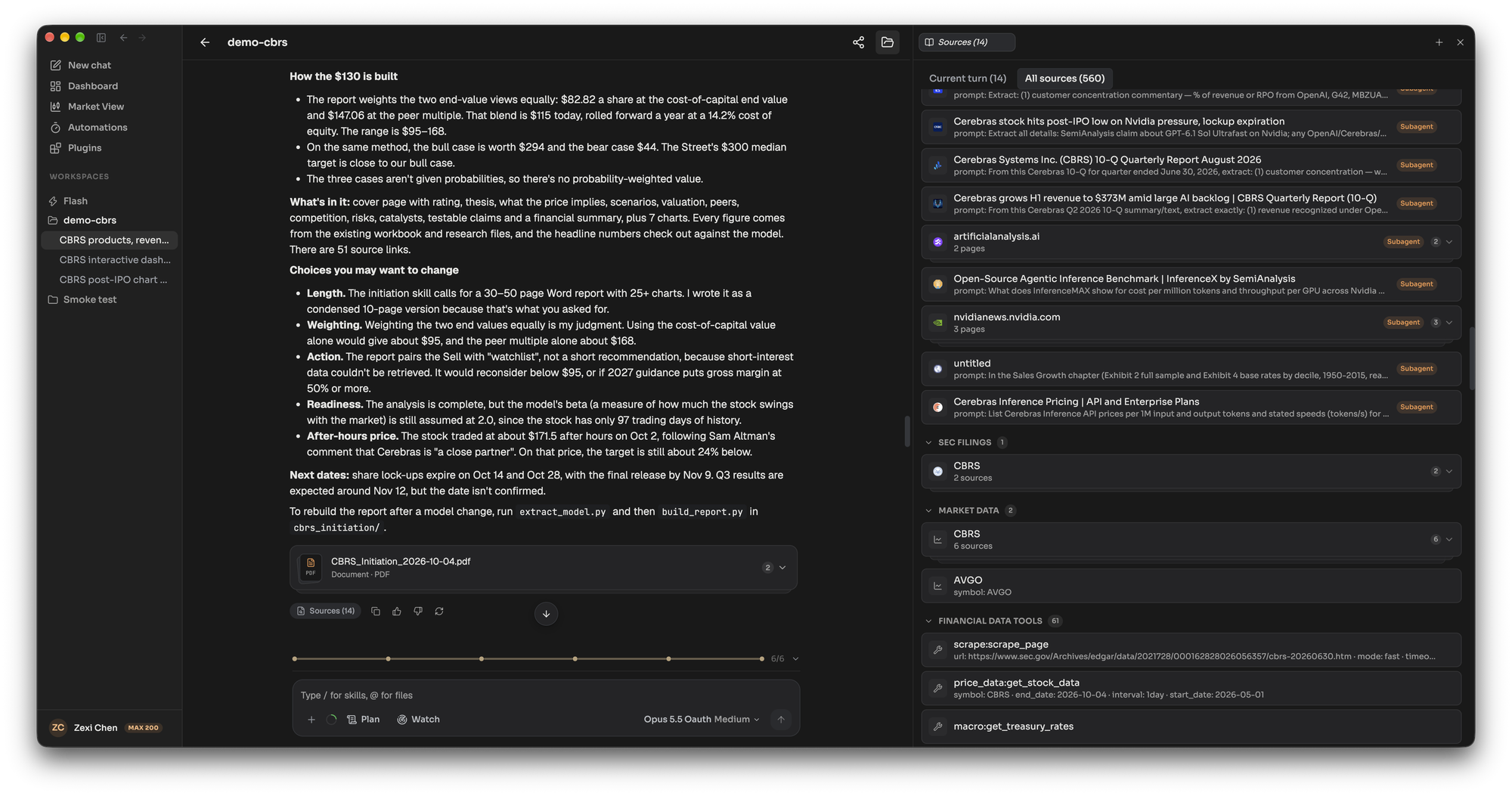
Sources: switch between this turn's 14 sources and the thread's 560, grouped into web search and crawling, SEC filings, market data and data tools, each with the prompt or arguments it ran with
Agentic trading
We are committed to making LangAlpha the best harness for agentic trading. Brokers now let AI agents trade real accounts, and the agents plugging in are general-purpose, so an order is one more tool call among many. In LangAlpha it is the one call the harness is built around:
- Limits that hold whatever the model does. What each connection may do, which orders wait for your approval, and the rule that an approved order runs exactly once are enforced on the host, on the one governed path every order takes. No prompt, and no script the agent writes, can widen them, and they stay the same for every model you run.
- An order path you can read. Every check an order passes, from the model's call to the request your broker receives, is code in this repository. You can read it before trusting it with money, and run it on your own machine under the same controls.
Four brokerages connect today, under the same controls:
| Robinhood | Interactive Brokers | moomoo | Webull | |
|---|---|---|---|---|
| Account, positions, history | ✅ | ✅ | ✅ | ✅ |
| Market data and watchlists | ✅ | ✅ | ✅ | ✅ |
| Order preview | ✅ | |||
| Paper trading | ✅ | |||
| Staged orders, confirmed in the broker's app | ✅ | |||
| Live orders | ✅ | ✅ |
Robinhood connects from the desktop app, because Robinhood only accepts sign-ins that return to a local app. moomoo covers US, Greater China, Japan and Southeast Asian markets.
When you connect one, you choose what it may do, from read-only to paper trading to live orders.
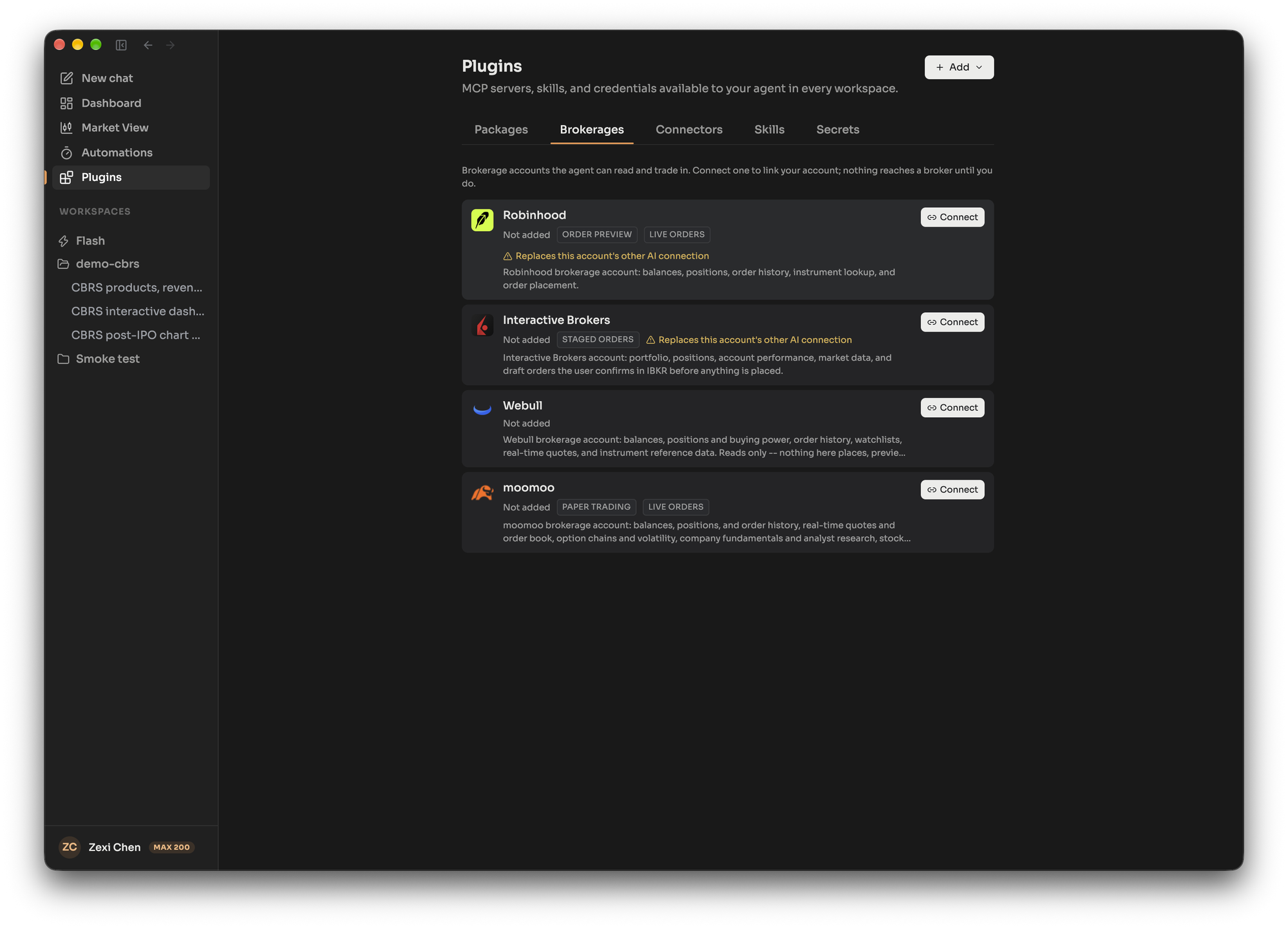
Brokerages: connect your brokerage account; each card lists what the agent can do there before you link it

Capabilities: switch on only what you trust. Orders sized against your positions wait on an approval card, and nothing reaches the broker until you say yes
Get started
Use the model you already pay for. Sign in with a Claude or ChatGPT subscription, use a coding plan from Kimi, GLM or MiniMax, bring any API key, or run a local model when you self-host.
Work where you are. Use the browser, the desktop app for macOS, Windows and Linux, or Slack, Discord, Telegram, Feishu and iMessage on LangAlpha.ai.
Hosted (beta). Sign up at LangAlpha.ai to start free or trial with one of our plans. Market data, cloud sandboxes, brokerage connections and channels are set up for you. Plans and features may change during the beta.
Self-host. All you need is Docker:
git clone https://github.com/ginlix-ai/langalpha.git && cd langalpha
make config   # wizard: model, data sources, sandbox, web search
make up       # Postgres, Redis, backend and web app
Open http://localhost:5173. The API listens on port 8000, with interactive docs at /docs.
How self-host differs. Agents, workspaces, automations, skills and governed orders run the same. The rest differs:
| Hosted | Self-host | |
|---|---|---|
| Market data | Live quotes for US equities and options, with extended hours. China A-shares coming soon | Yahoo Finance or FMP quotes, refreshed every 60 seconds and shown as delayed |
| Options and market structure | Options chains and snapshots, short interest, float and top movers | Not available |
| Price triggers | Fire on live ticks | Poll every 30 seconds against the delayed quotes |
| Channels | Chat in Slack, Discord, Telegram, Feishu and iMessage, with automation results in Slack, Discord and iMessage | Web app and desktop app. Automation results go to a webhook you run (AUTOMATION_WEBHOOK_URL) |
| Accounts | Sign-in with separate data per user | One local user with no sign-in, so anyone who can reach it acts as you, connected brokerages included. Keep it on your machine or a private network |
| Models | Models included with your plan, your own keys, or Claude and ChatGPT sign-in | Your own keys, coding plans, local models, or Claude and ChatGPT sign-in |
| Availability | Runs 24/7 on AWS in US East, so automations and price triggers fire while your computer sleeps | Runs only while your machine and its Docker stack are up |
| Remote access | Browser, desktop app and channels from anywhere | The web app and API listen on every network interface, so your local network can reach them. Reaching it from outside means exposing it yourself, behind a VPN or an authenticating proxy |
| Operations | Upgrades, migrations, backups and sandbox capacity are handled for you | You run upgrades, database migrations and backups. Docker sandboxes share your machine's CPU, memory and disk |
Optional keys and what they unlock
| Key | Unlocks |
|---|---|
FMP_API_KEY |
Fundamentals, financial statements, macro and analyst data (free tier) |
DAYTONA_API_KEY |
Cloud sandboxes from Daytona. Without it, sandboxes run in local Docker |
R2_*, S3_* or OSS_*, with storage.provider |
Object storage on Cloudflare R2, AWS S3, Alibaba OSS or MinIO. Holds workspace file snapshots, memos, attachments, skill archives, large transcripts and chat widget data, and serves downloads over signed links. Without a bucket these bytes stay in Postgres and chart image capture is off |
TAVILY_API_KEY, SERPER_API_KEY, EXA_API_KEY, PARALLEL_API_KEY, BOCHA_API_KEY |
Web search. The engine is chosen by search_api in agent_config.yaml (default tavily) or per user in Settings |
FIRECRAWL_API_KEY |
Upgraded web fetch and site crawling. The built-in crawler needs no key |
X_BEARER_TOKEN |
X post search and thread lookup. Add it as a vault secret on the Plugins page |
LANGSMITH_API_KEY, OTEL_EXPORTER_OTLP_ENDPOINT |
Tracing and metrics |
With no data keys you still get Yahoo Finance prices, fundamentals, analyst data and screening, SEC EDGAR filings, and a local Docker sandbox. Run make help for every command, or see CONTRIBUTING.md to run the backend and web app on your host.
Harness design
What context reaches the model, in what form, and what it can act on define the harness.
Where a convention already exists, LangAlpha follows the one frontier labs ship in their own agents: file tools that read, write, edit and search, a Bash shell, skills as SKILL.md files, and a workspace agent.md in the style of AGENTS.md. Those shapes are likely in a model's training data, so it arrives knowing how to use them.
Workspaces and memory
A thesis is tracked for weeks, months or longer, far past any context window. Workspaces and memory are what keep the agent on the same goal across that span, which is why it gets a full workspace and file system from the start: they are the foundation the rest builds on.
A computer owns one sandbox. Each workspace is a folder on it, with its own threads, files and notes, so a second idea opens in seconds instead of booting a new machine. Workspaces on one computer share an OS user; use separate computers when you want isolation.
Each folder holds an agent.md the agent maintains (goals, findings, an index of threads and files), a shared data/ directory, and one folder per task. Memory, settings and history live on the server, not in any one sandbox. A FUSE mount shows them on every computer as ordinary files, so they carry across computers and sandbox rebuilds, and Bash, code and the file tools all reach them the same way:
| Store | What it holds |
|---|---|
| Memory | Durable preferences and findings, per user and per workspace. The agent manages these proactively: it saves what it learns about you and your work, and updates or removes entries that go stale |
| Profile | Your portfolio, watchlist and preferences, as JSON files the agent reads and updates |
| Automations | One JSON file per automation. The agent creates, edits or pauses one by writing its file; the server validates each save before it takes effect and reports a refused one in the tool result |
| Workflows | Saved workflow scripts the agent can run by name, edit or add to |
| Memos | PDFs and notes you upload, extracted and indexed so the agent can cite them. Read-only to the agent |
| Transcripts | Every past thread, searchable, so the agent can look up what it did last week. Read-only |
Programmatic tool calling
LangAlpha has been built around programmatic tool calling since its first release in January 2026. Rather than calling tools one JSON call at a time, the agent writes Python that imports them: LangAlpha turns any MCP server into a Python module with its docs, and the code runs in the sandbox. Two reasons drive it:
-
Tools cost context before they are used. Bound as JSON tools, every server's schemas ride along on every call, whether the turn needs them or not. Here the prompt carries one line per server, and the agent reads a server's full docs from a file the first time it needs them. That saves tokens, keeps noise out, and a new server costs one line.
-
Financial data is tables, not prose. Ten years of daily bars for a dozen tickers is about 30,000 rows. A model cannot work that as text, and pasting it in would fill the window. In code the agent aggregates and transforms it, charts it, and feeds it into a valuation model or a backtest, and only the result comes back to the context.
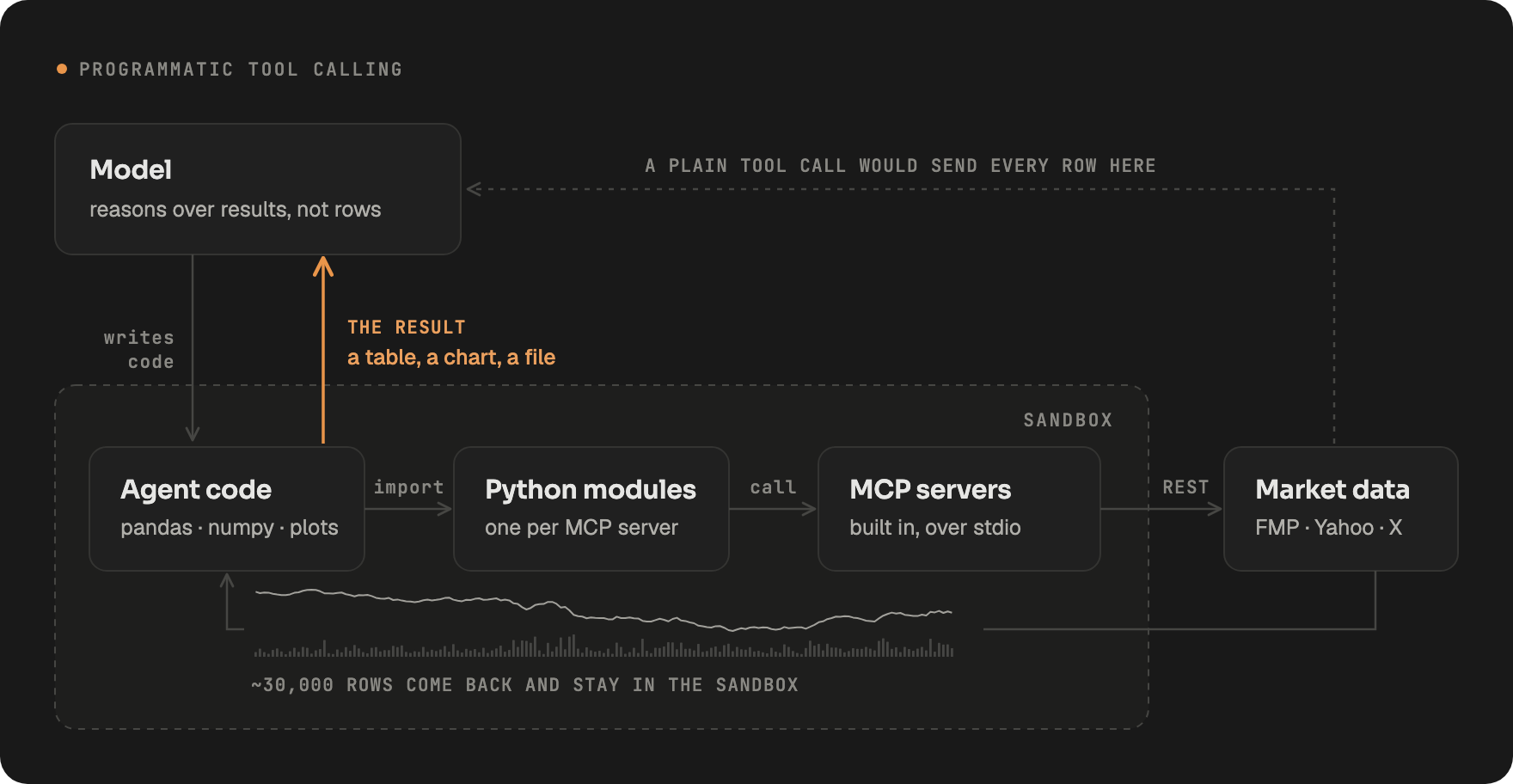
Code is the default, not the only path. Any MCP tool can instead run as a plain JSON tool call, set per tool on the Plugins page. That suits sensitive operations such as account actions, where every call should be visible on its own, and an order tool always runs this way, on the governed path.
Data and tools
Bulk data is worked in code through the Python modules, and quick lookups are bound direct: a quote, a company overview, a filing or a screen is a single JSON tool call and shows as a card in the chat. A result too large for the context, from either path, is saved to a file with a preview left in its place, and the agent opens the file in code when the preview is not enough.
The sources span three kinds of data:
- Market data: quotes, price history for stocks, indices, crypto, FX and commodities, options chains, screeners, and market and sector overviews.
- Fundamentals and macro: financial statements and ratios, analyst data, insider trades, earnings and economic calendars, macro series and the yield curve.
- Filings and text: SEC filings and earnings call transcripts, X posts and web pages.
LangAlpha's own data servers are made to be digested by code: every market-data tool returns the same envelope (symbol, currency, timezone, count, data, source), time series run oldest first, and failures come back as typed error codes, so agent code indexes the result instead of parsing prose.
Providers fall back per market: the real-time feed on LangAlpha.ai for US data, FMP for fundamentals and macro, and Yahoo Finance as the free floor. Web search supports Tavily, Serper, Exa, Parallel and Bocha, and web fetch uses a built-in crawler with optional Firecrawl delegation behind per-provider circuit breakers.
Beyond data, the agent works with these tools:
| Group | What the agent can do |
|---|---|
| Code and files | Run Python and shell commands, long jobs in the background; read, write, edit and search files; share a preview link to an app it serves from the sandbox |
| Web | Search, fetch a page, and with Firecrawl crawl or map a whole site |
| Output | Render an interactive widget in the chat, and draw annotations on a stock's live chart |
| Coordination | Dispatch subagents and workflows, ask you a structured question, and keep a todo list if you turn it on |
| Your connections | Brokerage and remote MCP servers over OAuth or header auth, and Agent Plugins |
| Messaging | On LangAlpha.ai, message you on a connected channel, with files attached |
The data provenance layer records every source the agent touches, outside the model's context: market data and MCP calls, whether the model calls a tool directly or the agent's Python or Bash calls it in the sandbox, web searches and fetched pages, SEC filings, and the files, memos and memory the agent reads. Each record carries the provider, the redacted arguments, a timestamp and a fingerprint of the result, keeps the result itself up to 64 KB, and is tied to the turn and to the agent, main or subagent, that made the call. The Sources panel lists them per turn, and the API returns the same records, so an answer can be checked against what it was built on.
Subagents and teams of agents
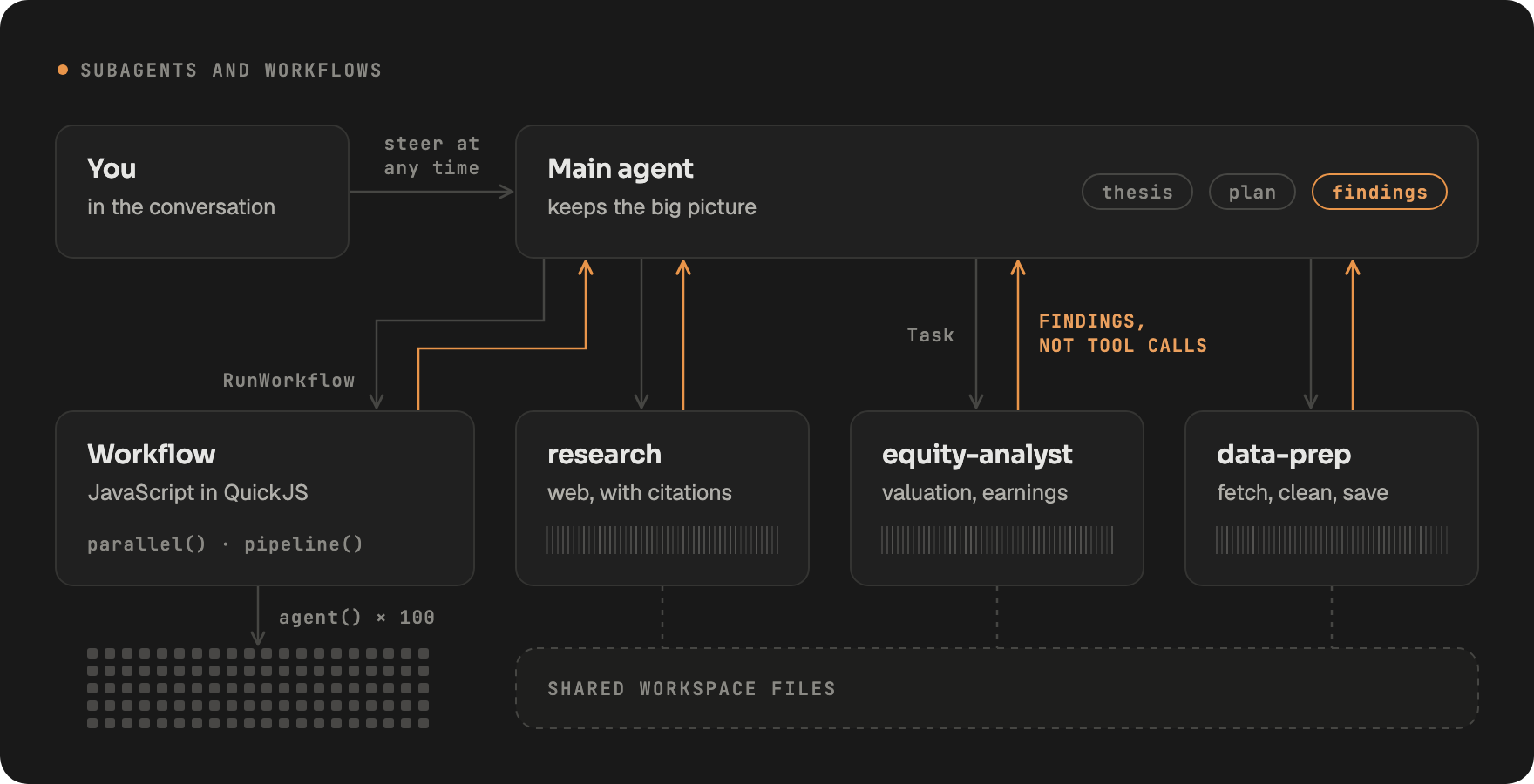
The main agent hands work to subagents, each with its own context window, for three reasons:
- More work, at once. Subagents run in the background, several in parallel, while the main agent keeps working or keeps talking to you.
- Wider and deeper research. A question fans out, one subagent per company, segment or source, each free to dig as deep as its piece needs.
- A main agent that keeps the big picture. A subagent hands back its findings, not the searches and tool calls behind them, so the main agent's context holds the thesis and the plan and stays on track.
Five ship built in (research, general-purpose, data-prep, equity-analyst, report-builder), and you can define more in agent_config.yaml. They stay reachable: the main agent can send a running subagent new instructions, or resume a finished one with its full history. Each one's tool calls and output stream to the UI live, and you can message one directly.
Workflows carry scale further. For a large study the agent runs a workflow, a short JavaScript program that fans work out to subagents with agent(), parallel() and pipeline() in a sandboxed QuickJS runtime on the server. It can run a saved workflow by name or write a new one on the spot. The program, not the conversation, is the loop, so a hundred-company screen does not cost a hundred turns, though it still spends the tokens of a hundred subagents.
How the context is built
Every model call is assembled in layers, ordered from most stable to most volatile, so a long session keeps hitting the provider's prompt cache.
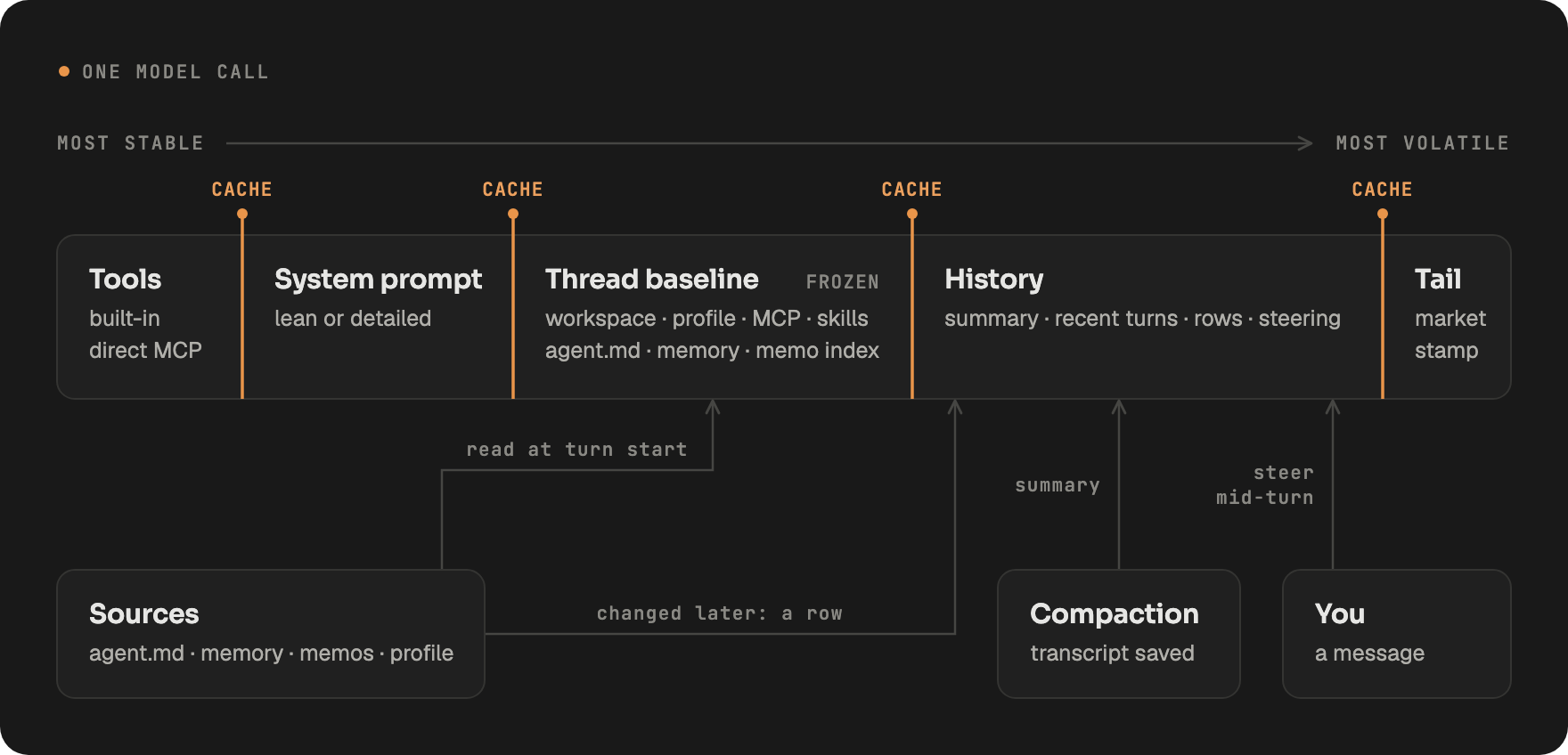
- System prompt. One template, rendered at the guidance level of the model in use.
- Thread baseline. Read once when a turn starts, then frozen: the workspace, your profile, the MCP server roster, the skills manifest,
agent.md, both memory tiers and the memo index. When one of them changes later, the agent gets a short row saying what changed and the baseline stays byte-identical. It is rebuilt after a compaction or once 20 rows pile up. - Runtime rows. Each turn opens with a row giving the time, the market session when it changed, and how long it has been since the last turn, sent the way each provider expects.
- Steering. A message you send while an agent works, main agent or subagent, lands before its next model call.
- Compaction. Old tool arguments are trimmed first, with the originals kept as files. Near the model's limit, older turns fold into a summary, the full transcript is saved, and the summary tells the agent where to read it.
Models
LangAlpha isn't tuned only for frontier models. The same tools and middleware drive every model, so an open-weight model can get you comparable results at a fraction of the cost. Switch providers mid-thread, and a failed call retries, then falls back to a model you configure.
Most providers accept the Chat Completions format, but for several it is a compatibility layer that drops what matters. For each provider, LangAlpha picks the API format that serves its models best, such as the OpenAI Responses API for OpenAI and Codex, and the Anthropic Messages API for Claude, Kimi, MiniMax and DeepSeek. Two things drive the choice:
- Thinking is preserved. Reasoning returns to the model within a turn and across turns, in its provider's own form: Anthropic's signed thinking blocks, OpenAI's encrypted reasoning items, GLM's reasoning text.
- Runtime context rides the right channel. The harness feeds the model a lot of runtime context. It goes as a
developermessage on OpenAI-shaped APIs and a mid-conversationsystemmessage on Anthropic and GLM, which honor it, and inside the user message elsewhere.
Three dials tune each model, set account-wide or per model in Settings:
- Prompt guidance. Frontier models get a lean prompt; smaller models get a detailed one with worked examples and step-by-step procedures. Both come from one template, so they never drift apart.
- Reasoning effort. One scale from
nonetomax, written to each vendor's own parameter and stepped down to the nearest level a model offers. Override it for a single message from the composer. - Compaction profile. Four presets, from aggressive to relaxed, set how early a long thread is compacted. By default the model's context window picks one.
| How you connect | Providers |
|---|---|
| Subscription sign-in | Claude (Claude Code), ChatGPT (Codex) |
| Coding plans | Kimi, GLM, MiniMax |
| API key | OpenAI, Anthropic, Gemini, DeepSeek, Qwen (DashScope), Kimi (Moonshot), GLM (Zhipu), MiniMax, OpenRouter, Groq, Cerebras |
| Local | Ollama, LM Studio, vLLM |
Keys and OAuth tokens are encrypted at rest with pgcrypto.
Skills and plugins
Skills follow the Agent Skills specification and plugins the Agent Plugins 1.0.0 format. The built-in MCP servers and skills ship as plugin bundles in plugins/, the same format you upload or install from a git URL on the Plugins page. On top of the standards, LangAlpha adds:
-
Skills load on demand. The prompt carries one manifest line per skill, and the full skill loads by slash command or when the agent reads its
SKILL.md. Tools a skill brings, such as the automation tools, stay hidden until it loads. -
Your skills, your commands. Upload a skill as a zip and give it a slash command of your choosing, or have the agent install one from GitHub into a workspace.
-
One extension block for plugins.
mcp.jsonstays closed to the format's own fields. Everything LangAlpha adds sits inplugin.jsonunderextensions["ai.langalpha"], the format's one extension point: adescriptionand aninstructionper server, which reach the prompt; atool_exposure_modeofsummaryordetailed, for how much of each tool the agent sees up front; andsecrets, naming each credential a server needs and where it binds. Strip the block and the package still installs in any Agent Plugins host. Details inplugins/README.md. -
Third-party servers run isolated. A server whose code LangAlpha does not own launches through pinned
uvxornpx, never from the app's own environment, so an SDK upgrade on one side cannot break the other.
Packages: six built-in bundles of MCP servers and skills, each switched on or off as one, with room for 50 of your own
38 skills ship built in:
| Bundle | Skills |
|---|---|
| Research | DCF model, comps analysis, 3-statement model, model update and check, initiating coverage, earnings preview and analysis, thesis tracker, trade pitch, company profile, competitive analysis, sector overview, impact analysis, catalyst calendar, idea generation, morning note, market watch, deck check |
| Deliverables | Excel, Word, PowerPoint, PDF, HTML report, interactive dashboard, inline widget, chart annotation, UI design |
| Service | Automations, onboarding, user profile and portfolio, secretary, workflows, product help, self-improvement |
| Alternative data | X research, web scraping |
Acknowledgement: some research skills are adapted from anthropics/financial-services-plugins.
Full-stack architecture
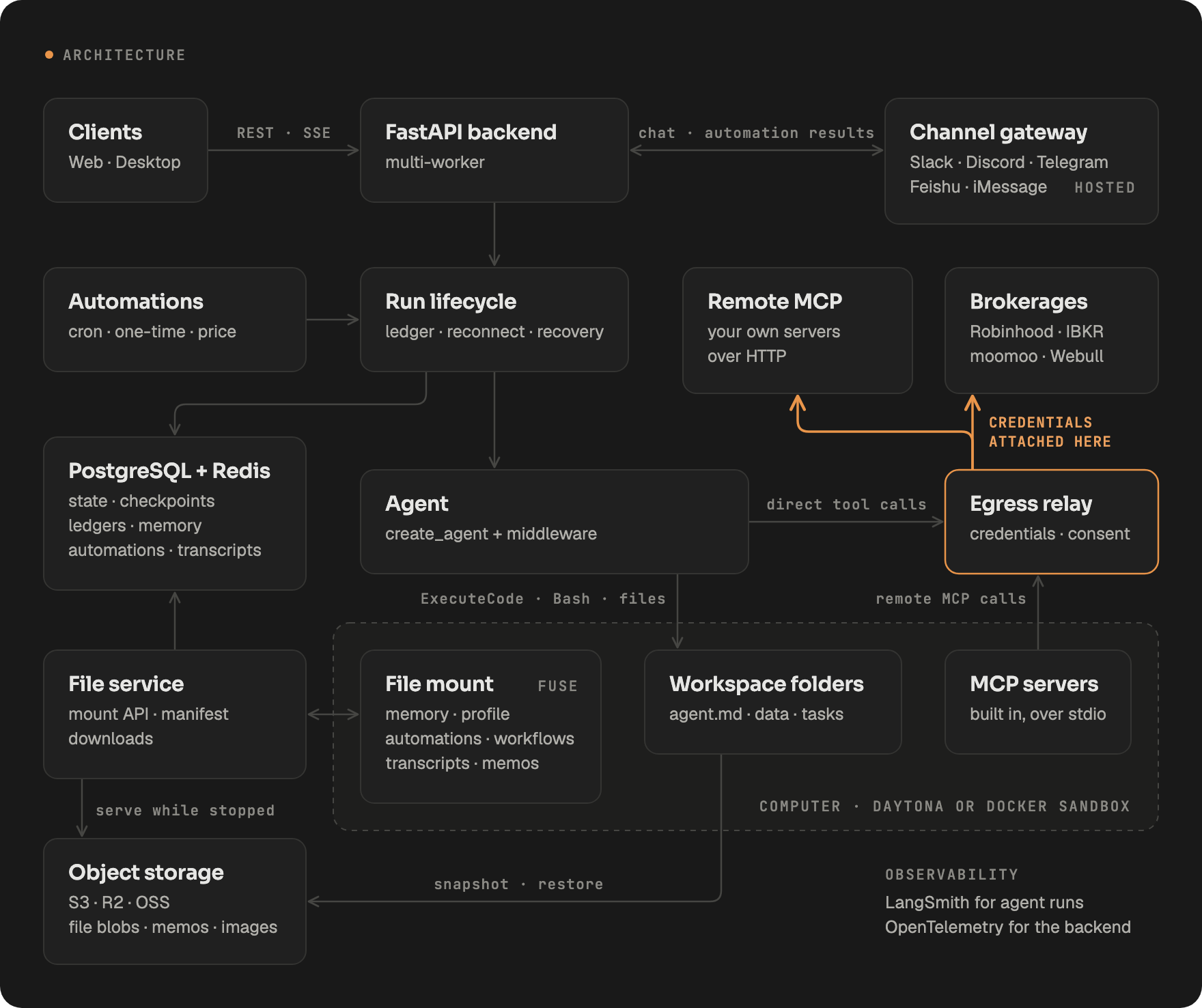
A turn runs as a background run, independent of the HTTP connection that started it. Events stream over SSE through a per-run Redis stream, so a closed tab or a dropped network loses nothing: the client reconnects and catches up, and finished turns replay from the LangGraph checkpoint. Postgres is the source of truth and Redis is transport, so the backend runs with several workers and any of them can serve the stream, drain the queue or recover an orphaned run. When configured, agent runs trace to LangSmith and the backend exports traces and metrics over OpenTelemetry.
Files outlive the sandbox. After each turn, and whenever a computer stops, every workspace folder that changed is snapshotted. The manifest is one Postgres row per path. The bytes go from the sandbox straight to S3-compatible object storage, or stay in Postgres when you run without one. The file browser and downloads keep working while the computer is off, and a recreated sandbox is restored from the snapshot. A Daytona computer left stopped for a week also archives its whole disk to cold storage and resumes from it on the next start.
The channel gateway is part of LangAlpha.ai. It carries Slack, Discord, Telegram, Feishu and iMessage conversations into the same chat API the web app uses, and posts automation results to the channel you pick.
Governed orders
An order moves real money, so it gets its own path. Order tools are pinned to direct JSON calls: one call is one order the system can see, show and stop. A sandbox script could place any number of orders in a single execution, so order tools are never exposed there.
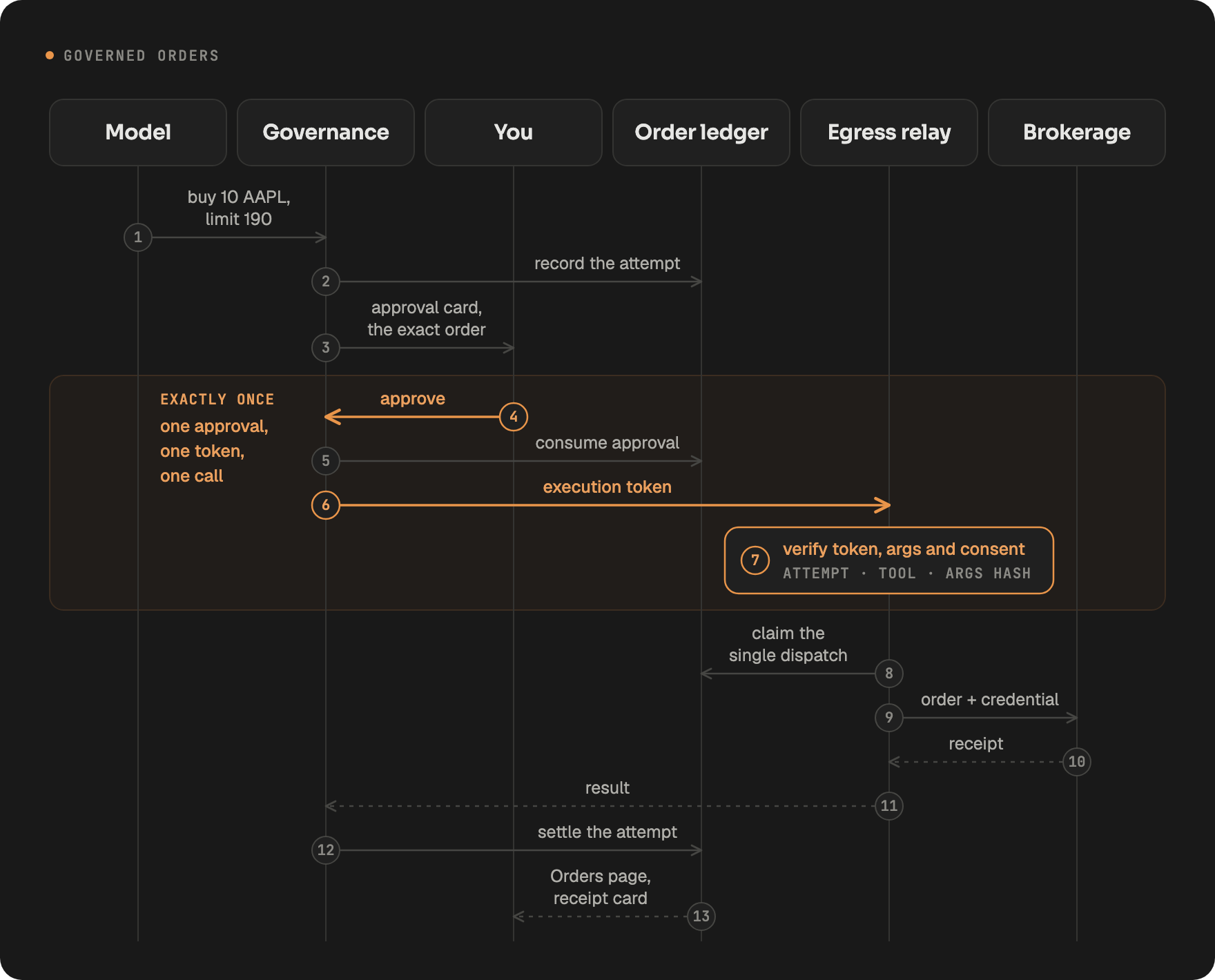
- Consent per connection. When you connect a brokerage you pick which capability groups it carries. The relay refuses any call outside them, whatever the model asks for.
- Approval per order. Live and staged orders wait for you by default and paper orders do not. Each mode is a switch you control.
- Exactly one execution. An approval mints a short-lived token bound to that attempt, that tool and a hash of those arguments. A changed argument, a replay or a second call fails at the relay.
- Broker credentials stay out of the sandbox. Brokerage OAuth tokens and remote MCP credentials are attached by the relay on the host, so code the agent writes never sees them.
- A ledger you can read. Every attempt, approval, rejection and fill lands on the Orders page, and a reconciler settles orders against the broker's own records.
Security
- Vault. Store an API key once and use it from code in any workspace with
from vault import get. Secrets are encrypted at rest and only the owner can reveal or change them. - Leak redaction. Every tool result is scanned for known secret values before it reaches the model, and matches are replaced with
[REDACTED:NAME]. Downloads and shared files get the same treatment. - Sandboxed execution. Agent code runs in a Daytona or Docker sandbox, and protected-path guards refuse tool calls that reach into system directories.
Roadmap
- [x] Research harness: data in code, persistent workspaces, agent teams
- [x] LangAlpha.ai and the desktop app
- [x] Brokerage connections with governed orders
- [ ] Agents tuned for crypto and prediction markets
- [ ] Let your own AI agent (ChatGPT, Claude) hand trades to LangAlpha
Contributing
Issues and pull requests are welcome; see CONTRIBUTING.md. The repo holds the backend and agent core (src/), the web app (web/), the desktop shell (desktop/) and built-in plugins (plugins/). For partnerships, email [email protected].
Disclaimer
LangAlpha is software, not a financial adviser. Nothing it produces is investment advice or a recommendation to buy or sell any security. Agents act only within the permissions you grant, and you are responsible for every order placed on your accounts. Do your own due diligence.