Deep-tempest: Using Deep Learning to Eavesdrop on HDMI from its Unintended Electromagnetic Emanations
Summary
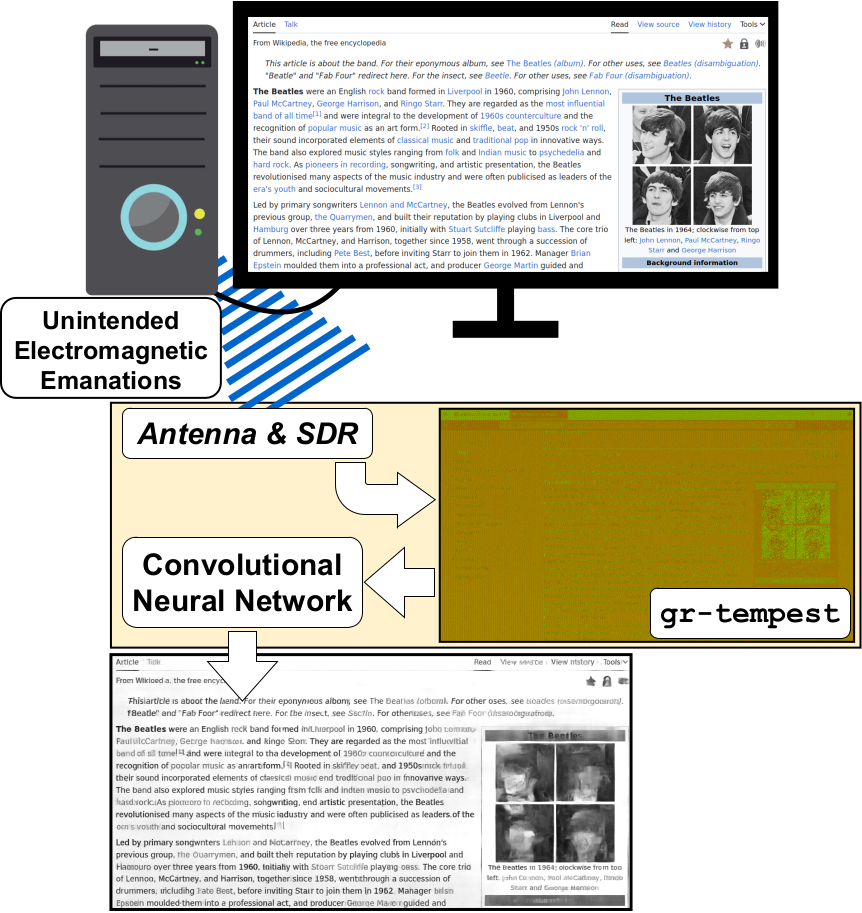
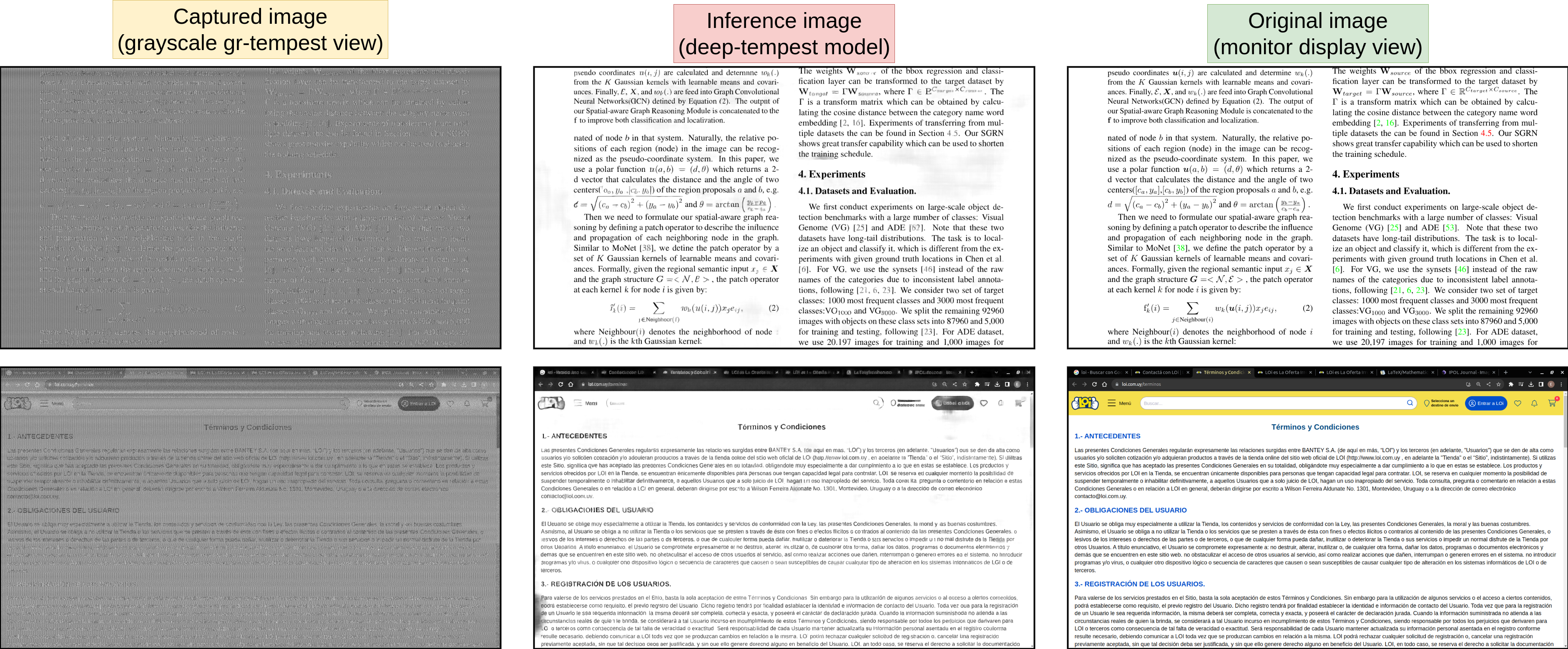
In this project we have extended the original gr-tempest (a.k.a. Van Eck Phreaking or simply TEMPEST; i.e. spying on a video display from its unintended electromagnetic emanations) by using deep learning to improve the quality of the spied images. See an illustrative diagram above. Some examples of the resulting inference of our system and the original unmodified version of gr-tempest below.
The following external webpages provide a nice summary of the work:
- NewScientist: AI can reveal what’s on your screen via signals leaking from cables
- RTL-SDR.com: DEEP-TEMPEST: EAVESDROPPING ON HDMI VIA SDR AND DEEP LEARNING
- PC World: Hackers can wirelessly watch your screen via HDMI radiation
- Techspot: AI can see what's on your screen by reading HDMI electromagnetic radiation
- Futura: Hallucinant : ce système permet d’afficher et espionner ce qu’il y a sur l’écran d’un ordinateur déconnecté
- hackster.io: Deep-TEMPEST Reveals All
- Hacker News: Deep-Tempest: Using Deep Learning to Eavesdrop on HDMI
- TechXplore: Security researchers reveal it is possible to eavesdrop on HDMI cables to capture computer screen data
- Tom's Hardware: AI can snoop on your computer screen using signals leaking from HDMI cables — researchers develop new AI model that enables using antennas for long-range attacks
- Montevideo Portal: ¿Por qué la inteligencia artificial puede ver una pantalla? Un estudio uruguayo indagó
- El Observador: Uruguayos interceptan señales del cable HDMI para espiar monitores y asombran al mundo
- El País: La amenaza invisible: uruguayos descubrieron cómo un hacker podría espiar tu pantalla a través del cable HDMI
Video demo
We are particularly interested in recovering the text present in the display, and we improve the Character Error Rate from 90% in the unmodified gr-tempest, to less than 30% using our module. Watch a video of the full system in operation:

How does it works? (and how to cite our work or data)
You can find a detailed technical explanation of how deep-tempest works in our article. If you found our work or data useful for your research, please consider citing it as follows:
@inproceedings{deep_tempest,
author = {Fern\'{a}ndez, Santiago and Mart\'{\i}nez, Emilio and Varela, Jorge and Mus\'{e}, Pablo and Larroca, Federico},
title = {Deep-TEMPEST: Using Deep Learning to Eavesdrop on HDMI from its Unintended Electromagnetic Emanations},
year = {2024},
url = {https://doi.org/10.1145/3697090.3697094},
booktitle = {Proceedings of the 13th Latin-American Symposium on Dependable and Secure Computing (LADC '24)},
}
Data
In addition to the source code, we are also open sourcing the whole dataset we used. Follow this dropbox link to download a ZIP file (~7GB). After unzipping, you will find synthetic and real captured images used for experiments, training, and evaluation during the work. These images consists of 1600x900 resolution with the SDR's center frequency at the third pixel-rate harmonic (324 MHz).
The structure of the directories containing the data is different for synthetic data compared to captured data:
Synthetic data
-
ground-truth (directory with reference/monitor view images)
- image1.png
- ...
- imageN.png
-
simulations (directory with synthetic degradation/capture images)
- image1_synthetic.png
- ...
- imageN_synthetic.png
Real data
- image1.png (image1 ground-truth)
- ...
- imageN.png (imageN ground-truth)
-
Image 1 (directory with captures of image1.png)
- capture1_image1.png
- ...
- captureM_image1.png
-
...
-
Image N (directory with captures of image1.png)
- capture1_imageN.png
- ...
- captureM_imageN.png
Code and Requirements
Clone the repository:
git clone https://github.com/emidan19/deep-tempest.git
Both gr-tempest and end-to-end folders contains a guide on how to execute the corresponding files for image capturing, inference and train the deep learning architecture based on DRUNet from KAIR image restoration repository.
deep-tempest Environment Setup
This guide describes how to set up the environment for using the deep-tempest repository. You can choose between two setup options: using Conda or Pyenv + venv. The code works with both Python 3.12 and Python 3.10, and has been tested on Ubuntu 22.04.5 LTS and Ubuntu 24.04.2 LTS, so you can choose either version depending on your system and preference. The example below use Python 3.12.
The system runs with CUDA 12.4, but the environment uses the PyTorch and Torchvision build for CUDA 12.1, as it is the latest stable release officially provided by PyTorch.
Prerequisite (Required for All Options):
Before setting up the environment, you must install Tesseract OCR:
sudo apt update
sudo apt install tesseract-ocr
Option 1: Using Conda:
Create and activate a new Conda environment:
conda create -n deeptempest python=3.12
conda activate deeptempest
Install dependencies from the provided YAML file:
conda env update --file tempest_conda.yml
Install additional required packages:
pip install torch==2.5.1+cu121 torchvision==0.20.1+cu121 --index-url https://download.pytorch.org/whl/cu121
pip install pybind11==2.13.6
pip install --no-build-isolation git+https://github.com/sfernandezr/fastwer.git
Option 2: Using Pyenv + venv
Create and activate a virtual environment:
python3.12 -m venv deeptempest
cd deeptempest
source bin/activate
Install dependencies from tempest_pyenv file:
pip install -r tempest_pyenv.txt
Install additional required packages manually:
pip install torch==2.5.1+cu121 torchvision==0.20.1+cu121 --index-url https://download.pytorch.org/whl/cu121
pip install pybind11==2.13.6
pip install --no-build-isolation git+https://github.com/sfernandezr/fastwer.git
Regarding installations with GNU Radio, it is necessary to use the gr-tempest version in this repository (which contains a modified version of the original gr-tempest). After this, run the following grc files flowgraphs to activate the hierblocks:
Finally run the flowgraph deep-tempest_example.grc to capture the monitor images and be able to recover them with better quality using the Save Capture block.
Credits
IIE Instituto de Ingeniería Eléctrica, Facultad de Ingeniería, Universidad de la República, Montevideo, Uruguay, http://iie.fing.edu.uy/investigacion/grupos/artes/
Please refer to the LICENSE file for contact information and further credits.