← Open Source
biolab

orange3

🍊 :bar_chart: :bulb: Orange: Interactive data analysis.

Model DevelopmentClassical MLPython
Open on GitHub
Momentum
+-1stars in 24 hours-0.0%
5.72k
Stars
1.11k
Forks
+3
This week
100
Contributors
Created 2013-02-22 · Updated 2026-10-16 · #18494 today
Top developers

biolab/orange3 is ranked 18,494 with 5,725 stars.

Same-category comparison

biolab/orange3 is ranked 18,494 among these 8 peers; yenchenlin/nerf-pytorch is ranked 18,487.

Same-category comparison
NameRankMetrics
guofei9987/scikit-opt18,472
Language:
Python
Stars:
6,720
Forks:
1,109
Description:
Genetic Algorithm, Particle Swarm Optimization, Simulated Annealing, Ant Colony Optimization Algorithm,Immune Algorithm, Artificial Fish Swarm Algorithm, Differential Evolution and TSP(Traveling salesman).
tyiannak/pyAudioAnalysis18,478
Language:
Python
Stars:
6,268
Forks:
1,211
Description:
Python Audio Analysis Library: Feature Extraction, Classification, Segmentation and Applications.
Lightning-AI/lit-llama18,485
Language:
Python
Stars:
6,080
Forks:
517
Description:
Implementation of the LLaMA language model based on nanoGPT. Supports flash attention, Int8 and GPTQ 4bit quantization, LoRA and LLaMA-Adapter fine-tuning, pre-training. Apache 2.0-licensed.
yenchenlin/nerf-pytorch18,487
Language:
Python
Stars:
6,054
Forks:
1,123
Description:
A PyTorch implementation of NeRF (Neural Radiance Fields) that reproduces the results.
tensorspace-team/tensorspace18,505
Language:
JavaScript
Stars:
5,198
Forks:
454
Description:
Neural network 3D visualization framework, build interactive and intuitive model in browsers, support pre-trained deep learning models from TensorFlow, Keras, TensorFlow.js.
Plachtaa/VITS-fast-fine-tuning18,511
Language:
Python
Stars:
5,001
Forks:
725
Description:
This repo is a pipeline of VITS finetuning for fast speaker adaptation TTS, and many-to-many voice conversion.
KaiyangZhou/deep-person-reid18,515
Language:
Python
Stars:
4,926
Forks:
1,219
Description:
Torchreid: Deep learning person re-identification in PyTorch.
TheoKanning/openai-java18,519
Language:
Java
Stars:
4,717
Forks:
1,171
Description:
OpenAI Api Client in Java.
Key parameters and specifications
ParameterValue
LanguagePython
CategoryModel Development
SubcategoryClassical ML
KeywordsData analysis, No code/Low code
Stars5,725
Forks1,114
Contributors100
Created date2013-02-22
Updated date2026-10-16
Stars in 1 day-1
Stars in 7 days3
Rank18,494
Previous rank4,753
Rank change-13,741
7-day stars rank6,590
Previous 7-day stars rank6,593
7-day stars rank change3
Total stars rank2,491
Previous total stars rank2,487
Total stars rank change-4
CountrySlovenia
README summary

Orange Data Mining [Orange] is a data mining and visualization toolbox for novice and expert alike. To explore data with Orange, one requires __no programming or in-depth mathematical knowledge__. We believe that workflow-based data science tools democratize data science by hiding complex underlying mechanics and exposing intuitive concepts. Anyone who owns data, or is motivated to peek into data, should have the means to do so. Installing On Windows and macOS, download the latest installer. To install an

add-on, head to in the menu bar. On Linux (or for development), install using conda, pip or uv. Installing with Conda First, install Miniconda for your OS. Then, create a new conda environment, and install orange3: Run Orange from the correct environment. Note that the first launch may take some time. For installation of an add-on, use: See specific add-on repositories for details. Installing with pip We recommend using our standalone installer or conda. Installation with pip

might require a C/C++ compiler (on Windows we suggest using Microsoft Visual Studio Build Tools). To install Orange, create and activate a virtual environment, then run: Run Orange by activating the environment and then executing . Note that the first launch may take some time. Installing with uv Install with add uv tools to the path (see instructions printed by uv) and then run orange with . Installing with winget (Windows only) To install Orange with winget, run: Developing Want to

write a widget? Use the Orange3 example add-on template. Join us on Discord, introduce yourself in #general! Take a look at our contributing guide and style guidelines. Check out our widget development docs for a comprehensive guide on writing Orange widgets. The Orange ecosystem The development of core Orange is primarily split into three repositories: biolab/orange-canvas-core implements the canvas, biolab/orange-widget-base is a handy widget GUI library, biolab/orange3 brings it all together and

implements the base data mining toolbox. Additionally, add-ons implement additional widgets for more specific use cases. Some of our first-party add-ons: biolab/orange3-text biolab/orange3-bioinformatics biolab/orange3-timeseries biolab/orange3-single-cell biolab/orange3-imageanalytics biolab/orange3-educational biolab/orange3-geo biolab/orange3-associate biolab/orange3-network biolab/orange3-explain Setting up for core Orange development First, fork the repository by pressing the fork button in the top-right corner of this page. Set your

GitHub username, create a conda environment, clone your fork, and install it: Now you're ready to work with git. See GitHub's guides on pull requests, forks if you're unfamiliar. If you're having trouble, get in touch on Discord. Running Run Orange with (after activating the conda environment). will skip the splash screen and welcome window, and output more debug info. Add to clear the widget settings before start. To explore the dark side of the Orange, try Argument lists all

available options. To run tests, use Setting up for development of all components Should you wish to contribute Orange's base

Frequently asked questions

How many stars and forks are recorded?

biolab/orange3 has 5,725 stars and 1,114 forks.

What is the repository rank?

biolab/orange3 is ranked 18,494.

What language and category are recorded?

biolab/orange3 has 5,725 stars, uses Python and belongs to Model Development.

Which repository is closest in rank?

biolab/orange3 is compared with yenchenlin/nerf-pytorch, ranked 18,487 with 6,054 stars.

README
[![Orange Data Mining](https://raw.githubusercontent.com/irgolic/orange3/README-shields/distribute/orange-title.png)](https://orange.biolab.si/download)


[![](https://img.shields.io/github/v/release/biolab/orange3?label=download)](https://orange.biolab.si/download)
[![](https://readthedocs.org/projects/orange3/badge/?version=latest)](https://orange3.readthedocs.io/en/latest/?badge=latest)
[![](https://img.shields.io/discord/633376992607076354?logo=discord&color=7389D8&logoColor=white&label=Discord)](https://discord.gg/FWrfeXV)

Orange Data Mining

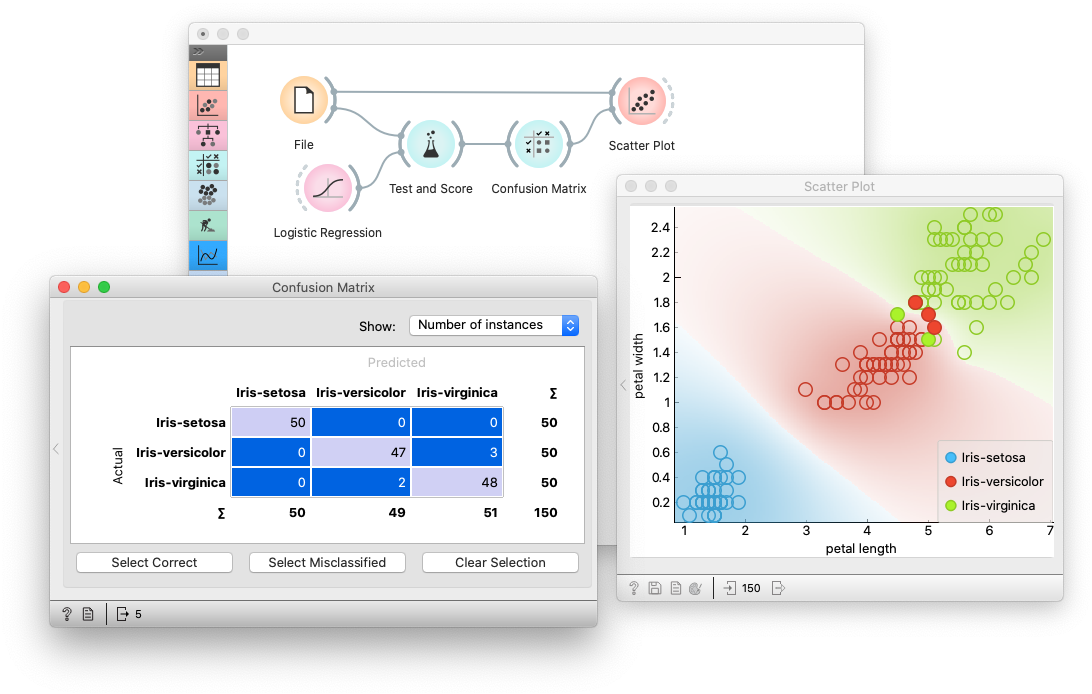
Orange is a data mining and visualization toolbox for novice and expert alike. To explore data with Orange, one requires no programming or in-depth mathematical knowledge. We believe that workflow-based data science tools democratize data science by hiding complex underlying mechanics and exposing intuitive concepts. Anyone who owns data, or is motivated to peek into data, should have the means to do so.

[![Example Workflow](https://raw.githubusercontent.com/irgolic/orange3/README-shields/distribute/orange-example-tall.png)](https://orange.biolab.si/download)
Installing

On Windows and macOS, download the latest installer. To install an add-on, head to Options -> Add-ons... in the menu bar.

On Linux (or for development), install using conda, pip or uv.

Installing with Conda

First, install Miniconda for your OS.

Then, create a new conda environment, and install orange3:

# Add conda-forge to your channels for access to the latest release
conda config --add channels conda-forge

# Perhaps enforce strict conda-forge priority
conda config --set channel_priority strict

# Create and activate an environment for Orange
conda create python=3.12 --yes --name orange3
conda activate orange3

# Install Orange
conda install orange3

Run Orange from the correct environment.

conda activate orange3
python -m Orange.canvas

Note that the first launch may take some time.

For installation of an add-on, use:

conda install orange3-

See specific add-on repositories for details.

Installing with pip

We recommend using our standalone installer or conda. Installation with pip might require a C/C++ compiler (on Windows we suggest using Microsoft Visual Studio Build Tools). To install Orange, create and activate a virtual environment, then run:

pip install PyQt6 PyQt6-WebEngine orange3

Run Orange by activating the environment and then executing python -m Orange.canvas. Note that the first launch may take some time.

Installing with uv

Install with

uv tool install -p 3.12 -w PyQt6,PyQt6-WebEngine orange3

add uv tools to the path (see instructions printed by uv) and then run orange with orange-canvas. The first launch may take some time.

Installing with winget (Windows only)

To install Orange with winget, run:

winget install --id  UniversityofLjubljana.Orange 

Developing

Want to write a widget? Use the Orange3 example add-on template.

Want to get involved? Join us on Discord, introduce yourself in #general!

Take a look at our contributing guide and style guidelines.

Check out our widget development docs for a comprehensive guide on writing Orange widgets.

The Orange ecosystem

The development of core Orange is primarily split into three repositories:

biolab/orange-canvas-core implements the canvas,
biolab/orange-widget-base is a handy widget GUI library,
biolab/orange3 brings it all together and implements the base data mining toolbox.

Additionally, add-ons implement additional widgets for more specific use cases. Anyone can write an add-on. Some of our first-party add-ons:

Setting up for core Orange development

First, fork the repository by pressing the fork button in the top-right corner of this page.

Set your GitHub username,

export MY_GITHUB_USERNAME=replaceme

create a conda environment, clone your fork, and install it:

conda create python=3.12 --yes --name orange3
conda activate orange3

git clone ssh://git@github.com/$MY_GITHUB_USERNAME/orange3

# Install PyQt. This will install PyQt6; you can also use PyQt5
pip install -r orange3/requirements-pyqt.txt
pip install -e orange3

Now you're ready to work with git. See GitHub's guides on pull requests, forks if you're unfamiliar. If you're having trouble, get in touch on Discord.

Running

Run Orange with python -m Orange.canvas (after activating the conda environment).

python -m Orange.canvas -l 2 --no-splash --no-welcome will skip the splash screen and welcome window, and output more debug info. Use -l 4 for more.

Add --clear-widget-settings to clear the widget settings before start.

To explore the dark side of the Orange, try --style=fusion:breeze-dark

Argument --help lists all available options.

To run tests, use unittest Orange.tests Orange.widgets.tests

Setting up for development of all components

Should you wish to contribute Orange's base components (the widget base and the canvas), you must also clone these two repositories from Github instead of installing them as dependencies of Orange3.

First, fork all the repositories to which you want to contribute.

Set your GitHub username,

export MY_GITHUB_USERNAME=replaceme

create a conda environment, clone your forks, and install them:

conda create python=3.12 --yes --name orange3
conda activate orange3

# Install PyQT and PyQtWebEngine. You can also use PyQt6
pip install -r requirements-pyqt.txt

git clone ssh://git@github.com/$MY_GITHUB_USERNAME/orange-widget-base
pip install -e orange-widget-base

git clone ssh://git@github.com/$MY_GITHUB_USERNAME/orange-canvas-core
pip install -e orange-canvas-core

git clone ssh://git@github.com/$MY_GITHUB_USERNAME/orange3
pip install -e orange3

# Repeat for any add-on repositories

It's crucial to install orange-base-widget and orange-canvas-core before orange3 to ensure that orange3 will use your local versions.

Nearby in the ranking
Similar items
