MonoSDF: Exploring Monocular Geometric Cues for Neural Implicit Surface Reconstruction
[Zehao Yu](https://niujinshuchong.github.io/)
·
[Songyou Peng](https://pengsongyou.github.io/)
·
[Michael Niemeyer](https://m-niemeyer.github.io/)
·
[Torsten Sattler](https://tsattler.github.io/)
·
[Andreas Geiger](http://www.cvlibs.net/)
NeurIPS 2022
Paper | Project Page | SDFStudio
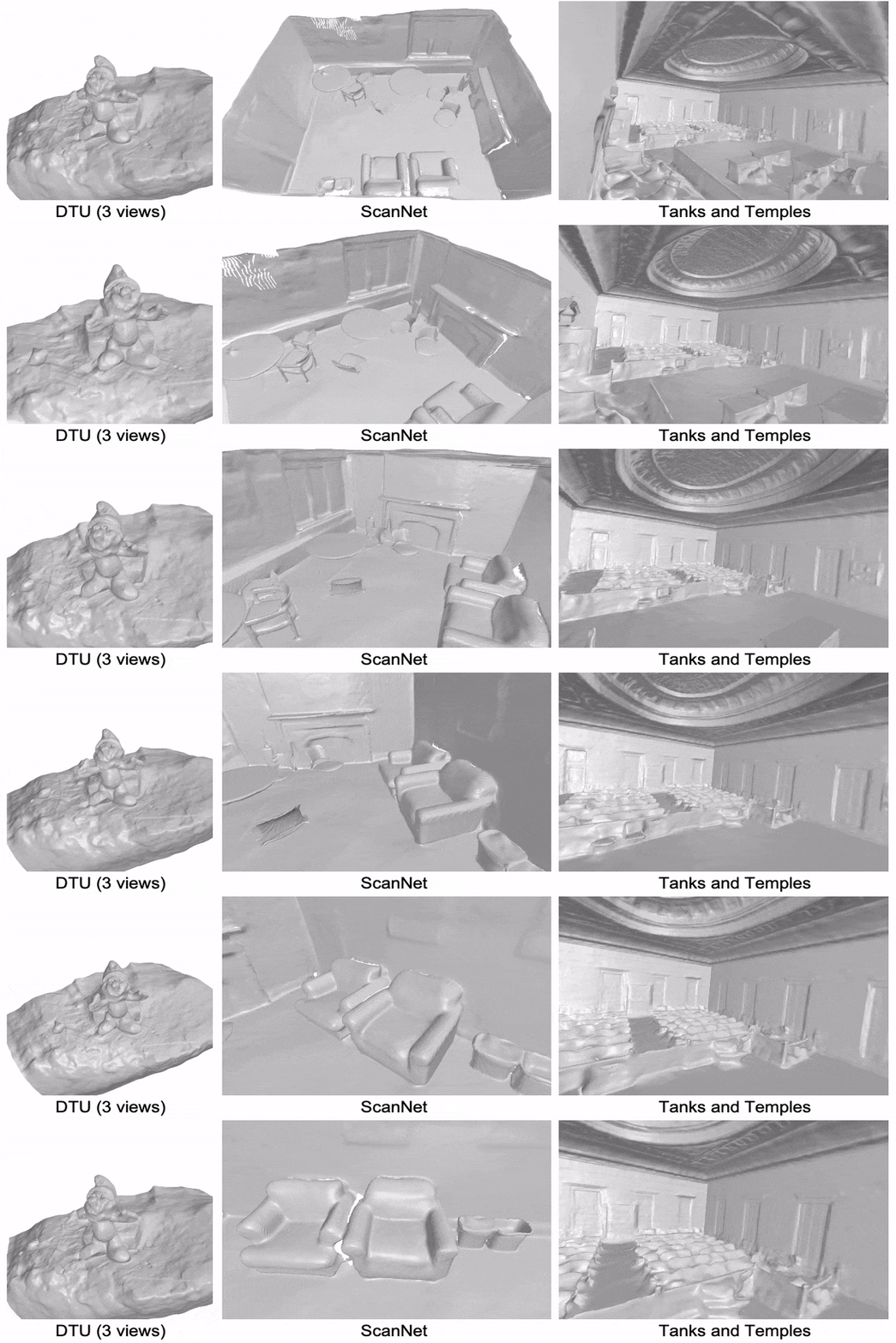
We demonstrate that state-of-the-art depth and normal cues extracted from monocular images are complementary to reconstruction cues and hence significantly improve the performance of implicit surface reconstruction methods.
Update
MonoSDF is integrated to SDFStudio, where monocular depth and normal cues can be applied to UniSurf and NeuS. Please check it out.
Setup
Installation
Clone the repository and create an anaconda environment called monosdf using
git clone git@github.com:autonomousvision/monosdf.git
cd monosdf

conda create -y -n monosdf python=3.8
conda activate monosdf

conda install pytorch torchvision cudatoolkit=11.3 -c pytorch
conda install cudatoolkit-dev=11.3 -c conda-forge

pip install -r requirements.txt
The hash encoder will be compiled on the fly when running the code.
Dataset
For downloading the preprocessed data, run the following script. The data for the DTU, Replica, Tanks and Temples is adapted from VolSDF, Nice-SLAM, and Vis-MVSNet, respectively.
bash scripts/download_dataset.sh
Training
Run the following command to train monosdf:
cd ./code
CUDA_VISIBLE_DEVICES=0 python -m torch.distributed.launch --nproc_per_node 1 --nnodes=1 --node_rank=0 training/exp_runner.py --conf CONFIG  --scan_id SCAN_ID
where CONFIG is the config file in code/confs, and SCAN_ID is the id of the scene to reconstruct.
We provide example commands for training DTU, ScanNet, and Replica dataset as follows:
# DTU scan65
CUDA_VISIBLE_DEVICES=0 python -m torch.distributed.launch --nproc_per_node 1 --nnodes=1 --node_rank=0 training/exp_runner.py --conf confs/dtu_mlp_3views.conf  --scan_id 65

# ScanNet scan 1 (scene_0050_00)
CUDA_VISIBLE_DEVICES=0 python -m torch.distributed.launch --nproc_per_node 1 --nnodes=1 --node_rank=0 training/exp_runner.py --conf confs/scannet_mlp.conf  --scan_id 1

# Replica scan 1 (room0)
CUDA_VISIBLE_DEVICES=0 python -m torch.distributed.launch --nproc_per_node 1 --nnodes=1 --node_rank=0 training/exp_runner.py --conf confs/replica_mlp.conf  --scan_id 1
We created individual config file on Tanks and Temples dataset so you don't need to set the scan_id. Run training on the courtroom scene as:
CUDA_VISIBLE_DEVICES=0 python -m torch.distributed.launch --nproc_per_node 1 --nnodes=1 --node_rank=0 training/exp_runner.py --conf confs/tnt_mlp_1.conf
We also generated high resolution monocular cues on the courtroom scene and it's better to train with more gpus. First download the dataset
bash scripts/download_highres_TNT.sh
Then run training with 8 gpus:
CUDA_VISIBLE_DEVICES=0,1,2,3,4,5,6,7,8 python -m torch.distributed.launch --nproc_per_node 8 --nnodes=1 --node_rank=0 training/exp_runner.py --conf confs/tnt_highres_grids_courtroom.conf
Of course, you can also train on all other scenes with multi-gpus.
Evaluations
DTU
First, download the ground truth DTU point clouds:
bash scripts/download_dtu_ground_truth.sh
then you can evaluate the quality of extracted meshes (take scan 65 for example):
python evaluate_single_scene.py --input_mesh scan65_mesh.ply --scan_id 65 --output_dir dtu_scan65
We also provide script for evaluating all DTU scenes:
python evaluate.py
Evaluation results will be saved to evaluation/DTU.csv by default, please check the script for more details.
Replica
Evaluate on one scene (take scan 1 room0 for example)
cd replica_eval
python evaluate_single_scene.py --input_mesh replica_scan1_mesh.ply --scan_id 1 --output_dir replica_scan1
We also provided script for evaluating all Replica scenes:
cd replica_eval
python evaluate.py
please check the script for more details.
ScanNet
cd scannet_eval
python evaluate.py
please check the script for more details.
Tanks and Temples
You need to submit the reconstruction results to the official evaluation server, please follow their guidance. We also provide an example of our submission here for reference.
Custom dataset
We provide an example of how to train monosdf on custom data (Apartment scene from nice-slam). First, download the dataset and run the script to subsample training images, normalize camera poses, and etc.
bash scripts/download_apartment.sh
cd preprocess
python nice_slam_apartment_to_monosdf.py
Then, we can extract monocular depths and normals (please install omnidata model before running the command):
python extract_monocular_cues.py --task depth --img_path ../data/Apartment/scan1/image --output_path ../data/Apartment/scan1 --omnidata_path YOUR_OMNIDATA_PATH --pretrained_models PRETRAINED_MODELS
python extract_monocular_cues.py --task normal --img_path ../data/Apartment/scan1/image --output_path ../data/Apartment/scan1 --omnidata_path YOUR_OMNIDATA_PATH --pretrained_models PRETRAINED_MODELS
Finally, we train monosdf as
CUDA_VISIBLE_DEVICES=0 python -m torch.distributed.launch --nproc_per_node 1 --nnodes=1 --node_rank=0 training/exp_runner.py --conf confs/nice_slam_grids.conf
Pretrained Models
First download the pretrained models with
bash scripts/download_pretrained.sh
Then you can run inference with (DTU for example)
cd code
python evaluation/eval.py --conf confs/dtu_mlp_3views.conf --checkpoint ../pretrained_models/dtu_3views_mlp/scan65.pth --scan_id 65 --resolution 512 --eval_rendering --evals_folder ../pretrained_results
You can also run the following script to extract all the meshes:
python scripts/extract_all_meshes_from_pretrained_models.py
High-resolution Cues
Here we privode script to generate high-resolution cues, and training with high-resolution cues. Please refer to our supplementary for more details.
First you need to download the Tanks and Temples dataset from here and unzip it to data/tanksandtemples. Then you can run the script to create overlapped patches
cd preprocess
python generate_high_res_map.py --mode create_patches
and run the Omnidata model to predict monocular cues for each patch
python extract_monocular_cues.py --task depth --img_path ./highres_tmp/scan1/image/ --output_path ./highres_tmp/scan1 --omnidata_path YOUR_OMNIDATA_PATH --pretrained_models PRETRAINED_MODELS
python extract_monocular_cues.py --task depth --img_path ./highres_tmp/scan1/image/ --output_path ./highres_tmp/scan1 --omnidata_path YOUR_OMNIDATA_PATH --pretrained_models PRETRAINED_MODELS
This step will take a long time (~2 hours) since there are many patches and the model only use a batch size of 1.
Then run the script again to merge the output of Omnidata.
python generate_high_res_map.py --mode merge_patches
Now you can train the model with
CUDA_VISIBLE_DEVICES=0,1,2,3,4,5,6,7,8 python -m torch.distributed.launch --nproc_per_node 8 --nnodes=1 --node_rank=0 training/exp_runner.py --conf confs/tnt_highres_grids_courtroom.conf
Please note that the script for generating high-resolution cues only works for the Tanks and Temples dataset. You need to adapt it if you want to apply to other dataset.
Acknowledgements
This project is built upon VolSDF. We use pretrained Omnidata for monocular depth and normal extraction. Cuda implementation of Multi-Resolution hash encoding is based on torch-ngp. Evaluation scripts for DTU, Replica, and ScanNet are taken from DTUeval-python, Nice-SLAM and manhattan-sdf respectively. We thank all the authors for their great work and repos.
Citation
If you find our code or paper useful, please cite
@article{Yu2022MonoSDF,
  author    = {Yu, Zehao and Peng, Songyou and Niemeyer, Michael and Sattler, Torsten and Geiger, Andreas},
  title     = {MonoSDF: Exploring Monocular Geometric Cues for Neural Implicit Surface Reconstruction},
  journal   = {Advances in Neural Information Processing Systems (NeurIPS)},
  year      = {2022},
}