 ___       _       _ _ _                  _     _____              _ _               ____        _
|_ _|_ __ | |_ ___| | (_) __ _  ___ _ __ | |_  |_   _| __ __ _  __| (_)_ __   __ _  | __ )  ___ | |_
 | || '_ \| __/ _ \ | | |/ _` |/ _ \ '_ \| __|   | || '__/ _` |/ _` | | '_ \ / _` | |  _ \ / _ \| __|
 | || | | | ||  __/ | | | (_| |  __/ | | | |_    | || | | (_| | (_| | | | | | (_| | | |_) | (_) | |_
|___|_| |_|\__\___|_|_|_|\__, |\___|_| |_|\__|   |_||_|  \__,_|\__,_|_|_| |_|\__, | |____/ \___/ \__|
                         |___/                                               |___/
₿   Ξ   ₳   ₮   ✕   ◎   ●   Ð   Ł   Ƀ   Ⱥ   ∞   ξ   ◈   ꜩ   ɱ   ε   ɨ   Ɓ   Μ   Đ  ⓩ  Ο   Ӿ   Ɍ  ȿ
📈 Intelligent Trading Signals 📉 ****
Intelligent trading bot
The aim of the project is to develop an intelligent trading bot for automated trading including cryptocurrencies using state-of-the-art machine learning (ML) algorithms and feature engineering. The project provides the following major functionalities:
- Clear and consistent separation between offline (batch) mode for training ML models and online (stream) mode for predicting based on the trained models. One of the main challenges here is to guarantee that the same (derived) features are used in both modes
- Extensible approach to defining derived features using (Python) functions including standard technical indicators as well as arbitrary custom features
- Providing possibility to work with different trade frequencies (time rasters), for example, 1 minute, 1 hour or 1 day
- Customizable functions for sending signals or predictions in online mode, for example, sending to Telegram channels, API end-point, storing in a database or executing real transactions
- Functions for backtesting and measuring trade performance on historic data which is more difficult because requires periodic re-train of the used ML models
- Trading service for online mode which uses a configuration file to regtularly retrieve data updates, do analysis and send signals or execute trade transactions
Intelligent trading signals
The signaling service is running in cloud and sends its signals to this Telegram channel:
📈 Intelligent Trading Signals 📉 ****
Everybody can subscribe to the channel to get the impression about the signals this bot can generate.
Currently, the bot is configured using the following parameters:
- Exchange: Binance
- Cryptocurrency: ₿ Bitcoin (BTCUSDT)
- Analysis frequency: 1 minute
- Intelligent indicator between -1 and +1. Negative values mean decrease, and positive values mean increase of the price
Example notification:
₿ 24.518 📉📉📉 Score: -0.26
The first number is the latest close price. The score -0.26 means that it is very likely to see the price lower than the current close price.
If the intelligent indicator exceeds some threshold specified in the model then buy or sell signal is generated:
〉〉〉📈 ₿ 74,896 Indicator: +0.12 ↑ BUY ZONE 1min
Here three arrows mean buy signal for bitcoin at the current price 74,896 and the indicator value 0.12. 1min frequence (analysis every minute). Such messages can be customized using Python functions including diagrams.
Training machine learning models (offline)
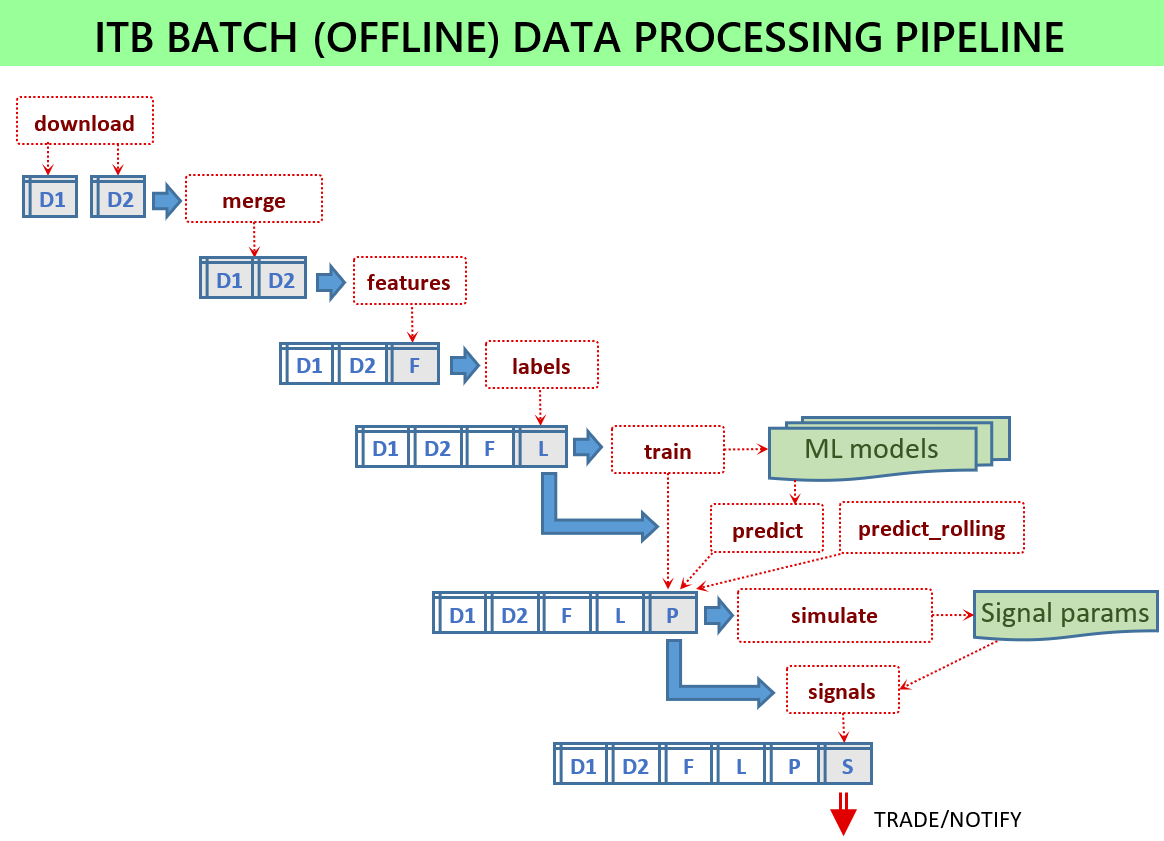
For the signaler service to work, a number of ML models must be trained and the model files available for the service. All scripts run in batch mode by loading some input data and storing some output files. The batch scripts are located in the scripts module.
If everything is configured, then the following scripts have to be executed:
python -m scripts.download -c config.jsonpython -m scripts.merge -c config.jsonpython -m scripts.features -c config.jsonpython -m scripts.labels -c config.jsonpython -m scripts.train -c config.jsonpython -m scripts.predict -c config.jsonpython -m scripts.signals -c config.jsonpython -m scripts.output -c config.json
All necessary parameters are provided in the configuration file. The project provides some sample configuration files in the config folder.
Some common parameters of the configuration file:
data_folder- location of data files which are needed only for batch offline modesymbolit is a trading pair likeBTCUSDTdescriptionAny text helping understand the purpose of this configuration filefreqdata frequency according topandasconventions
Download data
This batch script will download historic data from one or more data sources and store them in separate files. The data sources are listed in the data_sources section. One entry in this list specifies a data source as well as column_prefix used to distinguish columns with the same name from different sources. Currently data sources are not extendable and it is possible only to download from Binance and Yahoo.
Merging source data
The downloaded data are stored in multiple files. The system however works with only one data table therefore all these data entries (like candle lines) must be merged into one table. This is done by the merge script. It aligns all data entries according to their time stamp, that is, one record in the output file will merge records with the same time stamp from all input files. In addition, it will produce continuous raster in case there are gaps in the input files.
Generate features
This script is intended for computing derived features. These features will be added as additional columns to the data table. Feature definitions are provided in the feature_sets section of the configuration file. Each entry in this list specifies a feature generator as well as its parameters. The script loads one merged input file, applies feature generation procedures and stores all derived features in an output file.
Here are some notes on the current implementation:
- Not all generated features must be used for training and prediction. Some of them can be used as input to next features. Other feature could be used only for the feature selection process where we want to find which of them have better predictive power. For the train/predict phases, a separate explicit list of features is specified
- Currently it runs in non-incremental model by computing features for all available input records (and not only for the latest update), and hence it may take hours for complex configurations. Yet, in online (stream) mode, features can be computed more efficiently if it is supported by the feature generator
- Feature generation functions get additional parameters like windows from the config section
- The same features must be used in online (stream) mode (in the service when they are applied to a micro-batch) and offline mode. This is guaranteed by design
Here are some pre-defined feature generators (although it is possible to define custom feature generation functions):
talibfeature generator relies on the TA-lib technical analysis library. Here an example of its configuration:"config": {"columns": ["close"], "functions": ["SMA"], "windows": [5, 10, 15]}itbstatsfeature generator implements functions which can be found in tsfresh likescipy_skew,scipy_kurtosis,lsbm(longest strike below mean),fmax(first location of maximum),mean,std,area,slope. Here are typical parameters:"config": {"columns": ["close"], "functions": ["skew", "fmax"], "windows": [5, 10, 15]}itblibfeature generator implemented in ITB but most of its features can be generated (much faster) via talibtsfreshgenerates functions from the tsfresh library
Generate labels
This script is similar to feature generation because it adds new columns to the input file. However, these columns describe something that we want to predict and what is not known when executing in online mode. In other words, features are computed from previous (historic) data while labels are computed from future data which are not visible in online mode yet. For example, a label could find maximum price increase during next hour in percent. Computationally it is the same as computing features but this step is separate because we do not need (and cannot compute) this in online mode. This script will apply all labels defined in the label_sets section, add them as new columns and store the result in the output file. Just like for features, not all labels must be really used -- they could be generated for exploratory purposes. The really used labels are listed in the labels section.
Here are some pre-defined label generators:
highlowlabel generator returns True if the price is higher than the specified threshold within some future horizonhighlow2Computes future increases (decreases) with the conditions that there are no significant decreases (increases) before that. Here is its typical configuration:"config": {"columns": ["close", "high", "low"], "function": "high", "thresholds": [1.0, 1.5, 2.0], "tolerance": 0.2, "horizon": 10080, "names": ["first_high_10", "first_high_15", "first_high_20"]}topbotDeprecatedtopbot2Computes maximum and minimum values (labeled as True). Every labelled maximum (minimum) is guaranteed to be surrounded by minimums (maximums) lower (higher) than the specified level. The required minimum difference between adjacent minimums and maximums is specified vialevelparameters. The tolerance parameter allows for including also points close to the maximum/minimum. Here is a typical configuration:"config": {"columns": "close", "function": "bot", "level": 0.02, "tolerances": [0.1, 0.2], "names": ["bot2_1", "bot2_2"]}
Train prediction models
This script is needed only in batch (offline) mode and its purpose is to analyze historic data and produce ML models as output files. These ML models store in a condensed form some knowledge about the time series and they are used then in online (stream) model for forecasting. More specifically, one ML model is trained to predict some label based on the generated features. When this model is applied to the latest data in online mode, it will predict the value of this label which is normally used to make some trade decision.
The parameters for the train script are specified in the train_feature_sets section. Currently classification and regression algorithms can be used. They can automatically scale input features if specified in the configuration. The trained models are applied to the train data set and the prediction scores are stored in this file prediction-metrics.txt.
Post-processing
After ML models were applied and some predictions were generated as new columns (in online mode), we might want to compute something else based on these predictions. It is very similar to normal feature generation with the difference that it is done after predictions. Frequently we want to aggregate the predictions generated by ML algorithms for different labels and produce one intelligent indicator which is supposed to be used for making trade decisions. These computations are performed according to parameters in the signal_sets section which has same structure as feature generators. The result is one or more new columns.
Output signal generation
Each previous step adds new columns to the data table with historic (in batch mode) or latest (in stream model) data table. Yet, we need to provide some functions for interacting with external systems, for example, sending messages, storing signals in the database or executing real transactions (buying or selling some assets). How it is done is configured in the output_sets. Each entry in this list specifies a function which is supposed to do some interaction with an external system. For example, the generator score_notification_model will send a message to the configured Telegram channel.
Backtesting
When training ML models we need to find the best hyper-parameters. This is done in some traditional ways and is not explicitly supported by this framework. Yet, even if we find good hyper-parameters this does not guarantee that our trade performance will be good. The ultimate criterion for choosing among various features, labels, ML algorithms and their hyper-parameters is trade performance. Computing real (or close to real) trade performance is supported by the following two scripts working with historic data and helping to estimate trade performance of the whole pipeline.
The predict_rolling script applies prediction to some data (similar to the predict script) but does it by regularly re-training ML models. This makes the predictions much more realistic because the models are applied to unseen data only (data which is was not used for training) but the models are regularly re-trained after enough new data was collected. It is precisely what is done in real system but this script applies this to historic data. The scripts implements rolling walk-forward splits by training the models for each using previous data and applying them for predicting the next predict interval.
The simulate script applies some (pre-defined) logic of trading to historic data which includes all data expected in online mode. Essentially, it scans the historic data by applying the trade rules and produces buy-sell transactions which are then aggregated.
Online service
This script starts a service: python -m service.server -c config.json
The service will periodically (for example, every minute) execute these tasks:
- Retrieve the latest data from the server and update the current data window which includes some history (the history length is defined by a configuration parameter)
- Compute derived features based on the nearest history collected (which now includes the latest data). The features to be computed are described in the configuration file and are exactly the same as used in batch mode during model training
- Apply several (previously trained) ML models by predicting values of the labels which are also treated as (more complex) derived features. Trained models are loaded from the
MODELSfolder specified in the configuration file - Aggregate the results of forecasting produced by different ML models and compute the final signal score which reflects the strength of the upward or downward trend. Here we use many previously computed scores as inputs and derive one output score.
- Execute functions for interacting with external systems, for example, by sending notifications to a Telegram channel. It is also possible to configure a real trader which will execute buy or sell transactions
Related projects
- https://github.com/CryptoSignal/Crypto-Signal Github.com/CryptoSignal - #1 Quant Trading & Technical Analysis Bot
- https://github.com/tensortrade-org/tensortrade An open source reinforcement learning framework for training, evaluating, and deploying robust trading agents
- https://github.com/Superalgos/Superalgos Free, open-source crypto trading bot, automated bitcoin / cryptocurrency trading software, algorithmic trading bots. Visually design your crypto trading bot, leveraging an integrated charting system, data-mining, backtesting, paper trading, and multi-server crypto bot deployments
- https://github.com/kieran-mackle/AutoTrader A Python-based development platform for automated trading systems - from backtesting to optimisation to livetrading
- https://github.com/areed1192/python-trading-robot A trading robot, that can submit basic orders in an automated fashion using the TD API
- https://github.com/jmrichardson/tuneta Intelligently optimizes technical indicators and optionally selects the least intercorrelated for use in machine learning models
- https://github.com/Erfaniaa/binance-futures-trading-bot Easy-to-use multi-strategic automatic trading for Binance Futures with Telegram integration
- https://github.com/smileinnovation/cryptocurrency-trading How to make profits in cryptocurrency trading with machine learning
Backtesting
- https://github.com/nautechsystems/nautilus_trader
- https://github.com/mementum/backtrader
- https://github.com/kernc/backtesting.py
External integrations
- https://github.com/ccxt/ccxt A JavaScript / Python / PHP cryptocurrency trading API with support for more than 100 bitcoin/altcoin exchanges
- https://github.com/aiogram/aiogram Is a pretty simple and fully asynchronous framework for Telegram Bot API
- https://github.com/sammchardy/python-binance