← Open Source
arunponnusamy

cvlib

A simple, high level, easy to use, open source Computer Vision library for Python.

Model DevelopmentClassical MLPython
Open on GitHub
Momentum
+0stars in 24 hours0.0%
669
Stars
126
Forks
+0
This week
4
Contributors
Created 2018-02-23 · Updated 2026-10-06 · #15236 today
Top developers
arunponnusamywDove1rafaelgrecco

arunponnusamy/cvlib is ranked 15,236 with 669 stars.

Same-category comparison

arunponnusamy/cvlib is ranked 15,236 among these 8 peers; google-deepmind/hanabi-learning-environment is ranked 15,238.

Same-category comparison
NameRankMetrics
PaddlePaddle/Knover15,230
Language:
Python
Stars:
669
Forks:
124
Description:
Large-scale open domain KNOwledge grounded conVERsation system based on PaddlePaddle.
QuantClimate/GPJax15,231
Language:
Python
Stars:
669
Forks:
83
Description:
Gaussian processes in JAX and Equinox.
TropComplique/mtcnn-pytorch15,232
Language:
Jupyter Notebook
Stars:
669
Forks:
162
Description:
Joint Face Detection and Alignment using Multi-task Cascaded Convolutional Networks.
Waikato/moa15,233
Language:
Java
Stars:
669
Forks:
369
Description:
MOA is an open source framework for Big Data stream mining. It includes a collection of machine learning algorithms (classification, regression, clustering, outlier detection, concept drift detection and recommender systems) and tools for evaluation.
google-deepmind/hanabi-learning-environment15,238
Language:
Python
Stars:
669
Forks:
164
Description:
hanabi_learning_environment is a research platform for Hanabi experiments.
mks0601/ExAvatar_RELEASE15,240
Language:
Python
Stars:
669
Forks:
72
Description:
Official PyTorch implementation of "Expressive Whole-Body 3D Gaussian Avatar", ECCV 2024.
sail-sg/lorahub15,242
Language:
Python
Stars:
669
Forks:
44
Description:
[COLM 2024] LoraHub: Efficient Cross-Task Generalization via Dynamic LoRA Composition.
PetarV-/DGI15,246
Language:
Python
Stars:
668
Forks:
135
Description:
Deep Graph Infomax (https://arxiv.org/abs/1809.10341).
Key parameters and specifications
ParameterValue
LanguagePython
CategoryModel Development
SubcategoryClassical ML
KeywordsComputer vision, Object detection
Stars669
Forks126
Contributors4
Created date2018-02-23
Updated date2026-10-06
Stars in 1 day0
Stars in 7 days0
Rank15,236
Previous rank15,059
Rank change-177
7-day stars rank14,883
Previous 7-day stars rank14,899
7-day stars rank change16
Total stars rank15,409
Previous total stars rank15,387
Total stars rank change-22
CountryIndia
README summary

cvlib A simple, high level, easy-to-use open source Computer Vision library for Python. Installation Installing dependencies Provided the below python packages are installed, cvlib is completely pip installable. OpenCV TensorFlow If you don't have them already installed, you can install through pip Optional or you can compile them from source if you want to enable optimizations for your specific hardware for better performance. If you are working with GPU, you can install package through . Make sure you have

the necessary Nvidia drivers installed preoperly (CUDA ToolKit, CuDNN etc). If you are not sure, just go with the cpu-only package. You can also compile OpenCV from source to enable CUDA optimizations for Nvidia GPU. Installing cvlib To upgrade to the newest version Optional If you want to build cvlib from source, clone this repository and run the below commands. ** Face detection Detecting faces in an image is as simple as just calling the function . It will return the

bounding box corners and corresponding confidence for all the faces detected. Example : Seriously, that's all it takes to do face detection with . Underneath it is using OpenCV's module with a pre-trained caffemodel to detect faces. To enable GPU Checkout in directory for the complete code. Sample output : Gender detection Once face is detected, it can be passed on to function to recognize gender. It will return the labels (man, woman) and associated probabilities. Example Underneath is using an AlexNet

-like model trained on Adience dataset by Gil Levi and Tal Hassner for their CVPR 2015 paper. To enable GPU Checkout in directory for the complete code. Sample output : Object detection Detecting common objects in the scene is enabled through a single function call . It will return the bounding box co-ordinates, corrensponding labels and confidence scores for the detected objects in the image. Example : Underneath it uses YOLOv4 model trained on COCO dataset capable of detecting 80 common objects

in context. To enable GPU Checkout in directory for the complete code. Real time object detection is actually a heavy model to run on CPU. If you are working with real time webcam / video feed and doesn't have GPU, try using which is a smaller version of the original YOLO model. It's significantly fast but less accurate. Other supported models: YOLOv3, YOLOv3-tiny. Custom trained YOLO weights To run inference with custom trained YOLOv3/v4 weights try the following To

enable GPU Checkout the example to learn more. Sample output : Utils Video to frames method can be helpful when you want to grab all the frames from a video. Just pass the path to the video, it will return all the frames in a list. Each frame in the list is a numpy array. Optionally you can pass in a directory path to save all the frames to disk. Creating gif method lets you create gif from a list of

images. Just pass a list of images or path to a directory containing images and output gif name as arguments

Frequently asked questions

How many stars and forks are recorded?

arunponnusamy/cvlib has 669 stars and 126 forks.

What is the repository rank?

arunponnusamy/cvlib is ranked 15,236.

What language and category are recorded?

arunponnusamy/cvlib has 669 stars, uses Python and belongs to Model Development.

Which repository is closest in rank?

arunponnusamy/cvlib is compared with google-deepmind/hanabi-learning-environment, ranked 15,238 with 669 stars.

README

cvlib

A simple, high level, easy-to-use open source Computer Vision library for Python.

Installation

Installing dependencies

Provided the below python packages are installed, cvlib is completely pip installable.

  • OpenCV
  • TensorFlow

If you don't have them already installed, you can install through pip

pip install opencv-python tensorflow

Optional

or you can compile them from source if you want to enable optimizations for your specific hardware for better performance. If you are working with GPU, you can install tensorflow-gpu package through pip. Make sure you have the necessary Nvidia drivers installed preoperly (CUDA ToolKit, CuDNN etc).

If you are not sure, just go with the cpu-only tensorflow package.

You can also compile OpenCV from source to enable CUDA optimizations for Nvidia GPU.

Installing cvlib

pip install cvlib

To upgrade to the newest version pip install --upgrade cvlib

Optional

If you want to build cvlib from source, clone this repository and run the below commands.

git clone https://github.com/arunponnusamy/cvlib.git
cd cvlib
pip install .

Note: Compatability with Python 2.x is not officially tested.

Face detection

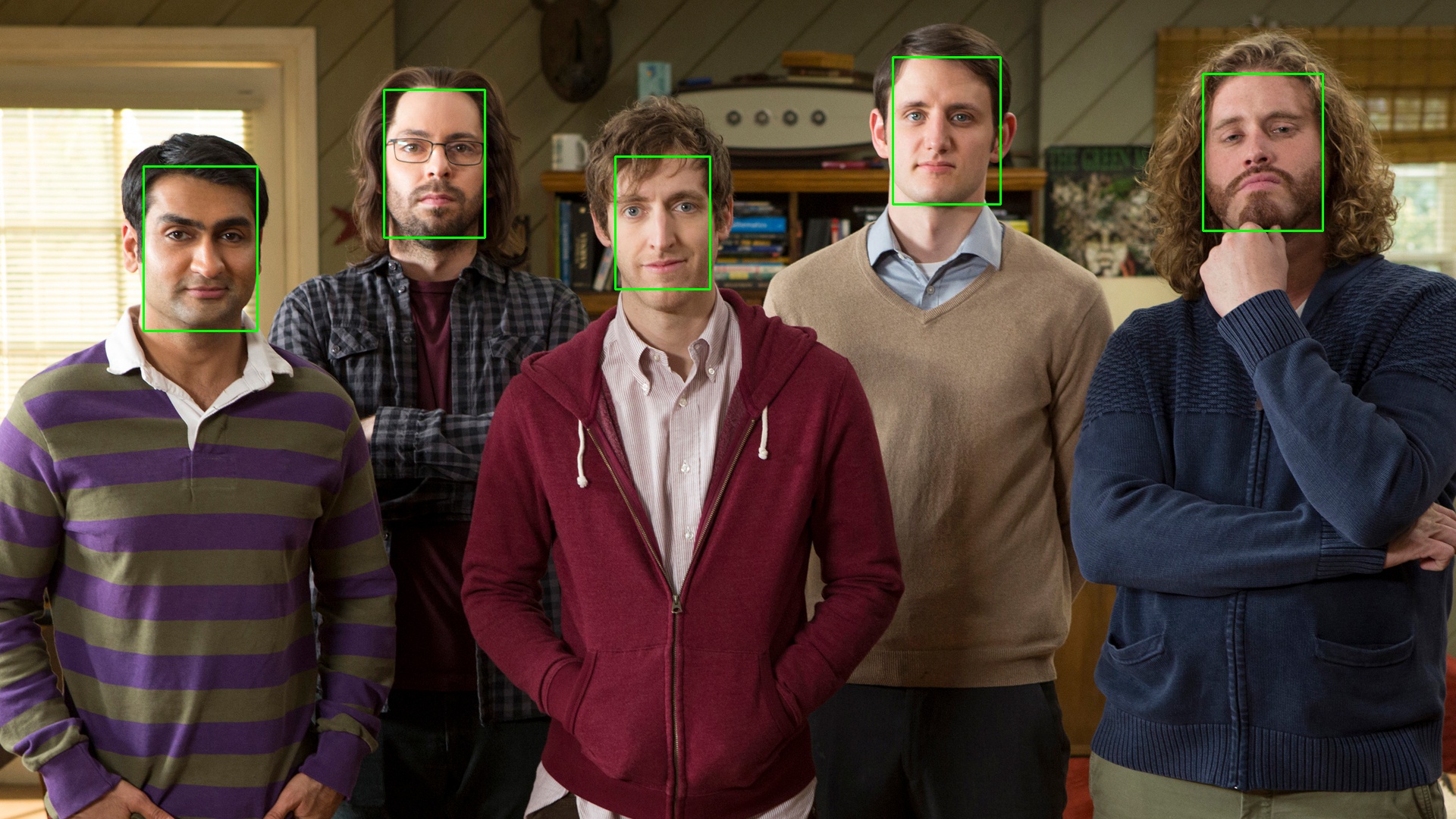
Detecting faces in an image is as simple as just calling the function detect_face(). It will return the bounding box corners and corresponding confidence for all the faces detected.

Example :

import cvlib as cv
faces, confidences = cv.detect_face(image)

Seriously, that's all it takes to do face detection with cvlib. Underneath it is using OpenCV's dnn module with a pre-trained caffemodel to detect faces.

To enable GPU

faces, confidences = cv.detect_face(image, enable_gpu=True)

Checkout face_detection.py in examples directory for the complete code.

Sample output :
Gender detection

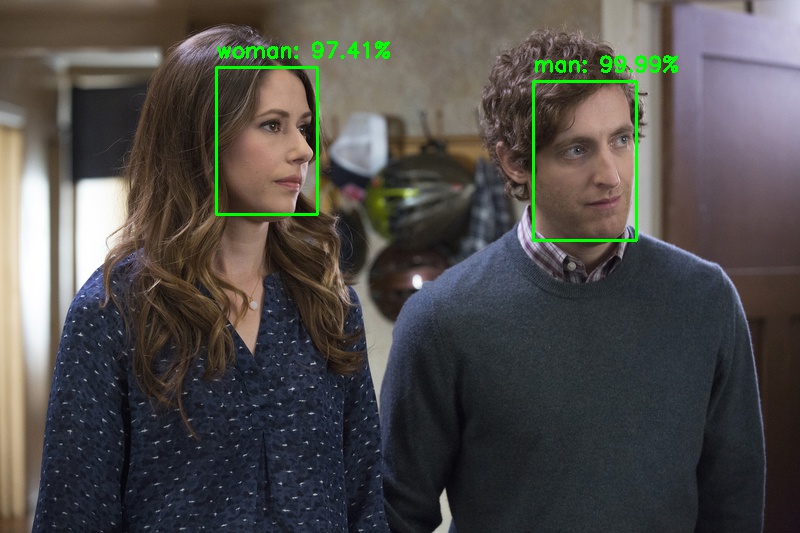
Once face is detected, it can be passed on to detect_gender() function to recognize gender. It will return the labels (man, woman) and associated probabilities.

Example

label, confidence = cv.detect_gender(face)

Underneath cvlib is using an AlexNet-like model trained on Adience dataset by Gil Levi and Tal Hassner for their CVPR 2015 paper.

To enable GPU

label, confidence = cv.detect_gender(face, enable_gpu=True)

Checkout gender_detection.py in examples directory for the complete code.

Sample output :
Object detection

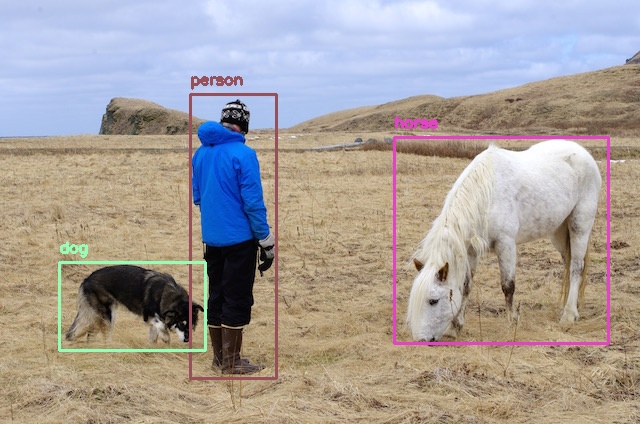
Detecting common objects in the scene is enabled through a single function call detect_common_objects(). It will return the bounding box co-ordinates, corrensponding labels and confidence scores for the detected objects in the image.

Example :

import cvlib as cv
from cvlib.object_detection import draw_bbox

bbox, label, conf = cv.detect_common_objects(img)

output_image = draw_bbox(img, bbox, label, conf)

Underneath it uses YOLOv4 model trained on COCO dataset capable of detecting 80 common objects in context.

To enable GPU

bbox, label, conf = cv.detect_common_objects(img, enable_gpu=True)

Checkout object_detection.py in examples directory for the complete code.

Real time object detection

YOLOv4 is actually a heavy model to run on CPU. If you are working with real time webcam / video feed and doesn't have GPU, try using tiny yolo which is a smaller version of the original YOLO model. It's significantly fast but less accurate.

bbox, label, conf = cv.detect_common_objects(img, confidence=0.25, model='yolov4-tiny')

Check out the example to learn more.

Other supported models: YOLOv3, YOLOv3-tiny.

Custom trained YOLO weights

To run inference with custom trained YOLOv3/v4 weights try the following

from cvlib.object_detection import YOLO

yolo = YOLO(weights, config, labels)
bbox, label, conf = yolo.detect_objects(img)
yolo.draw_bbox(img, bbox, label, conf)

To enable GPU

bbox, label, conf = yolo.detect_objects(img, enable_gpu=True)

Checkout the example to learn more.

Sample output :
Utils

Video to frames

get_frames( ) method can be helpful when you want to grab all the frames from a video. Just pass the path to the video, it will return all the frames in a list. Each frame in the list is a numpy array.

import cvlib as cv
frames = cv.get_frames('~/Downloads/demo.mp4')

Optionally you can pass in a directory path to save all the frames to disk.

frames = cv.get_frames('~/Downloads/demo.mp4', '~/Downloads/demo_frames/')

Creating gif

animate( ) method lets you create gif from a list of images. Just pass a list of images or path to a directory containing images and output gif name as arguments to the method, it will create a gif out of the images and save it to disk for you.

cv.animate(frames, '~/Documents/frames.gif')

Sponsor

Developing and maintaining open source projects takes a lot of time and effort. If you are getting value out of this project, consider supporting my work by simply buying me a coffee (one time or every month).

License

cvlib is released under MIT license.

Help

For bugs and feature requests, feel free to file a GitHub issue. (Make sure to check whether the issue has been filed already)

For usage related how-to questions, please create a new question on StackOverflow with the tag cvlib.

Community

Join the official Discord Server or GitHub Discussions to talk about all things cvlib.

Citation

If you find cvlib helpful in your work, please cite the following

@misc{ar2018cvlib,
  author =       {Arun Ponnusamy},
  title =        {cvlib - high level Computer Vision library for Python},
  howpublished = {\url{https://github.com/arunponnusamy/cvlib}},
  year =         {2018}
}
Nearby in the ranking
Similar items